

Context
In today’s global business environment, high availability and compliance with jurisdictional regulations are non-negotiable for organizations leveraging OIC. As digital services expand across regions, ensuring continuous availability becomes a cornerstone of user satisfaction and operational success. At the same time, the growing complexity of regulatory frameworks around data residency and governance demands solutions that align with both operational and legal requirements.
Geo-routing emerges as a powerful strategy for addressing these challenges. By intelligently distributing traffic based on user location, georouting not only optimizes performance by reducing latency but also facilitates adherence to jurisdictional rules by directing data to appropriate regional endpoints.
For global OIC implementations, leveraging georouting with an Active/Active configuration enables businesses to achieve the perfect balance of availability, performance, and compliance.
Core Concepts
Active/Active in Distributed Systems
An Active/Active configuration is a system design approach where multiple instances of a service are running in different regions and are simultaneously active. This contrasts with an Active/Passive setup, where one instance is operational while the other remains on standby for failover.
The key benefits of Active/Active architectures include:
- High Availability – Continuous operations even if one region experiences an outage.
- Improved Performance – Directs users to the nearest instance for lower latency.
- Disaster Resilience – Regional failures do not impact service.
- Load Distribution – Traffic is balanced dynamically across instances.
Georouting for Improved Latency and Compliance
Georouting is a DNS-based strategy that directs users to a particular instance based on their geographical location. This mechanism serves two critical purposes:
- Latency Optimization – Users are routed to the nearest instance for faster response times.
- Regulatory Compliance – Data is processed within the region that meets legal requirements (e.g., GDPR in Europe, CCPA in California).
For example, a company serving both European and U.S. customers can use geo-routing to ensure European users’ data is handled within EU-compliant data centers while U.S. users connect to U.S.-based services.
Traffic Routing Using DNS and Query Origins
Oracle Cloud Infrastructure (OCI) leverages DNS-based steering to direct traffic efficiently, using:
- Short-lived DNS entries for rapid updates.
- Query origin analysis to determine user locations.
Modes of Operation
Oracle Cloud Infrastructure provides multiple steering modes:
- Failover Mode – Redirects traffic if the primary instance is unavailable.
- Load Balancing Mode – Evenly distributes traffic across multiple instances.
- Geolocation Mode – Routes traffic based on a user’s geographic location.
- ASN Mode – Routes based on the network’s Autonomous System Number.
- IP Prefix Mode – Routes based on predefined IP address ranges.
Geographic DNS Routing (Georouting)
Policy Definition
- Georouting policies define how traffic is routed across geographic locations.
- Policies ensure compliance with jurisdictional rules and improve system reliability.
GeoIP Data and Accuracy Considerations
- OCI relies on commercial GeoIP databases to map IP addresses to locations.
- GeoIP data is not 100% accurate and can be bypassed using VPNs or proxies.
Oracle Steering Policies Overview (Online Documentation)
Geolocation Steering Policy
- Routes traffic based on the user’s geographic location.
- Configuration: Define mappings (e.g., Europe > Frankfurt OIC, North America > Ashburn OIC).
- Fallbacks: A default endpoint handles ambiguous locations.
Failover Steering Policy
- Ensures high availability by redirecting traffic if an endpoint becomes unhealthy.
- Configuration:
- Health Checks monitor endpoint status.
- Primary and Secondary Mappings for automatic failover.
Combining Geolocation and Failover for Optimal Performance
- Primary routing by geolocation, ensuring compliance and low latency.
- Failover acts as a safety net when primary regions experience downtime.
OIC Active/Active Configuration with Georouting
Prerequisites
Before deploying an Active/Active OIC setup with georouting, ensure:
- Selection of Oracle Cloud Regions – Choose regions based on performance and regulatory needs.
- DNS and Domain Setup – Configure Oracle DNS to manage location-based traffic.
- OIC Custom Endpoint – Set up a unified access point for traffic distribution.
Setting Up OIC in Regions with Custom Endpoint
To implement an Active/Active configuration with georouting, you’ll need to provision OIC instances in your chosen Oracle Cloud regions, configure a custom endpoint, and set up steering policies for traffic management. Here’s an overview of the process with references to detailed resources:
- Provision OIC Instances
Begin by provisioning Oracle Integration Cloud (OIC) instances in the selected Oracle Cloud regions. This step establishes the necessary infrastructure for a resilient and scalable Active/Active configuration. For detailed guidance, refer to the OIC documentation.
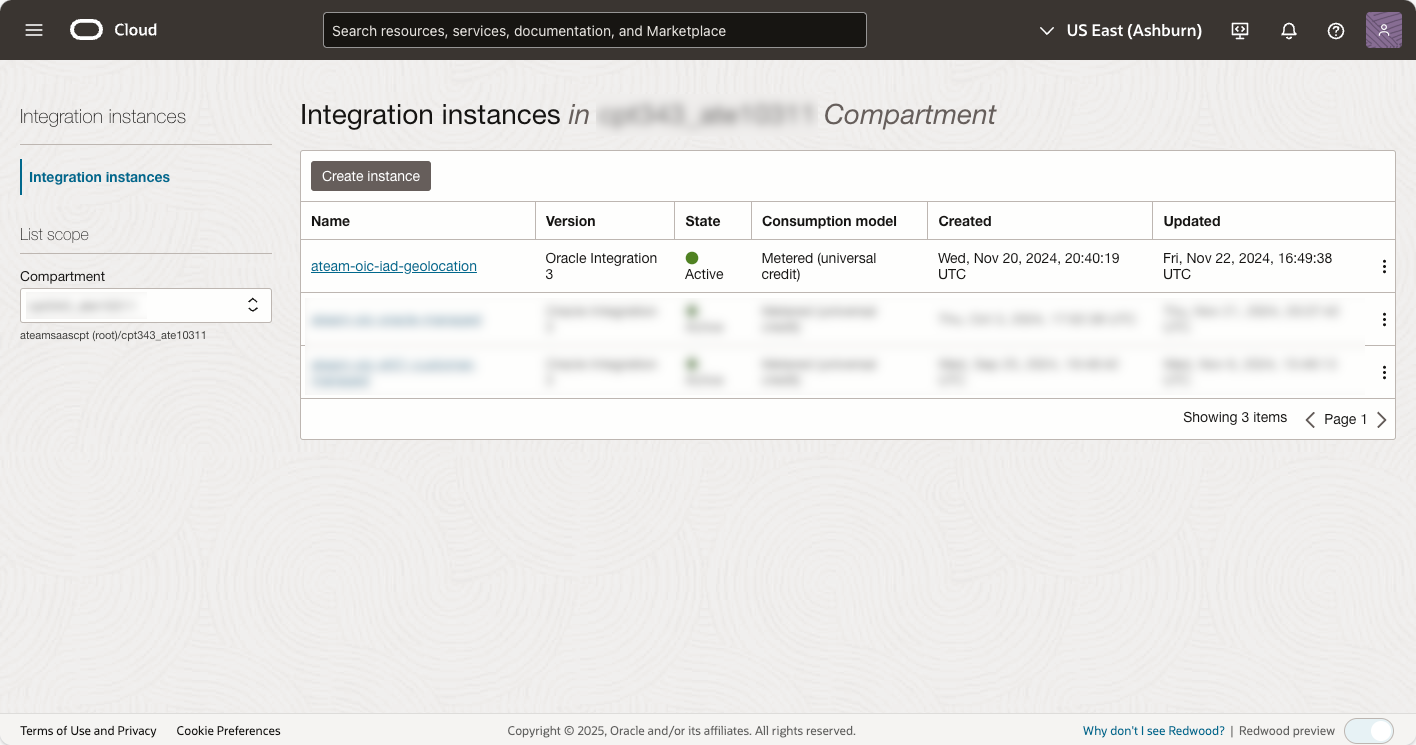
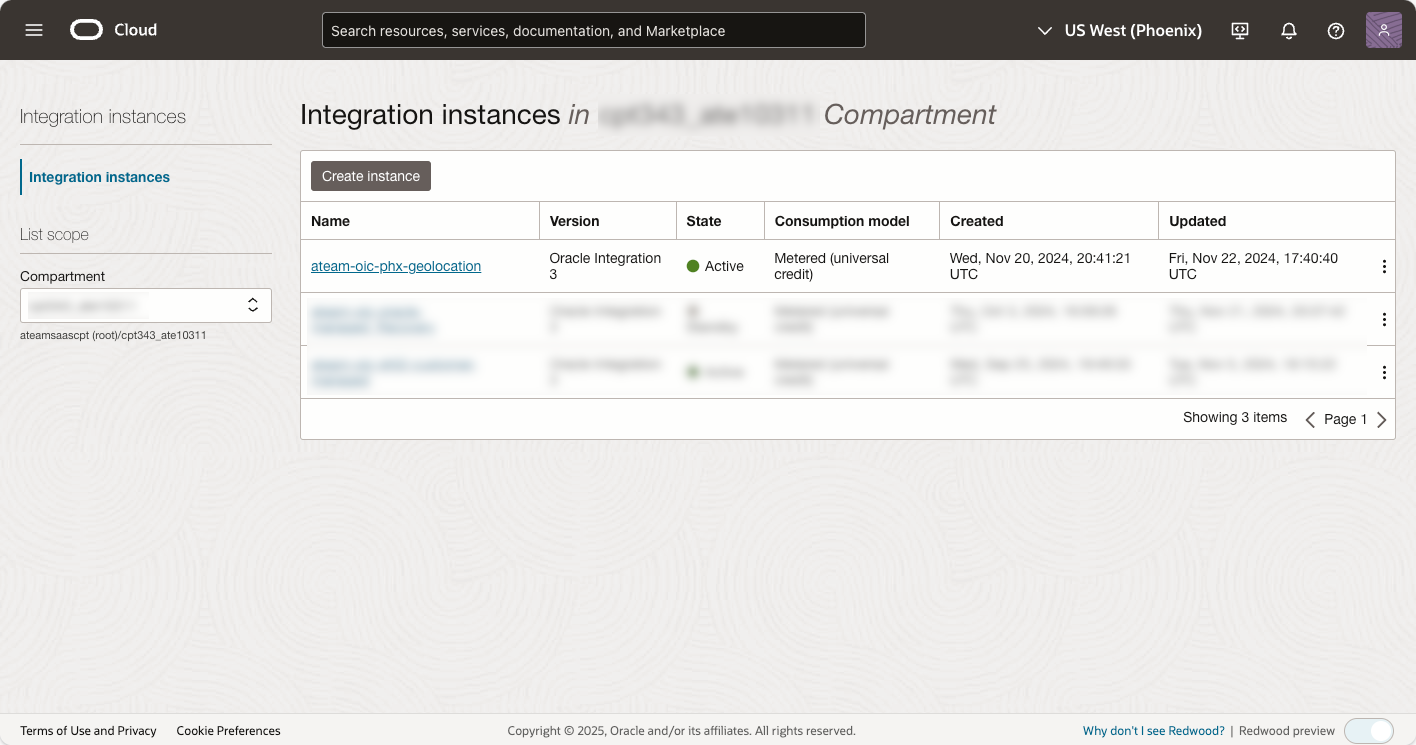
In our example, OIC instances are provisioned in two regions:
- US East (Ashburn)
- US West (Phoenix)
Each instance is listed as active and ready for use, as shown in the screenshots:
- Configure a Custom Endpoint
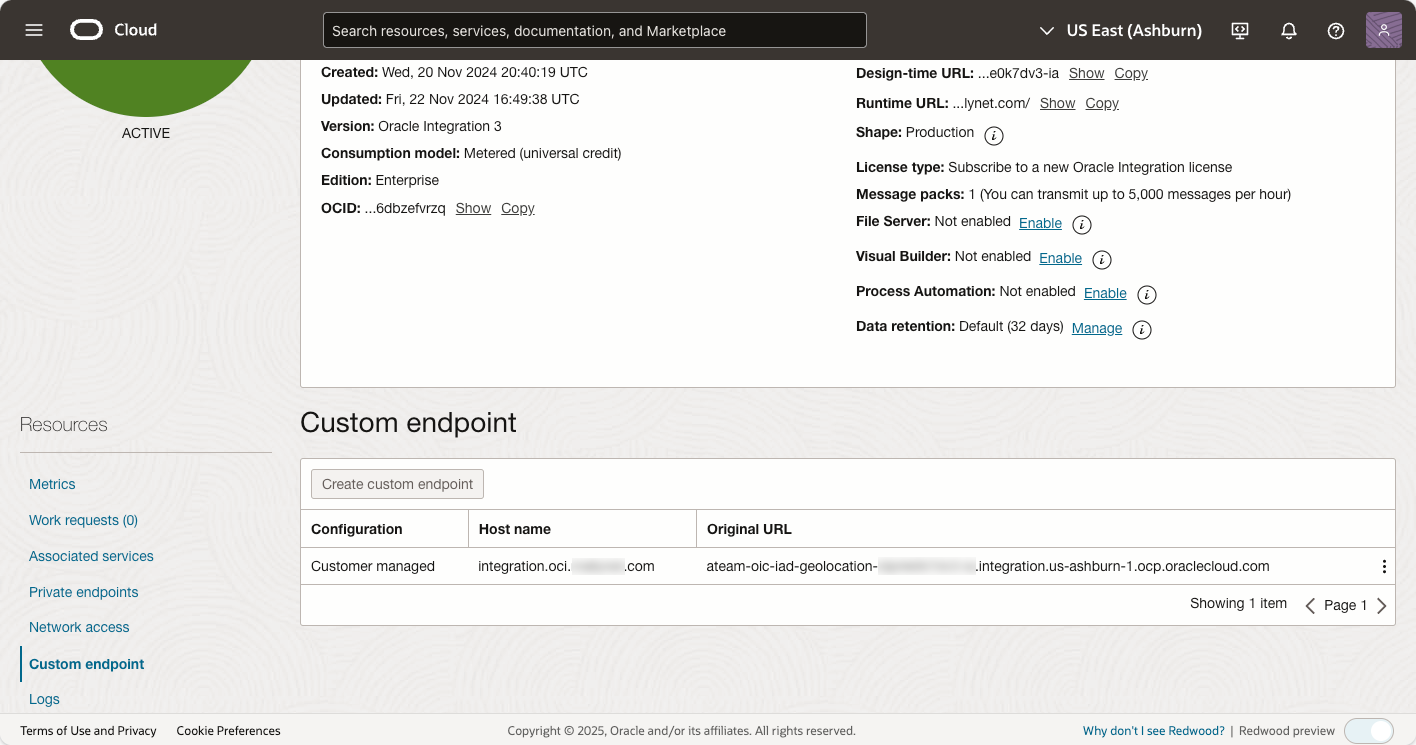
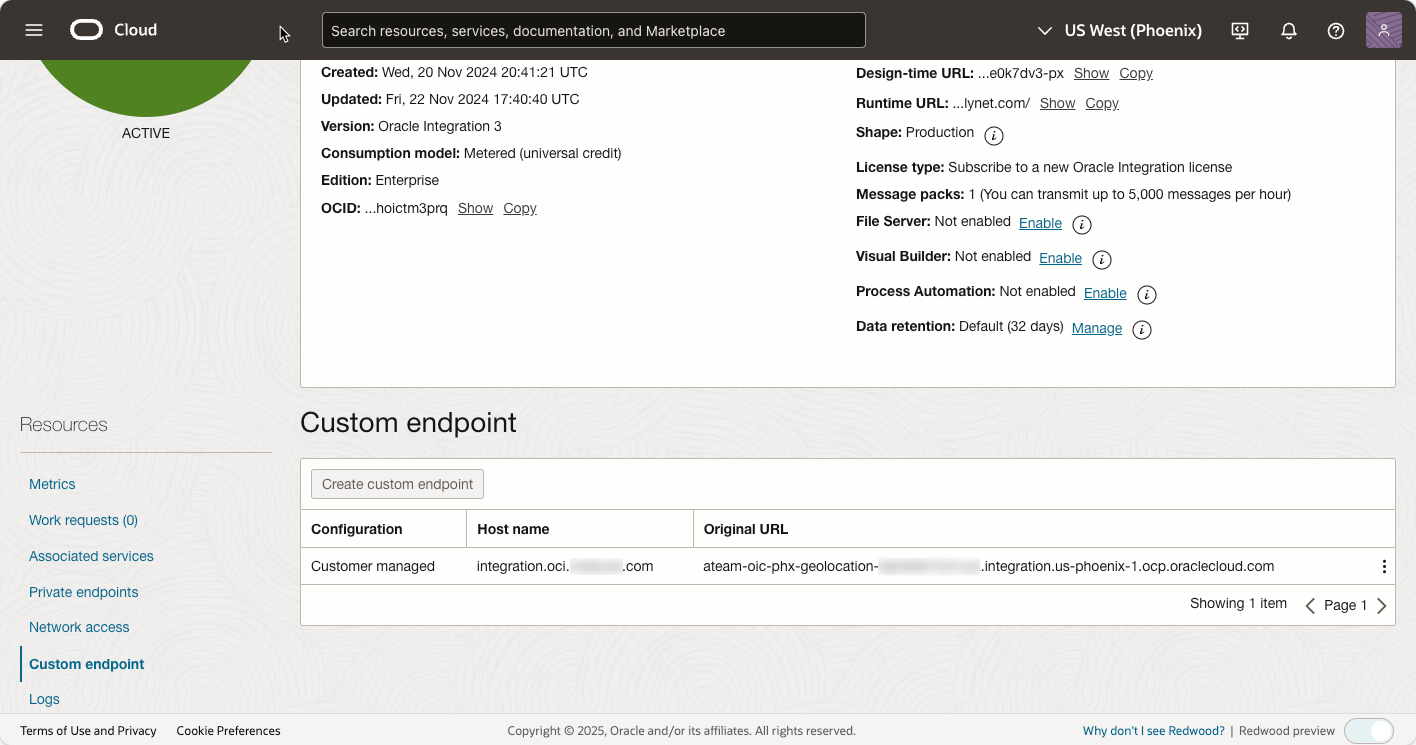
To unify access across multiple regions, you need to configure a custom endpoint for each Oracle Integration Cloud (OIC) instance in its respective region. This step ensures seamless traffic distribution and high availability. For detailed instructions, refer to the OIC documentation.
In our example, the custom endpoints are configured for US East (Ashburn) and US West (Phoenix) regions:
-
- Host Name: The custom endpoint host name remains consistent across all regions, acting as a unified access point. This is crucial for distributing OIC calls effectively across regions and instances.
- Steering Policy Configuration
Configuring DNS steering policies is critical to directing traffic appropriately across your regions. The details for this step are covered in the later sections of this blog post.
By referencing these resources and following the guidance in subsequent sections, you’ll establish a robust foundation for a georouting-enabled Active/Active OIC setup.
Configuring Steering Policies
Step-by-Step Configuration
Follow these steps to configure Active/Active OIC with georouting using Oracle Cloud Infrastructure (OCI) Traffic Management Steering Policies. Detailed configurations are provided in Oracle’s documentation, while our screenshots illustrate key configurations.
1. Access the Oracle Cloud Console
- Log in to the Oracle Cloud Infrastructure (OCI) Console.
- Navigate to Networking > Traffic Management Steering Policies.
- Click Create Steering Policy to begin configuration.
2. Define Geolocation Mappings
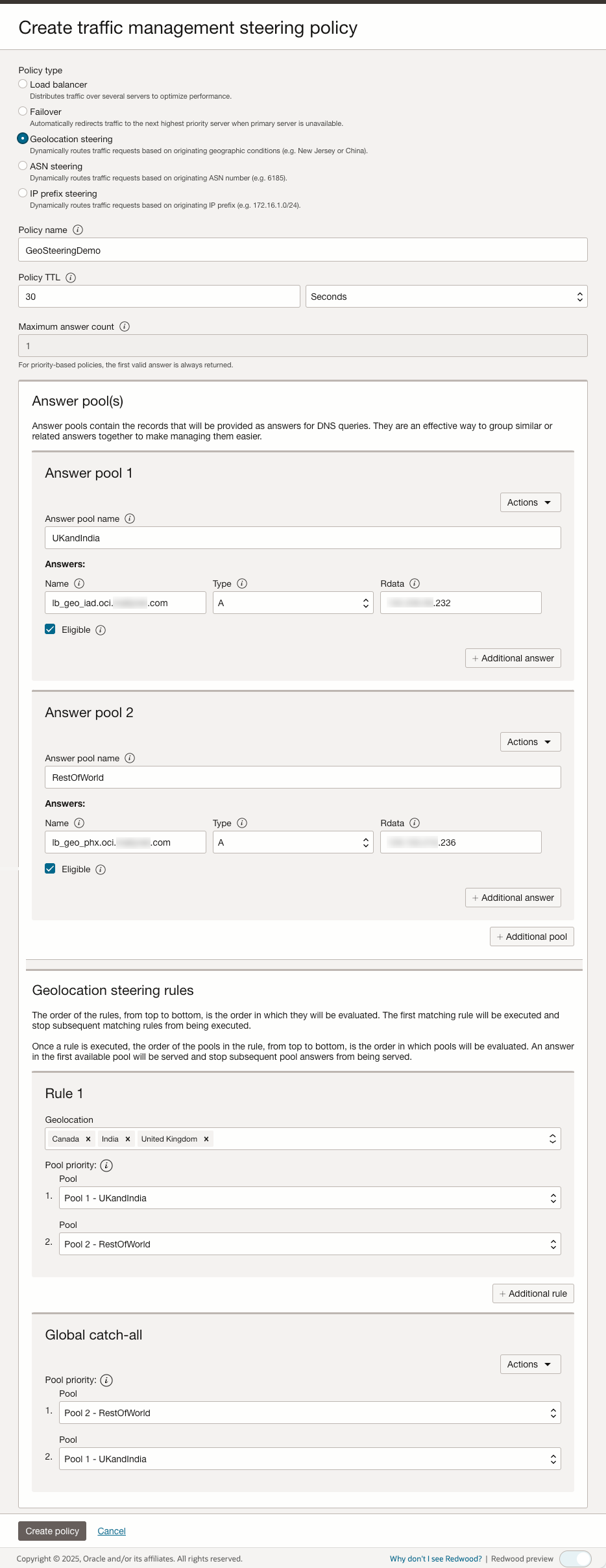
- Create Geolocation-based routing rules to direct users to the nearest OIC instance.
- Follow Oracle’s Geolocation Steering Guide to:
- Assign user regions to corresponding OIC instances (e.g., Europe > Frankfurt OIC, North America > Ashburn OIC).
- Configure fallback behavior for undefined or VPN-based locations.
- Ensure compliance by keeping regional traffic within designated jurisdictions.
The following screenshot illustrates how our example configures geolocation mappings:
3. Configure Health Checks for OIC
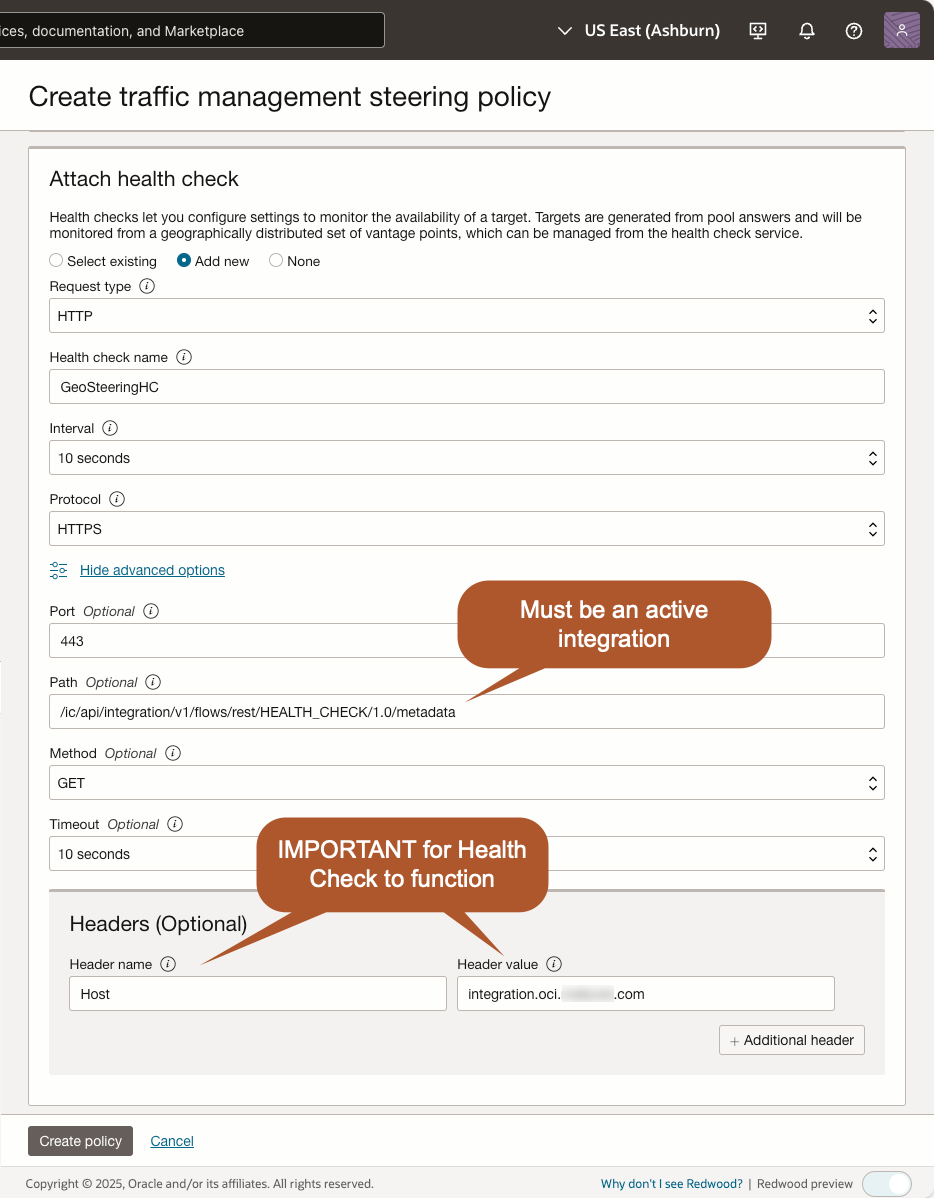
Oracle Traffic Management requires health checks, but OIC lacks a built-in health check API, so we use a workaround:
- Deploy a lightweight OIC integration that will always be active (e.g., a simple Echo API).
- Retrieve the metadata URL of this integration.
- Configure OCI Traffic Management Health Checks:
- The Request type will be HTTP.
- Set an interval appropriate for your requirements.
- The Protocol will be HTTPS.
- Advanced options (MOST IMPORTANT).
- Set the Port to 443.
- Use the metadata URL of the active integration for validation.
Pattern to construct the Path: /ic/api/integration/v1/flows/rest/{INTEGRATION_IDENTIFIER}/{VERSION}/metadata - Set the Method to GET
- Pick a timeout appropriate for your requirements.
- Add a Header called Host with a value of your OIC custom endpoint host name.
NOTE: OIC instances use the same custom endpoint hostname regardless of the region. However, the health check sends requests to the resolved IP address instead of the OIC hostname. Without the Host header, the OIC instance would reject the request because it strictly validates requests against the configured hostname, not just the IP.
The following screenshot illustrates how our example configures the health check:
Validating the Configuration
After configuring an Active/Active OIC deployment with georouting, it is essential to validate that traffic is routed correctly based on user location. This ensures that users are directed to the nearest Oracle Integration Cloud (OIC) instance, optimizing both performance and compliance. In our example, we have an integration called Health Check that simply returns a JSON payload of { “ack”: “alive” }. This integration is referenced in this section.
Validation involves three key areas:
- Testing DNS resolution using dig
- Testing georouting functionality with cURL
- Troubleshooting common misconfigurations
1. Testing DNS Resolution Using dig
The first step in validation is confirming that Oracle Cloud Infrastructure (OCI) DNS-based steering policies are correctly resolving the OIC endpoint to different regional IP addresses based on user location.
Steps for Validation:
- Run dig without a VPN to check which IP address is returned:
     $ dig @resolver1.opendns.com integration.oci.example.com

     ; <<>> DiG 9.10.6 <<>> @resolver1.opendns.com integration.oci.example.com
     ; (2 servers found)
     ;; global options: +cmd
     ;; Got answer:
     ;; ->>HEADER<<- opcode: QUERY, status: NOERROR, id: 22267
     ;; flags: qr rd ra; QUERY: 1, ANSWER: 1, AUTHORITY: 0, ADDITIONAL: 1

     ;; OPT PSEUDOSECTION:
     ; EDNS: version: 0, flags:; udp: 1410
     ;; QUESTION SECTION:
     ;integration.oci.example.com.	IN	A

     ;; ANSWER SECTION:
     integration.oci.example.com. 30 IN	A	192.0.2.232

     ;; Query time: 181 msec
     ;; SERVER: 208.67.222.222#53(208.67.222.222)
     ;; WHEN: Mon Feb 03 12:59:00 MST 2025
     ;; MSG SIZE  rcvd: 73
- Connect to a VPN in a different location, then re-run dig:
     $ dig @resolver1.opendns.com integration.oci.example.com

     ; <<>> DiG 9.10.6 <<>> @resolver1.opendns.com integration.oci.example.com
     ; (2 servers found)
     ;; global options: +cmd
     ;; Got answer:
     ;; ->>HEADER<<- opcode: QUERY, status: NOERROR, id: 22267
     ;; flags: qr rd ra; QUERY: 1, ANSWER: 1, AUTHORITY: 0, ADDITIONAL: 1

     ;; OPT PSEUDOSECTION:
     ; EDNS: version: 0, flags:; udp: 1410
     ;; QUESTION SECTION:
     ;integration.oci.example.com.	IN	A

     ;; ANSWER SECTION:
     integration.oci.example.com. 30 IN	A	198.51.100.236

     ;; Query time: 181 msec
     ;; SERVER: 208.67.222.222#53(208.67.222.222)
     ;; WHEN: Mon Feb 03 12:59:00 MST 2025
     ;; MSG SIZE  rcvd: 73
- Compare the IP addresses in both cases.
- If georouting is working correctly, the resolved IP address should change based on the VPN location, confirming that traffic is being routed to different OIC instances as expected.
This test ensures that Oracle Cloud’s Traffic Management Steering Policies are correctly mapping users to their respective OIC regions before sending an actual request.
2. Testing Georouting Functionality Using cURL
Once DNS resolution has been confirmed, the next step is verifying whether traffic is actually being routed to the correct OIC instance.
Steps for Validation:
- VPN Testing (Most Effective Method)
- Since OIC georouting is based on actual source IP rather than X-Forwarded-For headers, the best way to test is using a VPN connection to different locations.
- Procedure:
- Connect to a VPN server in a target location (e.g., UK, Canada, US).
- Run a cURL request to the OIC instance:
curl -X GET https://integration.oci.example.com/ic/api/integration/v1/flows/rest/HEALTH_CHECK/1.0
-
-
- Repeat steps 1 and 2 for different locations.
-
- Verifying Requests in the OIC Console
- Since each OIC instance is region-specific, log in separately to the OIC console for each region where an instance is deployed.
- For each region:
- Navigate to Observability > Integrations.
- Locate the latest execution of the HEALTH_CHECK integration.
- If the request appears in a particular region’s instance, this confirms that users from the originating location were routed correctly.
3. Troubleshooting Common Misconfigurations
If traffic is not routing as expected, check for the following misconfigurations:
Incorrect Oracle Cloud DNS Steering Policy Mappings
- Ensure that Oracle Cloud Traffic Management Steering Policies have the correct geolocation rules.
- If traffic is misdirected, verify mappings (e.g., Europe > Frankfurt OIC, North America > Ashburn OIC).
GeoIP Database Limitations
- OIC georouting relies on commercial GeoIP databases, which may not be 100% accurate.
- Some IPs may be misclassified (e.g., a UK-based ISP may appear as a US IP).
- Solution: Use manual overrides in Oracle Cloud DNS Steering Policies.
Unrecognized VPN or Proxy Traffic
- VPN users may not be routed correctly because GeoIP databases may detect only the VPN provider’s location.
- Solution: Configure fallback rules in DNS steering policies to handle ambiguous locations.
DNS Caching Issues
DNS caching generally shouldn’t be an issue, as georouting relies on DNS records with very short lifetimes (typically just a few seconds). However, certain intermediate DNS systems or client configurations may override this behavior by enforcing a significantly longer caching period.
- DNS resolutions are cached, which may prevent georouting changes from being immediately reflected.
- Solution: Flush your local DNS cache:
- Windows:
ipconfig /flushdns
-
- Mac:
sudo dscacheutil -flushcache && sudo killall -HUP mDNSResponder
-
- If testing from OCI compute instances, restart the instance or use a different public resolver like Google DNS (8.8.8.8) or Cloudflare DNS (1.1.1.1).
Scaling the Configuration
Scaling the configuration involves adding more regions or refining existing geolocation rules for optimized performance, regulatory compliance, and redundancy.
Adding More Regions
- Identify New Regions:
- Evaluate the business requirements for adding new regions. Key factors include customer locations, regulatory needs, and latency reduction.
- For example, if your customer base expands into Asia, provisioning an OIC instance in Singapore or Mumbai might be optimal.
- Provision and Configure Instances:
- Provision OIC instances in the identified regions. Ensure the same custom endpoint host name is used for uniform traffic distribution.
- Integrate these new instances into your existing geolocation steering policies.
- Update Geolocation Rules:
- Update Oracle DNS steering policies to include the new regions.
- Example:
- Europe > Frankfurt OIC
- North America > Ashburn OIC
- Asia > Singapore OIC
- Validate Configuration:
- Simulate traffic from the new region to verify proper routing.
- Test failover mechanisms to ensure seamless functionality across all active regions.
Refining Geolocation Rules
- Granular Geolocation:
- Adjust the granularity of geolocation mappings to better handle edge cases (e.g., country-level rules instead of continent-level).
- Example: Differentiate users in Canada and USA instead of mapping all to North America.
- Fallback Rules for Undefined Regions:
- Create robust fallback mechanisms for unrecognized locations or ambiguous GeoIP results (e.g., VPN users).
- Example:
- Fallback Endpoint: Route undefined traffic to a primary region, such as Ashburn OIC.
- Monitoring and Auditing:
- Use Oracle Cloud monitoring tools to analyze traffic patterns and optimize geolocation rules further.
Advanced Configurations
Combining Georouting with Failover Steering
- Dual Layer Protection:
- Use geolocation as the primary routing mechanism to direct users to the closest endpoint.
- Overlay failover steering to handle region-specific failures and ensure high availability.
- Example Workflow:
- Traffic from Europe routes to Frankfurt OIC (Geolocation Steering).
- If Frankfurt OIC fails (via health checks), failover redirects traffic to London OIC.
- Example Workflow:
Conclusion
Implementing an Active/Active OIC configuration with georouting provides businesses with a scalable, highly available, and regulation-compliant solution for distributing traffic efficiently across multiple regions. This approach ensures optimal performance, disaster resilience, and jurisdictional adherence, allowing enterprises to seamlessly manage workloads in a global environment.
Key Takeaways
- OIC Active/Active with Georouting Enables High Availability & Performance
- By deploying multiple active OIC instances across different regions, traffic is intelligently routed to the nearest, healthiest endpoint, reducing latency and ensuring seamless user experiences.
- Oracle Steering Policies Play a Crucial Role in Traffic Distribution
- Geolocation Steering ensures that users are directed to the most appropriate regional endpoint based on their geographical location.
- Failover Steering provides redundancy by automatically redirecting traffic if a primary region experiences an outage.
- Scaling the Configuration Ensures Long-Term Growth & Adaptability
- Expanding into new regions allows businesses to improve global performance and meet data residency requirements.
- Granular geolocation rules and fallback mechanisms prevent routing issues for ambiguous or unclassified traffic.
- Advanced Configurations Enhance Resilience
- Dual-layer protection with geolocation as the primary routing mechanism and failover steering as a backup ensures continuous service availability.
- Customizing routing for VPN and proxy users, while challenging, can be mitigated by fallback rules and user account metadata-based routing.