
Overview
This blog is about integrating additional external services into the new Fusion Application (FA) pages developed using Visual Builder Studio (includes both factory pages provided by Oracle as well as custom pages).
Imagine you’re a banking customer and are creating an extension to Oracle Fusion Cloud Financials application. You might want to add a new credit check page or an application extension which needs to integrate with a credit score service of your bank. Because this service contains sensitive data and probably has a bank-specific authorization scheme you need to convert the user authorization within Oracle’s ecosystem into a bank-specific one. Oracle API Gateway is the ideal middle-tier service for that. It provides the capability of validating and converting the Oracle access token into a different customer-specific one. So, all you need to do is to setup OAuth authorization for an Oracle API Gateway deployment that encapsulates your credit score service, configures the api gateway to handle the access tokens appropriately and gives your Oracle Financials application access to the credit score api gateway. Your credit check application extension will then be able to use the standard OAuth 2.0 User Assertion authentication to call the credit score service.
Since those application extensions or pages are directly served by Fusion Applications the API security is mostly handled by the Fusion Applications IAM identity domain which is preconfigured by Oracle. Also note that users are synchronized from Fusion Applications to the IAM identity domain. The synchronization ensures that the user identities and access privileges are managed centrally and consistently across the enterprise. This synchronization is configured by default and allows Fusion Applications users to also authenticate Oracle Cloud Infrastructure (OCI) extensions.

All Oracle Fusion Cloud Applications environments are now provisioned with the Oracle Cloud Infrastructure Identity and Access Management identity domain. The Fusion Applications identity domain is preintegrated with the inbuilt identity management functionality of Fusion Applications and serves as the identity framework for several tools of Fusion Applications, such as Oracle Visual Builder Studio. It enables federated Single Sign-On (SSO) and token-based authentication across Fusion Applications. This Fusion Applications identity domain is also available for deploying your extensions and integrations. The Fusion Applications identity domain for building extensions comes with several benefits:
-
Avoids the cost of user owned OCI identity domains for supporting extensions. No additional licensing cost is incurred when using the Fusion Applications Identity domain to build extensions inFusion Applications. In addition to saving the licensing cost, using the Fusion Applications identity domain instead of creating more user owned OCI identity domains minimizes operational and governance overhead. It also prevents identity proliferation and any other potential risks associated with it.
-
User synchronization is configured by default. All users created in Fusion Applications through the security console or through batch processes are actively synchronized to the Fusion Applications identity domain. This synchronization enables assigning Fusion Applications users to OCI-based extensions and integrations.
- Federated SSO is configured by default with the Fusion Applications as the Identity Provider (IdP) and the Fusion Applications identity domain as the Service Provider (SP). This configuration enables single sign-on between the Fusion Applications and custom-built extensions.
- The OAuth token-based authentication allows custom-built applications to connect with the Fusion Applications REST APIs.
The following article describes the Fusion Applications identity domain-related configuration using the example of accessing an Oracle API Gateway service endpoint located in a different Oracle cloud tenancy. As said in the beginning, Oracle API Gateway is an ideal middle-tier to integrate any external services within or outside an Oracle cloud, especially if there are requirements around API validation, request and response transformation, Cross-origin Resource Sharing (CORS), authentication and authorization, and request limiting.

Note: The external service (in this case, the Oracle API Gateway) which is directly used by Fusion Applications needs to accept OAuth access tokens generated by the Fusion Applications identity domain. Currently, that’s the only option available for providing authentication from Fusion Applications to external services. Of course, by leveraging Oracle API Gateway’s request transformation capability, the final external service endpoint would be able to use a different authentication mechanism.
Here are the high-level configuration steps:
- Configure an OAuth resource application for Oracle API Gateway in the Fusion Applications identity domain.
- Add the OAuth resource application as client scope to the Oracle Cloud Service for Fusion Applications in the Fusion Applications identity domain typically named “Oracle Applications Cloud (Fusion)”.
- Configure API Gateway to:
- allow Fusion Applications (at runtime) and Visual Builder Studio (at design time) to call the API Gateway endpoint.
- let the API Gateway accept an OAuth access token from the Fusion Applications identity domain.
- Configure a VBS application extension backend for Oracle API Gateway.
Here are the detailed steps:
Fusion Applications identity domain
OAuth resource application
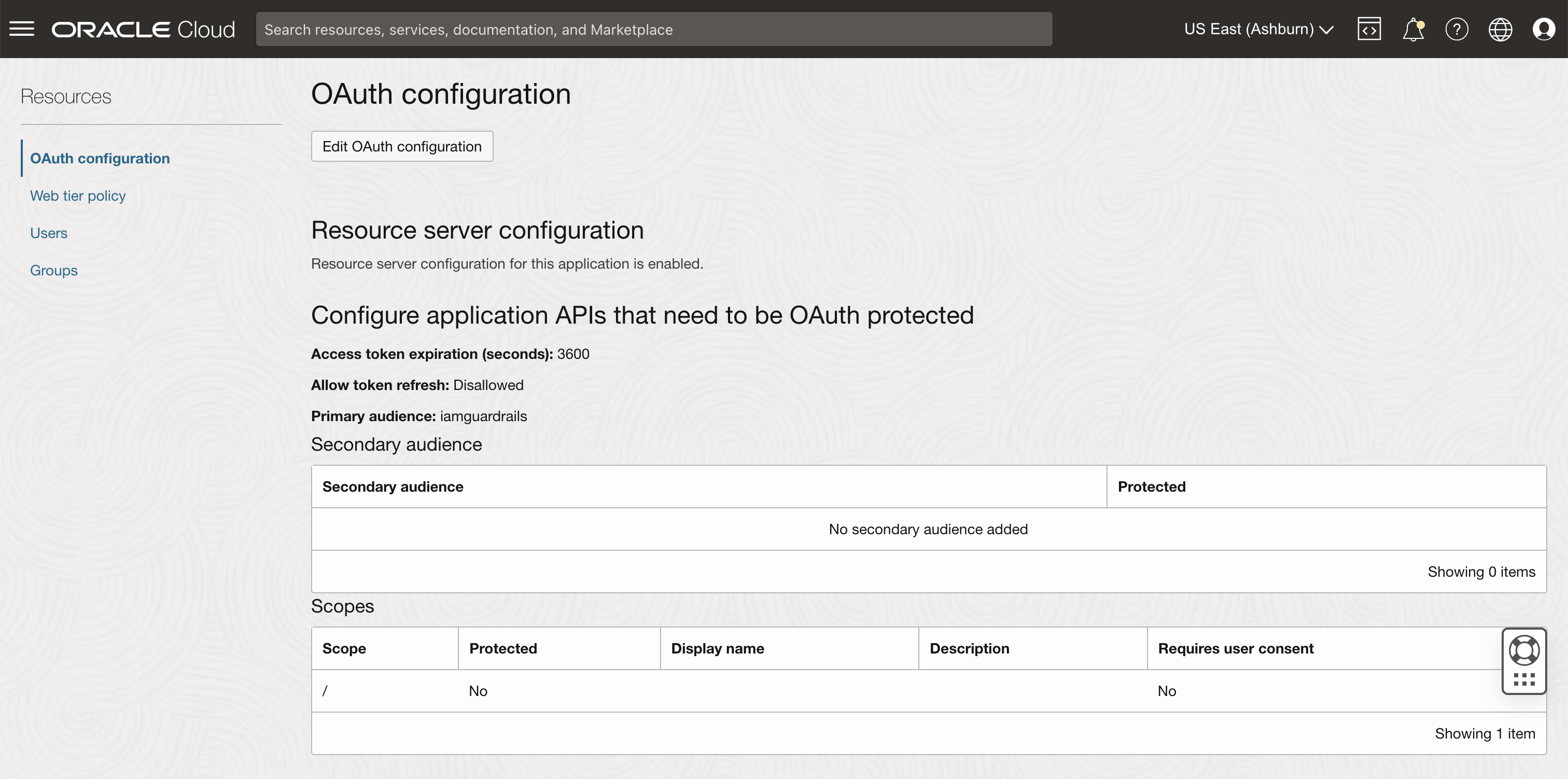
Configure an OAuth resource application for Oracle API Gateway in the Fusion Applications identity domain. Create a confidential application with following attributes:
- Edit OAuth configuration details. In the Resource server configuration section, enter the following values:
- Primary audience: <audience name of your choice>
- Scope: /
Oracle Cloud Service “Oracle Applications Cloud (Fusion)”
Add the OAuth resource application as a client scope to Oracle Cloud Service “Oracle Applications Cloud (Fusion)” in the Fusion Applications identity domain.
1. Navigate to Oracle Cloud Service “Oracle Applications Cloud (Fusion)”.
2. In the Application roles section, make sure you are assigned the role FA_GSI_Administrator” to edit the OAuth configuration.
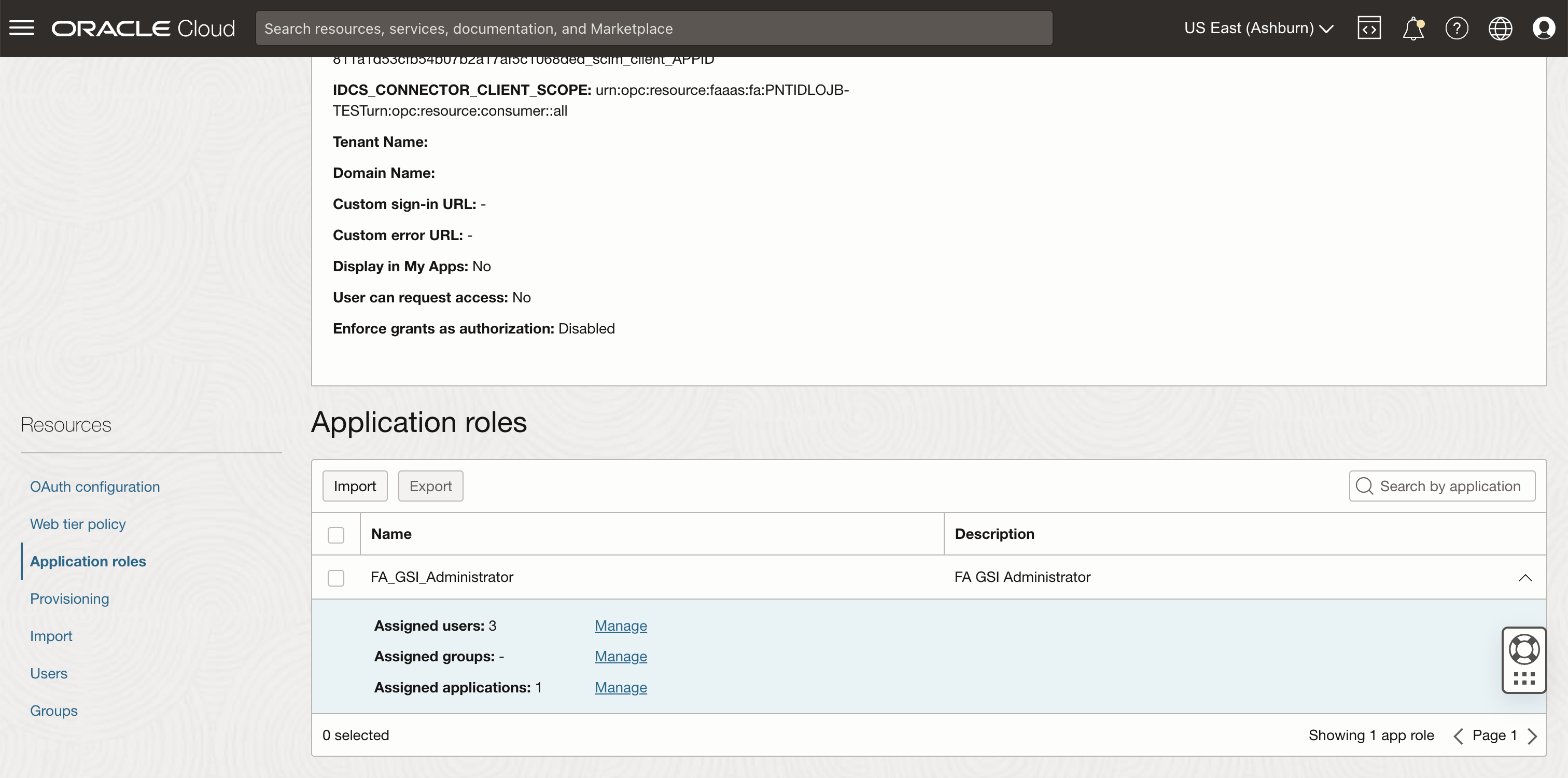
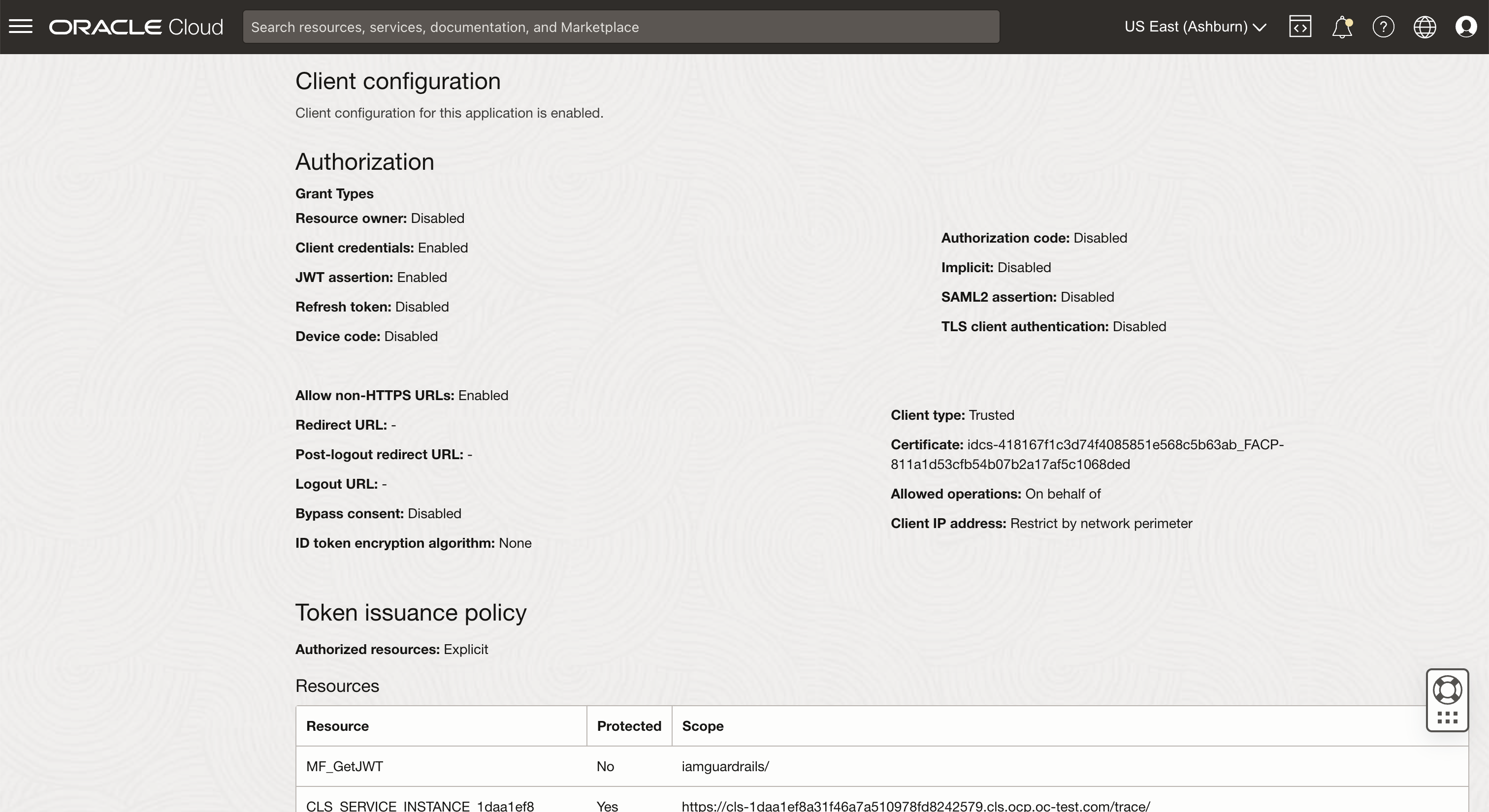
3. For OAuth configuration, in the Client configuration section, update the scope with the following values
- Resource: <name of confidential application>
- Scope: <resource server audience>/
API Gateway
CORS configuration
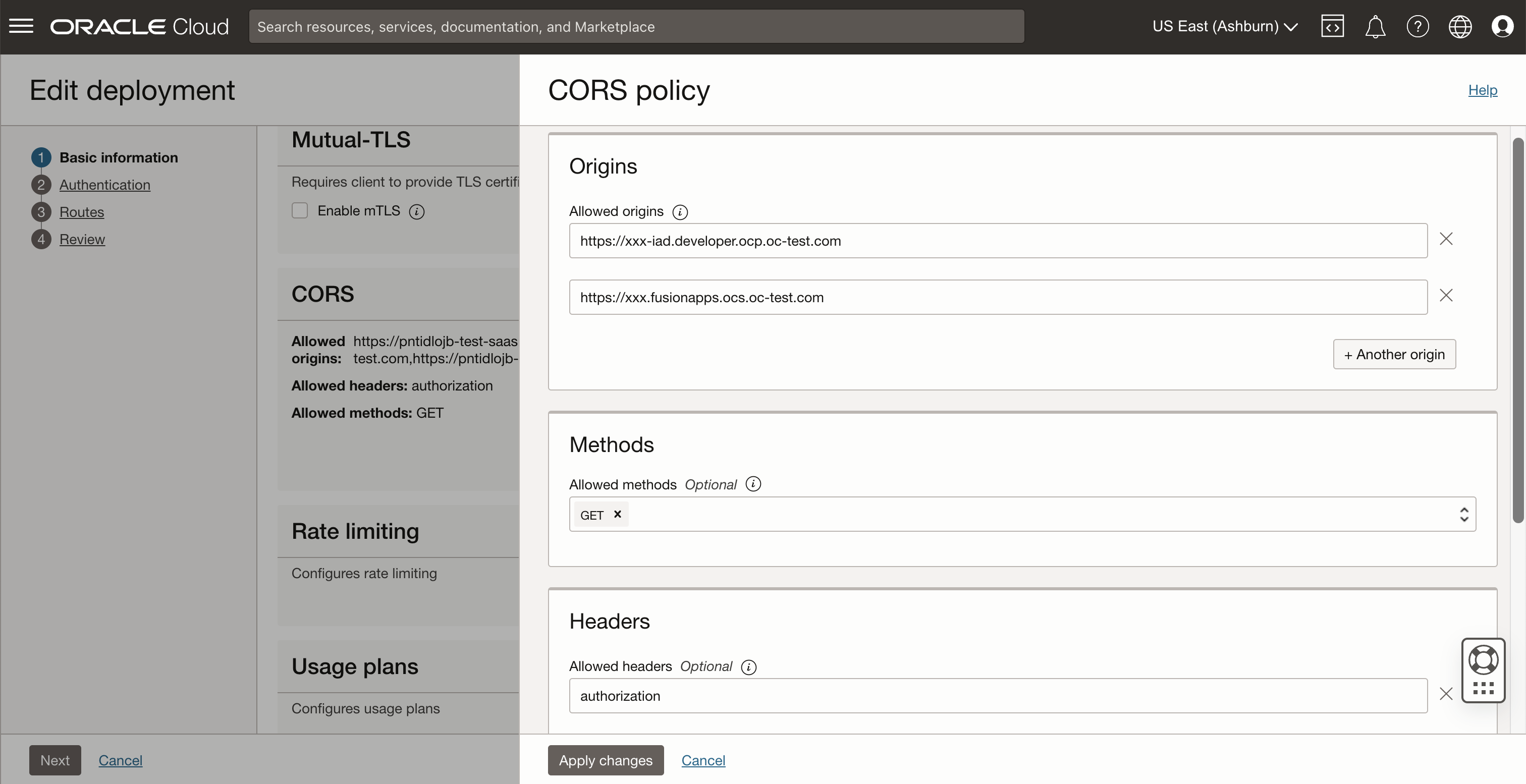
Fusion Applications at runtime and Visual Builder Studio at design time call external services directly from the browser. Therefore, you must set up CORS correctly in the Oracle API Gateway.
Update the CORS configuration in the API Gateway deployment:
- API request policies: CORS
- Allowed origins: https://<Fusion Applications host name>, https://<Visual Builder Studio host name>
- Allowed methods: GET
- Allowed headers: authorization
- Enable allow credentials: Yes
Authentication
Set up the configuration to accept OAuth access tokens from the Fusion Applications identity domain.
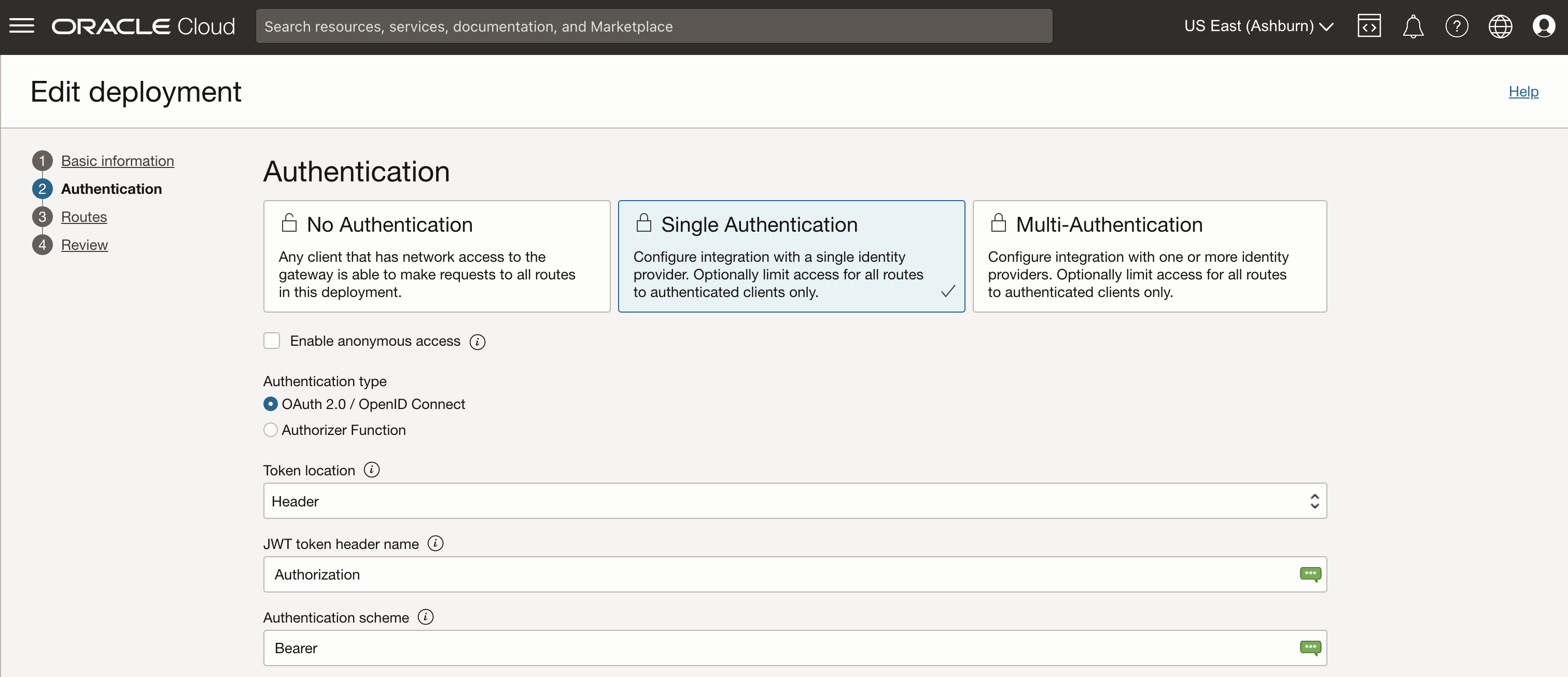
Update the Authentication configuration in the API Gateway deployment:
- Authentication: Single Authentication
- Authentication type: OAuth 2.0 / OpenID Connect
- Token location: Header
- JWT token header name: Authorization
- Authentication scheme: Bearer
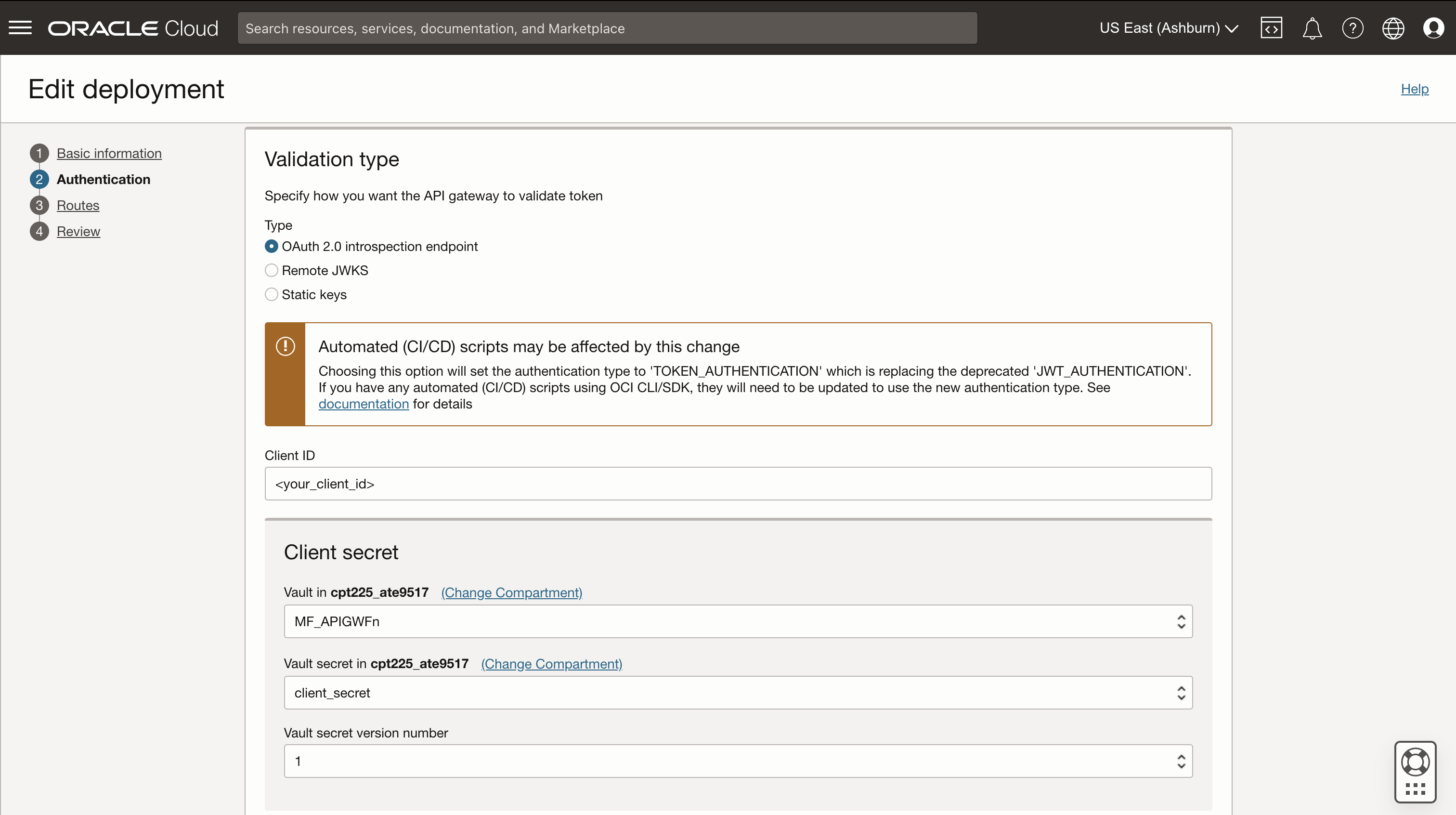
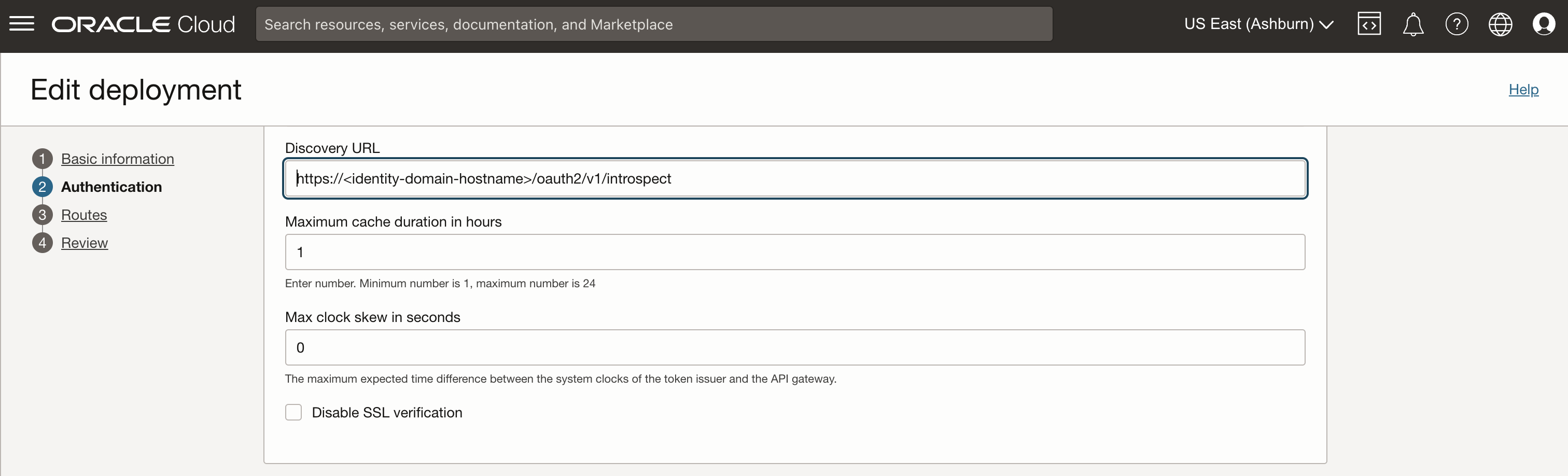
- Validation type: Depends on your environment setup. In many cases “OAuth 2.0 introspection endpoint” might be appropriate: “https://<Fusion Applications identity domain hostname>/oauth2/v1/introspect”
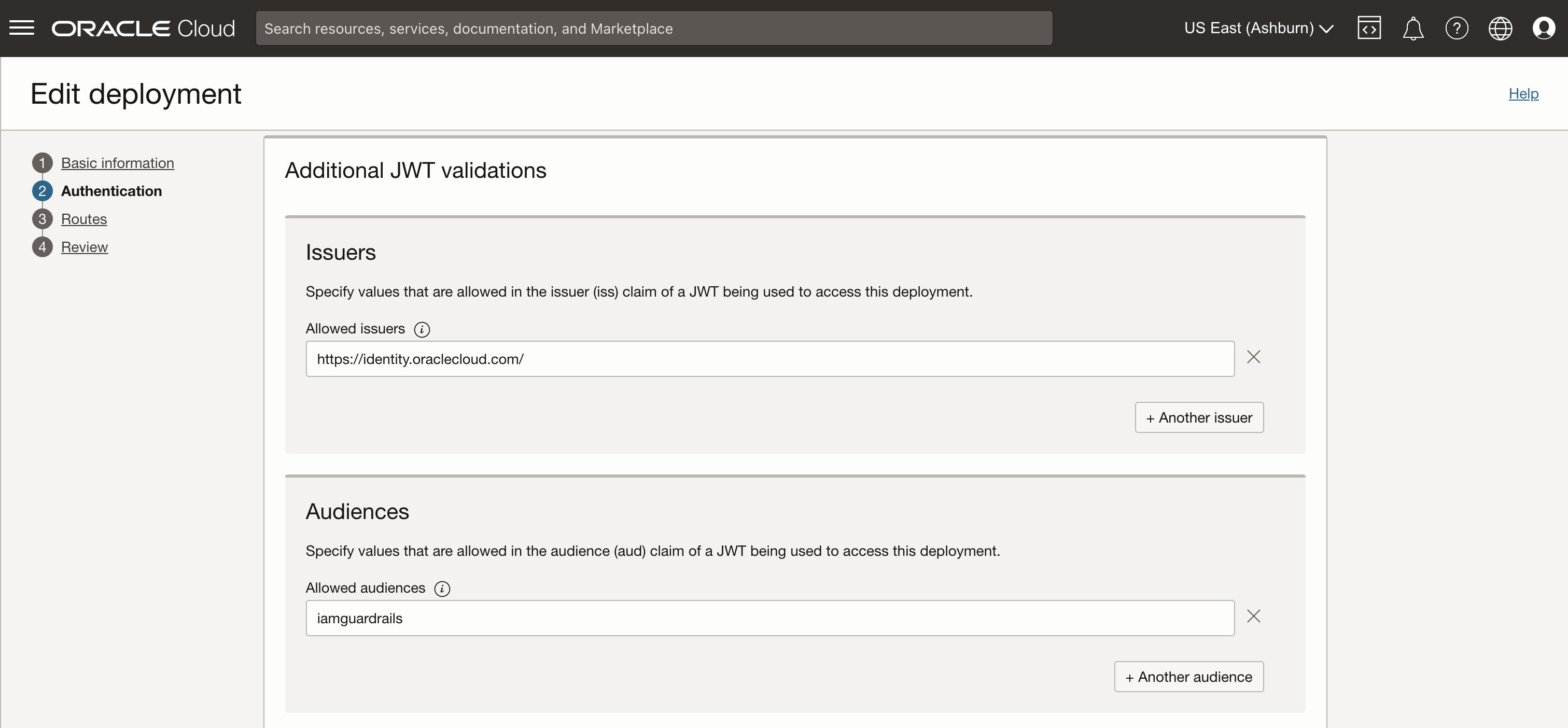
- Additional JWT validations
- Issuers: https://identity.oraclecloud.com/
- Audiences: <resource server audience as defined in Fusion Applications identity domain resource application>
Fusion Application application extension in Visual Builder Studio
Backend Configuration
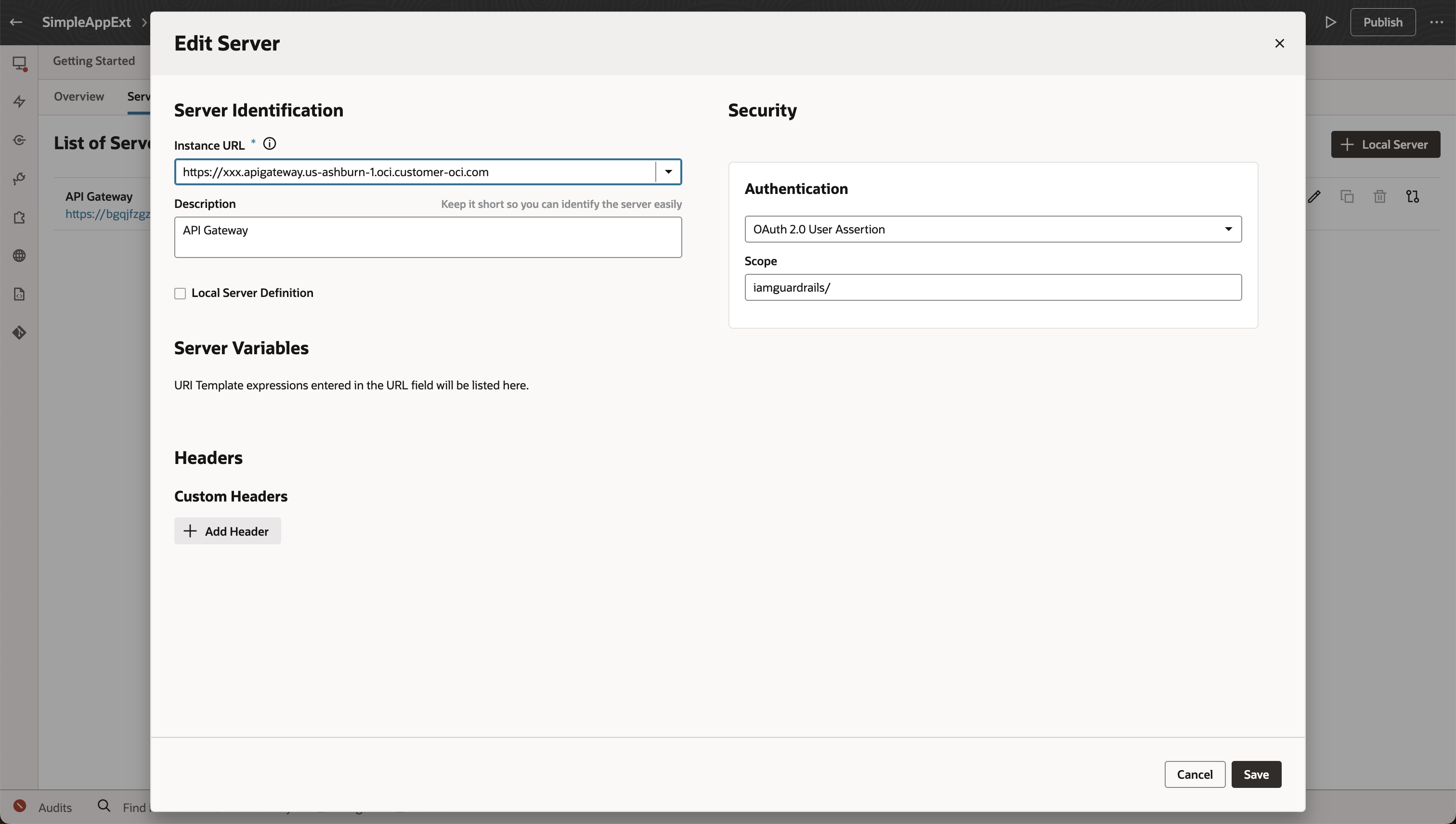
Configure a VBS application extension backend with authentication “OAuth 2.0 User Assertion” and the FA client scope configured in the identity domain
- Backend: https://<API Gateway host name>
- Disable Local Server Definition (to activate the Fusion Applications application extension Authentication variants).
- Authentication: OAuth 2.0 User Assertion
- Scope: <resource server audience>/ (needs to match the client scope configured for Oracle Cloud Service “Oracle Applications Cloud (Fusion)”)
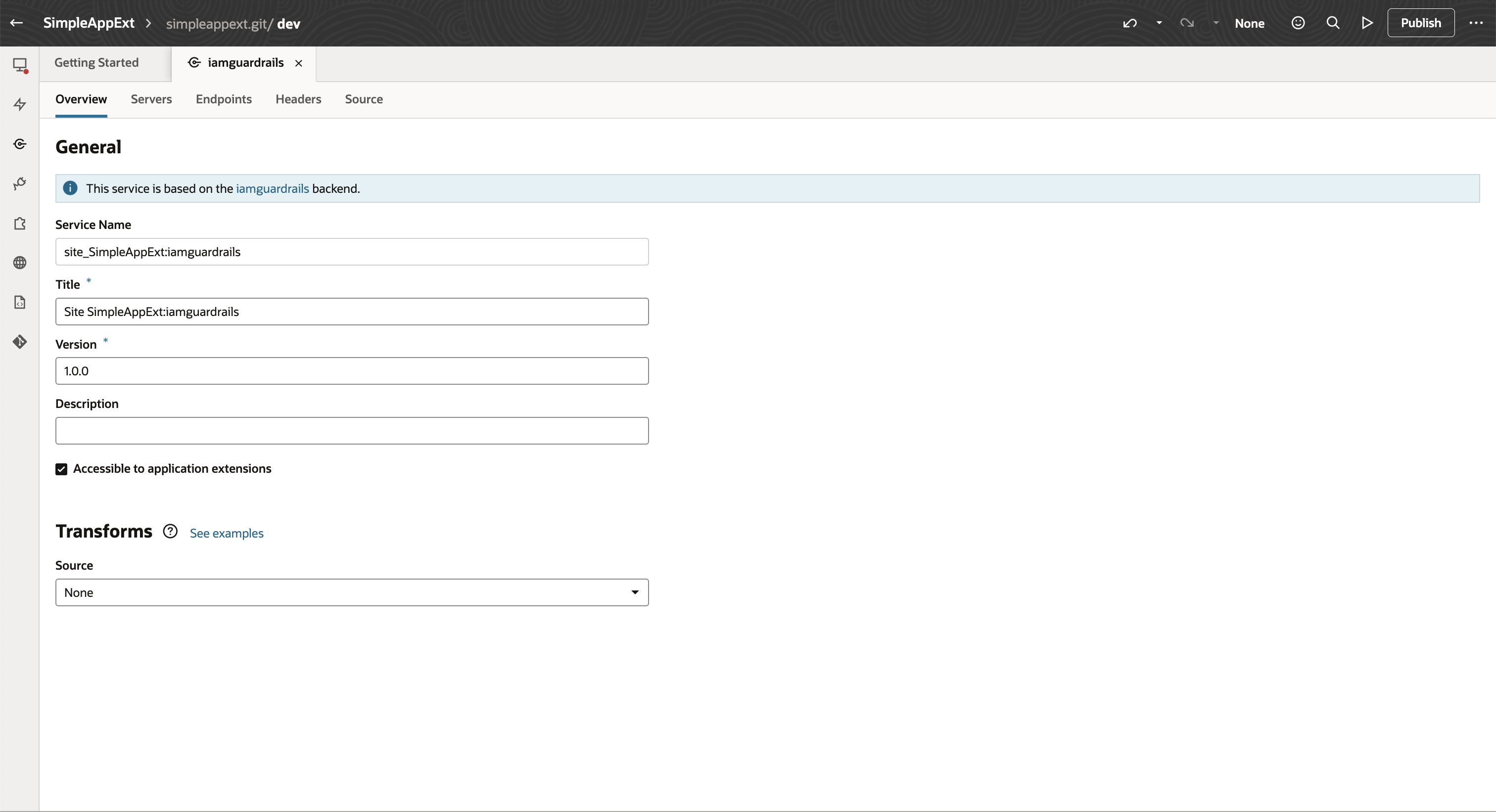
- Configure a service connection leveraging the backend
- Don’t forget to enable “Accessible to application extensions” in the service connection
Summary
This blog described the steps of configuring a Visual Builder Studio application extension for Fusion Applications, the associated IAM identity domain and an Oracle API Gateway in order to access external services from Fusion Applications.
Following are the important configuration artifacts:
- Configure an OAuth resource app in FA IAM identity domain for Oracle API Gateway
- Add the OAuth resource app as client scope to Oracle Cloud Service “Oracle Applications Cloud (Fusion)” in FA IAM identity domain
- Configure API Gateway for CORS
- Configure a VBS application extension backend with authentication “OAuth 2.0 User Assertion” and the FA client scope configured in the identity domain
Hope this gave a better understanding of how such integrations with external services can be configured.
Have fun!
max@ateam