
Introduction
All Oracle Fusion Cloud Applications environments are now provisioned with the Oracle Cloud Infrastructure Identity and Access Management identity domain. This Fusion Applications identity domain is pre-integrated with the identity system of Fusion Applications and serves as the identity backbone for several Fusion Applications extensibility services, such as Oracle Visual Builder Studio. It enables single sign-on (SSO) and token-based authentication across Fusion Applications and related extensions. This Fusion Applications identity domain is also available to deploy extensions and integrations.
Using the Fusion Applications identity domain for building extensions comes with several benefits:
- Avoids the cost of user-owned OCI identity domains for supporting extensions. No additional licensing cost is incurred when using the Fusion Applications Identity domain to build extensions in Fusion Applications.
- Note that the Fusion Applications identity domain is provisioned with the Oracle Applications domain type. In addition to saving the licensing cost, using the Fusion Applications identity domain instead of creating more user-owned OCI identity domains, minimizes operational and governance overhead. It also prevents identity proliferation and any potential risks associated with it.
- User synchronization is configured by default.
- All users created in Fusion Applications through the security console or through batch processes are actively synchronized to the Fusion Applications identity domain. This synchronization enables assigning Fusion Applications users to OCI-based extensions and integrations.
Integrated SSO and identity synchronization are configured by default between Fusion Applications and the Fusion Applications identity domain
- This configuration enables single sign-on between the Fusion Applications and custom-built extensions.
- The OAuth token-based authentication allows custom-built applications to connect with the Fusion Applications REST APIs.
Here’s a visual representation of how the overall model evolves with Fusion IAM integration. Note that the user is synchronized from Fusion Applications to the IAM identity domain. The synchronization ensures that user identities and access privileges are managed centrally and consistently across the enterprise. This synchronization is configured by default and allows Fusion Applications users to authenticate PaaS extensions and related services.
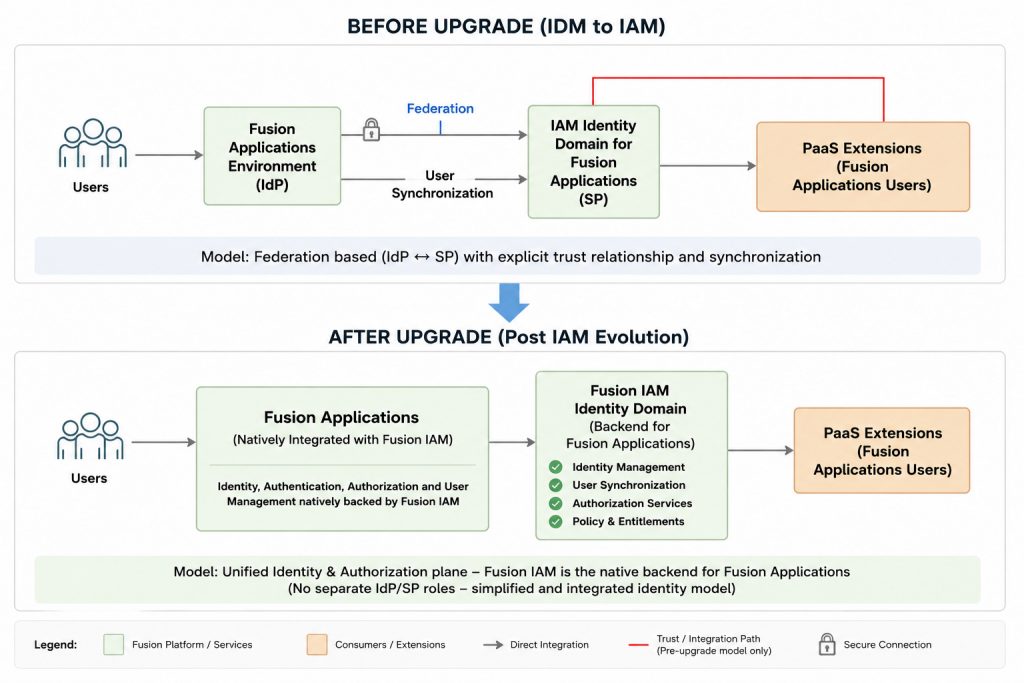
The Fusion Applications identity domain comes with guardrails to ensure that certain ready-to-use Oracle configurations aren’t modifiable by the user. The guardrails ensure that you can confidently use this IAM Identity domain for building extensions without concerns that those changes may impact Fusion Applications
VBCS Instance which is provisioned in Fusion Applications identity domain will have advantages over additional IAM Identity domain which is often used for SaaS Extensions tooling – OIC/VBCS mostly referred as PaaS Extensions.
By default – applications created using such Hybrid VBCS will be redirected to FA for Authentication (SSO with FA), user/role from FA will be available in Fusion Applications identity domain as user/groups which otherwise would need lot of configuration setups in additional IAM Identity domain as part of PaaS tools.
The requirement to build VBCS Applications stems from various use cases –
1. Application which is required to be accessible to Fusion Application users – in case of Cloud HCM, an application is built to create positions using cost distribution control from various cost centers flowing from Oracle EDMCS (Enterprise Data Management Cloud) where enterprise hierarchies are maintained, such kind of Position control application are useful for hospitals where various department funds one position.
2. Application which is required to be accessible to partners of enterprise where fusion cloud application is implemented, for e.g. partners of Bank where Bank has fusion cloud application implemented & partner wanted to view (Bank Information) & even modify some parts of data (add/update Address locations)
*Such partner users does not exist in fusion application & are coming from external systems (external IDP) however they need to access fusion application data for business process.
3. Mashup Applications – Where data is brought from multiple systems and monitoring dashboard is created, for E.g. Integration dashboard which pulls data from Fusion Application Jobs, process cloud for approval workflows, OIC for integrations.
* These dashboards are accessible to designated admin in system which may or may not be fusion application users, in this scenario we may consider them as OCI IAM local user.
In this blog, We will discuss various service connections which can be built for VBCS to access data from FA/External application using OAuth2.0 configuration in IAM.
Broadly we will cover below as they are available in VBCS Service connections & will discuss in detail over use case & when to use particular service connections as depicted in below diagram.
- OAuth 2.0 Resource Owner Password Credentials (ROPC)
- OAuth 2.0 User Assertion (UA)
- Oracle Cloud Account
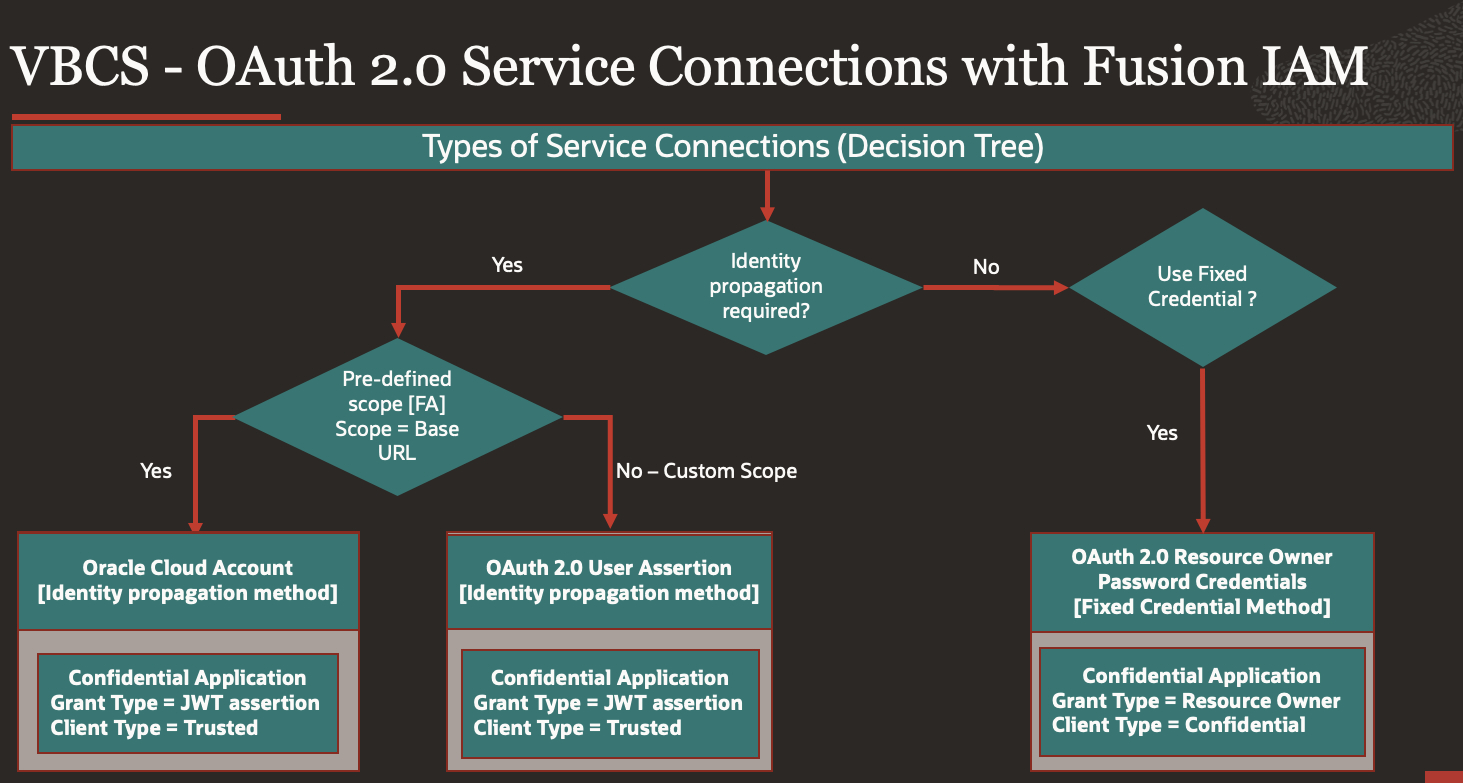
Fixed credentials – Ignores the signed-in end user’s identity or credentials
Identity Propagation – Logged in User Identity is used to access resource
Details:
Before we start, we will give a little background of OAuth 2.0, kind of applications & possible access methods.
OAuth 2.0 [RFC 6749] is the industry-standard protocol for authorization, OAuth 2.0 is an authorization framework that enables an application or service to obtain limited access to a protected HTTP resource.
In OAuth, the applications are called clients; they access protected resources by presenting an access token to the HTTP resource. As an administrator, you configure OAuth resources and clients and administer them.
There are multiple authorization flows defined in OAuth2.0 & it depends on kind of application (Native, Single Page, Server Page, Background) & use case to use specific Workflow.
Kind of Applications –
There may be four kinds of application for which access can be provided
- Native – Runs over desktop or phone of the User (E.g… Android/iOS, Windows Forms (WPF))
- Single Page – Applications which gets downloaded from server and runs directly over browsers built based on JavaScript platform (Angular, React)
- Server Page – Applications runs on server that emits HTML & then runs on the Browser – JSP, Servlets, PHP, python
- Background – Applications runs on Server and there is no user interaction. (API-API Communications)
Use Case – To Use OAuth2.0 we should decide which workflow (Grant Type) we should use for that kind of applications.
- Application running on Server – OAuth 2.0 Client Credentials (CC)
Generally used for Background Applications, Current Fusion IAM operational guidance recommends user-context authorization approaches for Fusion integrations. Refer to the decision tree for the recommended service connection patterns
- Application running on Server & have End User & is highly trusted Application – OAuth 2.0 Resource Owner Password Credentials (ROPC)
- Application running on server
- Has End Users
- Should be used only by highly trusted applications, as user is sharing user/name & Password.
- Typically, for backend systems where the resource owner (user) trusts the client with their credentials. This flow is considered less secure and should be used sparingly
- Two-Legged Authentication: User interacts with application only which in turn talks to identity server.
- Fixed Credential Authentication Method – User credentials which is provided would be used to access resource, ignoring the signed-in end user’s identity or credentials
- Both User & Applications are Authenticated with identity server
- Only Confidential clients may use this grant type, Confidential client is a client which is able to maintain secret.
- Client has access to user credentials
- Smooth user experience (User stays in app, no context change)
- Request: Client ID & Secret, Username/Password
- Response: Access token, expiry time, token type, scope
- Grant Type = Password
- There can be alternative more secure method than ROPC – OAuth 2.0 Authorization code grant type where password doesn’t need to be shared, this can be configured as confidential application in IAM however as of now – VBCS doesn’t provides this configuration directly as service connection but may provide it later as new authentication type option – OAuth 2.0 Auth Code.
- Where User does not want to share Password – case 2 (ROPC)
- User Gives password directly to identity server
- Application gives secret to identity server
- Both User & Application are authenticated with identity server
- Three-Legged Authentication: User talks to identity server for authentication & using authorization code application talks to identity server for access token.
- User Makes request to application, redirected to identity server, identity server authenticates users (browser-pops asking for user credentials), Identity server issues Authorization code, redirects back to application with Authorization code, Application sends request to identity server with Authorization code & Client Secret, if Authorization code is valid & Client secret is valid it issues a access token, both user & application are authenticated.
You can refer Angelo blog how to implement OAuth Authorization code flow for VBCS –
https://www.ateam-oracle.com/post/obtaining-fusion-apps-jwt-token-from-visual-builder-using-oauth-authorization-code-from-oracle-idcs
- If Multiple service/API are governed by same Oracle IAM & those service/API can be configured in Oracle IAM as a resource which can accept a valid IDCS token, then OAuth 2.0 User Assertion (UA) can be used, this is also available in VBS (Visual Builder Studio) Service connection to connect to Fusion Applications.
- The user assertion is exchanged for an access token, user assertion is a standard JSON web token (JWT), to be signed by a trusted client using its private key.
- A Certificate is generated to sign the JWT and then request for an access token from Oracle IDCS
- Trust between IAM and FA is established using X509 Certificate.
- Oracle IAM validates the digital signature that is included with the JWT and returns an access token
- Can be used to call an external system’s services that can be represented as a resource app with a particular scope in Oracle Identity Cloud Service (IDCS)
- User’s credentials are never accessible to the application
- Identity Propagation Authentication Methods – User which is Signed-in would assert user’s identity using digital signature (certificate) to sign JWT.
- Grant type: JWT Assertion
- To Access Fusion Cloud Applications or similar services which accept the URL as scope, Oracle Cloud Account is by far the most popularly used authentication method to achieve Identity Propagation. However, this authentication method is limited to certain pre-defined services (and therefore pre-defined scopes). Oracle Cloud Account implicitly supports the following cases:
- Identity Propagation to a FA-based SaaS REST API configured with SSO/Federation
- Identity Propagation to an Integration/Process Cloud REST API that is cohosted with VB.
- Application which are running on user Machine (Native) can use Implicit or Authorization Code (PKCE), we will not cover those for VBCS Service Connection use case.
Now we have brief understanding of OAuth2.0 flows & when to use what, we will cover setups of Service Connections used in VBCS
Prerequisites
- Identify the IDCS stripe (IAM domain) associated with your Fusion environment. You’ll need this to navigate to the IDCS Admin Console to create your confidential application.
- Identify the users who have the Identity Domain privileges to access the IDCS stripe (IAM domain). Only they can create the confidential application.
OAuth 2.0 Resource Owner Password Credentials (ROPC)
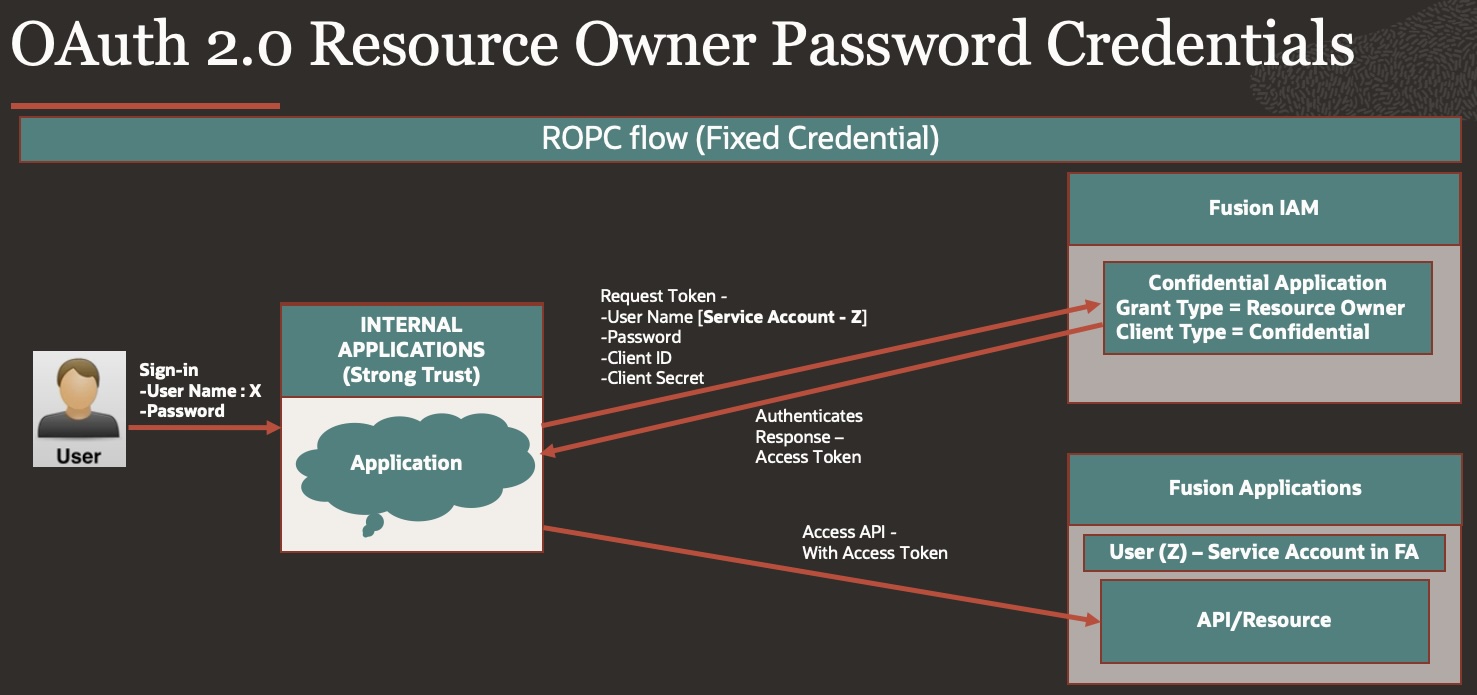
OAuth 2.0 grant types is used when you need a specific user’s credentials to connect to the service, sparingly used as it exposes user credentials, must be used for internal trusted application which are secure.
Step 1: Register your application with the authorization server
- Login to IAM in same domain which is domain of FA.
- Navigate to Identity > Domain> Choose FA Domain
- Go to Integrated Application, Press Button – Add Application
- Choose Confidential Applications
- In Add Application details – Give Name, description of your Choice – VBCS_OAuthROPC
- Press Next for Configure OAuth
- Choose Client configuration
- Authorization – Resource Owner
- Client Type – Confidential
- Resources – Add Scope
- Oracle Applications Cloud (Fusion)
- Press Next for Configure Policy
- Finish.
- Make note of the application’s Client ID and Client Secret & Scope.
- Activate Application
You can test configuration using Postman as a client to request access token
- In Postman, create a new request.
- In the Authorization tab, select OAuth 2.0 as Client Credentials.
- In the Configure New Token section, enter the following client configuration information:
| Fields |
Values |
| Access Token URL |
The IDCS URL appended with /oauth2/v1/token is used as the Access Token URL. |
| Client ID |
Enter the Client ID value collected from IDCS. |
| Client Secret |
Enter the Client Secret value collected from IDCS. |
| Username |
IAM Username [Service account – OCI IAM Admin user which is present in FA with appropriate roles] |
| Password |
IAM Username Password [OCI IAM Admin User used as Service account] |
| Scope |
Enter the Scope value defined in IDCS. |
| Token Name |
Generic name, can be anything. |
| Grant Type |
Client Credentials |
| Client Authentication |
Send as Basic Auth Header. |
- Click Get New Access Token.
- Postman passes on the information to Oracle Identity Cloud Service (IDCS).
- After successful authentication, Oracle IDCS returns the access token to Postman.
- Click Use Token and to use this token to access the resources.
Step 2: Create Service Connections in VBCS
- Login to VBCS Applications.
- Navigate to Service connections > Press + Button to create new.
- Use Define by End Point
- Provide Resource URL which you want to access
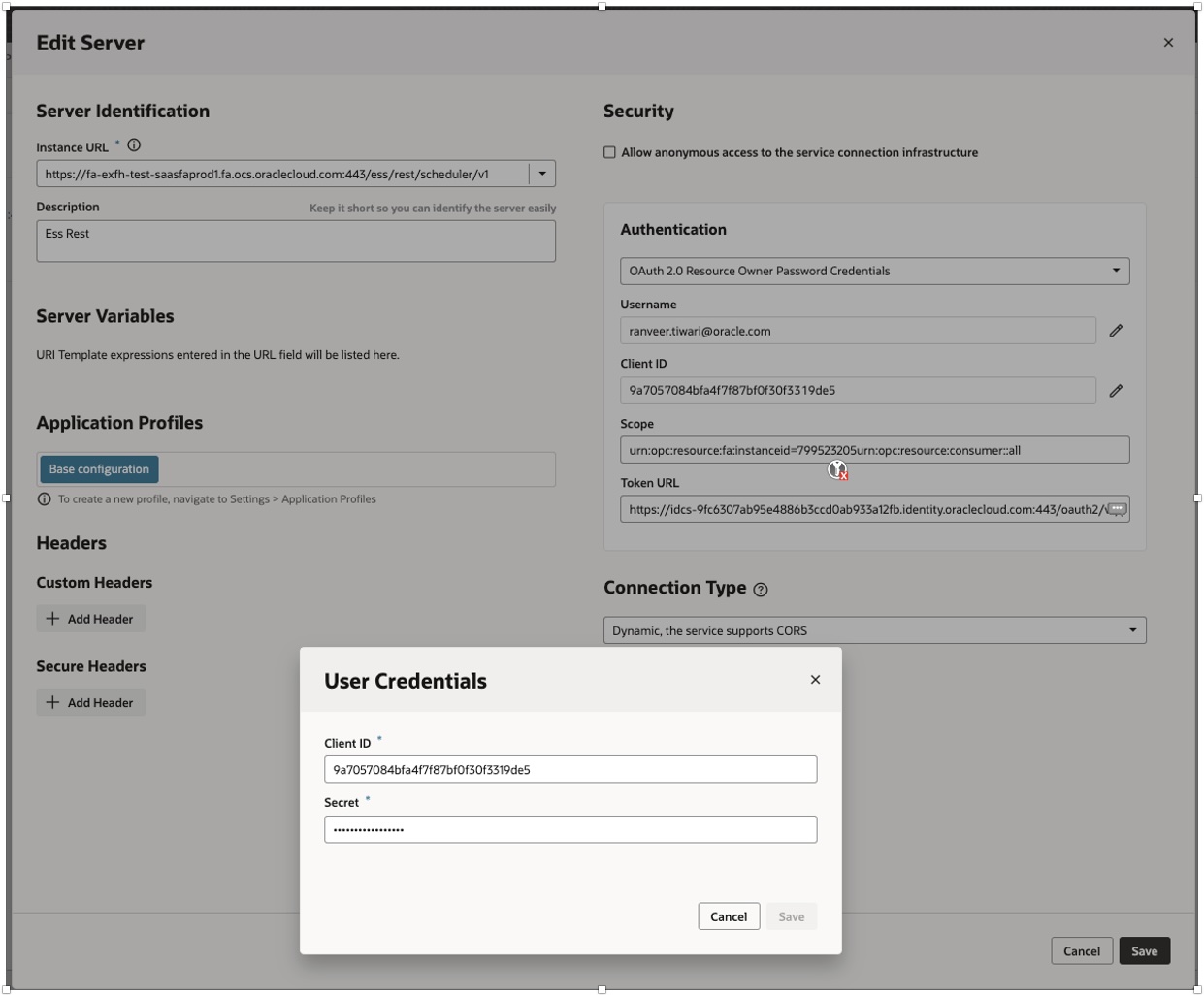
- Go to Server tab and provide below details –
- Authentication as – Oauth2.0 Resource Owner Password Credentials
- Username / Password [This is IAM Username/Password]
- Client ID – Copy from Step 1.11
- Secret – Copy from Step 1.11
- Scope – Copy from Step 1.11
- Token URL – <Replace with IDCS Base URL>/oauth2/v1/token
- Click Save and Exit Screen
- Go Back to Service connection
- Go to end Points>>Press Send request to test your service connection.
OAuth 2.0 User Assertion (UA)
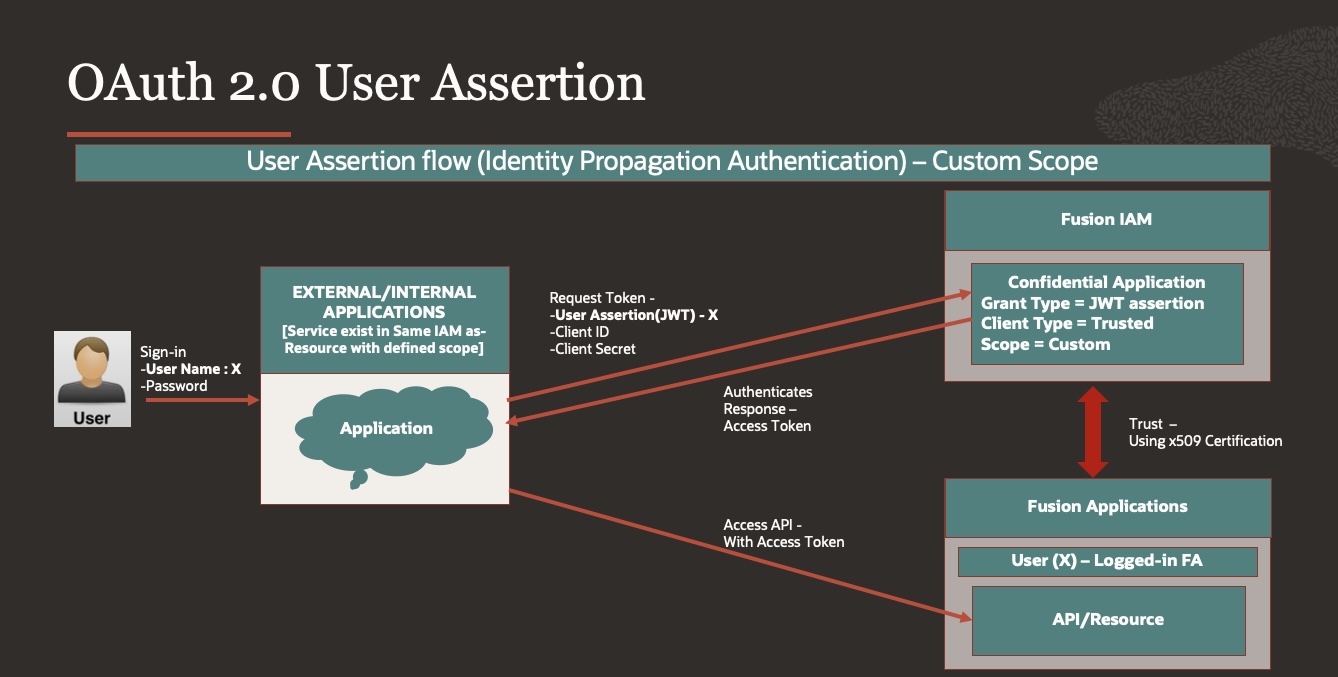
Select this method to call an external system’s services that can be represented as a resource app with a particular scope in Oracle Identity Cloud Service (IDCS). This also requires the user to sign with a valid Oracle Identity Cloud Service user account. As with Oracle Cloud Account authentication, the user’s identity is first converted into an assertion, then into an IDCS-issued JWT token for the configured scope. The difference is that with this method you can specify your own scope, rather than using the service’s URL
Step 1: Create Trust Certificate between Fusion IAM & Fusion Applications.
- Generate application’s signing Certificate –
Here we are generating Self-Signed Certificate using RSA Private key, for production instance it is recommended to use fully authorized key with a certificate from a well-known Certification Authority.
-
- Generate a private key
- openssl genrsa -out OAuthUserAssertion_priv01.key 2048
-
- Using the created private key, create an X509 certificate (.cer file) containing your public key, this certificate is valid for 365 days
- openssl req -new -x509 -key OAuthUserAssertion_priv01.key -out OAuthUserAssertion.cer -days 365
- Upload your application’s signing certificate, in Fusion Application, Security console>>Certificates –
Step 2: Register your application with the authorization server
- Login to IAM in same domain which is domain of FA.
- Navigate to Identity > Domain> Choose FA Domain
- Go to Integrated Application, Press Button – Add Application
- Choose Confidential Applications
- In Add Application details – Give Name, description of your Choice – VBCS_OAuthUserAssertion
- Press Next for Configure OAuth
- Choose Client configuration
- Authorization – JWT assertion
- Client Type – Trusted
- Upload Certificate generated as part of step 1 – OAuthUserAssertion.cer
- Resources – Add Scope
- Oracle Applications Cloud (Fusion)
- Press Next for Configure Policy
- Finish.
- Make note of the application’s Client ID and Client Secret & Scope.
- Activate Application
Step 3: Create Service Connections in VBCS
- Login to VBCS Applications.
- Navigate to Service connections > Press + Button to create new.
- Use Define by End Point
- Provide Resource URL which you want to access
- Go to Server tab and provide below details –
- Authentication as – Oauth2.0 User Assertion
- Client ID – Copy from Step 2.8 [This field is Optional for User Assertion, can be left blank ]
- Secret – Copy from Step 2.8 [This field is Optional for User Assertion, can be left blank ]
- Scope – Copy from Step 2.8
-
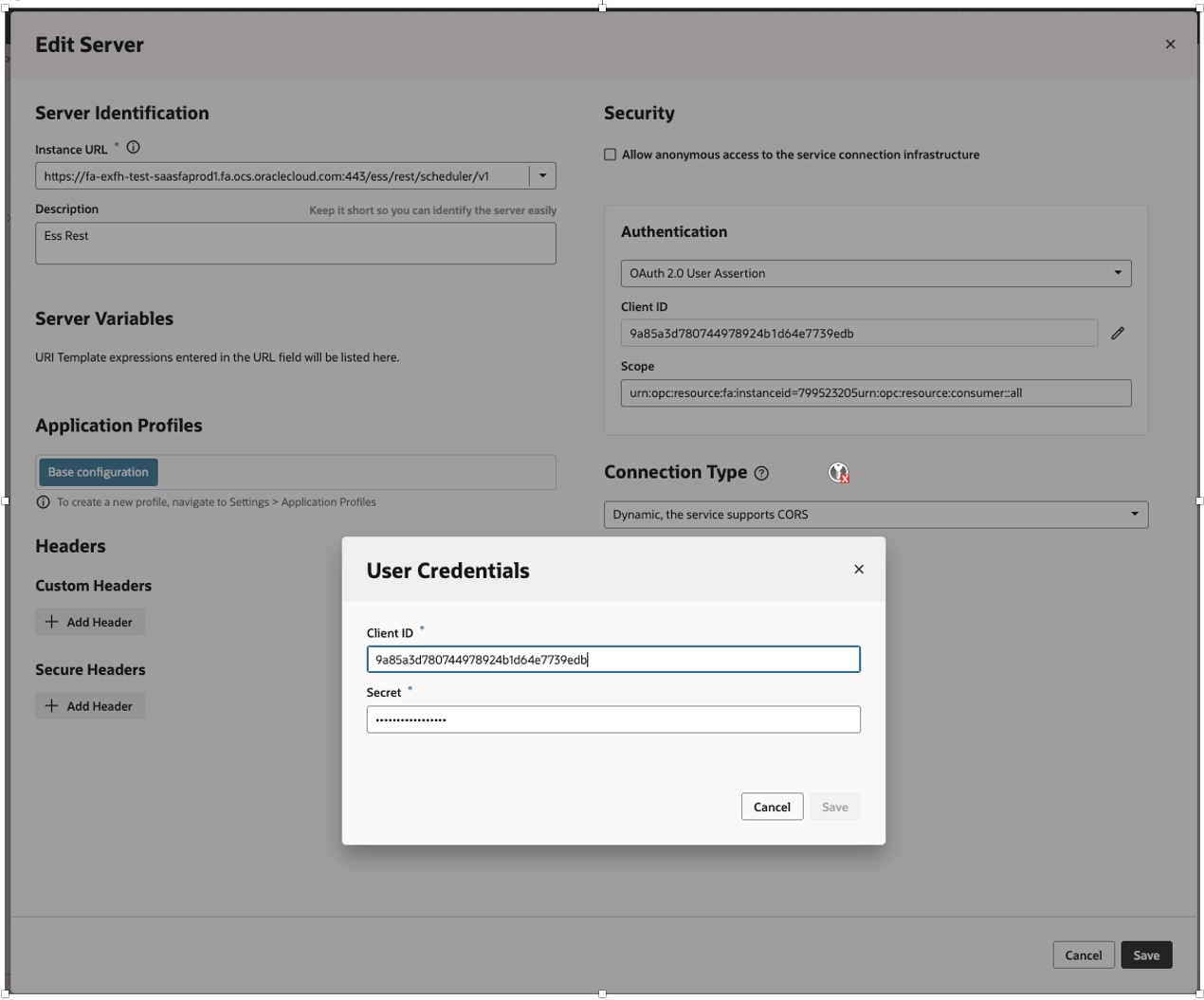
- Click Save and Exit Screen
- Go Back to Service connection
- Go to end Points>> Press Send request to test your service connection.
Oracle Cloud Account
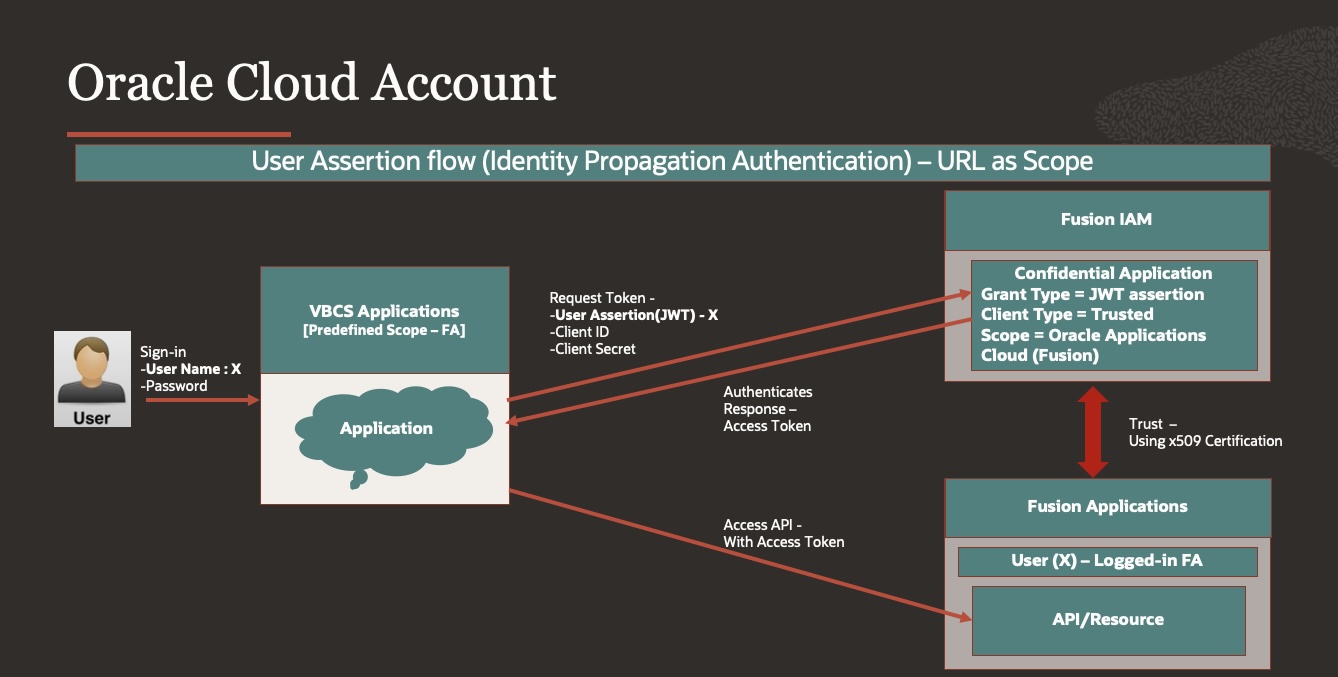
User must sign in with the credentials of a valid account in the Oracle Identity Cloud Service (IDCS) associated with Visual Builder. The user’s identity is converted into a user assertion, then into an IDCS-issued JWT token for the scope that is equivalent to the base URL of the service being called.
For example, if the service’s URL is https://fa.oraclecloud.com/myservice, the token is created for the scope of https://fa.oraclecloud.com
Step 1: Create Service Connections in VBCS
- Login to VBCS Applications.
- Open the instance’s Tenant Settings page.
- In the Services tab, click Create Backend, then choose Oracle Cloud Applications in the Create Backend dialog
- When specifying the URL in the Tenant Settings, you (the service administrator) only need to provide the instance URL of the Oracle Cloud Applications backend service to retrieve the list of services
- Configure other settings, such as security, as needed, ie..which authentication type you wanted, for our case we can pick oracle cloud account
- Click Create.
- This will create backend as oracle cloud applications.
- Visual Builder automatically discovers the interface Catalogs endpoint of the Oracle Cloud Applications backend, which retrieves the list of services and their metadata.
Step 2: Create Service Connections in VBCS
- Login to VBCS Applications.
- Navigate to Service connections > Press + Button to create new.
- Use – Select from Catalog
- This will show – Service catalog per application pillar – HCM, ERP, Sales & Service
- Select Pillar which you want to access, for our example- HCM, so it will load HCM API catalog
- Provide service name & Search for Business object
- In our example we will search for Worker, add end points & Press create
- Service connection is created
- Go to End point, select any end point & Test.
Conclusion
As Fusion Applications identity domain would now allow tools to be provisioned for application development, in this case VBCS – in same domain as Fusion Application, many configurations which were done earlier for SaaS Extensions may not be required (SSO, User/role sync) that will reduce development effort for SaaS extension using such hybridized VBCS instances.
We hope with this blog you have better understanding of different VBCS Service connections which are related to Fusion Applications identity domain Configuration for OAuth2.0 grant types, provides mechanism how to configure & illustrates when to use with which connection types.
In Part two – Extending Fusion Applications using VBCS – SSO Configurations of this blog series, we will focus on the SSO Setup of VBCS application developed in hybridized VBCS instances available in Fusion Applications identity domain for External & Local IAM Users.
References:
- Securing Authorizations in Oracle Cloud
- Managing OAuth Resources and Clients
- VBCS Service Connections
- Access Grant Types
https://docs.oracle.com/en/cloud/paas/identity-cloud/rest-api/SupportedAccessGrantTypes.html
- Visual Builder using OAuth Authorization code
- Add a Connection to Oracle Cloud Applications
- Add a Confidential Application
https://docs.oracle.com/en/cloud/paas/identity-cloud/uaids/add-confidential-application.html
- MOS Note – All Oracle Fusion Cloud Applications Environments are now Provisioned with an Associated Oracle-Managed OCI IAM Identity Domain (Doc ID 2889855.1)