
In this post I will discuss the two different types of sessions within OCI Bastion service; Managed SSH Sessions and SSH port forwarding sessions. When would you use one over the other? I hope to answer that question in this post. Regardless of which type of session you choose, the OCI Bastion Service provides a secure way to manage and access the sessions. Let’s dive in!
Managed SSH Sessions
Managed SSH Sessions are used when an administrator/developer or any user that needs direct access to a compute node or other private resources. This could be an administrator that is installing patches on the server or a developer that is writing/testing code. In any case, it is a user that needs to direct access. In order to access your private resources you will need to supply a public key when creating the session and use your private key when accessing. An SSH public key either can be generated by the OCI Bastion service or you can supply your own public key. To generate you own public key check out the docs here. The connection to the compute node uses port 22 by default that can be changed along with the maximum time-to -live for each session. You can check out my earlier blog post on how to manage long lived sessions.
Note: One pre-requisite to use Managed SSH Sessions on a compute node is the Bastion plugin must be enabled, by default the plugin is disabled.
SSH Port Forwarding Sessions
SSH port forwarding sessions otherwise known as SSH tunneling is a mechanism to send encrypted data from one node to another. It uses Secure Shell (SSH) which is a standard for remote logins and file transfers. Some use cases for SSH tunneling are supporting legacy applications that do not have encryption built-in or a typical Virtual Private Network (VPN) may use SSH tunneling to implement. SSH tunneling can send any TCP/IP traffic between two servers. For example you can use the SSH tunneling to send Remote Desktop Protocol (RDP) traffic to another server. SSH port forwarding can support any protocols that support SSH, including MySQL, ATP and OKE. With OCI Bastion service the SSH port forwarding session is created between a remote node and a compute node in a private subnet as defined by an IP address or hostname. An SSH public/private key is also used for access as described above for Managed SSH Sessions.
One of the pitfalls for using SSH tunneling is that you can bypass traditional firewalls, since the TCP/IP packets are encrypted.
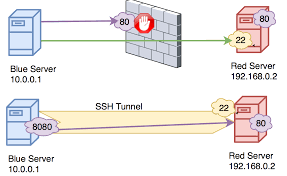
The OCI Bastion service mitigates the potential attack surface in three ways:
- By using OCI Bastion service, there is no need to create your own jump host. Creating a Bastion host increases your risk if not maintained appropriately.
- By managing the max session time of the session (time bound).
- By removing the public IP when accessing the bastion session.
By managing the max session time you have control of how long each session can last and since there is no public IP when establishing a connection to the Bastion service, there is no exposure via an IP address. Maintaining your own bastion host, patching/upgrading etc. is another attack vector if not maintained appropriately.
Thanks for reading!