
Introduction
Oracle Cloud Infrastructure (OCI) Vision is a serverless, multi-tenant service, that performs deep-learning–based image analysis at scale. It is one of the services that come under the OCI AI Services.
OCI Vision helps you to identify and locate objects, extract text, and identify tables, document types, and key-value pairs from business documents. There are prebuilt models available out of the box, and developers don’t need ML expertise to work with them.
This service is accessible, using the Console, REST APIs, OCI SDK, or OCI CLI.
OCI Vision’s features are split into Document AI for document-centric images, and Image Analysis for object and scene-based images.
Document AI comes with the following pre-trained models.
- Optical Character Recognition (OCR): Vision can detect and recognize text in a document.
- Document classification: Vision can classify a document, for example, whether the document is a tax form, an invoice, or a receipt.
- Language classification: Vision classifies the language of a document based on its visual features.
- Table extraction: Vision extracts content in tabular format, maintaining the row and column relationships of cells.
- Key-value extraction: Vision identifies values for common fields in receipts.
- Optical Character Recognition (OCR) PDF: Vision generates a searchable PDF file in your Object Storage.
For this solution, we are using the Key-value extraction model in Document AI.
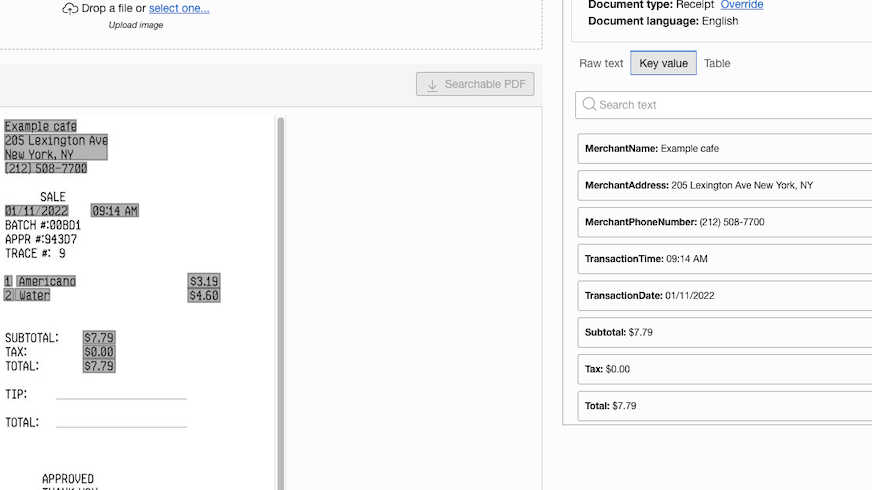
OCI Vision can automatically identify from a document of type Receipt, the fields like Merchant Name, Merchant Phone Number, Merchant Address, Transaction Date, Transaction Time, Total, Subtotal, Tax, Tip, Item Name, Item Price, Item Quantity, Item Total Price, and return them as a key-value pair.
Receipts can be in the following formats: JPEG, PDF, PNG, and TIFF.
Below image, shows a sample extraction of key-value pairs from a Receipt.
In this blog, I will show how the creation of expense reports can be automated using OCI Vision.
Fusion Expenses use case is chosen in this blog, since it is familiar to many people; however the code and patterns demonstrated here can be used for many other use cases. As the code sample is only a prototype to show the use of OCI Vision, it considers only the minimal data required for creating an expense report.
Architecture Diagram
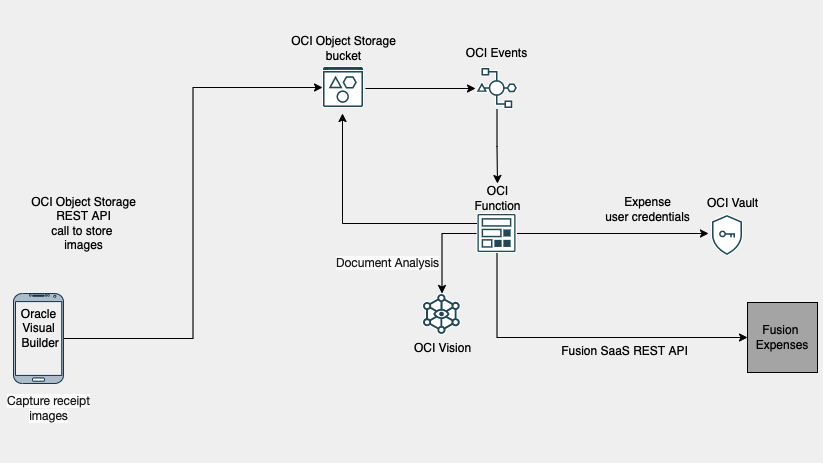
The following diagram illustrates the logical flow for this reference architecture.
Solution Components
The architecture uses OCIVision, OCI Functions, OCI Events, OCI Object Storage, OCI Vault and Oracle Visual Builder.
The Flow
The following section describes the flow in this architecture.
- Use the camera/File Picker option in the mobile application to upload images of the receipts.
- When Submit button in the mobile application is clicked, OCI Object Storage REST APIs are invoked to store the receipt images in an Object Storage bucket.
- The creation of objects in the bucket triggers an OCI Event Rule that invokes an OCI Function.
- OCI Function calls the analyze_document API of OCI Vision SDK for each image in the bucket. analyze_document API generates json response containing values of fields like Transaction Date, Total, Merchant Name from the receipt images. Function reads & parses this json response to get the key-value pairs. It then calls the Fusion SaaS Expenses REST APIs to create expense reports by passing those key-value pairs. To call the Expenses REST APIs, the user credentials of a user with Expense Manager role is used. These credentials are obtained from OCI Vault.
Detailed steps are given below.
Step 1. Capture Receipt images
Mobile application using Oracle Visual Builder
The mobile application to capture the receipt images is a Progressive web application (PWA) developed in Oracle Visual Builder. Users can click the photos of receipts using the camera or select images from the gallery and submit them for processing.
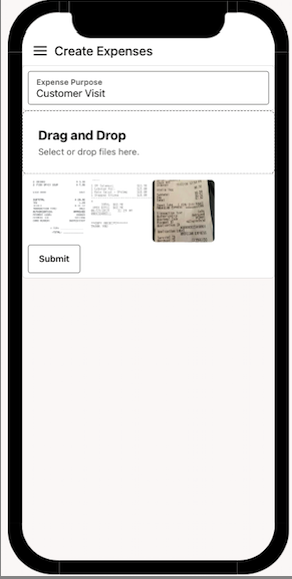
When Submit button is clicked, images get stored in a bucket in OCI Object Storage. The additional details required for expense creation like expense purpose, expense currency, PersonID of the user who submits the expenses get stored as a file, metadata.json in the same bucket.
Oracle Visual Builder uses a service connection to OCI Object Storage for storing files in bucket.
The service connection is to the PutObject endpoint of the OCI Object Storage API.
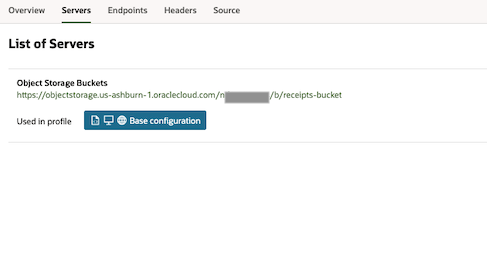
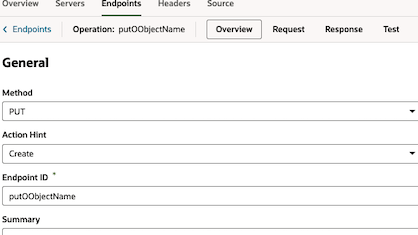
The Oracle Visual Builder Action Chain for Submit button calls the Object Storage PutObject API to store the captured receipt images in the bucket. Once all images are stored in bucket, Action Chain calls the Object Storage’s PutObject endpoint to store metadata.json, in the same bucket. metadata.json file will have values like the one shown below.
{“ReimbursementCurrencyCode”:”USD”,”Purpose”:”Customer Visit”,”PersonId”:”123552323″}
Refer this link for details on how to use Visual Builder for uploading files to OCI Object Storage.
Step 2. Store captured images for further processing
OCI Object Storage
OCI Vision supports documents from a local file or the ones stored in Object Storage. There is 1 bucket used in this sample – receipts-bucket and it stores the receipt images and metadata.json file.
This bucket has ‘Emit Object Events’ property enabled.
Step 3. Trigger OCI Functions
OCI Events
There are rules defined in Events to trigger a Function when objects get created in receipts-bucket.
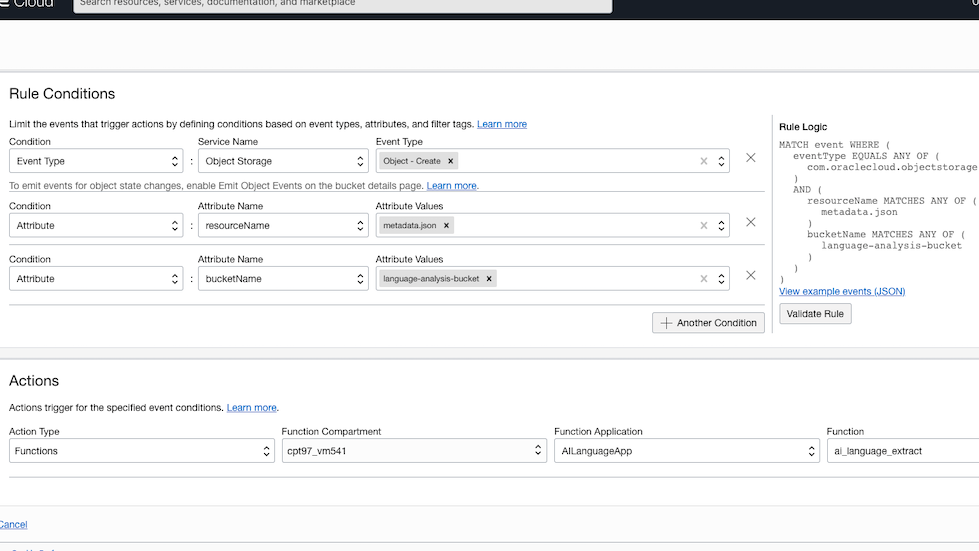
Step 4. Call OCI Vision SDK to extract receipt content and create expense reports.
OCI Functions
One Function is used in this solution, and it performs the following tasks.
- Analyze the receipt images in receipts-bucket using Vision SDKs.
- Gets the key values like transaction date, total amount, merchant name, etc from document analysis result.
- Gets the SaaS expense admin user credentials from OCI Vault. This admin user credentials is already stored in the Vault with secret name as expense_admin.
- Create Expense header, lines, and attachments using the extracted values by calling Fusion SaaS REST APIs.
Application Configuration
OCI Function Application has the following configuration keys.
Function Application Configuration
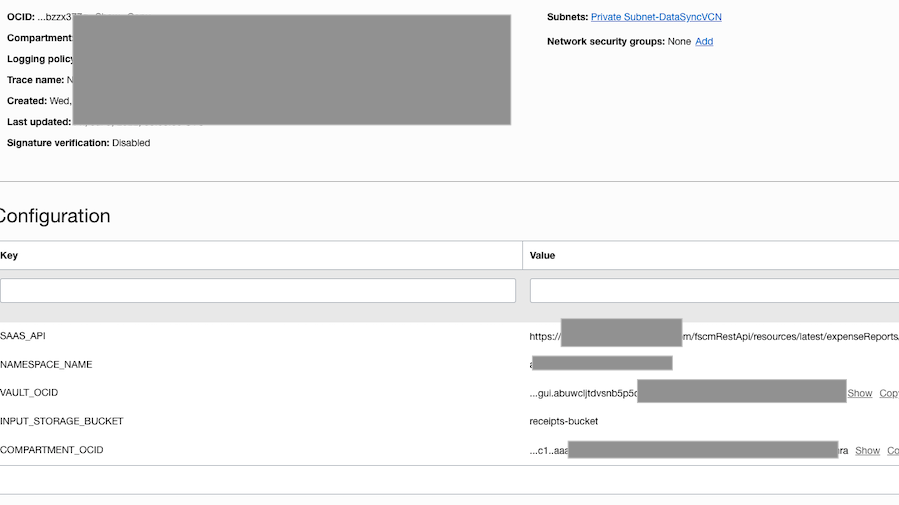
Function Code
Initialization and the handler methods
import base64
import io
import json
import logging
import os
import re
from datetime import datetime
import oci.object_storage
import pandas as pd
import requests
from fdk import response
try:
   signer = oci.auth.signers.get_resource_principals_signer()
   object_storage_client = oci.object_storage.ObjectStorageClient(config={}, signer=signer)
   if os.getenv("COMPARTMENT_OCID") is not None:
      compartment_ocid = os.getenv('COMPARTMENT_OCID')
   else:
      raise ValueError("ERROR: Missing configuration key  COMPARTMENT_OCID ")
   if os.getenv("SAAS_API") is not None:
      saas_api = os.getenv('SAAS_API')
   else:
      raise ValueError("ERROR: Missing configuration key  SAAS_API ")
   if os.getenv("NAMESPACE_NAME") is not None:
      namespace = os.getenv('NAMESPACE_NAME')
   else:
      raise ValueError("ERROR: Missing configuration key  NAMESPACE_NAME ")
   if os.getenv("INPUT_STORAGE_BUCKET") is not None:
      input_storage_bucket = os.getenv('INPUT_STORAGE_BUCKET')
   else:
      raise ValueError("ERROR: Missing configuration key  INPUT_STORAGE_BUCKET ")
   if os.getenv("VAULT_OCID") is not None:
      vault_ocid = os.getenv('VAULT_OCID')
   else:
      raise ValueError("ERROR: Missing configuration key  VAULT_OCID ")
except Exception as e:
   logging.getLogger().error(e)
   raise
# Handler method
def handler(ctx, data: io.BytesIO = None):
   try:
      process_receipts()

   except Exception as handler_error:
      logging.getLogger().error(handler_error)
      return response.Response(
         ctx,
         status_code=500,
         response_data="Processing failed due to " + str(handler_error)
      )
   return response.Response(
      ctx,
      response_data="success"
   )
The code snippet below shows the Function code, that calls analyze_document API of Vision Python SDK to invoke the KEY_VALUE_DETECTION model. This API returns a Response object with data of type AnalyzeDocumentResult. This result contains the extracted key-values along with other information like confidence percentage, bounding_polygons, etc.
def analyze_using_vision(object_name):
   ai_vision_client = oci.ai_vision.AIServiceVisionClient({}, signer=signer)
   analyze_response = ai_vision_client.analyze_document(
      analyze_document_details=oci.ai_vision.models.AnalyzeDocumentDetails(
         document=oci.ai_vision.models.ObjectStorageDocumentDetails(
            source="OBJECT_STORAGE",
            namespace_name=namespace,
            bucket_name=input_storage_bucket,
            object_name=object_name),
         features=[
            oci.ai_vision.models.DocumentKeyValueDetectionFeature(
               feature_type="KEY_VALUE_DETECTION")
         ],
         compartment_id=compartment_ocid,
         language="ENG",
         document_type="RECEIPT"
      ))
   return str(analyze_response.data.pages)
Here is a part of the json generated by analyze_document API.
[{
   "detected_document_types": null,
   "detected_languages": null,
   "dimensions": {
     "height": 747.0,
     "unit": "PIXEL",
     "width": 360.0
   },
   "document_fields": [
     {
       "field_label": {
         "confidence": 0.9999961,
         "name": "MerchantName"
       },
       "field_name": null,
       "field_type": "KEY_VALUE",
       "field_value": {
         "bounding_polygon": {
           "normalized_vertices": [
             {
               "x": 0.19444444444444445,
               "y": 0.0428380187416332
             },
             {
               "x": 0.7942141215006511,
               "y": 0.0428380187416332
             },
             {
               "x": 0.7942141215006511,
               "y": 0.0583598482880088
             },
             {
               "x": 0.19444444444444445,
               "y": 0.0583598482880088
             }
           ]
         },
         "confidence": null,
         "text": null,
         "value": "FISH & CHIPS RESTAURANT",
         "value_type": "STRING",
         "word_indexes": [
           0,
           1,
           2,
           3
         ]
       }
     },
     {
       "field_label": {
         "confidence": 0.9999987,
         "name": "MerchantAddress"
       },
       "field_name": null,
       "field_type": "KEY_VALUE",
       "field_value": {
         "bounding_polygon": {
           "normalized_vertices": [
Following code is to get the metatadata content from metadata.json , admin user credentials from OCI Vault and for processing the receipts.
# Process images in the bucket
def process_receipts():
   # Get the list of objects in input bucket
   objecs_list = object_storage_client.list_objects(namespace, input_storage_bucket)

   admin_credential = get_secret_from_vault("expense_admin")

   try:
      object_names = [b.name for b in objecs_list.data.objects]
      expense_metadata = get_metadata_object_content()
      expense_report_id = create_expense_header(expense_metadata, admin_credential)

      for x in object_names:
         object_name = str(x)
         if object_name != "metadata.json":
            # Analyze all files other than metadata.json in object storage
            vision_json = analyze_using_vision(object_name)
            # Create lines and attachments corresponding to each imnage in the bucket

            create_expense_lines_and_attachments(vision_json, object_name, expense_report_id, expense_metadata,
                                        admin_credential)
   except Exception:
      raise e

# Get the contents in metadata.json
def get_metadata_object_content():
   metadata_object = object_storage_client.get_object(namespace, input_storage_bucket, "metadata.json")
   if metadata_object.status == 200:
      content = metadata_object.data.text
      return content

# This method is to get the secret content stored in vault using the secret name
def get_secret_from_vault(vault_secret_name):

   # get the secret client
   client = oci.secrets.SecretsClient({}, signer=signer)

   # Read the secret content
   secret_content = client.get_secret_bundle_by_name(secret_name=vault_secret_name,
                                         vault_id=vault_ocid).data.secret_bundle_content.content
   decrypted_secret_content = base64.b64decode(secret_content).decode("utf-8")
   return decrypted_secret_content
def create_expense_header(expense_metadata, admin_credential):
   expense_header = json.loads('''{

      "targetRestApi": "''' + saas_api + '''",
      "targetRestApiOperation": "POST",
      "targetRestApiPayload": ''' + expense_metadata + '''
       ,
      "targetRestApiHeaders": {

         "Content-Type": "application/vnd.oracle.adf.resourceitem+json",
         "Authorization": "''' + admin_credential + '''"
      }
   }''')
   response_content = execute_rest_api(expense_header)
   api_call_response = json.loads(response_content['response_text'])
   expense_report_id = api_call_response['ExpenseReportId']
   logging.getLogger().info("expense_report_id", expense_report_id)
   return expense_report_id
Following is a code snippet that parses the analyze_document response using pandas library.
These extracted values are later used to create Expense Header and Lines. Function also gets the actual receipt images stored in the OCI Object Storage bucket and attaches them to respective Expense lines.
def create_expense_lines_and_attachments(vision_json, input_file_name, expense_report_id, expense_metadata,
                               admin_credential):
   try:
      # Parse the vision json
      data = json.loads(vision_json)
      df = pd.DataFrame.from_dict(data)
      temp_dict = {}
      counter = 0
      for entry in df['document_fields'][0]:
         temp_dict[counter] = entry
         counter += 1
      new_dataframe = pd.DataFrame.from_dict(temp_dict, orient='index')
      total = 0
      merchant_name = ""
      formatted_date = ""
      # Get the key-value section
      for ind in new_dataframe.index:
         if new_dataframe['field_type'][ind] == 'KEY_VALUE':
            fieldLabel = new_dataframe['field_label'][ind]
            filedValue = new_dataframe['field_value'][ind]
            if str(fieldLabel['name']) == "TransactionDate":
               transaction_date = str(filedValue['value'])
               try:
                  formatted_date = str(datetime.strptime(transaction_date, '%m/%d/%Y').date())
               except ValueError as ve:
                  formatted_date = str(datetime.strptime(transaction_date, '%m/%d/%y').date())
               except Exception :
                  pass
            if str(fieldLabel['name']) == "MerchantName":
               merchant_name = str(filedValue['value'])
            if str(fieldLabel['name']) == "Total":
               total = filedValue['value']
      total_numeric = re.findall('\d*\.?\d+', total)
      metadata_values = json.loads(expense_metadata)
      currency_code = metadata_values["ReimbursementCurrencyCode"]
      # Construct the API
      expense_lines = '''{
                            "targetRestApi": "''' + saas_api +  str(
         expense_report_id) + '''/child/Expense",
                            "targetRestApiOperation": "POST",
                            "targetRestApiPayload": {
            "ExpenseType": "Breakfast",
             "ReceiptAmount": ''' + str(total_numeric[0]) + ''',
            "ReceiptDate": "''' + formatted_date + '''",
            "ReceiptCurrencyCode": "''' + currency_code + '''",
            "ReimbursableAmount": ''' + str(total_numeric[0]) + ''',
             "MerchantName":"''' + merchant_name + '''",

            "ReimbursementCurrencyCode": "''' + currency_code + '''"
        },
                            "targetRestApiHeaders": {
                                "Content-Type": "application/vnd.oracle.adf.resourceitem+json",
                               "Authorization": "''' + admin_credential + '''"
                            }
                        }'''

      api_response = execute_rest_api(json.loads(expense_lines))
      api_response_body = json.loads(api_response['response_text'])
      expense_report_line_id = api_response_body['ExpenseId']
      input_file = object_storage_client.get_object(namespace, input_storage_bucket, input_file_name)

      if input_file.status == 200:
         file_contents = input_file.data.content

         encoded_file_contents = base64.b64encode(file_contents)

         attachments = json.loads('''{
                            "targetRestApi": "''' + saas_api + str(
            expense_report_id) + '''/child/Expense/''' + str(expense_report_line_id) + '''/child/Attachments",
                            "targetRestApiOperation": "POST",
                            "targetRestApiPayload":
            {
        "DatatypeCode" : "FILE",
        "FileName": "''' + input_file_name + '''",
        "Title": "attachment",
        "Description": "attachment",
       "FileContents":"''' + str(encoded_file_contents, 'utf-8') + '''"

        },
                            "targetRestApiHeaders": {

                                "Content-Type": "application/vnd.oracle.adf.resourceitem+json",
                                "Authorization": "''' + admin_credential + '''"
                            }
                        }''')

         execute_rest_api(attachments)

   except Exception as lines_and_attachments_ex:
      logging.getLogger().error("Error occured in create_lines_and_attachments", str(lines_and_attachments_ex))

# Common method for executing any REST API
def execute_rest_api(content):
   target_rest_api = content["targetRestApi"]
   target_rest_api_operation = content["targetRestApiOperation"]
   target_rest_api_payload = content["targetRestApiPayload"]
   target_rest_api_headers = content["targetRestApiHeaders"]
   if target_rest_api_operation == 'POST':

      api_call_response = requests.post(target_rest_api, data=json.dumps(target_rest_api_payload),
                                headers=target_rest_api_headers)
   elif target_rest_api_operation == 'PUT':

      api_call_response = requests.put(target_rest_api, data=json.dumps(target_rest_api_payload),
                               headers=target_rest_api_headers)

   content['response_text'] = api_call_response.text
   content['status_code'] = api_call_response.status_code
   logging.getLogger().info("api response ", api_call_response.text)

   return content
Inserting expense record into Oracle Fusion SaaS
Expenses are created in Saved state, by using the Fusion SaaS REST APIs. 3 APIs are used,
Conclusion
Business document processing can be a time consuming and labour intensive process.I hope this blog has given you some ideas on how you can use OCI Vision with other cloud native services and Oracle VIsual Builder to provide solutions in automating document processing.