ADW Version Oracle Database 19c Enterprise Edition Release – Production Version 19.11.0.0.0
Oracle Cloud Application 22A (11.13.22.01.0)
Fusion Analytics Warehouse Application Version 21.R3
Background
Oracle Fusion Analytics Warehouse provides analytics for Oracle Cloud applications, powered by Autonomous Data Warehouse and Oracle Analytics. More specifically:
Fusion ERP Analytics provides accounting data sourced from ERP Cloud in a warehouse designed to support broad set of analytics use cases.
Fusion HCM Analytics provides comprehensive workforce, turnover data sourced from Fusion HCM Cloud.
Fusion SCM Analytics give customers the ability to gain visibility into Supply Chain performance, correlate Supply Chain processes with business goals and detect, understand and predict Supply Chain issues.
Making the right business decisions is intrinsinclty tied to the system of records data accuracy of a company. In many specific use cases, Fusion Analytics data can be complemented with additional data for reconciliation or data augmentation purposes and to higlitghts trends in the reconciliation processes:
Financial Reconciliation, to compare two sets of records to ensure the records amounts match and to find / resolve discrepancies
Payroll, Cumulative Earning – Deduction or Costing data sets.
Payroll reconciliation, to compare payroll journal ledger entries amounts with the payroll amounts being prepared
Supplier reconcilation, to compare good received with invoice not received (GN/RI)
This blog describes how to utilize Fusion Analytics Warehouse (FAW) Data Augmentation feature and Oracle Analytics Cloud (OAC) Replication feature to replicate transactions data from Oracle SaaS Applications into Autonomous Data Warehouse (ADW) to extend the Data Layer of FAW with the ultimate goal of answering business questions and gaining business insight.
* Have access to an FAW Instance (OAC, ADW) with Administrative privileges
* Have access to an OCI Object Storage bucket
* Have access to an OCI local user (OCID)
Architecture Overview
FAW Data Augmentation
FAW Data Augmentation allows customers to leverage the FAW data pipeline to augment reports with datasets created :
By extending an existing entity or group of facts (with descriptive flex fields -DFF for instance) ,
By adding a new dimension in the target instance,
By adding a new fact in the target instance.
As only a subset of Fusion BI View Objects are available or Whitelisted for Data Augmentation, please refer to the documentation here to select the one(s) you need.
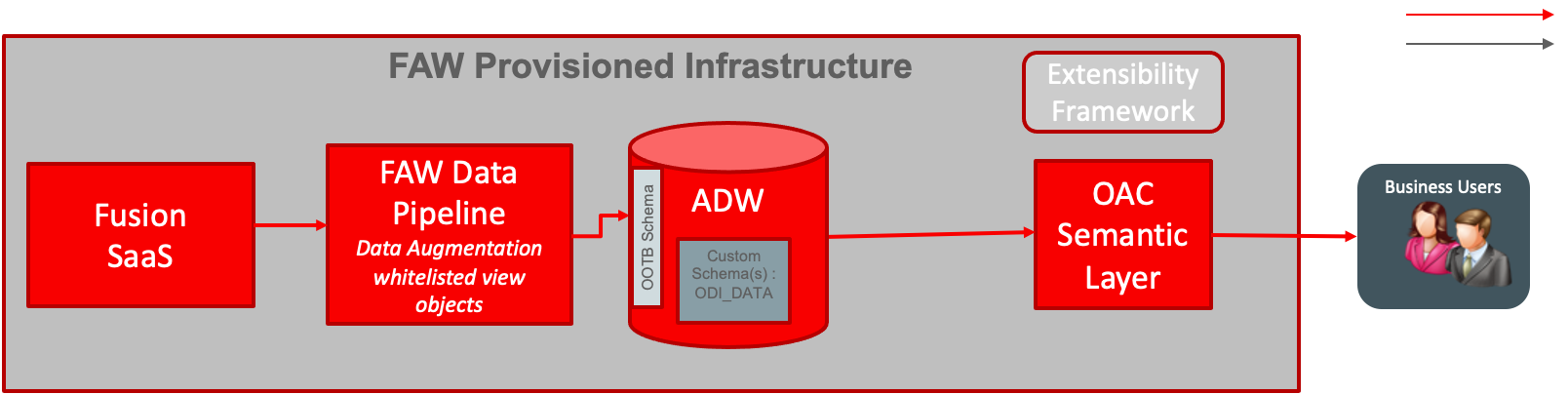
The diagram below details the architecture for this use case:
Figure 1: FAW Data Augmentation flow
The data flow is as follow:
FAW Data Augmentation (example with a Fact)
Create a Fact Data Augmentation on a Whitelisted View Object
Choose Attributes for the Data Augmentation
Select dimensions to be mapped with Fact columns
Save and Schedule the data augmentation pipeline job
FAW Data Pipeline processes the data augmentation pipeline jobs, extract the data from Fusion SaaS view object and load it into ADW.
Augmented data can be then queried directly using OAC Data set or a SQL client like SQL developer, through the database synonym named after the table name give in the first step
Semantic model can be extended by customizing an existing subject area or addition of a new subject area to allow reporting on augmented data extracted in ADW, as per the CEAL Team blog available here.
OAC Data Replication
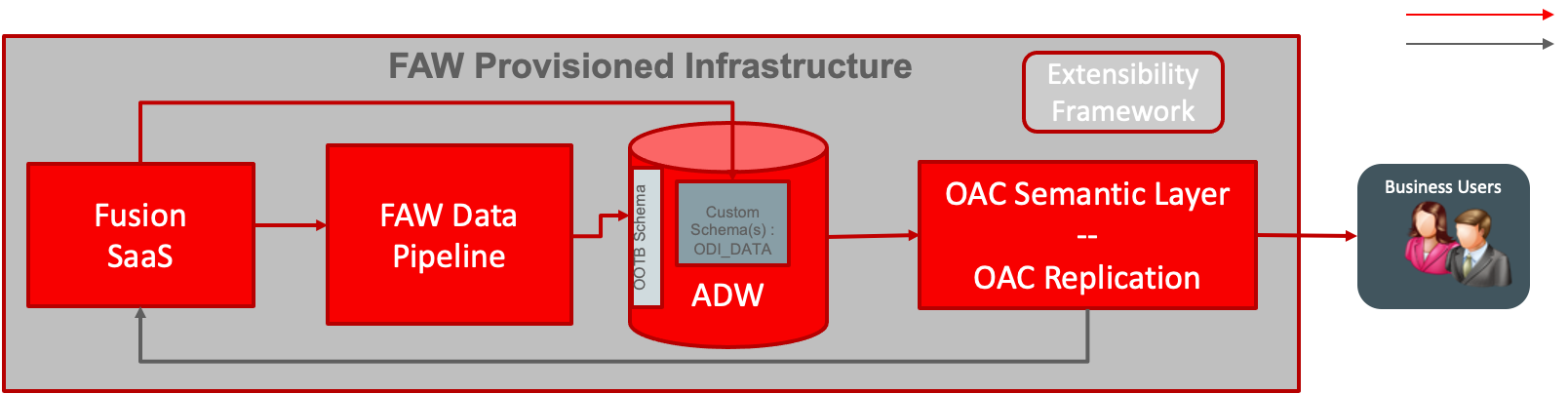
The diagram below details the architecture for this use case:
Figure 2: OAC Replicator Data Extension flow
The data flow is as follow:
OAC Replication Data Augmentation
Meet the OCI and FA prerequisites for Data Replication
Create a Source Replication Connection
Create a Target Replication Connection
Create a Data Replication for AP Invoice Batch View Object and choose columns
Save the Data replication and run it
OAC Replication will extract the View Object and load it into ADW custom schema (ODI_DATA in this example)
OAC Replication can be scheduled from OAC
Replicated data can be then used in Semantic Layer extension, or queries directly using OAC Data set or a SQL client like SQL developer
Semantic model will be extended by customizing an existing subject area or addition of a new subject area to allow reporting on data extracted in ADW, as per the CEAL Team blog available here.
Using FAW Data Augmentation
Set up SQL Developer Access to Fusion Analytics Warehouse Data with OAX_USER
Follow the steps described in the CEAL Team blog here to enable SQL Developer access to FAW augmented data: this will allow user to execute SQL queries against FAW delivered data model and FAW augmented data for any ORacle SQL Client (sqlplus, sqlcl, SQL Developer…).
Confirm in BI Cloud Connector the View Object is Enabled for Extract
In order for the Data Augmentation to successfully extract a Whitelisted View Object, this Whitelisted View Object has to be enabled for extract in BI Cloud Connector. To confirm it is, follow the steps below:
a) Sign in to BI Cloud Connector (with FAWService user for instance)
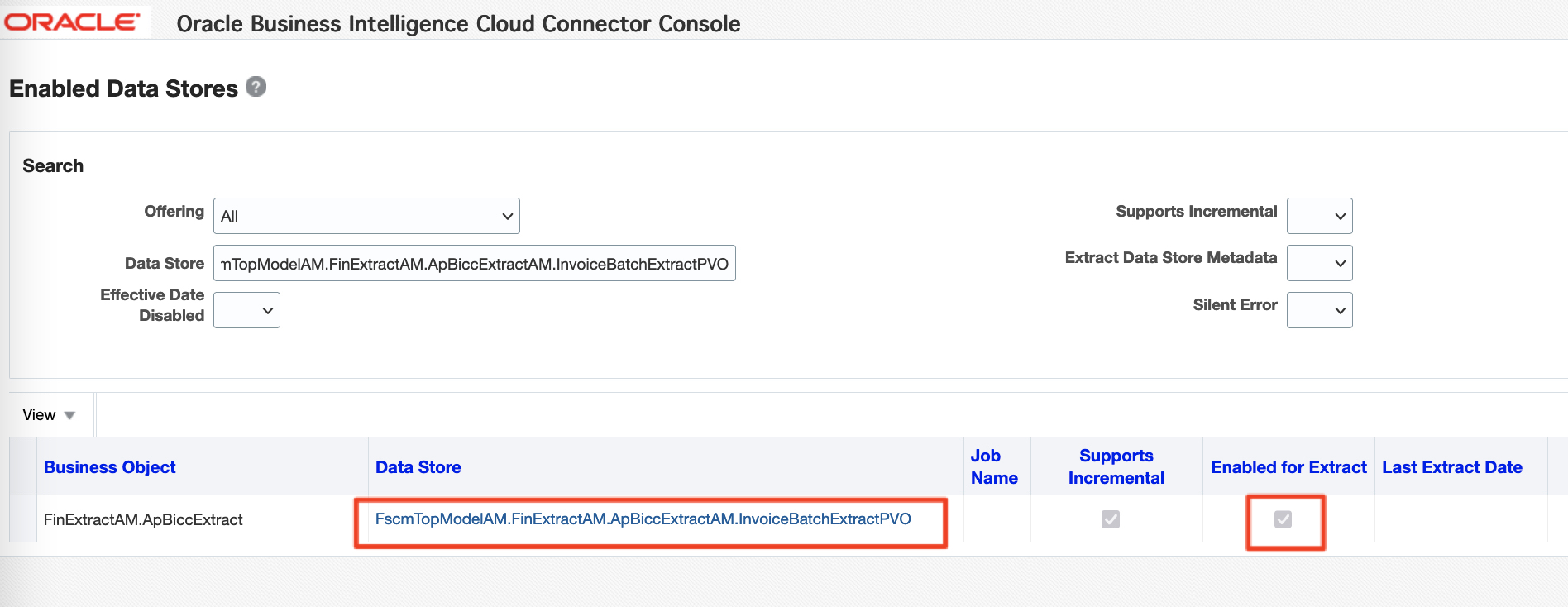
b) Once logged in, Search for Financial Offering and enter the Whitelisted View Object / Data Store name (here FscmTopModelAM.FinExtractAM.ApBiccExtractAM.InvoiceBatchExtractPVO), leave the other fields /check boxes as default and click Search
c) Confirm that the Whitelisted View Object is enabled for extract, as shown in the image below
Figure 3: FAW Data Augmentation flow
Create the Data Augmentation from the FAW Console
The next step now is to create the Data Augmentation form the FAW Console. Follow the steps below to do so:
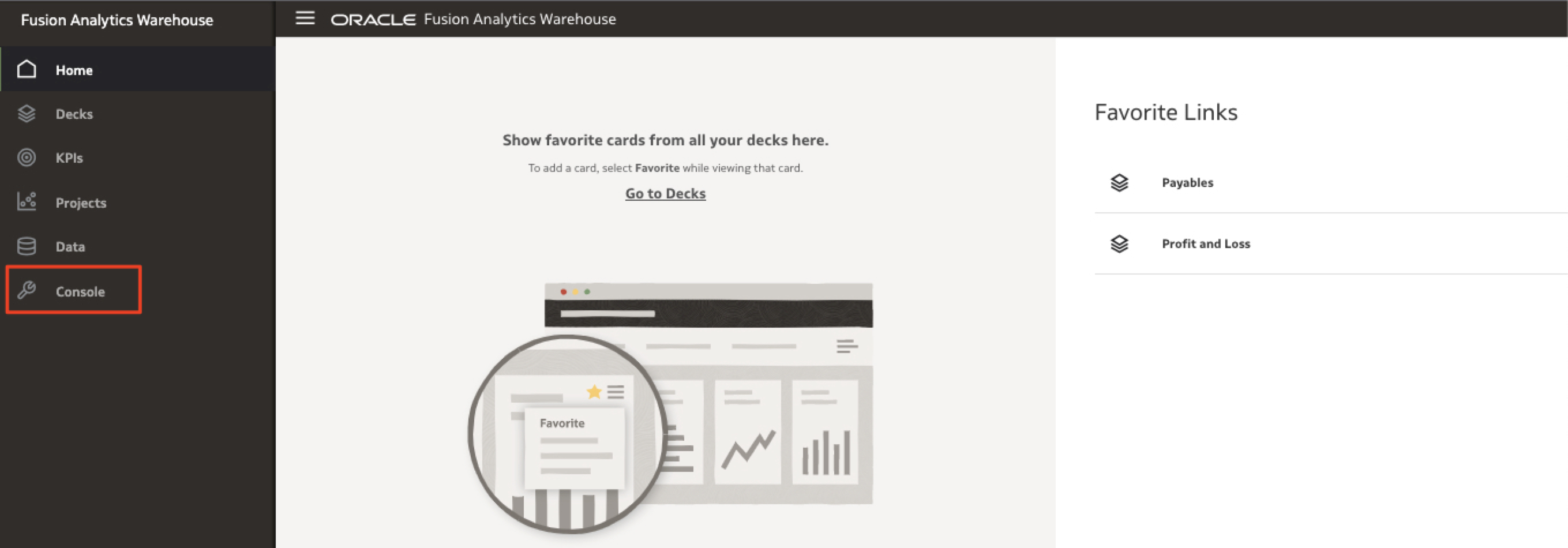
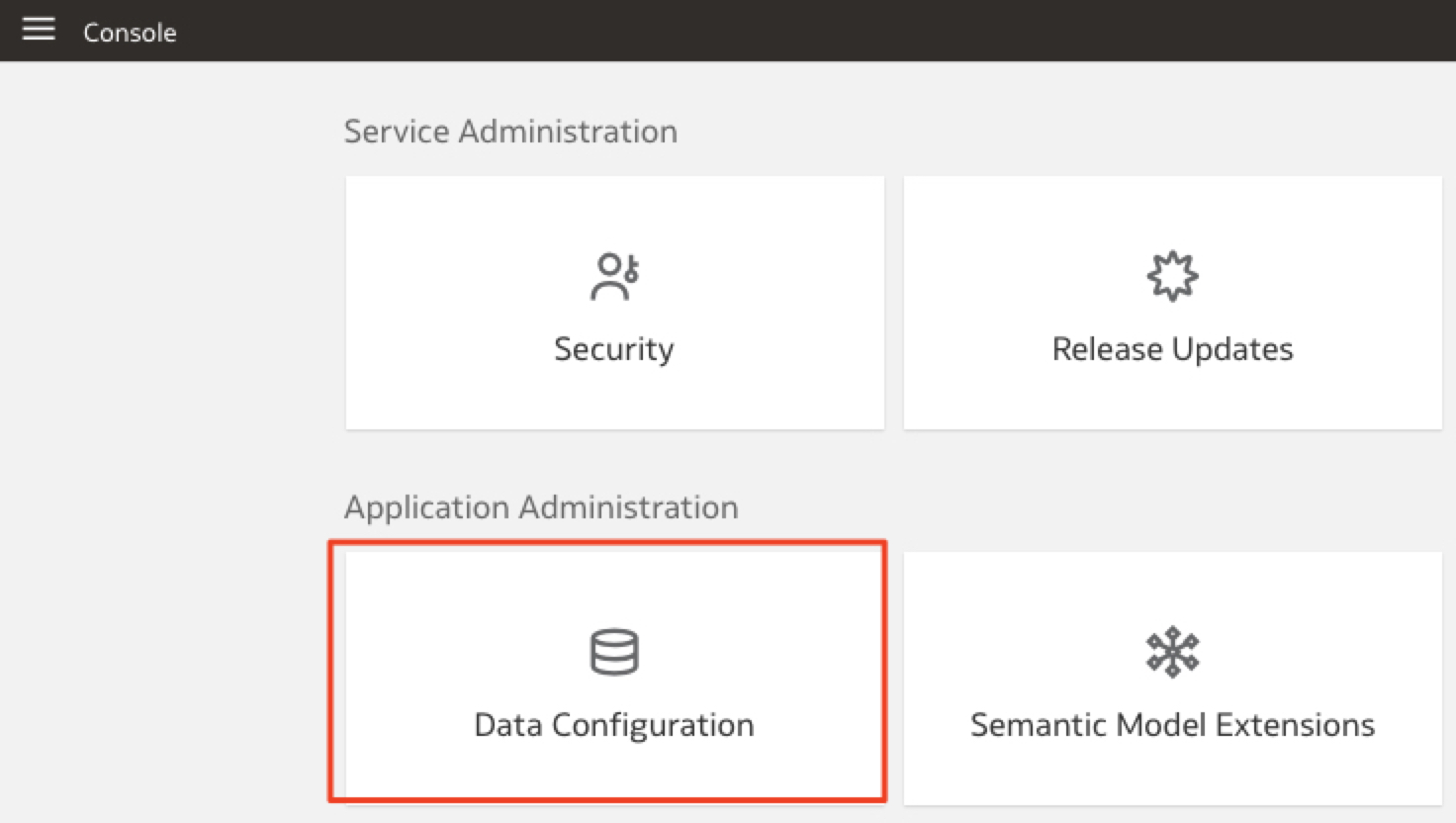
a) Sign in to FAW and connect to the Console
Figure 4: FAW Console
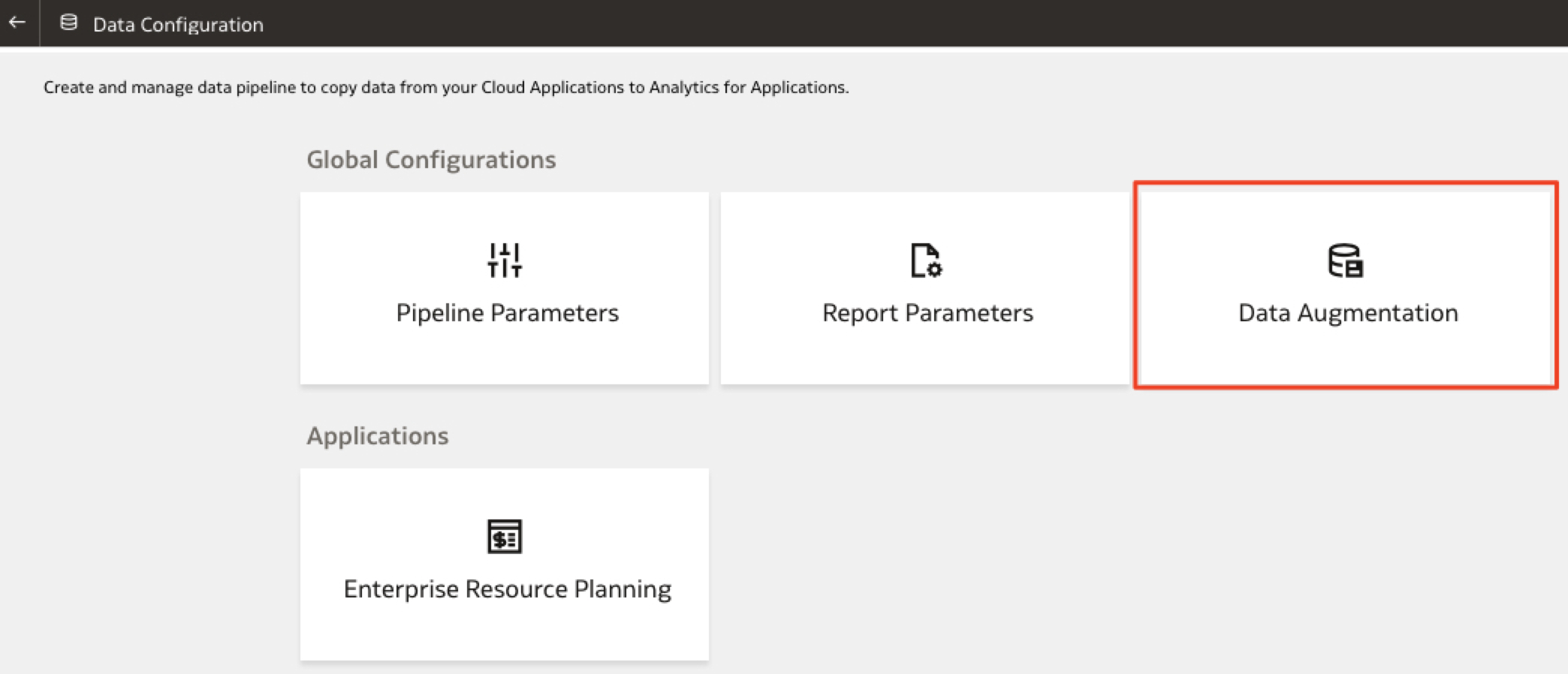
b) Click on the Data Configuration Tile
Figure 5: FAW Data Configuration
c) Then click on Data Augmentation Tile
Figure 6: FAW Data Augmentation Tile
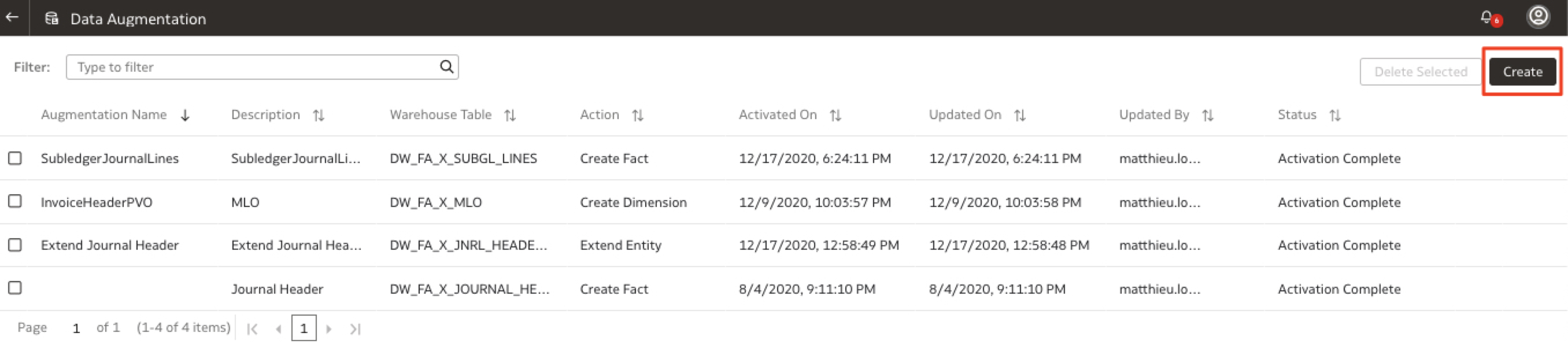
d) Click on Create
Figure 7 FAW Create Data Augmentation
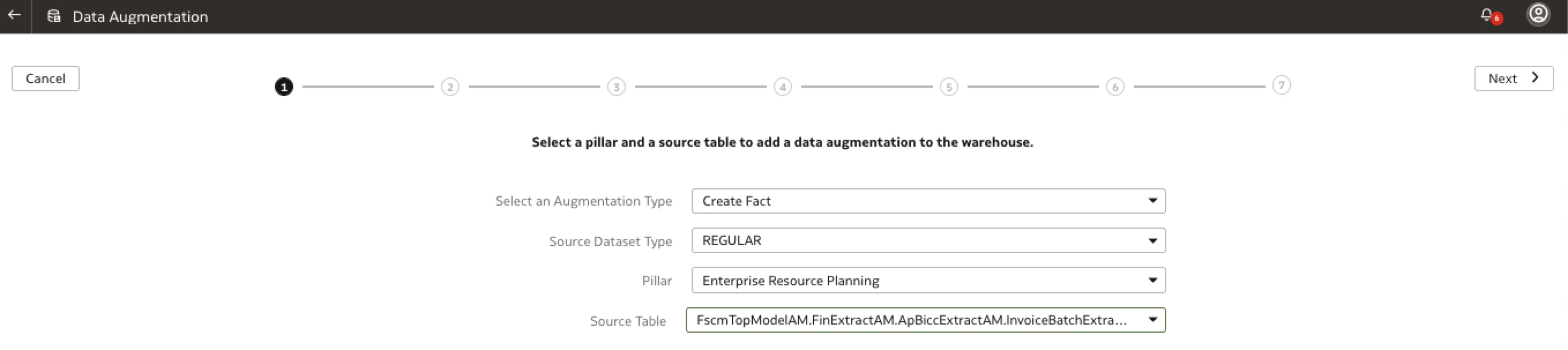
d) Enter the data augmentation specific details: the objective is to create a Fact, the source dataset typw is REGULAR, the Pillar ERP and the View Object / Source Table is FscmTopModelAM.FinExtractAM.ApBiccExtractAM.InvoiceBatchExtractPVO. Once entered, click Next.
Figure 8: FAW Specify Data Augmentation Details
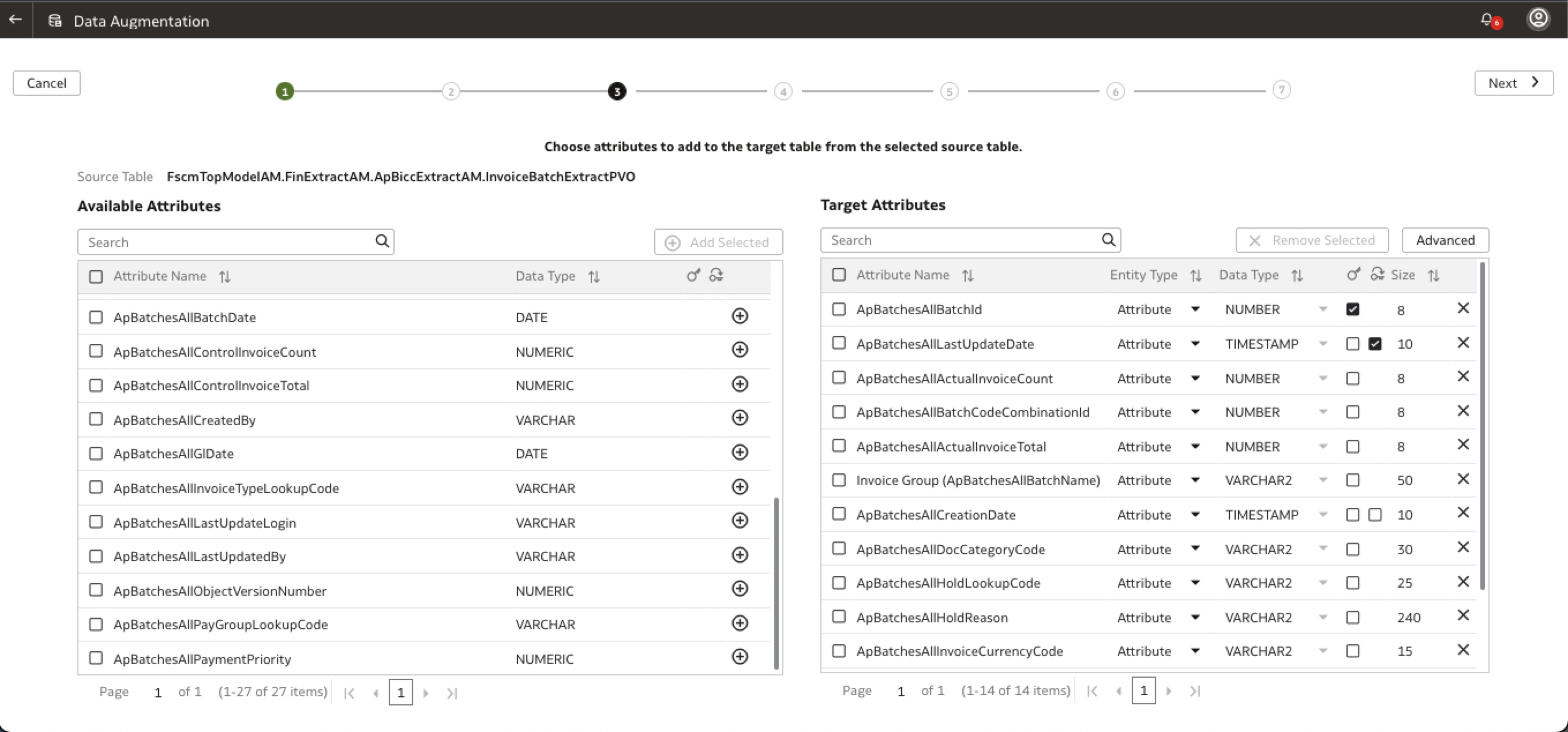
d) Choose the columns to be added to the Data Augmentation table and click Next
Figure 9: FAW Data Augmentation Columns
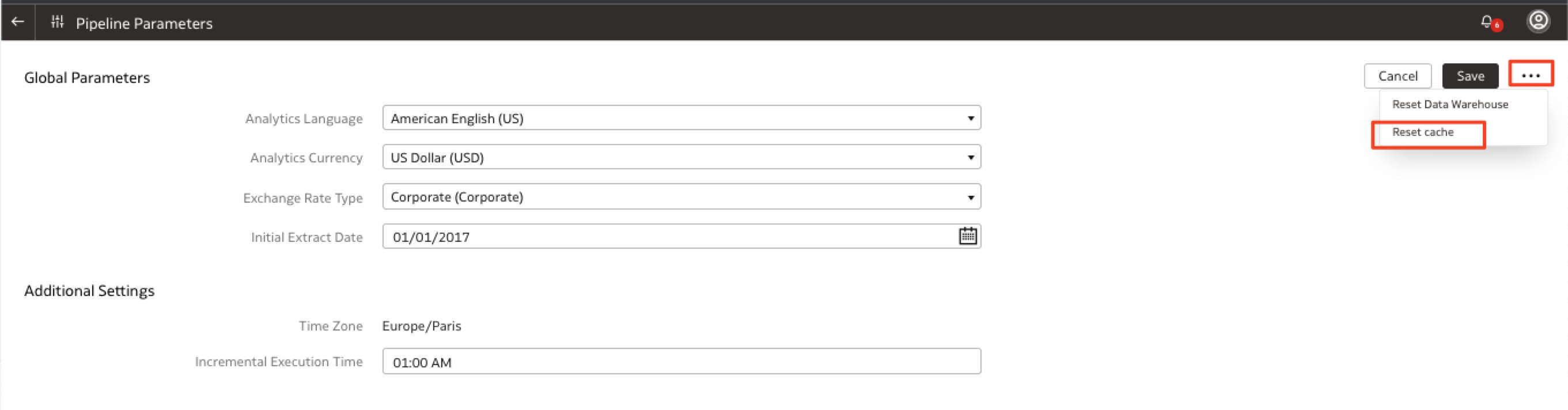
d) As the data augmentation source columns details are only maintained for a week and stored in the browser cache, you may have to reset the cache in the Console > Data Configuration > Pipeline Parameters section following the steps here.
Figure 10: FAW Data Augmentation Tile
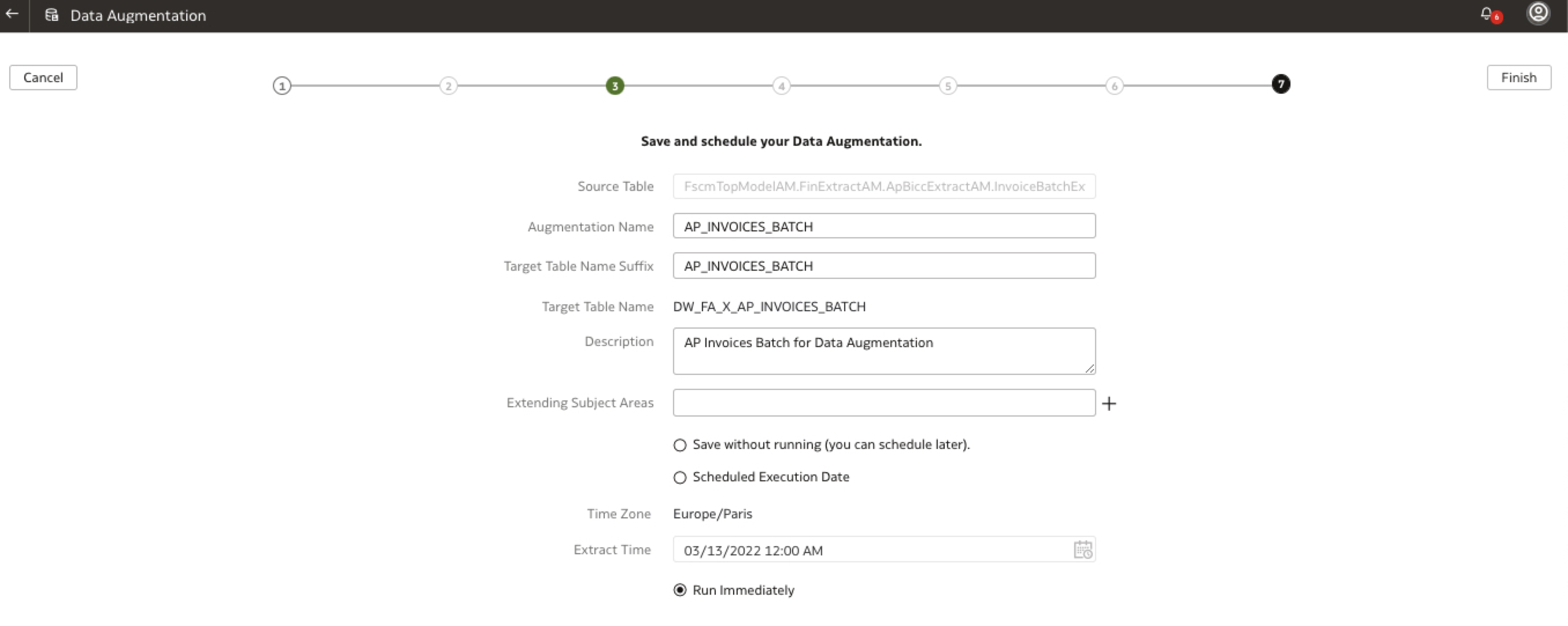
d) Save and schedule the data augmentation, give a name to the augmentation, the target table and choose to run immediatly. Click Finish
Figure 11: FAW Data Augmentation Tile
d) Confirm the Data Augmentation has been received
Figure 12: FAW Data Augmentation Received
d) Monitor the Data Augmentation status and confirm it changed to Scheduled (wait for a couple of minutes to see the Activation Scheduled status)
Figure 13: FAW Data Augmentation Scheduled
d) Monitor the Data Augmentation status and confirm it changed to Activation in Progress (wait for a couple of minutes to see the Activation In Progress status)
Figure 14: FAW Data Augmentation In Progress
d) Monitor the Data Augmentation status and confirm it changed to Acvitation Complete: the completion time depends on the View Object selected, the columns chosen so it may vary. Time for a coffee or tea break or to walk around the block 🙂
Figure 15: FAW Data Augmentation Completed
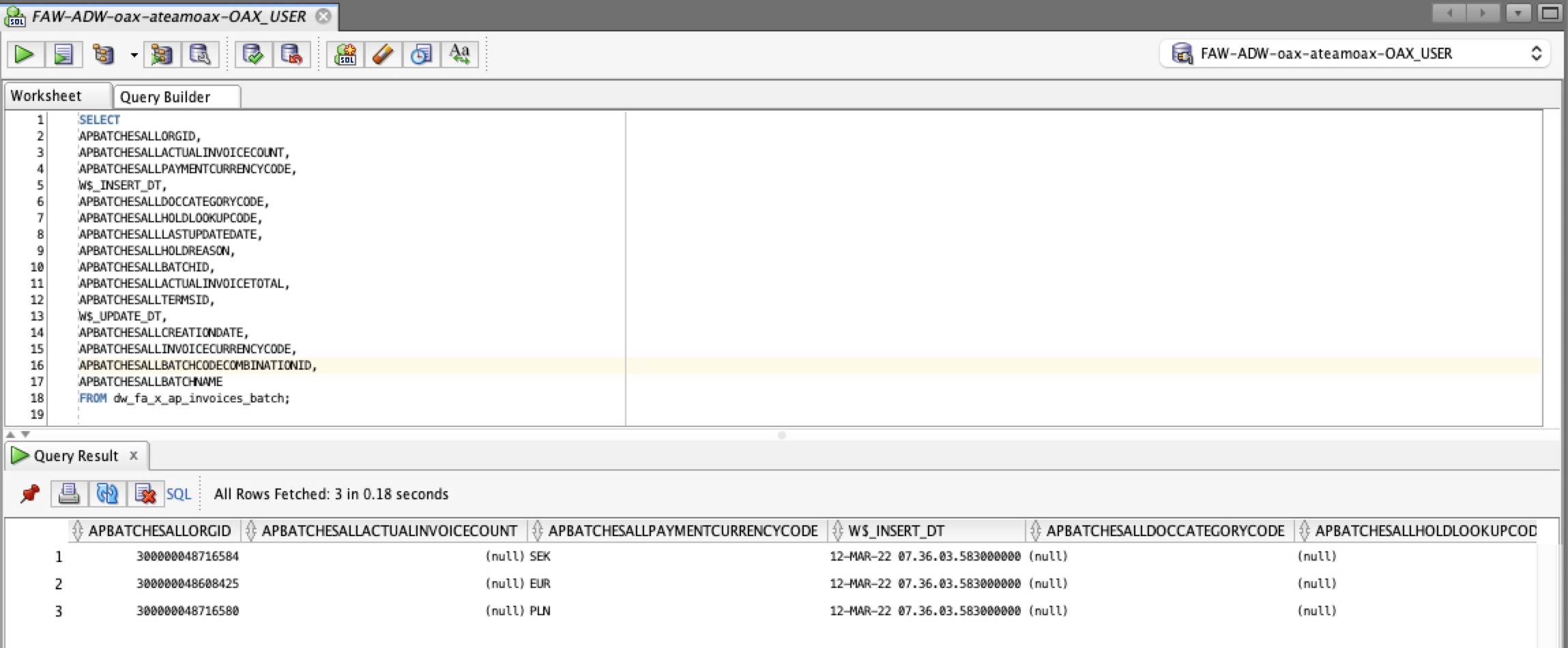
d) Connect to SQL Developer with the OAX_USER and open the Synonyms. Confirm that the DW_FA_X_AP_INVOICES_BATCH has been created. Open it and confirm you can see data. You can use this synonyms in SQL Queries directly or you can create additional Data Augmentation for dimensions and leverage the Semantic Model extensions to create your custom subject area.
Figure 16: Check Data in SQL Developer
We have seen how to use Data Augmentation feature to replicate specific Fusion SaaS data / View Objects into ADW.
We will now see how we can leverage OAC Replication features to achieve the same goal.
Using OAC Data Replication to Extract Fusion SaaS Data
My fellow colleague Richard Williams wrote a fantastic blog on the subject. I will just illustrate it here with an example using the same View Object as the one used in the previous section, i.e. FscmTopModelAM.FinExtractAM.ApBiccExtractAM.InvoiceBatchExtractPVO.
Create the Source Replication Data Connection
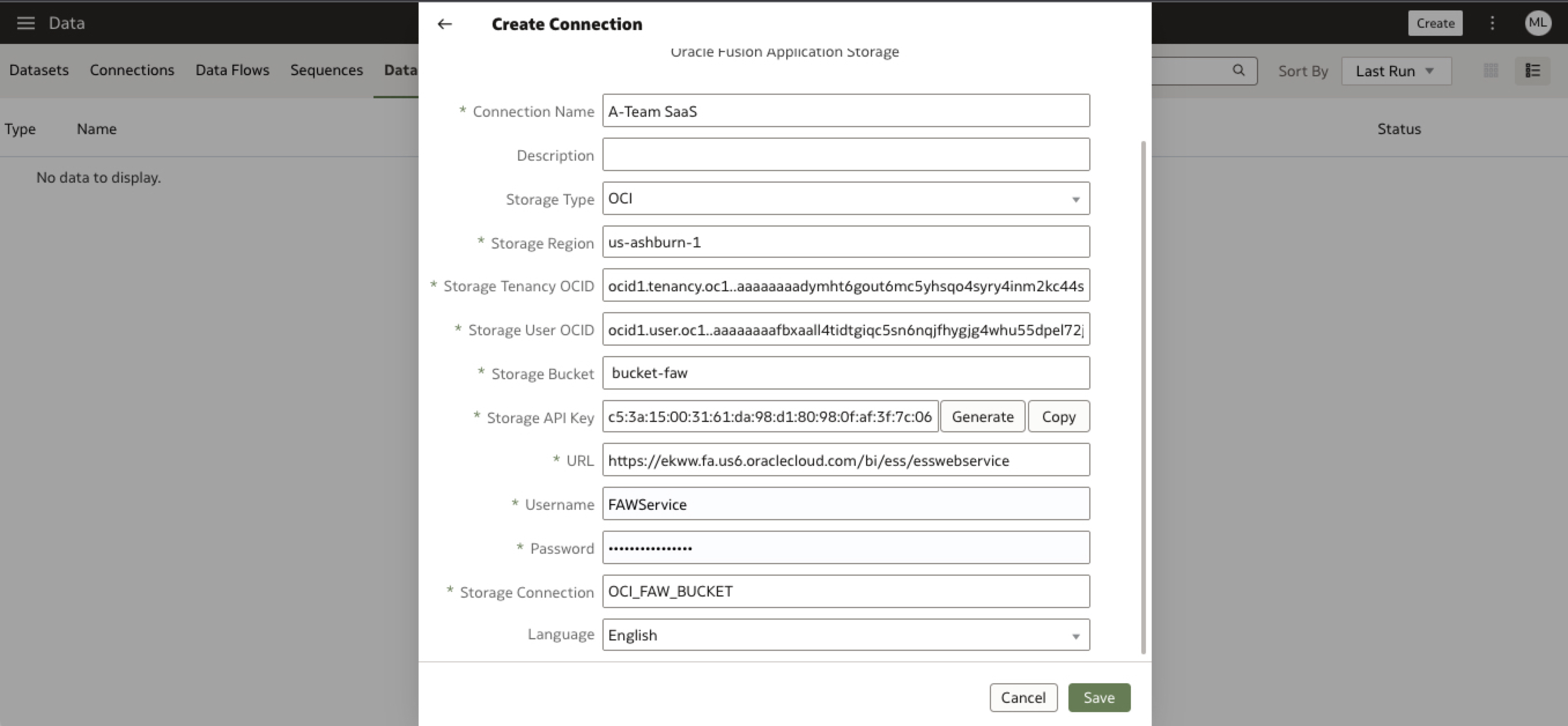
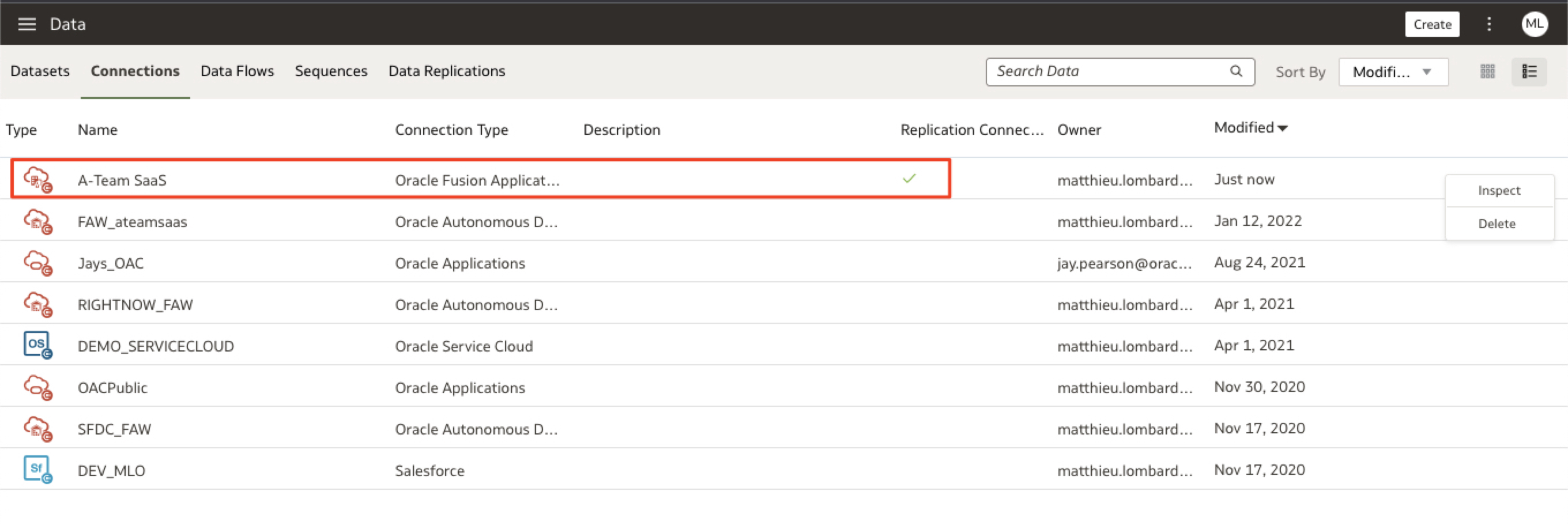
a) In OAC, go to the Data pane, click Create and choose Replication Connection. Choose Oracle Fusion Application Storage and enter the connection details and Save.
Figure 18: Fusion Application Replication Connection Created
Create the Target Replication Data Connection
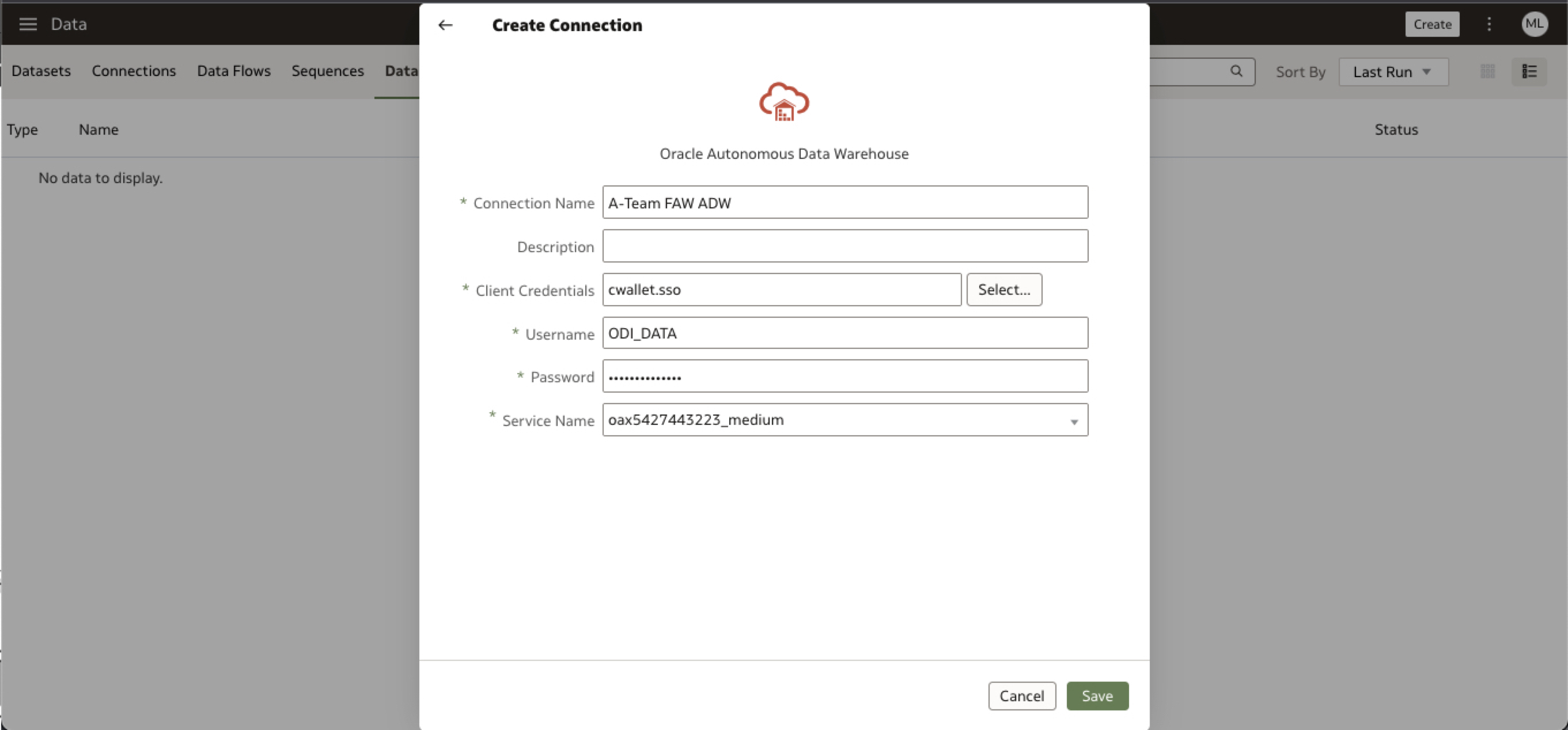
a) In the Data pane, click Create and choose Replication Connection. Choose Oracle Autonomous Data Warehouse and enter the connection details to your custom schema inside FAW ADW. Save.
Figure 19: ADW Replication Connection Details
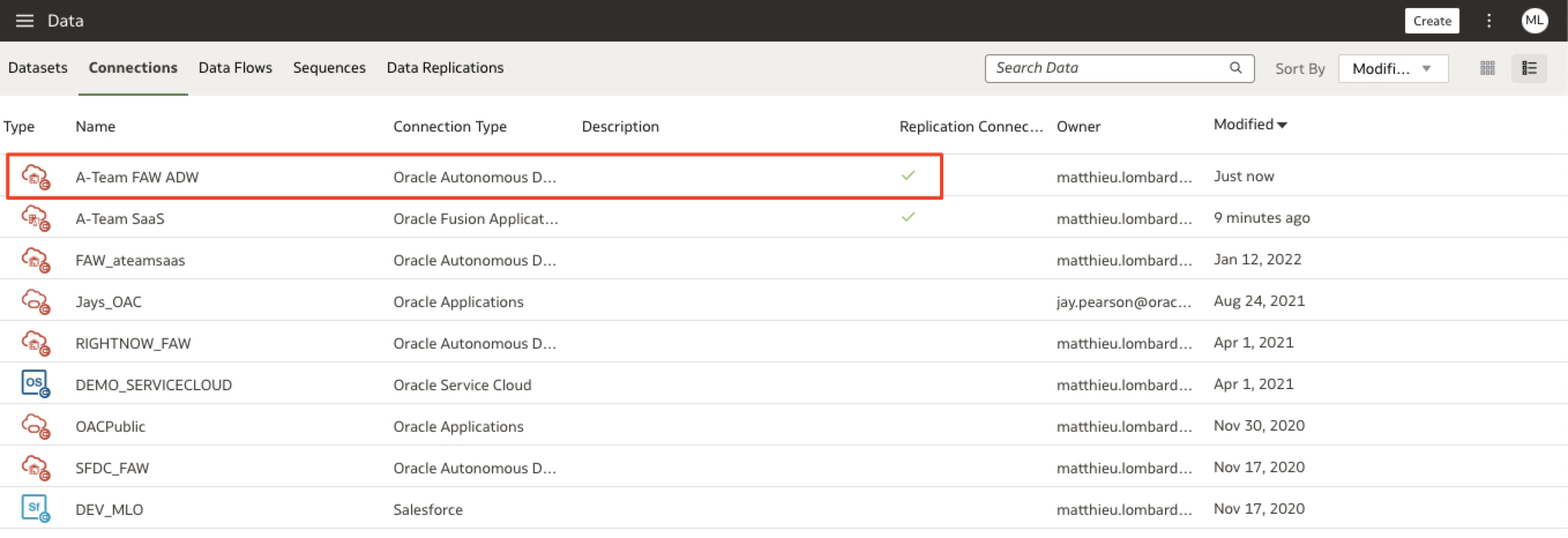
b) Confirm the Connection has been created
Figure 20: ADW Replication Connection Created
Create the Data Replication
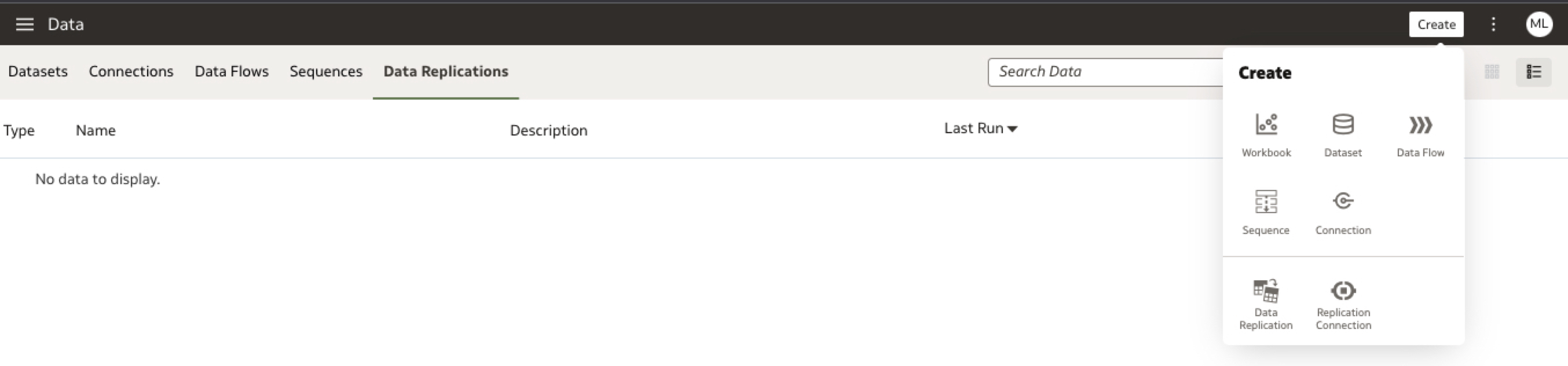
a) In the Data section, click on Data Replications and Create a new Data Replication
Figure 21: Create Data replication
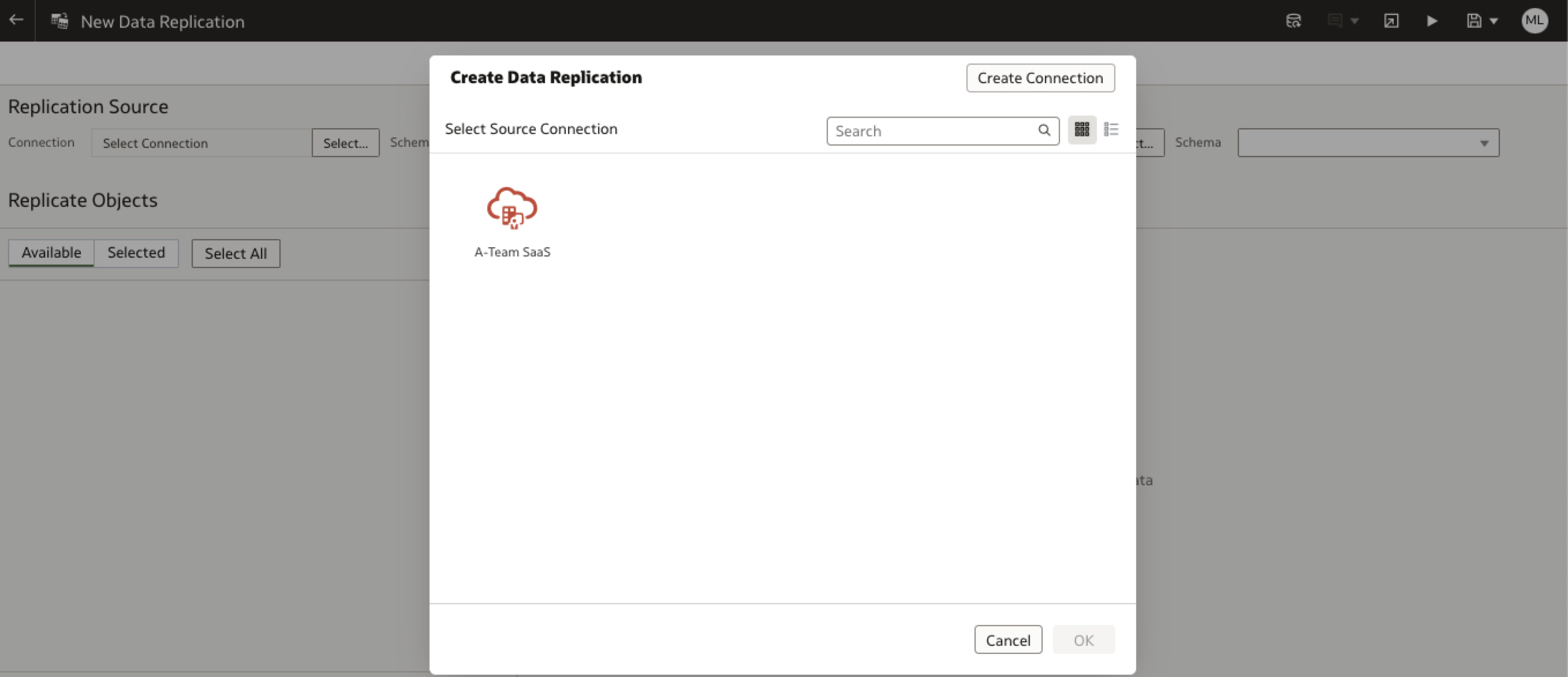
b) Select Data Replication source as Fusion SaaS
Figure 22: Data Replication Source
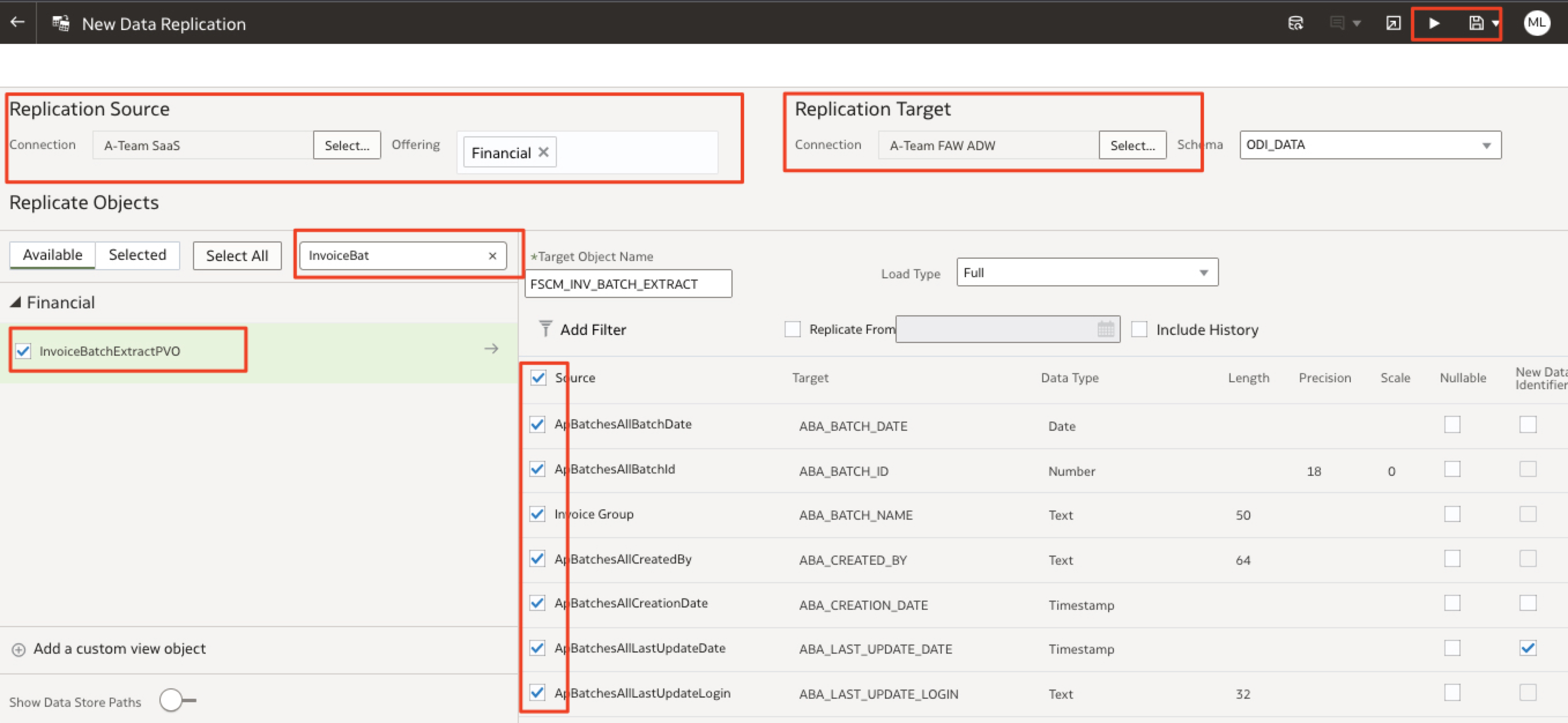
c) Select Financial Offering, filter the PVOs to display the InvoiceBatchPVO, select the Replication Target as the ADW and the schema ODI_DATA. Leave the Default target object name and select columns. Save the replication as AP_INVOICE_BATCH.
Figure 23: Check Data in SQL Developer
Run the Data Replication and Check the Data in ADW
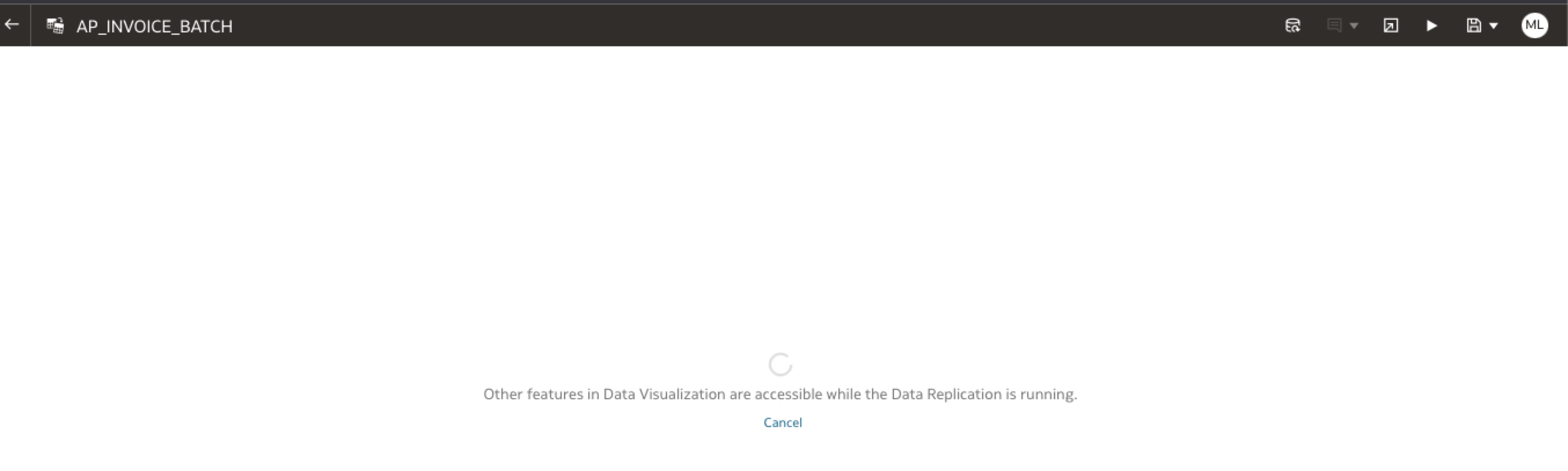
a) In the previous screen, click the play button to run the replication and wait for it to complete
Figure 24: Run data replication
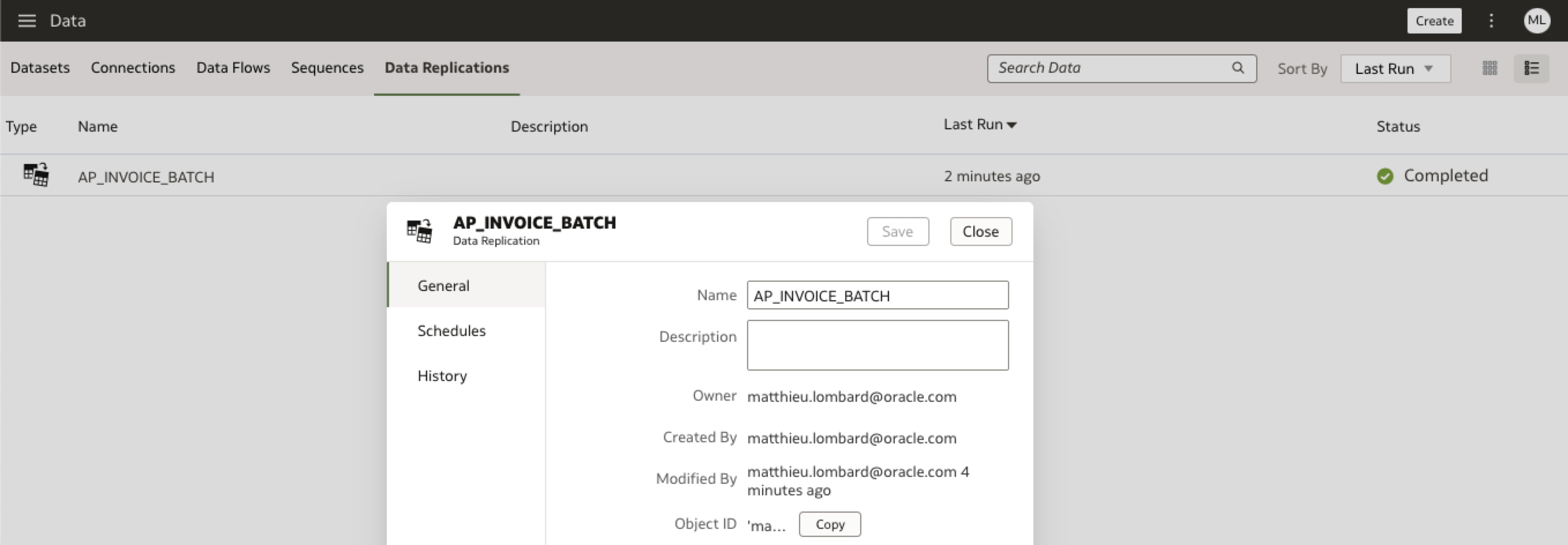
b) In the Data Replications pane. inspect the AP_INVOICE_BATCH replication after it completed.
Figure 25: Check Data in SQL Developer
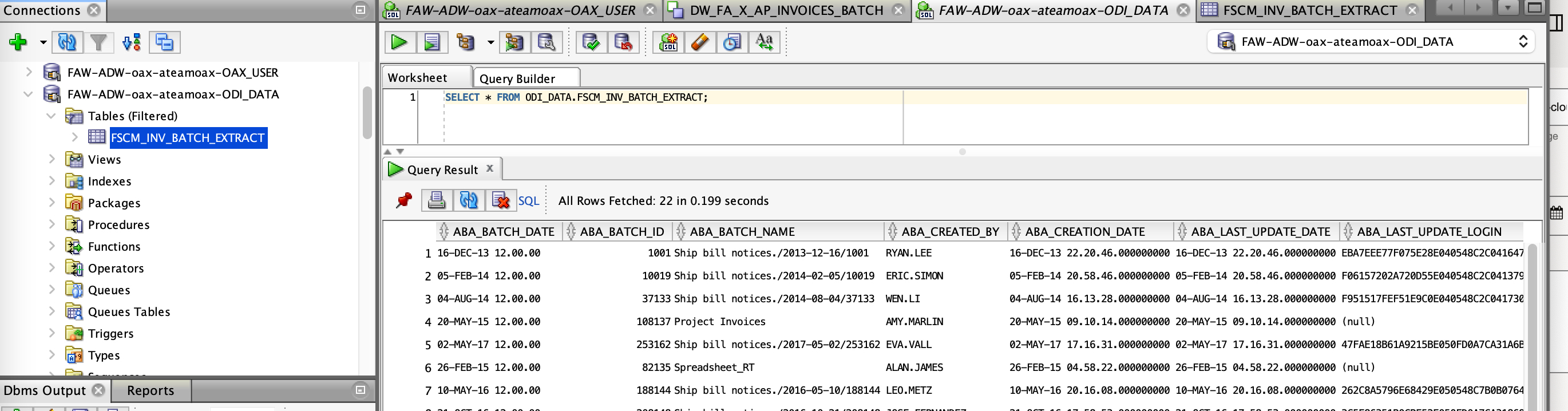
c) Connect to the ODI_DATA schema in ADW and query the replicated data.
Figure 26: Check Data in SQL Developer
Comparing the Two Approaches: When to Choose One Over the Other?
Now that we have seen how to use FAW Data Augmentation and Oracle Analytics Cloud to achieve the same goal, that is extract Fusion SaaS Application data and load it to ADW, let reflect on which approach to use over the other depending on the use case we are trying to address. The below table is an attempt in comparing the two approaches:
Criteria
FAW Data Augmentation
OAC Data Replication
Configuration Requirements
No BICC extra configuration
Data Loaded in delivered ADW Schema
BICC External storage configuration
Custom ADW Schema creation and maintenance
Performance
Data Delivery is depending on scheduled and shared resource in FAW Data Pipeline
Data Delivery is depending on OAC instance shape (OCPUs)
Maintenance
Delivered ADW schema
Read only schema (locked)
Custom ADW Schema
Potential to manual SQL updates / manual errors
Scheduling
Scheduled once daily in Data Configuration, along with the FAW incremental refreshes
Ad Hoc manual data refresh possible
Scheduling can be defined Hourly, Daily , Weekly, Monthly and Yearly
Ad Hoc manual data refresh possible
Data Coverage
Access Predefined Whitelisted set of View Objects in BICC
Access to complete list of View Objects in BICC
Full vs Incremental Load
Full and Incremental loads are Oracle Managed (FAW Data Pipeline)
Manual intervention to change the load type or create two replications (one for full and one for incremental)
Resiliency
Extraction and Load is Oracle Managed with Cloud Operations monitoring, logging, restartability
Click here for more A-Team Oracle Data Integrator (ODI) Blogs.
Click here to sign up to the RSS feed to receive notifications for when new A-team blogs are published.
Click here to access the ODI Marketplace documentation library.
In addition to the capability described in this blog, customers have the option to load budget data in ERP Cloud from any EPM system and that data is supported in Fusion ERP Analytics using GL Budget subject area, that will be covered in a future blog post.
Summary
This article walked through the steps to extract Fusion SaaS application data with Fusion Analytics Warehouse Data Augmentation and Oracle Analytics Cloud Data Replication. It also proposed a comparison of the two approaches.
Bookmark this post to stay up-to-date on changes made to this blog as our products evolve.
Authors
Matthieu Lombard
Consulting Solution Architect
The Oracle A-Team is a central, outbound, highly technical team of enterprise architects, solution specialists, and software engineers.
The Oracle A-Team works with external customers and Oracle partners around the globe to provide guidance on implementation best practices, architecture design reviews, troubleshooting, and how to use Oracle products to solve customer business challenges.
I focus on data integration, data warehousing, Big Data, cloud services, and analytics (BI) products. My role included acting as the subject-matter expert on Oracle Data Integration and Analytics products and cloud services such as Oracle Data Integrator (ODI), and Oracle Analytics Cloud (OAC, OA For Fusion Apps, OAX).