
Validation
-
Validated on 11/20/2020 with :
-
ODI Version 12.2.1.4.201011
-
ADW Version Oracle Database 19c Enterprise Edition Release – Production Version 19.5.0.0.0
-
EDMCS Version 20.10.70
-
Introduction
In order to have a single source of truth for an organization’s data, a reference data solution is often required. This reference data once define can be used by operational systems as well as reporting and analytics system. A common analytics requirement is to integrate and ingest reference data into a data warehouse or a data mart.
The Oracle Cloud solution to support reference data is called Oracle Enterprise Data Management Cloud (EDMCS). EDMCS is the cloud offering from Oracle to replace Data Relationship Management (DRM) in order to support the following data use cases:
- Master data management
- Reference Data
- Hierarchy Data
- Dimension Data
- Mapping Data
According to the Gartner definition, “Master data is the consistent and uniform set of identifiers and extended attributes that describes the core entities of the enterprise including customers, prospects, citizens, suppliers, sites, hierarchies and chart of accounts.”
EDMCS offers a set of REST APIs to allow data extraction. The purpose of this blog is to detail the approach of extracting Dimensions Data from EDMCS and loading them into Oracle Autonomous Data Warehouse (ADW) using Oracle Data Integrator (ODI) in the Marketplace.
As of the writing of this blog, the ODI in the Marketplace Virtual Machine comes at no additional licensing cost: our customer only pay for the Compute instance fees.
Before you begin
Prerequisites
To achieve the goal of integrating EDMCS data into ADW, there is a couple of requirements to be met:
- Having access to an EDMCS instance with dimension data created
- Having access to an ODI on the Marketplace VM
- Having access to a ADW Database
EDMCS
The main features of EDMCS are :
- Collate enterprise data from contributing applications
- Curate changes to enterprise data elements
- Conform changes across different business perspectives
- Consume changes among downstream business applications
![[!--$CEC_DIGITAL_ASSET--]CONT5234B1A74D564CB8A8424F2FE8557F53[/!--$CEC_DIGITAL_ASSET--]](/wp-content/uploads/sites/134/2025/11/9d6003e1483387bcced6ea5b71e967bd.jpeg)
Figure 1: EDMCS Entity Maintenance screen
For more details on EDMCS, please visit : https://cloud.oracle.com/enterprise-data-management-cloud
EDMCS Rest API Interface
REST APIs in Oracle Enterprise Data Management Cloud Service use the RESTful architecture style and HTTP methods to create, update, read, or delete data. This architecture includes the following features.
- Stateless : The client maintains the session state. Each request from the client contains the information that the server requires to respond to the client.
- Consistent interface : Oracle REST API uses the following design features to make sure the resources are consistent:
- Named URLs that identify each resource;
- Resource representation that manipulates each object;
- Each resource provides the metadata required to manipulate each object;
- Each response contains hypermedia links.
- Hypermedia: Provides the Engine of Application State. Hypermedia uses hypermedia links that include responses that can facilitate dynamic navigation of interfaces.
Enterprise Data Management Cloud Service REST APIs support data interchange by using JavaScript Object Notation (JSON) format.
In our particular use case, we need to call a sequence of methods to achieve the following:
- Retrieve the dimension information (ID) for the EDMCS application from which metadata will be exported.
GET <your EDMCS Server URL>/epm/rest/v1/applications
Example: GET https://edmcs.oraclecloud.com/epm/rest/v1/applications
- Run an export of the dimension(s)
POST <your EDMCS Server URL>/epm/rest/v1/dimensions/<your dimension ID from the application metadata in step 1>/export/download
Example: POST https://edmcs.epm.us6.oraclecloud.com:443/epm/rest/v1/dimensions/5edr20ef-f708-4bc1-a571-6d90bcadb9bb/export/download
- Verify and confirm the status of export
GET <your EDMCS Server URL>/epm/rest/v1/jobRuns/<the job ID generated as a response of step 2>
Example: GET https://edmcs.oraclecloud.com:443/epm/rest/v1/jobRuns/4aec033t-3610-4f1d-af52-5cfd5ae58ff8
- Finally download the export to a flat file (csv in our case)
GET <your EDMCS Server URL>/epm/rest/v1/files/temp/<job ID from step 2>?fileName=<your file name>
Example: GET https://edmcs.oraclecloud.com:443/epm/rest/v1/files/temp/4aec033p-3610-4f1d-af52-5cfd5ae58ff8?fileName=dimension.csv
For more information about EDMCS Rest API, please visit the following links: https://docs.oracle.com/en/cloud/saas/enterprise-data-management-cloud/edmra/edmcs_url_structure_rest_api_resource.html
Using Java BeanShell Scripts to Call EDMCS Rest API
ODI supports RESTful services invocation for reading or writing data. The RESTful endpoints can be configured like any other data server in topology and can be easily invoked through an ODI tool in the integration flow. In order to allow for more flexibility in the REST calls we will be executing, the approach of Java BeanShell scripts is preferred in this blog:
Using JQ to parse JSON files
As mentioned earlier, EDMCS REST API calls will produce JSON response that we will store as ASCII file in the context of this blog. JQ is a great and performant utility to parse JSON that we will be using here.
To install jq, execute the following steps on a Unix/Linux environment:
wget -O jq https://github.com/stedolan/jq/releases/download/jq-1.6/jq-linux64
chmod +x ./jq
cp jq /usr/bin
For more information about JQ, please visit:
https://stedolan.github.io/jq/download/
https://stedolan.github.io/jq/manual/#TypesandValues
Looping through the EDMCS dimensions and loading into Oracle ADW
In order to integrate all the available dimensions in EDMCS, we can implement a loop within ODI to extract each of the dimensions one by one and load the individual response csv files into their corresponding ADW table.
Please refer to Christophe’s blog for more details on loop implementation within ODI.
https://blogs.oracle.com/dataintegration/using-variables-in-odi:-creating-a-loop-in-a-package
Integrating EDMCS Dimensions
This section will describe the ODI Artefacts built in order to integrate EDMCS data into ADW.
ODI Topology
The ODI Topology is composed of two main technology : Files and Oracle ADW
- Files
![[!--$CEC_DIGITAL_ASSET--]CONT6BC380B457AA4FFB816E46654305498E[/!--$CEC_DIGITAL_ASSET--]](/wp-content/uploads/sites/134/2025/11/b14300bf467c2b343c0df23db2b3fe8f.jpeg)
Figure 2: Project File Topology
- Oracle
![[!--$CEC_DIGITAL_ASSET--]CONTF10C4D65343E482185B9C29B898BB2EE[/!--$CEC_DIGITAL_ASSET--]](/wp-content/uploads/sites/134/2025/11/258215f88871efb7d2b1b47bbb22b644.jpeg)
Figure 3: Project ADW Topology
ODI Models
Reverse engineered from the two data server above are two main models
![[!--$CEC_DIGITAL_ASSET--]CONT274142A041F74A5B8965022D17744C0F[/!--$CEC_DIGITAL_ASSET--]](/wp-content/uploads/sites/134/2025/11/5d268c9d47714b922ad2e133411b583a.jpeg)
Figure 4: ODI Models for File and ADW data servers
ODI Projects Artefacts
Variables
To implement the loop through the different dimensions, the following variables are used :
![[!--$CEC_DIGITAL_ASSET--]CONTB64EBC274CD3409C876D5B4233315D77[/!--$CEC_DIGITAL_ASSET--]](/wp-content/uploads/sites/134/2025/11/d5790402f30c43d1dcbc372d3087ef66.jpeg)
Figure 5: Project variables used to implement the loop
Packages
We are using five central packages here:
- PKG_EDMCS_00_Main: the package that embeds the main logic to call the rest APIs.
- PKG_EDMCS_01_GenerateDimList that generates the dimension list from the response of the first REST API call . It is being called by the main package.
- PKG_EDMCS_04_DownloadIngestAllDimensions: that implements the loop to download all dimensions from EDMCS into csv files and then ingest the csv files into ADW.
- PKG_EDMCS_02_DownloadDimension: that download a dimension form EDMCS into a CSV file. It is called as a start scenario in the loop from package PKG_EDMCS_04_DownloadIngestAllDimensions.
- PKG_EDMCS_03_IngestDimensionFileToWarehouse: that loads the dimension CSV file into an ADW table. It is also called as a start scenario in the loop from package PKG_EDMCS_04_DownloadIngestAllDimensions
PKG_EDMCS_00_Main
This package has four steps:
- Refresh the variable storing the local file path where all files are generated
- Refresh the variable storing the OCI host name, used as the base for our web service call (the <your EDMCS Server url> in the example above)
- Generate the dimension list from the response of the first REST API call (through an ODI scenario start of package PKG_EDMCS_01_GenerateDimList ).
GET <your EDMCS Server URL>/epm/rest/v1/applications
Example: GET https://edmcs.oraclecloud.com/epm/rest/v1/applications
![[!--$CEC_DIGITAL_ASSET--]CONT7AC11F781D8249619BA10549D0B58AAC[/!--$CEC_DIGITAL_ASSET--]](/wp-content/uploads/sites/134/2025/11/48763caa2262ad93b1797002a1fe3f75.jpeg)
Figure 6: Main Package – Generate Dimension CSV step
- Execute All dimension download and ingestion that starts the scenario of the package PKG_EDMCS_04_DownloadIngestAllDimensions.
![[!--$CEC_DIGITAL_ASSET--]CONTE9A1EC81E25D4C989B38E0BFC3B463CF[/!--$CEC_DIGITAL_ASSET--]](/wp-content/uploads/sites/134/2025/11/2f0ad1dfee5175249a7e6c7ecef4e348.jpeg)
Figure 7: Main Package – Generate Execute All Dimensions Download and Ingestion step
PKG_EDMCS_01_GenerateDimList
This package executes the following steps:
- Declares variables
- Clean up local files.
- Connects to the EDMCS REST API to get the application definition with the generateApplicationJSON procedure call
![[!--$CEC_DIGITAL_ASSET--]CONTBE03ADA0FE1E42319B4E2270C457DB05[/!--$CEC_DIGITAL_ASSET--]](/wp-content/uploads/sites/134/2025/11/fd8b871fb364a9255969277117cbeb86.jpeg)
![[!--$CEC_DIGITAL_ASSET--]CONTB0D9ABACAD334697B187F54BC18B81BA[/!--$CEC_DIGITAL_ASSET--]](/wp-content/uploads/sites/134/2025/11/7eb1e60cd9427de2acd9cb1da01b20be.jpeg)
Figure 8: GenerateApplicationJson Procedure step
The pseudo code below details the approach taken by the Java BeanShell target command call
- Declare all imports
- java.io.* ….
- Declare variables
- urlStrRestCall1, restCall1JSONFilename, restCall1OutFilename
- Define a function to get the current time
- public static String getCurrentTime () {…}
- Define a function to write a string to file
- public static void writeToFile(String fileName, String str) throws IOException {…}
- Define the main function that generates the Application definition JSON file
- public static void generateApplicationJSON(String urlStr, String jsonFileName, String outFileName) {
- Creating HTTPURLconnection and setting request properties (authentication, timeout,…)
- Connect and get response code
- If the response code is not 200 (success), throw a runtime exception
- Else
- Read the response input stream
- Write the response to a file, line by line
- Disconnect
- public static void generateApplicationJSON(String urlStr, String jsonFileName, String outFileName) {
- Call generateApplicationJSON(urlStrRestCall1, restCall1JSONFilename, restCall1OutFilename);
- Read the dimension ID/names pair from the Application detail json and load them into a csv file with the Generate Dimension list OS command, using jq to parse the json response from the previous procedure call.
![[!--$CEC_DIGITAL_ASSET--]CONT18CE98BD99DA4DEBB3F5A2F3CC2E6D82[/!--$CEC_DIGITAL_ASSET--]](/wp-content/uploads/sites/134/2025/11/9d8580011f72f647311cd3a7f9cffe19.jpeg)
Figure 9: Generate Dimension List step
rm -f #04___ODI_AND_RESTAPI.EDMCS_FILES_LOCAL_PATH/csv/dimensions_list.csv
cat #04___ODI_AND_RESTAPI.EDMCS_FILES_LOCAL_PATH/json/restCall_1.json | jq ‘.items[] | select(.name == “Data Warehouse”)’ | jq ‘.dimensions[] | select(.name)’ | jq ‘.name + “,” + .id’ > #04___ODI_AND_RESTAPI.EDMCS_FILES_LOCAL_PATH/csv/dimensions_list.csv
sed -i ‘s/,/”,”/g’ #04___ODI_AND_RESTAPI.EDMCS_FILES_LOCAL_PATH/csv/dimensions_list.csv
- Load the CSV file into the EDMCS_DIMENSIONS table through an ODI mapping to allow looping through dimensions in the next package.
![[!--$CEC_DIGITAL_ASSET--]CONT11DC4C0361A24BA79DB15C3EC3B5EF02[/!--$CEC_DIGITAL_ASSET--]](/wp-content/uploads/sites/134/2025/11/6f5ca950cd97f0529ecd7badb643e181.jpeg)
![[!--$CEC_DIGITAL_ASSET--]CONTC7D8F9BC7BC34798A9F530CD36CE04C0[/!--$CEC_DIGITAL_ASSET--]](/wp-content/uploads/sites/134/2025/11/2081bafa074b0ceb573ae809e921c889.jpeg)
Figure 10: Load Dimension List Mapping step
PKG_EDMCS_04_DownloadIngestAllDimensions
This package executes the following steps:
![[!--$CEC_DIGITAL_ASSET--]CONT2434ED984C60480AA1FA1D7084F4CDE6[/!--$CEC_DIGITAL_ASSET--]](/wp-content/uploads/sites/134/2025/11/051cd04f6aec96d5f992dcab55db10ed.jpeg)
Figure 11: the main loop
- Declare variables
- Refresh the DIMENSION_COUNT variable
- Set the DIMENSION_COUNTER to 1
- Get the current dimension name DIMENSION_NM
- Refresh the DIMENSION_ID based on the DIMENSION_NM variable
- Start the download dimension scenario (PKG_EDMCS_02_DownloadDimension) with the DIMENSION_NM passed variable.
- Start the ingest dimension scenario () with the DIMENSION_NM passed variable
- Looping through the dimension list (comparing the values of the DIMENSION_COUNTER and the DIMENSION_COUNT and Increment the DIMENSION_COUNTER)
PKG_EDMCS_02_DownloadDimension
This package executes the following steps:
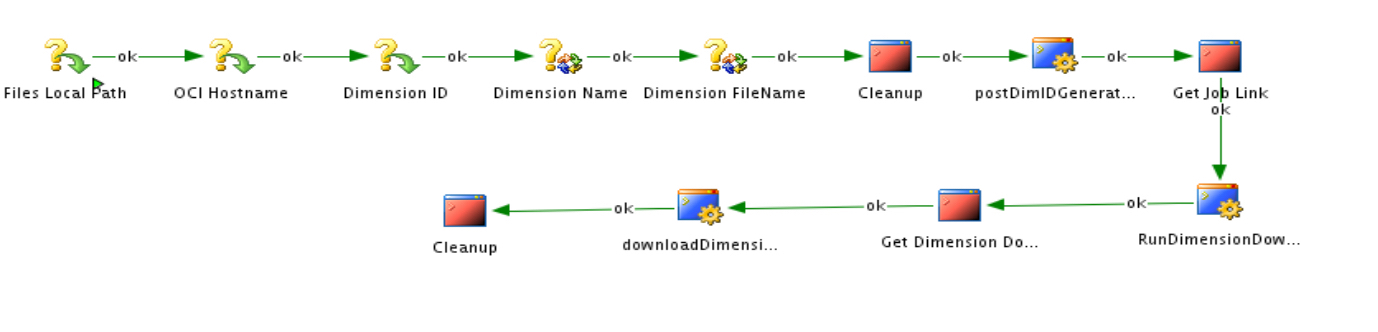
Figure 12: the Download Dimension Package
- Declare variables
- Refresh the DIMENSION_NM and DIM_FILE_NAME variables
- Clean up local files
- Execute the postDimIDGenerateJobURL procedure.
![[!--$CEC_DIGITAL_ASSET--]CONTE0BCFA8B062E468EA271BA2BA13B479E[/!--$CEC_DIGITAL_ASSET--]](/wp-content/uploads/sites/134/2025/11/baccb730c1054bcf8028b5d6cb7f48d1.jpeg)
Figure 13: postDimIDGenerateJobURL Procedure Step
The pseudo code in the approach taken by the Java BeanShell target command call is similar to the one in the previous step with the appropriate REST Call
- Get Job Link by parsing the JSON response file generated by the prior step using JQ
rm -f #04___ODI_AND_RESTAPI.EDMCS_FILES_LOCAL_PATH/csv/joblink.csv
cat #04___ODI_AND_RESTAPI.EDMCS_FILES_LOCAL_PATH/json/restCall_2.json | jq ‘.links[].href’ > #04___ODI_AND_RESTAPI.EDMCS_FILES_LOCAL_PATH/csv/joblink.csv
- Execute the RunDimensionDownloadJob ODI procedure
![[!--$CEC_DIGITAL_ASSET--]CONTFFD27B9E5EB84962A3F46EC58327A515[/!--$CEC_DIGITAL_ASSET--]](/wp-content/uploads/sites/134/2025/11/cc846e2897d7dcd5245c603f4239a39a.jpeg)
Figure 14: RunDimensionDownloadJob Procedure Step
The pseudo code in the approach taken by the Java BeanShell target command call is similar to the one in the previous step with the appropriate REST Call
- Get Dimension Download Link by parsing the JSON response file from the previous REST API call
cat #04___ODI_AND_RESTAPI.EDMCS_FILES_LOCAL_PATH/json/restCall_3.json | jq ‘.links[] | select(.rel == “results”)’ | jq ‘.href’ > #04___ODI_AND_RESTAPI.EDMCS_FILES_LOCAL_PATH/csv/downloadlink.csv
- Execute the downloadDimension ODI procedure
![[!--$CEC_DIGITAL_ASSET--]CONTF43D7DA1D8434BC291928B43C1624677[/!--$CEC_DIGITAL_ASSET--]](/wp-content/uploads/sites/134/2025/11/8651a2b679a457b6a9e1b5d2151986f7.jpeg)
Figure 15: downloadDimension Procedure Step
The pseudo code in the approach taken by the Java BeanShell target command call is similar to the one in the previous step with the appropriate REST Call
PKG_EDMCS_03_IngestDimensionFileToWarehouse
This package executes the following steps:
- Declare the Dimension ID
- Refresh the Dimension Name
- Based on the value of the Dimension Name, execute the correct interface to load the dimension CSV file into its corresponding ADW table
![[!--$CEC_DIGITAL_ASSET--]CONT3760A3898D0E4B07B09F96E2555A2447[/!--$CEC_DIGITAL_ASSET--]](/wp-content/uploads/sites/134/2025/11/aded8be247fa3811f61de6b6e3a46e05.jpeg)
![[!--$CEC_DIGITAL_ASSET--]CONTC09B0B7E23A54FFB9A6E44B70BAD82FB[/!--$CEC_DIGITAL_ASSET--]](/wp-content/uploads/sites/134/2025/11/61a293d390cf7542cb08ccadd86b4239.jpeg)
Figure 16: The Ingest Dimension package and Mapping example
Summary
Through the course of this blog, we learned how to extract dimension data from EDMCS and load this data into the Oracle Autonomous Data Warehouse using ODI on the Marketplace.
For other A-Team articles by Matthieu, click here
Reference
For more details on EDMCS, please visit : https://cloud.oracle.com/enterprise-data-management-cloud
For more information about EDMCS Rest API, please visit the following links: https://docs.oracle.com/en/cloud/saas/enterprise-data-management-cloud/edmra/edmcs_url_structure_rest_api_resource.html
For more information about JQ, please visit:
https://stedolan.github.io/jq/download/
https://stedolan.github.io/jq/manual/#TypesandValues
Please refer to Christophe’s blog for more details on loop implementation within ODI.
https://blogs.oracle.com/dataintegration/using-variables-in-odi:-creating-a-loop-in-a-package