
Oracle Fusion Applications (Fusion Applications) has several different interfaces for querying/extracting data and many customers use some, or all, of the interfaces available. In the A-Team here at Oracle we often see customers using the BIP utilities in a way which can cause issues later when they go production. This blog post attempts to explain why you should not be executing BIP queries to extract data from Oracle Fusion synchronously and what alternatives you should be using instead.
Before getting on to BIP lets do a quick recap of the various interfaces Fusion Application provides us for the extraction/querying of data, worth noting that my colleague Bala Mahalingam has a nice and much more detailed write up of the different options at this blog article .
In summary you can extract/query data from Oracle Fusion using :
- REST APIs (e.g. https://docs.oracle.com/en/cloud/saas/sales/22a/faaps/ for Sales Cloud)
- These are ideal for transactional operations where you are querying small amounts of data (e.g. <200 rows) from Fusion Applications
- They are used extensively by customers as the backend to many new user interfaces (e.g. Visual Builder, Mobile Apps ) and all new Fusion Applications user interfaces are being built using Visual Builder using these REST APIs to access data (read and write).
- The REST APIs are designed for synchronous operations and highly scale-able
- REST APIs are now provided across all pillars in Fusion Applications
- See the pillar documentation for details
- HCM Extracts (specifically designed for HCM)
- Specifically designed, and tuned, for HCM data extraction use cases
- Batch based, with additional features such “changes only” extraction, highly tuned for HCM Data
- See documentation for more information
- File Export Management (mainly Sales Cloud)
- Specifically designed for Sales Cloud data, the resulting dataset can be downloaded via SOAP APIs
- Batch based
- See documentation for more details
- BICC (Business Intelligence Cloud Connector)
- This tool is now the preferred approach for “bulk” extraction of data from Fusion Applications for many pillars.
- Data is extracted in batch to either Oracle UCM (Within Fusion) or to an Oracle OCI Storage bucket which can then be picked up by other processes
- OCI Data Integration and Oracle Data Integrator can both run and schedule BICC jobs from their own UI. They can then process the generated CSV files that are stored on OCI Object Storage and seamlessly load them in a target database.
- See documentation for more details
- BIP (BI Publisher)
- Primarily used to create pixel perfect reports especially in the ERP suite of services
The BIP Anti-Pattern(s)
AntiPattern 1
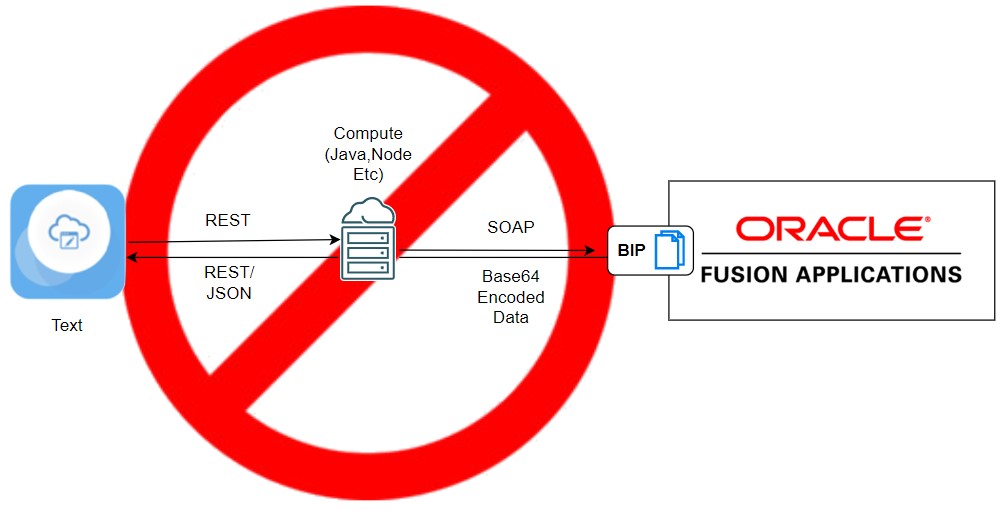
Some customers access BIP via a synchronous SOAP service and execute a BIP report to get data out of Fusion Applications. The response payload is a base64 data set and is usually then decoded by client code. This technique is often used as a data backend for user interfaces, e.g. Oracle VBCS, JET, AngularJS etc, and we have seen many different middletiers, e.g. Weblogic, NodeJS etc, doing the base64→JSON conversion for the user interface. Whilst this pattern appears to work fine, is considered an anti pattern and should be avoided. The reason for this is that the BIP backend services are designed/scaled for batch production of pixel perfect reports. We have seen many instances where customers have used this pattern to query data from Fusion Applications synchronously and then as soon as the request concurrency rate increases, e.g. beyond 5-8 concurrent requests, the performance degrades dramatically. The most damaging real world instance we have seen was a customer who built a VBCS UI, which in tern used a Java backend to call and process the BIP responses. This solution worked fine in development, with response times of 2-4 seconds (still not really real time), however when it was rolled out in production, 400 concurrent users hit the system and caused response times to shoot up into the minutes, with regular timeouts after 3-4 minutes. It also caused some collateral impact to legitimate production BIP users who were executing BIP reports.
AntiPattern 2
In addition to Anti-Pattern1, many customers also based their BIP report on raw SQL instead of using the logical data shapes available as an OTBI Analysis.
This is also considered an anti pattern for the following reasons :
- Oracle does not guarantee the schema wont change between releases, you could find that in the future the schema changes and if you don’t test properly between releases then queries / reports will fail. One could suggest that this is OK as they’ll simply retest and modify the SQL accordingly however it is also possible that the schema may change significantly where you will need to reimplement the queries. This all needs to be done from the time it was detected in testing to when the time the Fusion SaaS upgrade is applied to the production instance.
- By using SQL you are “by passing” the middle tier and going direct to the database tables, this isn’t too bad providing this is taken into account when designing the middle tier
- Table/column names will be internal names instead of business objects and business field names, the data will almost certainly need to be reshaped.
- You need to be careful that the queries you submit are properly implemented and use the appropriate indexes (It is not possible to add indexes or custom tables to the Oracle Fusion Database). Additionally queries often use temporary segments in the temporary tablespace and if you run very large , badly designed, long running queries, then these could fail, or be terminated, without warning if they consume too many resources..
What if REST Isn’t Good Enough?
A common reason why people claim they need to use BIP with SQL , even when the data is available via REST, is because the data they need to query is not easily query-able via REST. To achieve the queries objective in REST they would need to create an elaborate SQL query with multiple joins, unions etc. To execute this in REST you would need to first query the parent dataset, then issue REST queries for each row, e.g. if each row requires 3 sub queries, then for a 10 row query, this could end up being 31 rest calls ( 1 for the top root dataset and then 10*3 for the children). The best example of this we have seen , was a 1300 line SQL query with over a dozen union statements and lots and lots and LOTS of joins! Another example was were the data needed by a user interface is part of a complex dependant “master-detail-detail” dataset. If these were executed via REST it would require multiple nested REST queries, thus very inefficient, compared to the simplicity of a SQL query statement with lots of joins.
It is worth noting that in most scenarios we see this last pattern (master-detail-detail-detail ) , often the child queries data is based on slow changing data which could be cached..
Our Recommendations
We strongly recommend against using BIP as a synchronous data extraction technique, It is not designed for this use case , invariably will cause issues later and we often see issues with this technique.
When we do see this pattern we strongly recommend against it and then suggest alternative patterns, however before presenting these, lets recap why customers misuse BIP as a data extraction tool.
From our experience the reasons are :
- A number of customers have come over from E-Business Suite, and thus are used to querying the database directly with SQL. Alas this is not the cloud way and we should not rely on being able to query the Fusion DB directly being a feature long term.
- The REST interface now has complete coverage, however in the past there were large gaps and thus this pushed people to finding alternative approaches, e.g. BIP. AS we now have a complete REST API across all pillars this should be our go to approach. If the data you want to query is not available then we recommend you log a support ticket with Oracle customer support.
- There are times when a REST call would need to execute a complex query across multiple objects, perhaps with union or perhaps dynamic query columns. This is not something that efficiently be done using the REST API today
For 2 & 3 we always recommend users log an SR/Enhancement request so that development know this is a required feature, with a use case , and ask them to enhance the service whilst we look for an alternative pattern.
Pattern 1 : Calling Direct
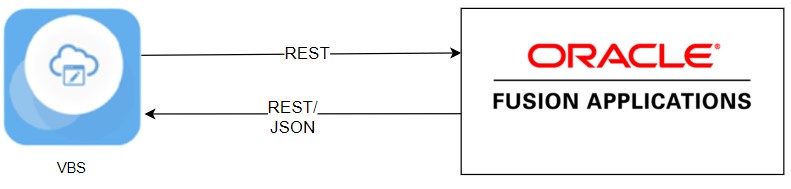
Our first recommendation is to always query Oracle Fusion SaaS using the REST APIs. This way you get real-time data, data security and predictable scalability.
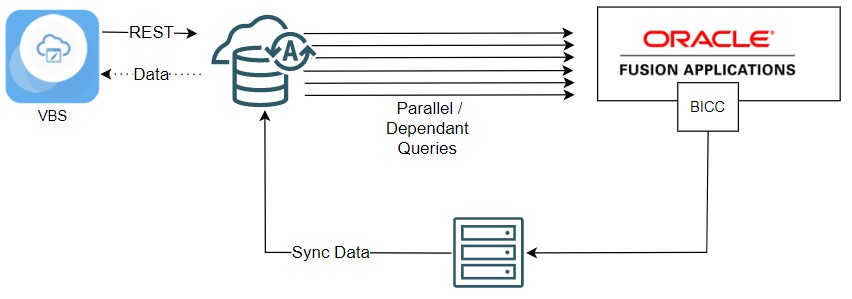
Pattern 2: Data Synchronised to Database using BICC and a Custom Sync Engine
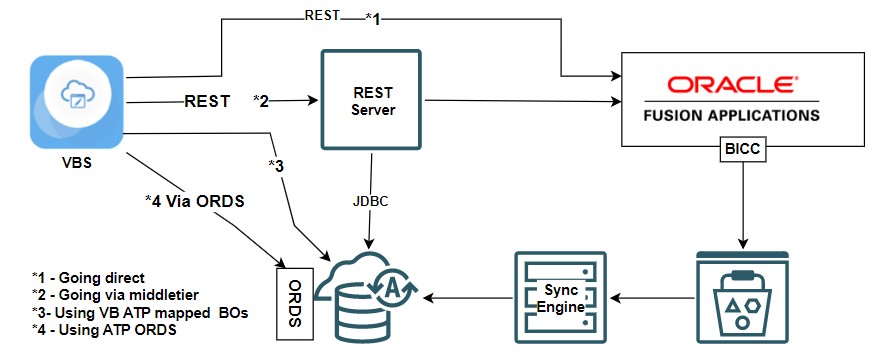
A very common pattern we see is to synchronize the data from Fusion Applications into a OCI ATP database and then execute SQL queries against this database instead of Oracle Fusion Direct.
This approach has the advantage that you can :
- Query all the data you need, asynchronously in batch in the background, into the ATP DB and then run whatever SQL Query you want against the data.
- You can use the full power of the Oracle Database, add additional indexes, views, materialised views etc to help querying the data
- If needed you can add custom objects to this database and then join with this data at query time
- You still query the “live” data from Fusion Applications from the database itself, using the REST interface, and then merge using local data
- This can be done from Java or from the database itself
- You can query the database over REST using
- The ORDS database extension but be careful on identity propagation
- Through a middle tier (Java, Python , Functions, Weblogic , Kubernetes etc)
- You can map Oracle VBCS Business Objects direct to an ATP database but its worth knowing this is Bring your own database (VB Controls the schema) not Bring Your Own Schema
- If no data security is needed then linking VBS with an ATP database works very well, if you need data security then our current recommendation is to use a middletier, however it is possible to implement a level of identity propagation to ORDS using OCI. This topic will be described in a future article and this bullet point will be updated with the details.
This pattern does however come with some additional work that is needed
- Data Security, if needed, will need to be baked into the architecture. in the below architecture this could be within the REST Server or within the database PLSQL code which is accessed via ORDS. VBCS BOs can only provide “write” data security not read data security.
- Data Consistency could be a problem for some use cases. It is therefore important that the developer takes this into account when designing the solution. A common pattern is to synchronize almost everything they need , focusing on the data which does not change , or change often, and then merge it with fresh live data retrieved from Oracle Fusion Applications.
Pattern 3 : Using a Middle Tier To Aggregate Data
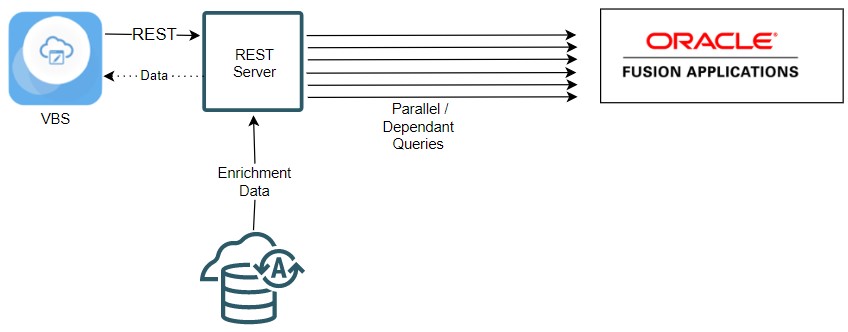
In this pattern the middle tier queries multiple sets of data from the Fusion SaaS Service using the REST Interface. If the queries are done in parallel they can be done efficiently and then if needed the data can be merged/enriched with data from the database. As this pattern is using a middle tier , authentication will be required and the choice of middle tier depends on the developers skills. For this use case we have seen customers use Weblogic Server, Oracle Cloud functions and even the Oracle database itself (see below).
Pattern 4 : Using The Database As A Middle Tier To Query And Merge Data
The Oracle Database is able to execute REST calls and able to execute these REST calls in parallel. Together with the option of syncing data from Fusion we can use the database as the engine for not only querying the data but also transforming it before returning it back to the client. Normally we woudnt recommend the database as a middle tier, but if you are querying data, and then executing join/union like queries against other data then it makes sense for the database itself to query this data and then execute the SQL Statement from within the DB. The alternative would be for a middle tier to query the data, then either insert the data into a database table for querying with other data, or querying all the additional data into the middle tier for querying.. Both approaches are very inefficient compared to using the DB to query and process the data.
If you want to know more about this pattern please see this blog by my colleague Jerome. This blog article was based on a real world customer that myself and Jerome worked on last year.
Conclusion
In summary Business Intelligence Publisher (“BIP”) is the report generation and delivery engine for Oracle Fusion Applications Suite. BIP is a reporting tool and is not recommended for data extraction or synchronous integrations. Some customers try and use custom BIP report for synchronous real-time integrations and we strongly discourage this. This comes from seeing many customers who have used this pattern (querying data from Fusion Applications synchronously using BIP) and then facing serious performance challenges in production.
Above we have presented a number of proven alternative patterns which work for most, if not all, use cases , if the patterns above do not meet the requirements then we recommend you get in touch with you support representative to discuss the use case with support and development. Often there is a “different way” of doing the functional use case which in turn changes the technical pattern so that BIP is not needed or one of the above alternative pattern works instead.
If none of these options work then feel free to reach out to Oracle Customer support or ourselves.
For additional information on the various options available to you for the extraction of data I recommend the following blog articles :
- This blog article from our HCM Fusion Centre of Excellence for a summary of the different export technologies available in Oracle Fusion.
- This blog article, and many others, from my A-Team colleague Bala Mahalingam. Here Bala dives into the different methods data extraction options out of Oracle Fusion Applications across the pillars with a specific focus on his favourite topic of Oracle ERP
- If you need to know everything there is to know about BICC then checkout Ulrich Janke’s blog articles, He specialises in BICC and anything to do with extracting, or importing, data into Oracle Fusion Applications
- Tim Bennett’s series of blog articles, especially if you are a customer who has access to App Composer and wants to explore how you can use groovy to solve some of the problems above
- Jerome Francoisse and Matthieu Lombard have published this video (link) where they walk you through the recommended approaches to extract data from our Fusion SaaS Application (ERP, HCM, SCM and CX)
- Finally, there is of course my blog series, where i tend to focus on how you can use Oracle OCI in conjunction with Oracle Fusion for extension and integration usecases.