
As organizations embrace the cloud to drive agility and innovation, gaining clear visibility into cloud spend becomes a powerful lever for optimization. Oracle Cloud Infrastructure (OCI) provides rich and detailed cost and usage reports (FOCUS reports) that help teams understand where their cloud budget is going.
By combining these reports with the built-in machine learning capabilities of Oracle Autonomous Data Warehouse (ADW), customers can take cost analysis to the next level—proactively identifying unusual patterns or spending spikes without needing any data science background. This blog series showcases how you can enhance your cost management strategy using ADW’s in-database AI features to uncover valuable insights with just a few lines of SQL.
***update***
The solution has been further automated and the details are available here.
About This Blog Series
This is a 3-part blog series that walks through building a complete anomaly detection solution for OCI cost reports:
- Part 1 (this post) – Introduction, solution overview, and code to copy FOCUS reports into ADW.
- Part 2 – Set up ADW schema and build an anomaly detection model using in-database machine learning (OML4SQL).
- Part 3 – Automate monthly model retraining and detect anomalies, trigger alerts via email or integrations.
Why This Matters
OCI customers often manage multiple regions, compartments, and services. Manually scanning through CSV reports for spikes, unusual charges, or misconfigurations is time-consuming and error prone. By automating anomaly detection with AI, you:
- Save time analyzing data
- Identify problems earlier
- Avoid billing surprises
- Enable chargeback optimization across teams
And the best part? You don’t need to build or train complex models manually. ADW’s OML4SQL and built-in algorithms make anomaly detection accessible with just SQL.
High-Level Solution Architecture
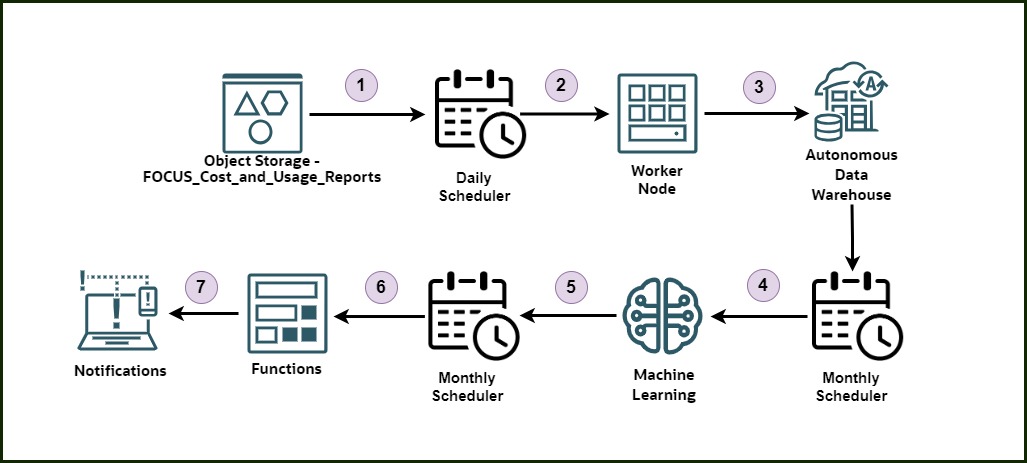
- Object Storage – FOCUS_Cost_and_Usage_Reports – Store all daily cost and usage reports (CSV files) in an OCI Object Storage bucket. Refer to this blog post for more information.
- Daily Scheduler – Automatically trigger a scheduled job every day using the OCI Scheduler.
- Worker Node – Run a Python script (using the OCI SDK and Oracle DB drivers) on a compute instance to load the latest reports into Autonomous Data Warehouse (ADW).
- Monthly Scheduler – Trigger a monthly job that initiates the anomaly detection process.
- Machine Learning (OML4SQL) – Use Oracle Machine Learning with a one-class SVM model to detect anomalies in cost data directly from SQL.
- Functions – Using OCI Resource Scheduler, execute an OCI Function to query and evaluate cost anomalies over the past 30 days.
- Notifications – Notify stakeholders automatically if any anomalies are found.
Step-by-Step Guide to Load FOCUS Reports to ADW
Prerequisites
- ADW instance
- ADW user Password stored in OCI Vault Secrets
- A bucket in OCI Object Storage with cost reports
- A working OCI config file or instance principal setup
- Python 3.9+
- Packages:
oci,oracledb,pandas
Python Script to Copy FOCUS CSVs to ADW
import oci
import oracledb
import pandas as pd
import os
import numpy as np
import time
import random
from datetime import datetime,timedelta
from concurrent.futures import ThreadPoolExecutor, as_completed
import base64
# === CONFIG ===
bucket_name = "cost_and_usage_reports" # change it based on your environment
namespace = "ociateam" # change it based on your environment
adw_user = "admin" # change it based on your environment
dsn = "(description= (retry_count=20)(retry_delay=3)(address=(protocol=tcps)(port=1522)(host=adb.us-xxx-1.oraclecloud.com))(connect_data=(service_name=xxxx_low.adb.oraclecloud.com))(security=(ssl_server_dn_match=yes)))"
local_folder = "temp_csvs"
os.makedirs(local_folder, exist_ok=True)
# === OCI SETUP ===
signer = oci.auth.signers.InstancePrincipalsSecurityTokenSigner()
object_storage = oci.object_storage.ObjectStorageClient(config={}, signer=signer)
secrets_client = oci.secrets.SecretsClient(config={}, signer=signer)
vault_client = oci.vault.VaultsClient(config={}, signer=signer)
secret_ocid = "ocid1.vaultsecret.oc1.iad.xxxxx" # Replace with your actual OCID of the secret
base64_secret = secrets_client.get_secret_bundle(secret_ocid).data.secret_bundle_content.content
decoded_bytes = base64.b64decode(base64_secret)
adw_password = decoded_bytes.decode("utf-8")
# === PAGINATED OBJECT LISTING ===
def list_all_objects(namespace, bucket_name):
    all_objects = []
    next_start_with = None
    while True:
        response = object_storage.list_objects(
            namespace_name=namespace,
            bucket_name=bucket_name,
            start=next_start_with
        )
        all_objects.extend(response.data.objects)
        next_start_with = response.data.next_start_with
        if not next_start_with:
            break
    return all_objects
# Fetch all objects
objects = list_all_objects(namespace, bucket_name)
start_date = datetime.utcnow() - timedelta(days=1)
start_date = datetime(start_date.year, start_date.month, start_date.day)
csv_files = []
for obj in objects:
    name = obj.name
    if name.endswith(".csv"):
        try:
            parts = name.split("/")
            if len(parts) >= 4:
                y, m, d = int(parts[1]), int(parts[2]), int(parts[3])
                file_date = datetime(y, m, d)
                if file_date >= start_date:
                    csv_files.append(name)
        except Exception as e:
            print(f"Skipping '{name}' due to parsing error: {e}")
print(f"csv_files are {csv_files}")
# === GLOBAL CONNECTION POOL (created once) ===
pool = oracledb.create_pool(
    user=adw_user,
    password=adw_password,
    dsn=dsn,
    min=1,
    max=5,
    increment=1,
    timeout=60,
    getmode=oracledb.POOL_GETMODE_WAIT
)
# === PROCESS ONE FILE ===
def process_file(file):
    print(f"[Thread] Processing: {file}")
    local_path = os.path.join(local_folder, os.path.basename(file))
    try:
        # Download the file from OCI Object Storage
        obj = object_storage.get_object(namespace, bucket_name, file)
        with open(local_path, "wb") as f:
            f.write(obj.data.content)
        # Load and clean CSV
        df = pd.read_csv(local_path, low_memory=False)
        drop_cols = ['Tags', 'oci_BackReferenceNumber']
        for col in drop_cols:
            if col in df.columns:
                df.drop(columns=[col], inplace=True)
        for col in ["BillingPeriodStart", "BillingPeriodEnd", "ChargePeriodStart", "ChargePeriodEnd"]:
            if col in df.columns:
                df[col] = pd.to_datetime(df[col], errors='coerce')
        numeric_columns = df.select_dtypes(include=["float", "int"]).columns.tolist()
        for col in numeric_columns:
            df[col] = pd.to_numeric(df[col], errors='coerce')
        df = df.astype({col: "float64" for col in df.select_dtypes(include="int64").columns})
        df.replace({np.nan: None, np.inf: None, -np.inf: None}, inplace=True)
        insert_columns = ",".join(df.columns)
        placeholders = ",".join([f":{i+1}" for i in range(len(df.columns))])
        insert_sql = f"INSERT INTO oci_cost_data ({insert_columns}) VALUES ({placeholders})"
        rows = df.values.tolist()
        # Retry connection logic
        conn = None
        for attempt in range(3):
            try:
                conn = pool.acquire()
                break
            except Exception as e:
                print(f"Failed to acquire DB connection (attempt {attempt+1}): {e}")
                time.sleep(2 ** attempt + random.uniform(0, 1))
        if not conn:
            raise Exception("Could not acquire DB connection after 3 retries.")
        with conn.cursor() as cursor:
            for i, row in enumerate(rows):
                try:
                    cursor.execute(insert_sql, row)
                except Exception as e:
                    print(f"\n Row {i} in {file} failed: {e}")
                    for col, val in zip(df.columns, row):
                        print(f"   {col}: {val} ({type(val).__name__})")
                    raise
        conn.commit()
        print(f"Loaded {len(rows)} rows from {file}")
        # Clean up local file after successful processing
        try:
            os.remove(local_path)
            print(f"Deleted local file: {local_path}")
        except Exception as cleanup_err:
            print(f"Could not delete file {local_path}: {cleanup_err}")
    except Exception as e:
        print(f"\n Error processing file '{file}': {e}")
# === MAIN EXECUTION ===
max_workers = 5  # Adjust based on compute capacity
with ThreadPoolExecutor(max_workers=max_workers) as executor:
    futures = {executor.submit(process_file, f): f for f in csv_files}
    for future in as_completed(futures):
        file = futures[future]
        try:
            future.result()
        except Exception as e:
            print(f"Uncaught error in thread for file '{file}': {e}")
You can schedule this script to run daily using a cron job or OCI Resource scheduler to ensure your database stays up to date.
What’s Next in Part 2
In the next blog, we’ll dive into how to use ADW’s built-in machine learning with DBMS_DATA_MINING and OML4SQL to train an anomaly detection model using your loaded cost data. You’ll see how to:
- Prepare training data
- Use one-class SVM for unsupervised learning
- Query anomalies using SQL
Final Thoughts
With ADW and its built-in AI, anomaly detection becomes effortless—even for those with no machine learning background.