
Introduction
In this blog series we are going to discuss Oracle Cloud Infrastructure (OCI) networking best practices and provide you with some recommendations and tips to help you design, build, secure and manage your OCI network infrastructure. This is the third blog in this series and will cover OCI network connectivity such as IPSec Virtual Private Network (VPN) and FastConnect. The topics for this blog series are outlined below:
- Part One – OCI Network Design, VCN, and Subnets Best Practices, Recommendations, and Tips
- Part Two – OCI Network Security Best Practices, Recommendations, and Tips
- Part Three – OCI Network Connectivity Best Practices, Recommendations, and Tips
- Part Four – OCI Network Monitoring, Observability, and Management Best Practices, Recommendations, and Tips
Ensure Proper Redundancy Is Established
Rationale
With customers continuing to grow their cloud deployments, more and more of their critical applications and workloads are now being hosted in OCI and therefore accessed from on-premise or other Cloud Service Providers (CSP) via connectivity methods such as IPSec VPN and FastConnect. With this growth, you need to ensure those critical applications in OCI are available and connected in a redundant way so that it can support both planned and unplanned outages.
Recommendation
- For FastConnect connections, review the FastConnect Redundancy Best Practices and:
- Understand how many FastConnect locations your OCI region provides
- Find your FastConnect scenario in the link and understand the level of diversity it provides and what your options are to increase the diversity
- For IPSec VPN connections:
- Deploy two Customer Premise Equipment (CPE) with a second set of IPSec tunnels.
- The two CPEs should prefferably be located in different datacenters or geography if possible for maximum diversity.
- If the two CPEs are in the same datacenter and location, at a minimum ensure they are on separate power supplies, LAN switches, and using different Internet Service Providers (ISP) to provide the highest level of diversity
- Use Border Gateway Protocol (BGP) for dynamically advertising of routes to seamlessly provide proper network failover
- Test your failover, including:
- When you first provision your redundant connections to validate it’s working correctly
- Routinely test failover to validate it continues to work as changes can be made later that impacts your failover mechanism and you won’t know until an outage happens
- Test various links and devices in the path to validate failover in all scenarios. For example, test an individual link or connection, test bringing down each CPE, etc.
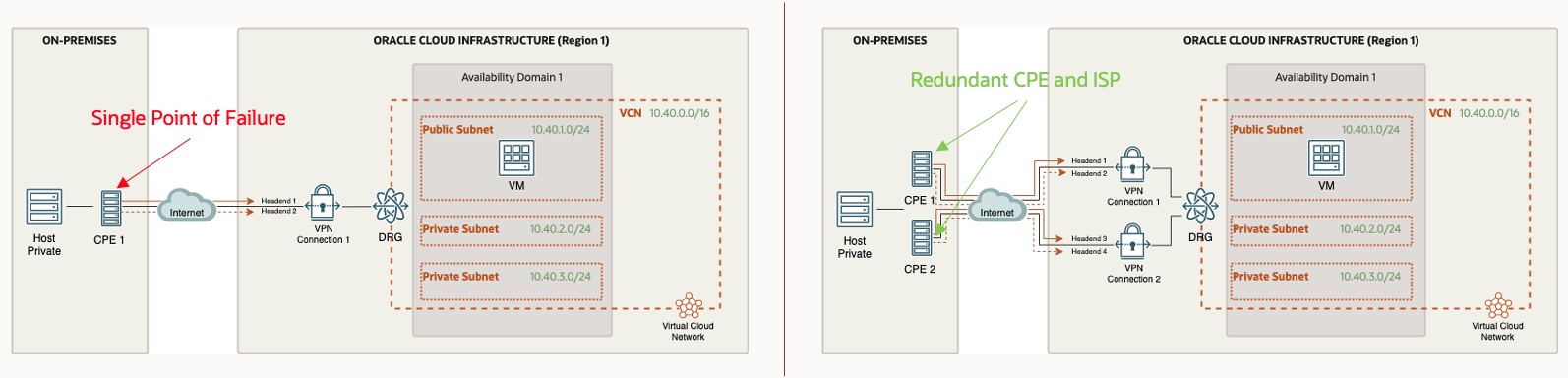
Tip: Once you have redundant connectivity established, make sure to review the OCI Connectivity Redundancy Guide for detailed redundancy options, including specific routing details to accomplish proper failover. For example, using BGP attributes such as AS path and local preference to manipulate the routing to accomplish your desired failover.
Use A FastConnect Partner
Rationale
Security lists let you define a set of security rules that applies to all of the VNICs in an entire subnet, whereas Network Security Groups (NSG) provide more granular filtering and control of traffic flowing to and from an individual or group of virtual network interface cards (VNIC) controlled by the NSG. NSG approach allows customers to implement a microsegmentation strategy inside OCI and reduce the total attack surface of a network security incident.
As an example, if you allow Secure Shell (SSH) in a securily list rule you will end up allowing SSH to all VNICs in that subnet. Allowing SSH in a NSG will only allow it to the VNICs that are associated with that NSG, if there is no rule in the corresponding security list (NOTE: See the tip below for understanding how security lists and NSGs operate if they are used together).
Oracle recommends using NSGs for components that all have the same security posture. For example, in a multi-tier architecture, you would have a separate NSG for each tier. A given tier’s VNICs would all belong to that tier’s NSG. Within a given tier, you might have a particular subset of the tier’s VNICs that have additional, special security requirements. Therefore you would create another NSG for those additional rules, and place that subset of VNICs into both the tier’s NSG and the additional NSG.
Oracle also recommends using NSGs because Oracle will prioritize NSGs over security lists when implementing future enhancements.
More information on Network Security Groups can be found here: OCI Network Security Groups
Recommendation
- Create NSGs for specific groups of resources that have the same traffic flow requirements, such as NSG for each tier of an application
- Take a whitelist approach to all security list and NSG rules and only allow the specific sources, protocols, and ports that is required by your application or workload
- Resist the urge to allow large sources, protocos, and ports because you are unsure what is specifically required
- If you do allow large sources, protocols, and ports, only do so temporarily (such as for troubleshooting) and lock them down later
Tip: When mixing both NSG and security lists together, the most union of the two is enforced. This means that a packet in question is allowed if any rule in any of the relevant security lists or NGS allows the traffic. For example, if your security list allows SSH from all sources (0.0.0.0/0) but your NSG does not, the VNICs in that subnet and associated with that NSG will permit SSH from all sources because the security list rule allows it.
Tip: When allowing traffic in an NSG or security list temporarily, such as allowing Internet Control Message Protocol (ICMP) for troubleshooting, make a note in the rule description when you create it that this is temporary and can be deleted later. I have seen customers often forget to remove the rule when they are done, and when reviewing the rules in the future they are hesitant to remove them because they are unsure if it’s required or not.
Tip: Take a look at the network security section of the Oracle Cloud Foundation
Pick the connectivity to match the workload requirements
Rationale
VPN connections are often used when customers are moving one or two non-critical workloads to OCI. This is usually part of a longer-term migration strategy. We recommend that these pilot applications are self-contained with limited integration points back to their on-premises environments.
Over some time, as confidence in the migration plan increases, a tipping point is often reached whereby moving to a dedicated connection is preferable. This is usually because the level of integration between cloud-based and on-premises based applications is high from a frequency, volume, or latency-sensitive perspective. The migration plan can heavily influence the time when this point is reached. In particular, the ability to migrate data-dependent applications together can have a significant bearing on when the tipping point is reached.
Take a look at the Migration Patterns topics for more information.
A dedicated connection may also be adopted early when a migration candidate is considered a critical application, particularly when consistent wide area network performance is a vital requirement.
Recommendation
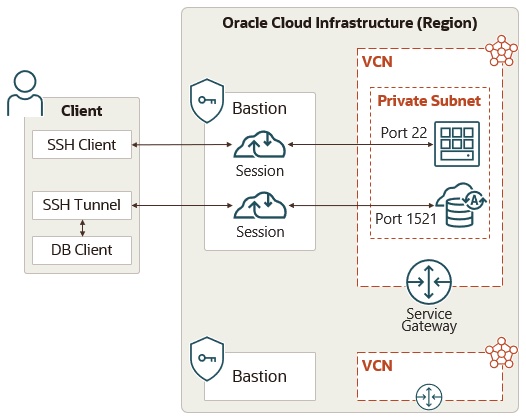
- Familiarize yourself with OCI Bastion Service and utilize it instead of provisioning a bastion host in a public subnet
- Lock down access to the Bastion Service via IAM policies
Restrict Access to OCI Network Resources with IAM Policies
Rationale
The OCI IAM service lets you control who has access to your cloud resources. You can control what type of access a group of users has and to which specific resources. Network resources that you provision inside of OCI are typically part of the core building blocks in your architecture that your applications and workloads depend on. Restricting access to these network resources is an important part of your OCI security and IAM design to help prevent unauthorized users from creating or changing these resources that could lead to downtime or security holes.
Recommendation
- Start with the simplest approach by creating a policy to let network admins manage a cloud network
- For a more advanced approach, create policies to restrict access to individual network resources. For example, creating separate policies to let one group of admins manage the Dynamic Routing Gateways (DRG), another group of admins manage Virtual Cloud Networks (VCN), etc.
- Consider read-only policies that are necessary for non network admins to have access to, such as:
- Limit the usage of the ‘use’ and ‘manage’ verbs in your IAM policies for the virtual-network-family
- See IAM Policies for Networking for more information
- Your OCI network IAM policies and design should be one piece of your overall OCI IAM policy and design
Tip: Oracle documentation has many common IAM policies documented here.
Consider Deploying the OCI Network Firewall or a 3rd Party Firewall for More Network Security Capabilities
Rationale
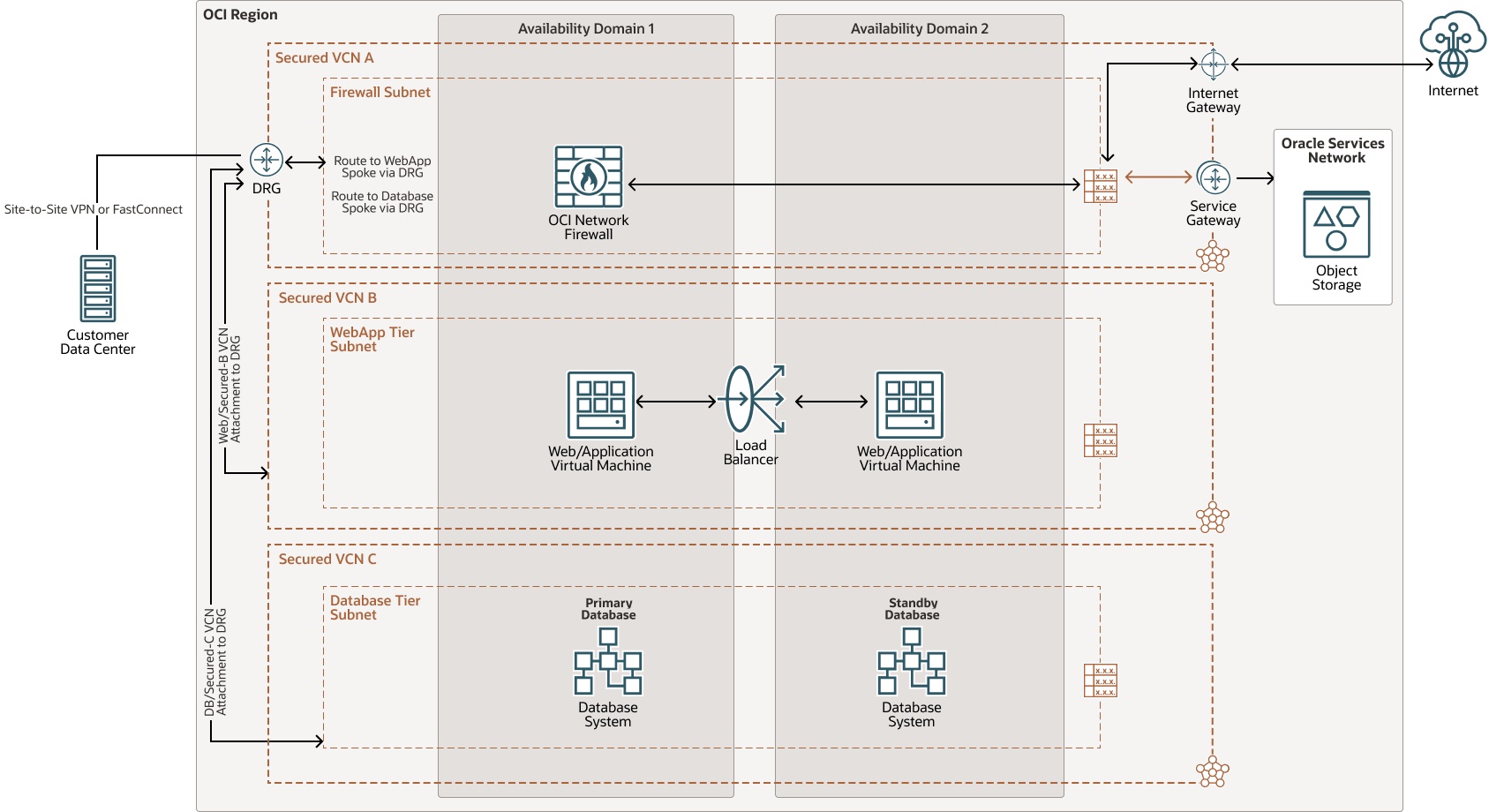
Many customers have network security requirements that require more functionality, features, and capabilities than what the native Security Lists or Network Security Groups in OCI provide. To meet those requirements, the OCI recommendation is to deploy either the OCI Network Firewall or a 3rd party firewall. These firewalls typically bring next-generation firewall capabilities such as intrusion detection and prevention (IDPS), url filtering, and Secure Socket Layer (SSL) inspection.
Recommendation
- Check with your preferred 3rd party firewall vendor to see if they support their platform on OCI
- Investigate if using the native OCI Network Firewall will meet your requirements
- Use the hub and spoke VCN design and place the firewall(s) in a hub VCN and use the DRG to route the traffic through the firewalls
- Understand the impact to network performance by routing traffic through a firewall in OCI, such as throughput and latency
Tip: Try out the OCI Network Firewall using Oracle Live Labs here.
Stay tuned for Part Three of this blog series which will focus on OCI Network Connectivity Best Practices, Recommendations, and Tips