
Welcome to the Web 3.0 world! I believe we all know the basics of cryptocurrency and blockchain technology. The Ethereum is most used public blockchain in the Web 3.0 world. In 2022 we have seen many Enterprises launching NFTs using Public blockchains (i.e. Ethereum, Polygon). There may be a requirement to connect with the Web 3.0 world from the enterprises existing ecosystem. This blog focuses on connecting Crypto wallets using ODA and showcases simple money transfers. This is the initial step in connecting with the Web 3.0 world.
Wallet
Web 3.0 is built on a foundation of cryptocurrencies and decentralized applications (Dapps). The wallet is used to interact with decentralized applications. MetaMask is one of the leading crypto wallets and serves as one of the main gateways to the world of Web3, decentralized finance (DeFi) and NFTs. It is a browser plugin that serves as a wallet and is installed like any other browser plugin.
You can download the MetaMask browser extension from https://metamask.io/ and set up the wallet using a public blog.
Once the wallet is set up, you can create an account in the Ethereum Goerli test network. The account is pair of a private key and a public address. The keys are stored in the users’ system, not on the MetaMask server but MetaMask uses a private key to sign the transaction before publishing it to Ethereum Blockchain.
You can get some test ETH from Goerli Faucet by entering your public address to initiate blockchain transactions on the Ethereum ecosystem.
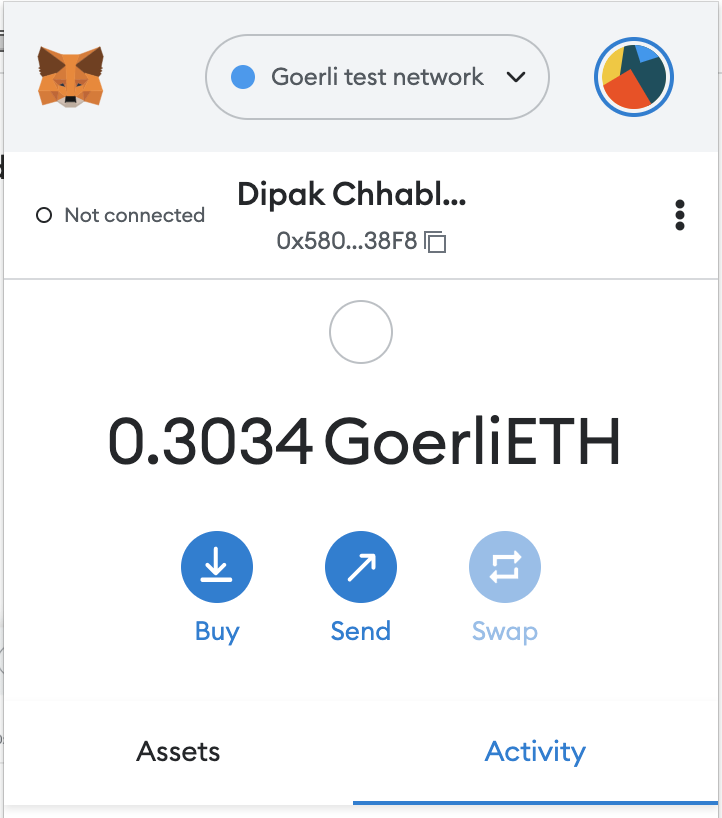
Fig. 1. MetaMask Wallet
The Use Case
The use case showcases the interaction with the Web 3.0 ecosystem from Oracle Digital Assistant. The ODA is embedded in the VBCS screen. The MetaMask is a browser plugin, ODA can’t directly interact with the browser so all the interactions are passed through ODA Web SDK in the VBCS screen. Please refer to Abhay’s blog to embed Oracle Digital Assistant in VBCS application.
1. ODA displays the welcome message and prompts user to connect to the MetaMask wallet.
2. The user clicks on connect Wallet and the request gets transferred to Web SDK which opens the MetaMask browser plugin prompting the user to connect to an account. The user chooses the account from the list and ODA shows the connected account address.
3. The user initiates transactions from ODA for example sending money to a colleague, the Web SDK transfers the request to MetaMask to sign the transactions.
4. All the transactions which cost Ethereum Gas require user consent, these transactions are signed with a Private Key (stored on the user’s machine) in MetaMask.
5. MetaMask publishes the transaction to the Ethereum blockchain via third-party provider Infura which runs the Ethereum Node.
6. Users can check the transaction status on Ethereum blockchain explorer.
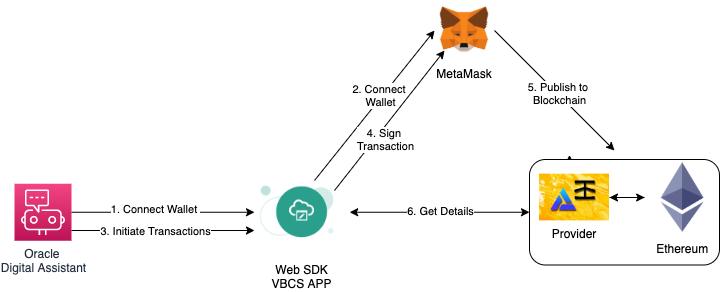
Fig. 2. Use Case: Web3 Transactions From ODA