
In this post, I describe some of the issues you may encounter when setting up OCI IAM with OCI Government cloud. Specifically setting up a Federation partner. Hopefully, with my recent encounters with OCI Government cloud customers will help you get off the ground quickly. This post is assumes you have some basic knowledge using Federation/SAML2.0.
When setting up Federation in OCI, one of the first steps is to exchange meditated between your Identity Provider (IdP) and the OCI Control Pane which is the Service Provider (SP). In order to obtain trust between the two parties we must import the identity provider’s meta-data into OCI.
This is where you may encounter your first issue. In this scenario, we are using Identity Cloud Service (IDCS) as the IdP. During the configuration you will need to enter the client ID and the client secret of the application in IDCS. When doing so you may see the error below:
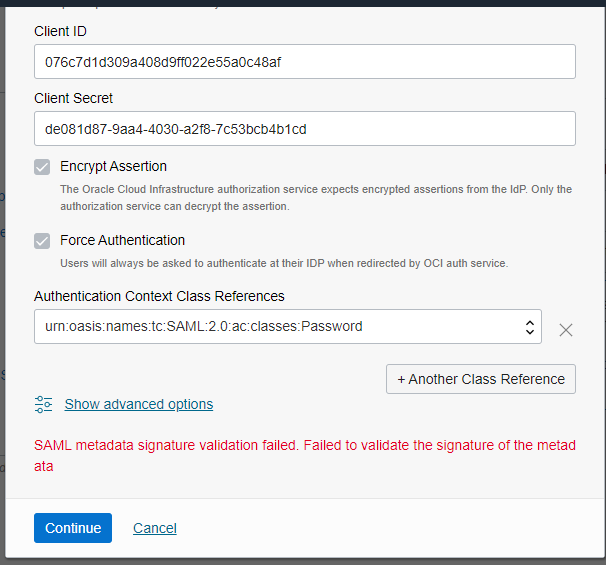
This error is a little misleading. The user provided no meta-data during this step. The user did however provide the IDCS URL and the metadata is being fetched from a back-end channel.
Before getting into why this happened you need to understand how Federation works in OCI Government cloud. The OCI government cloud supports FedRAMP High. Here is a post that you might find helpful.
One of the requirements of FedRAMP is to support something called Holder of Key(HoK). The HoK method in SAML is basically a public or secret key that is used to identify the subject in a SAMNL assertion. But in most cases, even with OCI Government cloud, users are identified by username and password and not a secure token.
So getting back to the error above. The reason this “probably” occurred is because HoK is required on OCI Government cloud systems and the IsP does not support HoK. So how do we fix this? We need to disable the HoK requirement. We can do this by sending an SR to support and having them disable the HoK flag.
There is a second issue I’d like to discuss. If you’re using an IdP other than IDCS you will need to import the IdP’s metadata into OCI control pane. When receiving metadata from your IdP, there are two forms of metadata you can receive. Signed metadata or unsigned metadata. Signed metadata is to ensure that the file has not been tampered with. During the import process OCI will validate the metadata based on the signature within the file. OCI Government cloud by default requires signed metadata. So if you received unsigned metadata and try to import that in the OCI control pane you will get the same error. Some IdP’s do not have the ability to sign their metadata. For these IdP’s you can also disable the signature validation flag with support.
In summary:
By default all government OCI tenancies will have the HoK flag set to true and the signature validation flag set to true as well. If you do not use keys for user verification then you must turn the HoK flag to false. If the metadata from your IdP is not signed then you will also need to turn the signature validation flag to false.