
As enterprises expand their Oracle Cloud Infrastructure (OCI) footprint across multiple tenancies and environments, determining the right deployment strategy for Oracle Access Governance (AG) becomes a key architectural decision. The objective is to determine whether a single AG instance can effectively meet governance requirements or if multiple instances are necessary to support the desired operating model.
To make this decision effectively, it’s essential to understand how AG interacts with OCI Identity and Access Management (IAM), and how requesting and responding tenancies define that relationship. These concepts form the foundation for how AG connects to OCI IAM, governs access across tenancies, and scales governance operations enterprise-wide.
Understanding Requesting and Responding Tenancies
Requesting Tenancy
The tenancy where your Oracle Access Governance Service Instance resides. It must access OCI IAM APIs, either within the same tenancy or in a different one, to retrieve or update the IAM entities being governed.
Responding Tenancy
The tenancy where OCI IAM identity data actually resides. This is the tenancy whose users, groups, policies and resources are governed by AG.
Depending on whether both functions (requesting and responding) reside in the same OCI tenancy or across separate ones, AG can be integrated in one of two modes: Intra-Tenant and Cross-Tenant.
Understanding AG Instance Creation and Placement
Before exploring how to architect Oracle Access Governance (AG) deployments across one or more OCI tenancies, it’s important to first understand how an AG instance is created and how its placement within OCI compartments and identity domains works.
When creating an AG instance, you must specify a compartment. This placement determines who can manage the instance itself, not who can access or perform operations within AG. Choosing the right compartment is therefore an administrative decision and ensures that only authorized users can perform instance management tasks such as deleting the instance, changing its license type, or moving it to another compartment.
Below are the permissions required to create service instance:
Read objectstorage-namespace in tenancy
Manage agcs-instance for a given compartment or tenancy
Each AG instance also includes a predefined set of application roles that control access within the service. For example, the ‘AG_Administrator’ role grants full administrative privileges such as onboarding systems, managing access review campaigns, and defining access policies. In contrast, the ‘AG_CampaignAdmin’ role limits access to campaign management only.
An AG instance is automatically associated with the identity domain of the user who creates it. This means only users within that same identity domain can be assigned AG roles and access its functionality. For instance, if a user, who signed into OCI through the ‘XYZ’ identity domain, creates an AG instance, that instance becomes tied to the ‘XYZ’ domain.
Deployment Options
1. Intra-Tenant Access (Single Tenancy Integration)
In this model, a single OCI tenancy performs both roles:
- It hosts the AG Service Instance (Requestor).
- It also contains the OCI IAM data to be governed (Responder).
In such a setup, policies are deployed only within that one tenancy, inside the root compartment, to grant AG the required IAM API access.
This design simplifies setup and maintenance since there’s only one set of policies and one tenancy boundary to manage.
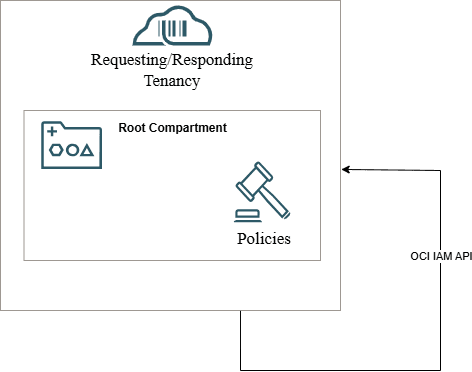
Required OCI Policies:
allow resource agcsgovernanceinstance agcs-rp to inspect all-resources in tenancy where all {request.principal.siOcid='<AG_SI_OCID>'}

allow resource agcsgovernanceinstance agcs-rp to manage domains in tenancy where all {request.principal.siOcid='<AG_SI_OCID>'}

allow resource agcsgovernanceinstance agcs-rp to read audit-events in tenancy where all {request.principal.siOcid='<AG_SI_OCID>'}

allow resource agcsgovernanceinstance agcs-rp to read objectstorage-namespace in tenancy where all {request.principal.siOcid='<AG_SI_OCID>'}

allow resource agcsgovernanceinstance agcs-rp to manage policies in tenancy where all {request.principal.siOcid='<AG_SI_OCID>', request.permission in ('POLICY_UPDATE', 'POLICY_DELETE'), target.policy.name !='Tenant Admin Policy'}
2. Cross-Tenant Access
In this model, the Requesting Tenancy (hosting the AG instance) and the Responding Tenancy (hosting the OCI IAM identity data) are separate.
Here, policies need to be deployed on both tenancies:
- In the Requesting Tenancy, policies allow the AG instance to make API calls to other tenancies.
- In the Responding Tenancy, policies allow external access from the AG instance to governed IAM data.
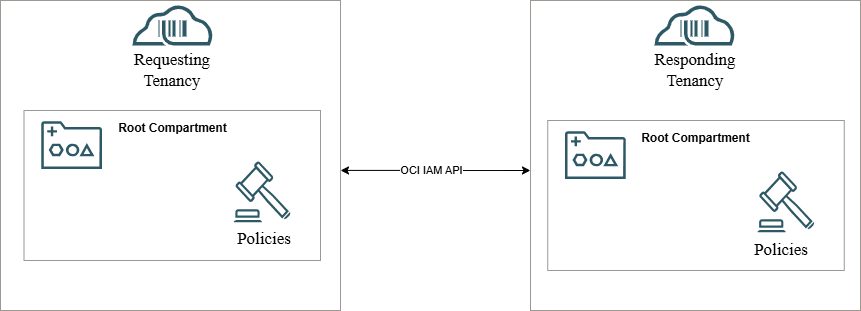
This structure supports more complex multi-tenancy models, enabling one AG instance to govern IAM data across several tenancies securely.
Required Policies:
- Requesting Tenancy
define tenancy AG-OCI-RESPONDING as <RESPONDING_TENANCY_OCID>

endorse resource agcsgovernanceinstance agcs-rp to use agcs-instance in tenancy AG-OCI-RESPONDING where all {request.principal.id=' AG_SI_OCID>'}
- Responding Tenancy
define tenancy AG-OCI-REQUESTING as <REQUESTING_TENANCY_OCID>

admit resource agcsgovernanceinstance agcs-rp of tenancy AG-OCI-REQUESTING to use agcs-instance in tenancy where all {request.principal.id='<AG_SI_OCID>'}

allow resource agcsgovernanceinstance agcs-rp to inspect all-resources in tenancy where all {request.principal.siOcid='<AG_SI_OCID>'}

allow resource agcsgovernanceinstance agcs-rp to manage domains in tenancy where all {request.principal.siOcid='<AG_SI_OCID>'}

allow resource agcsgovernanceinstance agcs-rp to read audit-events in tenancy where all {request.principal.siOcid=<AG_SI_OCID>''}

allow resource agcsgovernanceinstance agcs-rp to read objectstorage-namespace in tenancy where all {request.principal.siOcid=<AG_SI_OCID>''}

allow resource agcsgovernanceinstance agcs-rp to manage policies in tenancy where all {request.principal.siOcid='<AG_SI_OCID>', request.permission in ('POLICY_UPDATE', 'POLICY_DELETE'), target.policy.name !='Tenant Admin Policy'}
Determining the Number and Placement of AG Instances
Once the Requesting–Responding tenancy relationship along with how AG instances are placed and associated with OCI identity domains, the next architectural question becomes:
How many AG instances should be created ?
It depends on how governance, visibility, and self-service access are expected to operate across the environment and whether a single tenancy or multiple tenancies are in scope.
Organizations with a single OCI Tenancy
For customers operating within a single tenancy, one AG instance is sufficient.
It can:
- Govern all identity domains in the tenancy.
- Manage provisioning, access reviews, and apply access guardrails.
- Offer enterprise-level visibility through the built-in dashboards.
This model is ideal for organizations operating within a single OCI tenancy that want to centralize governance, visibility, and access management within one unified AG instance.
Organizations with multiple OCI Tenancies
For organizations managing multiple OCI tenancies, the number of AG instances to deploy depends on which of the following scenarios best aligns with their requirements:
Scenario 1: Centralized Governance without per-tenancy self-service
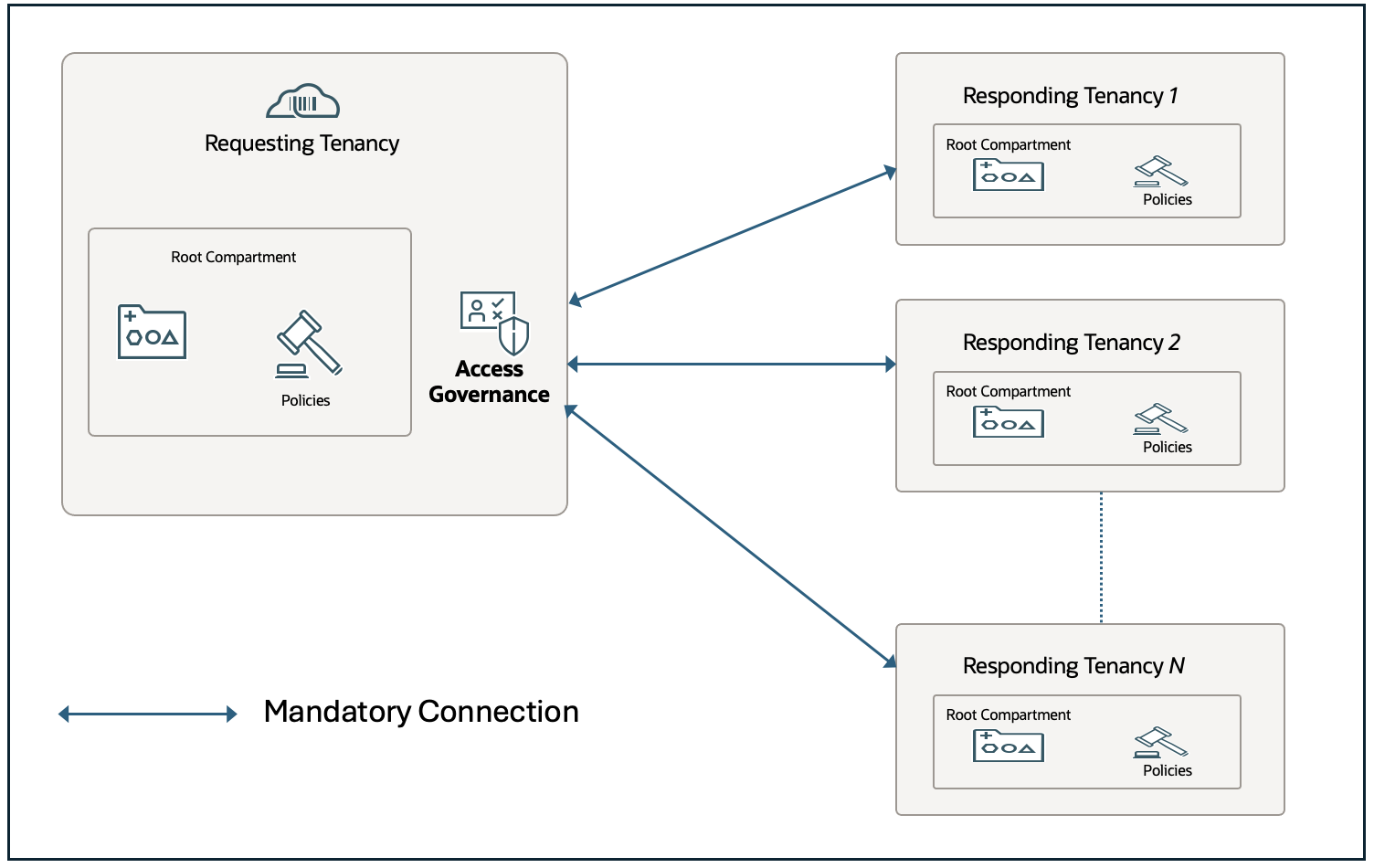
If your goal is enterprise-wide visibility and centralized control, and you don’t require local governance or self-service provisioning by users in individual tenancies, a single AG instance (in the main or parent tenancy) is sufficient.
- The AG instance in the parent tenancy connects to other tenancies (responders) through OCI IAM APIs and cross-tenancy policies.
- Administrators in the main tenancy can request and manage access on behalf of users in other tenancies.
- All governed tenancies feed data into a single compliance and audit view for unified oversight.
This model is ideal for organizations that want a single point of governance without distributing self-service capabilities. It is equally applicable to parent–child tenancy structures and peer tenancy setups that are not formally linked and AG connects through policy-based access in exactly the same way.
Scenario 2: Distributed Self-Service and Governance
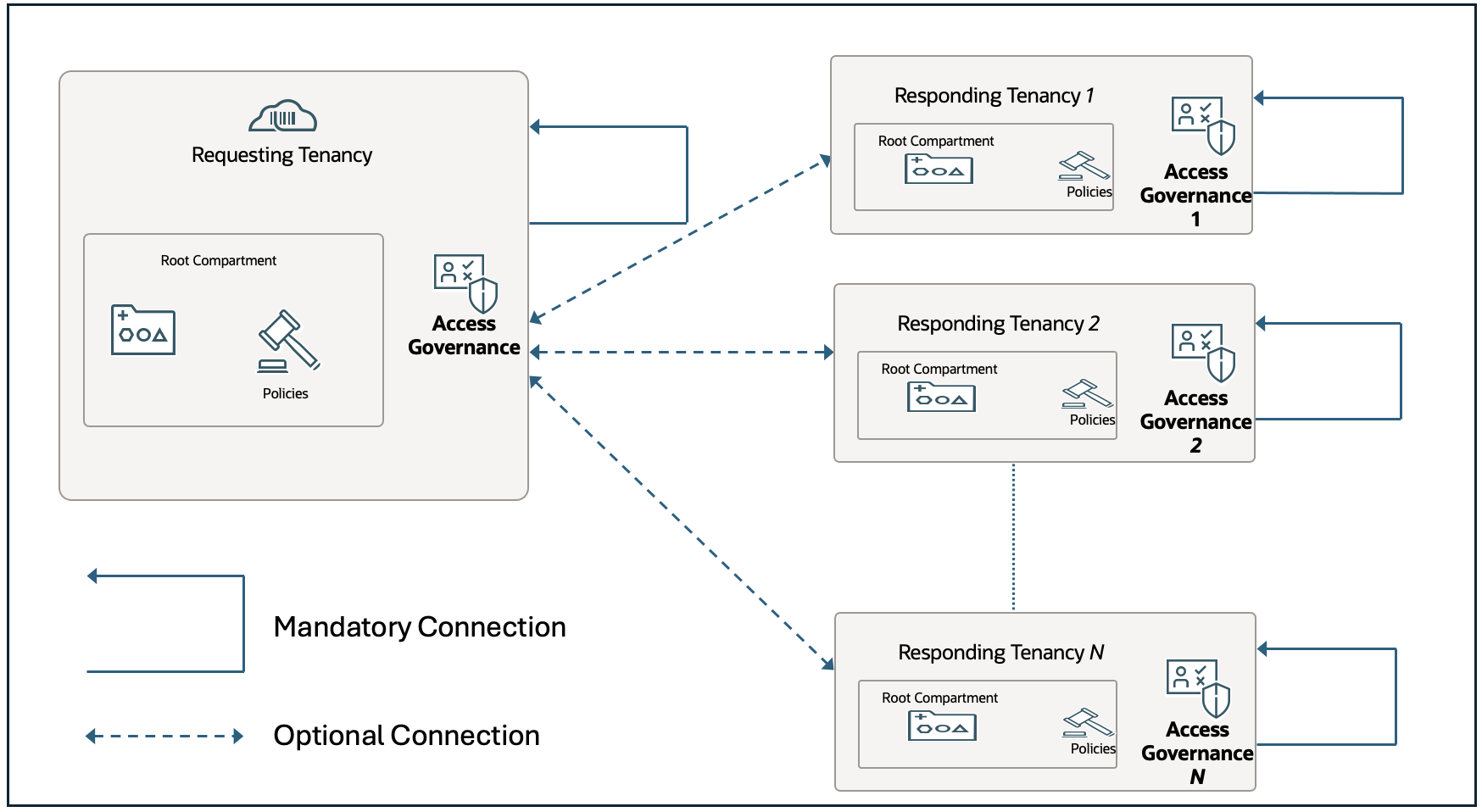
If your organization requires self-service provisioning and local governance autonomy within each tenancy, deploy a separate AG instance per tenancy.
Each tenancy’s AG instance:
- Manages its own users, groups, and access policies.
- Supports end-user self-service requests, approvals, and lifecycle workflows.
- Provides localized governance and policy enforcement specific to that environment.
Optionally, the AG instance in the parent tenancy can connect to all others to enable enterprise-wide visibility, monitoring, and compliance reporting, creating a hybrid model that blends central oversight with local autonomy.
This model is best suited when multiple tenancies need to operate independently while still reporting into a central governance layer. It applies to both parent–child tenancy architectures and unlinked peer tenancies, with integration behaviour remaining consistent.
A few additional tips
- Create the Access Governance instance in its own identity domain and compartment to keep it isolated and manage users independently.
- Set up a dedicated administrator user for the AG instance, assign the AG administrator role, and avoid using the tenancy administrator for these tasks.
- Use separate AG instances for development or testing to maintain data and configuration isolation.
- After onboarding OCI and completing data load, activate users in AG to avoid identity mapping errors.
Final Thoughts
Oracle Access Governance provides a unified layer of visibility and policy enforcement across various system and workloads. It ensures that every user, group, and access grant within OCI remains governed, auditable, and compliant with enterprise security standards.
Whether deployed as a single instance for centralized oversight or as distributed instances enabling self-service across tenancies, AG is central to sustainable OCI operations. It transforms how access to OCI resources, app roles, and IAM entities is managed by bringing automation, accountability, and risk control to the heart of your OCI environment. In short, AG is not just about access, it’s about ensuring governed growth and resilient security across OCI.