
Welcome to a 2-part blog entry with focus on the OCI-Azure Interconnect. In part 1, we will discuss a few challenges with Interconnect and a few advanced scenarios, while in the second part we will do a demo on an advanced architecture.
Oracle and Microsoft have become partners by introducing a redundant, private, bandwidth guaranteed, low latency link between them called Interconnect. The Interconnect leverages the OCI FastConnect and the Azure ExpressRoute concepts to connect the two clouds together without needing to involve a connectivity Service Provider.
While the service works great, there are some challenges we need to discuss when we go into advanced scenarios, challenges which will be the focus of this blog. We will also build a lab environment and see the proposed designs at work in the second part of the series.
Challenge 1 – Not all cloud regions support Interconnect
The Interconnect has been designed with latency in mind. To provide as little latency as possible, the Interconnect can be built only in specific paired regions, such as:
- OCI Ashurn can only interconnect to Azure US East 1
- OCI Phoenix can only interconnect to Azure US West 3
Note: A list of all interconnected regions can be found here: OCI-Azure Interconnect Regions
Does this mean that you cannot use Interconnect if your environment is deployed outside of these regions? Absolutely not. Each of the two clouds provide means to use their own backbone and move the data from your existing region to the closest region that has Interconnect. Let’s take an example from each cloud.
OCI
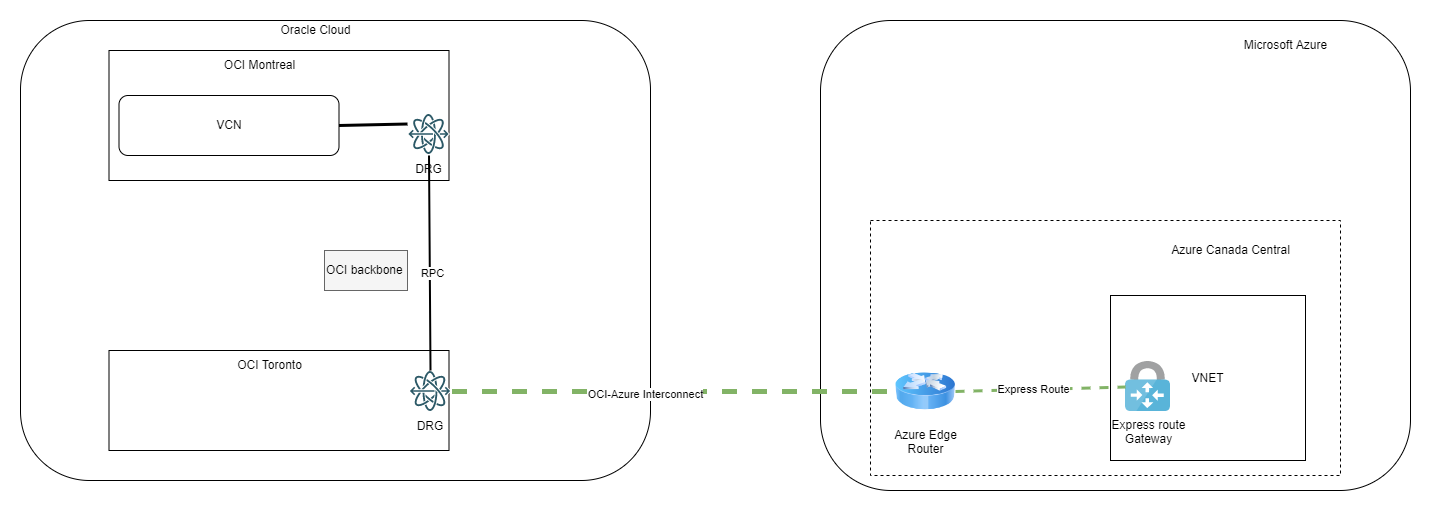
In OCI there is a construct called Remote Peering Connection which uses the OCI backbone to link two OCI regions. For example, if you have your workloads in the OCI region Montreal you can use the RPC to connect to the region Toronto where the Interconnect is available, like in the diagram below:
One important note is that the RPC will not carry FastConnect traffic with the default settings. To enable the RPC to learn the subnets coming in on the FastConnect BGP you need to:
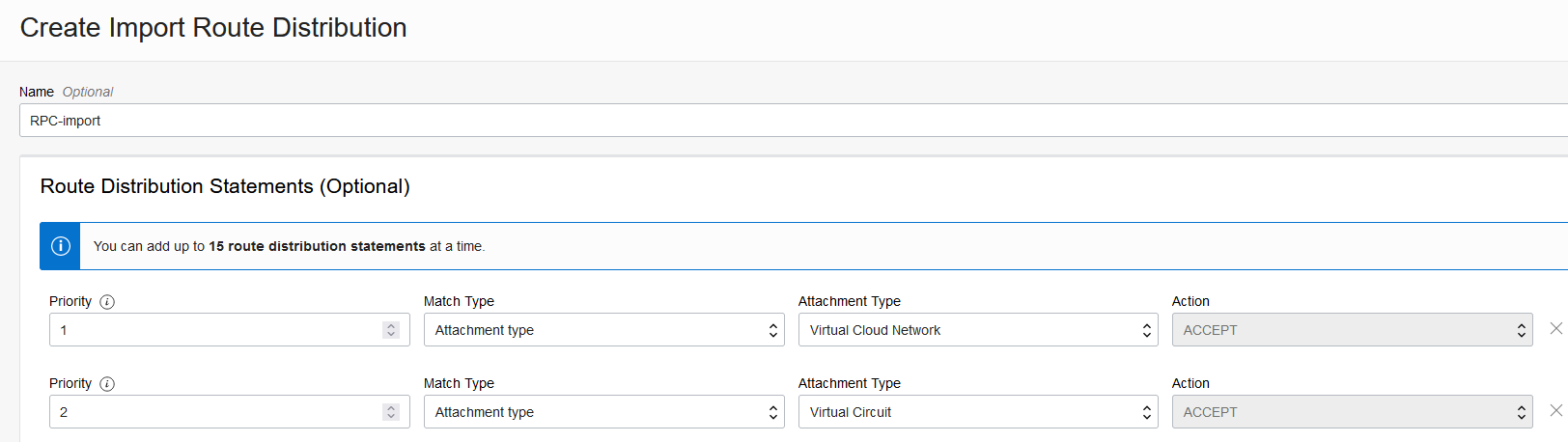
- Create a custom Import Route Distributions list in the DRG
- Assign the Import list above to the RPC DRG route table
The custom list should look similar to this:
Azure
Microsoft provides a few options but we will only focus on the ExpressRoute SKUs which are:
- Local: the circuit and the ExpressRoute Gateway must be in the same metro area
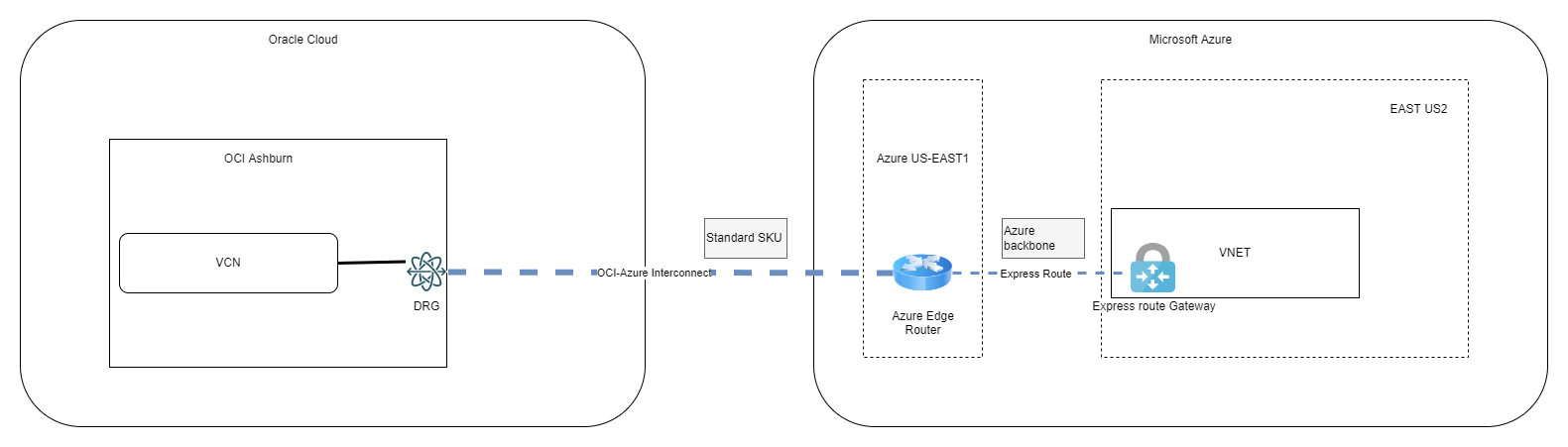
- Standard: the circuit and the ExpressRoute Gateway must be in the same Geopolitical area (ex: North America)
- Premium: the circuit and the Express Route Gateway can be in any two regions around the world
By leveraging the Standard SKU we will be able to peer a circuit built in a region in North America to an ExpressRoute Gateway built inside a VNET in any other region in North America, like in the example below:
Please note that there are different costs associated with using the different ExpressRoute types.
Challenge 2 – Multiregion deployment
What happens if you have resources in multiple regions in both OCI and Azure. Let’s explore some options.
a) We have the option to use OCI’s RPC and Azure’s ExpressRoute SKUs to use a single Interconnect between the clouds, like in the diagram below:
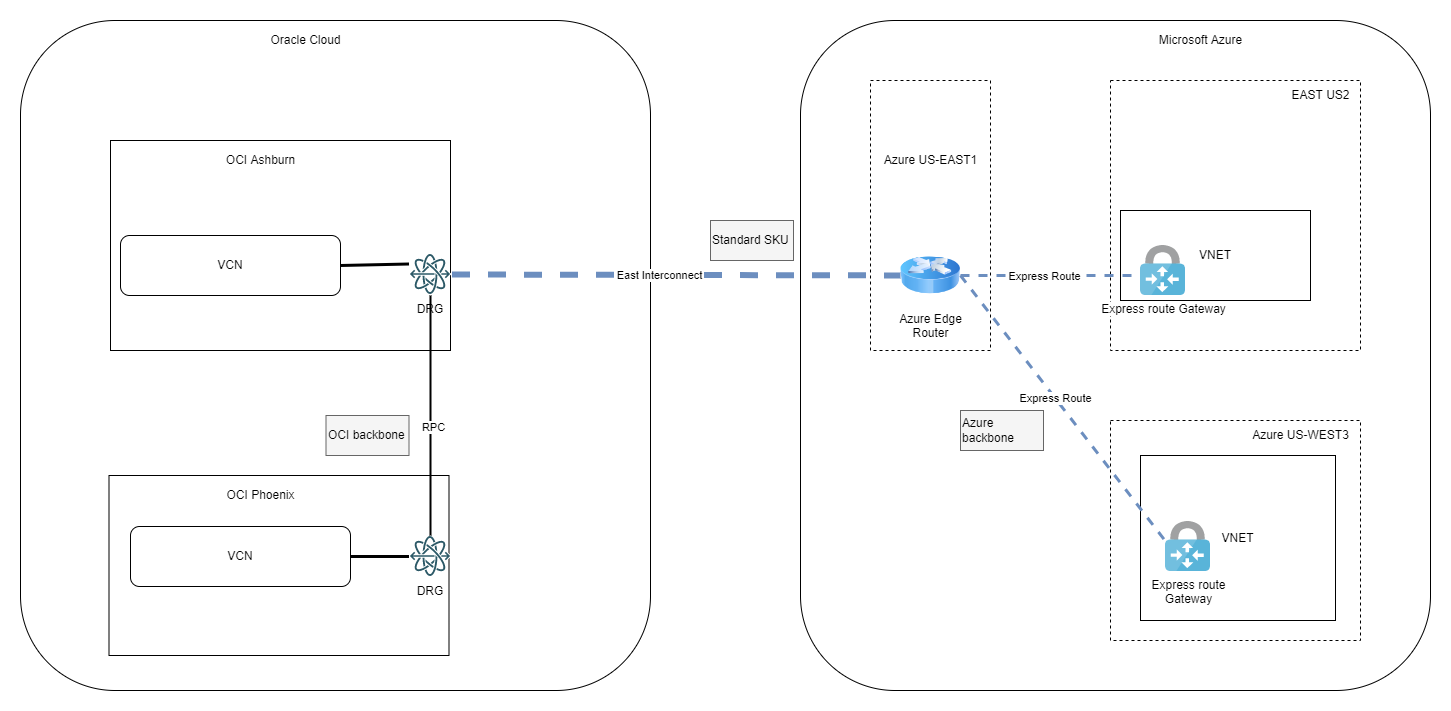
The Interconnect is built upon 2 redundant physical links so it has built-in redundancy but it still uses the infrastructure in a small geographical region which might be impacted by local disasters. Furthermore, latency between the remote regions (Phoenix to Azure West3) might be an issue for your applications.
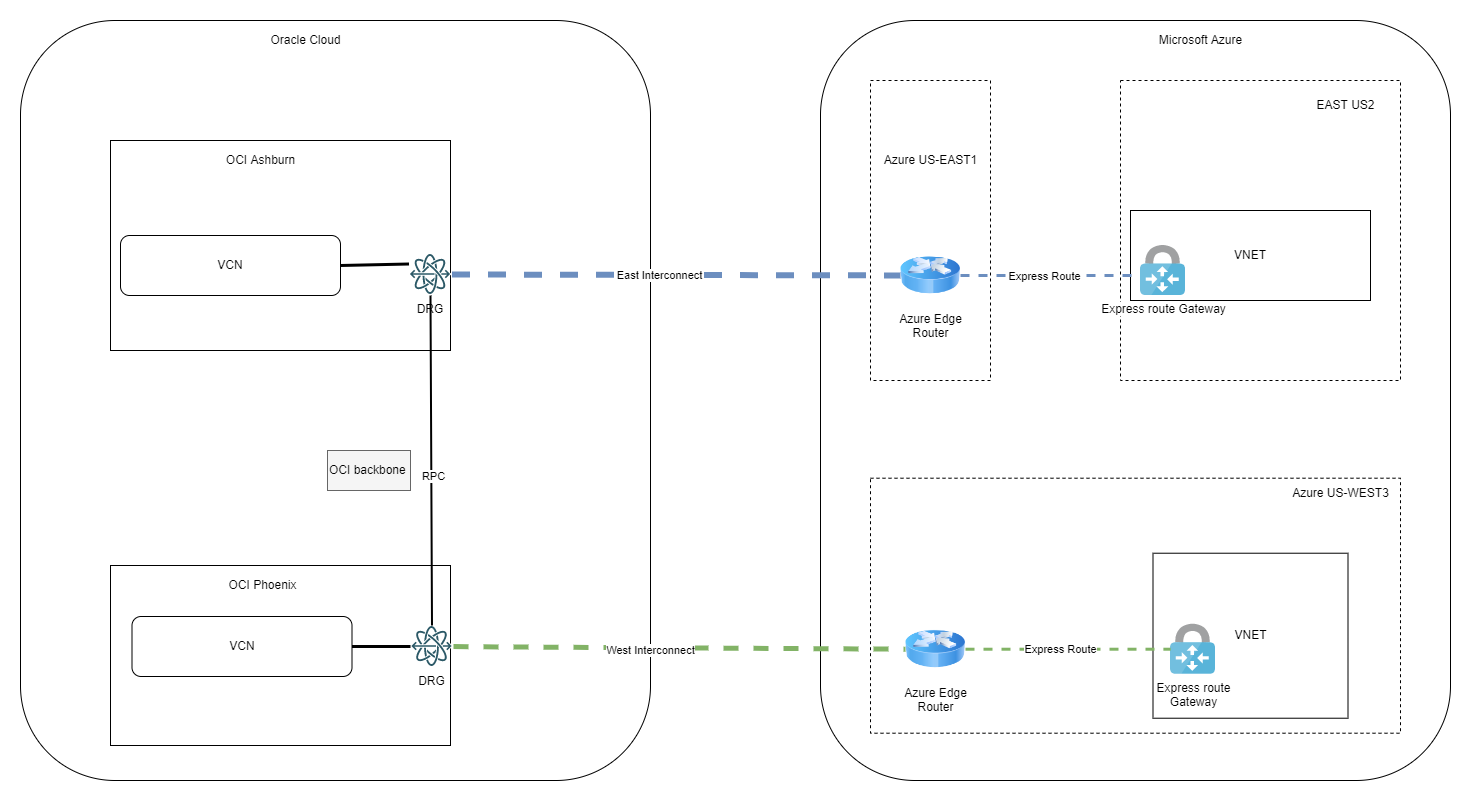
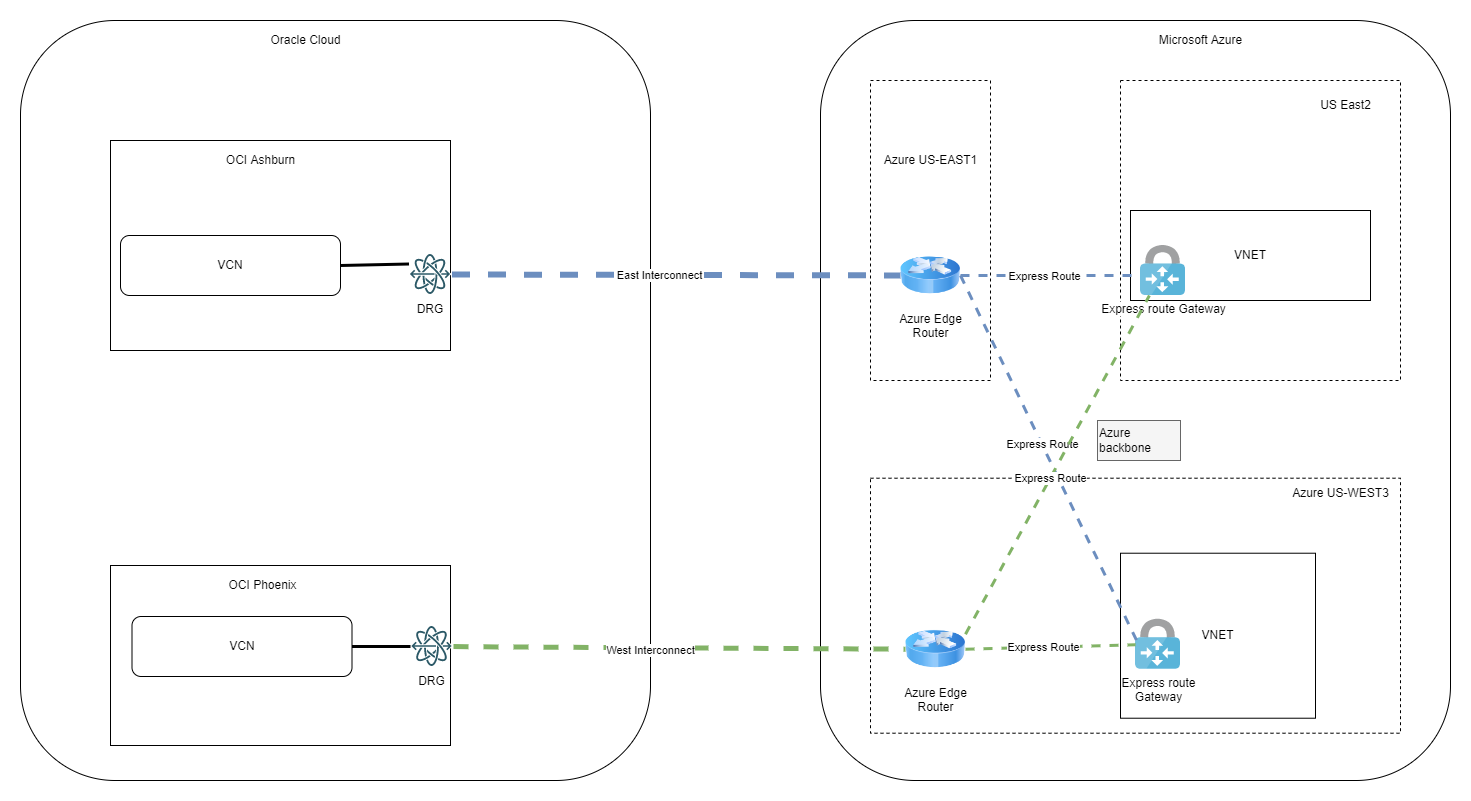
b) We can enhance the scenario above by building a second Interconnect. The connectivity between the clouds cross region (OCI East to Azure West or OCI West to Azure East) can be carried by either OCI’s backbone or Azure’s backbone, depending on your choice for the implementation:
OCI backbone:
Azure backbone:
While this approach is fine, it still does not provide a highly available network path between all regions.
c) Full mesh with redundant paths between the clouds
Can we build an architecture where all the regions from both clouds can talk to each other on multiple Interconnect links and can those links provide a redundant path? Yes, we can, but it requires some additional routing configuration.
The Interconnect is built on top of eBGP, however there are some limitations:
- You cannot configure BGP parameters (ex: path-prepend) on either side; Azure does provide “Local preference” capabilities but that only affects one direction of the traffic
- Each cloud link will announce its known prefixes as directly connected regardless if it’s the local region or the remote region.
So, if we build two Interconnect links and announce all OCI and Azure prefixes on both, we will end up with multiple paths between the two clouds with identical priority which is never good as the routing might become asymmetrical. The way around that is to use OCI’s DRG routing capabilities with static entries.
The architecture would look like this:

With this architecture, each Interconnect provides a redundant path for the other Interconnect. Let’s take the example of Azure East US2 traffic to OCI Ashburn:
– Normal path: Azure East US2 -> Azure East US1 -> Interconnect -> OCI Ashburn
– Backup path: Azure East US2 -> Azure West US3 -> OCI Phoenix -> RPC -> OCI Ashburn
In part 2 we will do a demo on this exact scenario.