
1. Introduction
Oracle Private Domain Name System (DNS) allows you to use your own private DNS domain names and fully manage the associated zones and records to provide hostname resolution for your applications running within Virtual Cloud Networks (VCNs), between VCNs, in your on-premise environment, or another private network. In this blog we will look deeper into some of the common scenarios for deploying Private DNS.
Private DNS – Components and OCI default functionality
Before we dive into the scenarios let’s do a quick review of the basic components:
- Private DNS Zones: Private DNS zones contain DNS data only accessible from within a VCN, such as private IP addresses. A private DNS zone has similar capabilities to an internet DNS zone but provides responses only for clients that can reach it through a VCN.
- Private DNS Views: A private DNS view is a collection of private zones. You can reference private views from a resolver to manage how DNS queries are answered. A zone can only belong to a single view. Any given view can be used by an arbitrary number of resolvers, allowing you to share private DNS data across VCNs.
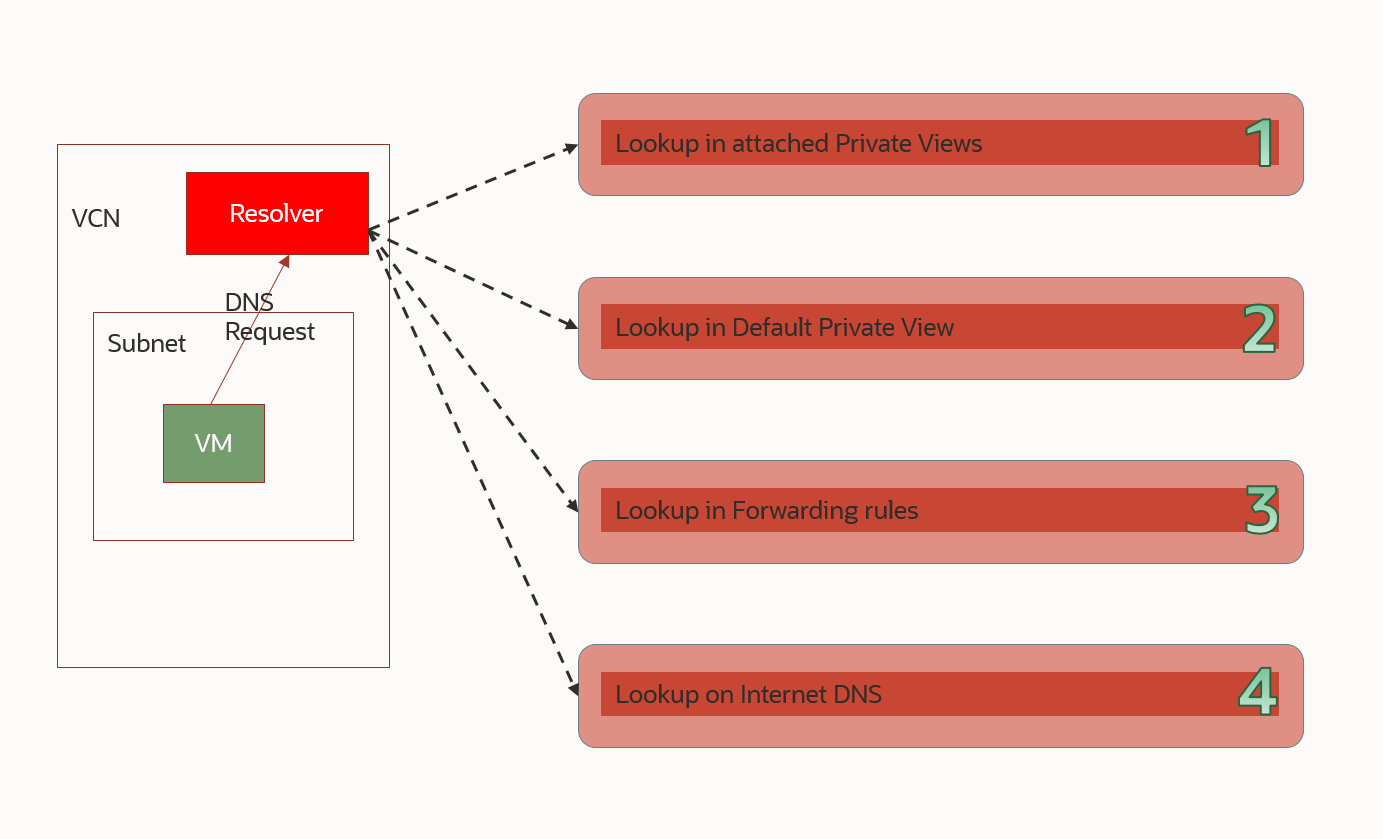
- Private DNS Resolver: A private DNS resolver provides responses to DNS queries. It provides responses by checking each customer-referenced view in order, then the default view, then each rule in order, and finally by using internet DNS.
- Private DNS Resolver Endpoints: Resolver endpoints come in two flavors. The listening endpoint allows the DNS Resolver to answer DNS queries coming from outside the VCN such as on-prem systems and other resolvers. The forwarding endpoint allows the DNS resolver to query a remote DNS as defined in the Forwarding rules.
All these components are linked together and can be configured in various ways to support more complicated scenarios which we will look into later in the blog.

Next, let’s understand what the OCI default behavior is. When you deploy a VCN, a subnet, or a compute instance, the DNS system works in the background to provide full functionality. A quick example can be seen below:
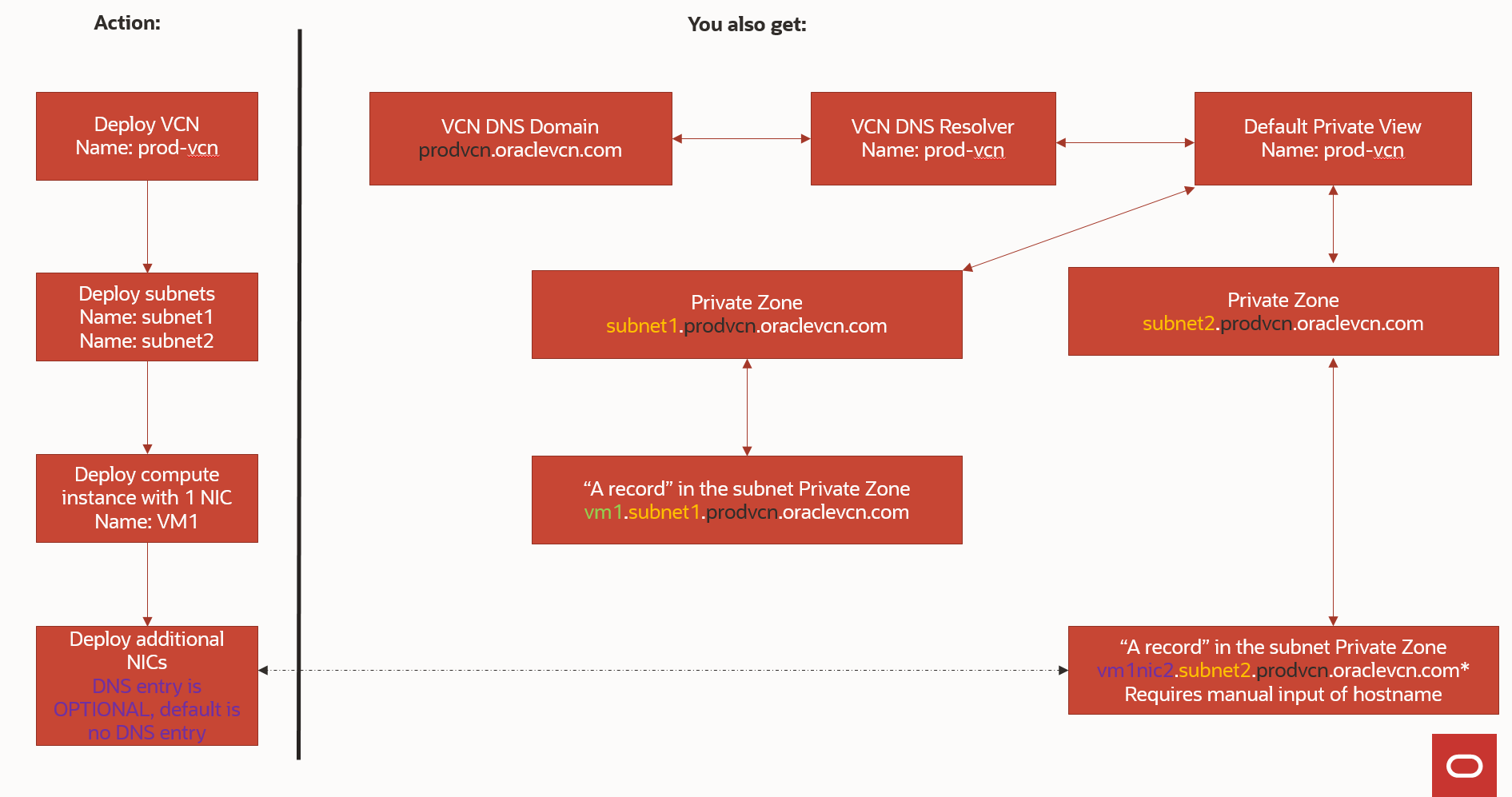
Once you deploy the VCN you get a dedicated VCN Resolver where you can add additional Private Views and Private Zones. Please note that Oracle will not create any DNS entries in your Custom Private Zones, you will need to manage those entirely.
One final, important, note in this introduction is that the VCN DNS Resolver will try to answer each query by looking into the configuration, with different priorities, as shown below:
For a more comprehensive read on Private DNS Components please check the official documentation: https://docs.oracle.com/en-us/iaas/Content/DNS/Tasks/privatedns.htm
2. Common scenarios
Let’s discuss some of the most used deployment scenarios in relation to OCI Private DNS. We will start from the simplest example and move on to more complicated ones.
Scenario 1 – Multiple VCNs in the same Region and the same OCI Tenancy
Let’s look at a scenario where the client has 3 VCNs deployed in the same region, all peered together through a Dynamic Routing Gateway (DRG) for network connectivity. The easiest way to have the DNS resolvers know about the other VCNs domains is to attach the Private Views of each Resolver to the other Resolvers, as shown below:
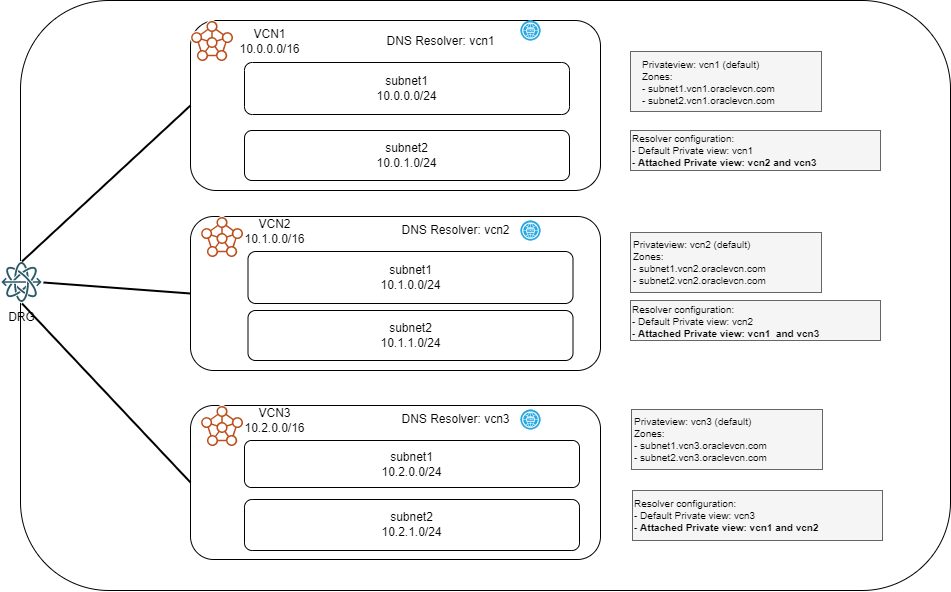
Advantages:
- Easy and fast to set up
- No DNS traffic between VCNs
- Can easily grow to more VCNs or to more custom Private Views
- No endpoints needed
Disadvantages:
- VCNs must be in the same region
- VCNs must be in the same tenancy (different compartments are supported)
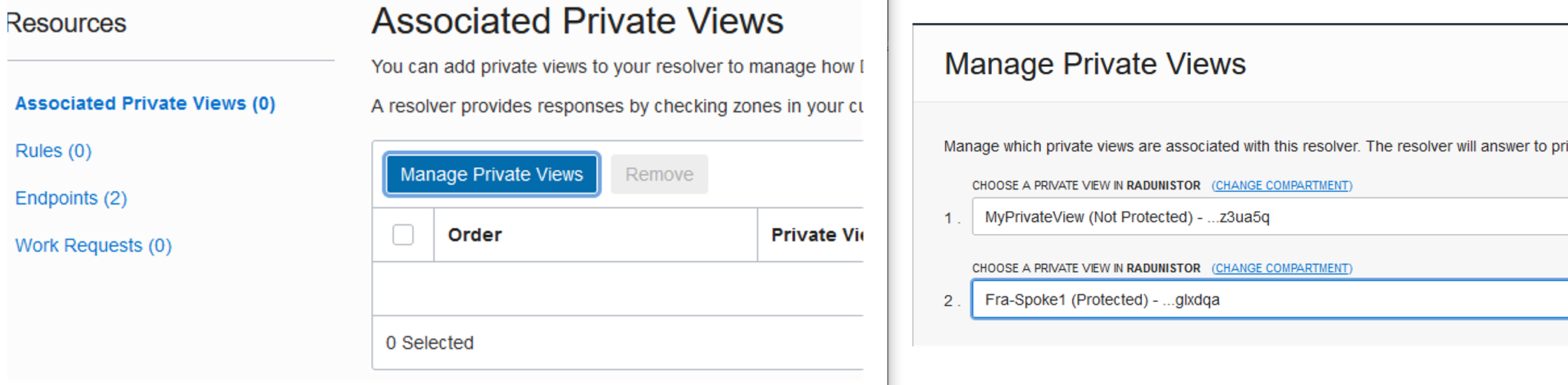
To implement this scenario you have to go each VCN Resolver and attach the other Private Views:
Go to Networking -> Virtual Cloud Networks -> Click on the VCN to see details

Click on the DNS Resolver name. Click on Manage Private Views and attach the other Private Views.
Scenario 2 –VCNs in different Regions and/or different OCI Tenancies
In the previous scenario we covered the use case of multiple VCNs in the same region and in the same OCI Tenancy, but what happens if you have multiple tenancies and even VCNs in other Regions? In this case, we need to leverage the functionality of DNS Resolver Endpoints and Forwarding rules. Let’s look at a simple scenario, with 2 VCNs in the same OCI Region but different Tenancies:
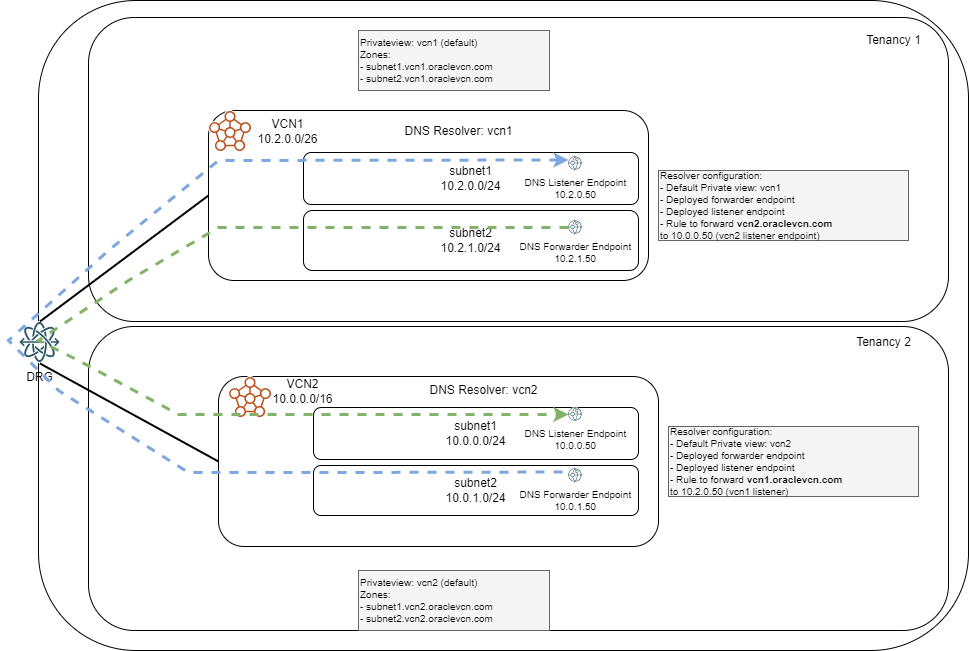
In this scenario, each VCN will have:
- Only its own Private View attached
- One DNS Resolver Endpoint type Forwarding to connect to the other VCN
- One DNS Resolver Endpoint type Listening to respond to queries from the other VCN
- Set of forwarding rules for the Resolver to follow
Advantages:
- VCNs can be in different tenancies
- VCNs can be in different regions
- Forwarding rules can be even more specific (ex: only certain subnets) than the whole VCN domain
Disadvantages:
- Does not scale, each additional VCN introduces more configuration and DNS traffic
- It becomes hard to manage if many custom Private views are used
To deploy Resolver Endpoints, go to the VCN details and click the resolver name:
Next, click Endpoints on the left and click “Create Endpoint”. Deploy both type of endpoints by selecting a VCN Subnet.


The endpoints will each take 1 IP from the subnet. Note that the Endpoints are Highly Available across the Availability Domains.
Next, we need to create forwarding rules so click Rules on the left and Manage rules. Input all the domains of the target VCN, select your Forwarding Endpoint and input the IP of the LISTENER in the other VCN.
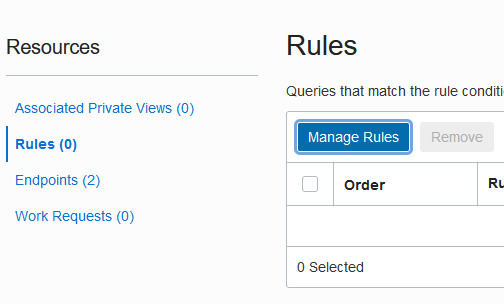

Next, do the reverse rules in the other VCN and everything should start to work.
One last thing to note is that the routing and security rules on both VCNs will need to be adjusted to allow Protocol UDP Port 53 flows between the endpoints. The source will always be the Forwarding Endpoint IP and the destination will be the Listening Endpoint IP on the other side.
Scenario 3 – Hybrid DNS with on-prem and full DNS forwarding for scrubbing
One interesting scenario is to forward all DNS traffic to a remote location for additional security. The remote location can have a 3rd Party tool for DNS scrubbing of “bad” domains (ex: Cisco Umbrella). Let’s look at an example were we have 3 VCNs in the same region and the same tenancy:
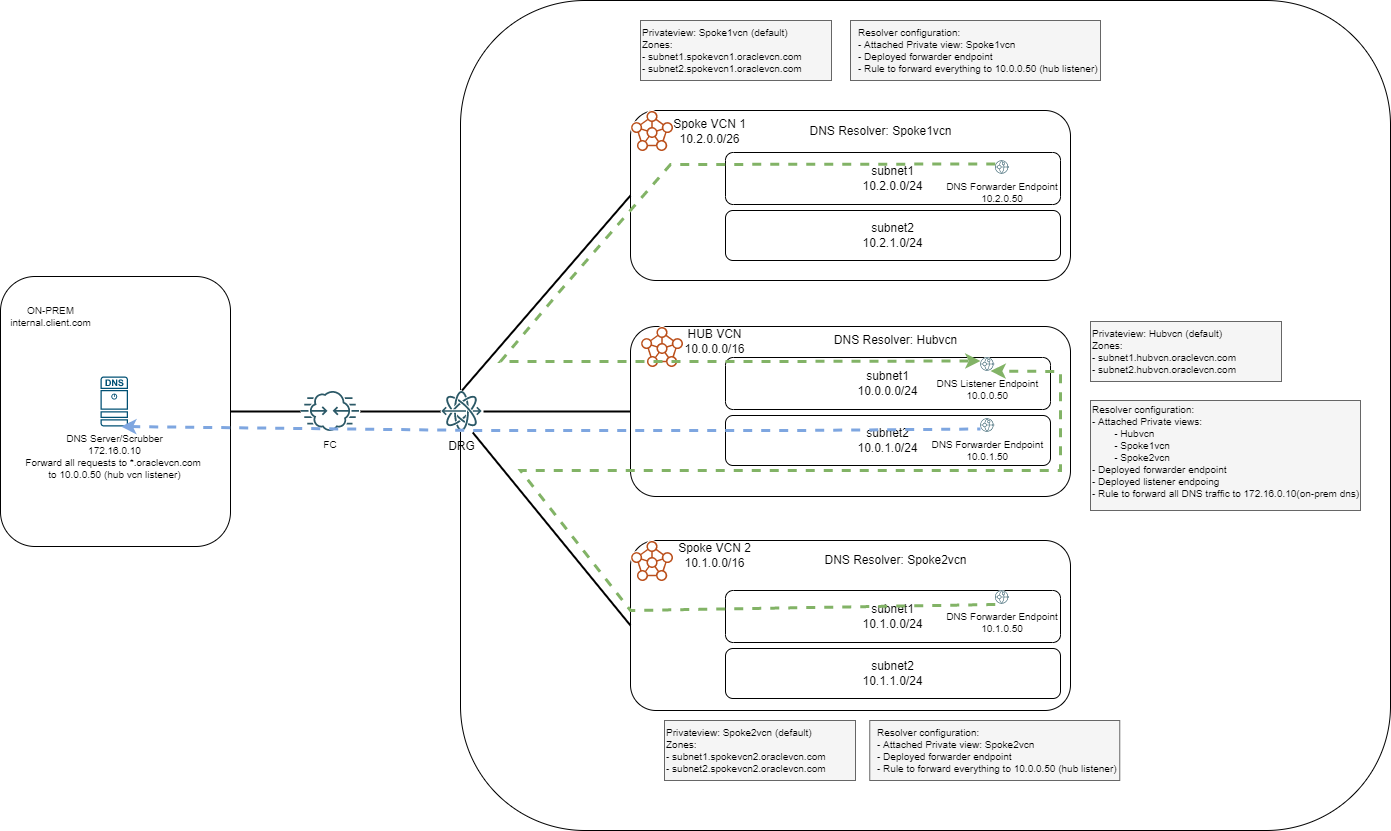
In this case we will do the following:
- Designate one of the VCNs as a DNS Hub so we keep all forwarding configuration in a single place
- The DNS HUB Resolver will attach all the Private Views in the region, including the default ones from the other Resolvers
- The DNS Hub will have a “catch-all” rule to forward all non-OCI DNS traffic to your on-prem scrubber
- The other VCNs, designated Spokes, will have the same “catch-all” rule to target the HUB Listener
- The on-prem DNS should also have a rule to forward all *.oraclevcn.com traffic to the DNS HUB VCN
The diagram above contains all the configuration items necessary to implement this setup with the only comment that the forwarding rule will have NONE as the forwarding condition ( “none” means no specific rule, forward everything).
Scenario 4 – Hybrid DNS with on-prem and a Disaster Recovery OCI Region
Let’s look into a more complex scenario, where we have the following elements:
- Primary OCI Region with 3 VCNs in the same tenancy
- DR OCI Region with 1 VCN
- Connectivity from the Primary Region to a client datacenter via Fast Connect or IPSEC VPN
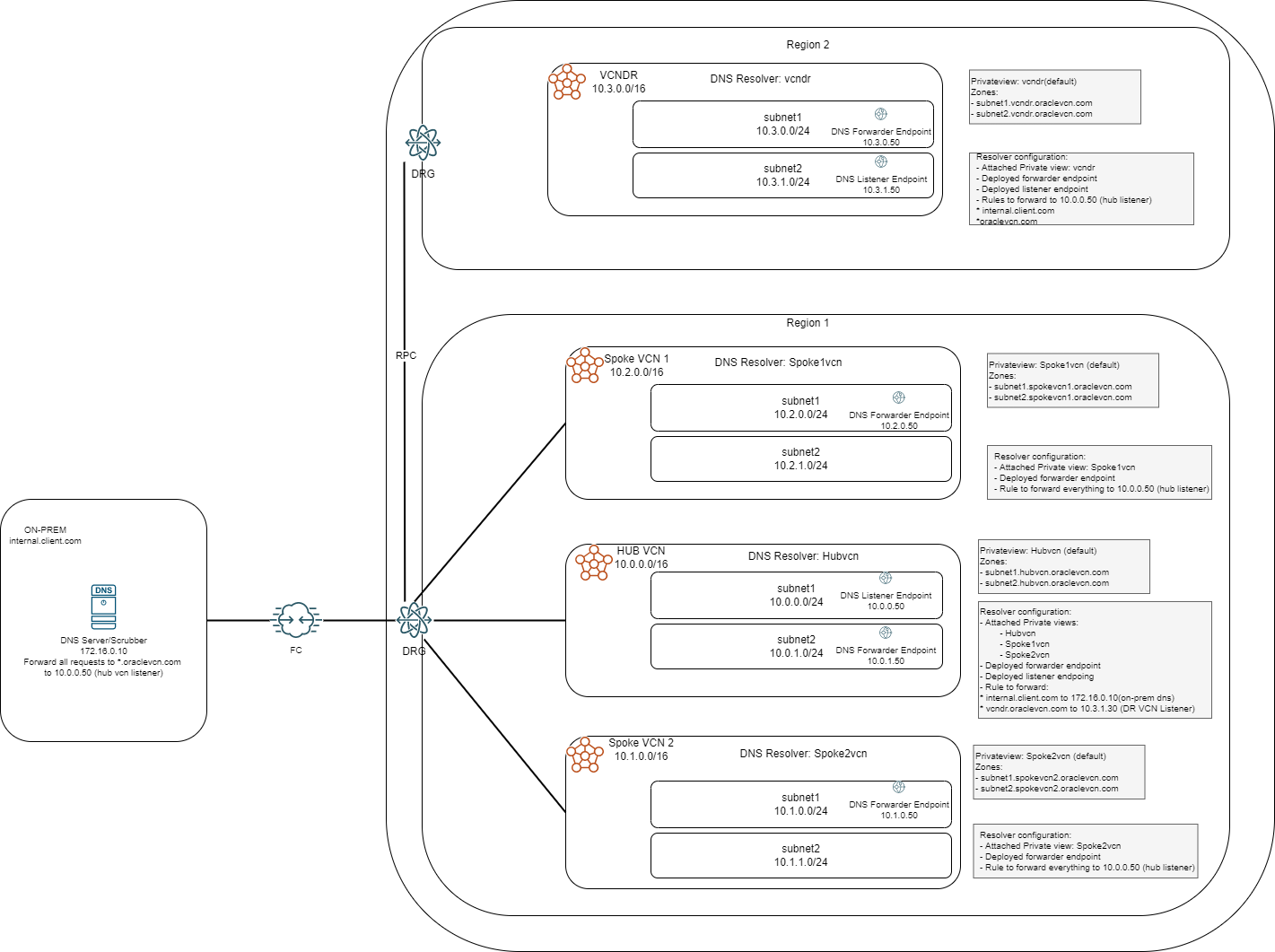
Let’s take each VCN and discuss the implementation. Similar to scenario 3, one of the VCNs in the primary region is designated as a DNS HUB, a role which any VCN can take as it is just a virtual assignation for a central place to aggregate most of the forwarding configuration.
Configuration details:
- Spoke VCNs (all the VCNs in the region that are not the HUB) will only be able to resolve their internal domains so they will go to the HUB VCN for any other domain (a “catch-all” rule in the DNS forwarding rules)
- The HUB VCN will act like a central place to manage DNS resolutions and forwarding configuration:
- It will know all the domains in the region because it will have all the Private Views attached (like in scenario 1)
- It will have forwarding rules for on-prem domains and DR site domains (scenario 2)
- The DR VCN will target the HUB for both on-prem domains and Primary region domains. The Hub will answer directly for OCI domains and forward the query for on-prem domains to the on-prem DNS server
- The on-prem DNS server will target the HUB for any *.oraclevcn.com queries and will answer to queries from the HUB for the on-prem domains
3. Conclusion
The OCI Private DNS solution can be used in various scenarios for OCI infrastructure deployments and can easily integrate with existing customer on-prem DNS systems.
IMPORTANT NOTE: The forwarding rules in the DNS Resolver are working based on priorities. If a rule matches the request then the resolver will never try another rule even if the query fails with time-out, so creating two rules for HA targeting two different on-prem DNS servers will not work. Instead, we can use an OCI Network Load Balancer that has DNS capabilities, as explained in this blog post.