
With the newly VTAP functionality we added on OCI, we can create central logging servers by collecting the logs received from the VTAP. In this new blog post we will integrate the VTAP with the Linux logging tool called RSyslog.
The VTAP configuration will not be explicitly listed in this blog, the step-by-step configuration process was fully covered in the blog Using VTAP to Assist in Troubleshooting. The main objective is to integrate the VTAP with RSyslog on a Linux VM.
RSyslog is the rocket-fast system for log processing.
You need to make sure that the Security Lists or Network Security Groups are configured to permit the traffic between the subnets or VMs.
1. Networking Topology
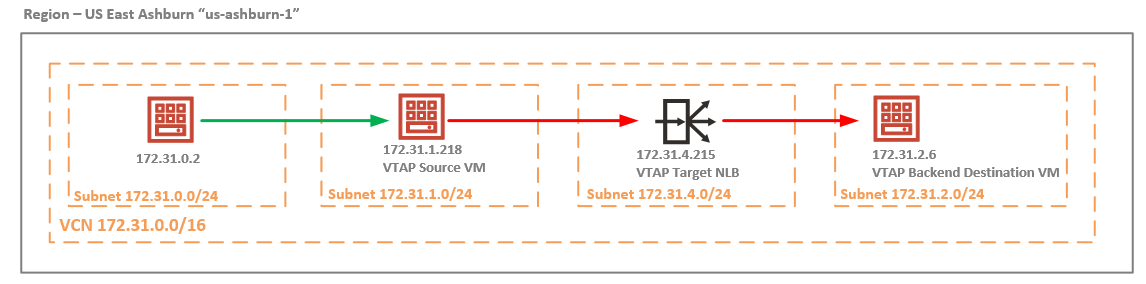
The use case analyzed is related to the ingress traffic received by the 172.31.1.218 from 172.31.0.2 denoted by the green line that needs to be mirrored using the VTAP configuration: VTAP Source VM -> VTAP Target NLB -> VTAP Backend Destination VM denoted by the red line. On the VTAP Backend Destination VM, the RSyslog will be configured and the mirrored traffic will be logged into the log file created by the RSyslog.
2. Analyzing the VTAP Backend VM mirrored traffic received
In order to configure the RSyslog on the VTAP Backend VM at 172.31.2.6, let’s analyze how the mirrored traffic looks like. In order to complete this step:
a) we will start a tcpdump matching the IP address of 172.31.1.218 (the source of the mirrored traffic – we know that the NLB preserves the source and destination IP addresses), the tcpdump capture will be saved as a .pcap file;
b) generate the IP traffic from 172.31.0.2 to 172.31.1.218;

The IP traffic was captured, let’s download the vtap.pcap file and analyze the content:
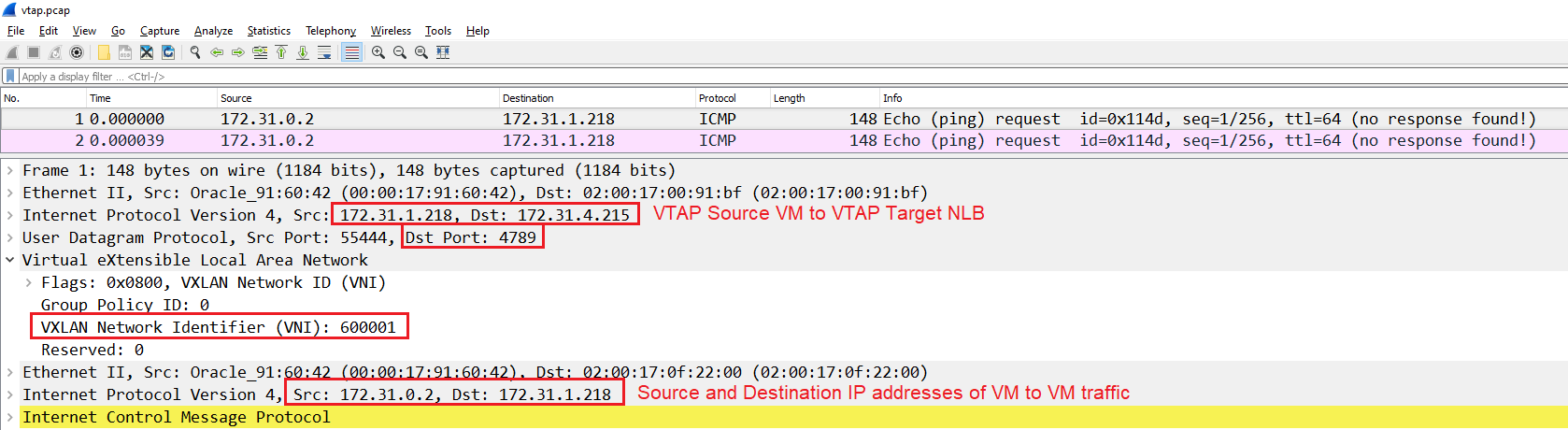
First, there is an outer IP header exposed and used for routing which has the source IP address of 172.31.1.218 and the destination being the NLB (as per the VTAP configuration). Next, we can see that the VTAP on OCI uses UDP on port 4789. Then we have the VNI configured for this mirrored session.
The entire initial IP packet is encapsulated including the L2 information.
3. RSyslog configuration
The Rsyslog configuration will be performed on the VTAP Backend Destination VM, it will act as a log server for the VTAP mirrored traffic.
3.1 Install the rsyslog using the command: sudo yum install rsyslog
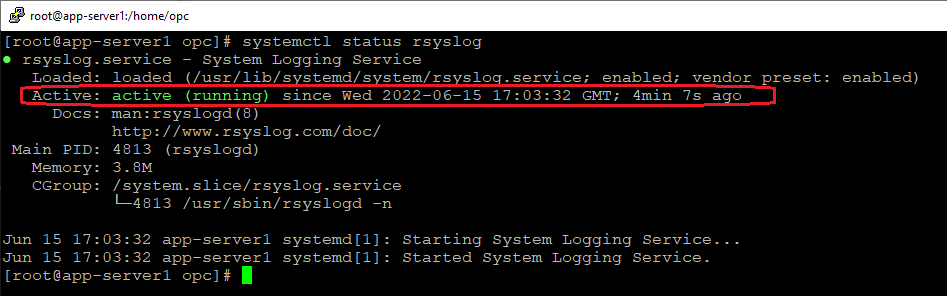
3.2 Enable and Start the rsyslog service using the commands: enable -> sudo systemctl enable rsyslog, start -> sudo systemctl start rsyslog and verify the status with the command systemctl status rsyslog:
3.3 RSyslog uses a configuration file located under /etc named rsyslog.conf, we will edit the configuration file and include the relevant information for port listening and log file creation:
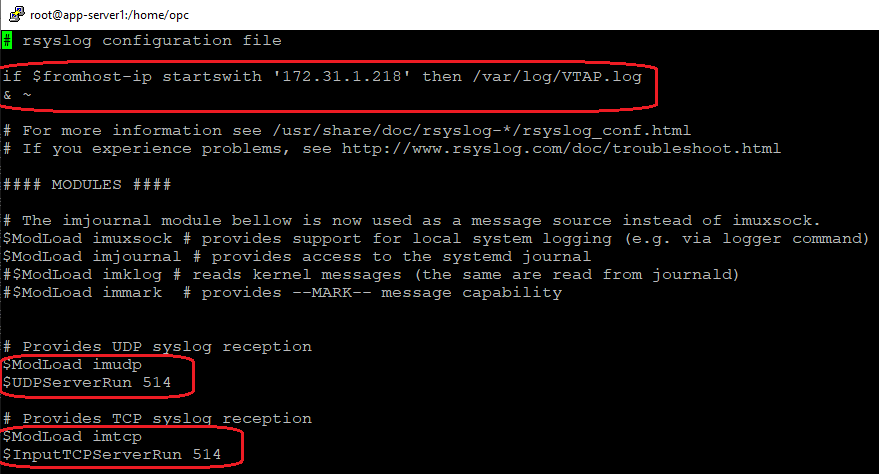
The first highlighted command will create the log file called VTAP.log under /var/log if the source IP address of the received log starts with 172.31.1.218. As we saw on the packet capture analyzed above, the source IP address of the mirrored traffic is 172.31.1.218.
The second and third commands relate to the ports used by the RSyslog, TCP/UDP 514:

After the above changes were performed, restart the rsyslog process using the command: sudo systemctl restart rsyslog. Make sure the TCP/UDP port 514 is permited at the VM firewall level using the commands: sudo firewall-cmd –permanent –add-port=514/udp , sudo firewall-cmd –permanent –add-port=514/tcp , sudo firewall-cmd –reload. In our case we will use UDP 514.
3.4 While the ping from 172.31.0.2 to 172.31.1.218 is still running, verify if the log file called VTAP.log was generated by RSyslog under /var/log:

That is strange, the log file should be created but it isn’t. The rsyslog.conf is correct, why the log file is not generated? The answer can be found in the packet capture explored at section 2. In order for the RSyslog to generate the log, it needs: the source IP address to be 172.31.1.218, the destination IP address needs to be 172.31.2.6 (the server itself), and the destination port needs to be UDP/TCP 514.
It is clear that only one condition is met, only the source IP address is the expected one. The destination IP address and the destination port are totally different than the expected ones. The destination IP address in the outer IP header is the NLB IP address (remember that the NLB preserves the source and destination IP address of the traffic).
Question: how we can make the destination IP address and the destination port match 172.31.2.6 and UDP 514? To answer this question, we need to be familiar with Linux IPTables chains. That being said, we will use the PREROUTING chain and perform a DNAT for destination IP address and port:
iptables -t nat -A PREROUTING -s 172.31.1.218 -d 172.31.4.215 -p udp –dport 4789 -j DNAT –to-destination 172.31.2.6:514
The above command is having the following logic: if the source IP address of the incoming packet is 172.31.1.218 and the destination IP address is 172.31.4.215 and port UDP 4789 then change the destination IP address from 172.31.4.215 to 172.31.2.6 and the destination port from UDP 4789 to UDP 514 and route the packet. The conclusion we draw is this entry is analyzed before the routing process (hence the PREROUTING chain).
After the above command was added, let’s check if the log file called VTAP.log was generated by the RSyslog under /var/log:

Our log file is created and ready to be analyzed.