
In this new blog post, we will discuss the possibility to include the information related to the public IP address in the OCI VM metadata.
At any time, the OCI VM metadata can be obtained by using just a simple cURL command for Linux or Windows (if the Windows version includes the curl command):
curl -H "Authorization: Bearer Oracle" -L http://169.254.169.254/opc/v2/instance/
You can read more about the instance metadata in the OCI public documentation at this link
By default the OCI VM metadata once called, from the IPv4 address perspective, will include only the information regarding the IP address obtained from the VCN, thus only the private IP address. The public IP address is not directly assigned to the VM VNIC, so, this information is not included in the metadata.
Why is the information regarding the public IPv4 important to be present in the metadata? This is a valid question.
Let’s explore one use case when this information is very important. Suppose that an OCI VM is originating a session to an external host via the Internet Gateway. If the connection is initiated via the Internet Gateway to the external host, that means the OCI VM sits on a public subnet and has a public IP address assignment to the private IP object. In some use cases, the payload must contain the information regarding the VM public IP address. This is needed for the case the external host needs to initiate a connection back to the OCI VM for certain reasons. The initiated connections are independent from the session initiated by the OCI VM.
On the OCI VM we have a configuration file which expects to extract the public IP address information from the instance metadata, create the payload and initiate the connection to the external host. By default, the instance metadata does not include the desired information. Let’s query the instance metadata for a test VM and examine the information included:
[root@test-instance-iad opc]# curl -H "Authorization: Bearer Oracle" -L http://169.254.169.254/opc/v2/vnics/

[ {
  "vnicId" : "ocid1.vnic.oc1.iad.abuwcljr6badzc6ikunn5jm2bxzeyfmocc5cw3brlil7ql7g6cd4hjrfpxza",
  "privateIp" : "198.18.0.9",
  "vlanTag" : 1914,
  "virtualRouterIp" : "198.18.0.1",
  "subnetCidrBlock" : "198.18.0.0/27"
} ]
As we can see, there is no information regarding the public IP address.
One very easy solution to include the desired IPv4 information in the instance metadata is to define a free-form tag. More about the free-form tag can be found in our public documentation at the link
The steps we are going to implement:
1. Note down the public IP address of the instance, for the test instance the public IP address is 150.136.146.31;
2. Create a free-form tag and include the public IP address:
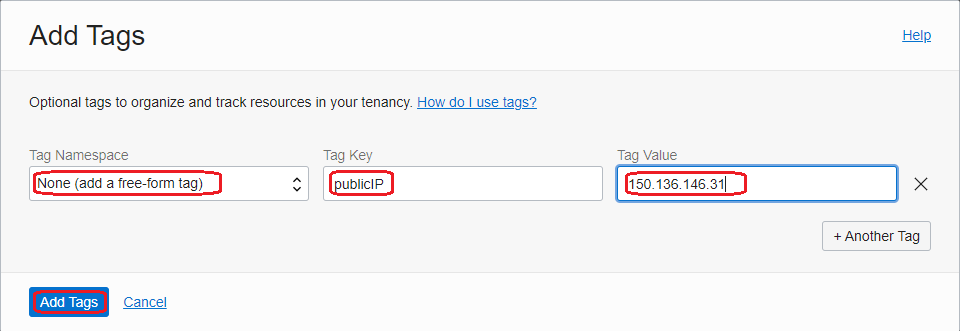
3. After adding the tag, wait few seconds and query the instance metadata and confirm the publicIP address information is included:
[root@test-instance-iad opc]# curl -H "Authorization: Bearer Oracle" -L http://169.254.169.254/opc/v2/instance/

---output ommited---

},
  "freeformTags" : {
    "publicIP" : "150.136.146.31"
  },
Now, our desired information regarding the public IPv4 address is included in the metadata. Very easy, isn’t it?