
Ben had earlier written a nice blog post on this topic. This blog post builds on it by introducing OCI WAF into the equation.
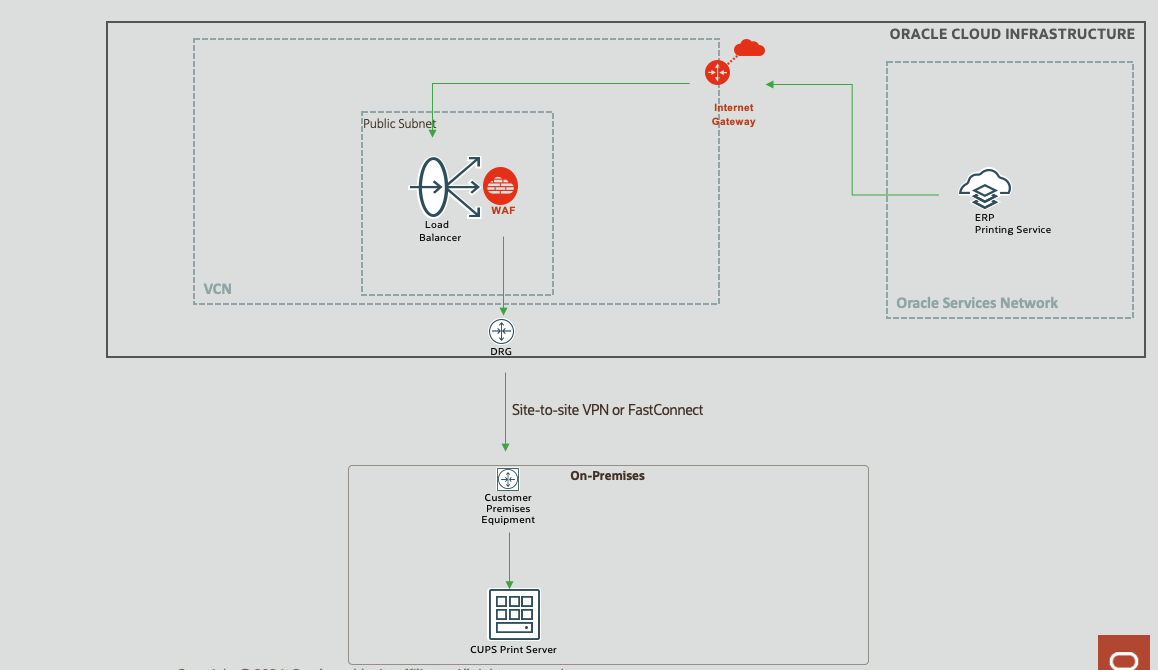
Fig 1
One of the requirements of the Fusion Cloud (e.g. ERP) printing service is that the printer uses IPP protocol. Most modern printers support IPP, however, many organizations also use a dedicated print server such as CUPS (Common UNIX Printing System) which supports IPP.
Why WAF?
Ben shows in great detail how to setup the infrastructure so that access to the on-premise print server is restricted only from the Oracle Cloud. So why WAF? IPP uses HTTP as the transport protocol which implies that the printing requests from the Oracle Fusion Cloud to the on-premise print server can be potentially exposed to web based attacks. While configuring the print server configuration in the Fusion Cloud, the URI of the print server has to be provided, e.g., ipps://printer.acmecorp.com/printers/printer1, where ipps is the scheme (Oracle Support document). This gets mapped to https://printer.acmecorp.com/printers/printer1 during transport. The requests are sent as POST messages. Since organizations should design for zero trust architectures, a WAF nicely fits the bill of inspecting incoming requests and protecting the print server from malicious attacks.
WAF Features
To protect the print server, the following features of the OCI WAF can be used.
Access Control
Access control rules in the WAF can be set so that only POST HTTP messages are allowed. Also, WAF can ensure that the URL path in the requests have /printers/printer1 (which could be unique to your org), taking the example from the above section.
Rate Limiting
Rate limiting rules can be set to ensure that incoming requests are within the expected rate.
Protection Rules
OCI WAF provides a gamut of protection rules to protect against various types of attacks. For the print server use case, the following can be of particular interest.
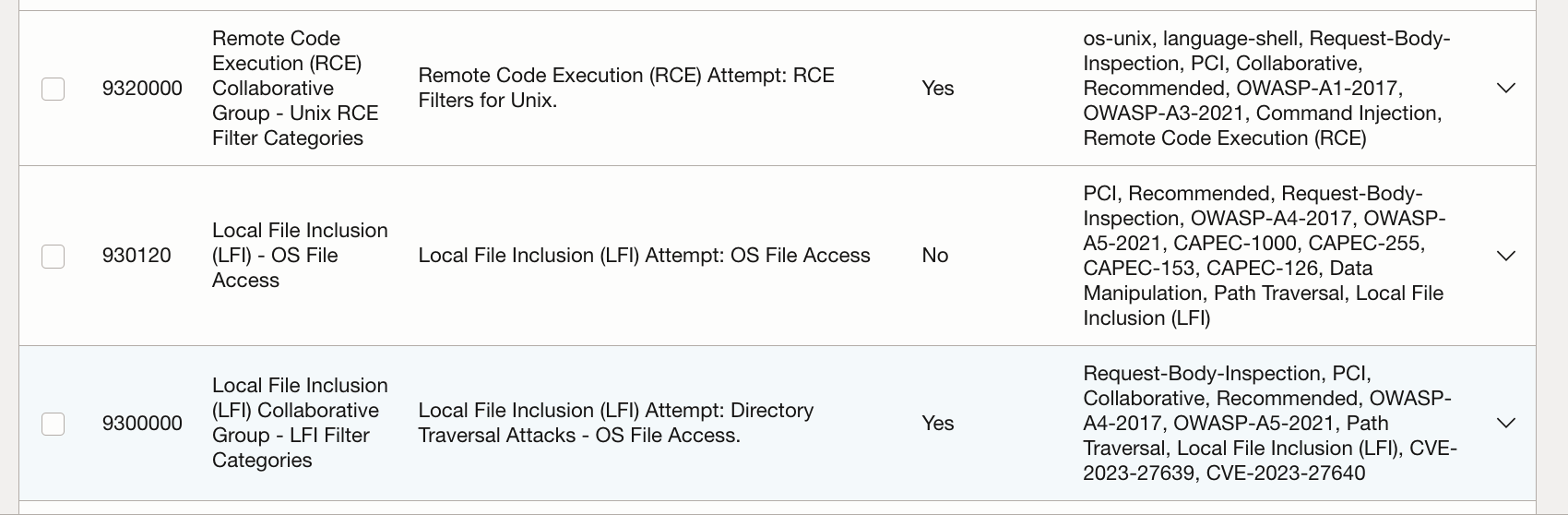
Fig 2
The above rules for access control and protections are not exhaustive, but simply highlight how OCI WAF can help in securing access to the on-premise print servers. A more comprehensive set of rules of WAF has to be devised for a real world scenario.
Configuration Setup
The configuration steps are similar to the steps in Ben’s post. The only changes required for incorporating the WAF will be three-fold:
i) Creare a suitable WAF Policy and attach it to the load balancer.
ii) The printer certificate for the domain “printer.acmecorp.com” should be now installed at the load balancer (using OCI Certificates Service).
iii) Instead of configuring SSL tunnelling at the load balancer, terminate SSL at the load balancer and configure a backend SSL.
With the plumbing in place, you can have the WAF start inspecting requests to the print server.