

Oracle Integration Cloud is a fully managed, preconfigured environment that gives you the power to integrate your Oracle Cloud Infrastructure applications and services and on-premises applications.
With Oracle Integration Cloud, you can:
- Develop integrations to design, monitor, and manage connections between your applications.
- Create process applications to automate and manage your business work flows.
- Build custom web and mobile applications.
- Store and retrieve files in Oracle Integration using the embedded SFTP-compliant file server.
- Create integrations that use B2B e-commerce to extend business processes to reach trading partners.
As more customers are onboarded to Oracle Cloud Infrastructure (OCI) and run their critical integrations between OCI cloud services. Having a robust observability and monitoring solution for Oracle Integration Cloud (OIC) is pivotal for ensuring the efficiency, reliability and security of Oracle Integration solutions. It enables the organizations to maintain oversight over their integrations, diagnose issues promptly, and optimize performance.
Out-of-the-box Oracle Integration Cloud monitoring dashboards
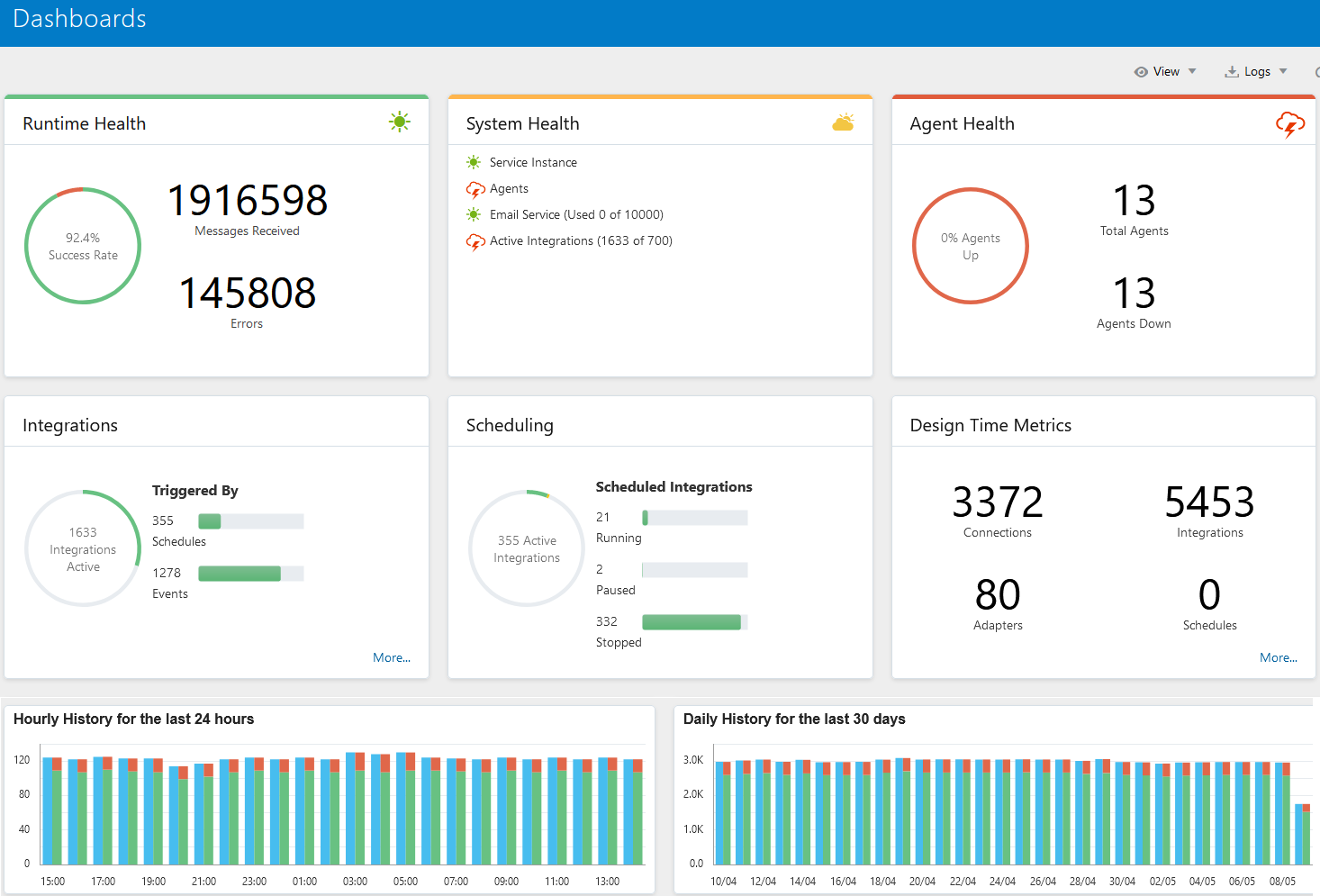
Oracle Integration Cloud offers out-of-the-box monitoring capabilities such as using the Oracle Integration dashboard to monitor and manage your integrations in the runtime environment.
- Runtime Health
- System Health
- Agent Health
- Integrations Stats
- OIC Scheduling
- Design Time Metrics
You can also view information about how your integrations are performing. You can find more details of OIC native monitoring dashboard in OIC documentation.
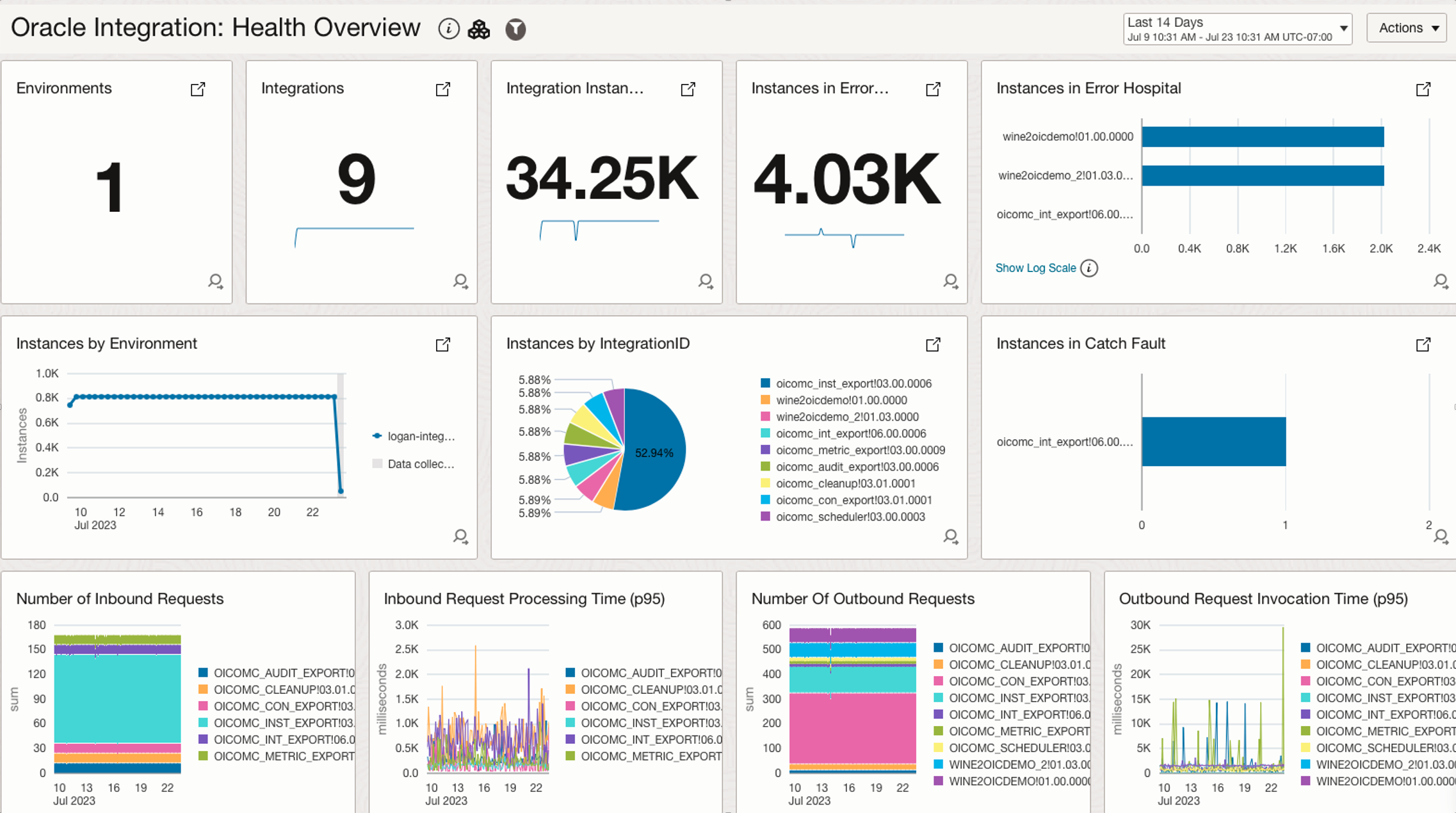
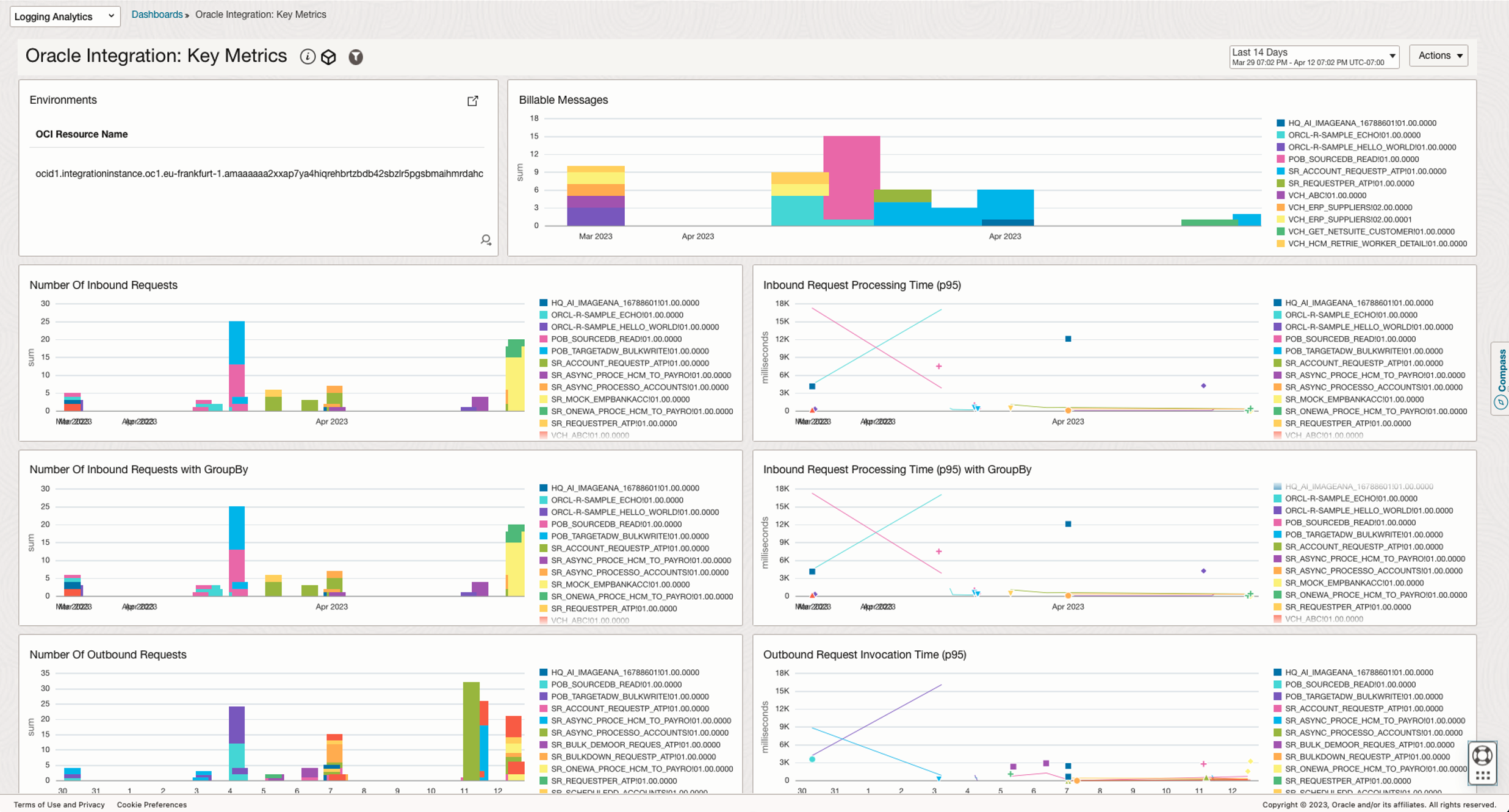
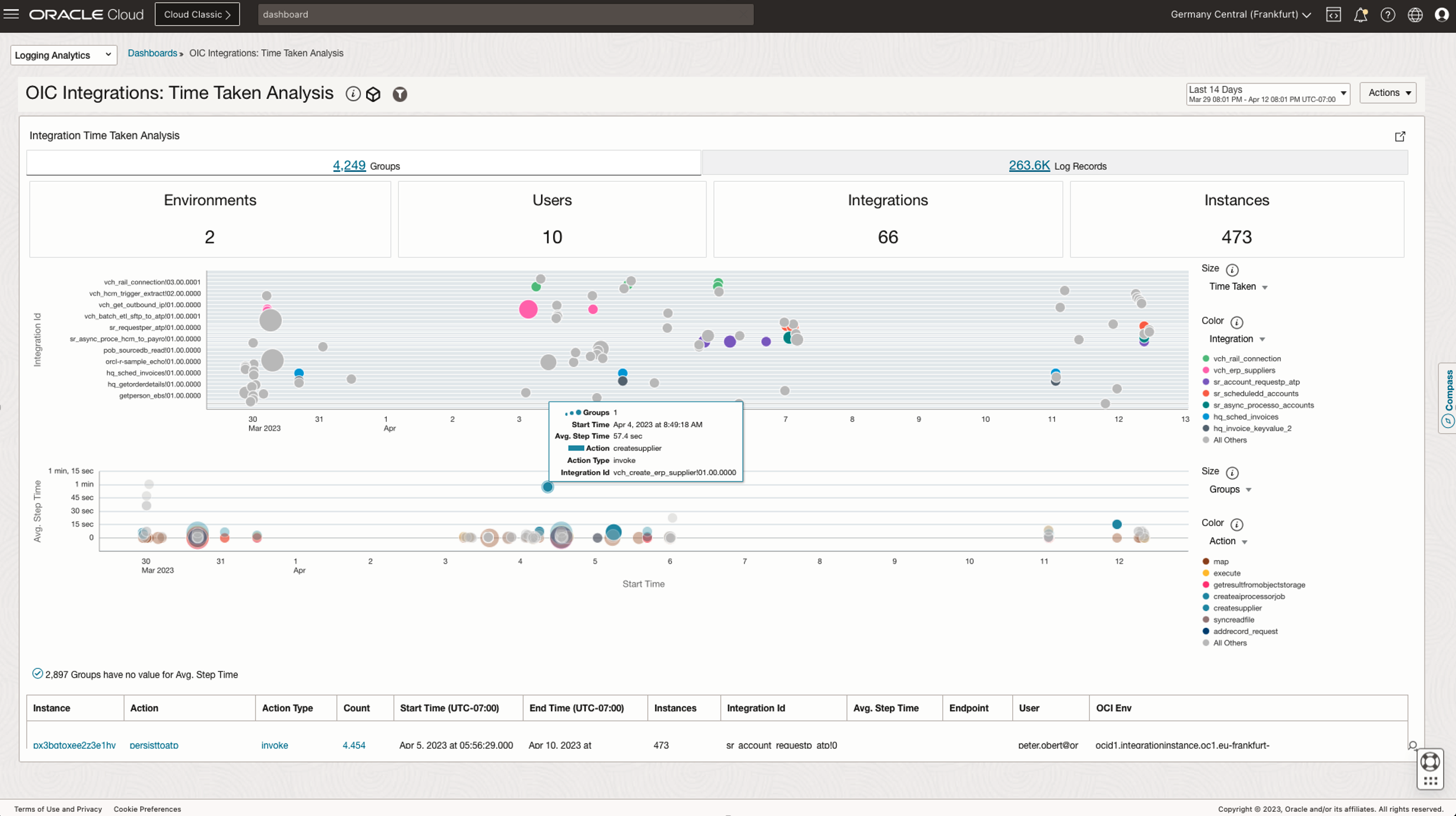
In the meantime, OCI Logging Analytics service takes the OIC logging and monitoring challenges further by delivering out-of-the-box OIC dashboards for all OCI customers. Oracle Logging Analytics is a cloud solution in Oracle Cloud Infrastructure that lets you index, enrich, aggregate, explore, search, analyze, correlate, visualize, and monitor all log data from your applications and system infrastructure.
OCI Logging Analytics takes the following OIC metrics and OIC activitiy stream logs as the telemetry sources for the out-of-the-box dashboards:
- OIC Service Metrics – Monitoring namespace: Integration
- OIC Activity Stream Logs – Logging Service Logs
Oracle Integration Cloud Design Time Audit Logs Use Cases
Oracle Integration Cloud also provides comprehensive record of changes and actions taken within the design-time environment of OIC. The Design Time Audit log data is instrumental for security, compliance, troubleshooting, and governance reasons. It provides a critical layer of visibility and control that is essential for managing the Oracle Integration Cloud instances.
- Infrastructure operation teams can view and track the changes across the OIC integrations and configurations
- Security and governance teams can monitor the accesses and changes in OIC to detect unauthorized or suspicious activities for operational transparency and collaboration
- Design Time Audit Log can be a valuable resource for integration developers to identify and troubleshoot issues for faster problem resolution
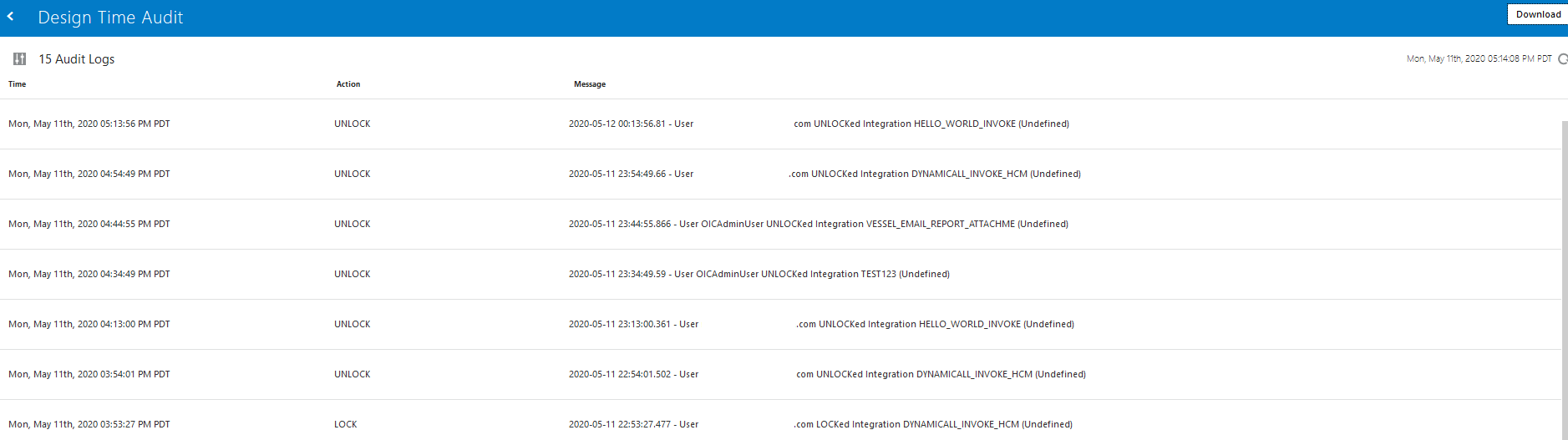
There are two ways of accessing Design Time Audit Log records, and Design Time Audit Log records are excluded from the OIC activity stream logs, therefore there is no out-of-the-box integration between OIC Audit Log records and OCI Logging service logs.
- Using OIC console
- Via OIC REST API endpoints
Next, we will walk you through the strategies to enable the OIC Design Time Audit Logs in OCI Logging Analytics, so that you can:
- Enable short term reporting on the OIC Audit logs
- Retain OIC Audit logs in long term archive respository
Oracle Cloud Integration Audit Logs Ingestion Strategies
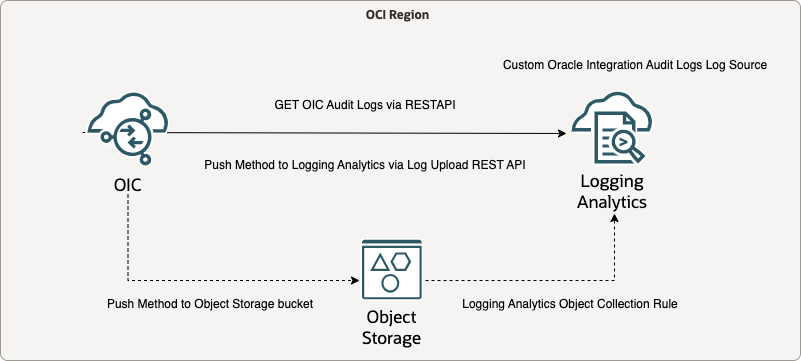
We have three log ingestion strategies for OIC Audit logs (applicable to both OIC Gen2 and OIC Gen3), each strategy maps to specific monitoring use cases with the pros and cons. Based on our researches and testing, we recommend the push method via OIC Custom Integration for our customers to simplify the configuration complexity and reduce the overall operation overhead.
Recommended Option:
- Push Method via OIC Custom Integration
- GET OIC Audit Logs via OIC REST API Endpoint into a stage file
- Push OIC stage file to Logging Analytics via LA Log Upload REST API
- (Optional) Use Logging Analytics Archival Storage Tier for long term OIC Audit Logs retention with lower cost
- (Optional) Push OIC Audit Logs into Object Storage bucket and upload to Logging Analytics via Object Collection Rule
- (Optional) Store the OIC Audit Logs in Object Storage for long term compliance and regulartory requirement
- Pros:
- Highly customizable custom integration to orchestrate the OIC Audit Logs ingestion
- Flexible long term OIC Audit Logs retention options
- Cons:
- Additional workload impact on the OIC instances
Other Options:
- Merge Method via OIC custom integration
- GET OIC Audit Logs via OIC REST API Endpoint
- Merge OIC Audit logs into OIC Activity Stream Logs via Logger Action
- (Optional) Use Logging Analytics Archival Storage Tier for long term OIC Audit Logs retention with lower cost
- (Optional) Push OIC Audit Logs into Object Storage bucket via Service Connector Hub for long term retention
- Pros:
- OIC Audit Logs will be part of the OIC Activity Stream service logs, no need to stage additional files
- Single REST API call within the custom integration
- Cons:
- OIC Audit Log records are XML format in the Activity Stream service elogs, additional parsing is required for the embedded XML format
- Additional workload impact on the OIC instnaces
- Pull Method via Logging Analytics REST API Log Ingestion
- GET OIC Audit Logs via OIC REST API Endpoint
- Via Management Agent Logging Analytics Plugin
- Pull OIC Audit logs via API endpoint in Management Agent and forward OIC Audit Logs to Logging Analytics
- Pros:
- No custom integration required for OIC instance
- Native Logging Analytics REST API Log Ingestion via Management Agent
- Cons:
- Need to maintain an additional VM
- Logging Analytics Entity will be associated with the Management Agent VM, not with the OIC instance
Visualization and Dashboard
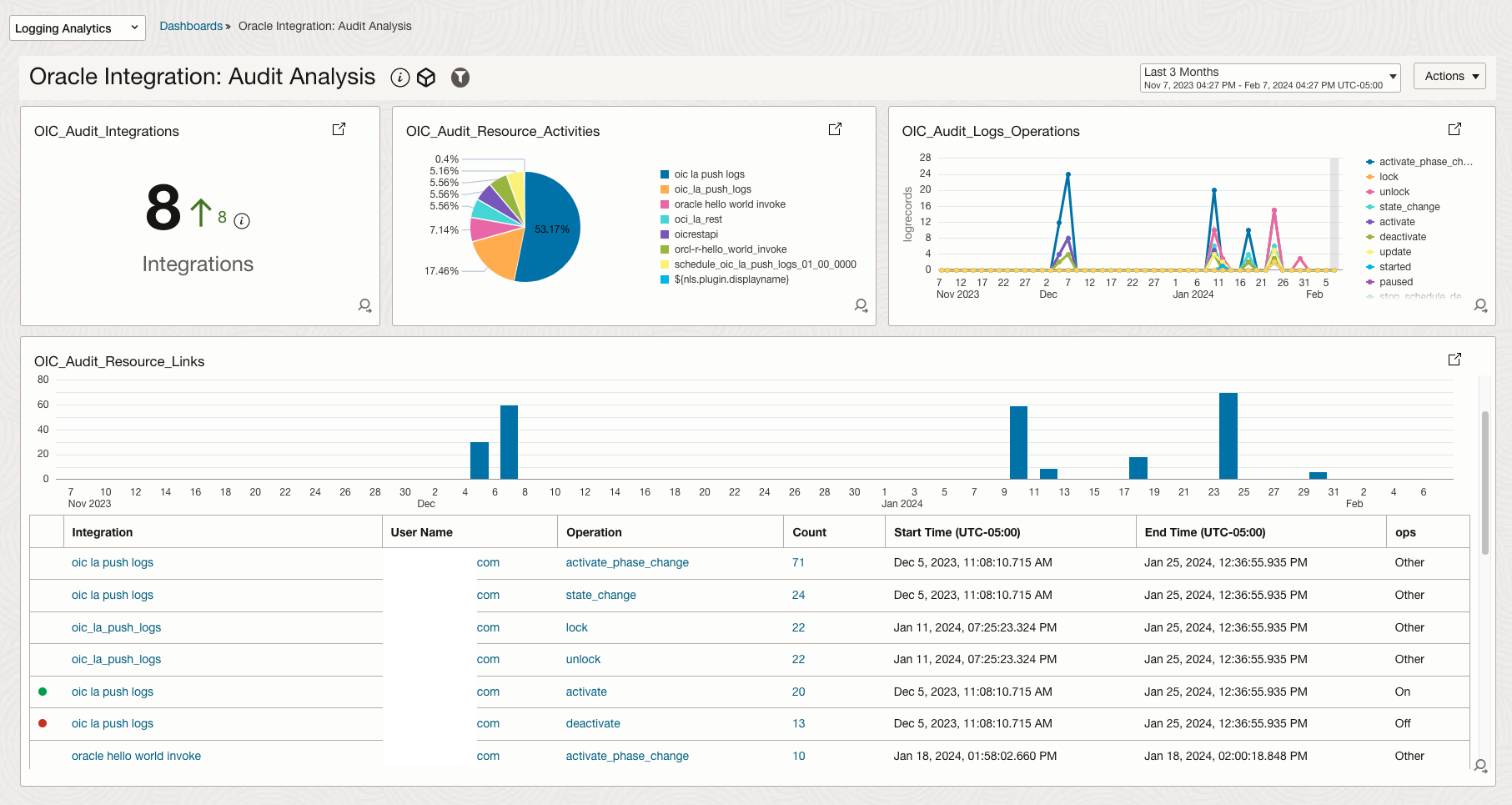
After successful ingestion of OIC Audit logs into Logging Analytics, we can query and visualize the OIC Audit logs and create widgets for Oracle Integration Cloud Audit Analysis dashboard.
Conclusion
Incorporating OIC Design Time Audit Logs into OCI Logging Analytics represents a strategic approach to maximizing the operational intelligence and security posture of cloud integration environments. By ingesting these detailed change records into OCI Logging Analytics, organizations unlock the potential to transform raw data into actionable insights to foster a more secure, efficient, and compliant integration ecosystem. Furthermore, the aggregation of OIC Audit Logs in Logging Analytics facilitates a more robust compliance framework, offering an aggregated view of activities across the integration landscape that is invaluable for audit trails and regulatory adherence.
Further Reading
- Monitor Integrations OIC GEN2
- Monitor Integrations OIC GEN3
- Review the OIC RESTful API for monitoring integration
- Surfacing OIC Design Time Audit blog
- OIC and OCI Logging Analytics
- Collect Logs from OCI Object Storage bucket
- Logging Analytics REST API Log Ingestion
Acknowledgements
- Contributor: Nolan Trouvé