

Oracle Integration Cloud is a fully managed, preconfigured environment that gives you the power to integrate your Oracle Cloud Infrastructure applications and services and on-premises applications. As more customers are onboarded to Oracle Cloud Infrastructure (OCI) and run their critical integrations between OCI cloud services. Having a robust observability and monitoring solution for Oracle Integration Cloud (OIC) is pivotal for ensuring the efficiency, reliability, and security of Oracle Integration solutions. It enables the organizations to maintain oversight over their integrations, diagnose issues promptly, and optimize performance.
In the part 1 of the blog Leveraging Logging Analytics for Oracle Integration Cloud Logging and Monitoring, we talked about the observability and monitoring features for Oracle Integration Cloud (OIC). We can use the OIC metrics data, activitiy stream log data as well as ingesting the OIC Design Time Audit Log data into Logging Analytics to unlock the potential to transform raw OIC telemetry data into actionable insights so that we can maximize the operational intelligence and security posture of cloud integration environments.
In this blog, we will deep dive into the details of the push method via OIC custom integration to ingest OIC Audit Logs into Logging Analytics.
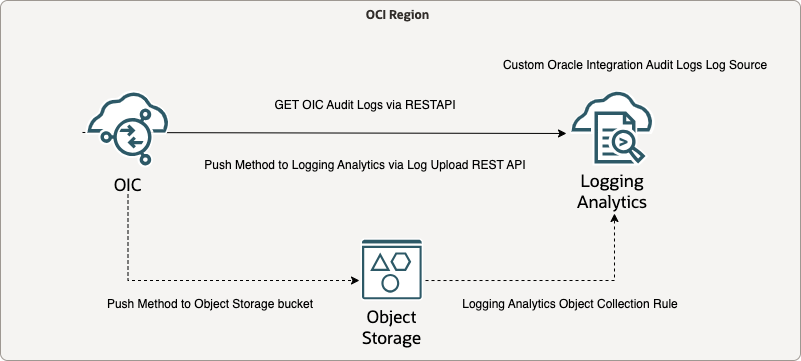
Architecture Diagram
Integration connection details
- Get OIC Audit Logs using OIC REST API endpoint (/ic/api/integration/v1/monitoring/auditRecords) and OAuth2.0 Client Credentials
- Stage the content of the OIC Audit Log into a stage file
- (Optional) Push OIC Audit Log stage file into Object Storage bucket using OCI API key
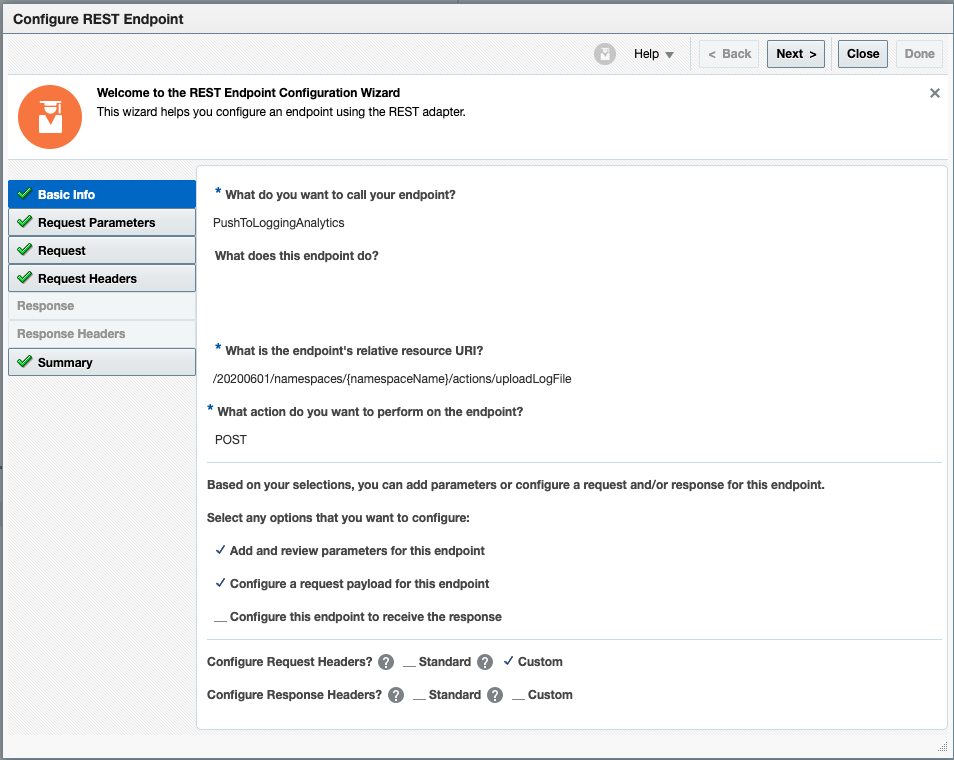
- Push OIC stage file to Logging Analytics via LA Log Upload REST API /20200601/namespaces/{namespaceName}/actions/uploadLogFile
Step 1. Setup OAuth 2.0 Client Credentials for Oracle Integration Cloud instance
Note: Beginning in March 2023, Oracle began a region-by-region migration of all tenancies to use identity domains. Tenancy owners will be notified two weeks prior to the migration of their tenancy. All IDCS instances in the tenancy will be converted at the same time regardless of the IDCS home region.
Configure the OAuth Client Credentials (Required in OIC Gen3, basic authentication is no longer supported in Gen3 Oracle defined REST API endpoints)
Determine Whether a Cloud Account Uses Identity Domains
To determine whether your cloud account uses identity domains, open the Oracle Cloud Infrastructure navigation menu, and click Identity & Security. Under Identity, check for Domains:
- If Domains is listed, then your cloud account uses identity domains. See Set Up Users, Groups, and Policies in Cloud Accounts That Use Identity Domains.
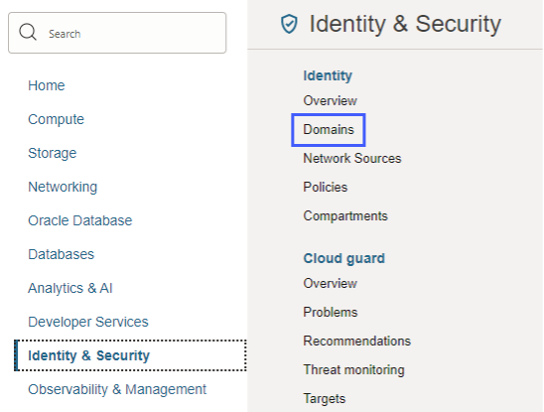
- If Domains is not listed, then your cloud account is still configured to link identities in IDCS and Oracle Cloud Infrastructure IAM using federation. See Set Up Users, Groups, and Policies in Cloud Accounts That Do Not Use Identity Domains.
My cloud account uses the IDCS, so the following steps will be followed:
- Understand Oracle Integration Federation
- Create an IDCS Group
- Create an IAM Group
- Create an IAM Policy
- Map the IDCS and IAM Groups
- Create IDCS Users
- Create IAM Users
- Assign Oracle Integration Roles to Groups
Authentication and authorization in Oracle Integration is managed by Oracle Identity Cloud Service. Oracle Integration REST APIs as well as REST endpoints exposed in integrations are protected using OAuth token-based authentication.
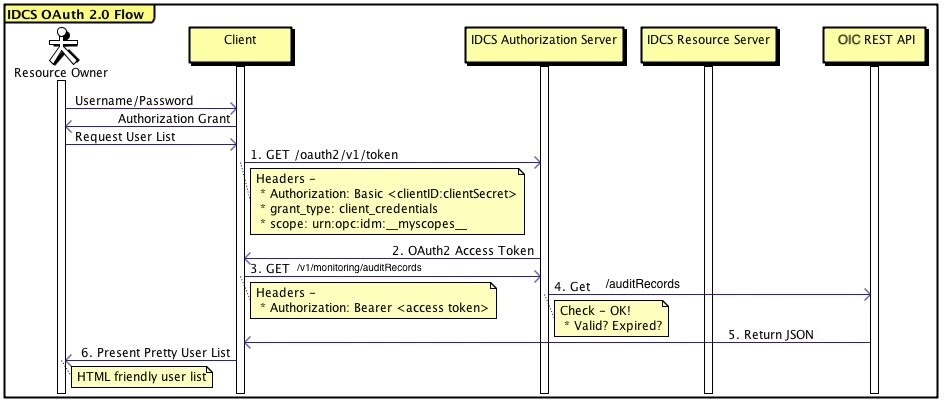
Oracle Integration supports various OAuth authentication grant types, we will use the Client Credentials grant type to authenticate and get the authorization to Oracle Integration Cloud service. This type of authentication is used for applications which need to access its owner resources, not on behalf of a particular user. It is suitable for machine-to-machine communication where an application needs to access services or data without human interaction. You don’t need to share usernames and passwords with clients or manage user passwords that expire.
OAuth Client Credentials Flow
Note: Oracle Integration Cloud also supports other OAuth authentication grant types, for instance, Authorization Code, JWT user Assertion.
Oracle Integration REST APIs, integrations with REST adapters, and integrations with application adapters exposing REST endpoints are protected using OAuth.
- The trusted application provides access to REST endpoints in Oracle Integration. You register a trusted application with Oracle Identity Cloud Service for each Oracle Integration instance. This trusted application provides access to the OAuth protected REST endpoints in Oracle Integration.
- Clients use the trusted application client ID and secret. You provide clients with the client ID and client secret of your trusted application along with the Oracle Identity Cloud Service URL, and the Oracle Integration instance scope. The scope represents all the resources the trusted application can access. In the case of Oracle Integration, the scope provides access to all REST APIs and REST APIs exposed in integrations.
- Clients get an access token. With the information you provide clients, each client can request an authorization code and access token from Oracle Identity Cloud Service. The authorization code is short-lived. Once the client receives the authorization code, it exchanges the code for an access token. Each user has a different access token. The access token contains information about the client application and who the end user is.
- Clients use the access token to access Oracle Integration REST APIs. The client application uses the access token it received from Oracle Identity Cloud Service to call Oracle Integration REST APIs or REST endpoints exposed in integrations.
- Clients can refresh expired access tokens. If an access token expires, the client can refresh it. Access tokens expire after one hour by default, but you can change this in the trusted application configuration.
- Identity Domain Administrators can revoke access tokens for users. If security issues arise, you can revoke the access token for a specific user.
The OAuth Client Configuration in IDCS Trusted Application:

Test the OIC REST API endpoint using Postman
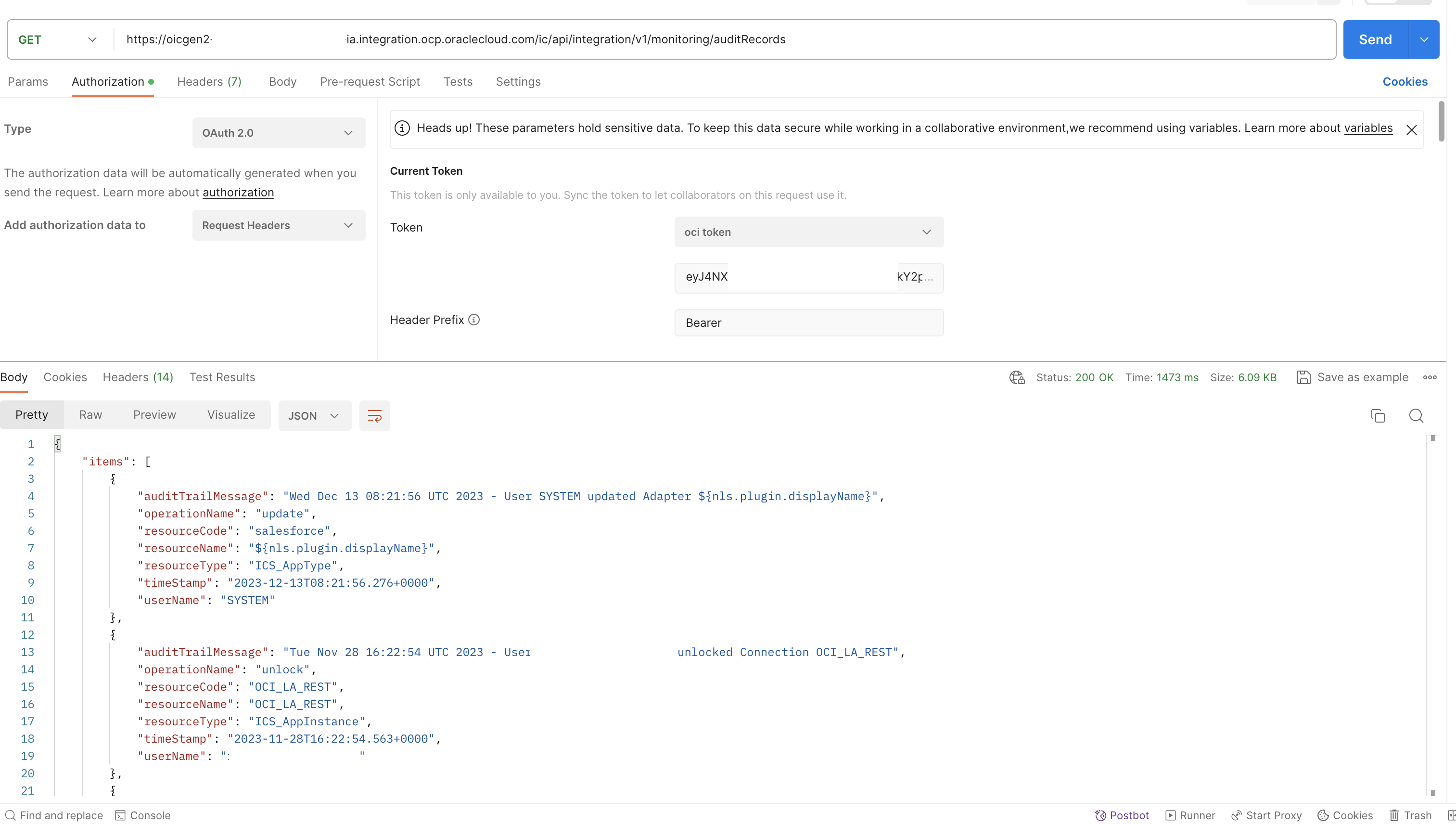
Once you have the Trusted Application created and configured with OAuth, you can start to test the REST API endpoint via Postman.
- URL: https:// <oicgen2-instance-name>.integration.ocp.oraclecloud.com/ic/api/integration/v1/monitoring/auditRecords
- Grant type: Client Credentials
- Auth URL: https://<IDCS_URL>.identity.oraclecloud.com/oauth2/v1/authorize
- Access Token URL: https:// <IDCS_URL>.identity.oraclecloud.com/oauth2/v1/token
- Client ID: Retrieve from the trusted application page
- Client Secret: Retrieve from the trusted application page
- Scope: https://<OIC_INSTANCE_ID>.integration.ocp.oraclecloud.com:443urn:opc:resource:consumer::all
- Client Authentication: Send client credentials in body
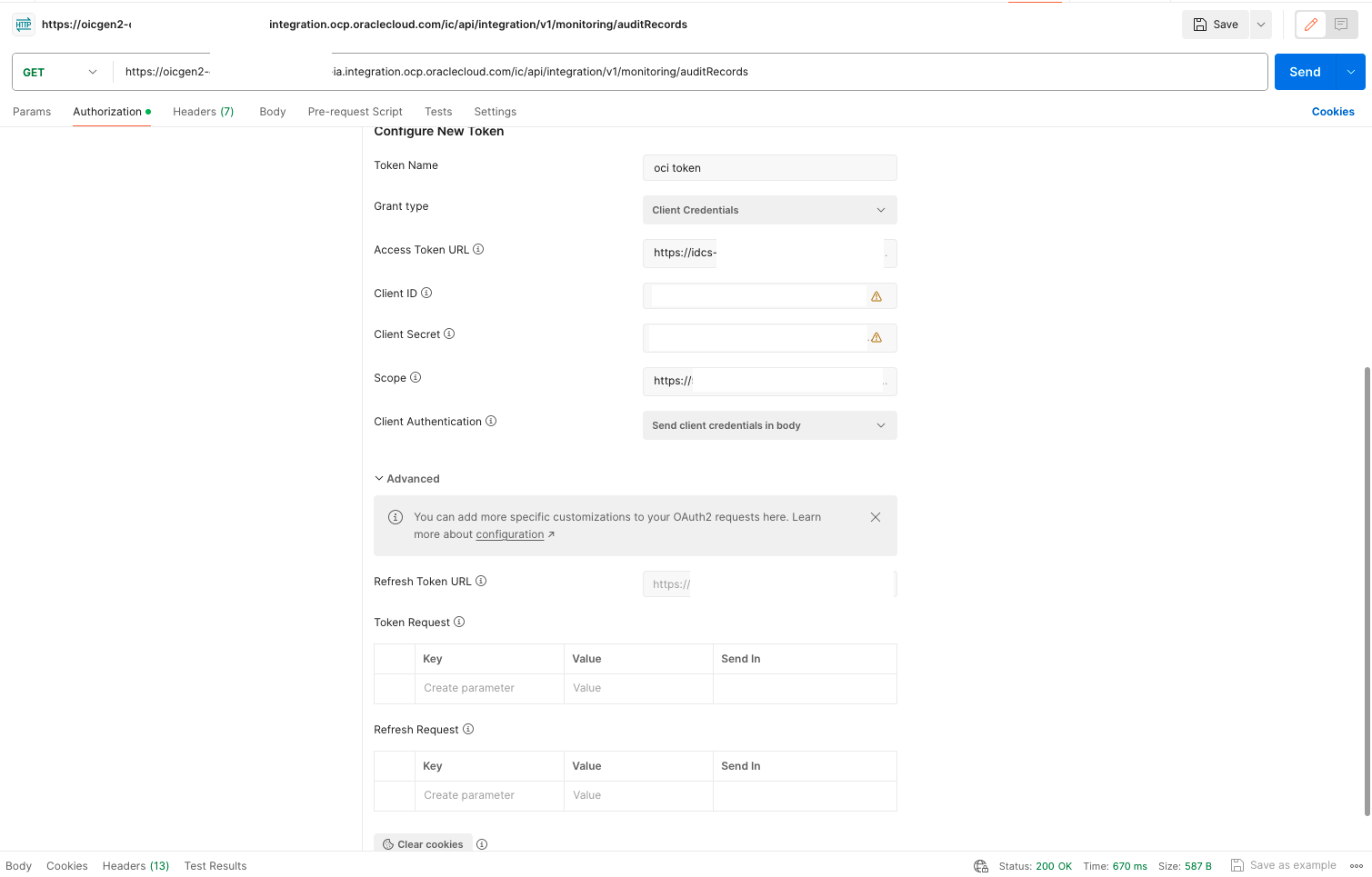
Postman test result:
Step 2. Create Connections in Oracle Integration Cloud
- Login OIC GEN2 service console
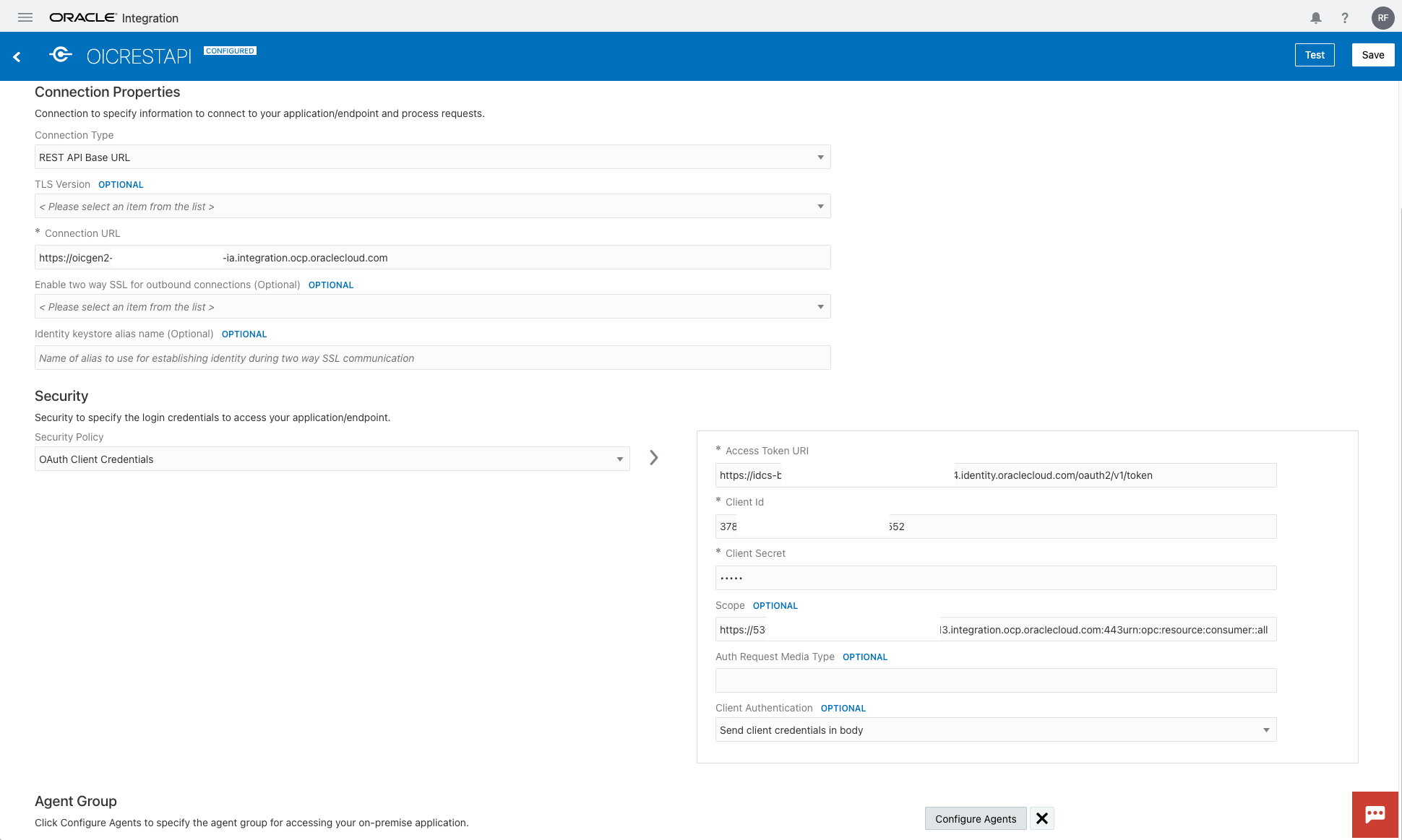
- Create OIC connection to interact with Oracle Integration Cloud API – OAuth Client Credentials
- Select Integrations within Oracle Integration
- Select Connections
- Create a Connection using the REST Adapter
- Connection Type: REST API Base URL
- Connection URL: https:// <oicgen2-instance-name>.integration.ocp.oraclecloud.com
- Security: OAuth Client Credentials
- Access Token URI: https:// <IDCS_URL>.identity.oraclecloud.com/oauth2/v1/token
- Client Id
- Client Secret
- Scope: https://<OIC_INST_ID>.integration.ocp.oraclecloud.com:443urn:opc:resource:consumer::all
- Client Authentication: Send client credentials in body
- Click Test and Save
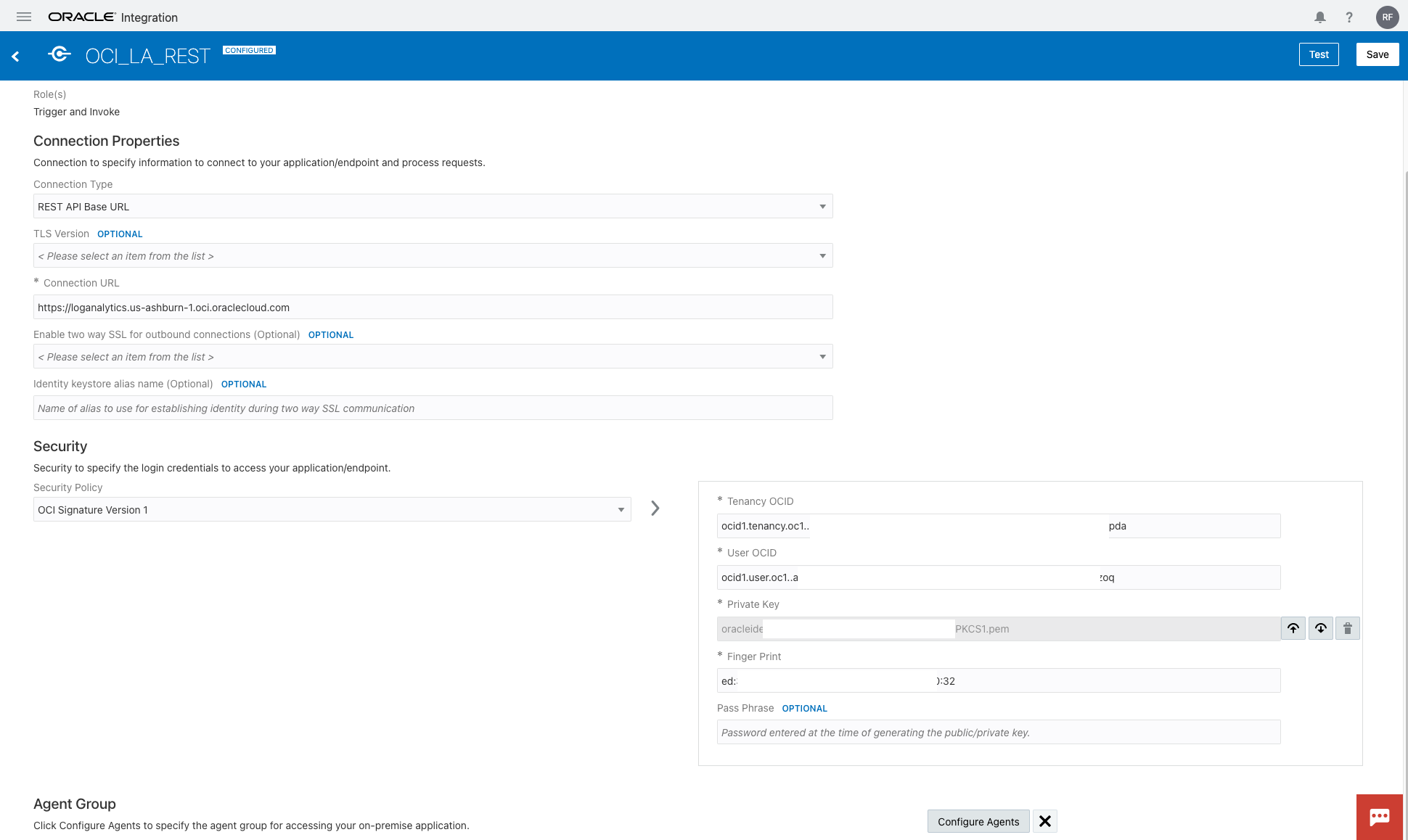
- Create OIC connection to interact with OCI Logging Analytics API – OCI API Signature
- Connection Type: REST API Base URL
- Connection URL: https://loganalytics.us-ashburn-1.oci.oraclecloud.com
- Security: OCI Signature Version 1
- Tenancy OCID
- User OCID
- Private key
- Finger Print
- Click Test and Save
Step 3. Create Oracle Integration Cloud Audit Log Source in OCI Logging Analytics
Logging Analytics GitHub community Repo for OIC
- Download the OIC AuditLog log source from log-sources
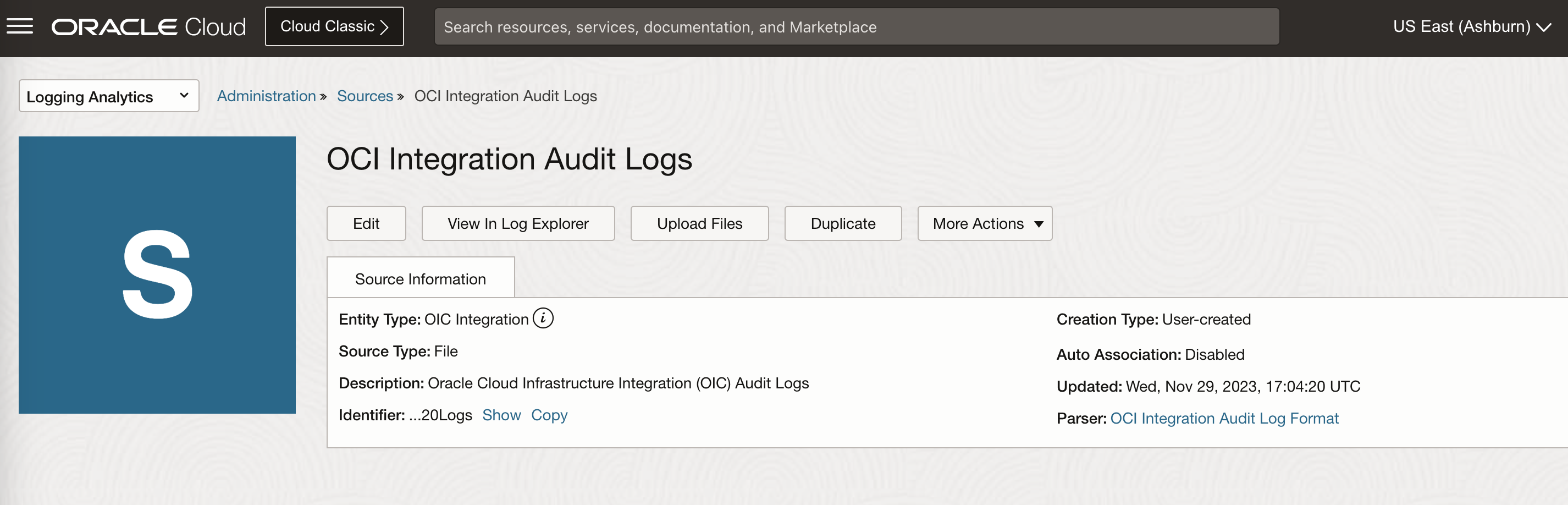
- Import the OIC Audit Log log source in OCI Logging Analytics
- Select Import Configuration Content from Logging Analytics Administration
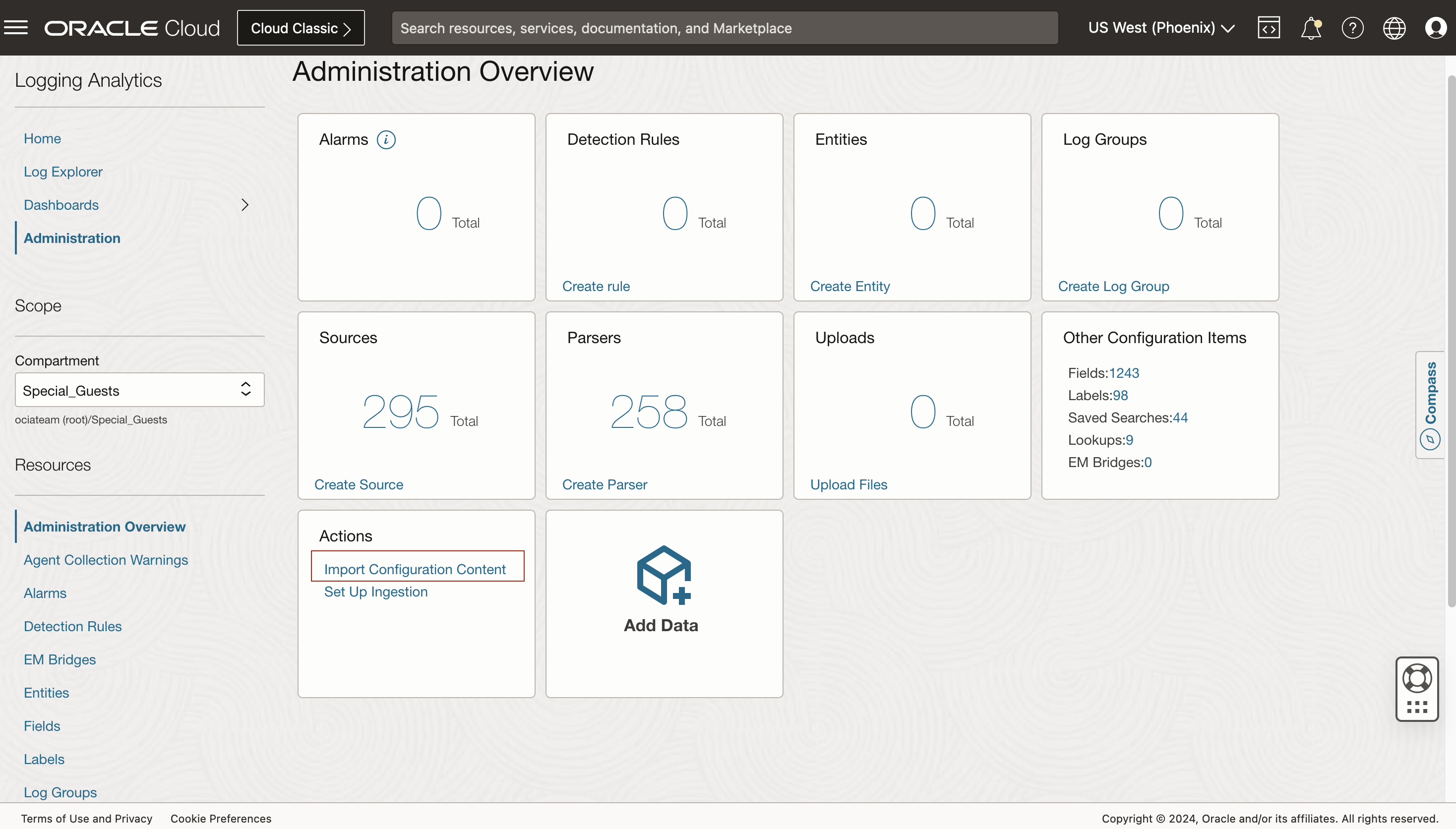
- Select the downloaded Oracle Integration Cloud log source zip file and import

- Select Sources and search “Integration”, you will find the OCI Integration Audit Logs imported
Step 4. Create Custom Integration in Oracle Integration Cloud
With all the ingredients ready, you can start to create the custom integration flow.

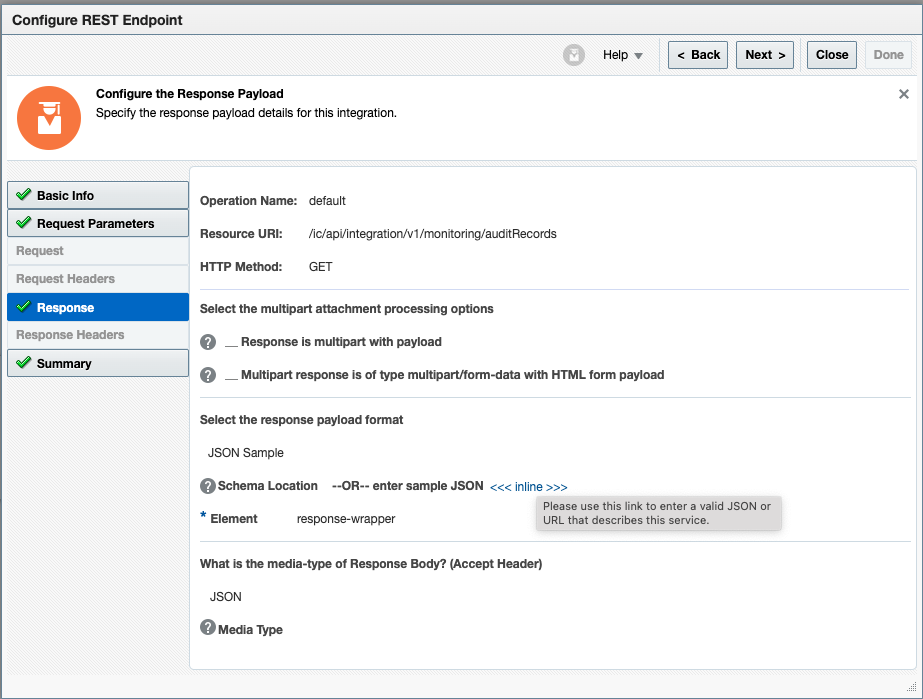
- Retrieve OIC Audit Log records from the Oracle Integration Cloud via REST API endpoint
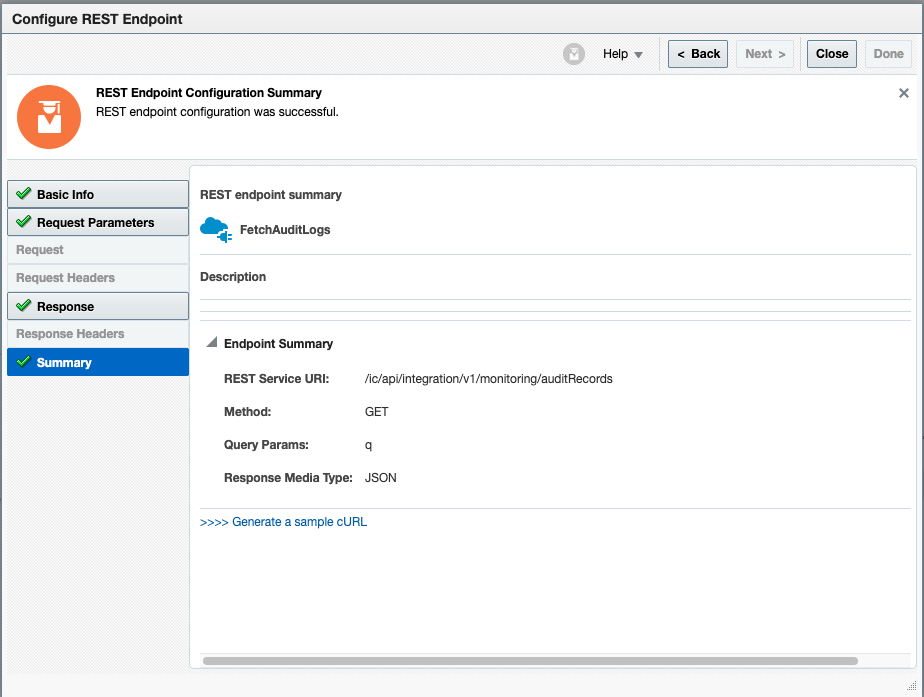
- Configure REST connection endpoint to Fetch Audit Logs
- Configure Query Parameter
- Configure REST response
- Verify the configuration summary
- Save the OIC Audit Log records as json format
- Add and configure Stage File Action
- Specify the Filename
- Configure Schema options
- Specify the JSON Format
- Configuration Summary for Stage File


- Send the OIC Audit Log records json file to OCI Logging Analytics
- Logging Analytics REST Endpoint Configuration
- Provide Query Parameter
- Configure the Payload
- Configure the Logging Analytics log group id in the request header
- REST Endpoint Configuration Summary

Step 5. Explore Oracle Integration Cloud Audit Log in Logging Analytics
- Kick off the Custom Integration to Push the OIC Audit Records to Logging Analytics
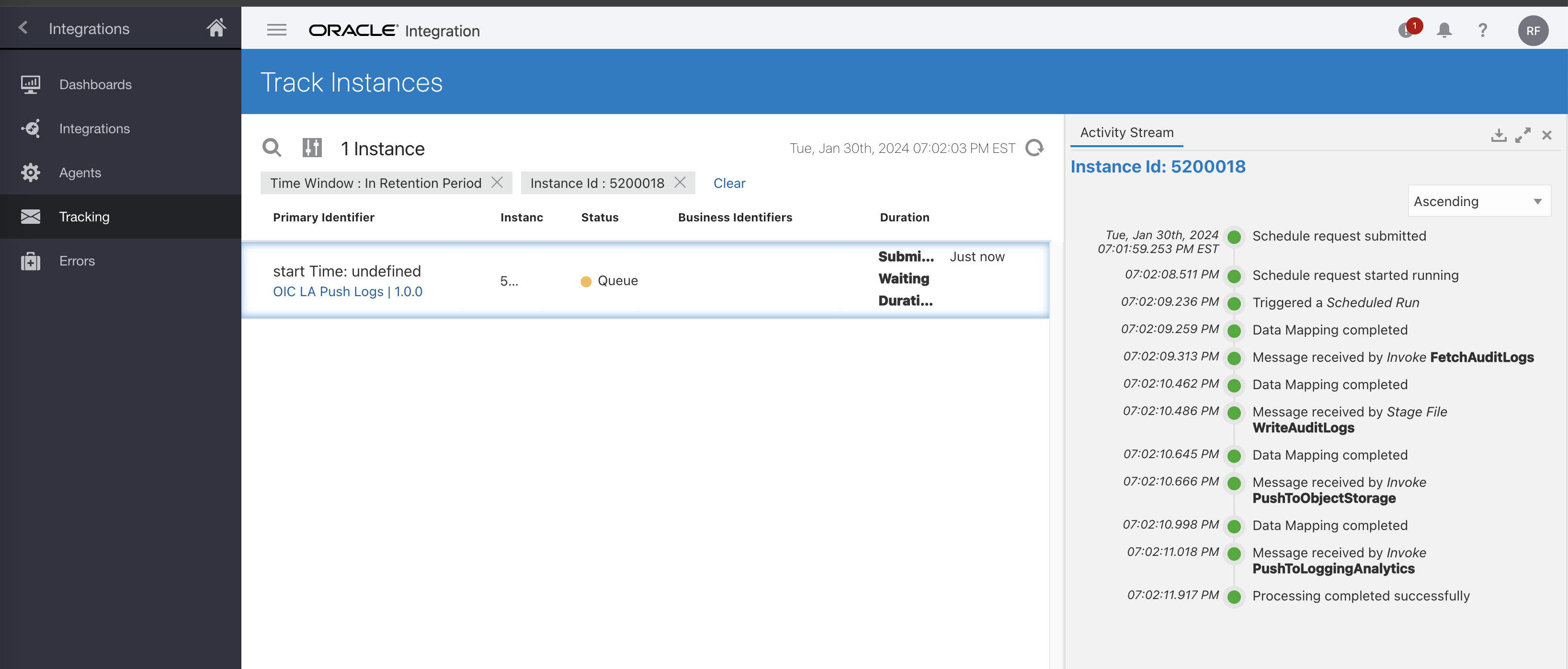
- Check the details of the custom integration
- Check the result of the invocation of Fetching Audit Records from OIC
- Expand each step for more details
- Verify the Audit Records from OIC REST API
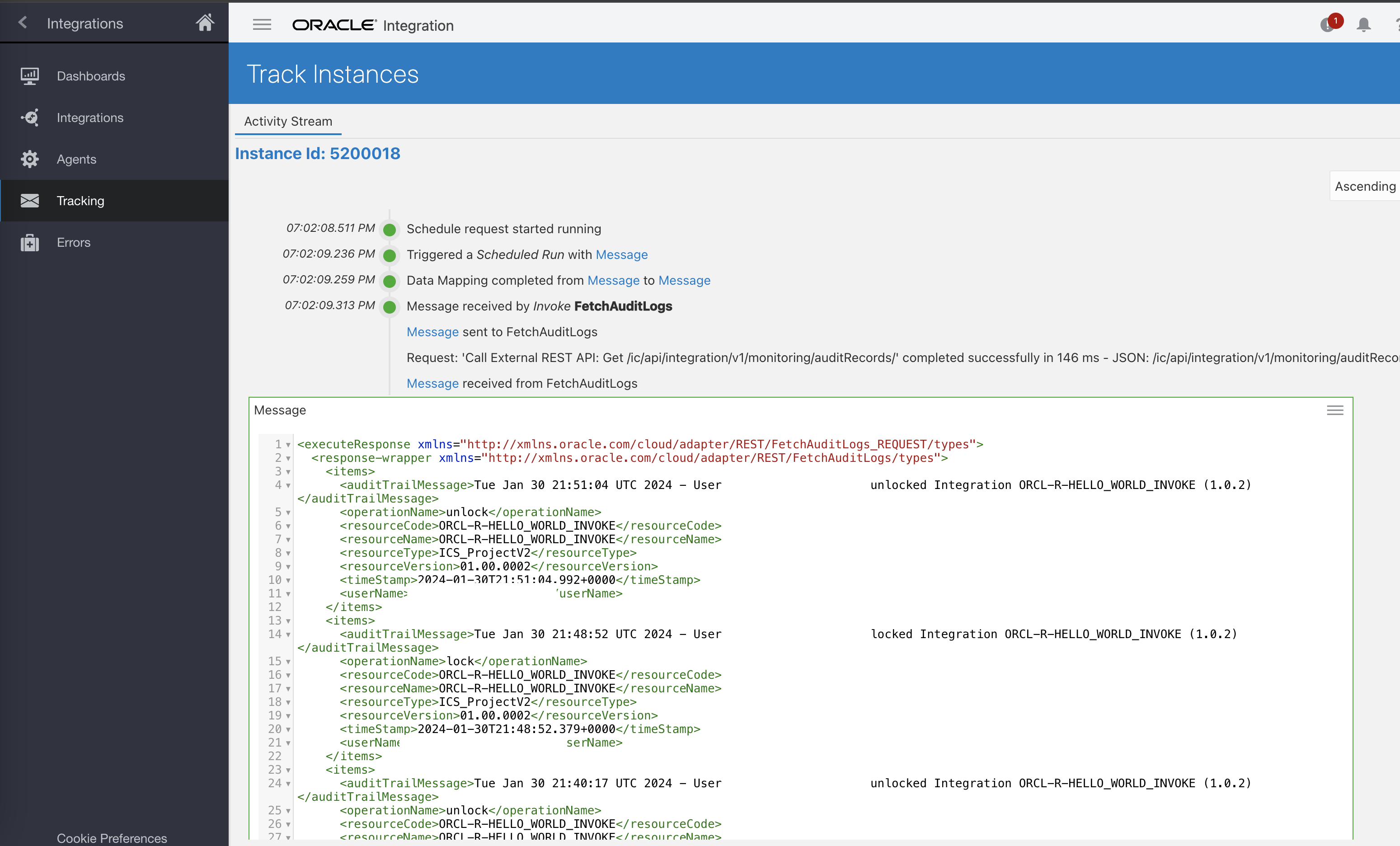
- Verify the OIC Audit Log records are successfully ingested and parsed within OCI Logging Analytics

- Visualize the OIC Audit Logs in Dashboard
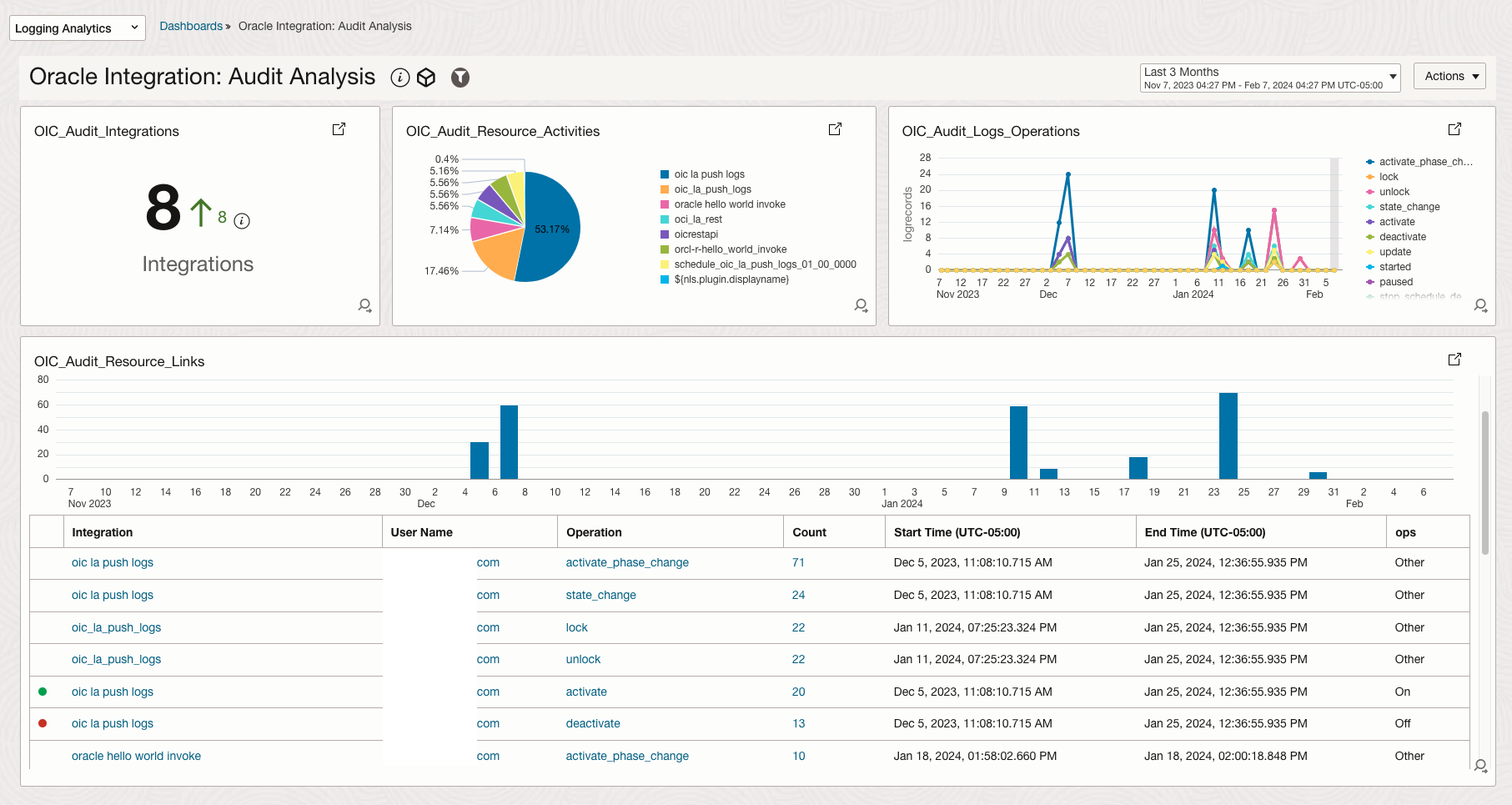
Reference
- Configure a Trusted Application to Authenticate with OAuth
- OAuth Authentication and Authorization in Oracle Integration Cloud
- OIC AuditRecords API Reference
- Logging Analytics UploadLogFile API Reference
- IDCS OAuth Access Token Expiration Time Behaviour with IDCS Scopes and Custom Scopes (Doc ID 2580015.1)
- Use OAuth 2.0 Grants in Oracle Identity Cloud Service Environments
- Using the REST Adapter with Oracle Integration Generation 2
- Identity Cloud Services OAuth 2.0 and REST API
- Demystifying OAuth Using the JWT User Assertion in OIC
Acknowledgements
- Contributor: Nolan Trouvé