
Oracle Cloud Infrastructure’s Logging Analytics offers a comprehensive solutions to transform raw log data into meaningful insights through its advanced Log Parsers, Log Sources, Data Filters, Extended Fields, Field Enrichment, and Labels. Logging Analytics uses these features to offer a robust framework for businesses to monitor system health, enhance security protocols, comply with regulatory standards, and optimize operational efficiency. Applicable across various sectors, from technology and cybersecurity to healthcare and finance, OCI Logging Analytics is not just a tool but a strategic asset for organizations seeking to leverage their data for competitive advantage and innovation.
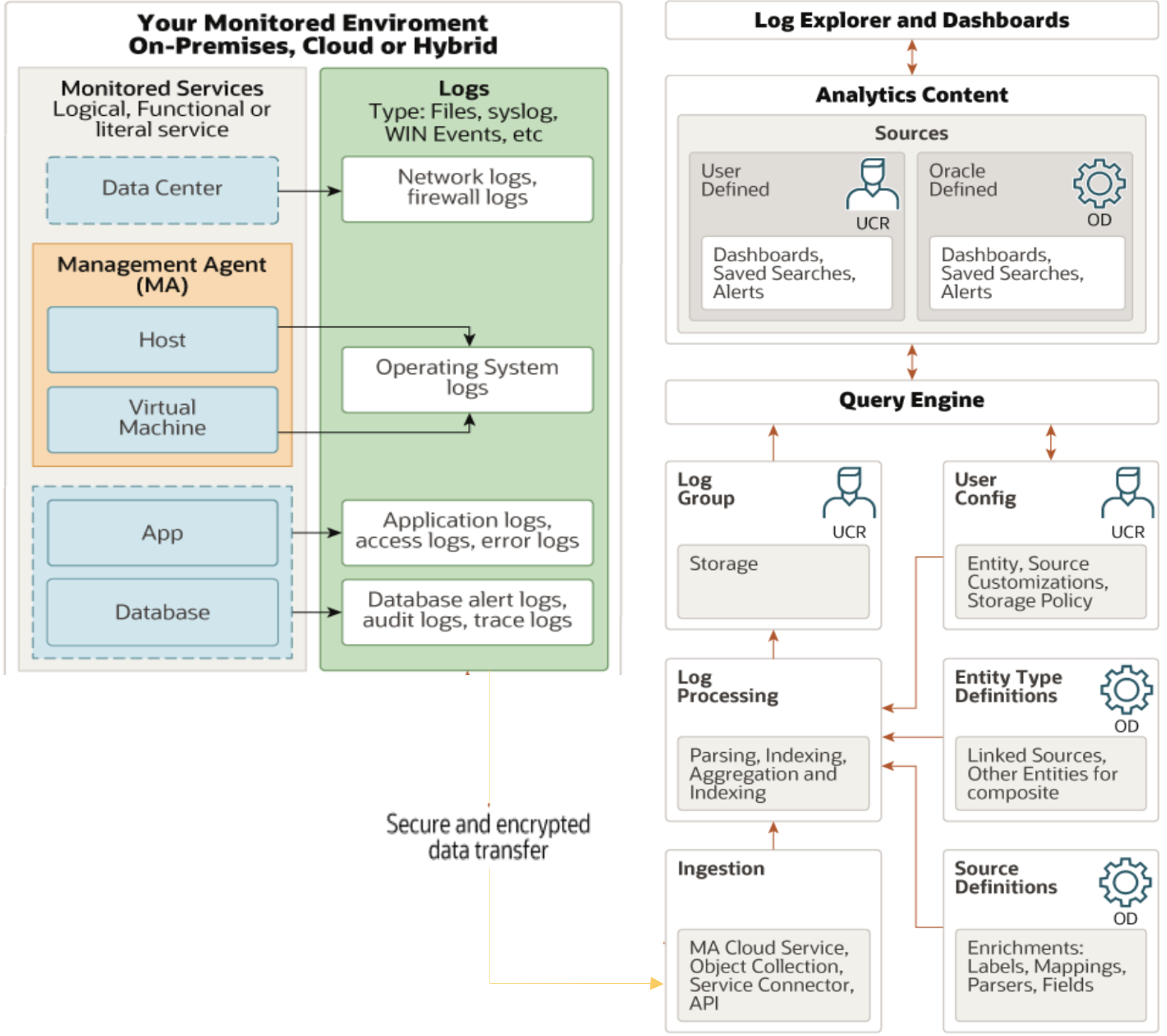
In this blog, I will share some tips and best practices that can enhance your proficiency in creating and managing log parsers and log sources within Logging Analytics so that you can effectively process and analyze your logs, ensuring that you extract maximum value from your data.
Tip 1: Customize Oracle-defined Log Source
Log Sources define where the log files are located when you use management agent for collection, and how to parse and enrich the logs while ingesting them, irrespective of the method of ingestion. Oracle Logging Analytics offers hundreds of Oracle-defined sources and parsers that you can directly use without creating custom ones. The first step is to customize the Oracle-defined content by adding your own elements to them. Logging Analytics keeps the customization in user namespaces while keeping the original content in the system namespace. When Oracle updates the Oracle-defined sources, you will continue to get those updates while at the same time keeping your customizations.
Example:
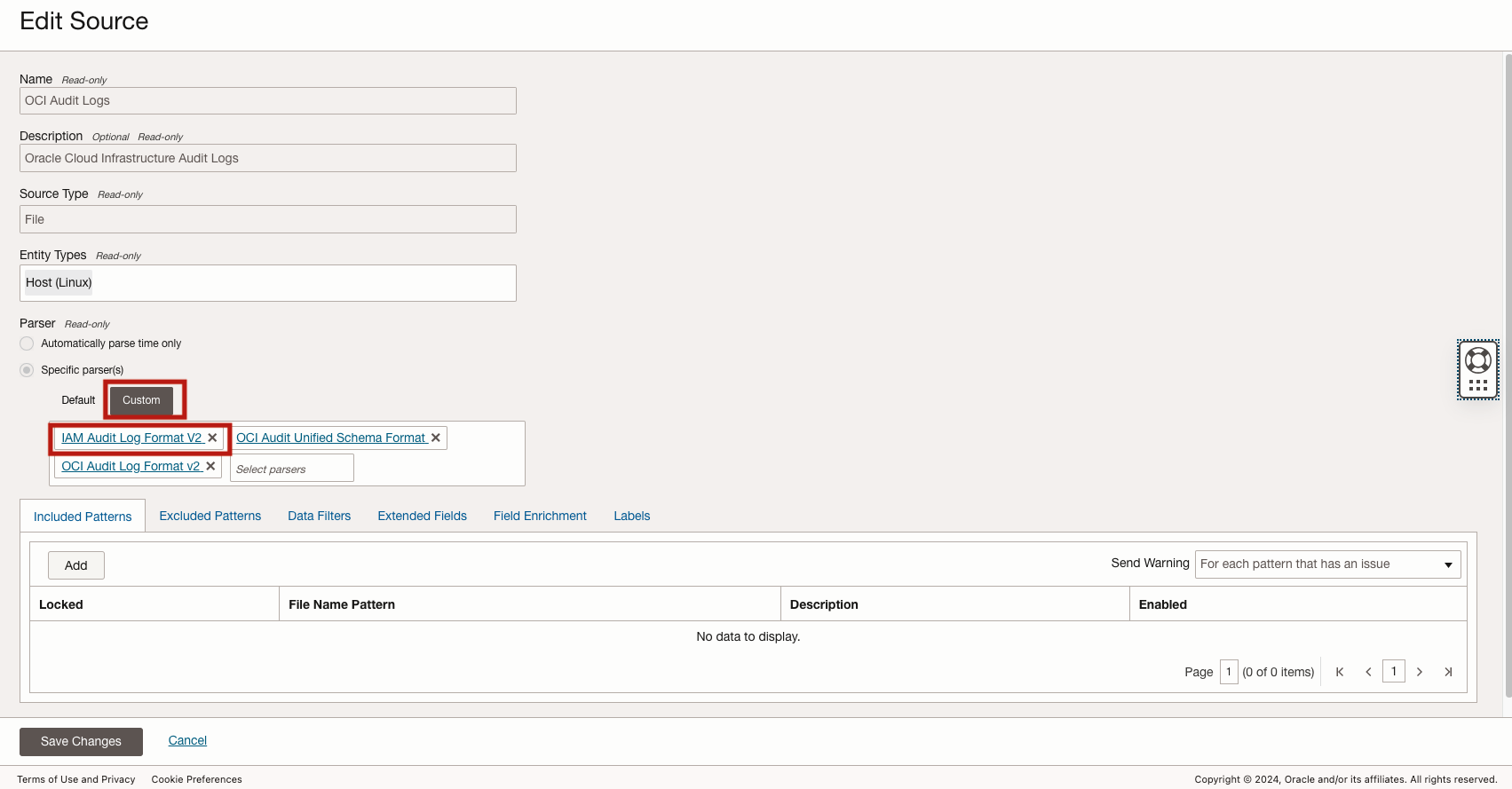
OCI Audit Logs is the log source to parse the OCI Audit logs generated within OCI tenancy. This log source is associated with all Oracle Cloud Infrastructure Audit Logs, the Entity Log Source association can not be changed to a user-defined log source. In order to parse the OCI Audit Logs differently, we can customize the existing Log Source with new custom Log Parser.
Tip 2: Duplicate feature to clone Oracle-defined content
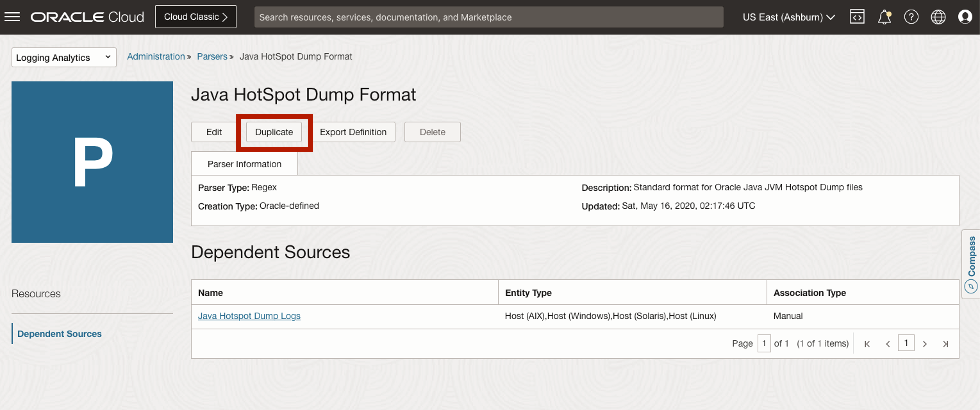
If you don’t find an Oracle-defined source that suits your requirements, then you can create your own by duplicating the Oracle-defined source. When creating a source, you will need to pick one or more parsers to parse the log file into log entries and to break the log entry into fields. You can create a custom source or use an Oracle-defined parser if there is already one that matches your log format. Like Log Source, you can duplicate Oracle-defined parser if there is no Oracle-defined parser for your custom source. By duplicating Oracle-defined log source or log parser, it enpowers you to quickly develop new custom log source and parser for different log parsing and processing use cases.
Tip 3: Create a new Log Parser from scratch using the Guided Regex tool
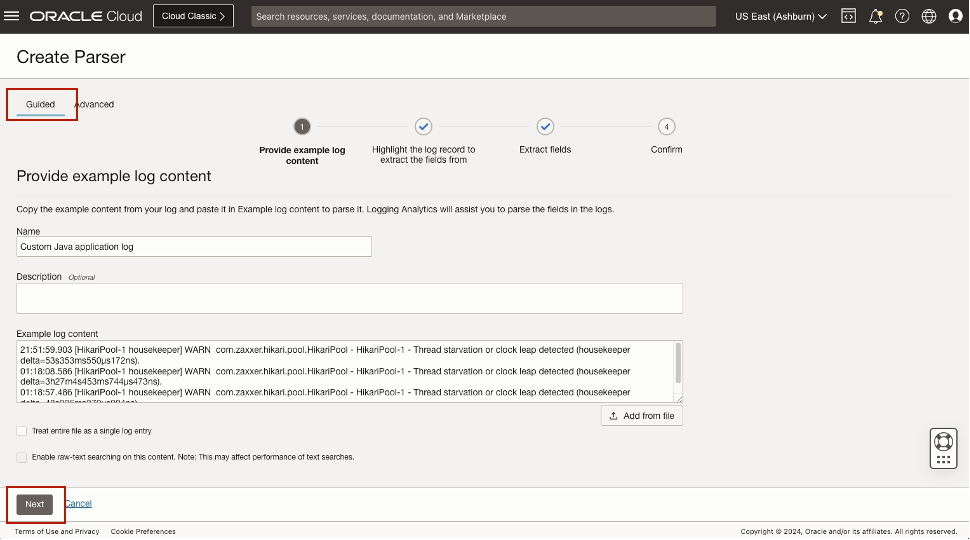
You can also create a new custom log parser from scratch by using Guided Regex tool to develop a regular expression to parse your log entry efficiently.
Note: Logging Analytics Parser regular expression constructs are based on Java Platform Standard Ed. 8 Documentation
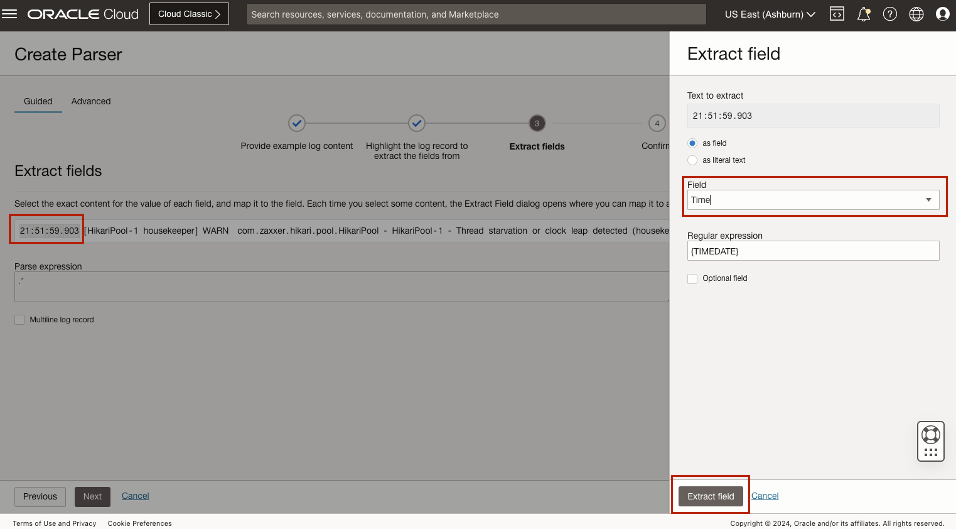
If you prefer to use the Regex syntax to parse the log entries, here is an example of creating multiline Springboot error stack trace log parser:
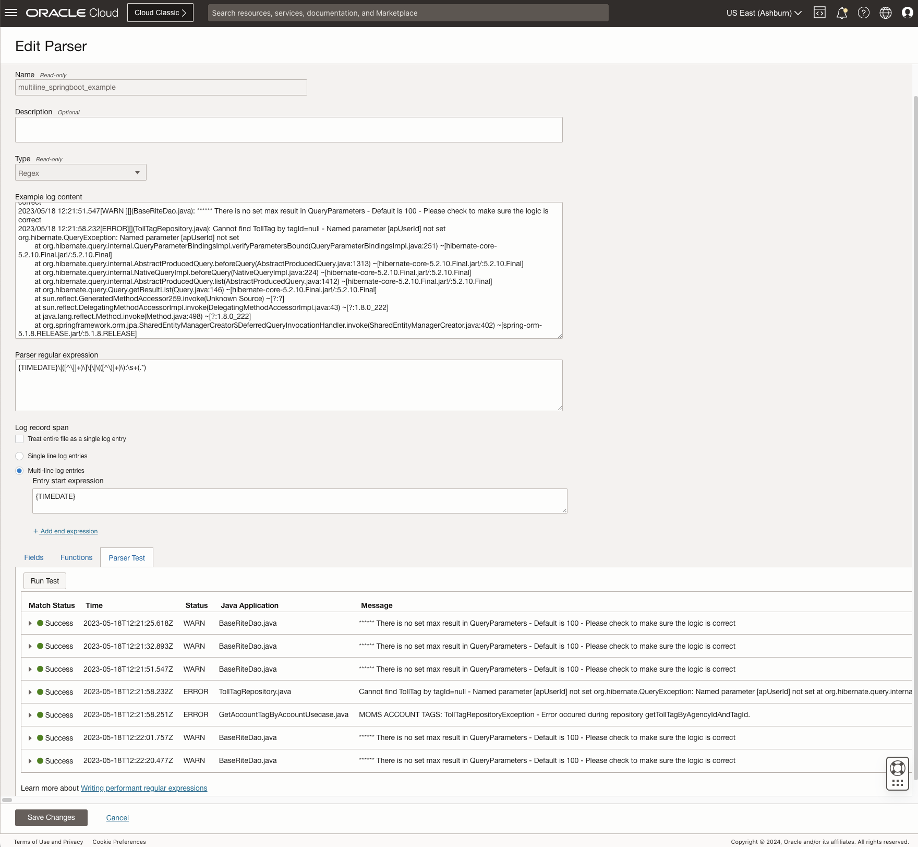
Tip 4: Use Data Filters in Log Source to mask sensitive data
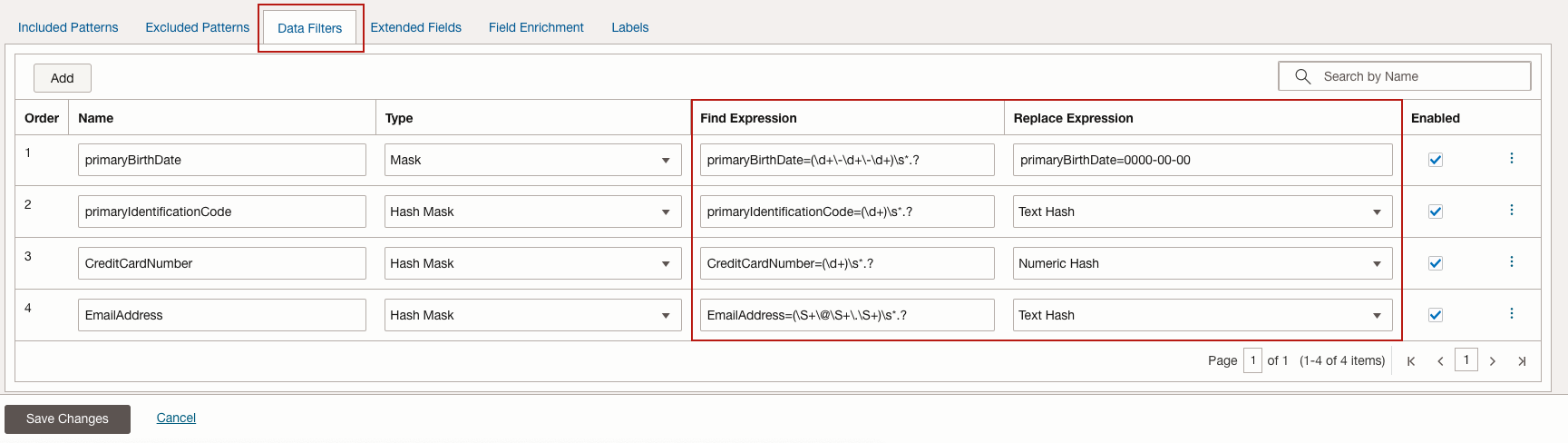
Oracle Logging Analytics lets you mask and hide sensitive information from your log entries as well as hide entire log entries before the log data is uploaded to the cloud. Using the Data Filters tab when editing or creating a source, you can mask IP addresses, user ID, host name, and other sensitive information with replacement strings, drop specific keywords and values from a log entry, and also hide an entire log entry.
Note: If the log data is sent to Oracle Logging Analytics using On-demand Upload or collection from object store, then the masking will happen on the cloud side before the data is indexed. If you are collecting logs using the Management Agent, then the logs are masked before the content leaves your premises.
Examples:
- Log sensitive data masking, for example, masking the bank account, credit card info
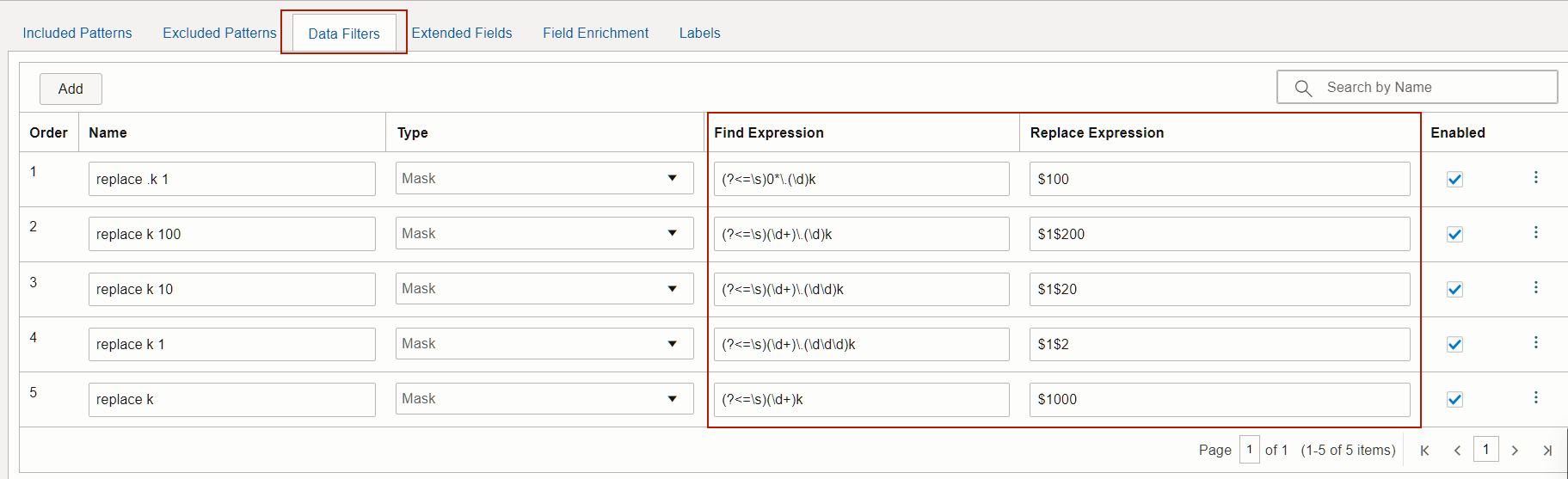
- Log data transformation, for example, convert 16K to 16,000.
Tip 5: Use Extended Fields to extract additional information from parsed log entries
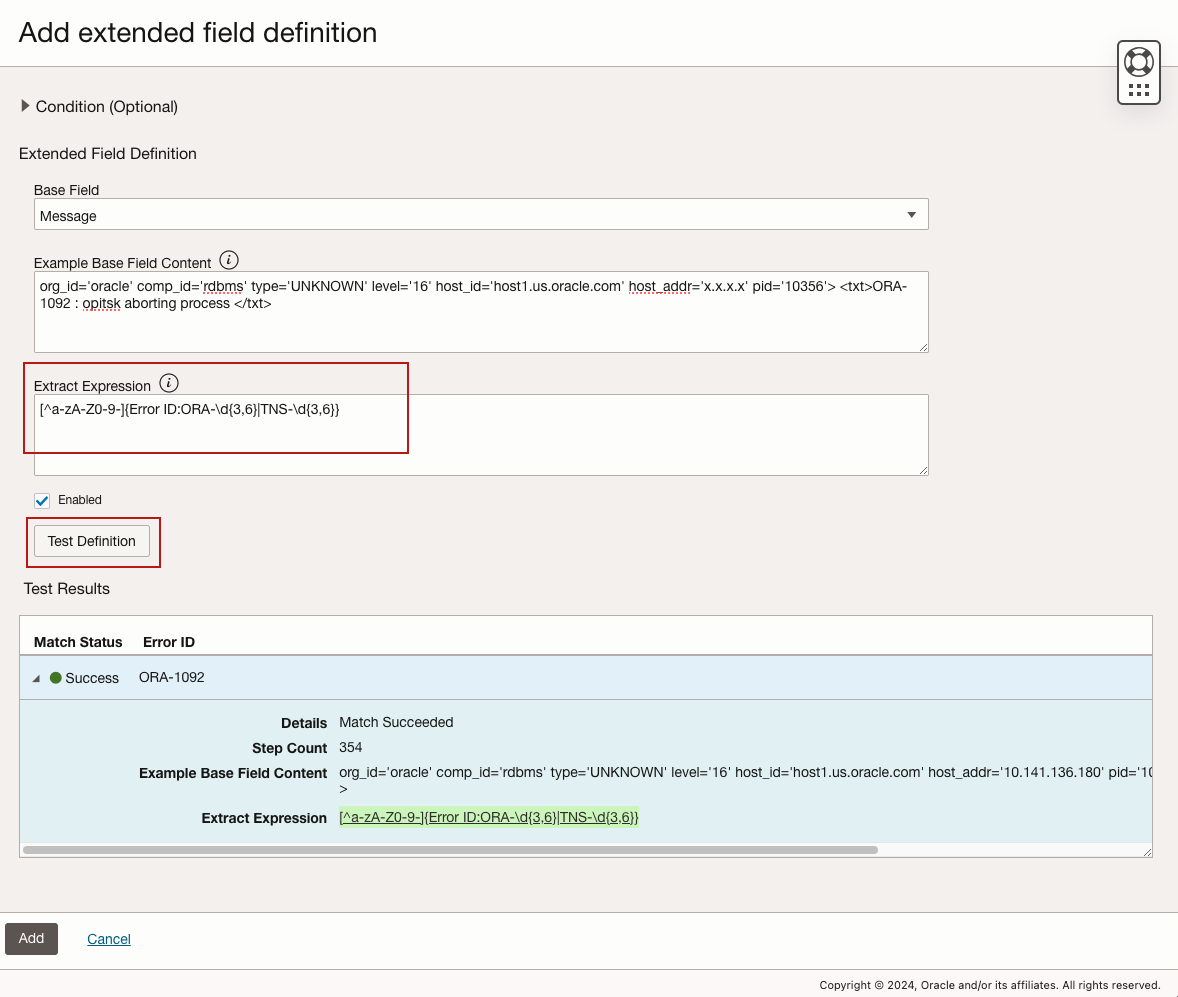
The Extended Fields feature in Oracle Logging Analytics lets you extract additional fields from a log record in addition to any fields that the parser parsed. In the source definition, a parser is chosen that can break a log file into log entries and each log entry into a set of base fields. These base fields would need to be consistent across all log entries. A base parser extracts common fields from a log record. However, if you have a requirement to extract additional fields from the log entry content, then you can use the extended fields definition. For example, the parser may be defined so that all the text at the end of the common fields of a log entry are parsed and stored into a field named Message.
For example, you want to extract Oracle database ORA- error code from the Oracle database alert log file message field:
Tip 6: Use Field Enrichment to integrate with Oracle Threat Intelligence Service
Oracle Logging Analytics lets you configure Field Enrichment options so you can further extract and display meaningful information from your extended fields data. One of the Field Enrichment options is Geolocation, which converts IP addresses or location coordinates present in the log records to a country or country code. This can be used in log sources like Web Access Logs that have external client IP addresses.
To detect threats with the geolocation information, enable the check box Threat intelligence enrichment. During the ingestion of the log data, if the IP address value associated with the Source Address input field in the log content is flagged as a threat, then it is added to the Threat IPs field. You can then use the field to filter the logs that have threat associated with them. Additionally, those log records will also have Threat IP label with a problem priority High. You can use the label in your search.
For instance, you can enable Field Enrichment Threat Intelligence integration for your database listener alert log file to detect any Threat IP accesses the database listener:

Tip 7: Use Labels to speed up Error Detection in log stream
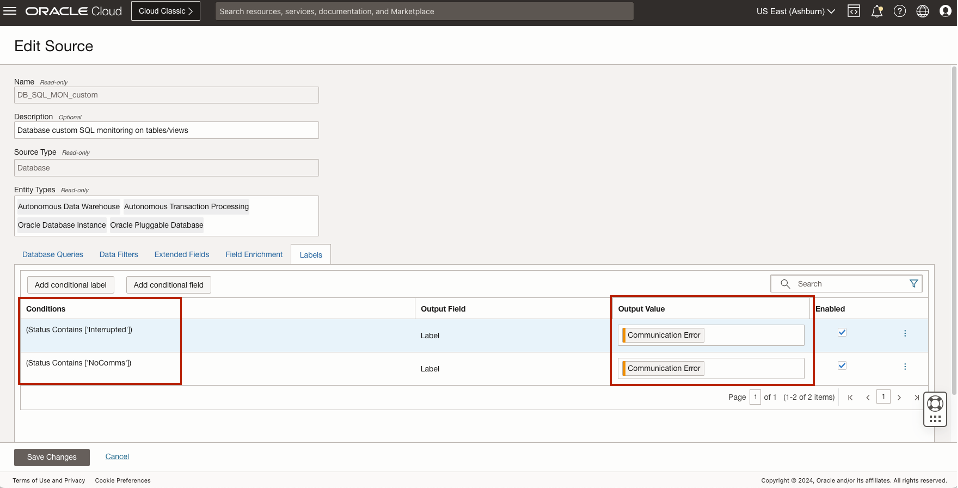
Oracle Logging Analytics lets you add labels or tags to log records, based on defined conditions. When a log entry matches the condition that you have defined, a label is populated with that log entry. This comes handy when you want to detect specific errors from the log records and populate this detection during the ingestion time and these labels are available in your log explorer visualization and you can create detection rule on these labels whenever there is new errors detected from log records. For example, if database session data Status field returns the data includes key words Interrupted or NoComms, it will attach the label to the log data with Communication Error and give the problem priority as Medium.
Tip 8: Import Knowledge Content from Oracle quickstart OCI Observability and Management Services GitHub community repository
OCI O&M advanced services provide a lot of knowledge content related to telemetry data collection, enrichment, analytics,dashboards, alarms etc that enable faster troubleshooting, analysis, and monitoring of infrastructre, applications, services, databases etc. This is a community maintained repository of knowledge content created by subject matter experts for sharing best practices, recommendation, examples etc with anyone using OCI O&M Services.
- Import Log Source, Log Parsers: Logging Analytics Aministration Overview -> Import Configuration Content
- Import Dashboards: Logging Analytics Dashboards -> Import Dashboards
Logging Analytics knowledge content covers the following monitoring targets and keeps growing
- Oracle E-Business Suite
- Oracle Integration Cloud
- Security Fundamentals Dashboards
- Oracle Database APEX Monitoring
Further Reading
- OCI Logging Analytics Best Practices Series – Management Agent Tuning
- OCI Logging Analytics Best Practices Series – Cost Optimization
- OCI Logging Analytics Parser Details
- OCI Logging Analytics Oracle-Defined Sources
- Configure Logging Analytics Log Source Data Filters
- Configure Logging Analytics Extended Fields in Sources
- Logging Analytics Field Enrichment in Sources
- How to Write Performant Regular Expression
- Regular-expression constructs that can be used with parsers, labels, and datafilters, see Java Platform Standard Ed. 8 Documentation
- Lookups and Query-time regex, refer to the RE2J syntax at Java Implementation of RE2
Please check out our Oracle Cloud Customer Connect Observability and Management Community. You can pose questions, connect with experts, and share your successes, thoughts and ideas about Oracle Cloud Observability and Management solutions (including OCI Application Performance Monitoring, Stack Monitoring, Logging Analytics, Database Management and Operations Insights).
Acknowledgements
- Contributor: Waymon Whiting