
Maintaining good password hygiene across your Oracle Cloud Identity Domain is essential for both security compliance and user experience. Oracle Identity Domains allow you to define password expiration policies, and it’s possible to programmatically or interactively track each user’s password status — whether it’s Active, Expiring Soon, Never Set or Expired.
This blog walks through two practical methods to track password expiration:
- Using the OCI CLI + jq (ideal for quick inspection)
- Using the OCI Python SDK (ideal for custom automation or reporting)
Each OCI Identity Domain has a password policy that controls when passwords expire. We can check this by running the OCI CLI command as seen below
oci identity-domains password-policy get –password-policy-id PasswordPolicy –endpoint https://idcs-xxxxx.identity.oraclecloud.com
sample output would be
{
  "data": {
    "allowed-chars": null,
    "compartment-ocid": "ocid1.compartment.oc1..xxxxxx",
    "configured-password-policy-rules": null,
    "delete-in-progress": null,
    "description": "Default out of the box policy",
    "dictionary-delimiter": null,
    "dictionary-location": null,
    "dictionary-word-disallowed": null,
    "disallowed-chars": null,
    "disallowed-substrings": null,
    "disallowed-user-attribute-values": null,
    "distinct-characters": null,
    "domain-ocid": "ocid1.domain.oc1..xxxxxx",
    "external-id": null,
    "first-name-disallowed": true,
    "force-password-reset": null,
    "groups": null,
    "id": "PasswordPolicy",
    "idcs-created-by": {
      "display": "idcssm",
      "ocid": null,
      "ref": https://idcs-xxxxx.identity.oraclecloud.com/admin/v1/Apps/xxxxx,
      "type": "App",
      "value": "6923eddd11d1457084f550273b51027a"
    },
    "idcs-last-modified-by": {
      "display": "Dinesh Maricherla",
      "ocid": "ocid1.user.oc1..xxxxxxx",
      "ref": https://idcs-xxxxxxx.identity.oraclecloud.com/admin/v1/Users/xxxxx,
      "type": "User",
      "value": "xxxxxxx"
    },
    "idcs-last-upgraded-in-release": null,
    "idcs-prevented-operations": null,
    "last-name-disallowed": true,
    "lockout-duration": 30,
    "max-incorrect-attempts": 5,
    "max-length": 40,
    "max-repeated-chars": null,
    "max-special-chars": null,
    "meta": {
      "created": "2024-01-29T16:01:12.835Z",
      "last-modified": "2025-04-16T18:51:13.013Z",
      "location": https://idcs-xxxxxxx.identity.oraclecloud.com:443/admin/v1/PasswordPolicies/PasswordPolicy,
      "resource-type": "PasswordPolicy",
      "version": "d1xxxxx"
    },
    "min-alpha-numerals": null,
    "min-alphas": null,
    "min-length": 16,
    "min-lower-case": 1,
    "min-numerals": 1,
    "min-password-age": null,
    "min-special-chars": null,
    "min-unique-chars": null,
    "min-upper-case": 1,
    "name": "defaultPasswordPolicy",
    "num-passwords-in-history": 10,
    "ocid": "ocid1.domainpasswordpolicy.oc1.iad.xxxxx",
    "password-expire-warning": 5,
    "password-expires-after": 90,
    "password-strength": "Custom",
    "priority": null,
    "required-chars": null,
    "schemas": [
      "urn:ietf:params:scim:schemas:oracle:idcs:PasswordPolicy"
    ],
    "starts-with-alphabet": null,
    "tags": null,
    "tenancy-ocid": "ocid1.tenancy.oc1..xxxxxx",
    "user-name-disallowed": true
  },
  "opc-total-items": "1"
}
If the passwordExpireWarning setting is not currently configured in your Identity Domain’s password policy, it is recommended to set it. This attribute defines the number of days prior to password expiration when users should start receiving warnings.
As shown in the sample output above, a value like “passwordExpireWarning”: 5 indicates that users will be warned 5 days before their password expires.
Since this setting cannot be configured via the OCI Console, it must be updated using the OCI CLI or the Identity Domains API.
OCI CLI command to patch the password policy passwordExpiresAfter 100 days and set passwordExpireWarning to 10 days before it expires would be as below: (If we don’t have passwordExpiresAfter set the users can keep the same password indefinitely)
oci identity-domains password-policy patch \
–password-policy-id PasswordPolicy \
–endpoint https://idcs-xxxxxxxxx.identity.oraclecloud.com \
–schemas ‘[“urn:ietf:params:scim:api:messages:2.0:PatchOp”]’ \
–operations ‘[
{
“op”: “replace”,
“path”: “passwordExpiresAfter”,
“value”: 100
},
{
“op”: “replace”,
“path”: “passwordExpireWarning”,
“value”: 10
}
]’
We have a password policy that controls when passwords expire. Now lets go over the methods that would list the users and the status of their passwords
Method 1: Using the OCI CLI + jq to List Password Set Dates
If you want a quick, human-readable view of when each user last set their password, this CLI method is ideal:
oci identity-domains users list –all –endpoint https://idcs-xxxxxxxx.identity.oraclecloud.com –attributes urn:ietf:params:scim:schemas:oracle:idcs:extension:passwordState:User:lastSuccessfulSetDate | jq -r ‘.data.resources[]|.”urn-ietf-params-scim-schemas-oracle-idcs-extension-password-state-user”.”last-successful-set-date” + “\t” + .”user-name”‘ | column -ts $’\t’
The output would be like this

Method 2: Using the OCI Python SDK to Compute Password Status
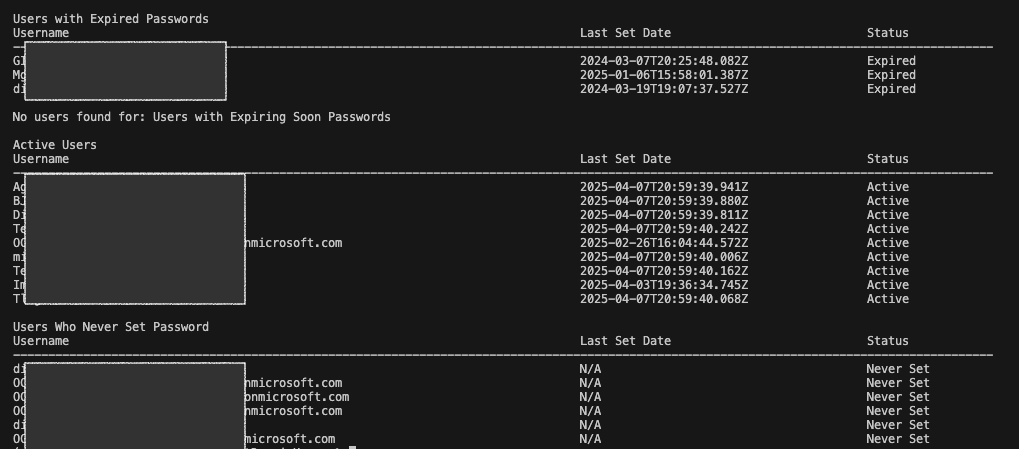
The script performs the following:
- Authenticates to the OCI Identity Domain using your config file.
- Fetches the password policy, including how long passwords are valid and when users should receive expiration warnings.
- Retrieves all users and their
lastSuccessfulSetDate. - Calculates each user’s status based on:
- Current date
- Password expiration settings
- Last time the password was successfully set
- Prints and groups users by password status:
- Expired
- Expiring Soon
- Active
- Never Set
Here is a code snippet:
Note: This is a sample script provided for educational and illustrative purposes only. It should be tested thoroughly in a non-production or sandbox environment before being used in any customer tenancy. Ensure appropriate error handling, logging, and access controls are in place when adapting this for use in real-world environments.
import oci
from dateutil import parser
from datetime import datetime, timedelta, timezone

CONFIG_PATH = "~/.oci/config"

# === LOAD CONFIG ===
config = oci.config.from_file(CONFIG_PATH)
domain_url = "https://idcs-xxxxxx.identity.oraclecloud.com"
idcs_client = oci.identity_domains.IdentityDomainsClient(config, domain_url)

def get_password_policy():
    response = idcs_client.list_password_policies(
        attributes="passwordExpiresAfter,passwordExpireWarning"
    )
    policy = response.data.resources[0]
    expires_after = getattr(policy, 'password_expires_after', None)
    expire_warning = getattr(policy, 'password_expire_warning', 5)

    return expires_after, expire_warning

def list_users_with_password_dates():
    users = []
    page_token = None
    page_count = 1

    while True:
        response = idcs_client.list_users(
            attributes=(
                "userName,"
                "urn:ietf:params:scim:schemas:oracle:idcs:extension:passwordState:User:lastSuccessfulSetDate"
            ),
            page=page_token,
            limit=100
        )

        print(f"Fetched page {page_count} with {len(response.data.resources)} users")
        users.extend(response.data.resources)

        if response.has_next_page:
            page_token = response.next_page
            page_count += 1
        else:
            break

    return users

def compute_expiration(last_set_date, expires_after, expire_warning):
    if expires_after is None:
        return "No Expiration"

    last_set_datetime = parser.parse(last_set_date)
    expire_date = last_set_datetime + timedelta(days=expires_after)
    warning_date = last_set_datetime + timedelta(days=(expires_after - expire_warning))

    current_date = datetime.now(timezone.utc)

    if current_date > expire_date:
        return "Expired"
    elif warning_date < current_date <= expire_date:
        return "Expiring Soon"
    else:
        return "Active"

def print_user_list(title, user_list):
    if user_list:
        print(f"\n{title}")
        print(f"{'Username':80} {'Last Set Date':40} {'Status'}")
        print("-" * 140)
        for username, display_date, status in user_list:
            print(f"{username:80} {display_date:40} {status}")
    else:
        print(f"\nNo users found for: {title}")

def main():
    expires_after, expire_warning = get_password_policy()

    if expires_after is None:
        print("Password expiration is NOT configured. Passwords won't expire.")
    else:
        print(f"Password expires after: {expires_after} days (Warning: {expire_warning} days before)")

    users = list_users_with_password_dates()

    print("\nAll Users Password Status")
    print(f"{'Username':80} {'Last Set Date':40} {'Status'}")
    print("-" * 140)

    expired_users = []
    expiring_soon_users = []
    active_users = []
    never_set_users = []

    for user in users:
        username = user.user_name
        ext = user.urn_ietf_params_scim_schemas_oracle_idcs_extension_password_state_user
        last_set_date = getattr(ext, "last_successful_set_date", None)

        if not last_set_date:
            status = "Never Set"
            display_date = "N/A"
            never_set_users.append((username, display_date, status))
        else:
            status = compute_expiration(last_set_date, expires_after, expire_warning)
            display_date = last_set_date
            if status == "Expired":
                expired_users.append((username, display_date, status))
            elif status == "Expiring Soon":
                expiring_soon_users.append((username, display_date, status))
            elif status == "Active":
                active_users.append((username, display_date, status))

        print(f"{username:80} {display_date:40} {status}")

    # Print summaries
    print_user_list("Users with Expired Passwords", expired_users)
    print_user_list("Users with Expiring Soon Passwords", expiring_soon_users)
    print_user_list("Active Users", active_users)
    print_user_list("Users Who Never Set Password", never_set_users)

if __name__ == "__main__":
    main()
What the script does it gathers these attributes from the identity domain
- lastSuccessfulSetDate
- This is the timestamp of when the user last successfully set their password.
- Fetched per user using:
- urn:ietf:params:scim:schemas:oracle:idcs:extension:passwordState:User:lastSuccessfulSetDate
- passwordExpiresAfter
- Number of days a password remains valid after being set. Configured in the Identity Domain’s password policy.
- passwordExpireWarning
- Number of days before expiration when the system should start warning users.
Then calculates the computed dates using the below logic
- expire_date = last_set_datetime + timedelta(days=password_expires_after)
- warning_date = last_set_datetime + timedelta(days=(password_expires_after – password_expire_warning))
- current_date = datetime.now(timezone.utc)
The script then compares the current_date against those computed dates and classifies the user accounts as shown
As seen below we do have accounts which don’t have the date set, reason could be
- Their account was provisioned but they never set a password.
- They are a federated user (e.g., via SSO) and don’t use local passwords.
- The account is a service account or technical user where password management is not applicable.
The sample output would be
This script can be further enhanced to exclude federated or service accounts, or to automatically deactivate users with expired passwords. It can also be deployed as an OCI Function to run on a scheduled basis, generating and sending output for downstream analysis or integration with monitoring and alerting systems. Schedule regular checks to catch soon-to-expire or expired accounts.
In conclusion, we’ve explored multiple methods to identify users whose passwords are nearing expiration. By combining the capabilities of the OCI CLI and the OCI Python SDK, you can build a lightweight yet powerful password monitoring solution that enhances both security and user experience across your OCI Identity Domain.