
Introduction:
In today’s cloud environment, it’s critical to ensure high availability and reliability when it comes to network connectivity. It’s quite common to have redundant FastConnect connections via different partners. By leveraging multiple providers, you can significantly enhance the resilience and reliability of your on-prem/multi-cloud connections, ensuring your critical workloads remain uninterrupted in the event of a failure.
This guide outlines best practices for achieving redundancy when implementing FastConnect by utilizing two different partners.
Design Considerations:
When implementing redundant OCI FastConnect connections, careful planning and confuguration are crucial. Below, we have outlined the key factors to consider when setting up redundant connections via colo/third party method, through a single partner or via multiple partners.
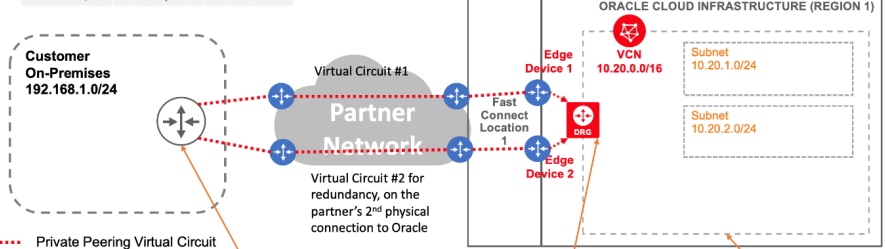
Co-Location/Third Party Connections:
When deploying a FastConnect connection using a co-location or third-party method, the OCI console provides an option to specify router-proximity. This ensures that the second, redundant connection is not created on the same router as the first one within OCI. By enabling this option, the second connection will be established on a different router, enhancing redundancy and reducing the risk of a single point of failure.
Redundancy with a Single Partner:
If you are using the same partner for both redundant connections, most partners will automatically place the connections on two different routers to ensure redundancy. However, its crucial to confirm this with your partner during the setup process to ensure that the redundant connection is configured on a different router on the OCI side.
Redundancy Across Multiple Partners:
When using different partners for redundancy, you must obtain the details of the OCI router to which the first connection from partner 1 is connected. Share this information with Partner 2 to ensure that they do not use the same router when establishing the redundant connection. This coordination is essential to avoid both connections being terminated on the same router.
Redundancy for Cloud Interconnect:
Oracle collaborated with partners to establish a dedicated, private cloud-to-cloud connection between OCI and Microsoft Azure or Google Cloud Platform (GCP) in select regions. These OCI Interconnects include built-in backend redundancy, so users should select the “Single Circuit” option (instead of “Redundancy Circuit”) when creating the connection. They will then be prompted to provide primary and secondary BGP peer IP addresses.
Where can I find OCI router information in the OCI console?
Once your FastConnect partner completes the configuration on their end and the virtual circuit’s status changes to ‘Provisioned’, you can view the OCI router information. The logical device name will be displayed under the BGP information on the virtual circuit page.
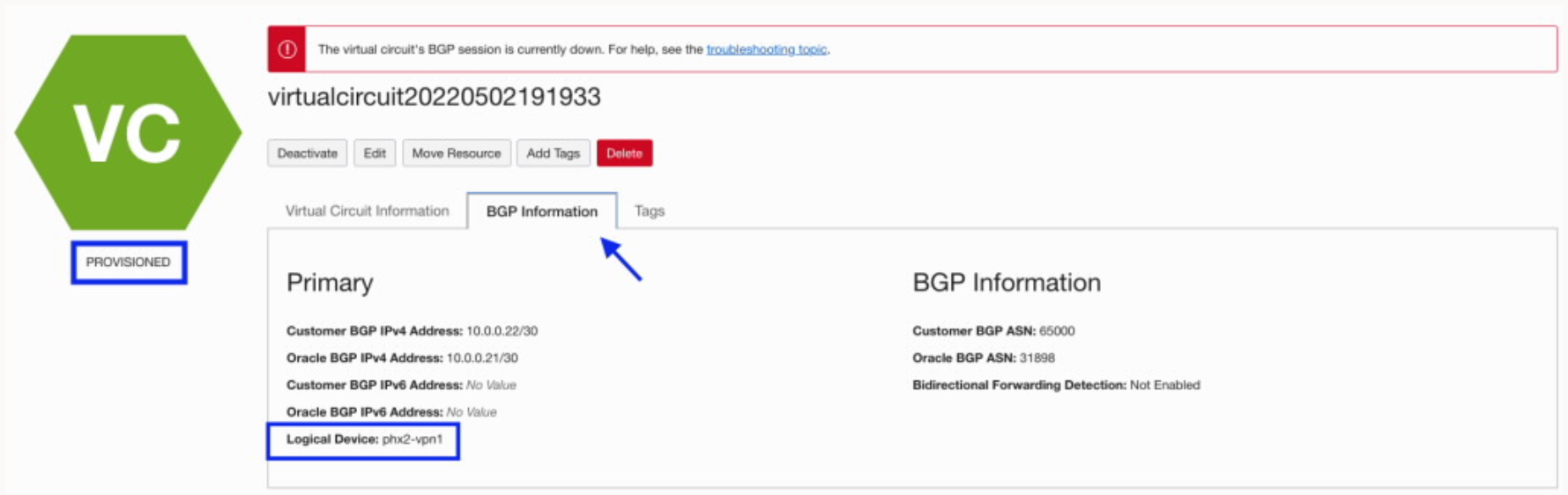
What should I do if the connection ends up on the same router on the OCI side?
Unfortunately, if the second connection is established on the same router as the first, the only option is to delete the second connection and recreate it. Ensure that before you recreate the connection, communicate with your partner and share the logical-device ID of the first connection to ensure that they will use a different router on the OCI side for the redundant connection.
Can we use the same ASN when configuring BGP for redundant connections with different partners?
Yes, you can use same BGP ASN range for private peering on two different connections with different partners. However, ensure that the BGP/30 IP addresses configured for each connection are different.
Related links:
Fastconnect requirements – https://docs.oracle.com/en-us/iaas/Content/Network/Concepts/fastconnectrequirements.htm
Fastconnect Pricing – https://www.oracle.com/vn/cloud/networking/FastConnect/pricing/
Maintaining virtual circuits – https://docs.oracle.com/en-us/iaas/Content/Network/Concepts/vc-maintenance.htm
FastConnect redundancy best practices – https://docs.oracle.com/en-us/iaas/Content/Network/Concepts/fastconnectresiliency.htm
Redundancy Guide – https://docs.oracle.com/en-us/iaas/Content/Resources/Assets/whitepapers/connectivity-redundancy-guide.pdf
Conclusion:
In this blog, we explored how to achieve redundancy with OCI FastConnect using two different partners, ensuring there is no single point of failures. Also, it answers some of the common queries when one tries to implement the same.