
Introduction:
Many Oracle Cloud Infrastructure (OCI) customers leverage the native Site-Site service to establish secure connectivity between their on-premises networks and OCI environments. As business needs evolve, customers often need to update their existing VPN configurations—typically due to the addition of new systems or workloads with different IP ranges.
A common assumption is that simply modifying the VPN connection to include the new routes is sufficient. However, this is not always the case. In reality, additional adjustments to other OCI networking components are often required to ensure seamless connectivity.
In this blog, we will explore the key networking configurations that may need to be updated when incorporating new IP ranges into an existing OCI Site-to-Site VPN setup.
Network Diagram:
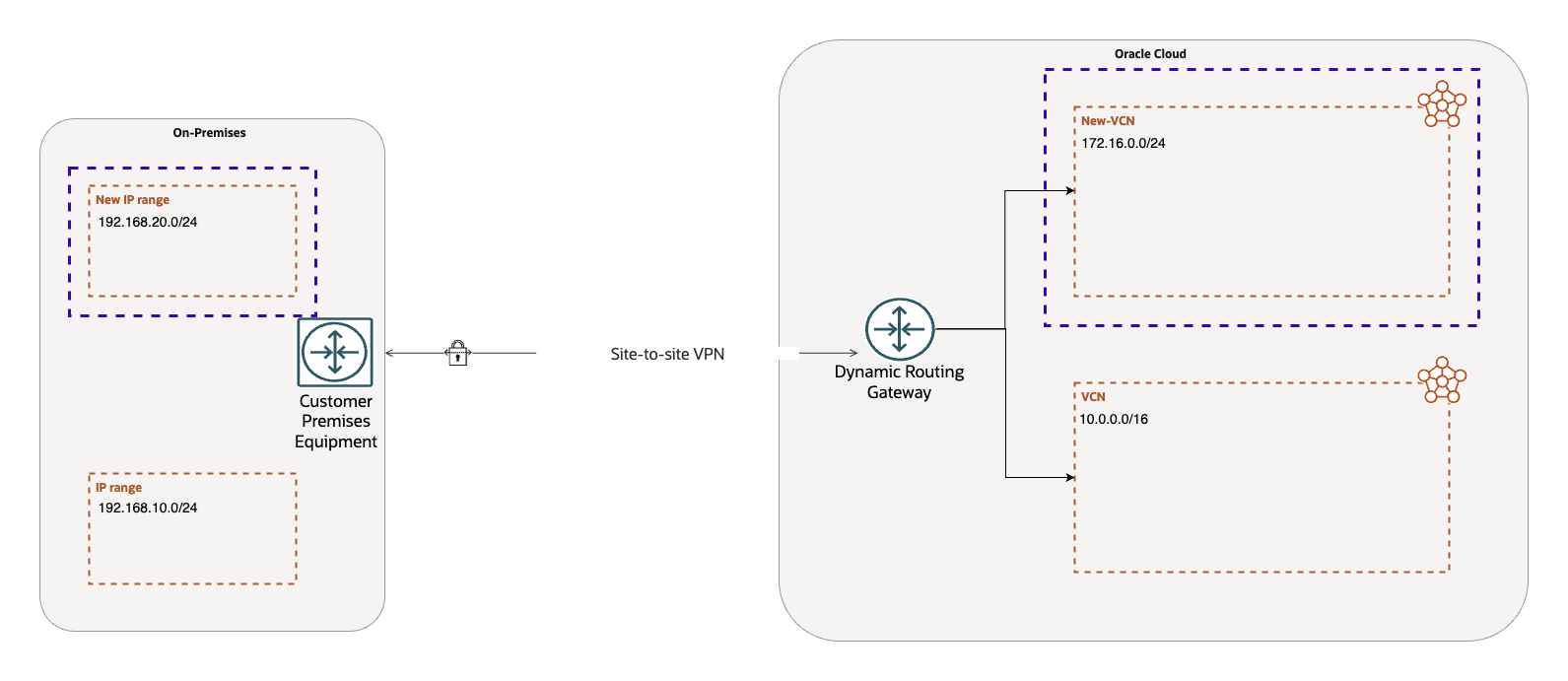
For this blog, I have provisioned:
- a DRG
- Site-Site VPN
- a VCN attached to the DRG
On-premises CIDR range: 192.168.10.0/24
VCN CIDR range: 10.0.0.0/16
All necessary routing and security configurations have been applied to ensure seamless communication between on-premises and OCI.
For this demonstration, we will add:
- A new on-premises CIDR block: 192.168.20.0/24
- A new VCN with the CIDR block: 172.16.0.0/24
The new VCN 172.16.0.0/24 has already been attached to the DRG, so our focus will be on the required configuration updates.
We will evaluate the scenarios for all supported types of VPN routing: Static, Policy based and BGP (dynamic).
Changes required in the VPN configuration:
-
Static Routing:
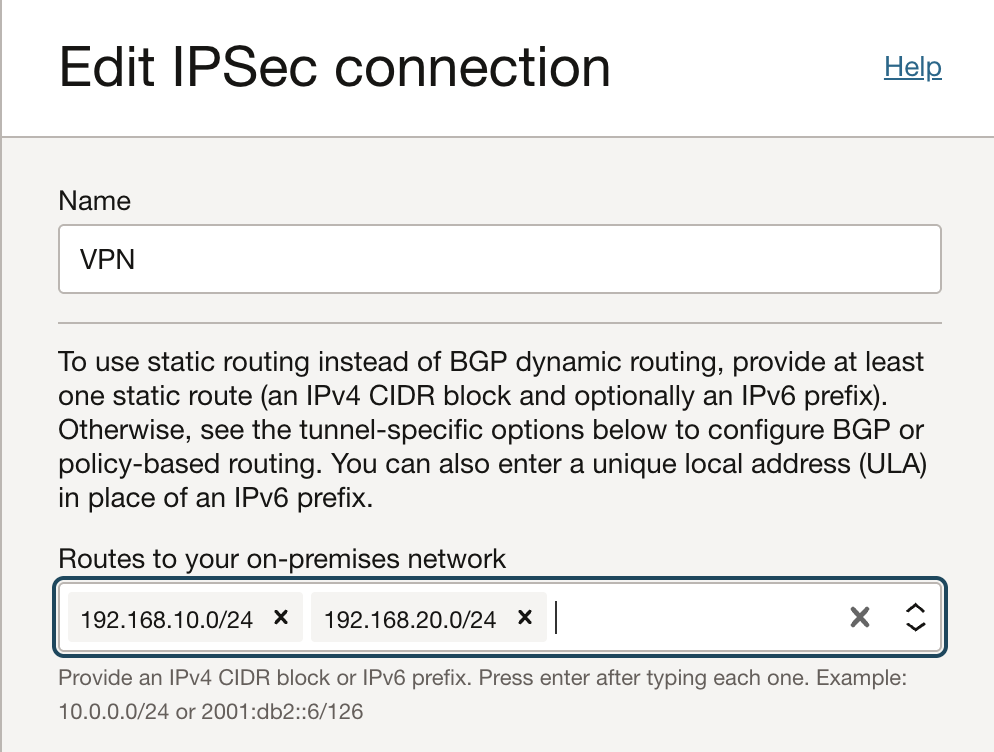
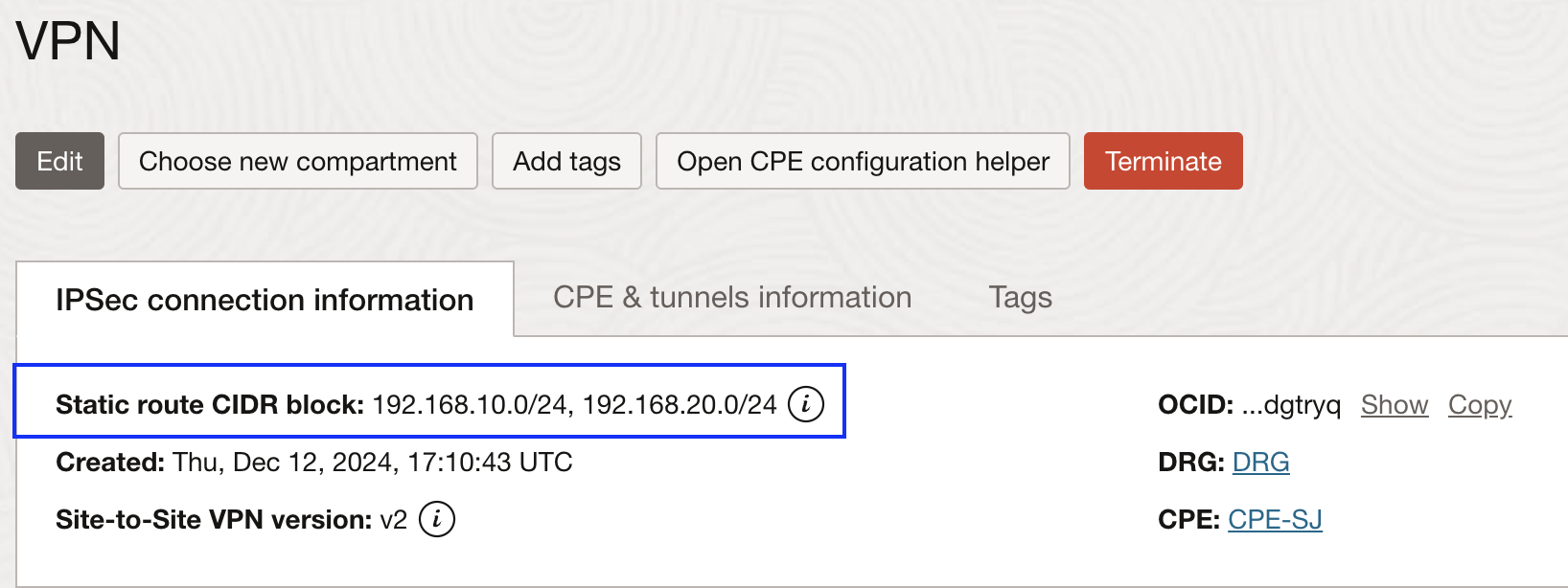
For static routing, we need to change the field ‘Static Routes’ in the VPN configuration to add the new on premises IP range 192.168.20.0/24.
We do not need to make any change in the VPN configuration to add VCN CIDR block 172.16.0.0/24
Click on the ‘Edit’ button and add the required CIDR block to this section:
-
Policy based routing:
In policy based routing, we configure what we call as ‘encryption domain’. A pair of on premises CIDR block and OCI CIDR block forms an encryption domain.
Each entry generates an encryption domain with all possible entries on the other end of the tunnel.
For this reason, we need to add both on premises and OCI CIDR block in the VPN tunnel configuration as follows:
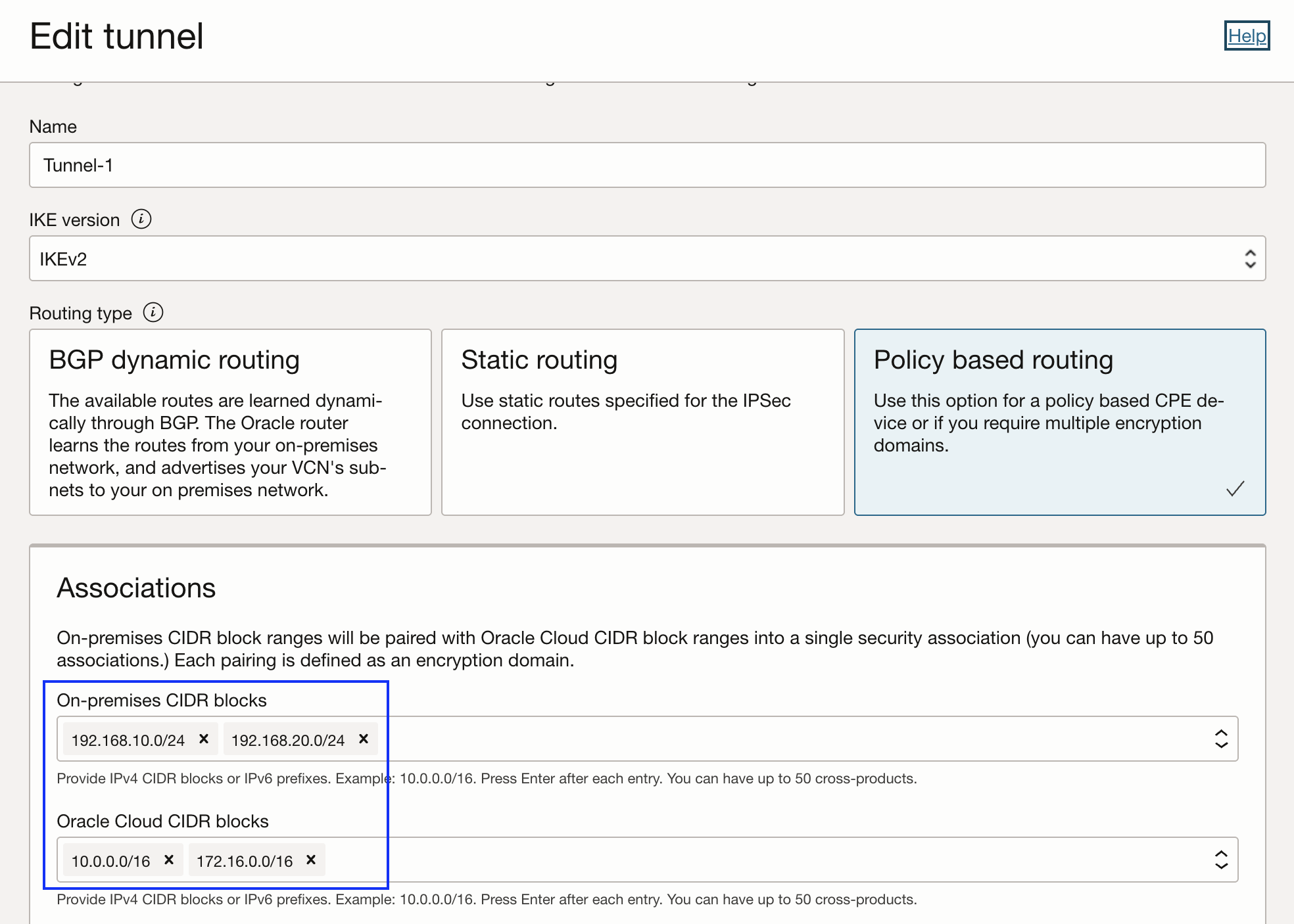
This will generate total of 4 security associations that can be verified on the tunnel page as follows:
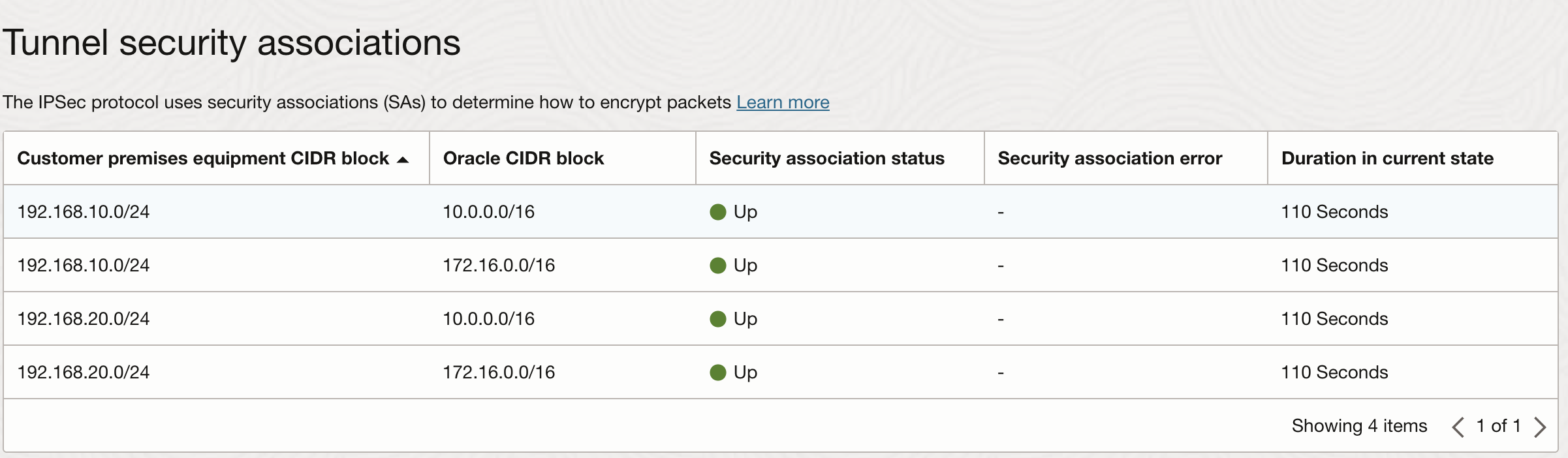
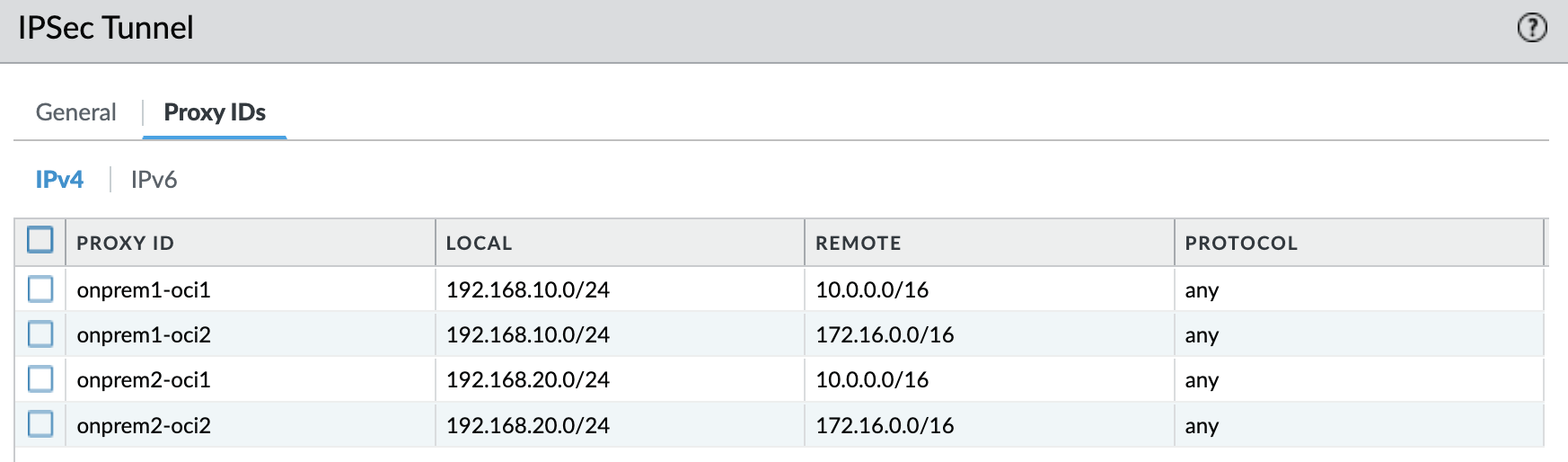
Please note that the encryption domains must match exactly on both the sides of the tunnel. In my case, I am using Palo Alto as the remote side and I need to match the proxy IDs:
-
BGP (Dynamic) routing:
Due to the inherent dynamic nature of BGP, we do not need to change any VPN configuration. Whatever IP ranges customer advertise over BGP would be imported automatically into the route tables at the DRG. Same goes for the OCI CIDR blocks.
It is one of the reasons Oracle recommends to have BGP based routing in Site-Site VPN.
Changes required in the VCN constructs:
Modifying the VPN tunnel configuration alone is not sufficient to fully integrate the new IP ranges. Depending on the specific use case, additional changes may be required in various OCI networking components to ensure seamless connectivity. Let’s go over these areas one by one.
-
Subnet route tables:
Route rules within a subnet determine how traffic is directed for specified CIDR ranges. These rules define the next hop for outbound traffic, ensuring that packets are sent to the correct destination.
To enable communication with the new on-premises CIDR 192.168.20.0/24, a route rule must be added to forward traffic to the appropriate destination. For scenarios requiring traffic inspection through a Network Virtual Appliance (NVA), the target can instead be set to a private IP of the NVA instance. However, for this blog, the traffic is sent directly to the DRG. This route rule needs to be added in every subnet’s route table that requires connectivity to the new on premises CIDR range:
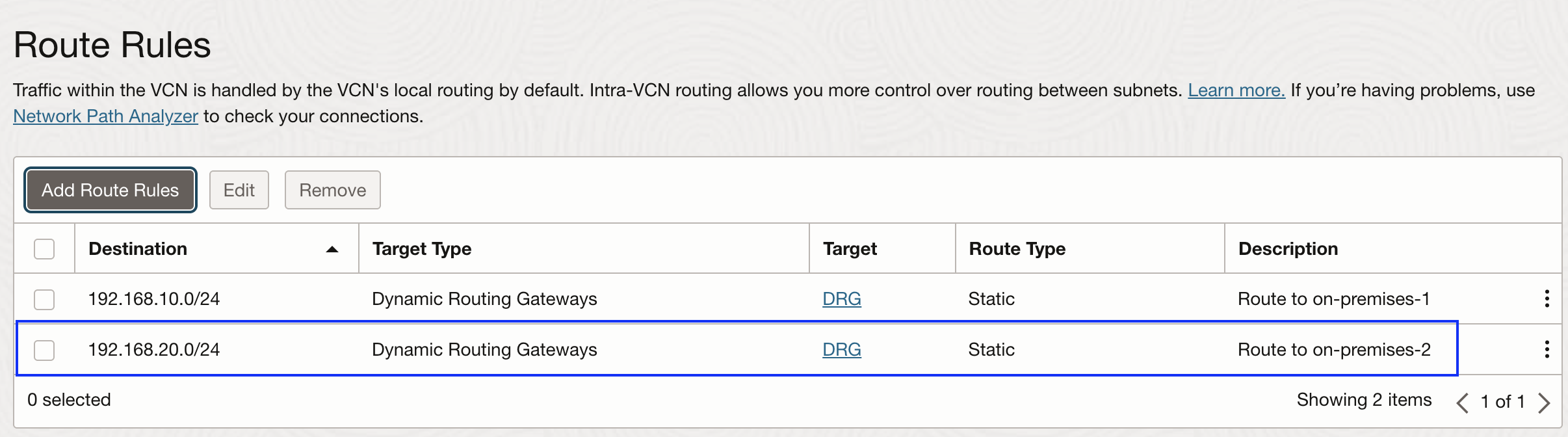
Although the newly added route rule is labeled as static, it should not be confused with the type of routing used within the VPN configuration. VPN routing, whether static, policy-based, or BGP (dynamic), operates independently from these subnet route rules.
The purpose of this route rule is solely to direct outbound traffic from OCI subnets toward the Dynamic Routing Gateway (DRG), which then ensures the traffic is forwarded over the VPN tunnel to the on-premises network.
By adding this route, OCI subnets recognize that any traffic intended for 192.168.20.0/24 should be sent to the DRG. From there, the DRG processes the traffic and applies the appropriate VPN routing mechanism to establish communication with the on-premises network.
-
Security Lists/Network Security Groups:
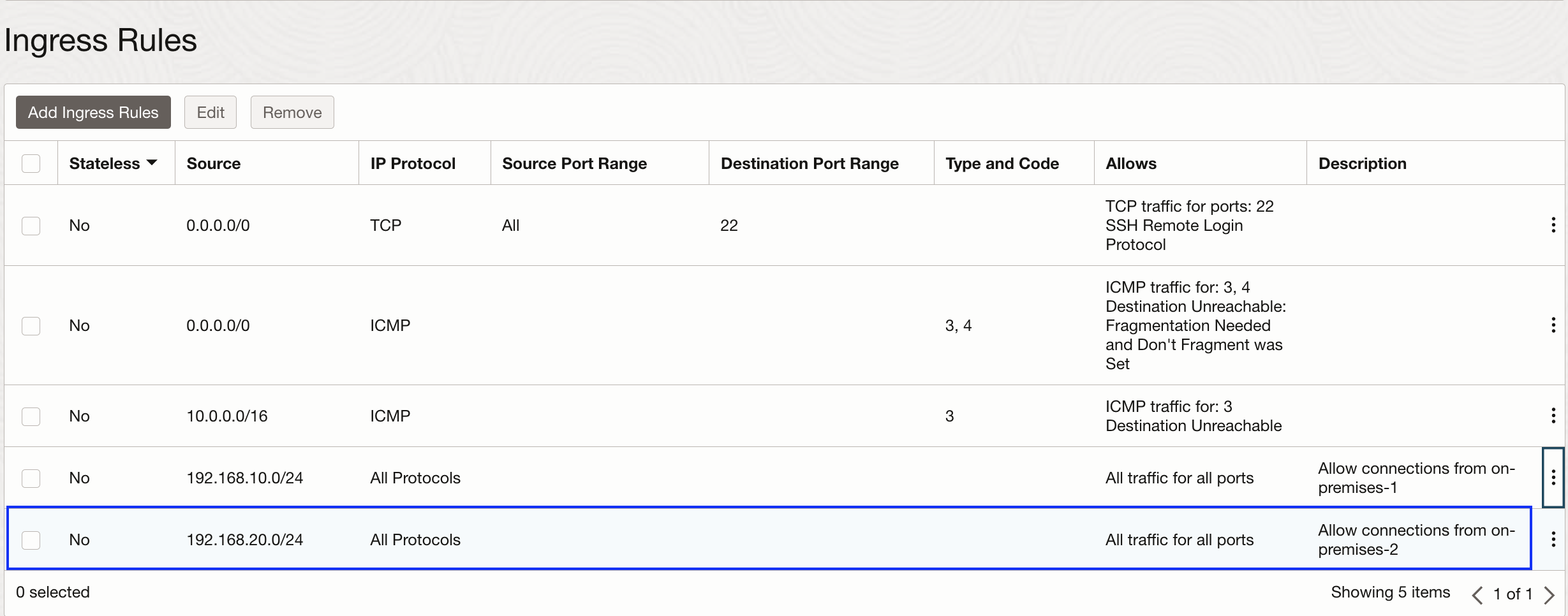
In my experience, this is very simple but yet very easy to miss configuration. Depending on the flow of traffic, we need to add ingress/egress rules allowing new on premises CIDR range to communicate with the subnet as follows. This security rule needs to be added in every subnet’s security list that requires connectivity to the new on premises CIDR range. If you are also using Network Security Groups to manage the security requirements of individual vNICs, add the rules there as well:
-
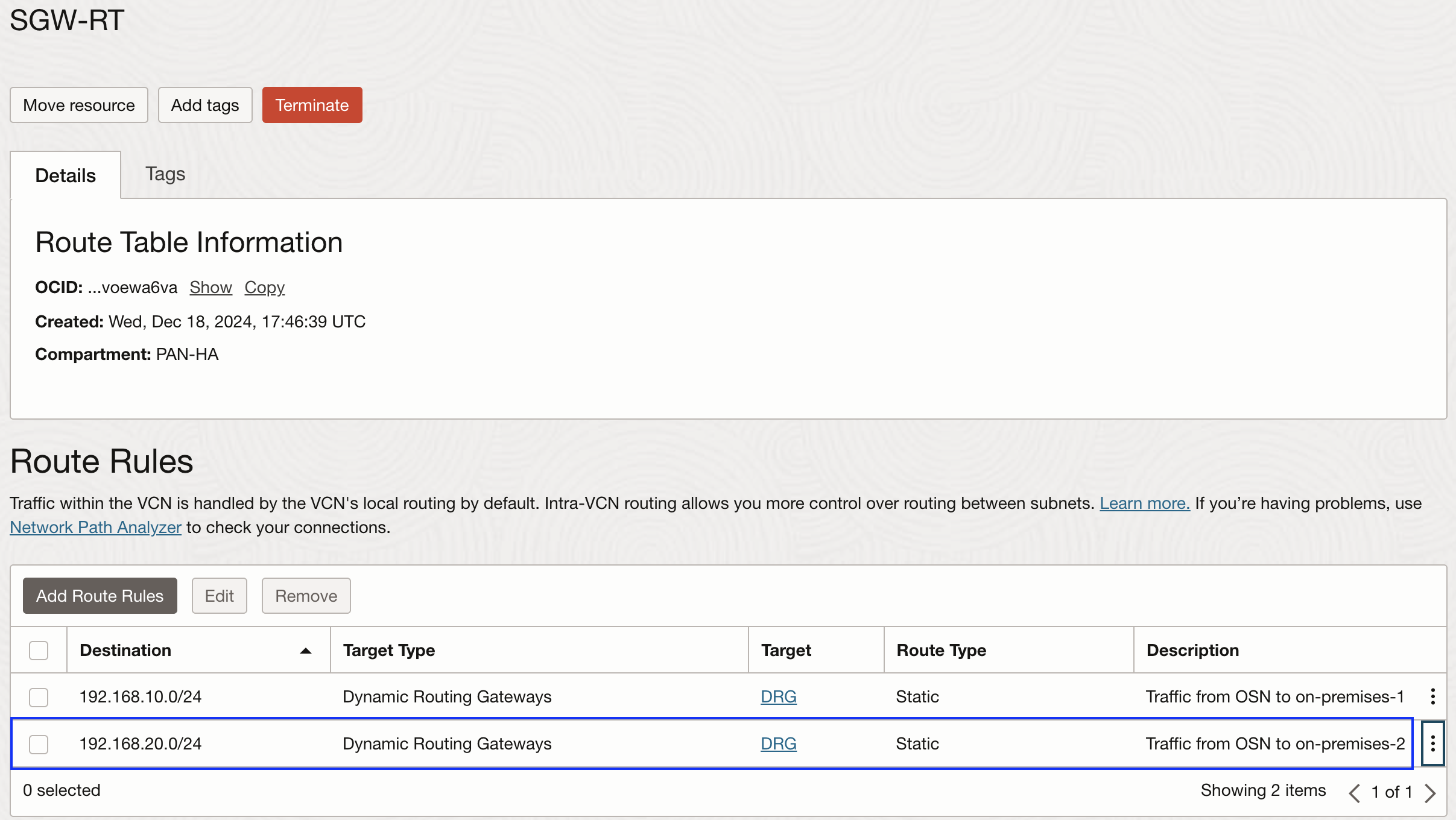
Service Gateway route table:
In some advanced use cases such as ‘Private access to OSN services from on-premises’, we need to associate a route table to the Service Gateway with a route rule pointing on-premises IP ranges to the DRG or to a private IP for use cases like traffic inspection through a Network Virtual Appliance (NVA). If your architecture is utilizing such use case, add a new rule incorporating new on-premises CIDR range. Lets say we are forwarding the on-premises traffic directlty to the DRG as follows:
-
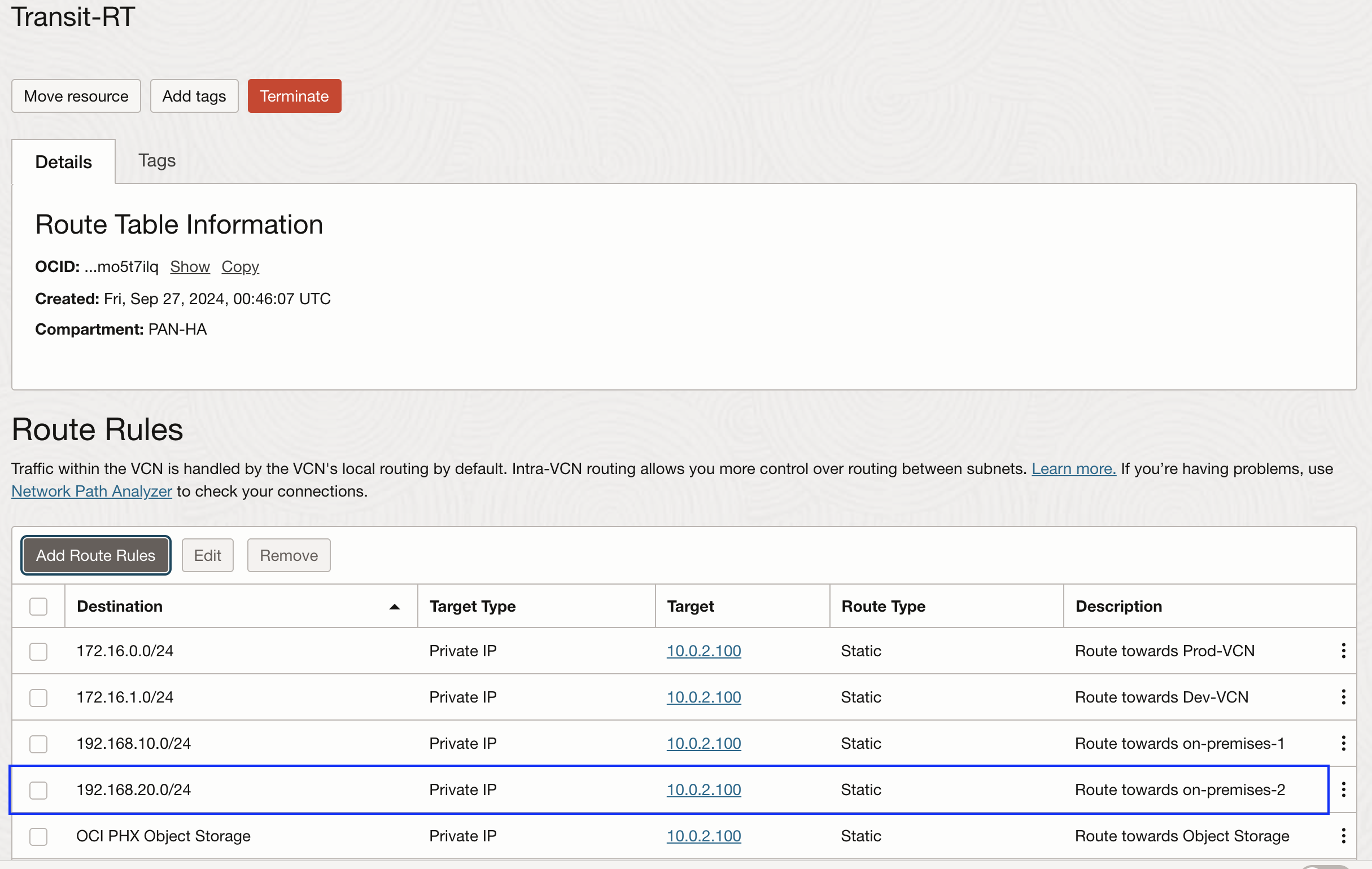
Transit route table:
This type of route table is typically used when Hub and Spoke model is being used with a Network Virtual Appliance (NVA) for the traffic inspection. It is created in the VCN and attached at the DRG to the Hub VCN attachment. It has route rules pointing the on-premises/spoke VCN IP ranges to a private IP of NVA. Here, based on how you have configured your transit route table (for example, some customers may have 0.0.0.0/0 rule that covers all the IP ranges), you will need to make sure to include new on-premises/spoke VCN IP ranges. In this example, I am sending all the traffic to the trust interface first:
-
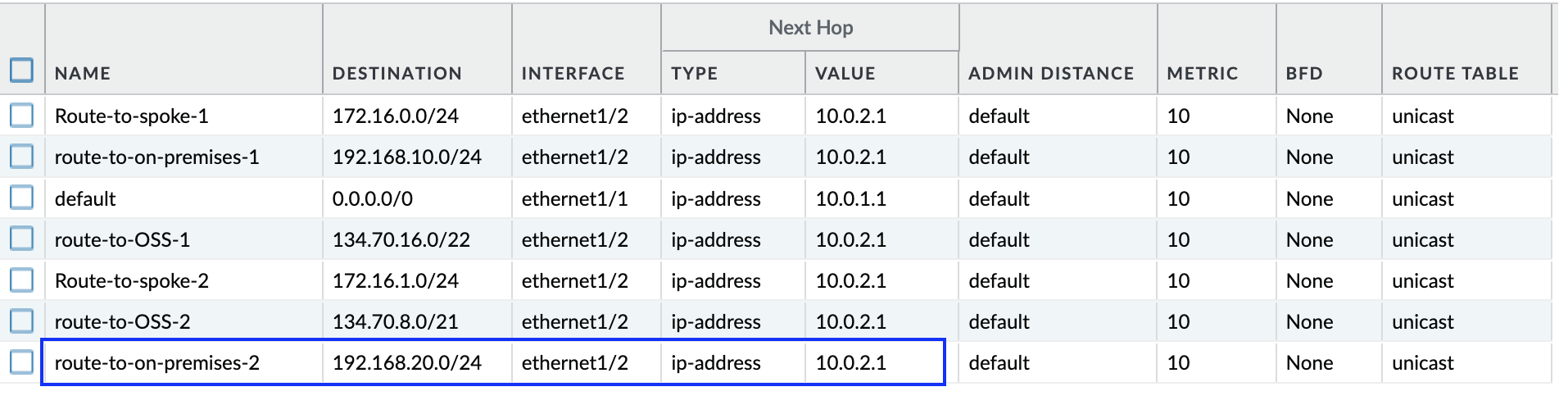
Network Virtual Appliance (NVA) configuration:
Customers often deploy NVA to inspect the East-West/North-South traffic. Since they are typically deployed from the OCI Marketplace, customers manage all the routing and security within the NVA. When we add any new on-premises/OCI IP ranges, routing and security configuration need to be updated accordingly. Following is the example of Palo Alto routing where I am sending the interested traffic to the trust subnet gateway IP:
Conclusion:
In this blog, we explored most common areas on OCI where we need to update the configuration, along with the basic VPN configuration, if new on-premises/OCI CIDR block(s) have been added based on the new requirements.