
Introduction
Enterprises have embarked on their Generative AI journey, beginning with basic prompt-response interactions, progressing to retrieval-augmented generation, and ultimately adopting AI Agents, which became a major focus in 2024. Looking ahead to 2025, the emerging trend is anticipated to center around multi-agent AI workflows.
During CloudWorld, Oracle unveiled over 50+ AI agents designed for Oracle Fusion Cloud applications, including ERP, EPM, HCM, SCM, and CX. In this blog, we will dive into the mechanics of AI Agents, explore the components of LLM-based agents, and understand how these agents can interact with Fusion Applications.
AI Agents
AI agents combine large language models (LLMs) with external tools to understand user queries, generate plans, and execute tasks. They process tool outputs, refine their approach, and iterate this process in a loop until achieving the desired result, ensuring efficient and dynamic problem-solving and marking a significant evolution in automation capabilities.
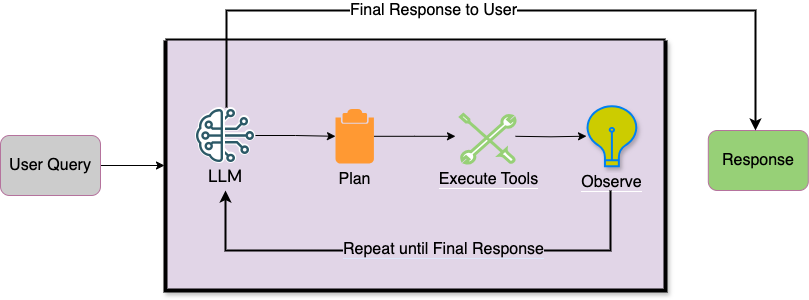
Let create basic AI Agent which can execute the associated tools based on user query, this Agent is inspired by Open AI Swarm Library and Cohere AI Agent, Cohere has released the Version 2 for its Chat APIs streamlining more closely to industry standards. The preamble and chat_history parameters have been unified into a single messages array, categorized by roles such as system, user, and assistant. Tool results are also incorporated into the messages array under the tool role type.
This AI agent is based on Cohere V2 APIs and capable of handoff to child agents. We will explore the Triage Agent (Hierarchical Agent) flow later in this blog.
import cohere
from pydantic import BaseModel
from typing import Optional
import json
import inspect

API_KEY = <

   > # fill in your Cohere API key here
co = cohere.ClientV2(API_KEY)

class Agent(BaseModel):
    name: str = "Agent"
    model: str = "command-r-plus-08-2024"
    instructions: str = "You are a helpful Agent"
    tool_schemas: list = []
    tools_map: dict = {}

class Response(BaseModel):
    agent: Optional[Agent]
    messages: list

def run(agent, messages):

    current_agent = agent
    num_init_messages = len(messages)
    messages = messages.copy()

    print('Starting the Agent Execution : ',current_agent.name)

    while True:

        # turn python functions into tools and save a reverse map
        #tool_schemas = [function_to_schema(tool) for tool in agent.tools]
        #tools_map = {tool.__name__: tool for tool in agent.tools}
        tool_schemas = current_agent.tool_schemas
        tools_map = current_agent.tools_map
        #print('Starting the Agent Execution : ',current_agent.instructions)

        response = co.chat(
            model=current_agent.model,
            messages=[{"role": "system", "content": current_agent.instructions}] + messages,
            max_tokens=4000,
            tools=tool_schemas or None,
        )
        message = response.message

        if not message.tool_calls:  # if finished handling tool calls, break
            print(f"{current_agent.name}: Assistant Message - ", message.content)
            msg = {'role': 'assistant','content':message.content[0].text}
            messages.append(msg)
            break
        else:
            print(f"{current_agent.name}: Tool Call - ", message.tool_calls)
            msg = {'role': 'assistant','tool_calls':message.tool_calls,'tool_plan':message.tool_plan}
            messages.append(msg)

        # === 2. handle tool calls ===

        for tool_call in message.tool_calls:
            result = execute_tool_call(tool_call, tools_map)
            print(f"{current_agent.name}: Tool Call Result - ", result)

            if type(result) is Agent:  # if agent transfer, update current agent
                agent_handoff = result
                transfer_msg = (
                    f"Transferred to {current_agent.name}, Answer user query by calling appropriate tools."
                )

                result_message = {
                    "role": "tool",
                    "tool_call_id": tool_call.id,
                    "content": transfer_msg,
                }
                messages.append(result_message)

                agent_response=run(agent_handoff,[messages[0]])
                messages.extend(agent_response.messages)
                return Response(agent=agent_handoff, messages=messages[num_init_messages:])
            else:
                result_message = {
                "role": "tool",
                "tool_call_id": tool_call.id,
                "content": result,
                }

                messages.append(result_message)


    # ==== 3. return new messages =====
    #return messages[num_init_messages:]
    return Response(agent=current_agent, messages=messages[num_init_messages:])

def execute_tool_call(tool_call, tools_map):
    name = tool_call.function.name
    args = json.loads(tool_call.function.arguments)
    #print(f"Printing Executing The Tool Call: {name}({args})")
    # call corresponding function with provided arguments
    return tools_map[name](**args)
Components of LLM Agent
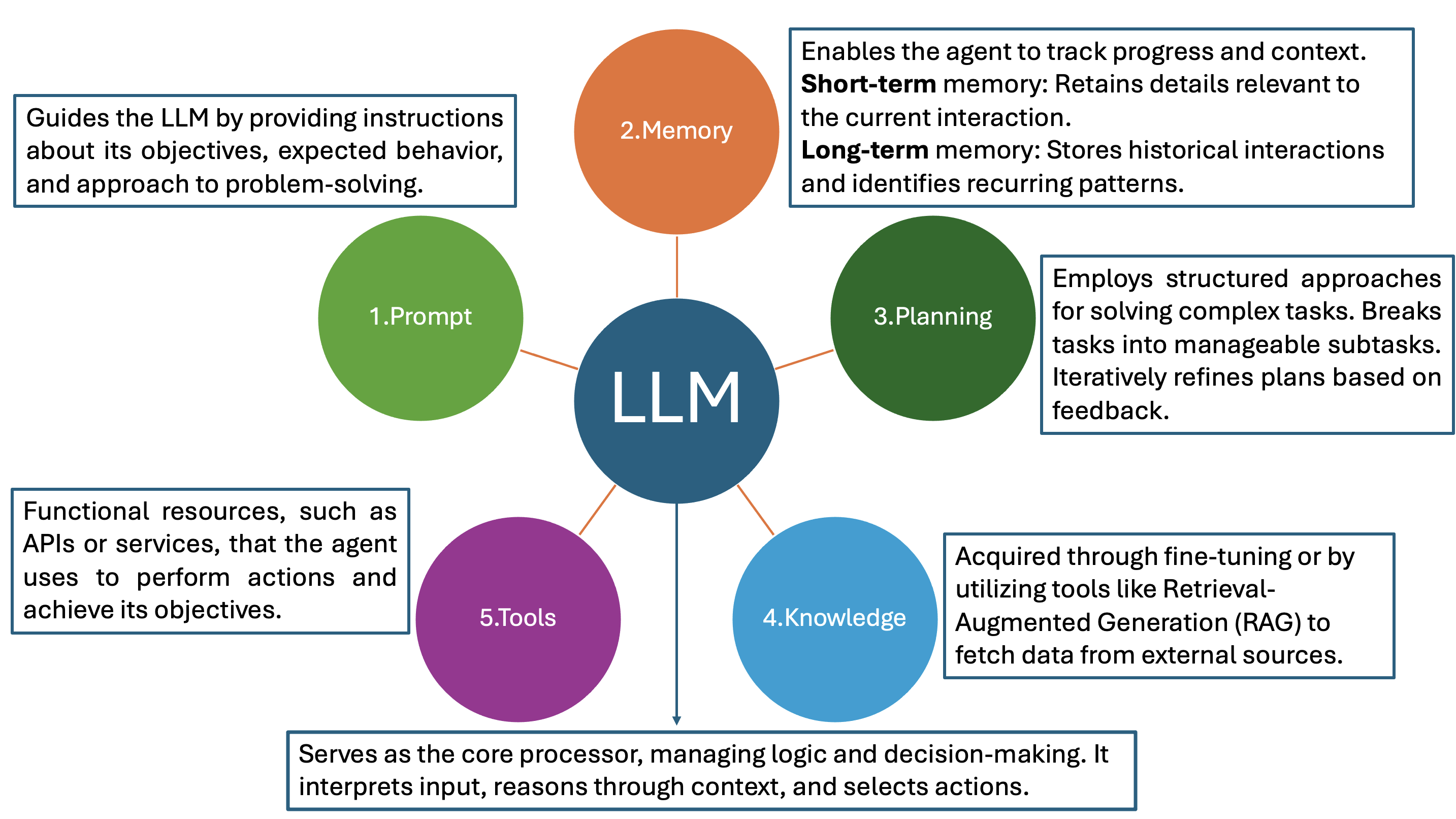
Additionally, Agentic AI systems require orchestration to coordinate tools and workflows effectively. Guardrails are essential to limit their autonomy and ensure controlled actions. Monitoring systems with logs and dashboards help track behavior, identify inefficiencies, and maintain compliance. Regular evaluation of performance, accuracy, and efficiency is crucial, along with feedback loops to refine decision-making, tool usage, and overall logic.
AI Agent Frameworks
There are various types of frameworks for building agentic systems, each with its own strengths and challenges:
LLM-Centric Approach: This framework relies heavily on the language model to handle most tasks autonomously. While this approach offers simplicity, it often leads to issues such as agents going off-track, getting stuck in loops.
Flow-Controlled Approach: Offers reliability through strict control of workflows but requires extensive design effort and results in narrowly tailored agents.
Balancing autonomy with control is key to optimizing agent behavior, AutoGen/Magentic-One, LangGraph, Llama Index, CrewAI, and PydanticAI are various frameworks designed to streamline the development of AI agents.
AI Agents for Oracle Fusion Application
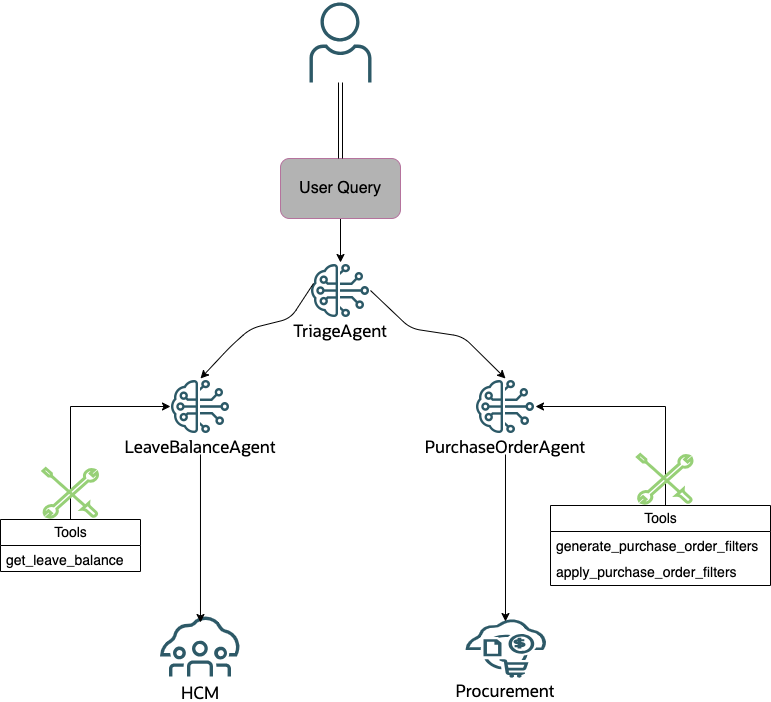
In this blog, we will design a Purchase Order Agent capable of addressing user queries related to purchase orders and a Leave Balance Agent to handle questions about leave balances, such as vacation or sick leave. Additionally, we will develop a Triage Agent that analyzes incoming user requests and determines the appropriate agent to delegate the task, ensuring efficient and accurate query resolution.
The Cohere Agent framework requires users to clearly define the tool schema to ensure accurate execution of tools based on user requests. In this proof of concept, we have separated the tool schema definition from the agent class, providing users complete flexibility to define the schema according to their specific requirements.
Purchase Order Agent
The agent begins by executing the generate_purchase_order_filters tool, which takes the user’s query as input and utilizes a prompt with the LLM to identify the relevant filters for selecting purchase orders. In this proof of concept, the LLM is tasked with extracting five predefined filters from the user input and returning the results as a JSON schema or Python dictionary containing name-value pairs.
Next, the agent invokes apply_purchase_order_filters to convert the generated filters into a query (q) parameter, sets the result limit to 3, and defines the desired purchase order fields. It then calls the Purchase Order REST API to fetch the purchase order details. Finally, the agent leverages the LLM to respond to the user query based on the output from the tools.
While this example simplifies the process by focusing solely on filter generation, the LLM can also dynamically generate values for the result limit and purchase order fields.
from agent import Agent
import requests,json
from requests.auth import HTTPBasicAuth
import cohere

API_KEY = <

   > # fill in your Cohere API key here
co = cohere.ClientV2(API_KEY)

purchase_order_tool_schemas = [
    {
        "type": "function",
        "function": {
            "name": "generate_purchase_order_filters",
            "description": "Use this tool to select appropriate filters for purchase orders from a list of predefined options based on user input, returning a dictionary of the selected filters.",
            "parameters": {
                "type": "object",
                "properties": {
                    "user_query": {
                        "type": "string",
                        "description": "It is user input, don't modify it and pass as it is to this tool as parameter."
                    }
                },
                "required": ["user_query"]
            }
        }
    },
    {
        "type": "function",
        "function": {
            "name": "apply_purchase_order_filters",
            "description": "Use this tool to apply the seleted filters to retrieve the purhase orders, returning a dictionary of the filtered purchase orders.",
            "parameters": {
                "type": "object",
                "properties": {
                    "filters": {
                        "type": "array",
                        "description": "list of filters to apply on purchase order details.",
                        "items": {
                            "type": "object",
                            "properties": {
                                "name": { "type": "string" },
                                "value": { "type": "string" }
                            },
                            "required": ["name", "value"]
                        }
                    }
                },
                "required": ["filters"]
            }
        }
    }
]

# Generate filters
def generate_purchase_order_filters(user_query: str) -> dict:
    """Use this tool to select appropriate filters for purchase orders from a list of predefined options based on user input, returning a dictionary of the selected filters."""

    preamble = """
    You are a Purchase Order assistant. Your task is to determine the appropriate filters for purchase orders based on the user's input.
    """
    message ="""
    Given the filter schema and the user's query, determine the appropriate filter(s).

    ### Instructions
    - You are restricted to use only the provided filters. Do not create new filters.
    - If you don't find any filters in the user query, generate an empty JSON array.
    - The response should be a JSON array of objects, where each object contains the filter name and its corresponding value.
    - If you don't find any mentioned filters in the user query, generate an empty JSON array.

    ##Context : Filters Schema for Purchase Orders
    - {"name": "OrderNumber", "description": "Filter purchase orders by the currency", "examples": ["USD", "EUR", "GBP"]},
    - {"name": "CurrencyCode", "description": "Filter purchase orders by the currency", "examples": ["USD", "EUR", "GBP"]},
    - {"name": "Supplier", "description": "Filter purchase orders by the supplier", "examples": ["Advanced Corp", "ABC Consulting"]},
    - {"name": "Buyer", "description": "Filter purchase orders by the Buyer", "examples": ["Gee, May", "Brown, Casey"]},
    - {"name": "Status", "description": "Filter purchase orders by the status", "examples": ["Open", "Closed", "Canceled","Incomplete","Pending Approval","Rejected"]}

    ### Validation: Don't include filter attributes with None or unknown values. Exclude them from the response.

    ###Follow the Examples for generating the response.
    Example 1:
    - User Input: "Show me purchase orders in USD currency and approved status"
    - Output: [{"name": "CurrencyCode", "value": "USD"},{"name": "Status", "value": "Approved"}]

    Example 2:
    - User Input: "List orders handled by Gee, May and pending approval."
    - Output: [{"name": "Buyer", "value": "Gee, May"},{"name": "Status", "value": "Pending Approval"}]

    Example 3:
    - User Input: Find purchase orders from ABC Consulting supplier."
    - Output: [{"name": "Supplier", "value": "ABC Consulting"}]

    Example 4:
    - User Input: "Retrieve orders in EUR and rejected status."
    - Output: [{"name": "CurrencyCode", "value": "EUR"},{"name": "Status", "value": "Rejected"}]

    Example 5:
    - User Input: "What is the status of purchase order 162844."
    - Output: [{"name": "OrderNumber", "value": "162844"}]

    ###Response Evaluation:
    Ensure that the response is a valid JSON array and does not include any None values or extra formatting.
    Don't include ```json in response.

    ###response_format:
    {
        "type": "array",
        "items": {
            "type": "object",
            "properties": {
                "name": {"type": "string"},
                "value": {"type": "string"}
            },
            "required": ["name", "value"]
        }
    }
    """
    message = f"""
    {message}
    ###User request: {user_query}
    """

    messages=[
        {"role": "system", "content": preamble},
        {"role": "user", "content": message}
    ]
    response = co.chat(
        model="command-r-plus",
        messages=messages,
        max_tokens=4000,
        temperature=0
    )

    filters=json.loads(response.message.content[0].text)
    filters = [filter for filter in filters if ('value' in filter)]
    filters = [filter for filter in filters if not (filter['value']==None or filter['value']=="null" or filter['value']=="?" or filter['value']==filter['name'])]
    return json.dumps(filters)

def apply_purchase_order_filters(filters: dict) -> dict:
    """Use this tool to apply the seleted filters to retrieve the purhase orders, returning a dictionary of the filtered purchase orders."""

    # Convert the filter list to the REST `q` parameter format
    query_parts = [f"{f['name']}='{f['value']}'" for f in filters]
    q_parameter = " and ".join(query_parts)
    fields="POHeaderId,OrderNumber,Supplier,ProcurementBU,Total,Status,Buyer,CurrencyCode,CreationDate"
    limit=3
    print(q_parameter)
    auth = HTTPBasicAuth('user', 'password')
    headers={"REST-Framework-Version":"2"}
    url=f"https://fa-xxx.oraclecloud.com/fscmRestApi/resources/11.13.18.05/purchaseOrders?q={q_parameter}&fields={fields}&limit={limit}&onlyData=true"
    print(url)
    response = requests.get(url,headers=headers,auth=auth)
    if response.status_code >= 200 and response.status_code < 300:
        items = response.json()['items']
        return json.dumps(items)
    else:
        return f"Failed to call events API with status code {response.status_code}"

purchase_order_tools_map = {
    "generate_purchase_order_filters": generate_purchase_order_filters,
    "apply_purchase_order_filters": apply_purchase_order_filters
}

purchase_order_agent = Agent(
    name="Purchase Order Agent",
    model= "command-r-plus-08-2024",
    instructions="""
    You are a purchase order agent designed to generate the analytics data by utilizing a set of specialized tools. Your primary goal is to execute the tools in order to generate the analytics data.

    You are equipped with necessary tools to response to user query.
    - 1. Call generate_purchase_order_filters tool to generate the appropriate filters for purchase orders from a list of predefined options based on the user's input
    - 2. Call apply_purchase_order_filters to apply the generated filters on purchase orders and retrieve the filtered purchase orders.

    Make sure you call tools to in order to generate the final analytics chart data, don't generate your own respones.

    """,
    tool_schemas=purchase_order_tool_schemas,
    tools_map=purchase_order_tools_map
)
Leave Balance Agent
The agent begins by determining the leave type (e.g., vacation or sick) from the user’s query. It then executes the get_leave_balance tool, passing the identified leave type as a parameter. This tool calls the Plan Balance HCM REST API to retrieve leave balance details. Using the output from the tool, the agent utilizes the LLM to convert leave balance from hours to days and craft a response to the user’s query.
from agent import Agent
import requests,json
from requests.auth import HTTPBasicAuth

leave_balance_tool_schemas = [
    {
        "type": "function",
        "function": {
            "name": "get_leave_balance",
            "description": "Use this tool to provide user's Vacation or Sick leave balance details.",
            "parameters": {
                "type": "object",
                "properties": {
                    "leave_type": {
                        "type": "string",
                        "description": "It is leave type, for example Vacation or Sick"
                    }
                },
                "required": ["leave_type"]
            }
        }
    }
]

def get_leave_balance(leave_type: str) -> str:
    """
    Use this tool to provide user's Vacation or Sick leave balance details.
    """
    auth = HTTPBasicAuth('user', 'password')
    response = requests.get(f"https://fa-xxx.oraclecloud.com/hcmRestApi/resources/11.13.18.05/planBalances?q=planName={leave_type}&onlyData=true",auth=auth)
    if response.status_code >= 200 and response.status_code < 300:
        items = response.json()['items']
        return json.dumps(items)
    else:
        return f"Failed to call events API with status code {response.status_code}"

leave_balance_tools_map = {
    "get_leave_balance": get_leave_balance
}

leave_balance_agent = Agent(
    name="Leave Balance Agent",
    model= "command-r-plus-08-2024",
    instructions="""
    - You are a Leave Balance agent.
    - Help user with information about Vacation and Sick leaves.
    - You are equipped with necessary tools to response to user query.
    - You can use appropriate tool messages to generate user response.
    - Ensure you convert the leave balance from hours to days by dividing it by 8 before responding to the user.
    """,
    tool_schemas=leave_balance_tool_schemas,
    tools_map=leave_balance_tools_map
)
Triage Agent
The agent is equipped with tools designed to handoff execution to either the Purchase Order Agent or the Leave Balance Agent based on the user’s query. These tools are simple Python functions that return the appropriate agent. During execution, the Triage Agent instance evaluates the return type, and if it identifies an agent, it seamlessly handoff the request to the specific agent to handle the user’s query.
import json
import agent
from procurement import purchase_order_agent
from hcm import leave_balance_agent

triage_agent_tool_schemas = [
    {
        "type": "function",
        "function": {
            "name": "transfer_to_purchase_order_agent",
            "description": "Use this to transfer to purchase_order_agent for query relatd to purchase order.",
            "parameters": {
                "type": "object"
            }
        }
    },
    {
        "type": "function",
        "function": {
            "name": "transfer_to_leave_balance_agent",
            "description": "Use this to transfer to leave_balance_agent for query relatd to vacation or sick leave balance.",
            "parameters": {
                "type": "object"
            }
        }
    }
]

def transfer_to_purchase_order_agent():
    """Use this to transfer to purchase_order_agent for query relatd to purchase order"""
    return purchase_order_agent

def transfer_to_leave_balance_agent():
    """Use this to transfer to leave_balance_agent for query relatd to vacation or sick leave balance"""
    return leave_balance_agent

triage_agent_tools_map = {
    "transfer_to_purchase_order_agent": transfer_to_purchase_order_agent,
    "transfer_to_leave_balance_agent": transfer_to_leave_balance_agent
}

triage_agent = agent.Agent(
    name="Triage Agent",
    model= "command-r-plus-08-2024",
    instructions="""
    - You are a fusion assistant bot.
    - You are equipped with necessary purchase_order_agent and leave_balance_agent to response to user query.
    """,
    tool_schemas=triage_agent_tool_schemas,
    tools_map=triage_agent_tools_map
)
user_input="Show me purchase orders for Advanced Corp supplier"
messages = []
messages.append({"role": "user", "content": user_input})
response = agent.run(triage_agent, messages)
messages.extend(response.messages)
print("Final Agent Response: ",messages[-1]["content"])
Demo
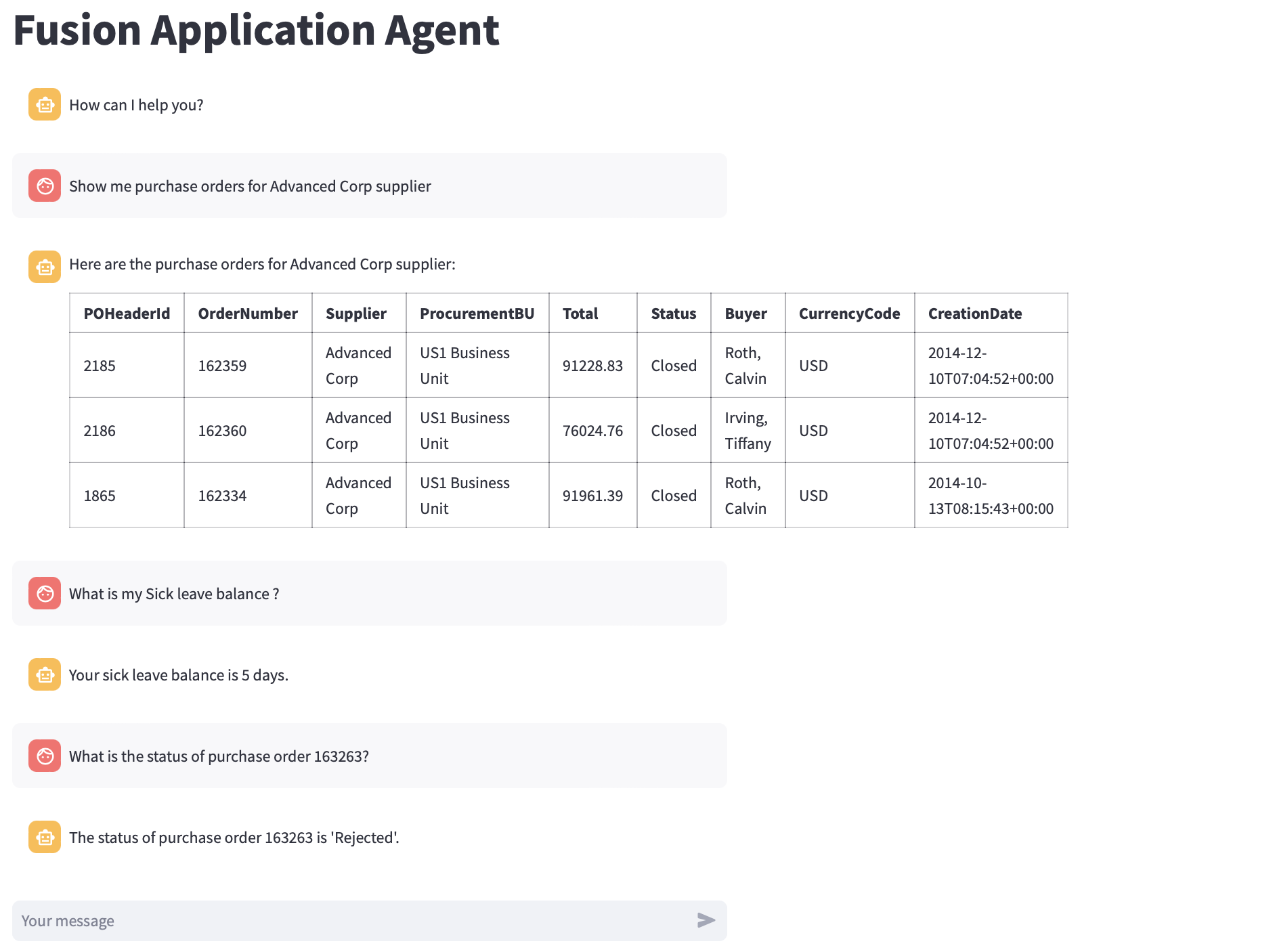
The demo illustrates a user inquiring about purchase orders and leave balances, with the triage agent directing each request to the appropriate agent to address the query.
Conclusion
This blog post aims to outline fundamental structure and components of AI agents, highlights various agent frameworks, and presents a Triage Agent demo for Fusion Applications that directs user queries to Purchase Order or Leave Balance Agents. Looking ahead to 2025, we anticipate the emergence of more use cases centered around multi-agent workflows. Wishing you Happy Holidays and a Happy New Year!