
Introduction
OCI Workload Identity Federation (WIF) allows workloads such as GitHub Actions or other cloud workloads to authenticate to OCI without using long-lived credentials. If you are new to Workload Identity Federation, you can read more about this service here.
In this blog, I will show how to set up WIF for Resource Principal Session Token (RPST) exchange using Terraform and deploy it with OCI Resource Manager.
UPST vs RPST: Which Token Should You Use?
OCI supports two token types that can be issued via WIF token exchange. They differ in what identity they represent and what you can do with them in IAM policies.
| Aspect | UPST | RPST |
| What it represents | A specific OCI service user — a non-interactive IAM identity you create and manage | An ephemeral workload identity — no OCI user required |
| Requires OCI user? | Yes — you must create a service user in OCI IAM and assign it to groups for policy authorization | No — identity is created dynamically at token exchange time |
| Max token lifetime | 1 hour (minimum of: IDP token remaining duration, API-supplied value, 60 minutes) | Up to 12 hours (configurable using rpst_exp parameter) |
| Claim propagation | Not supported — policies evaluate against the service user’s group memberships | Supported — up to 3 claims from the incoming JWT can be embedded into the RPST and used in policy conditions |
| IAM policy authorization | Policies grant permissions to the service user’s group memberships | Policies can evaluate specific claim values embedded in the token — such as a GitHub repository, an AWS role ARN, or any custom claim from the incoming JWT |
| Best for | Workloads that need to impersonate a known OCI service user; scenarios where group-based access control is preferred | Automated pipelines, CI/CD, and cross-cloud workloads where no static OCI identity should exist |
Use RPST when your workload is ephemeral or automated and when you want fine-grained policy control based on claim values in the incoming token — such as which repository, role, or environment triggered the request.
GitHub Repo, Resource Manager and Key Variables
A complete Terraform project is available on GitHub. For full details on the Terraform scripts and input variables, check out the README file in the repository.
The key variables you will need to set in terraform.tfvars are:
- idcs_endpoint – Identity Domain URL (e.g. https://idcs-xxxx.identity.oraclecloud.com:443)
- issuer – The external IdP issuer URI (e.g. https://token.actions.githubusercontent.com for GitHub Actions)
- public_key_endpoint – The JWKS URL of the external IdP, used to validate the incoming JWT signature
- impersonating_resource – A customer-defined string label (not an OCID) that the calling workload must pass during token exchange to match this trust
- claim_propagations – Up to 3 claim names to copy from the incoming JWT into the RPST, specified with the ext_ prefix (e.g. ext_repository, ext_workflow_ref, ext_actor)
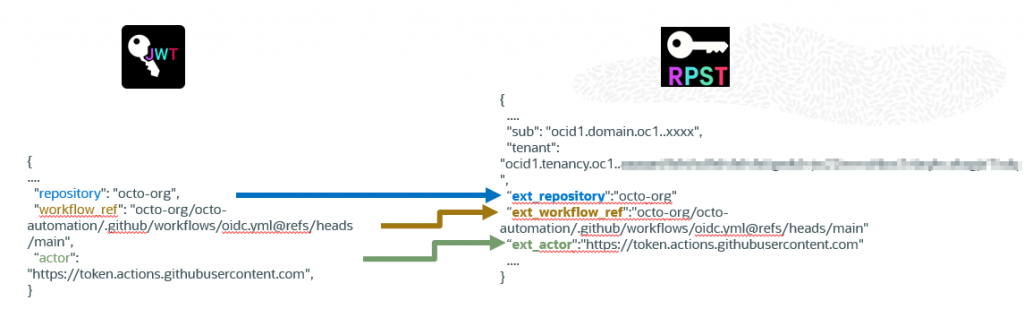
Note: Customers can use any claim names their IdP includes in the JWT. The ext_ prefix is required in claim_propagations and is how OCI embeds these claims into the RPST for use in IAM policy conditions.
When deploying with Resource Manager:
- In the OCI Console, navigate to: Developer Services → Resource Manager → Stacks.
- Click Create Stack and upload the folder containing the Terraform files cloned from the GitHub repo.
- Click Next and set the required variables.
Terraform Execution Flow
When you run Apply, the Terraform scripts execute in sequence:
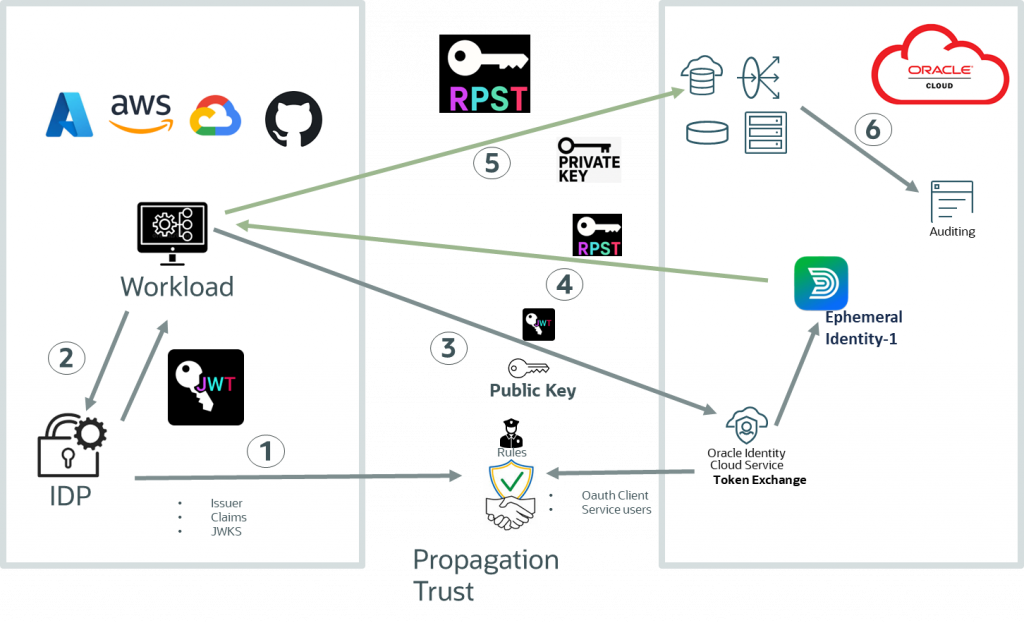
Step 1 – Create Confidential Application
A confidential application is created in the Identity Domain. Terraform captures the client ID automatically. After apply, retrieve the client secret from the OCI Console.
Step 2 – Create Identity Propagation Trust
Terraform configures a Propagation Trust bound to the confidential application. This establishes which external IdP is trusted, which JWKS endpoint validates incoming JWTs, and which ext_ claims are copied into the issued RPST.
GitHub Actions Example
Once the trust is configured, workloads can begin exchanging tokens without any stored OCI credentials. The following GitHub Actions workflow demonstrates the end-to-end flow — from obtaining the GitHub OIDC token to running Terraform against OCI using an RPST.
Store CLIENT_ID, CLIENT_SECRET, and DOMAIN_BASE_URL as GitHub Actions secrets or repository variables. Never hardcode credentials in the workflow file.
name: RPST - Deploy VCN with GitHub OIDC to OCI

on:
  workflow_dispatch:

permissions:
  id-token: write
  contents: read

jobs:
  RPST-terraform:
    runs-on: ubuntu-latest

    env:
      CLIENT_ID: "xxxxxxxxxxxxxxxxxxxx"
      CLIENT_SECRET: "xxxxxxxxxxxxxxxxxxxxxxxxxxx"
      DOMAIN_BASE_URL: "https://idcs-xxxxxx.identity.oraclecloud.com:443"
      OCI_TENANCY: ${{ vars.OCI_TENANCY }}
      OCI_REGION: "us-ashburn-1"

    steps:
      - name: Checkout
        uses: actions/checkout@v4

      - name: Generate RSA Key Pair
        run: |
          mkdir -p .oci
          openssl genrsa -out .oci/temp_private.pem 2048
          openssl rsa -in .oci/temp_private.pem -pubout -out .oci/temp_public.pem
          chmod 600 .oci/temp_private.pem .oci/temp_public.pem

      - name: Convert Private Key to Single Line (No Headers)
        id: privkey
        run: |
          awk '/BEGIN PRIVATE KEY/ {skip=1; next} /END PRIVATE KEY/ {skip=0; next} skip {gsub(/\r/, ""); printf "%s", $0;}' .oci/temp_private.pem > .oci/private_key.one_line.pem

      - name: Convert Public Key (No Headers)
        id: pubkey
        run: |
          awk '/BEGIN PUBLIC KEY/ {skip=1; next} /END PUBLIC KEY/ {skip=0; next} skip {gsub(/\r/, ""); printf "%s", $0;}' .oci/temp_public.pem > .oci/public_key.one_line.pem
          PUBKEY=$(cat .oci/public_key.one_line.pem)
          echo "pubkey=$PUBKEY" >> $GITHUB_OUTPUT

      - name: Fetch GitHub OIDC Token
        id: jwt
        run: |
          curl -sSL -H "Authorization: Bearer $ACTIONS_ID_TOKEN_REQUEST_TOKEN" \
            "${ACTIONS_ID_TOKEN_REQUEST_URL}&audience=${CLIENT_ID}" > id-token.json

          JWT=$(jq -r '.value' id-token.json)
          echo "$JWT" > .oci/id-token.jwt
          echo "jwt=$JWT" >> $GITHUB_OUTPUT

      - name: Exchange JWT for OCI RPST
        id: RPST
        continue-on-error: true
        run: |
          AUTH_HEADER=$(printf "%s" "${CLIENT_ID}:${CLIENT_SECRET}" | base64 | tr -d '\n')
          SUBJECT_TOKEN=$(tr -d '\n' < .oci/id-token.jwt)
          PUBKEY=$(tr -d '\n' < .oci/public_key.one_line.pem)

          RESPONSE=$(curl -sSL \
            --header "Content-Type: application/x-www-form-urlencoded" \
            --header "Authorization: Basic $AUTH_HEADER" \
            --data-urlencode "grant_type=urn:ietf:params:oauth:grant-type:token-exchange" \
            --data-urlencode "requested_token_type=urn:oci:token-type:oci-rpst" \
            --data-urlencode "subject_token=$SUBJECT_TOKEN" \
            --data-urlencode "subject_token_type=jwt" \
            --data-urlencode "public_key=$PUBKEY" \
            --data-urlencode "res_type=ref_github" \
            --data-urlencode 'rpst_exp=60' \
            "${DOMAIN_BASE_URL}/oauth2/v1/token")

          echo "$RESPONSE" > .oci/RPST-response.json
          jq -r '.token' .oci/RPST-response.json | tr -d '\n' > .oci/RPST.token

          if [ -s .oci/RPST.token ]; then
            echo "RPST token was successfully extracted"
            echo "success=true" >> $GITHUB_ENV
          else
            echo "‼️ Failed to extract RPST token"
            cat .oci/RPST-response.json
            echo "success=false" >> $GITHUB_ENV
          fi

          {
            echo "==== GitHub OIDC Token ===="
            cat .oci/id-token.jwt | fold -w 80
            echo ""
            echo "==== RPST Response ===="
            cat .oci/RPST-response.json | fold -w 80
            echo ""
            echo "==== Extracted RPST Token (if present) ===="
            [ -s .oci/RPST.token ] && cat .oci/RPST.token | fold -w 80 || echo "(not available)"
          } > .oci/token-debug.log

      - name: Configure OCI Config for Terraform
        if: env.success == 'true'
        run: |
          chmod 600 .oci/temp_private.pem .oci/RPST.token

          FINGERPRINT=$(openssl rsa -pubout -outform DER -in .oci/temp_private.pem 2>/dev/null | openssl md5 -c | awk '{print $2}')
          WORK_DIR=$(pwd)

          CONFIG_PATH="${WORK_DIR}/.oci/RPST_config"
          echo "[DEFAULT]" > $CONFIG_PATH
          echo "region=${OCI_REGION}" >> $CONFIG_PATH
          echo "tenancy=${OCI_TENANCY}" >> $CONFIG_PATH
          echo "fingerprint=${FINGERPRINT}" >> $CONFIG_PATH
          echo "key_file=${WORK_DIR}/.oci/temp_private.pem" >> $CONFIG_PATH
          echo "security_token_file=${WORK_DIR}/.oci/RPST.token" >> $CONFIG_PATH

          echo "OCI_CONFIG_FILE=${CONFIG_PATH}" >> $GITHUB_ENV

          echo "✅ Created OCI config at: $CONFIG_PATH"
          echo "📄 Config contents:"
          cat $CONFIG_PATH

      - name: Upload Debug Files (Always)
        if: always()
        uses: actions/upload-artifact@v4
        with:
          name: oci-RPST-debug
          path: |
            .oci/token-debug.log
            .oci/RPST-response.json
            .oci/id-token.jwt
            .oci/public_key.one_line.pem
            .oci/temp_private.pem
            .oci/RPST.token
            .oci/RPST_config

      - name: Prepare OCI config for Terraform
        if: env.success == 'true'
        run: |
          mkdir -p /home/runner/.oci
          cp /home/runner/work/github-action-demo/github-action-demo/.oci/RPST_config /home/runner/.oci/config
        working-directory: terraform/vcn

      - name: Set up Terraform
        if: env.success == 'true'
        uses: hashicorp/setup-terraform@v3

      - name: Terraform Init (VCN)
        if: env.success == 'true'
        run: terraform init
        working-directory: terraform/rpst-vcn
        env:
          OCI_CONFIG_FILE: ${{ env.OCI_CONFIG_FILE }}

      - name: Terraform Plan (VCN)
        if: env.success == 'true'
        run: terraform plan
        working-directory: terraform/rpst-vcn
        env:
          OCI_CONFIG_FILE: ${{ env.OCI_CONFIG_FILE }}

      - name: Terraform Apply (VCN)
        if: env.success == 'true'
        run: terraform apply -auto-approve
        working-directory: terraform/rpst-vcn
        env:
          OCI_CONFIG_FILE: ${{ env.OCI_CONFIG_FILE }}
Note: The workflow requests id-token: write permission so GitHub Actions can issue an OIDC token. The RPST is used in-memory within the job and expires automatically — no credentials are persisted.
Writing IAM Policies for RPST Workloads
RPST policies use the identityfederateddomainapp principal type. The ext_ claims propagated into the RPST are available as policy conditions, allowing you to control access based on the specific workload context — repository, workflow, environment, or any custom claim from the incoming JWT.
Example 1 – Allow a specific GitHub repository to manage Object Storage:
allow any-user to manage object-family in compartment my-compartment
where all {
  request.principal.type = 'identityfederateddomainapp',
  request.principal.ext_repository = 'octo-org/infra-deploy'
}
Example 2 – Restrict to a specific workflow file and branch for secret access:
allow any-user to read secret-bundles in compartment prod-secrets
where all {
  request.principal.type = 'identityfederateddomainapp',
  request.principal.ext_repository = 'octo-org/app-repo',
  request.principal.ext_workflow_ref = 'octo-org/app-repo/.github/workflows/deploy.yml@refs/heads/main'
}
Example 3 – Custom claim from any IdP:
allow any-user to use vaults in compartment shared-infra
where all {
  request.principal.type = 'identityfederateddomainapp',
  request.principal.ext_tenant_id = 'acme-corp-prod'
}
The same pattern applies to any IdP — you can propagate whatever claims your provider includes and evaluate them as policy conditions.
Claim Propagation: GitHub Actions Example
During token exchange, OCI copies the named claims from the incoming JWT and inserts them into the RPST with the ext_ prefix. The table below shows the mapping for GitHub Actions.
| Incoming GitHub JWT claim | Propagated into RPST as |
| repository | ext_repository |
| workflow_ref | ext_workflow_ref |
| actor | ext_actor |
| environment | ext_environment |
Conclusion
This Terraform automation simplifies deploying OCI Workload Identity Federation for RPST-based token exchange. With RPST, external workloads can access OCI resources without any stored credentials, with configurable token lifetimes up to 12 hours, and with fine-grained IAM policy control based on claim values propagated from the incoming JWT.
Important: This deployment is for RPST (resource principal) mode. If you want to use user impersonation mode (UPST), refer to the companion blog and Terraform project for that flow.
Ramesh Balajepalli
Master Principal Cloud Architect
Ramesh Balajepalli is a Cloud Architect at OCI. He works with customers to design secured, scalable, and well-architected solutions on Oracle Cloud Infrastructure. He is passionate about solving complex business problems with the ever-growing capabilities of technology.