
Introduction
In this blog, we will explore how to build a Generative AI agent with custom function calling. This blog will guide you through the process of building an AI agent that can handle complex tasks using Oracle Cloud Infrastructure (OCI) Generative AI Agent platform released on March 26, 2025 and Java Function. The new release of the Generative AI Agent Runtime in OCI allows you to use custom functions, which enables you to build more complex agents that can handle a wide range of tasks. The agent is designed to handle function calls dynamically, enabling it to perform tasks based on user input. We’ll walk through the key components of the example, which demonstrates how to implement this functionality.
Overview of the example
The example is a RESTful service can be implemented using Helidon MP that interacts with Oracle’s Generative AI Agent Runtime using OCI SDK. It uses function calling to dynamically execute specific tasks based on user input. The agent supports two main functions:
- Get Weather: Fetches the current temperature for a given latitude and longitude.
- Get Geolocation: Retrieves the latitude and longitude of a location based on its name and country code.
The agent is exposed via a REST endpoint (/<path>/invoke) and processes user queries to return appropriate responses.
What do you need
Setup
To set up the example, you can follow these steps:
- Create an OCI GenAI Agent and Agent Endpoint. See instructions here, Note down the AGENT ENDPOINT OCID. Check OCI Generative AI Agents ihosted regions using this link. e.g. for Chicago region, the agent runtime endpointt URL is https://agent-runtime.generativeai.us-chicago-1.oci.oraclecloud.com.
- Create 2 Custom Function Calling Tools for the agent you just created in step 1. See instructions here
Get_Weather
{
    "name": "Get_Weather",
    "description": "Get Current Weather using longitude, latitude, and temperature unit requested",
    "parameters": {
        "type": "object",
        "properties": {
            "longitude": {
                "type": "double",
                "description": "The longitude of the city"
            },
            "latitude": {
                "type": "double",
                "description": "The latitude of the city"
            },
            "unit": {
                "type": "string",
                "description": "Temperature unit requested. The options are Celsius, Fahrenheit, and Kelvin. The default is Celsius."
            }
        },
        "required": [
            "longitude",
            "latitude",
            "unit"
        ]
    }
}
Get_GeoLocation
{
    "name": "Get_GeoLocation",
    "description": "Get the longitude and latitude of a location in a country",
    "parameters": {
        "type": "object",
        "properties": {
            "location": {
                "type": "string",
                "description": "The name of the city"
            },
            "country_code": {
                "type": "string",
                "description": "The country code"
            }
        },
        "required": [
            "location",
            "country_code"
        ]
    }
}
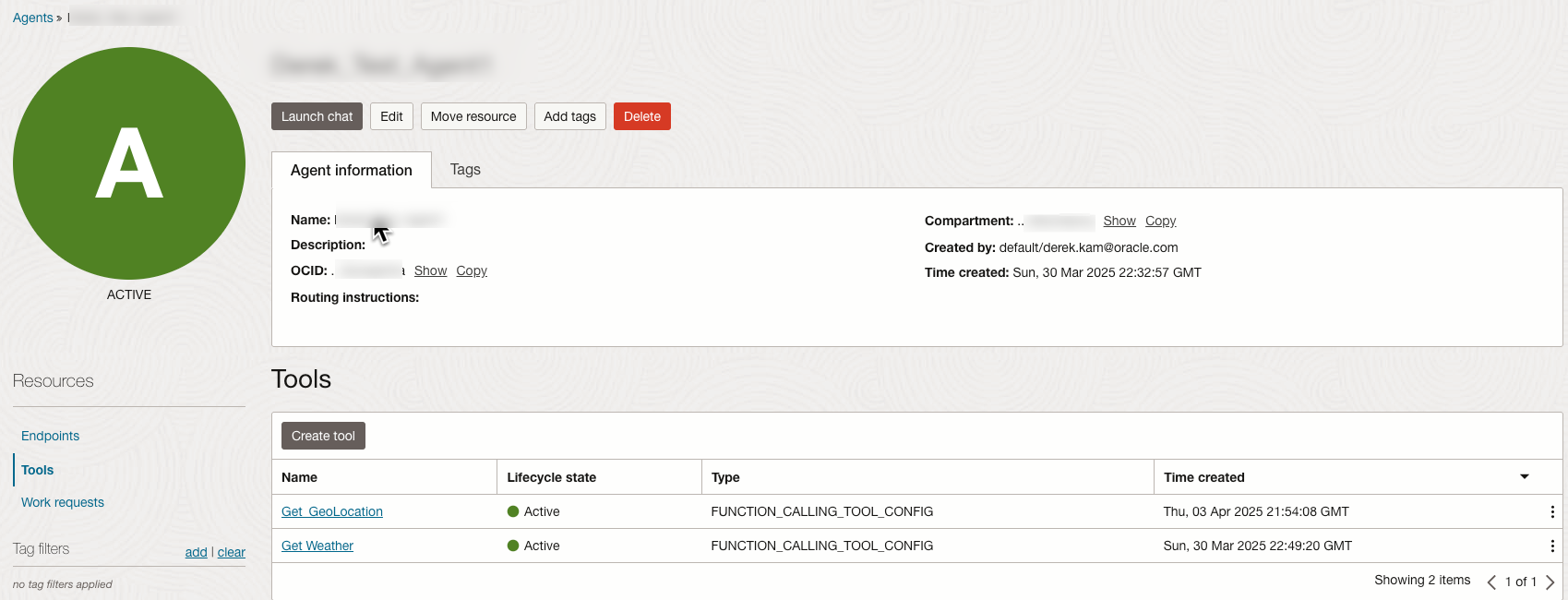
- Install and configure the Oracle Cloud Infrastructure SDK for Java. See instructions here
- Generate Helidon MP Project. See instructions here
Function Definitions
The example defines two core functions using Java’s Function interface. These functions encapsulate the logic for specific tasks, such as fetching weather data or geolocation information. By using the Function interface, the agent can dynamically invoke these functions based on user input.
a. getWeather
The getWeather function retrieves the current temperature for a given latitude and longitude. It accepts a map of parameters (latitude, longitude, and unit) and uses the Open-Meteo API to fetch the temperature. The helper method getCurrentTemperature is responsible for interacting with the Open-Meteo API to fetch the temperatur
public static final Function<Map<String, Object>, Object> getWeather = (params) -> {
  try {
    ObjectMapper mapper = new ObjectMapper();
    Map<String, String> weatherParamMap = mapper.readValue(mapper.writeValueAsString(params), new TypeReference<Map<String, String>>() {});
    double longitude = Double.parseDouble(weatherParamMap.getOrDefault("longitude", "0"));
    double latitude = Double.parseDouble(weatherParamMap.getOrDefault("latitude", "0"));
    String unit = weatherParamMap.getOrDefault("unit", "°F");
    int temperature = getCurrentTemperature(latitude, longitude, unit);
    return String.format("{\"temperature\": \"%s %s\"}", temperature, unit);
  } catch (IOException e) {
    throw new RuntimeException(e);
  }
};

private static Integer getCurrentTemperature(double latitude, double longitude, String unit) {
  /**
  * Invoke Open-Meteo forecast API to retrieve the current temperature.
  **/
  ....
  return (int) Math.round(temp);
}
b. getGeoLocation
The getGeoLocation function retrieves the latitude and longitude of a location based on its name and country code. It accepts a map of parameters (location and country_code) and uses the Open-Meteo Geocoding API to fetch the geolocation data. The helper method getGeoLocation interacts with the Open-Meteo Geocoding API to fetch the geolocation data.
public static final Function<Map<String, Object>, Object> getGeoLocation = (params) -> {
  try {
    ObjectMapper mapper = new ObjectMapper();
    Map<String, String> geoParamMap = mapper.readValue(mapper.writeValueAsString(params), new TypeReference<Map<String, String>>() {});
    String location = geoParamMap.getOrDefault("location", "Unknown");
    String countryCode = geoParamMap.getOrDefault("country_code", "Unknown");
    Map<String, Double> geoLocation = getGeoLocation(location, countryCode);
    return String.format("{\"longtitue\": \"%s, \"latitude\": %s\"}", geoLocation.get("longitude"), geoLocation.get("latitude"));
  } catch (IOException e) {
    throw new RuntimeException(e);
  }
};

private static Map<String, Double> getGeoLocation(String location, String countryCode) {
  /**
  * Invoke Open-Meteo Geocoding API to retrieve the geolocation data.
  **/
  ....
  geoMap.put("latitude", latitude);
  geoMap.put("longitude", longitude);
  return geoMap;
}
Function Map
The functionMap is a static map that associates function names with their corresponding implementations. This allows the agent to dynamically invoke functions based on user input.
static final Map<String, Function<Map<String, Object>, Object>> functionMap = new HashMap<>();
static {
  functionMap.put("Get_Weather", getWeather);
  functionMap.put("Get_GeoLocation", getGeoLocation);
};
REST Endpoint
The /invoke endpoint is the main entry point for the agent. It processes user queries, interacts with the Generative AI Agent Runtime, and returns the final response. The endpoint operates in a loop to handle multiple function calls dynamically, as required by the agent’s response.
Here’s how it works:
– First Interaction: The agent receives the user query and determines which function needs to be called. This is done by invoking the Generative AI Agent Runtime.
– Function Execution: Once the agent identifies the function to call, the service executes the corresponding function (e.g., getWeather or getGeoLocation) and retrieves its output in JSON format.
– Subsequent Interactions: If the agent determines that another function needs to be called, the output of the previous function is passed as input to the next function. This process continues until all required functions have been executed.
– Final Response: Once all functions have been called and no further actions are required, the final output is returned to the user.
This dynamic process ensures that the agent can handle complex workflows involving multiple function calls seamlessly.
@POST
@Produces(MediaType.APPLICATION_JSON)
@Path("/invoke")
public Message invoke(JsonObject jsonData) throws Exception {
  String question = jsonData.getString("question");
  agentClient = this.createGenAiAgentClient(AGENT_ENDPOINT);
  // Create a session with the Generative AI agent
  CreateSessionRequest request = CreateSessionRequest.builder()
    .agentEndpointId(AGENT_ENDPOINT_OCID)
    .createSessionDetails(CreateSessionDetails.builder()
      .description("Test multiple function calling")
      .displayName("Get Weather Agent")
      .build())
    .build();
  String sessionId = agentClient.createSession(request).getSession().getId();
  com.oracle.bmc.generativeaiagentruntime.model.Message outputMessage = null;
  ChatResponse chatResponse;
  String outputText = "";
  while (true) {
    final ChatDetails functionCallChatDetails = ChatDetails.builder()
      .shouldStream(false)
      .userMessage(question)
      .sessionId(sessionId)
      .build();

    final ChatRequest functionCallChatRequest = ChatRequest.builder()
      .chatDetails(functionCallChatDetails)
      .agentEndpointId(AGENT_ENDPOINT_OCID)
      .build();

    chatResponse = agentClient.chat(functionCallChatRequest);
    List<RequiredAction> requiredActions = chatResponse.getChatResult().getRequiredActions();
    String actionId = "";
    String functionCallOutput = "";
    if (!requiredActions.isEmpty()) {
      for (RequiredAction requiredAction : requiredActions) {
        functionCallOutput = callFunction(chatResponse);
        actionId = requiredAction.getActionId();
      }
    }
    PerformedAction performedAction = FunctionCallingPerformedAction.builder()
      .actionId(actionId)
      .functionCallOutput(functionCallOutput)
      .build();
    final ChatDetails finalChatDetails = ChatDetails.builder()
      .shouldStream(false)
      .userMessage(question)
      .performedActions(List.of(performedAction))
      .sessionId(sessionId)
      .build();
   final ChatRequest finalChatRequest = ChatRequest.builder()
      .chatDetails(finalChatDetails)
      .agentEndpointId(AGENT_ENDPOINT_OCID)
      .build();
   chatResponse = agentClient.chat(finalChatRequest);
   outputMessage = chatResponse.getChatResult().getMessage();
   if (outputMessage != null) {
     outputText = outputMessage.getContent().getText();
     break;
   }
  }
  return new Message(outputText);
}

private GenerativeAiAgentRuntimeClient createGenAiAgentClient(String endpoint) throws IOException {
  AuthenticationDetailsProvider provider = new ConfigFileAuthenticationDetailsProvider(OCI_CONFIG_PROFILE);
  ClientConfiguration clientConfiguration = ClientConfiguration.builder()
    .retryConfiguration(RetryConfiguration.NO_RETRY_CONFIGURATION)
    .readTimeoutMillis(240000)
    .build();
  return GenerativeAiAgentRuntimeClient.builder()
           .endpoint(endpoint)
           .configuration(clientConfiguration)
           .build(provider);
         }
Calling Functions Dynamically
The callFunction method dynamically invokes the appropriate function based on the agent’s response. It parses the function name and arguments, retrieves the corresponding function from the functionMap, and executes it.
private String callFunction(ChatResponse response) {
  String functionCallOutput = null;
  try {
    FunctionCallingRequiredAction requiredAction = (FunctionCallingRequiredAction) response.getChatResult().getRequiredActions().get(0);
    FunctionCall functionCall = requiredAction.getFunctionCall();
    String functionName = functionCall.getName();
    String args = functionCall.getArguments();
    ObjectMapper mapper = new ObjectMapper();
    JsonNode jsonNode = mapper.readTree(args);
    Map<String, Object> inputMap = processInputArgument(jsonNode);
    Function<Map<String, Object>, Object> selectedFunction = functionMap.get(functionName);
    if (selectedFunction != null) {
       LOGGER.log(Level.INFO, "Function Call input: {0}", mapToString(inputMap));
       functionCallOutput = (String) selectedFunction.apply(inputMap);
       LOGGER.log(Level.INFO, "Function Call Output: {0}", functionCallOutput);
    } else {
       LOGGER.log(Level.WARNING, "No function found with name: {0}", functionName);
    }
  } catch (JsonProcessingException ex) {
    throw new RuntimeException("Error processing JSON", ex);
  }
  return functionCallOutput;
}
Utility Methods
This method processes a JSON node and converts it into a map of key-value pairs. It handles various data types, including strings, integers, doubles, booleans, and nested objects.
private Map<String, Object> processInputArgument(JsonNode jsonNode) {
  Iterator<Map.Entry<String, JsonNode>> fields = jsonNode.fields();
  Map<String, Object> inputMap = new HashMap<>();
  while (fields.hasNext()) {
    Map.Entry<String, JsonNode> entry = fields.next();
    String fieldName = entry.getKey();
    JsonNode valueNode = entry.getValue();
    Object value;
    if (valueNode.isTextual()) {
       value = valueNode.asText();
    } else if (valueNode.isInt()) {
       value = valueNode.asInt();
    } else if (valueNode.isLong()) {
       value = valueNode.asLong();
    } else if (valueNode.isDouble()) {
       value = valueNode.asDouble();
    } else if (valueNode.isBoolean()) {
       value = valueNode.asBoolean();
    } else if (valueNode.isNull()) {
       value = null;
    } else {
       value = valueNode;
    }
    inputMap.put(fieldName, value);
  }
  return inputMap;
}
Test
curl POST http://localhost:8080/ateam-agent/invoke -H "content-type: application/json" -d '{"question": "You need to answer the following question. To answer the question, first you need to get the geolocation of the location, then get the weather using the longtitude and latitude. \nQuestion: What's the weather like in Singapore?"}'
Sample Output:
{ “message”: “The weather in Singapore is 31 degrees Celsius.” }
Logs:
2025.04.09 14:16:04 INFO com.oracle.ateam.ociagent.AteamAgent VirtualThread[#123,[0x6f58b247 0x257db0ba] WebServer socket]/runnable@ForkJoinPool-1-worker-7: Function Call input: {country_code=SG, location=Singapore}
2025.04.09 14:16:05 INFO com.oracle.ateam.ociagent.AteamAgent VirtualThread[#123,[0x6f58b247 0x257db0ba] WebServer socket]/runnable@ForkJoinPool-1-worker-7: Function Call Output: {“longtitue”: “103.85007, “latitude”: 1.28967″}
2025.04.09 14:16:10 INFO com.oracle.ateam.ociagent.AteamAgent VirtualThread[#123,[0x6f58b247 0x257db0ba] WebServer socket]/runnable@ForkJoinPool-1-worker-7: Function Call input: {unit=Celsius, latitude=1.28967, longitude=103.85007}
2025.04.09 14:16:11 INFO com.oracle.ateam.ociagent.AteamAgent VirtualThread[#123,[0x6f58b247 0x257db0ba] WebServer socket]/runnable@ForkJoinPool-1-worker-7: Function Call Output: {“temperature”: “31 Celsius”}
Tips
- Be Clear in Your Prompt: Clearly specify the steps and tasks you want the agent to perform. For example, if the agent needs to call multiple functions, explicitly outline the sequence of operations. In the test example above, the prompt specifies that the agent must first retrieve the geolocation and then use it to fetch the weather.
- Handle Empty Responses: If the response message is empty, it indicates that the agent has more tasks to perform. Ensure your prompt provides sufficient details for the agent to complete all required steps.
- Match Function Names: Use the exact function names defined in the OCI GenAI Agent Custom Function configuration. Any mismatch between the function name in the configuration and the code will result in errors or failed function calls.
- Ensure JSON Output Format: The output of each function call must be in JSON string format.
- Validate Input and Output: If you are chaining multiple function calls, ensure that the output of one function matches the input parameters required by the next function. For example, the geolocation function’s output must provide the latitude and longitude required by the weather function.
- Log Inputs and Outputs: Use logging to debug and monitor the inputs and outputs of each function call. This helps identify issues in the function execution or data flow.
- Test with Different Scenarios: Test the agent with various scenarios to ensure it handles edge cases, such as missing parameters, invalid inputs, or unexpected API responses.
- Use Retry Logic for API Calls: If the agent relies on external APIs (e.g., Open-Meteo), implement retry logic to handle transient failures or network issues.
- Optimize Function Performance: Ensure that the functions are optimized for performance, especially if they involve external API calls. Use caching where appropriate to reduce redundant API requests.
- Secure Sensitive Data: If the agent uses sensitive data (e.g., API keys or user inputs), ensure that it is securely stored and transmitted. Avoid logging sensitive information. Enable Guardrails for Content moderation and Prompt injection (PI) protection when you configure your agent in OCI GenAI Agent Service.
- Monitor Agent Behavior: Use monitoring tools to track the agent’s performance and behavior in production. This helps identify bottlenecks or errors in real-time. You can monitor the agent metrics using the OCI GenAI Agent Service, see Metrics in Generative AI Agents for more details
- Document Function Behavior: Provide clear documentation for each function, including its input parameters, expected output, and any dependencies. This makes it easier to maintain and extend the agent.
- Handle Multi-Step Workflows Gracefully: If the agent needs to perform multi-step workflows, ensure that intermediate outputs are correctly formatted and passed between steps. Use descriptive error messages to handle failures gracefully.
Conclusion
The sample demonstrates how to build a powerful Generative AI agent with dynamic function calling capabilities. By leveraging Oracle Cloud Infrastructure and Java, the agent can process user queries, invoke specific functions, and return meaningful responses. This approach can be extended to support additional functions, making it a versatile solution for various use cases.