
Introduction & Background
Manasi wrote a blog post a while back explaining the difference between syncing your users from one identity store to another via SCIM vs using Just In Time (JIT) provisioning instead. I won’t copy the entire thing but the conclusion in her summary was absolutely clear – “automated user provisioning and sync using SCIM APIs should be the first choice”.
And yet sometimes you have to use JIT.
When you use JIT there’s a bunch of little problems and one big one. The small ones are things like outdated names, group memberships and the like. And the big one is that the target system (in this case OCI IAM) is like a roach motel – users check in but never check out; and you wind up with users in IAM that no longer exist in the source. Cleaning up hundreds or thousands of users after they’ve been provisioned is like cleaning up after a party – it takes way more time than it should or than you’d like.

A customer recently approached us and asked for help with this exact situation. In the past some admin had opened the admin console, selected everyone, and deleted them. A simple task, but since it was manual it was somewhat slow, a litle annoying, and just generally bad all around. And it required someone to remember to do it. Apparently whoever that person was had forgotten (or “forgotten”) to do that for quite some time before quitting. And my customer was looking for a better/faster/easier way that they could ideally automate.
Almost a year ago I wrote a post about creating 1,000,000 fake users and then cleaning them up. I had updated my code to be multithreaded, but didn’t blog about it because I’m lazy I didn’t know if anyone would care. When this customer came along asking about cleaning up these users and I started to describe how they would do it I realized that I already had everything they needed – they just needed to code the right search string into the existing code and they’d be good to go!
So here are those changes…
Searching For “Idle” Users
Getting Last Login Time
The first thing you need to know is that there is a special field in OCI IAM that contains the last successful login time of the user. This field is updated whether you log in with a username and password or if you SSO in via federation. The field is not obvious and well known because it is only returned if you specifically ask for it:
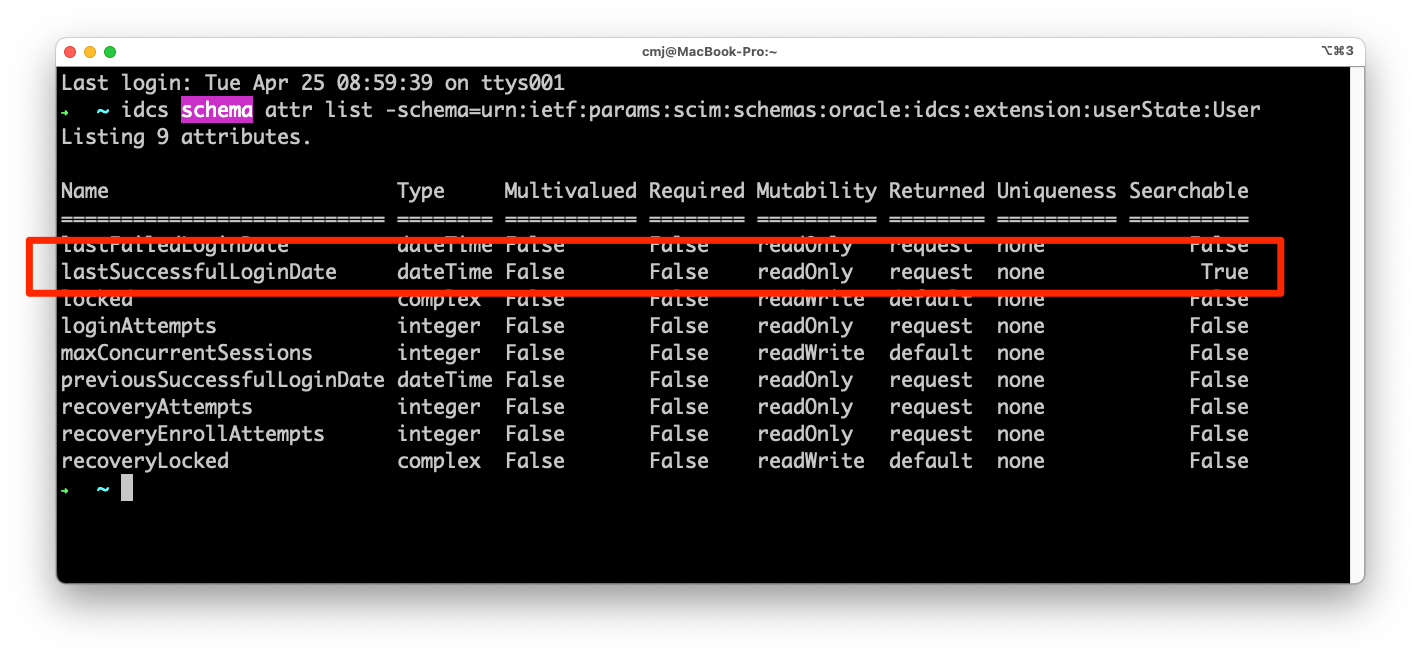
To request this attribute when searching Users or retreiving an individual user you need to simply add the key “attributes” to the query string and include the value “schemas,id,urn:ietf:params:scim:schemas:oracle:idcs:extension:userState:User:lastSuccessfulLoginDate”.
For example: https://myidentitydomain.oraclecloud.com/admin/v1/Users?attributes=schemas%2Cid%2Curn%3Aietf%3Aparams%3Ascim%3Aschemas%3Aoracle%3Aidcs%3Aextension%3AuserState%3AUser%3AlastSuccessfulLoginDate%2CuserName
Note: remember to URL encode the values in your query string parameters!
When you do that you’ll get back the last login time:
{
  "Resources": [
    {
      "id": "12345678901234567890",
      "schemas": [
        "urn:ietf:params:scim:schemas:core:2.0:User",
        "urn:ietf:params:scim:schemas:oracle:idcs:extension:userState:User",
        "urn:ietf:params:scim:schemas:oracle:idcs:extension:user:User"
      ],
      "urn:ietf:params:scim:schemas:oracle:idcs:extension:userState:User": {
        "lastSuccessfulLoginDate": "2019-02-22T14:59:24.595Z"
      },
      "userName": "sterling"
    }
  ]
}
In this case “sterling” hasn’t signed in since 2019.
Searching for users with “Very Old” last login times
Now we know how to see the last login time. And that little table there says that we are allowed to search on the contents of that field.
So let’s do that in three easy steps…

- Pick a number of days
I chose 90
- Calculate “now” minus that number of days
Today (as I’m writing this) is April 25.
April 25 minus 90 days is Jan 25
- Ask OCI IAM for anyone who has lastSuccessfulLoginDate older than that
Just do a GET on /admin/v1/Users
with filter= and URL encoded:
urn:ietf:params:scim:schemas:oracle:idcs:extension:userState:User:lastSuccessfulLoginDate lt “2023-01-01T12:00:00Z”
Like so:
GET on /admin/v1/Users?filter=urn%3Aietf%3Aparams%3Ascim%3Aschemas%3Aoracle%3Aidcs%3Aextension%3AuserState%3AUser%3AlastSuccessfulLoginDate+lt+%222023-01-01T12%3A00%3A00Z%22&sortBy=id
A couple of things to notice:
- OCI IAM wants a time, not just a date. In the code when I calculate “now” minus 90 days I am going to let Python do that for me.
- I included sortBy=id to sort the search results by id. This is the same thing I did in my old post and I’m doing it for the same reason
- the search string I’m going to use in the code will also include instructions that “id” has to be greater than the last ID I saw. Again check out my old post for why!
Deleting users with a little extra “oomph”
OCI IAM uses the industry standard SCIM for all user managment. Which means to delete a user you need to simply send an HTTP request with the verb DELETE to the endpoint representing the User record. In OCI IAM that’s “/admin/v1/Users/” plus the user’s “id” (see the JSON payload above).
The only wrinkle is that the DELETE action will refuse to delete the user if there are any other constructs associated with them – like group membership.
That’s not a problem though. There’s an extra query string argument you can include to instruct OCI IAM to delete them anyway:
Query Parameters
forceDelete(optional): boolean
To force delete the resource and all its references (if any).
This is all fully documented here.
So to delete sterling, even if he is in any groups, you would just send an HTTP DELETE to
https://myidentitydomain.oraclecloud.com/admin/v1/Users/12345678901234567890?forceDelete=true
My code uses the Bulk API call so I just need to include the argument in each request.
Code Changes?
In my existing Github repo you’ll see a script to clean up the fake users. I took that script, renamed it, and made a few simple changes:
How many days ago?
As I said above I chose 90 days. To make this reusable let’s not hard code it and instead put it in a variable.
# how do you define an "idle" user
# in this case I do it by how many days since the last time they logged in
DAYSIDLE=90
Calculate that many days ago
Again I’m not going to hard code a date here. Just take now and subtract the number of days (from the variable). Python makes that easy
# calculate now minus DAYSIDLE
from datetime import datetime, timedelta
logging.debug("Current time: {}".format(datetime.now().strftime("%c")))
deletedatetime = datetime.utcnow() + timedelta(days=-DAYSIDLE)
logging.info("will delete users who have not logged in since {}".format(deletedatetime.strftime("%c")))
Simple!
Change the Search Filter
Within the old script was this:
        logging.debug("Constructing search filter...")
        filter = 'idcsCreatedBy.value eq "{}" and id gt "{}"'.format(myAppID,lastId)
        logging.debug( "Filter: {}".format( filter ))
That code just needs to be tweaked to:
        logging.debug("Constructing search filter...")
        filter = 'urn:ietf:params:scim:schemas:oracle:idcs:extension:userState:User:lastSuccessfulLoginDate lt "{}" and id gt "{}"'.format(deletedatetime,lastId)
        logging.debug( "Filter: {}".format( filter ))
Getting the Code
In my Github repo you will find a new branch “cleanupIdleUsersBlogPost” which contains the code for this blog post.
Here’s a direct link if you want it
https://github.com/therealcmj/fakingUsers/tree/cleanupIdleUsersBlogPost
What should I improve

The code is not perfect. Or even clost to it. So be warned!
The obvious dangers are:
- It deletes anyone who hasn’t signed in within the past “90” days.
You should be signing in to the idenitty domain via SAML anyway, so this shouldn’t be an issue. But if you have some admins declared for things like Break Glass use cases this could be a problem. If you are in that situation you should probably change the search filter to guard against that – perhaps by using tags.
- The code still uses my old IAM code that makes Bulk calls without worrying whether they succeed or not.
Just as in that old post this is probably OK since this is just cleaning up old, unused users who were provisioned by JIT and should be able to be deleted quickly and easily by IAM. So it’s probably safe. But probably isn’t definite, so you’ll want to monitor this.
- The code still uses a Client ID and Secret. OCI IAM supports OCI API signing.
Using a client ID + secret is better in some cases. Using API signing is better in others. I’m leaving it to you to decide if this is one of them. I personally think that in this specific case using an Application with a Client ID and Secret is better than signing it with an individual user’s API key, but a Resource Principal is definitely just as good if not better.
And I’m sure there are others as well.
Wrapping up
They say “Good Coders Copy but Great Coders Steal”.
They also say “done is better than perfect.”
And supposedly Bill Gates said “I choose a lazy person to do a hard job. Because a lazy person will find an easy way to do it.”
I think they’re all sort of right but also sort of wrong. I say “If you have to do it then at least do it mostly right. So when you have to do it again you’re already done.”
I’m still working on making it sound cleverer than that, but you get the gist!
.