For advanced security reasons, OCI customers may require to provision thier ODI instance in a private subnet. This article describes the basic steps to allow ODI developers to connect to the ODI Studio when the ODI Marketplace compute instance is located in a private subnet. This can be achieve with two distinct approaches :
Having a compute instance provisioned in a public subnet in the same VCN as where the private resource live and forwarding port using SSH port forward from command line
Having a Bastion Service, a port forwarding session allowing to forward default VNC port 5901 to the local machine
The OCI Bastion Service can enable access to private hosts without deploying and maintaining a jump host. In addition, customers gain improved security posture with identity-based permissions and a centralized, audited, and time-bound SSH session. It removes the need for a public IP for bastion access, eliminating the hassle and potential attack surface from remote access.
Overall prerequisites
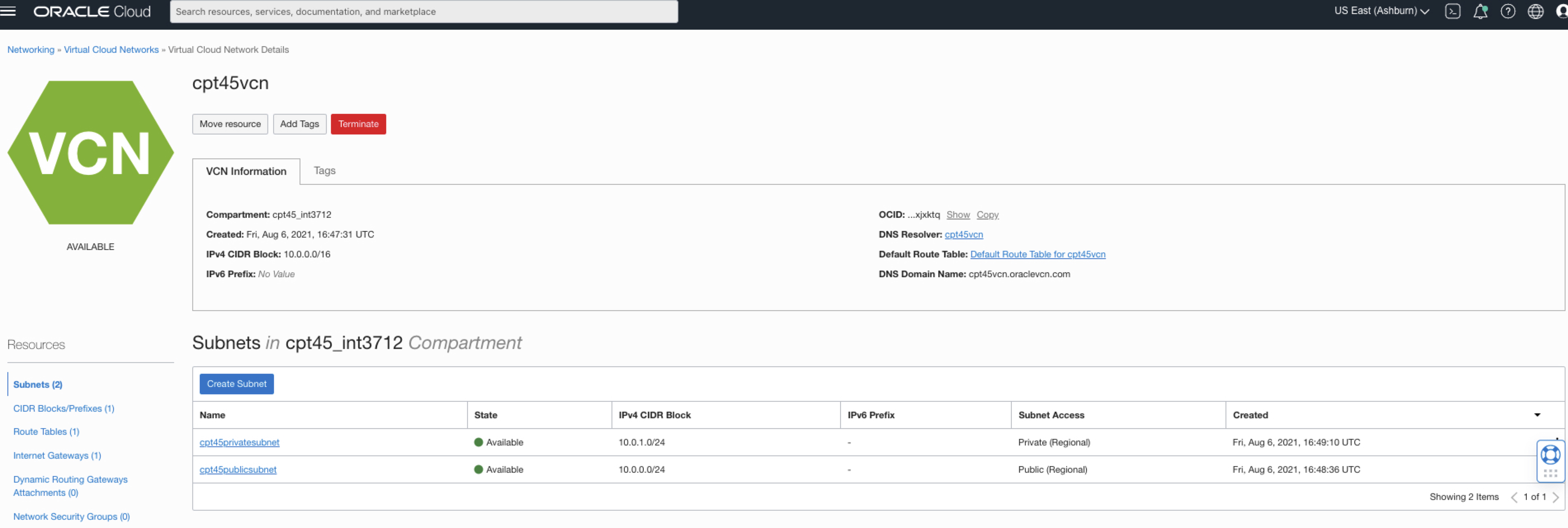
* Have a VCN created cpt45vcn with a public subnet and a private subnet, as per the below
Figure 1: VNC and subnets
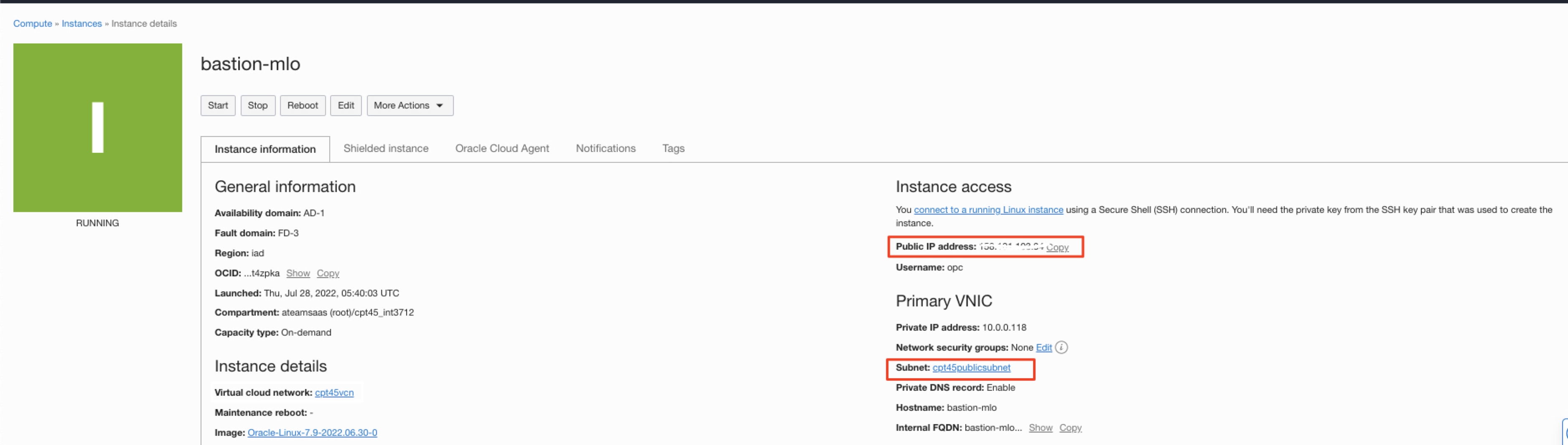
* Have access to a bastion compute instance provisioned in the public subnet for approach 1 listed above
Figure 2: Bastion instance
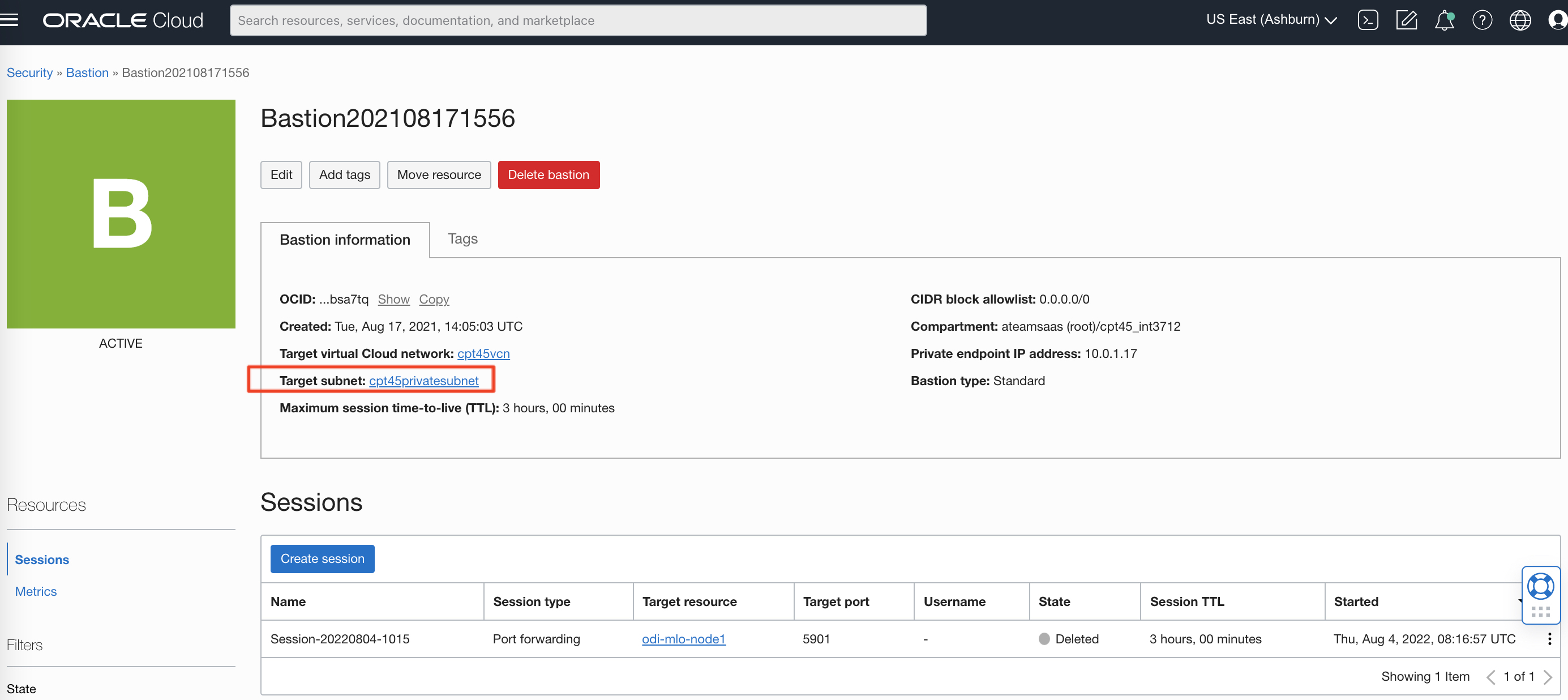
* Have access to an Active Bastion service targeting the private subnet where the ODI Marketplace instance is located, with corresponding CIDR block allowlist
Figure 3: Bastion instance
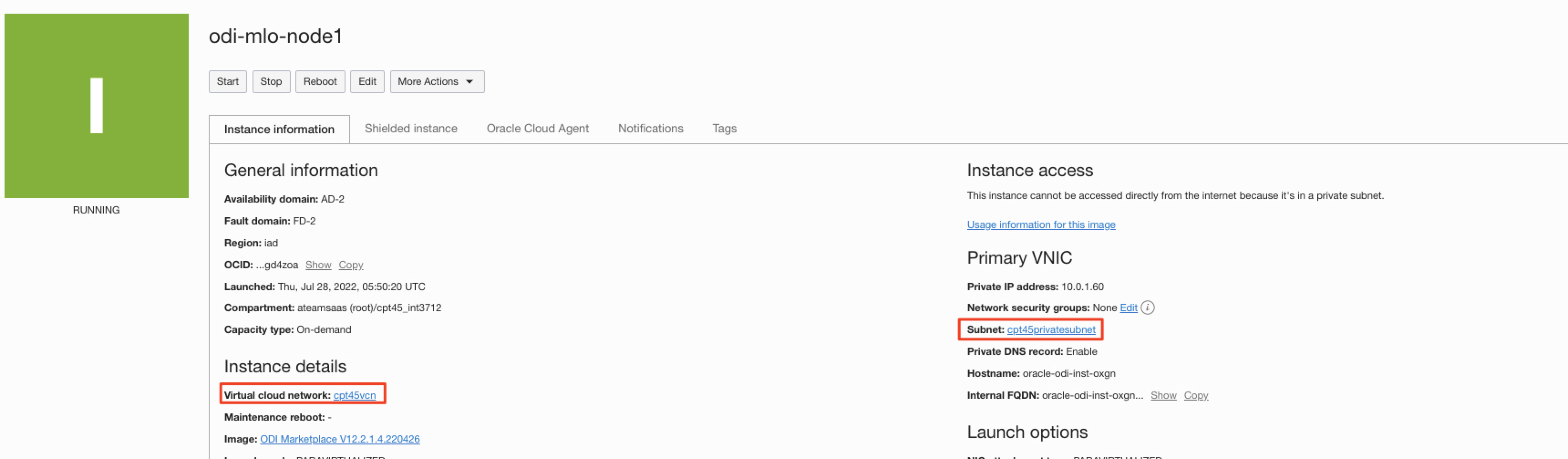
* Have access to an ODI Marketplace instance provisioned in the private subnet
Figure 4: ODI Marketplace instance
* Have access to an OCI user (OCID)
* Have access to the bastion and ODI Marketplace ssh private key (in our case the same file is used for both and is located under /Users/matlomba/Documents/A-Team/OCI/ateamsaas/odi/ssh-key-2022-07-28.key in our local machine. Thye must have restricted privilges
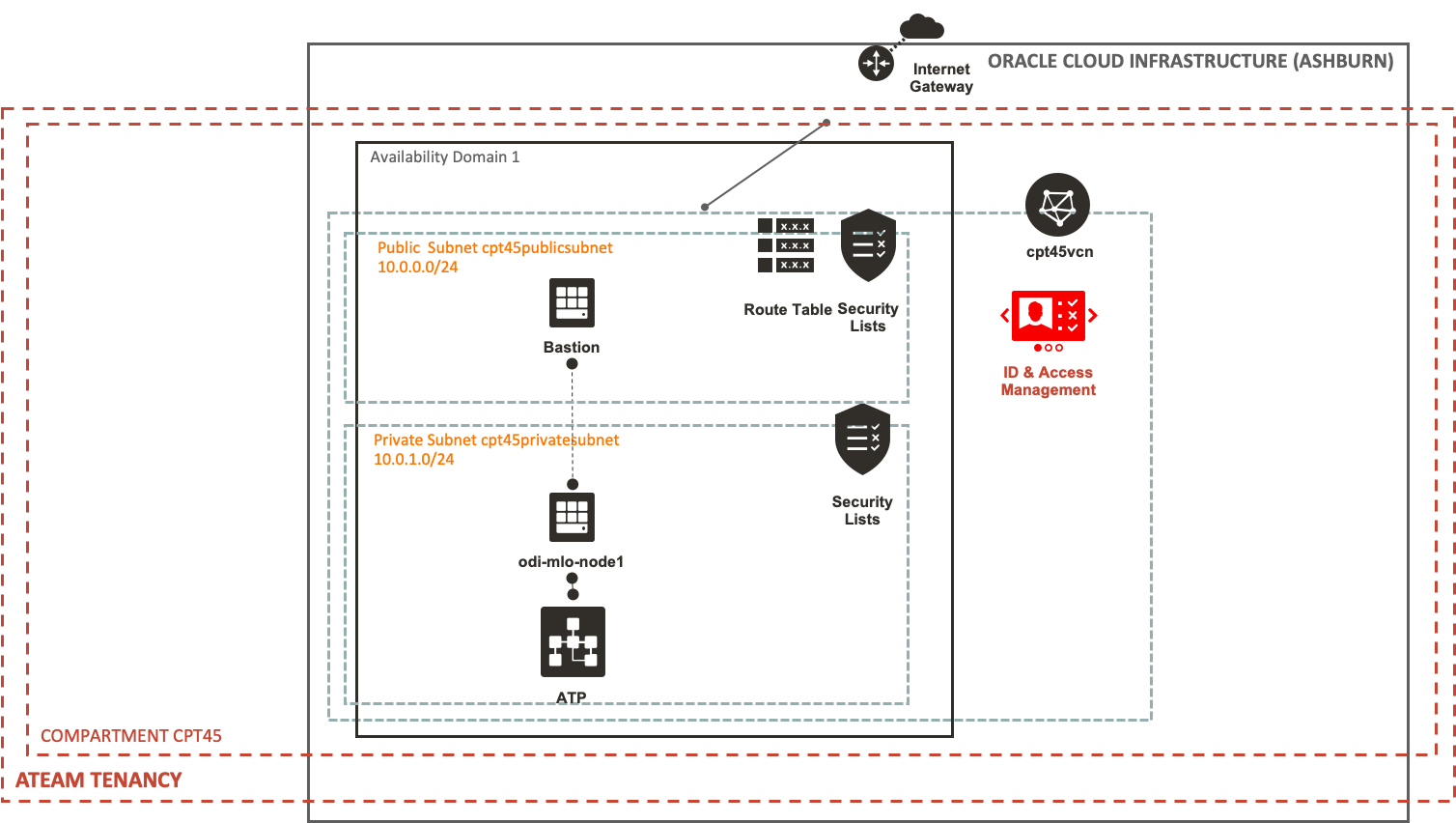
The diagram below details the architecture for the approach 1
Figure 5a: Architecture – Approach 1 – Old school bastion compute instance
The configuration steps to allow developer to VNC into the ODI Marketplace private instance are the following:
Set up ssh profile (for Linux / UNIX / Mac users) for bastion and ODI Markerplace compute instance access with opc OS user. You can leverage terminal clients such as MobaXterm on Windows. This article provides example for Mac users.
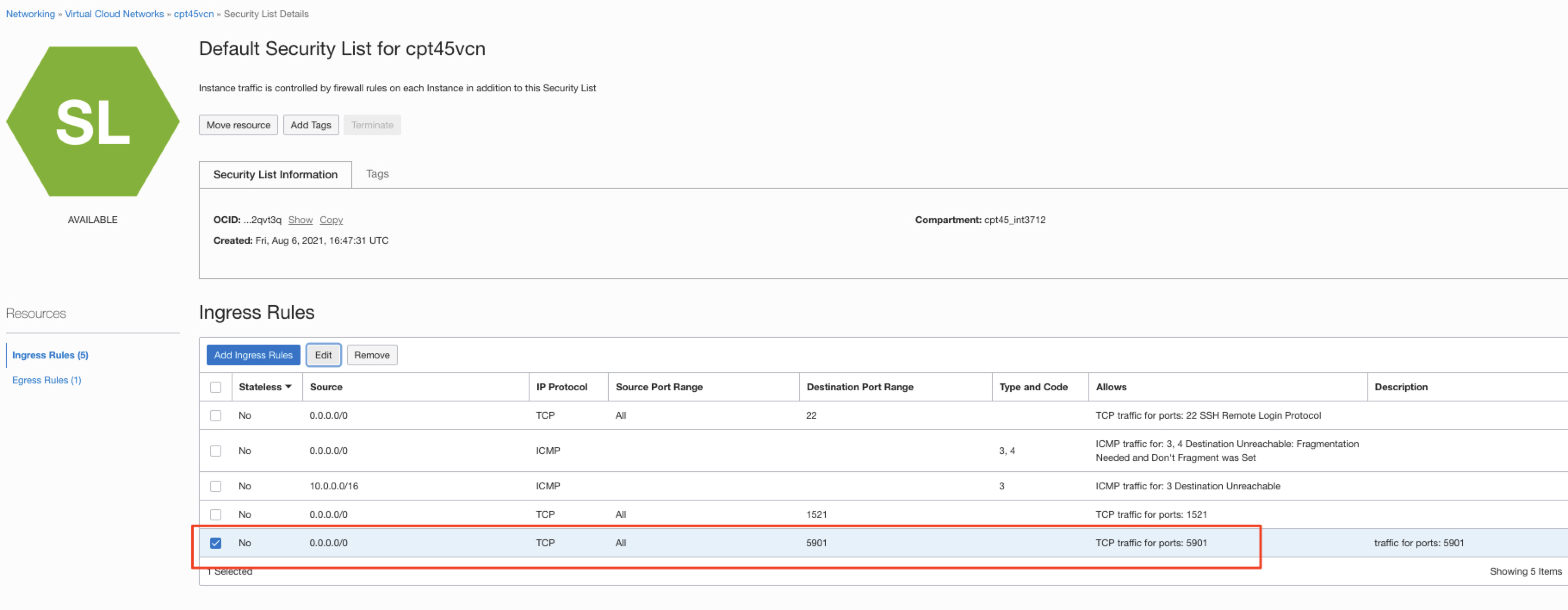
Open default VNC port 5901 in the ODI Markerplace compute instance firewall and add a new security list rule to allow incoming traffic to port 5901
Set up oracle OS user as a sudoer on the ODI Markerplace compute instance
Open up a ssh session to the ODI Markerplace with the bastion as a jump host and with port 5901 forwarding and open VNC viewer on localhost and run ODI Studio
Approach 2 – Bastion Service
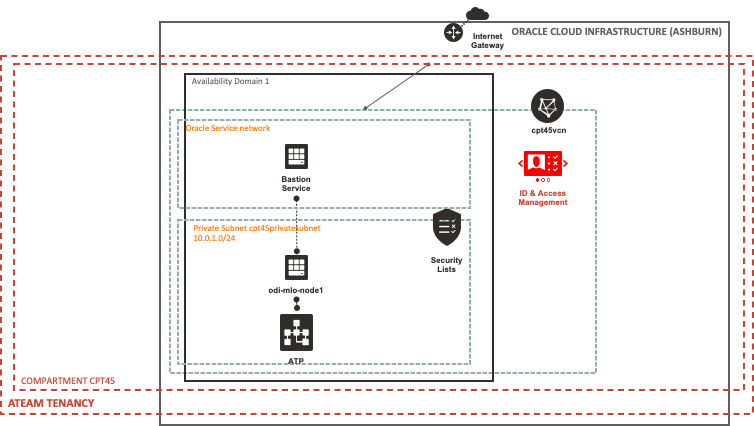
The diagram below details the architecture for the approach 2
Figure 5b Architecture – Approach 2 – Bastion Service
The configuration steps to allow developer to VNC into the ODI Marketplace private instance are the following:
Create a Port forwarding session in the bastion service to port 5901
Open up a ssh session to the ODI Markerplace with the bastion service session ssh command
Approach 1 – Old school bastion compute instance
Set up SSH Profile on local machine
Follow the steps below to update SSH profile on your local machine to include bastion and ODI Markerplace compute instance access with opc OS user.
a) Edit the ~/.ssh/config with vi editor and add the below entry to set up bastion compute instance access with opc OS user.
(base) matlomba-mac:odi matlomba$ vi ~/.ssh/config
Host bastion-mlo
        Hostname 158.101.103.34
        User opc
        IdentityFile /Users/matlomba/Documents/A-Team/OCI/ateamsaas/odi/ssh-key-2022-07-28.key
b) Edit the ~/.ssh/config with vi editor and add the below entry to set up ODI Markerplace compute instance access with opc OS user.
(base) matlomba-mac:odi matlomba$ vi ~/.ssh/config
Host odi-mlo-node1
        Hostname 10.0.1.60
        User opc
        IdentityFile /Users/matlomba/Documents/A-Team/OCI/ateamsaas/odi/ssh-key-2022-07-28.key
        ProxyJump opc@bastion-mlo
        LocalForward 5901 localhost:5901
        ServerAliveInterval 60
c) Validate connection to the bastion
Figure 6: SSH to the bastion instance
d) Validate connection to the ODI marketplace instance
Figure 7: SSH to the ODI Markerplaceinstance
Allow traffic to port 5901 on the ODI Marketplace private instance
Open default VNC port 5901 in the ODI Markerplace compute instance firewall
a) Run the below commands to create new firewall rules to allow traffic on the ODI Marketplace instance to port 5901
(base) matlomba-mac:odi matlomba$ ssh odi-mlo-node1
Last login: Fri Jul 29 05:09:11 2022 from bastion-mlo.cpt45publicsubn.cpt45vcn.oraclevcn.com
[opc@oracle-odi-inst-oxgn ~]$ sudo su -
Last login: Fri Jul 29 05:16:28 GMT 2022 on pts/0
[root@oracle-odi-inst-oxgn ~]# firewall-cmd --list-all
public (active)
  target: default
  icmp-block-inversion: no
  interfaces: ens3
  sources:
  services: dhcpv6-client odiagentssh odijettyssh odirestssh ssh
  ports:
  protocols:
  masquerade: no
  forward-ports:
  source-ports:
  icmp-blocks:
  rich rules:

[root@oracle-odi-inst-oxgn ~]# firewall-cmd --add-port=5901/tcp
success
[root@oracle-odi-inst-oxgn ~]# firewall-cmd --permanent --add-port=5901/tcp
success
[root@oracle-odi-inst-oxgn ~]# firewall-cmd --list-all
public (active)
  target: default
  icmp-block-inversion: no
  interfaces: ens3
  sources:
  services: dhcpv6-client odiagentssh odijettyssh odirestssh ssh
  ports: 5901/tcp
  protocols:
  masquerade: no
  forward-ports:
  source-ports:
  icmp-blocks:
  rich rules:

[root@oracle-odi-inst-oxgn ~]# firewall-cmd --reload
success
[root@oracle-odi-inst-oxgn ~]# exit
b) Confirm the port is reachable
[opc@oracle-odi-inst-oxgn ~]$ nc -zv 10.0.1.60 5901
 Ncat: Version 7.50 ( https://nmap.org/ncat )
 Ncat: Connected to 10.0.1.60:5901.
 Ncat: 0 bytes sent, 0 bytes received in 0.01 seconds.
 [opc@oracle-odi-inst-oxgn ~]$ exit
 logout
 Connection to 10.0.1.60 closed.
 (base) matlomba-mac:odi matlomba$
Add a new security list rule to allow incoming traffic to port 5901
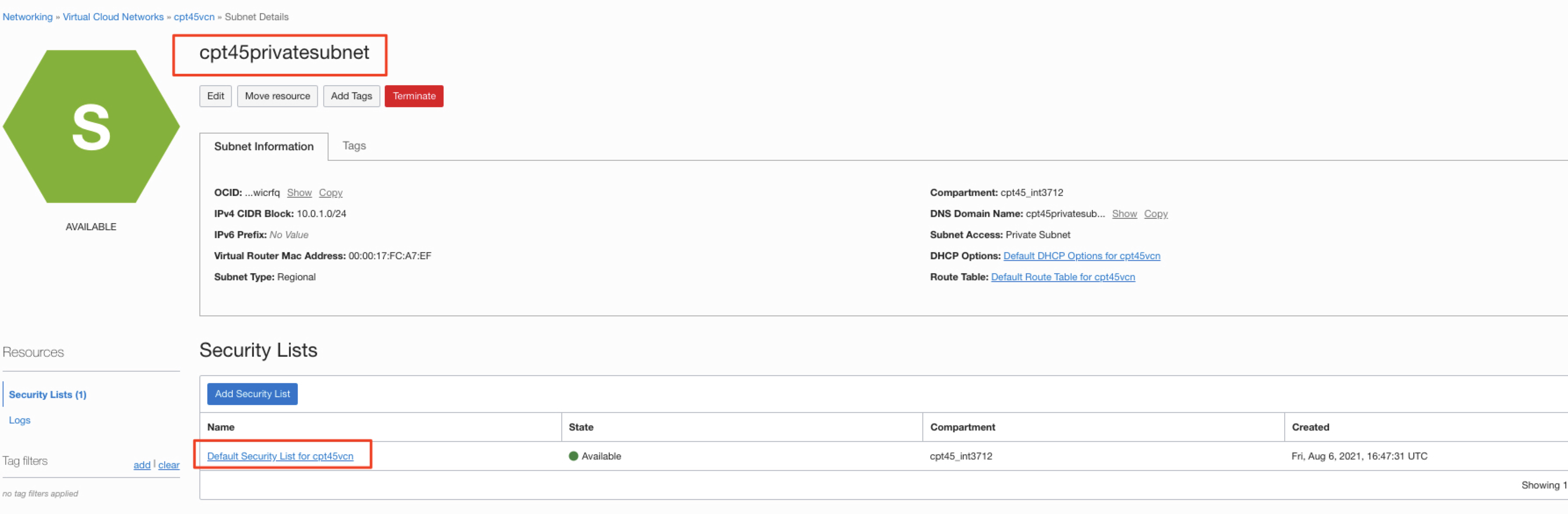
a) In the OCI console, open the private subnet and the security list
Figure 8: Private subnet security list
b) Add a new rule to port 5901 as per the screen below
Figure 9: Add Ingress rule to port 5901
Setup oracle user as a sudoer and connect to the private ODI Studio with VNC Viewer
Set up oracle OS user as a sudoer on the ODI Markerplace compute instance
a) Run the below command to allow oracle user to sudo into the ODI Marketplace instance, as oracle is the user set up to connect to the ODI Marketplace with VNC viewer
(base) matlomba-mac:odi matlomba$ ssh odi-mlo-node1
Last login: Fri Jul 29 05:00:26 2022
Welcome to Autonomous Linux
Effective kernel version is 5.4.17-2136.304.4.1.el7uek.x86_64
[opc@oracle-odi-inst-oxgn ~]$ echo -e "oracle ALL=(ALL) NOPASSWD: ALL" >/etc/sudoers.d/020_oracle
-bash: /etc/sudoers.d/020_oracle: Permission denied
[opc@oracle-odi-inst-oxgn ~]$ sudo su -
Last login: Thu Jul 28 05:52:58 GMT 2022
ABRT has detected 1 problem(s). For more info run: abrt-cli list
[root@oracle-odi-inst-oxgn ~]# echo -e "oracle ALL=(ALL) NOPASSWD: ALL" >/etc/sudoers.d/020_oracle
b) Update the SSH profile on the local machine to add an entry to connect to the ODI Marketplace with oracle user, as per the below commands
(base) matlomba-mac:odi matlomba$ vi ~/.ssh/config
Host odi-mlo-node1-oracle
        Hostname 10.0.1.60
        User oracle
        IdentityFile /Users/matlomba/Documents/A-Team/OCI/ateamsaas/odi/ssh-key-2022-07-28.key
        ProxyJump opc@bastion-mlo
        LocalForward 5901 localhost:5901
        ServerAliveInterval 60
Open up a ssh session to the ODI Markerplace with the bastion as a jump host and with port 5901 forwarding
a) Run the below command in the terminal and leave the terminal window open
(base) matlomba-mac:odi matlomba$ ssh odi-mlo-node1-oracle
Last login: Fri Jul 29 05:20:14 2022 from bastion-mlo.cpt45publicsubn.cpt45vcn.oraclevcn.com
[oracle@oracle-odi-inst-oxgn ~]$
Open VNC viewer on localhost and run ODI Studio
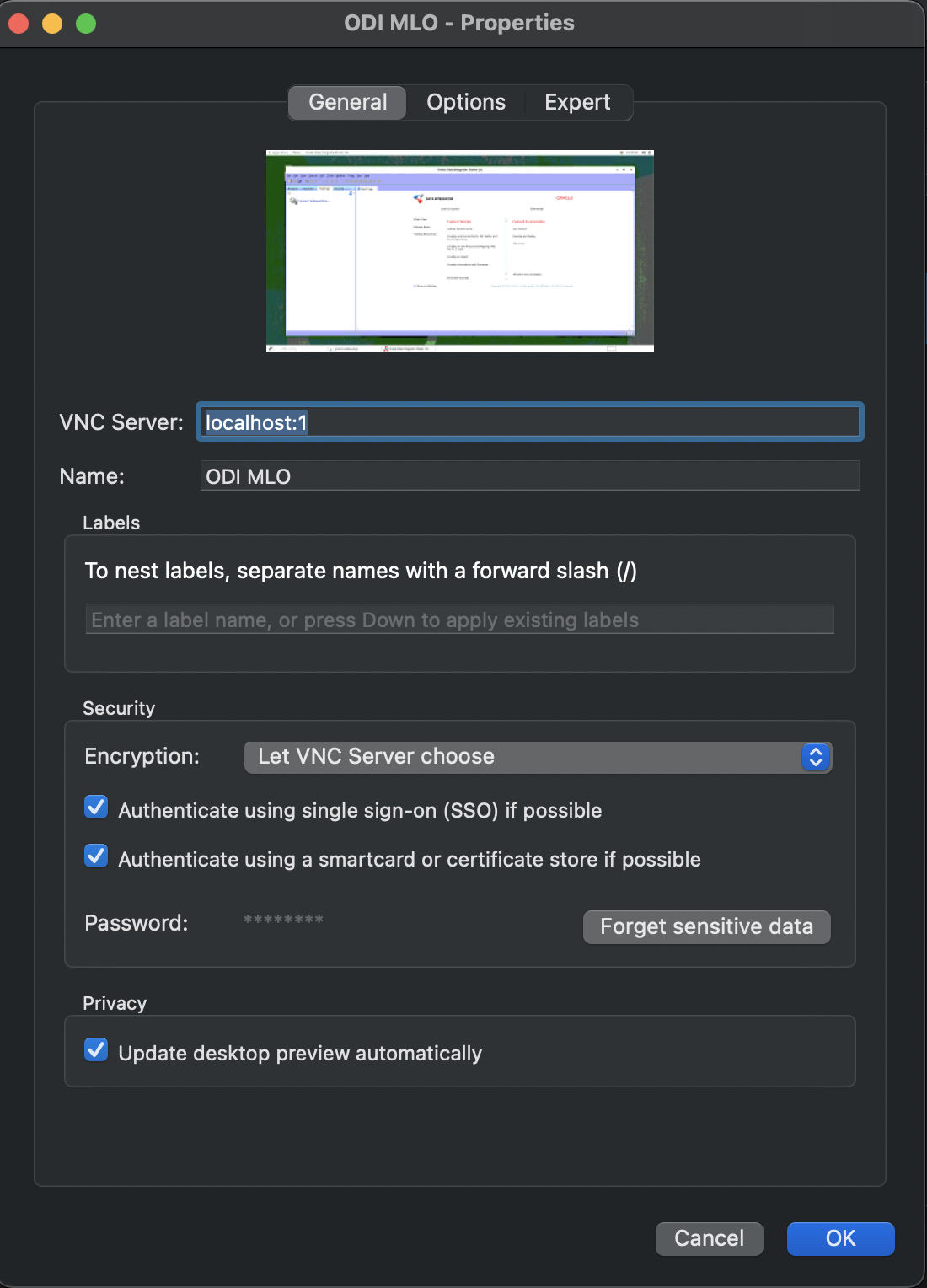
a) Define a new connection in VNC Viewer
Figure 10: Define VNC Viewer connection
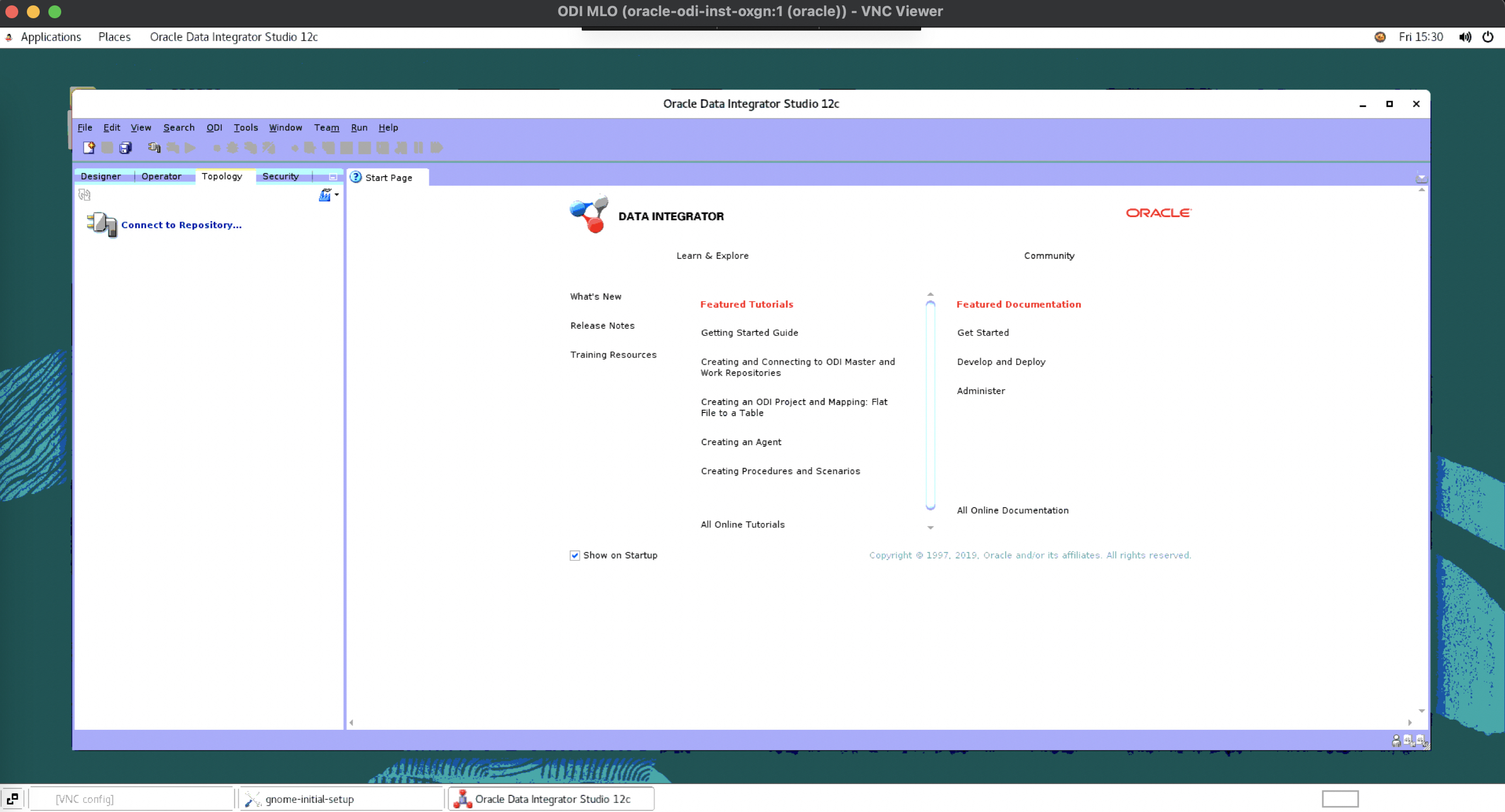
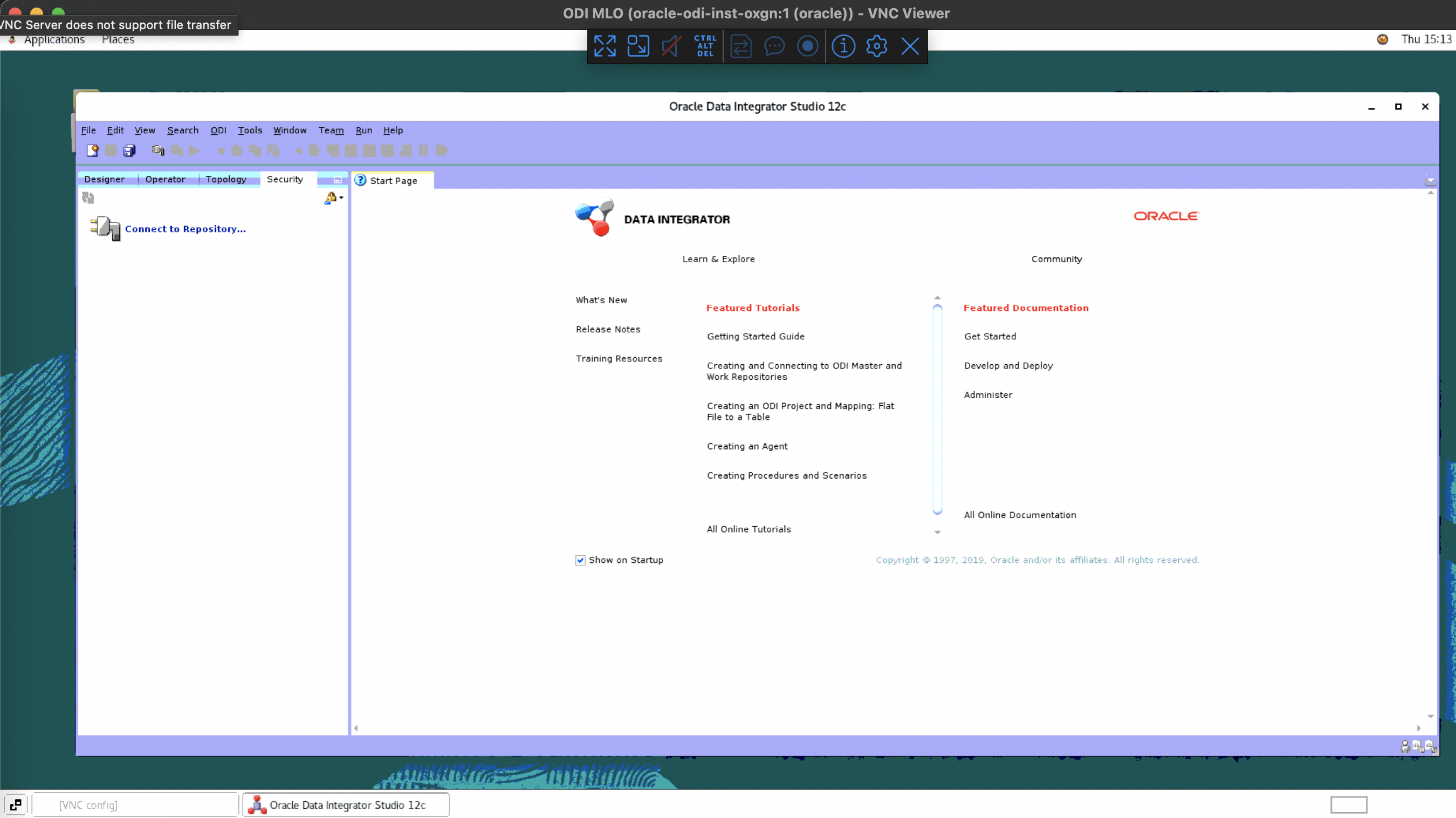
b) Connect to private ODI Marketplace instance and open ODI Studio
Figure 11: Connect to ODI and open ODI Studio
Approach 2 – Bastion Service
To connect to the Private ODI Marketplace VNC Session via the Bastion Service :
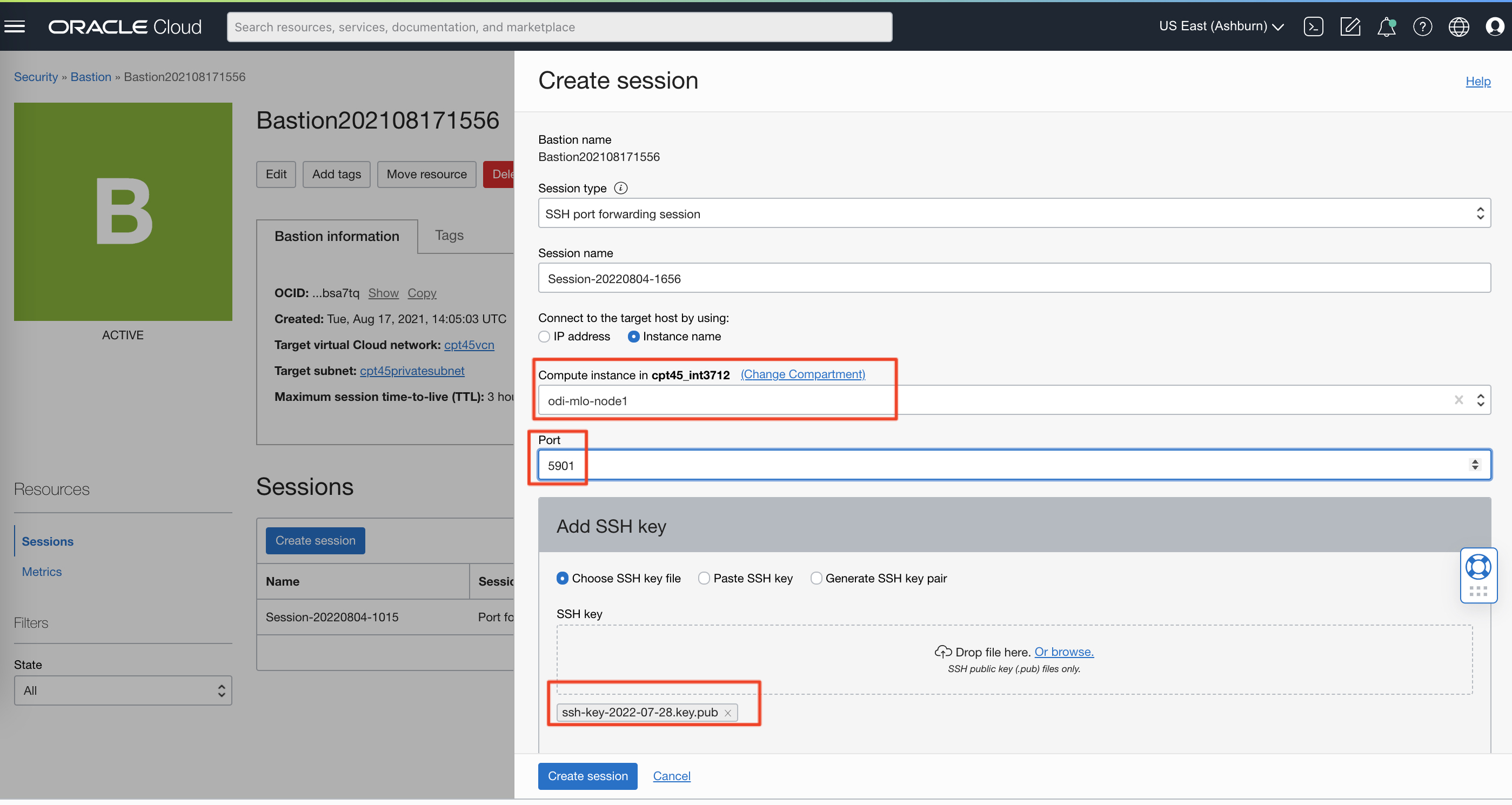
a) Create a new port forwarding session in the Bastion service using the same public key as the one used when provisioning the ODI Marketplace instance
Figure 12: Create Bastion Service port forwardinf session
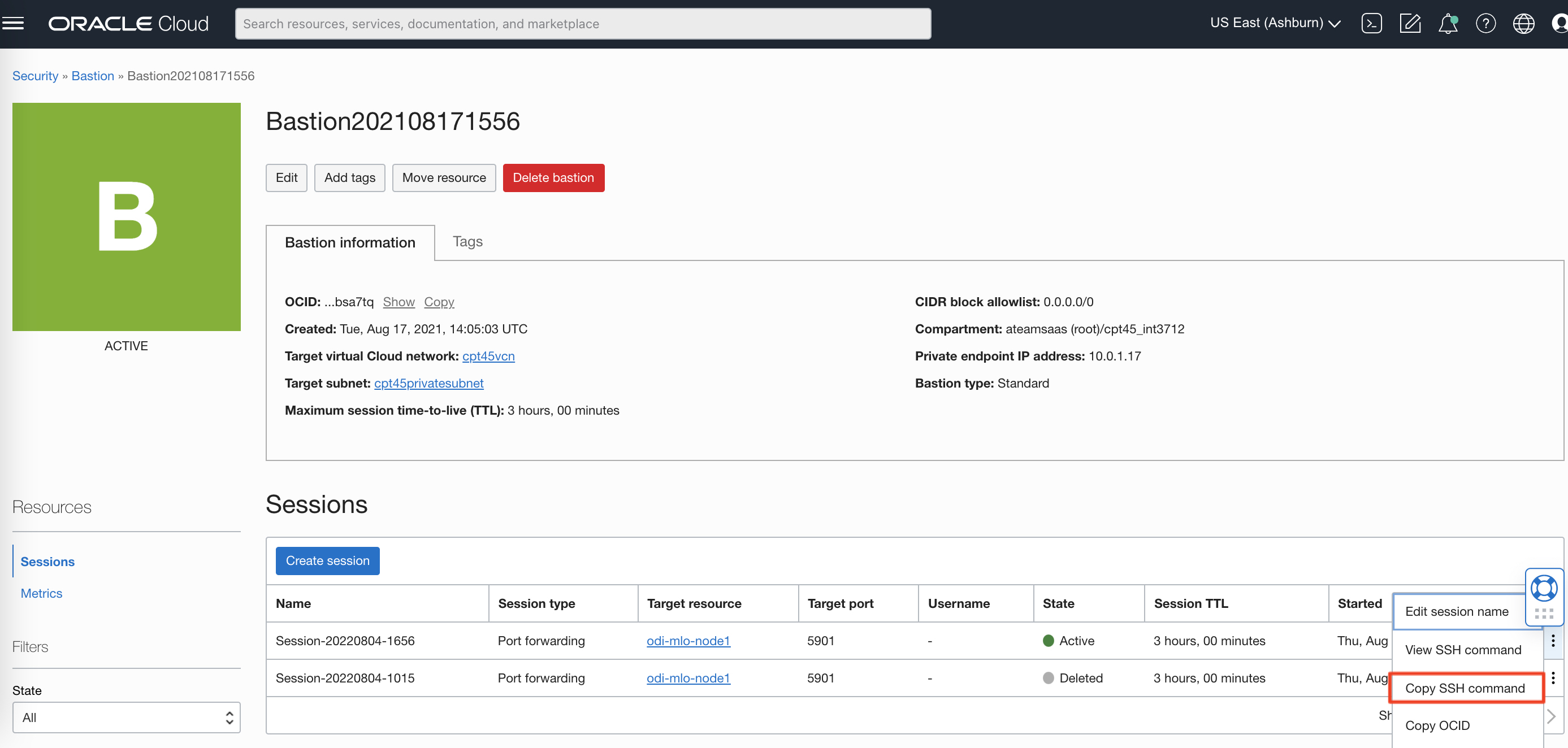
b) Copy the Bastion service session SSH command
Figure 13: Copy SSH Command
c) Run the command after updating the private key and the local port
Figure 14: Update SSH command with local private key and port
d) Connect to private ODI Marketplace instance and open ODI Studio, using the same VNC connection as for Approach 1
Figure 15: Connect to ODI and open ODI Studio
This concludes the activities in the blog.
Want to Learn More?
Click here for more A-Team Oracle Data Integrator (ODI) Blogs.
Click here to sign up to the RSS feed to receive notifications for when new A-team blogs are published.
Click here to access the ODI Marketplace documentation library.
Summary
This article walked through the steps to allow ODI developers to connect to the ODI Studio when the ODI Marketplace compute instance is located in a private subnet.
Bookmark this post to stay up-to-date on changes made to this blog as our products evolve.
Authors
Matthieu Lombard
Consulting Solution Architect
The Oracle A-Team is a central, outbound, highly technical team of enterprise architects, solution specialists, and software engineers.
The Oracle A-Team works with external customers and Oracle partners around the globe to provide guidance on implementation best practices, architecture design reviews, troubleshooting, and how to use Oracle products to solve customer business challenges.
I focus on data integration, data warehousing, Big Data, cloud services, and analytics (BI) products. My role included acting as the subject-matter expert on Oracle Data Integration and Analytics products and cloud services such as Oracle Data Integrator (ODI), and Oracle Analytics Cloud (OAC, OA For Fusion Apps, OAX).