Introduction
A Bill of Material (BOM) is an essential concept in manufacturing and supply chain management. A BOM is a complete list of the items that are required to build a product or a componet of a final product. As a product or a component is usually built with multiple subcomponents, a BOM is often best represented in a hierarchical data structure. A BOM of a complex product can have thousands of items organized in multiple levels in the hierachy. To ease integrations with other applications, the BOM hierarchical structure is often flattened with additional attributes added to indicate each item’s position in the hierarchy. When a consuming application can only deal with hierarchical JSON objects, OIC can be used in transforming a flat JSON into a hierarchical JSON. However, currently in OIC, JSON payloads can only be specified with a JSON sample rather than a JSON schema. the challenge is that there is no way to create a JSON sample to represent an unlimited levels of hierarchy. The following is a simple hierarchical JSON representation of a BOM structure.
{
  "Level": 0,
  "ItemNumber": 100000098761600,
  "items": [
    {
      "Level": 1,
      "ItemNumber": 100000098761610,
      "items": [
        {
          "Level": 2,
          "ItemNumber": 100000098761871,
          "items": []
        },
        {
          "Level": 2,
          "ItemNumber": 100000098761872,
          "Items": [
            {
              "Level": 3,
              "ItemNumber": 100000098761957,
              "Items": [
                {
                  "Level": 4,
                  "ItemNumber": 100000098761567,
                  "items": []
                },
                {
                  "Level": 4,
                  "ItemNumber": 100000098761659,
                  "items": []
                }
              ]
            }
          ]
        }
      ]
    },
    {
      "Level": 1,
      "ItemNumber": 100000098761916,
      "Items": [
        {
          "Level": 2,
          "ItemNumber": 100000098761922,
          "Items": []
        }
      ]
    }
  ]
}
Below is the same JSON payload in a flat format. The combination of the Level attribute and the item’s position in the array indicates its position in the hierarchy.
{
    "items": [
        {
            "Level": 0,
            "ItemNumber": 100000098761600
        },
        {
            "Level": 1,
            "ItemNumber": 100000098761610
        },
        {
            "Level": 2,
            "ItemNumber": 100000098761871
        },
        {
            "Level": 2,
            "ItemNumber": 100000098761872
        },
        {
            "Level": 3,
            "ItemNumber": 100000098761957
        },
        {
            "Level": 4,
            "ItemNumber": 100000098761567
        },
        {
            "Level": 4,
            "ItemNumber": 100000098761659
        },
        {
            "Level": 1,
            "ItemNumber": 100000098761916
        },
        {
            "Level": 2,
            "ItemNumber": 100000098761922
        }
    ]
}
This blog shows one way to implement this conversion in OIC Gen3.
Integration Overview
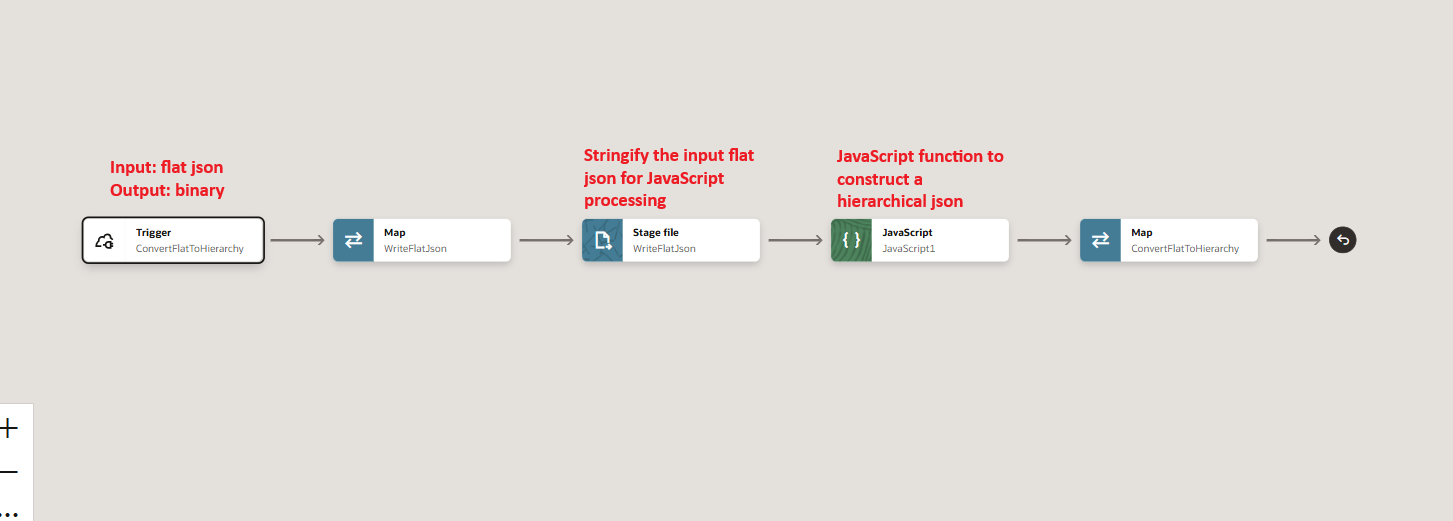
The following image provides an overview of the sample integration. The key activity is the Javascript function call. In this use case, XSLT transformation is not possible because of the hierarchical level is undetermined. A Javascript function can walks through each element in the flat payload and build the hierarchy dynamically.
Integration Steps in Details
REST Trigger
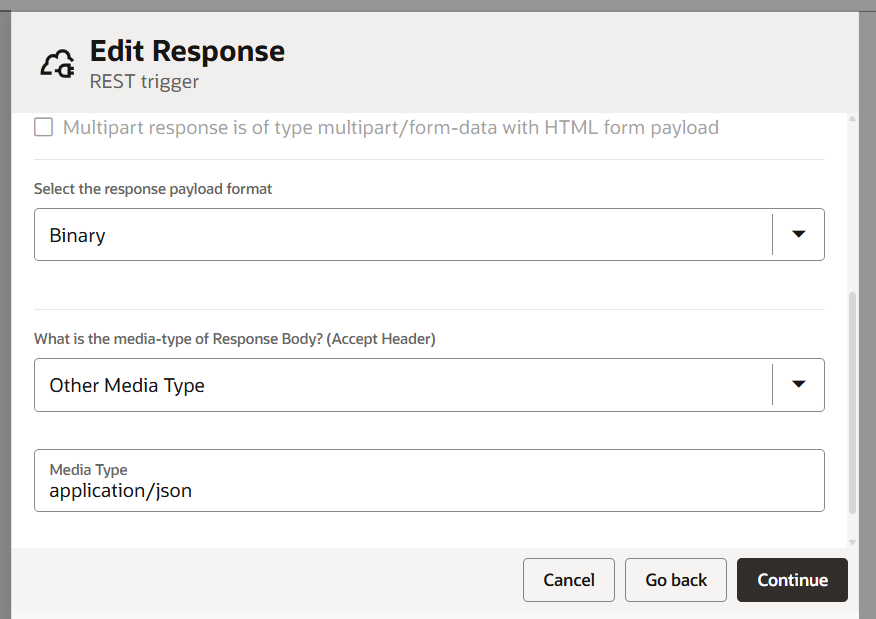
In this sample, we will use a simple REST trigger that takes the flat JSON (as shown above) in a POST message payload. For response, we cannot specify JSON or XML because we can not predetermine the number of levels in the resulting hierarchical BOM structure. So we will set the the response to Binary, and also set the media type to “Custom Media Type” and “application/json”.
Stage File
In OIC, Javascript function only takes string as input and output. To convert a JSON object into a string form, we write the JSON payload into a stage file and use the built-in function: encodeReferenceToBase64 to read file back as a base64 encoded string. In the stage file configuration, we specify the trigger input flat payload as a JSON sample to define the format of the stage file.
Custom Javascript Function
This custom Javascript function takes the flat JSON payload in a string form and parse it into a JSON object. It then walks through each of the item in the array, and uses the position of the item in the array and its Level attribute to determine its position in the hierarchy. Below is the Javascript code.
function convertFlatToHierarchical( flatJsonString ) {
  var result = {};
  var sourceJson = JSON.parse(flatJsonString);

  var parents = [];
  var currentLevel = -1;

  for (itemIndex=0; itemIndex<sourceJson.items.length; itemIndex++) {
    var item = sourceJson.items[itemIndex];
    var newItem = {};
    newItem.Level = item.Level;
    newItem.ItemNumber = item.ItemNumber;
    newItem.items = [];

    if (item.Level == 0) {
      result = newItem;
    }
    else if (item.Level > currentLevel) {
      parents[parents.length-1].items.push(newItem);
    }
    else {
      for (i=0; i<=currentLevel-item.Level; i++) {
        parents.pop();
      }

      parents[parents.length-1].items.push(newItem);
    }

    parents.push(newItem);
    currentLevel = newItem.Level;

  }

  const resultString = JSON.stringify(result, null, 2);
  return resultString;
}
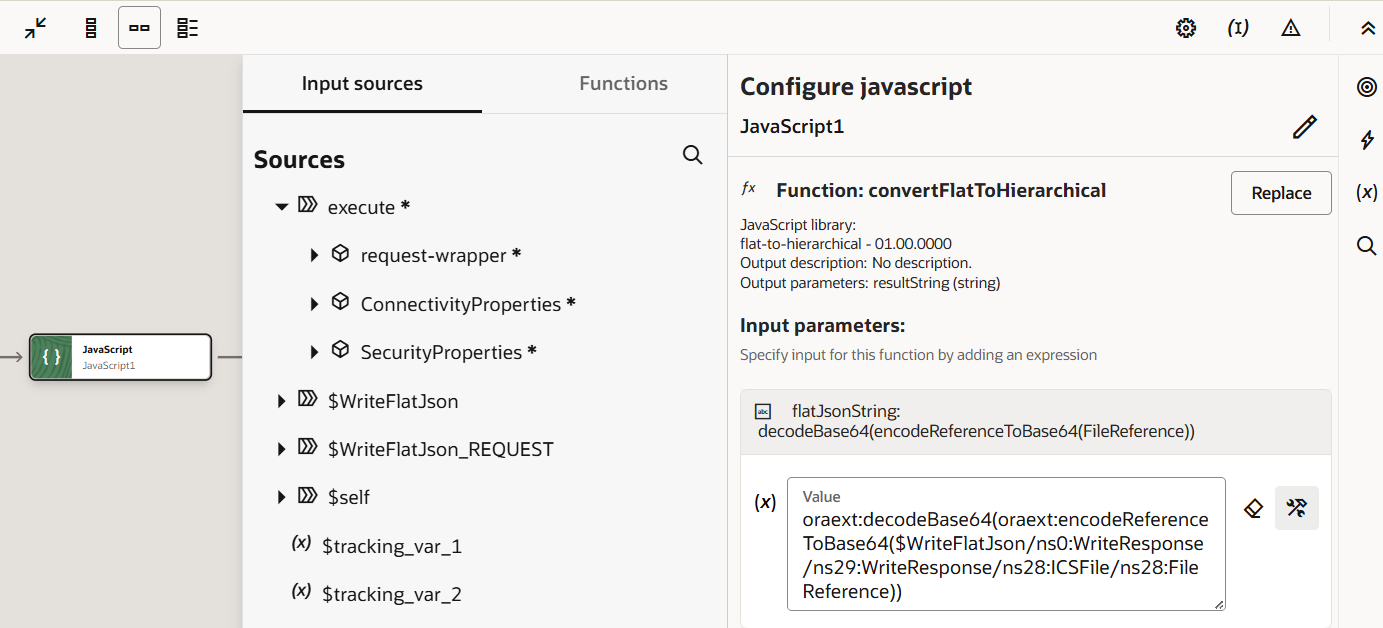
When configuring the input for the function, we first use the encodeReferenceToBase64 function to read the json from the stage file as an base64-encoded string, and then, use the decodeBase64 function to restore the string from base64, and pass it to our custom function.
The Final Mapping
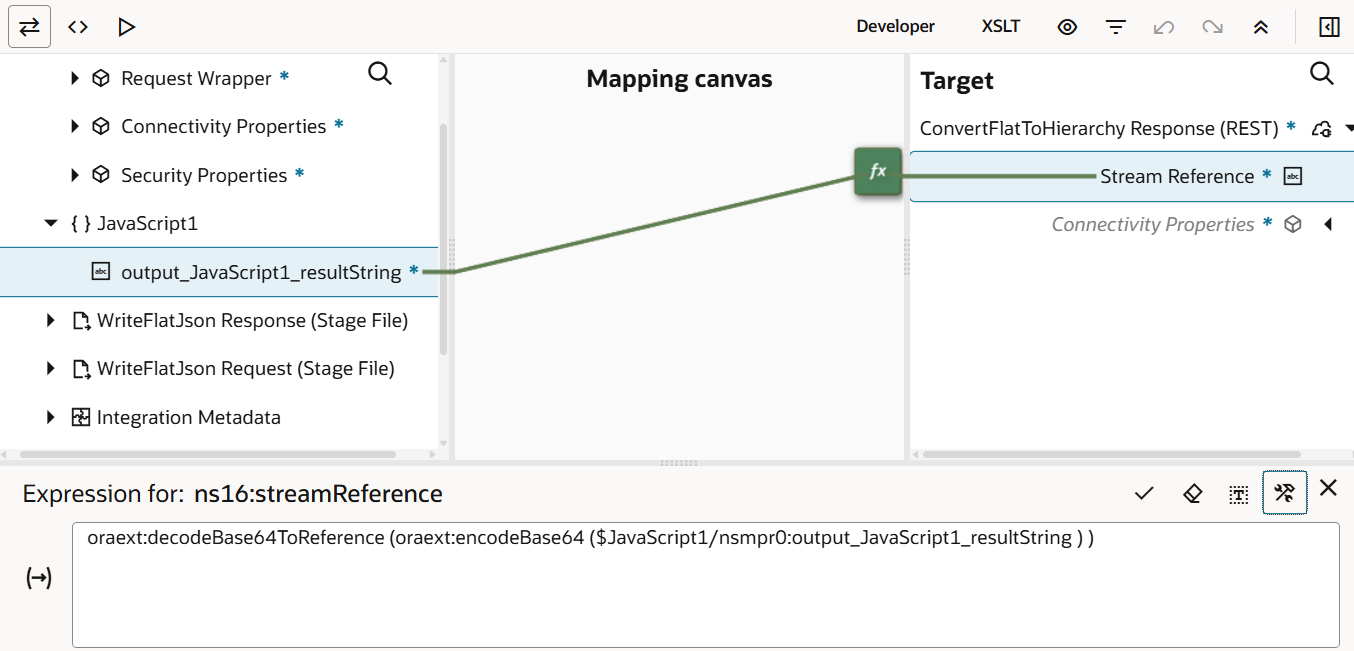
The Javascript function returns a string of our reconstructed hierarchical JSON payload. In this final step, we need to map the string to our outbound response payload. Because we specified the response payload as Binary, we need a stream reference to map to it. To do that, we can use the out of box function decodeBase64ToReference to create a stream out of a string. But this function only accepts a base64 encoded string. So we first have to encode the Javascript functon output into base64 before we can decode it into a reference.
Testing
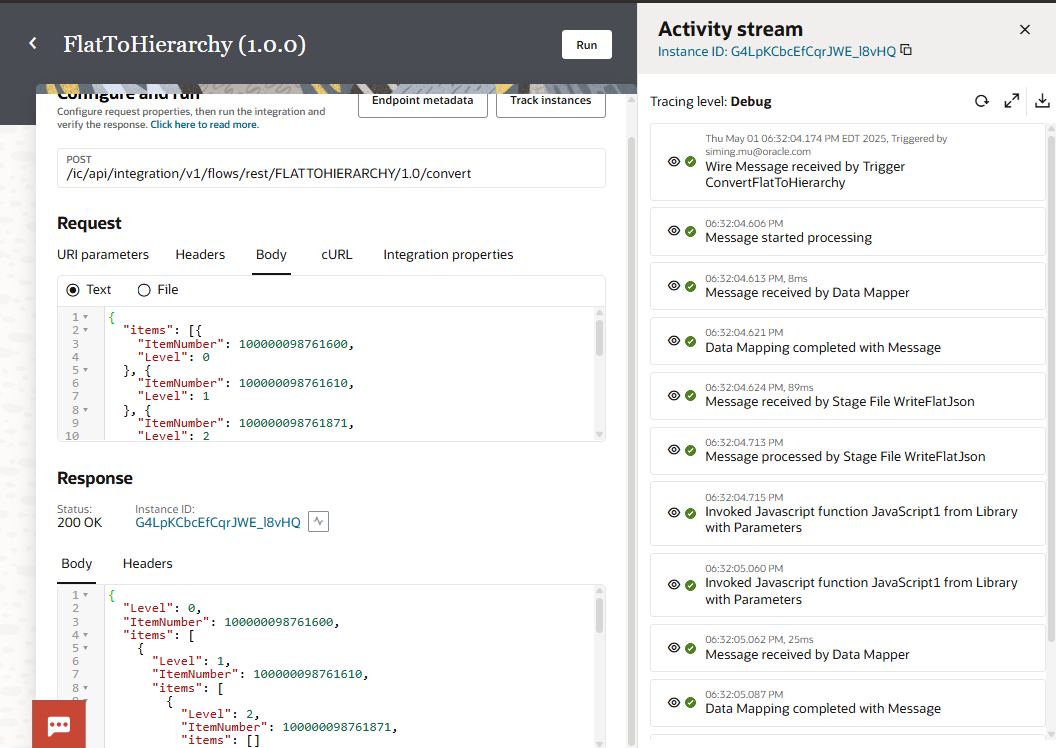
I will conclude this blog with an image that shows a test run of the integration.