
Oracle Data Transforms is an ETL / ETL tool built upon the powerful engine of ODI, with a design graphical data transformations such as data flows and workflows to move and transform data between systems. Whether you’re new to Data Transforms or have past experience with Oracle Data Integrator, it’s helpful to familiarize yourself with these concepts before starting with Data Transforms. See Terminology Information in the Using Data Transforms guide to learn more.
Use Case
Imagine a scenario where your customer needs to load monthly data into aggregated tables. Depending on the volume of data and the frequency of updates to the source tables, it may be necessary to load this data in batches, filtered by month. To handle this efficiently, we can implement a loop to process and load the monthly data in cycles.
How to do it in Oracle Data Transforms?
We are going to create a Workflow as the below one. I’m going to explain all steps and how it works:
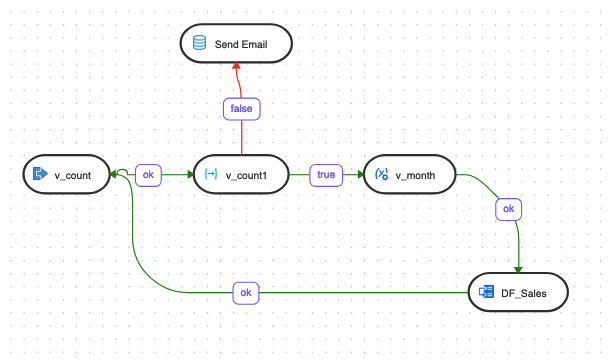
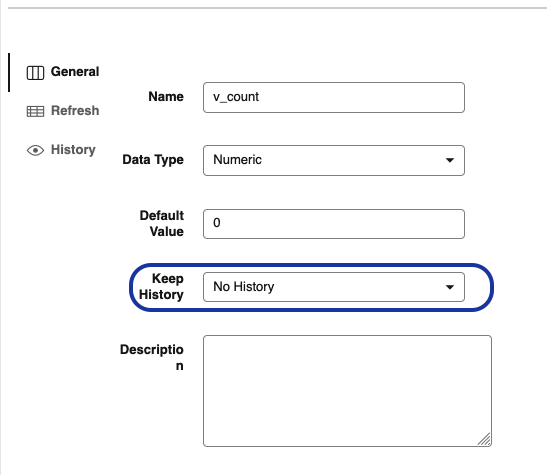
You will need to create 2 variables. In my example, I have the v_count and v_month variables and both are Numeric type. Please, check this blog on how to use variables.
The variables are refreshbed based on these selects:
- v_count – Select #PROJECT.v_count + 1 from dual
- Select MONTH_ID from (select MONTH_ID,rownum as counter from ETL_MONTHS) where counter = #PROJECT.v_count
The ETL_MONTHS is a table I created for this blog. It just contains one column which is MONTH_ID(number(8)) with format YYYYMM.
The Workflow will start by refreshing the variable v_count which it will contain the value 1. The next step is v_count1 and we check if the same variable v_count contains a value that is less than or equal to 12. In each loop the v_count variable will increment by 1.
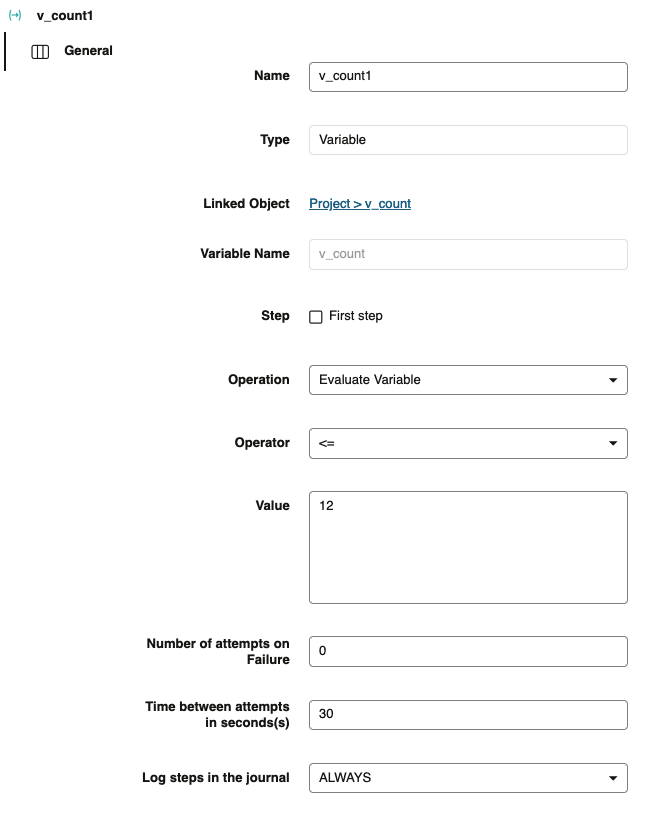
If the condition is true, it will run the data flow which contains the v_month to filter data:
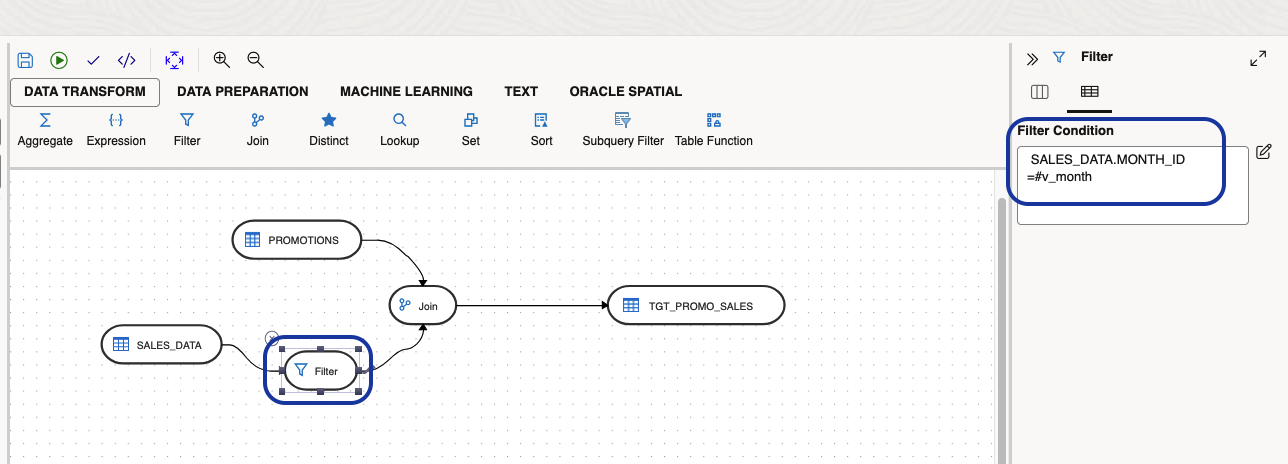
After this step, we refresh again the v_count variable and process the next month. When we delete the last month the variable have the 13 value and the process finishes and sends an email.
Step Send Email:
- begin
SEND_MAIL(‘<email>’,'<subject>’, ‘<Body message>’);
end;
You can find the code for SEND_EMAIL procedure here. Please, don’t forget to add an Access Control Entry (ACE) on autonomous to allow SMTP access:
BEGIN
— Allow SMTP access for user ADMIN
DBMS_NETWORK_ACL_ADMIN.APPEND_HOST_ACE(
host => ’www.us.example.com’,
lower_port => 587,
upper_port => 587,
ace => xs$ace_type(privilege_list => xs$name_list(‘SMTP’),
principal_name => ‘ADMIN’,
principal_type => xs_acl.ptype_db));
END;
/
Conclusion
I hope that you have enjoyed this blog and that it can help you to start using Oracle Data Transforms.