
Introduction
This blog series describes different patterns you can use for syncing data from source applications to target applications. This is the first part of the blog series.
You need a mechanism for sending data from source to target systems in many instances.
One use case could be, syncing of data from a mobile/web application that performs transactions on SaaS data – The mobile/web application fetches data from SaaS and stores it locally. Users perform transactions on this data and those transactions need to be synced to SaaS.
Another case could be the integration of external systems with SaaS, with a need to continuously send data from those systems to SaaS.
Regardless of what the source or target application is, it is ideal to have a middle tier that handles the data flow due to a number of reasons —
- Reduced load on the source system in terms of data sync operations, retrials and error handling.
- Ability to persist data at the middle tier and perform retrials on this data in case of failure.
- Ability to handle data sync from multiple source & target applications from a single middle tier.
- Ability to transform or filter messages at the middle tier before sending to the target application.
- Easy monitoring/reporting of the data flow.
- Ability to fire notifications in case of failures.
- Ability to have a consolidated view of the data sync activities and error cases.
- Ability to enable data syncing in a publish-subscribe asynchronous model.
- Allow source systems to continue with data syncing operation even if the target application is down, say for maintenance.
- Ability to use centralized metrics and logging features.
- Ability to scale the middle tier based on the data load and processing requirement.
And why choose OCI Native Services for building this middle tier? Choosing OCI Cloud Native Services has several benefits,
- They are based on open source and standards.
- They have built-in management capabilities. So development teams can focus on building competitive features and spend less time installing, patching, and maintaining infrastructure.
- Availability of good pricing models.
- They are highly secure, scalable, durable and reliable.
In this part of blog series, I will describe a pattern that uses the OCI services – Streaming, API Gateway, Functions, Service Connector Hub, Vault, OCI Registry, Notifications and Object Storage.
Architecture
This architecture shows a source application sending data to a target application through a middle tier.
An API Gateway receives source application requests and routes the requests to a Function. The Function constructs Streaming messages from the requests and sends them to a stream.
A Service Connector, moves the messages from the stream to a target Function. Target Function reads the messages and posts data contained in the message to the target application. If there is a failure in posting data to target application, Function pushes messages to error streams.
There is a second API Gateway that receives retry requests and calls a retry Fuunction. The retry Function, reads the messages in error streams and tries to reprocess the failed messages and post them to the target application.
Service Connector connected to the error streams, sends notifications to support personnel and also stores the errored messages in an Object Storage bucket.
The following diagram illustrates this architecture.
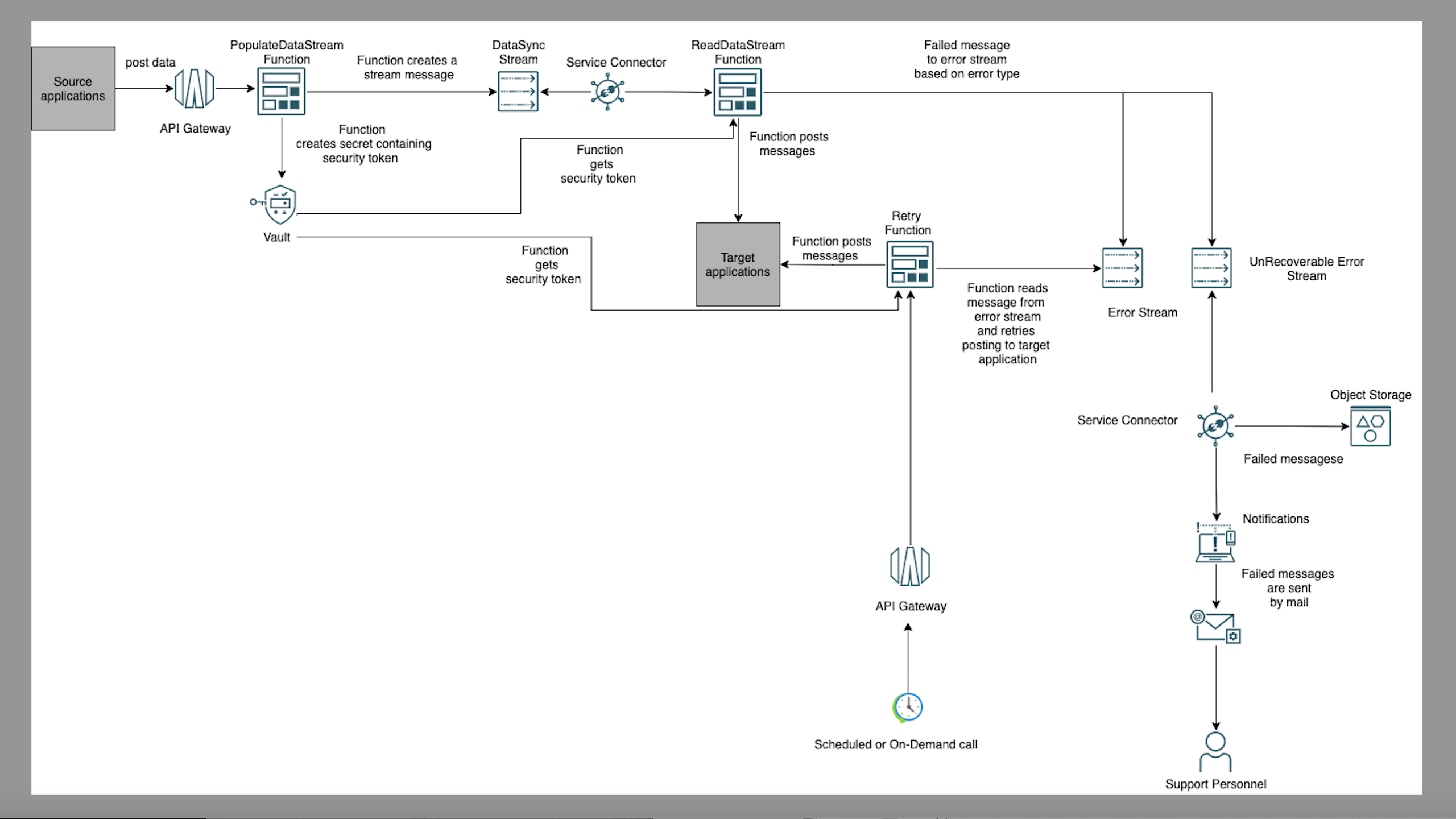
The architecture has the following components:
Streaming
Streaming is chosen in this pattern, as it is a good fit for any use case in which data is produced and should be processed continually and sequentially in a publish-subscribe messaging model.
Additionally, it can connect to Service Connector Hub which means that you can designate a stream as a data source, and use Functions to process the stream’s messages.
It is also is a fully managed and scalable OCI service. Customers need to pay only for what they use so it is a service that you can consider for workloads with large spikes in usage.
In this pattern, two types of streams are used, one for storing data posted by the source application and streams for storing errored data.
Posting of data to target application/s can error out due to multiple reasons, like server unavailability, data inconsistency, error on the server side while processing data and so forth. Some of these errors are recoverable, say an error that occurred due to server unavailability is eventually recoverable when the server becomes available. Some of the errors are unrecoverable, i.e. the processing of data will not be successful even after several retrials. It is important to categorize and re-process errored messages based on the error type to avoid data loss and unnecessary retrials.
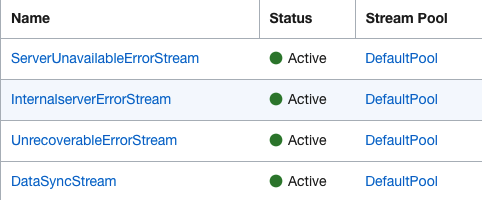
I have configured a stream, DataSyncStream which stores the data posted by the source application. ServerUnavailableErrorStream, InternalserverErrorStream and UnrecoverableErrorStream are for storing errored messages. You can either store all errors in one stream or have separate streams for different types of errors.

Functions
3 Functions are used, a Function PopulateDataStreamFunction to populate the DataSyncStream.
A second Function, ReadDataStreamFunction gets the messages from the DataSyncStream and calls the target application’s API. If there is a failure in target application API call, the messages are sent to error Streams by the Function.
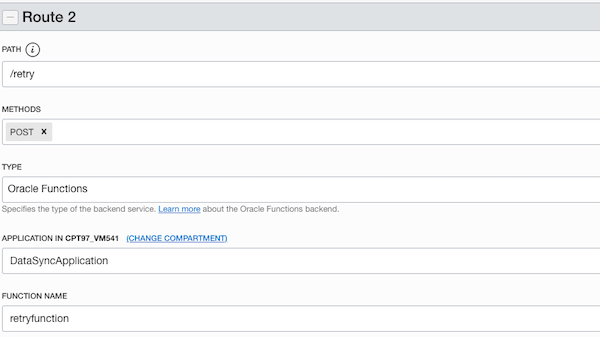
The third Function, RetryFunction retries the messages in error streams. This Function is exposed as a public API using an API Gateway. You can invoke the exposed API as a batch process or on an ad-hoc basis, to reprocess the failed messages in any stream.
The Functions use Streaming SDK for Java, to interact with Streaming service.
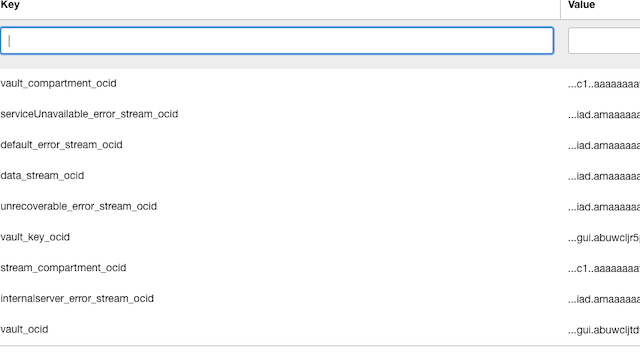
Application configuration used by the Functions contain the stream and Vault OCIDs.
API Gateway
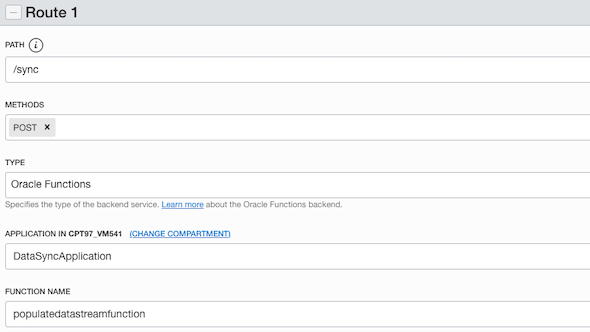
API Gateway has routes defined for PopulateDataStreamFunction and RetryFunction.
Route with path /sync .
Route with path /retry .
Notifications
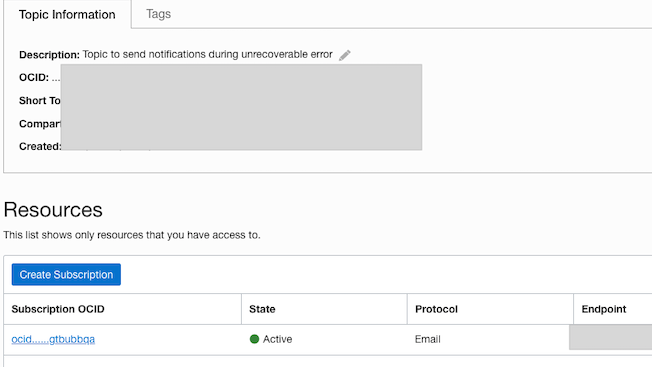
A notification topic, which is a subscription to an Email protocol is used. This is to send notifications when a message is added to the error streams.
Object Storage Bucket
An Object Storage Bucket, stores errored messages. This will help in analysing the cause of failure.
Service Connector Hub
Service Connector Hub is a cloud message bus platform that orchestrates data movement between various services in OCI.
A Source in Service Connector Hub is a service that contains the data to be moved according to specified tasks.
A Target in Service Connector Hub is a service that receives data from the source. A given target service processes, stores, or delivers received data—the Functions service processes the received data; the Object Storage, and Streaming services store the data; and the Notifications service delivers the data.
Service connectors run continuously and data is moved sequentially by individual move operations. The amount of data and the speed of each move operation depend on the service connector configuration (source,target) and the relevant service limits.
In this pattern, I have used Functions, Notifications and Object Storage as targets.
There are 3 Service Connectors configured.
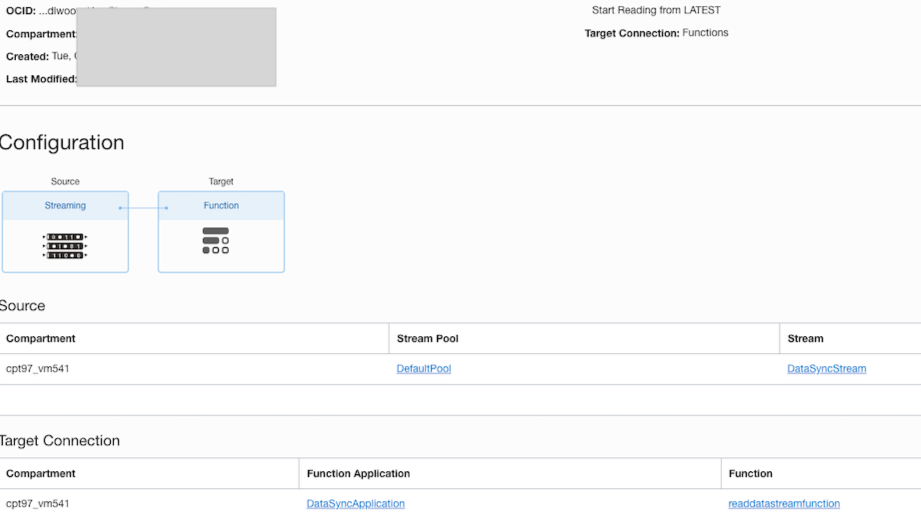
- Service Connector, to connect DataSyncStream to Functions, where the target of the Service Connector is set as ReadDataStreamFunction. Each move operation moves data from the selected stream to the Function target. Select the Read Position as Latest to read from the newest position in the stream.
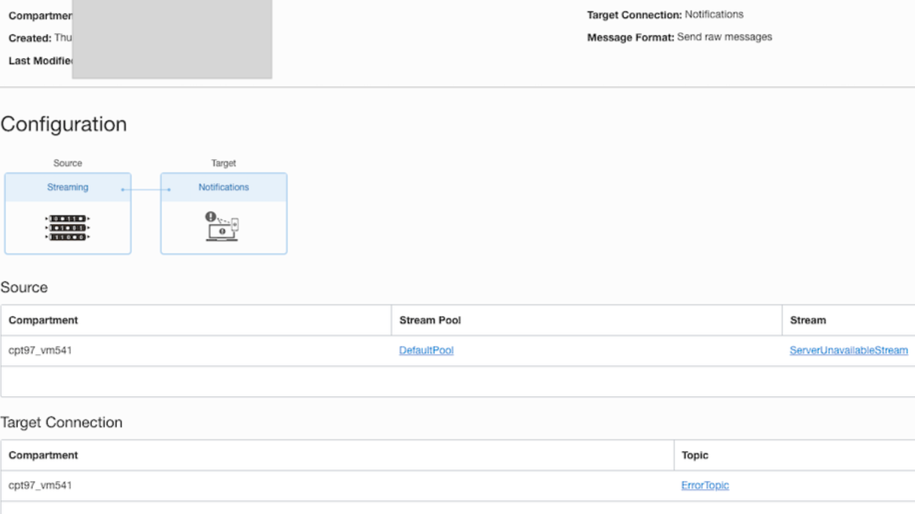
- Service Connector from error stream to Notifications, so that a support personnel is notified of the error. Add more Service Connectors, if you require notifications from other error streams.
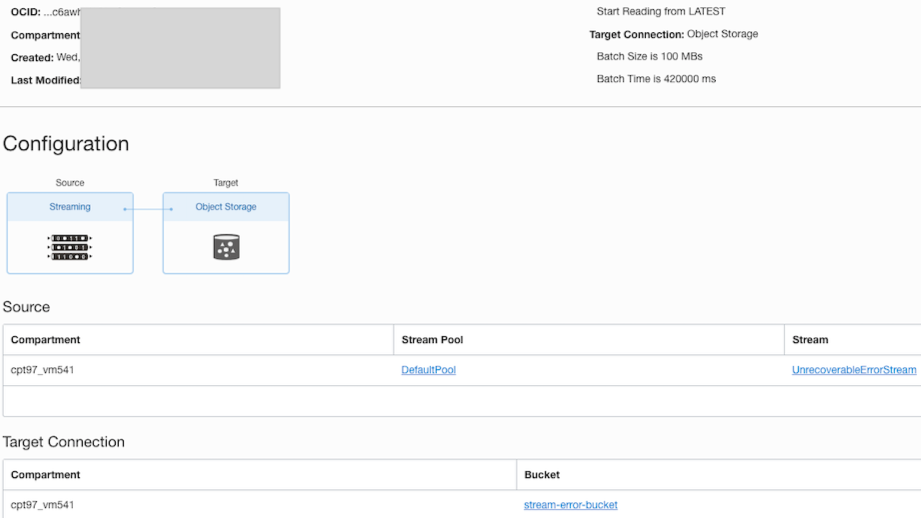
- Service Connector from error streams to Object Storage Bucket. You can later inspect the failed messages in the Object Storage bucket.
Vault
In most cases, the target application API call will need a security token. In this pattern, I am passing the token in the authorization header of the POST call to API Gateway. Token needs to be securely stored for calling target application API later by Functions. Vault is used to store tokens as secrets.
The secrets will use encryption keys in the Vault.

Process Flow
Step 1. Source application posts data to the API Gateway’s /sync route. CURL command sample is given below.
curl --location --request POST 'https://pfk2ep3.apigateway.us-ashburn-1.oci.customer-oci.com/stream/sync'

--header 'Authorization: Bearer YWRtaW46V2VsY29tZTEyMzQq'

--header 'Content-Type: application/json'

--data-raw '{

"streamKey": "key_123",

"streamMessage": {

"vaultSecretName": "secret_1",

"targetRestApi": "https://gthsjj.com/fscmRestApi/resources/version/salesOrders",

"targetRestApiOperation": "POST",

"targetRestApiPayload": {

"SourceTransactionNumber": "R13_HdrEff_01",

"SourceTransactionSystem": "GPR",

"SourceTransactionId": "R13_HdrEff_01",

"BusinessUnitName": "Vision Operations",

"BuyingPartyName": "Computer Service and Rentals",

"TransactionType": "Standard Orders",

"RequestedShipDate": "2022-01-19T20:49:12+00:00",

"RequestedFulfillmentOrganizationName": "Vision Operations",

"PaymentTerms": "30 Net",

"TransactionalCurrencyName": "US Dollar",

"RequestingBusinessUnitName": "Vision Operations",

"FreezePriceFlag": false

},

"targetRestApiHeaders": [

{

"key": "Content-Type",

"value": "application/json"

}

]

}

}'
The json payload contains streamKey and streamMessage keys. streamKey is the key of the message sent to the DataSyncStream and streamMessage is the value of the message sent to the DataSyncStream. streamKey can be empty if a key is not required while populating streams.
The streamMessage section is self-contained i.e. it contains the target application API in targetRestApi key, target application’s Rest API operation in targetRestApiOperation key and target application’s Rest API payload in targetRestApiPayload key. Headers for target REST API call should be sent as key,value pair in targetRestApiHeaders.
For every request, you should also pass vaultSecretName. The auth token required by the target application API call is passed in the header of the sync API POST call. vaultSecretName is used as the Vault secret name to store tokens. For this purpose, you should pass a unique value in vaultSecretName for all messages having the same auth token. When the auth token in the authorization header changes, a new value should be passed in the vaultSecretName for those messages. The auth token changes usually, when the request is for a different user or if the token of a user expires and a new token is passed.
Step 2. PopulateDataStreamFunction parses the json payload and creates a new stream message with stream key as streamKey and value as streamMessage and pushes it to DataSyncStream. It also reads the vaultSecretName and creates a new secret in Vault with content as the authorization header token and secret name as vaultSecretName. A new secret will be created only if a secret with the same name is not already present in Vault.
Step 3. DataSyncStream is connected to the Function, ReadDataStreamFunction through a Service Connector. Service Connector invokes this Function when DataSyncStream is populated with new messages.
Step 4. ReadDataStreamFunction processes the messages in DataSyncStream by reading the targetRestApiPayload section and then invokes the target application API. If an error occurs, say if the server is unavailable, Function pushes the message to error streams defined in the Function Application configuration variables.
Step 5. Lastly, there is an option to retry the messages in error streams using an API Gateway API, that exposes the RetryFunction. A sample CURL command is shown below.
curl --location --request POST 'https://.....apigateway.us-ashburn-1.oci.customer-oci.com/stream/retry'
--header 'Content-Type: application/json'
--data-raw '{
    "streamOCIDToRetry": "ocid1.stream.oc1.iad.amaaaaaah7pzzmqaxistniogtwc2idu64b6tcy7segby3f3olmhik6mbrmza",
    "noOfMessagesToProcess": 5,
    "readOffset": -1,
    "readPartition": "0",
    "errormapping": [
        {
            "responsecode": "404",
            "stream": "ocid1.stream.oc1.iad.amaaaaaah7pzzmqadel2rnmbwsaksgfeqfm7ho27vwvw367icgmrxmgojjla"
        },
        {
            "responsecode": "503",
            "stream": "ocid1.stream.oc1.iad.amaaaaaah7pzzmqaqosrvw5k6r4pvtq6oe3s5lvuhtx526zffr4ejlngoz4q"
        },
        {
            "responsecode": "unexpectedError",
            "stream": "ocid1.stream.oc1.iad.amaaaaaah7pzzmqaqosrvw5k6r4pvtq6oe3s5lvuhtx526zffr4ejlngoz4q"
        },
        {
            "responsecode": "unmapped",
            "stream": "ocid1.stream.oc1.iad.amaaaaaah7pzzmqaqosrvw5k6r4pvtq6oe3s5lvuhtx526zffr4ejlngoz4q"
        }
    ]
}'
In the retry payload, you specify the stream OCID to retry using streamOCIDToRetry key and the stream offset from where the retry should happen. noOfMessagesToProcess is the no of stream messages to process in a single Function call.
readAfterOffset is the offset location from where the messages are to be read. Set this to -1 to start reading from the oldest message in the stream.
The payload also contains an errormapping section to specify the streams to which errored messages should be directed to.
This API’s response body will have information on the last offset which was successfully processed, no. of successfully processed messages and no. of failed messages. It also informs whether the end of the stream has been reached so that you can stop further call for retrial if there is no more message to process.
{“lastReadOffset”:405 ,”processedmessages”:0,”failedMessages”:1,”endOfStream”: true}
Enhancing the sample
Note that the sample given is only to demonstrate a pattern and mostly you will need to enhance it to fit your needs.
While enhancing the sample do consider the following.
- I have defined a few error stream OCID in the Function application configuration. Add new error streams or modify the existing ones based on your requirement. You should modify the ReadDataStreamFunction code if new keys are added to the application configuration.
- If the target application can publish its planned maintenance time, then you can use that information to push the messages directly into the error stream. You need to modify the PopulateDataStreamFunction to check if the target application is down, and if it’s down, send messages to an error stream instead of pushing them to DataSyncStream.
- Change the errormapping section of the RetryFunction payload, if needed. The sample makes use of the API response code for determining the error streams to use. Change this, if a different type of mapping is required. RetryFunction code also would need a change if there is a change in the payload structure.
- RetryFunction payload has the key noOfMessagesToProcess to set the no of messages to process in a single call. Do change this to a smaller number if the processing of each message takes time and there is a possibility of Function to time out.
- Consuming messages from a stream requires you to: create a cursor, and then use the cursor to read messages. A cursor is a pointer to a location in a stream. One of the options is to use a specific offset to start the reading of the message. This is called an AT_OFFSET cursor. RetryFunction in the sample uses the AT_OFFSET cursor for consuming the message. It accepts readAfterOffset as the starting offset to read the message. It returns the last successfully read offset in the response. To process a large number of messages together, store returned offset value in a specific location and pass it as the value of readAfterOffset in JSON payload and invoke /retry the API endpoint sequentially.
- The sample function handles PUT, POST and DELETE operations. To add or remove operations, change the ReadDataStreamFunction and RetryFunction code. Also, change the targetRestApiOperation section of the payload.
- During failure, you can append the reason for failure to the message before pushing it to the error stream. This gives visibility into the cause of the error.
- You will need a process to delete the Vault secrets once they are no longer needed. One option is to write a Function, that can do the clean-up task periodically.
- It is assumed that the authentication token to invoke the target application’s REST API is passed in the “Authorization” Header. There is a possibility that the authorization token stored in Vault expires while retrying the message. This scenario is not considered in the sample. You can enhance the Function to get Refresh Tokens in case of token expiry.
- It is also possible to move the common methods in Functions to helper classes and reuse them.
- You will need to secure your API Gateway in a production application. This is not considered in the sample.
Reference Code
You can download the full code from GitHub
Following are the code snippets from the Functions code.
PopulateDataStreamFunction
private static final Logger LOGGER = Logger.getLogger(PopulateDataStreamFunction.class.getName());

private final ResourcePrincipalAuthenticationDetailsProvider provider = ResourcePrincipalAuthenticationDetailsProvider

.builder().build();

private static final String VAULT_OCID = System.getenv().get("vault_ocid");

private static final String VAULT_COMPARTMENT_OCID = System.getenv().get("vault_compartment_ocid");

private static final String VAULT_KEY_OCID = System.getenv().get("vault_key_ocid");

private static final String DATA_STREAM_OCID = System.getenv().get("data_stream_ocid");


/**

* @param httpGatewayContext

* @param requestBody

* @return String

* @throws JsonMappingException

* @throws JsonProcessingException

*

*                                 This is the entry point of the function

*                                 execution.

*/

public String handleRequest(HTTPGatewayContext httpGatewayContext, String requestBody) {


String streamKey = "";

String streamMessage = "";

String vaultSecretName = "";


// Read the request header to get the authorization header value.

// This will be stored in a vault

Headers headers = httpGatewayContext.getHeaders();

Optional<String> authorizationHeaderOpt = headers.get("Authorization");


ObjectMapper objectMapper = new ObjectMapper();

try {

JsonNode jsonNode = objectMapper.readTree(requestBody);


// Get the message key and the actual content to be stored in the stream.

// streamKey will be used as the stream message's key


streamKey = jsonNode.path("streamKey").asText();


streamMessage = jsonNode.path("streamMessage").toString();

// To get the vaultSecretName from streamMessage

JsonNode streamMessageNode = objectMapper.readTree(streamMessage);

if (authorizationHeaderOpt.isPresent()) {


String authorizationHeader = authorizationHeaderOpt.get();

vaultSecretName = streamMessageNode.get("vaultSecretName").asText();


// If secret with the name vaultSecretName is not already present,

// create a secret

if (checkSecretInVault(vaultSecretName)) {

createSecretInVault(authorizationHeader, vaultSecretName);

}


}


storeMessageinStream(streamMessage, DATA_STREAM_OCID, streamKey);


} catch (BmcException e) {

LOGGER.severe(e.getLocalizedMessage());

httpGatewayContext.setStatusCode(e.getStatusCode());

return e.getLocalizedMessage();


} catch (JsonProcessingException jsonex) {

LOGGER.severe(jsonex.getLocalizedMessage());

httpGatewayContext.setStatusCode(500);

return "Error occured in processing the payload ";

}


return "success";


}


/**

* @param vaultSecretName

* @return boolean

*

*         This method is used to get check if secretname is present already in

*         vault

*/

private boolean checkSecretInVault(String vaultSecretName) {


VaultsClient vaultClient = new VaultsClient(provider);


ListSecretsRequest listSecretsRequest = ListSecretsRequest.builder().name(vaultSecretName).vaultId(VAULT_OCID)

.compartmentId(VAULT_COMPARTMENT_OCID).build();


ListSecretsResponse listSecretsResponse = vaultClient.listSecrets(listSecretsRequest);

List<SecretSummary> items = listSecretsResponse.getItems();

vaultClient.close();

return items.isEmpty();


}


/**

* @param authorizationHeader

* @param vaultSecretName

*

*                            This method is to store the auth token in a vault.

*                            It generates a secret with content as auth token

*                            and name as the vaultSecretName. The secret is

*                            stored in the vault in the compartment specified

*                            in application configuration variables. The secret

*                            encryption key used is also specified in the

*                            application configuration variable.

*/


private void createSecretInVault(String authorizationHeader, String vaultSecretName) {

VaultsClient vaultClient = new VaultsClient(provider);

//Create a new secret with content as the authorization header value and name as vaultSecretName

Base64SecretContentDetails base64SecretContentDetails = Base64SecretContentDetails.builder()

.content(authorizationHeader).name(vaultSecretName).stage(SecretContentDetails.Stage.Current).build();


// The secret is created in the compartment and vault specified in application

// configuration variable

// The secret uses the key mentioned in the application configuration variable

CreateSecretDetails createSecretDetails = CreateSecretDetails.builder().compartmentId(VAULT_COMPARTMENT_OCID)

.secretName(vaultSecretName).keyId(VAULT_KEY_OCID).vaultId(VAULT_OCID)

.secretContent(base64SecretContentDetails).build();

CreateSecretRequest createSecretRequest = CreateSecretRequest.builder().createSecretDetails(createSecretDetails)

.build();

vaultClient.createSecret(createSecretRequest);

vaultClient.close();


}


/**

* @param streamOCID

* @return Stream This method obtains the Stream object from the stream OCID.

*/

private Stream getStream(String streamOCID) {

StreamAdminClient streamAdminClient = StreamAdminClient.builder().build(provider);

GetStreamResponse getResponse = streamAdminClient

.getStream(GetStreamRequest.builder().streamId(streamOCID).build());

return getResponse.getStream();

}


/**

* @param message

* @param streamOCID

* @param streamKey

*

*

*                   This method stores the message in the Stream

*/

private void storeMessageinStream(String message, String streamOCID, String streamKey) {


StreamClient streamClient = StreamClient.builder().stream(getStream(streamOCID)).build(provider);


PutMessagesDetails messagesDetails = PutMessagesDetails.builder()

.messages(Arrays.asList(

PutMessagesDetailsEntry.builder().key(streamKey.getBytes()).value(message.getBytes()).build()))

.build();

PutMessagesRequest putRequest = PutMessagesRequest.builder().streamId(streamOCID)

.putMessagesDetails(messagesDetails).build();


PutMessagesResponse putResponse = streamClient.putMessages(putRequest);

for (PutMessagesResultEntry entry : putResponse.getPutMessagesResult().getEntries()) {

if (entry.getError() != null) {


LOGGER.severe("Put message error " + entry.getErrorMessage());

} else {


LOGGER.info("Message pushed to offset " + entry.getOffset() + " in partition " + entry.getPartition());

}

}


}
ReadDataStreamFunction
private static final Logger LOGGER = Logger.getLogger(ReadDataStreamFunction.class.getName());

private final ResourcePrincipalAuthenticationDetailsProvider provider = ResourcePrincipalAuthenticationDetailsProvider

.builder().build();

private static final String VAULT_OCID = System.getenv().get("vault_ocid");

private static final String UNRECOVERABLE_ERROR_STREAM_OCID = System.getenv()

.get("unrecoverable_error_stream_ocid");

private static final String SERVICEUNAVAILABLE_ERROR_STREAM_OCID = System.getenv()

.get("serviceUnavailable_error_stream_ocid");

private static final String INTERNALSERVER_ERROR_STREAM_OCID = System.getenv()

.get("internalserver_error_stream_ocid");

private static final String DEFAULT_ERROR_STREAM_OCID = System.getenv().get("default_error_stream_ocid");

private static final String STREAM_COMPARTMENT_OCID = System.getenv().get("stream_compartment_ocid");

private static final String[] OPERATIONS = new String[] { "PUT", "POST", "DELETE" };

private static final List<String> STREAM_OCIDS = List.of(UNRECOVERABLE_ERROR_STREAM_OCID,

SERVICEUNAVAILABLE_ERROR_STREAM_OCID, INTERNALSERVER_ERROR_STREAM_OCID, DEFAULT_ERROR_STREAM_OCID);


/**

* @param incomingMessage

* @param httpGatewayContext

* @return

*

*

*         This is the entry point of the function execution.

* @throws InterruptedException

* @throws IOException

*/

public String handleRequest(String incomingMessage, HTTPGatewayContext httpGatewayContext) {


ObjectMapper objectMapper = new ObjectMapper();

StreamAdminClient streamAdminClient = StreamAdminClient.builder().build(provider);


if (!streamExist(streamAdminClient)) {

httpGatewayContext.setStatusCode(500);


return "failed";


}

// Read the stream messages


try {

JsonNode jsonTree = objectMapper.readTree(incomingMessage);


for (int i = 0; i < jsonTree.size(); i++) {

JsonNode jsonNode = jsonTree.get(i);

// Get the stream key and value


String streamKey = jsonNode.get("key").asText();

String streamMessage = jsonNode.get("value").asText();

// Decode the stream message


String decodedMessageValue = new String(Base64.getDecoder().decode(streamMessage.getBytes()));


try {


processMessage(decodedMessageValue, streamKey, streamAdminClient);


} catch (Exception ex) {


LOGGER.severe("Message failed with exception " + ex.getLocalizedMessage());


populateErrorStream(streamMessage, streamKey, UNRECOVERABLE_ERROR_STREAM_OCID, streamAdminClient);

}


}

} catch (JsonProcessingException e) {

httpGatewayContext.setStatusCode(500);

LOGGER.severe("Message processing failed with JSONProcessing exception" + e.getLocalizedMessage());

return "failed";


}


return "success";


}


/**

* @param streamAdminClient

* @return boolean

*

*         This method checks if a stream exist

*/

private boolean streamExist(StreamAdminClient streamAdminClient) {


boolean streamsExist = true;


for (int i = 0; i < STREAM_OCIDS.size(); i++) {


ListStreamsRequest listRequest = ListStreamsRequest.builder().compartmentId(STREAM_COMPARTMENT_OCID)

.id(STREAM_OCIDS.get(i)).lifecycleState(LifecycleState.Active).build();


ListStreamsResponse listResponse = streamAdminClient.listStreams(listRequest);


if (listResponse.getItems().isEmpty()) {


streamsExist = false;


LOGGER.log(Level.SEVERE,

"Processing failed as stream OCID {0} in application configurations doesnt exist.",

STREAM_OCIDS.get(i));


break;

}


}


return streamsExist;


}


/**

* @param streamMessage

* @param streamKey

* @param StreamAdminClient

*

* @throws InterruptedException

* @throws IOException          This method parses the incoming message and

*                              processes it based on the targetRestApiOperation

*                              defined in the message

*/

private void processMessage(String streamMessage, String streamKey, StreamAdminClient streamAdminClient)

throws IOException, InterruptedException {

HttpClient httpClient = HttpClient.newHttpClient();


String targetRestApiPayload = "";

String vaultSecretName = "";

String targetRestApiOperation = "";

String targetRestApi = "";

StringBuilder failureMessage = new StringBuilder("");

boolean processingFailed = false;


int responseStatusCode = 0;

ObjectMapper objectMapper = new ObjectMapper();

HttpRequest request = null;

JsonNode jsonNode = null;


jsonNode = objectMapper.readTree(streamMessage);


// parse the incoming message


if (jsonNode.has("vaultSecretName")) {


vaultSecretName = jsonNode.get("vaultSecretName").asText();

}


if (jsonNode.get("targetRestApi") != null) {

targetRestApi = jsonNode.get("targetRestApi").asText();

} else {

processingFailed = true;

failureMessage = new StringBuilder(

"Message could not be processed as targetRestApi node is not found in payload.");

}

if (jsonNode.has("targetRestApiOperation")) {


targetRestApiOperation = jsonNode.get("targetRestApiOperation").asText();

if (Arrays.stream(OPERATIONS).noneMatch(targetRestApiOperation::equals)) {

processingFailed = true;

failureMessage.append(

" Message could not be processed as targetRestApiOperation node doesnt contain PUT,POST or DELETE.");

}


} else {

processingFailed = true;

failureMessage

.append(" Message could not be processed as targetRestApiOperation node is not found in payload.");

}


if (jsonNode.get("targetRestApiPayload") != null) {

targetRestApiPayload = jsonNode.get("targetRestApiPayload").toString();

}

if (processingFailed) {

LOGGER.log(Level.SEVERE, failureMessage.toString());

populateErrorStream(streamMessage, streamKey, UNRECOVERABLE_ERROR_STREAM_OCID, streamAdminClient);

return;


}

// Get the targetRestApiHeaders section of the json payload

JsonNode headersNode = jsonNode.get("targetRestApiHeaders");

Map<String, String> httpHeaders = new HashMap<>();


for (int i = 0; i < headersNode.size(); i++) {

JsonNode headerNode = headersNode.get(i);

httpHeaders.put(headerNode.get("key").asText(), headerNode.get("value").asText());


}

// process the messages based on the operation

switch (targetRestApiOperation) {


case "PUT": {

Builder builder = HttpRequest.newBuilder().PUT(HttpRequest.BodyPublishers.ofString(targetRestApiPayload))

.uri(URI.create(targetRestApi));


request = constructHttpRequest(builder, httpHeaders, vaultSecretName);

break;


}


case "POST": {


Builder builder = HttpRequest.newBuilder().POST(HttpRequest.BodyPublishers.ofString(targetRestApiPayload))

.uri(URI.create(targetRestApi));


request = constructHttpRequest(builder, httpHeaders, vaultSecretName);

break;

}


case "DELETE": {

Builder builder = HttpRequest.newBuilder().DELETE().uri(URI.create(targetRestApi));


request = constructHttpRequest(builder, httpHeaders, vaultSecretName);

break;

}

default:

LOGGER.log(Level.SEVERE, "No processing action taken");

}


// make the http request call


HttpResponse<InputStream> response = httpClient.send(request, BodyHandlers.ofInputStream());

// get the status code

responseStatusCode = response.statusCode();


// Populate error streams in case of a failure

String errorStreamOCID = "";


if ((Family.familyOf(responseStatusCode) == Family.SERVER_ERROR)

|| (Family.familyOf(responseStatusCode) == Family.CLIENT_ERROR)) {


switch (responseStatusCode) {


case 503: {

errorStreamOCID = SERVICEUNAVAILABLE_ERROR_STREAM_OCID;

break;

}

case 500: {

errorStreamOCID = INTERNALSERVER_ERROR_STREAM_OCID;

break;

}


case 400: {

errorStreamOCID = UNRECOVERABLE_ERROR_STREAM_OCID;

break;

}


default:

errorStreamOCID = DEFAULT_ERROR_STREAM_OCID;


}


populateErrorStream(streamMessage, streamKey, errorStreamOCID, streamAdminClient);

}


}


/**

* @param builder

* @param httpHeaders

* @param vaultSecretName

* @return HttpRequest

*

*         This method constructs http request for the target application call

*/

private HttpRequest constructHttpRequest(Builder builder, Map<String, String> httpHeaders, String vaultSecretName) {


if (!vaultSecretName.equals("")) {

String authorizationHeaderName = "Authorization";

// Read the Vault to get the auth token

String authToken = getSecretFromVault(vaultSecretName);

builder.header(authorizationHeaderName, authToken);

}

// add targetRestApiHeaders to the request


httpHeaders.forEach((k, v) -> builder.header(k, v));

// add authorization token to the request


return builder.build();


}


/**

* @param vaultSecretName

* @return String

*

*         This method is used to get the auth token from the vault using

*         secretName

*/

private String getSecretFromVault(String vaultSecretName) {

SecretsClient secretsClient = new SecretsClient(provider);


GetSecretBundleByNameRequest getSecretBundleByNameRequest = GetSecretBundleByNameRequest.builder()


.secretName(vaultSecretName).vaultId(VAULT_OCID).build();


// get the secret

GetSecretBundleByNameResponse getSecretBundleResponse = secretsClient

.getSecretBundleByName(getSecretBundleByNameRequest);


// get the bundle content details

Base64SecretBundleContentDetails base64SecretBundleContentDetails = (Base64SecretBundleContentDetails) getSecretBundleResponse

.getSecretBundle().getSecretBundleContent();

secretsClient.close();


return base64SecretBundleContentDetails.getContent();


}


/**

* @param streamOCID

* @return Stream

*

*

*         This method obtains the Stream object from the stream OCID.

*/

private Stream getStream(String streamOCID, StreamAdminClient streamAdminClient) {


GetStreamResponse getResponse = streamAdminClient

.getStream(GetStreamRequest.builder().streamId(streamOCID).build());

return getResponse.getStream();

}


/**

* @param streamMessage

* @param streamKey

* @param errorStreamOCID

* @param StreamAdminClient

*

*                          This method is used to populate the error stream

*                          with the failed message

*/

private void populateErrorStream(String streamMessage, String streamKey, String errorStreamOCID,

StreamAdminClient streamAdminClient) {


// Construct the stream message


PutMessagesDetails messagesDetails = PutMessagesDetails.builder().messages(Arrays.asList(

PutMessagesDetailsEntry.builder().key(streamKey.getBytes()).value(streamMessage.getBytes()).build()))

.build();


PutMessagesRequest putRequest = PutMessagesRequest.builder().streamId(errorStreamOCID)

.putMessagesDetails(messagesDetails).build();


// Read the response


PutMessagesResponse putResponse = StreamClient.builder().stream(getStream(errorStreamOCID, streamAdminClient))

.build(provider).putMessages(putRequest);

for (PutMessagesResultEntry entry : putResponse.getPutMessagesResult().getEntries()) {

if (entry.getError() != null) {


LOGGER.log(Level.SEVERE, String.format("Put message error  %s, in stream with OCID %s.",

entry.getErrorMessage(), errorStreamOCID));


} else {


LOGGER.log(Level.INFO,

String.format("Message pushed to offset %s, in partition  %s in stream with OCID %s",

entry.getOffset(), entry.getPartition(), errorStreamOCID));


}


}


}
RetryFunction
private static final Logger LOGGER = Logger.getLogger(RetryFunction.class.getName());

private final ResourcePrincipalAuthenticationDetailsProvider provider = ResourcePrincipalAuthenticationDetailsProvider

.builder().build();

private static final String VAULT_OCID = System.getenv().get("vault_ocid");

private static final String STREAM_COMPARTMENT_OCID = System.getenv().get("stream_compartment_ocid");

private static final String DEFAULT_ERROR_STREAM_OCID = System.getenv().get("default_error_stream_ocid");

private static final String[] OPERATIONS = new String[] { "PUT", "POST", "DELETE" };


/**

* @param requestBody

* @param httpGatewayContext

* @return String

*

*         This is the entry point of the Function call

*/

public String handleRequest(String requestBody, HTTPGatewayContext httpGatewayContext)


{


Map<String, String> errorStreamMapping = new HashMap<>();

ObjectMapper mapper = new ObjectMapper();

StreamAdminClient streamAdminClient = StreamAdminClient.builder().build(provider);


String readPartition = "";

int noOfMessagesToProcess = 0;

int readAfterOffset = 0;

String streamOCIDToRetry = "";


try {

JsonNode jsonNode = mapper.readTree(requestBody);


String[] keys = { "streamOCIDToRetry", "readAfterOffset", "readPartition", "noOfMessagesToProcess",

"errormapping" };


for (String key : keys) {

if (!jsonNode.has(key)) {


LOGGER.log(Level.SEVERE, "{0} doesnt exist.", key);


httpGatewayContext.setStatusCode(500);

return key + " doesnt exist.";

}


}


streamOCIDToRetry = jsonNode.path("streamOCIDToRetry").asText();


// check if the stream exists

if (!streamExist(streamOCIDToRetry, streamAdminClient)) {

LOGGER.log(Level.SEVERE,

"Processing Failed.  Correct the streamOCIDToRetry with correct stream OCID. {0}  doesnt exist",

streamOCIDToRetry);


httpGatewayContext.setStatusCode(500);

return streamOCIDToRetry + " doesnt exist. Correct the streamOCIDToRetry  with correct stream OCID";


}


readAfterOffset = jsonNode.path("readAfterOffset").asInt();


readPartition = jsonNode.path("readPartition").asText();


noOfMessagesToProcess = jsonNode.path("noOfMessagesToProcess").asInt();

if (noOfMessagesToProcess <= 0) {

LOGGER.log(Level.INFO, "Stopped Function execution as noOfMessagesToProcess <=0.");

return "Stopped Function execution as noOfMessagesToProcess <=0.";


}


if (!streamExist(DEFAULT_ERROR_STREAM_OCID, streamAdminClient)) {


LOGGER.log(Level.SEVERE, "Check DEFAULT_ERROR_STREAM_OCID value in Function Configurations.");

httpGatewayContext.setStatusCode(500);

return "Check DEFAULT_ERROR_STREAM_OCID value in Function Configurations.";

}


// Get the error mapping nodes to get the error code and error stream ocid

// mappping to use


JsonNode errorMMappingNodes = jsonNode.get("errormapping");


for (int i = 0; i < errorMMappingNodes.size(); i++) {

JsonNode node = errorMMappingNodes.get(i);

String streamOCID = node.get("stream").asText();


// check if the error stream OCIDs in the payload are correct

if (!streamExist(streamOCID, streamAdminClient)) {

LOGGER.log(Level.SEVERE,

"Processing Failed.  Correct the errormapping section with correct stream OCID. {0}  doesnt exist",

streamOCID);


httpGatewayContext.setStatusCode(500);

return streamOCID + " doesnt exist. Correct the errormapping section with correct stream OCID";


}

// store in a map

errorStreamMapping.put(node.get("responsecode").asText(), streamOCID);


}


try {

return processStreamMessages(streamOCIDToRetry, streamAdminClient, readPartition, readAfterOffset,

errorStreamMapping, noOfMessagesToProcess);


} catch (BmcException e) {

LOGGER.severe(e.getLocalizedMessage());

httpGatewayContext.setStatusCode(e.getStatusCode());

return e.getLocalizedMessage();

}


} catch (JsonProcessingException jsonex) {

LOGGER.severe(jsonex.getLocalizedMessage());

httpGatewayContext.setStatusCode(500);

return "Error occured in processing the payload " + jsonex.getLocalizedMessage();

}


}


/**

* @param streamOCID

* @param streamAdminClient

* @return boolean Returns true if stream exist, else returns false.

*

*         This method checks if a stream exist

*/

private boolean streamExist(String streamOCID, StreamAdminClient streamAdminClient) {


ListStreamsRequest listRequest = ListStreamsRequest.builder().compartmentId(STREAM_COMPARTMENT_OCID)

.id(streamOCID).lifecycleState(LifecycleState.Active).build();


ListStreamsResponse listResponse = streamAdminClient.listStreams(listRequest);


return !listResponse.getItems().isEmpty();


}


/**

* @param streamOCIDToRetry

* @param streamAdminClient

* @param readPartition

* @param readAfterOffset

* @param errorStreamMapping

* @param noOfMessagesToProcess

* @return String Returns the no. of processed and failed messages.

*

*         This method gets the Stream from OCID, creates a Stream cursor and

*         then reads and processes individual messages. It returns the process

*         status, showing the no. of successfully processed messages, failed

*         messages and if end of stream is reached, returns endOfStream as

*         true.

*/

private String processStreamMessages(String streamOCIDToRetry, StreamAdminClient streamAdminClient,

String readPartition, long readAfterOffset, Map<String, String> errorStreamMapping,

int noOfMessagesToProcess) {


// Get the Stream to retry

Stream retryStream = getStream(streamOCIDToRetry, streamAdminClient);


// Get the streamClient


StreamClient retryStreamClient = StreamClient.builder().stream(retryStream).build(provider);


// Get the cursor


String cursor = getStreamCursor(retryStreamClient, readPartition, streamOCIDToRetry, readAfterOffset);


// Read and process messages in stream using cursor


return readMessagesFromStream(cursor, retryStreamClient, streamOCIDToRetry, errorStreamMapping,

noOfMessagesToProcess, streamAdminClient);

}


/**

* @param streamOCID

* @param streamAdminClient

* @return Stream

*

*         This method obtains the Stream object from the stream OCID.

*/

private Stream getStream(String streamOCID, StreamAdminClient streamAdminClient) {


GetStreamResponse getResponse = streamAdminClient

.getStream(GetStreamRequest.builder().streamId(streamOCID).build());


return getResponse.getStream();

}


/**

* @param streamClient

* @param readPartition

* @param streamOCIDToRetry

* @param readAfterOffset

* @return String Returns a Stream cursor

*

*         This method creates a Stream message cursor using an

*         AFTER_OFFSET/TRIM_HORIZON cursor type

*/

private String getStreamCursor(StreamClient streamClient, String readPartition, String streamOCIDToRetry,

long readAfterOffset) {

CreateCursorDetails cursorDetails = null;


if (readAfterOffset == -1) {

cursorDetails = CreateCursorDetails.builder().partition(readPartition).type(Type.TrimHorizon).build();


} else {


cursorDetails = CreateCursorDetails.builder().partition(readPartition).type(Type.AfterOffset)

.offset(readAfterOffset).build();

}


CreateCursorRequest createCursorRequest = CreateCursorRequest.builder().streamId(streamOCIDToRetry)

.createCursorDetails(cursorDetails).build();


CreateCursorResponse cursorResponse = streamClient.createCursor(createCursorRequest);


return cursorResponse.getCursor().getValue();

}


/**

* @param cursor

* @param streamClient

* @param streamOCIDToRetry

* @param errorStreamMapping

* @param readAfterOffset

* @param noOfMessagesToProcess

* @param StreamAdminClient

* @return String Returns the no. of processed and failed messages.

*

*         This method is used to read the messages from stream

*/

private String readMessagesFromStream(String cursor, StreamClient streamClient, String streamOCIDToRetry,

Map<String, String> errorStreamMapping, int noOfMessagesToProcess, StreamAdminClient streamAdminClient) {


long lastReadOffset = 0;

String endOfStreamMessage = "";

GetMessagesRequest getRequest = GetMessagesRequest.builder().streamId(streamOCIDToRetry).cursor(cursor)

.limit(noOfMessagesToProcess + 1).build();


GetMessagesResponse getResponse = streamClient.getMessages(getRequest);

List<Message> responseItems = getResponse.getItems();


// if end of stream is reached, return


if (responseItems.isEmpty()) {


return "{\"endOfStream\": true}";

}


if (responseItems.size() < noOfMessagesToProcess) {


endOfStreamMessage = ",\"endOfStream\": true";

}


// process the messages


int successMessages = 0;

int failedMessages = 0;

String streamKey = "";

String streamMessage = "";


for (Message message : responseItems) {


try {

streamMessage = new String(message.getValue(), UTF_8);

if (message.getKey() != null) {


streamKey = new String(message.getKey(), UTF_8);

} else {

streamKey = "";

}


executeMessage(streamMessage, streamKey, errorStreamMapping, streamAdminClient);


successMessages = successMessages + 1;


} catch (Exception ex) {

LOGGER.log(Level.SEVERE, "Retry Failed due to Exception in processing message. {0}",

ex.getLocalizedMessage());

ex.printStackTrace();


populateErrorStream(streamMessage, streamKey, errorStreamMapping.get(String.valueOf("unexpectedError")),

streamAdminClient);


failedMessages = failedMessages + 1;


}

// Return the offset upto which messages were read

lastReadOffset = message.getOffset();


LOGGER.log(Level.INFO, "Read message at offset {0}", lastReadOffset);


}


return new StringBuilder("{\"lastReadOffset\":").append(lastReadOffset).append(" ,\"processedmessages\":")

.append(successMessages).append(",\"failedMessages\":").append(failedMessages)

.append(endOfStreamMessage).append("}").toString();


}


/**

* @param streamMessage

* @param streamKey

* @param errorStreamMapping

* @param StreamAdminClient

* @throws InterruptedException

* @throws IOException

*

*                              This method parses target api payload and

*                              processes it.

*

*/

private void executeMessage(String streamMessage, String streamKey, Map<String, String> errorStreamMapping,

StreamAdminClient streamAdminClient) throws IOException, InterruptedException {


HttpClient httpClient = HttpClient.newHttpClient();

String targetRestApiPayload = "";

String vaultSecretName = "";

String targetRestApiOperation = "";

String targetRestApi = "";

StringBuilder failureMessage = new StringBuilder("");

boolean targetApiCallFailed = false;


HttpRequest request = null;

int responseStatusCode;

ObjectMapper objectMapper = new ObjectMapper();


JsonNode jsonNode = objectMapper.readTree(streamMessage);


// parse the stream message

if (jsonNode.has("vaultSecretName")) {


vaultSecretName = jsonNode.get("vaultSecretName").asText();

}


if (jsonNode.get("targetRestApi") != null) {

targetRestApi = jsonNode.get("targetRestApi").asText();

} else {

targetApiCallFailed = true;

failureMessage = new StringBuilder("targetRestApi node not found in payload. ");

}

if (jsonNode.has("targetRestApiOperation")) {


targetRestApiOperation = jsonNode.get("targetRestApiOperation").asText();

if (Arrays.stream(OPERATIONS).noneMatch(targetRestApiOperation::equals)) {

targetApiCallFailed = true;

failureMessage.append("targetRestApiOperation node doesnt contain PUT,POST or DELETE.");

}


} else {

targetApiCallFailed = true;

failureMessage.append("  targetRestApiOperation node is not found in payload.");

}


if (jsonNode.get("targetRestApiPayload") != null) {

targetRestApiPayload = jsonNode.get("targetRestApiPayload").toString();

}

if (targetApiCallFailed) {

LOGGER.log(Level.SEVERE, failureMessage.toString());

populateErrorStream(streamMessage, streamKey, DEFAULT_ERROR_STREAM_OCID, streamAdminClient);

return;


}

// Get the targetRestApiHeaders section of the json payload

JsonNode headersNode = jsonNode.get("targetRestApiHeaders");

Map<String, String> httpHeaders = new HashMap<>();


for (int i = 0; i < headersNode.size(); i++) {

JsonNode headerNode = headersNode.get(i);

httpHeaders.put(headerNode.get("key").asText(), headerNode.get("value").asText());


}


switch (targetRestApiOperation) {


case "PUT": {

Builder builder = HttpRequest.newBuilder().PUT(HttpRequest.BodyPublishers.ofString(targetRestApiPayload))

.uri(URI.create(targetRestApi));


request = constructHttpRequest(builder, httpHeaders, vaultSecretName);

break;


}


case "POST": {


Builder builder = HttpRequest.newBuilder().POST(HttpRequest.BodyPublishers.ofString(targetRestApiPayload))

.uri(URI.create(targetRestApi));


request = constructHttpRequest(builder, httpHeaders, vaultSecretName);

break;

}


case "DELETE": {

Builder builder = HttpRequest.newBuilder().DELETE().uri(URI.create(targetRestApi));


request = constructHttpRequest(builder, httpHeaders, vaultSecretName);

break;

}


default:

LOGGER.log(Level.SEVERE, "Target API not processed.");

}

HttpResponse<InputStream> response = null;


response = httpClient.send(request, BodyHandlers.ofInputStream());


responseStatusCode = response.statusCode();


if ((Family.familyOf(responseStatusCode) == Family.SERVER_ERROR)

|| (Family.familyOf(responseStatusCode) == Family.CLIENT_ERROR)) {


if (errorStreamMapping.containsKey(String.valueOf(responseStatusCode))) {

// move the message to an error stream if a stream corresponding to response

// status is defined

populateErrorStream(streamMessage, streamKey,

errorStreamMapping.get(String.valueOf(responseStatusCode)), streamAdminClient);


} else {

// if there is no error stream defined for the REST response code, use the

// default

populateErrorStream(streamMessage, streamKey, DEFAULT_ERROR_STREAM_OCID, streamAdminClient);

}

}


}


/**

* @param builder

* @param httpHeaders

* @param vaultSecretName

* @return HttpRequest

*

*         This method constructs http request to make the target REST API call

*/

private HttpRequest constructHttpRequest(Builder builder, Map<String, String> httpHeaders, String vaultSecretName) {


if (!vaultSecretName.equals("")) {

String authorizationHeaderName = "Authorization";

// Read the Vault to get the auth token

String authToken = getSecretFromVault(vaultSecretName);

// add targetRestApiHeaders to the request

// add authorization token to the request

builder.header(authorizationHeaderName, authToken);

}


httpHeaders.forEach((k, v) -> builder.header(k, v));


return builder.build();


}


/**

* @param vaultSecretName

* @return String Returns the token stored in Vault

*

*         This method is used to get the auth token from the vault using

*         secretName

*/

private String getSecretFromVault(String vaultSecretName) {

SecretsClient secretsClient = new SecretsClient(provider);


GetSecretBundleByNameRequest getSecretBundleByNameRequest = GetSecretBundleByNameRequest.builder()


.secretName(vaultSecretName).vaultId(VAULT_OCID).build();


// get the secret

GetSecretBundleByNameResponse getSecretBundleResponse = secretsClient

.getSecretBundleByName(getSecretBundleByNameRequest);


// get the bundle content details

Base64SecretBundleContentDetails base64SecretBundleContentDetails = (Base64SecretBundleContentDetails) getSecretBundleResponse

.getSecretBundle().getSecretBundleContent();

secretsClient.close();


return base64SecretBundleContentDetails.getContent();


}


/**

* @param streamMessage

* @param streamKey

* @param errorStreamOCID

* @param StreamAdminClient

*

*                          This method is used to populate the error stream

*                          with the failed message

*

*/

private void populateErrorStream(String streamMessage, String streamKey, String errorStreamOCID,

StreamAdminClient streamAdminClient) {


// Construct the stream message


PutMessagesDetails messagesDetails = PutMessagesDetails.builder().messages(Arrays.asList(

PutMessagesDetailsEntry.builder().key(streamKey.getBytes()).value(streamMessage.getBytes()).build()))

.build();


PutMessagesRequest putRequest = PutMessagesRequest.builder().streamId(errorStreamOCID)

.putMessagesDetails(messagesDetails).build();

// Read the response


PutMessagesResponse putResponse = StreamClient.builder().stream(getStream(errorStreamOCID, streamAdminClient))

.build(provider).putMessages(putRequest);

for (PutMessagesResultEntry entry : putResponse.getPutMessagesResult().getEntries()) {

if (entry.getError() != null) {


LOGGER.log(Level.SEVERE, String.format("Put message error  %s, in stream with OCID %s.",

entry.getErrorMessage(), errorStreamOCID));


} else {


LOGGER.log(Level.INFO,

String.format("Message pushed to offset %s, in partition  %s in stream with OCID %s",

entry.getOffset(), entry.getPartition(), errorStreamOCID));


}


}


}