
How DNS TTLs are Used & Defined
When you visit a website, your computer relies on something called the Domain Name System (DNS) to figure out where that website lives on the internet. DNS is like the internet’s phonebook, translating human-friendly domain names (like oracle.com) into IP addresses (like 192.0.2.1) that computers use to communicate. One important part of this process is something called TTL, or “Time to Live.” This blog will explain what a TTL is, how it works, and clear up some common misunderstandings about it.
What are DNS TTLs?
TTL stands for Time to Live, and it’s a setting that tells other computers how long they should remember (or “cache”) a DNS record before checking back for an update. Think of it as an expiration date for DNS information.
For example, if a DNS record has a TTL of 3600 seconds (1 hour), any computer or server that looks up that record will store it in its memory for 1 hour. After that, it will discard the cached record and fetch a fresh one from the DNS server.
The technical definition within RFC 1035 states that a TTL is:
               “a 32 bit signed integer that specifies the time interval
                that the resource record may be cached before the source
                of the information should again be consulted.  Zero
                values are interpreted to mean that the RR can only be
                used for the transaction in progress, and should not be
                cached.  For example, SOA records are always distributed
                with a zero TTL to prohibit caching.  Zero values can
                also be used for extremely volatile data.”
Why are DNS TTLs Important?
TTLs for DNS records play a big role in how efficiently the internet works by defining how long a DNS record is cached for. Caching DNS records reduces the number of times computers need to ask DNS servers for information, speeding up website access, reducing server load, and reducing DNS cloud usage costs.
DNS TTL settings can let you control how quickly changes to your DNS records (like moving your website to a new server) are noticed by the rest of the internet, while cached records also help ensure that users can still access your website even if your DNS server is temporarily unavailable.
Common Misconceptions About DNS TTLs
1. Lowering the TTL Has an Immediate Effect
A common misconception is that if you lower the TTL for a DNS record, everyone will immediately start using the new TTL. In reality, TTL changes only take effect after the current TTL expires. For example, if a record has a TTL of 1 hour and you lower it to 5 minutes, computers that already cached the record will still use the old 1-hour TTL until it expires. Only new lookups will use the updated TTL.
2. DNS TTLs Solely Control How Quickly DNS Changes Are Seen
Another misconception is that if you change a DNS record (like pointing your domain/website to a new IP address), the TTL determines how quickly the change is noticed. While a TTL does influence how long cached records are used, other factors (like how often DNS resolvers refresh their caches) can also affect how quickly changes propagate. An individual DNS record’s TTL is just one piece of the puzzle.
3. Shorter TTLs Are Always Better
Some believe that setting a very short TTL (like 30 seconds) is always a good idea because it ensures changes are noticed quickly. However, short TTLs can increase the load on DNS servers and slow down website access because computers have to look up the DNS record more often. This increased demand in DNS queries can also drive up cloud usage costs. For most websites, a TTL of 1 hour (3600 seconds) or more is a good balance between performance and flexibility.
How to Use TTL Effectively
– Set a reasonable default TTL that works for your organization’s needs while also allowing for the ability to quickly change certain DNS records if necessary. For most websites, a TTL of 1 hour (3600 seconds) or 24 hours (86400 seconds) works well for A records or CNAME records. Other records that will remain static, such as NS records, can have much longer TTLs such as 1 day. This keeps DNS lookups fast and reduces server load.
– If you’re planning to update a DNS record (like moving your website to a new server), lower the TTL a day or two in advance. For example, change it from 1 hour to 5 minutes (300 seconds). This ensures that when you make the change, it propagates quickly. After the change is complete, you can raise the TTL back to its original value.
– Don’t set TTLs too low permanently. Unless you have a specific reason (like a frequently changing IP address), avoid setting TTLs below 1 hour. Short TTLs can cause unnecessary traffic to your DNS servers, incur additional cloud usage costs, and slow down website access for users.
Modifying TTLs Within OCI
To modify your DNS records’ TTLs within the Oracle Cloud Infrastructure (OCI) web console, you will first need to navigate to the DNS Zone that you wish to make changes to.
1. Login to https://cloud.oracle.com.
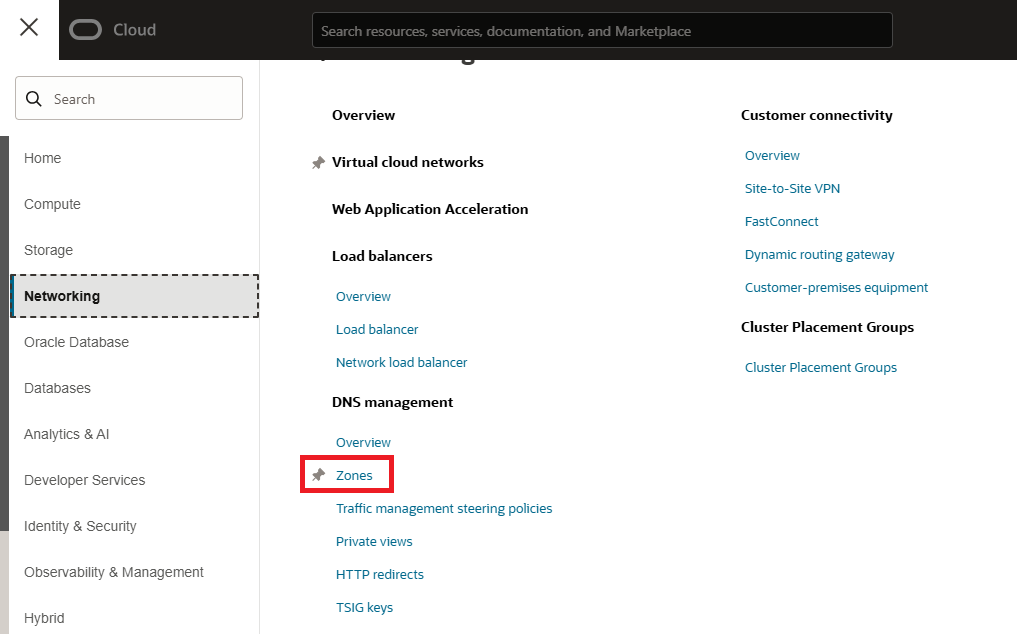
2. Click the menu icon at the top left of the page.
3. Select Networking -> Select Zones from under DNS Management .
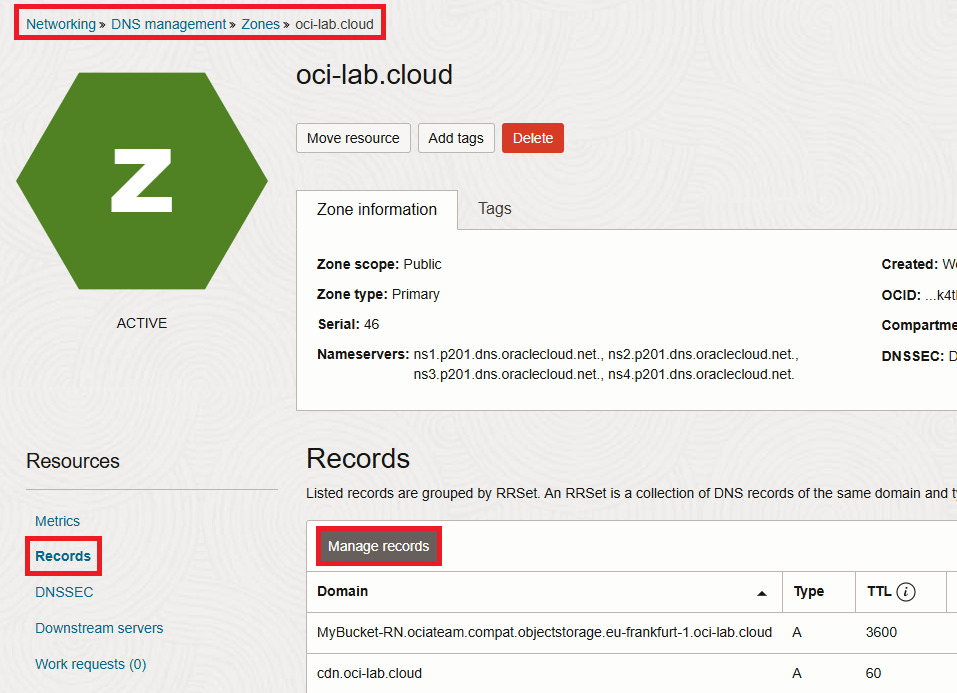
4. After selecting your DNS zone, you will land on your zone’s Metrics page. To navigate to the zone’s DNS records, select Records under the Resources heading on the left-hand side of the page.
5. Click the “Manage records” button.
6. Select the three-dot option icon next to the DNS record that you wish to modify, then select Edit.
7. Within the Record Information box, you will find a text field labelled TTL in seconds where you can modify your DNS record’s TTL. The value entered must be a number that represents how long you wish the TTL to be in seconds. For example, for a 1 hour TTL, the value entered would be “3600”.
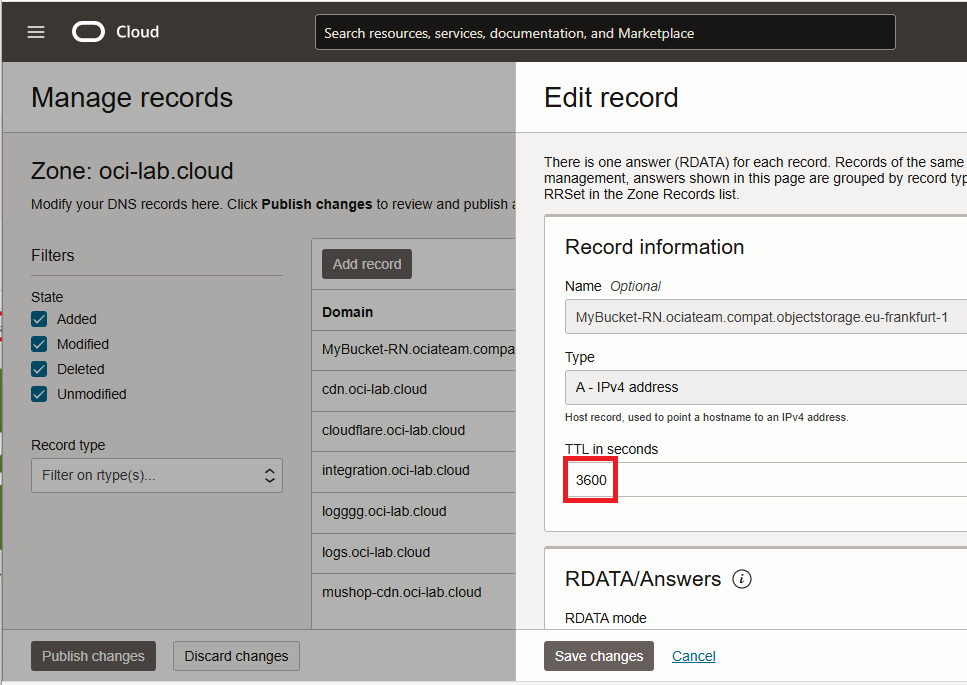
8. Click the “Save changes” button when you are finished changing your DNS record’s TTL value.
9. Click the “Publish changes” button.
10. Click the “Confirm publish changes” button to make these changes active, or “live”.
TTLs & Traffic Management Steering Policies
When using OCI’s Traffic Management Steering Policies, your Traffic Management Steering Policy’s DNS records will need to have lower TTLs by default than your DNS records without Traffic Management Steering Policies would have.
For example, an “A” record without any Traffic Management Steering Policies would normally have a default TTL of 3600 seconds (1 hour), whereas a Traffic Management Steering Policy “A” record would have a TTL of 60 seconds (1 minute) by default.
The reason for this lower TTL on Traffic Management Steering Policies is the result of these services (Load Balancer, Geolocation Steering, Failover, etc.) functionality in which they must add or remove DNS records from your zone based upon your pre-defined conditions. If for example these Traffic Management Steering Policy records had TTLs of a standard DNS “A” record, it may take over an hour for some customers or locations to query for your secondary site’s IP address during a Failover event.
Summary
DNS TTLs (Time to Live) inform computers how long to cache DNS records before checking for updates. Changes to TTL settings only take effect after the current cached TTL expires. Although shorter TTLs can make DNS changes propagate faster, they can also increase server load and DNS cloud usage costs. Lastly, when making changes to your DNS records (such as migrating DNS providers), plan ahead and lower the TTLs for critical records before making DNS changes, and raise them back to their initial value afterward.