
Introduction
We recently came across this interesting scenario with a customer where they have Oracle Fusion Applications, that have extended their SaaS environment using Oracle Integration Cloud (using the VBCS) and discovered they were not able to embed the VBCS UI within an iFrame in Oracle Fusion, due to a browser “forbidden” error. When looking at the JavaScript console the error was reported as “Refused to display ‘frameurl’ in an iframe because it had ‘X-Frame-Options’ set to ‘sameorigins’ “. Embedding VBCS UIs into Oracle Fusion pages is something we commonly do so it was quite puzzling to us why this customer was not able to embed their VBCS UI in Oracle Fusion and yet we were able to do this in our development environments.
At first, we thought it was because the VBCS developer had not set the “Allow embedding in any application domain” option to true in VBCS – this was however not the case. After some investigation we discovered the VBCS page was redirecting to the associated IDCS login page, this was stranger still given the IDCS instance associated with VBCS is also federated with Oracle Fusion.
The forbidden message is due to Oracle IDCS being configured to use Oracle IDCS as the authentication provider and thus show the IDCS login page and not the Oracle Fusion (Provider and login page). When this happens the IDCS login page is rendered to the user because the user hasn’t logged into “IDCS” however they have logged in to Oracle Fusions identity management page. If Oracle Fusion had been configured as the “login provider” then IDCS login page wouldn’t be rendered as the user is already logged in at the Fusion. In this case the login page would not be rendered and thus no issue and this is how many customers have Oracle Fusion and VBCS configured.
Customers Setup
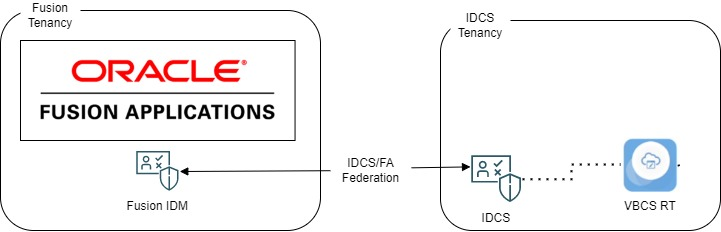
- They have Oracle Fusion Applications
- Oracle Fusion Applications has its own identity management stack (IDM)
- It has its own login screen
- They have Oracle Integration Cloud (OIC)
- This contains both VBCS and Integration tooling
- OIC has its own associated Identity Cloud Service (IDCS) instance associated with it to provide login and identity services
- IDCS stores all the users’ credentials and has its own login screen
- Oracle IDCS identity is federated with Oracle Fusions Identity Service (aka IDM) and IDCS is the “Service Provider – SP” with Fusion being the “Identity Provider – IDP”
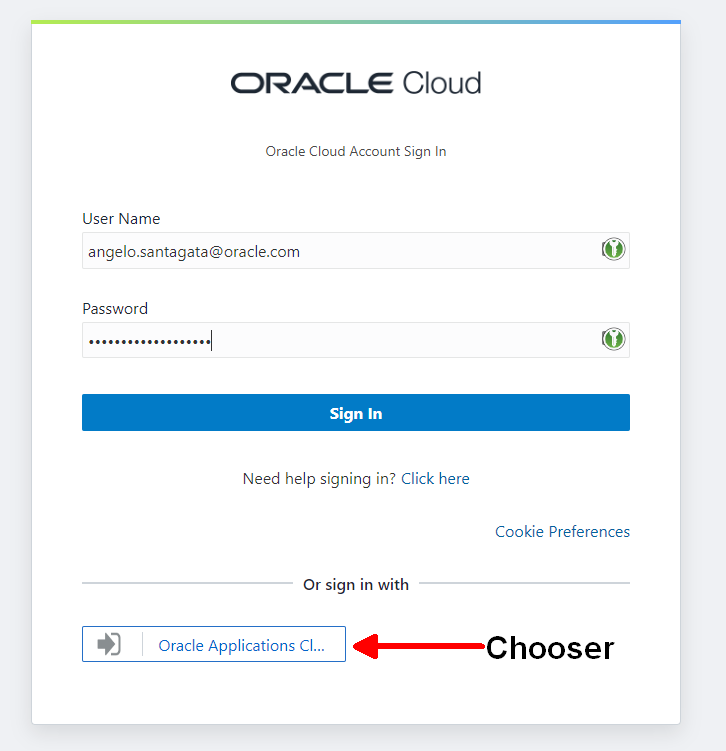
This customers configuration of IDCS was configured to redirect authentication of IDCS associated services to the IDCS login page and not Fusion Applications for IDCS managed applications. On the IDCS login page a user can login using a username / password combo, or they can click the “Oracle Applications” button to log in using the federated Oracle Applications IDM Stack, if they are already logged in then they are automatically then logged in on the IDCS environment.
Our Initial Solution: Configure The Default IDCS Login Provider for VBCS
After speaking to a colleague of mine, Max Froeschl, we thought the simple solution would be to make Oracle Fusion the default authentication provider, this means all IDCS services would use the Fusion Applications login screen. This configuration is quite simple to do and is done by modifying the default SSO policy and nominating Oracle Fusion IDM as the login provider.
When this is done, it all works! But how does it work?
- We login to Oracle Fusion, navigate to a Fusion page with an embedded VBCS page
- The VBCS authentication layers will (first time only) not detect IDCS SSO tokens and redirect the browser iFrame to IDCS requesting it to authenticate the user
- Due to the IDCS default policy being “let fusion do the authentication/login”, the browser is redirected to the Oracle Fusions authentication services
- Oracle Fusions authentication services determines that the user is already logged in (it detects the Fusion applications SSO Cookie) and simply replies to IDCS saying “yes user logged in and the user is Angelo” and thus doesn’t show the login screen
- Oracle IDCS then sets a IDCS cookie in the browser so that the VBCS UI knows next time that the user is already logged in
- The browser is then redirected back to the VBCS Application URL and this time it detects the IDCS SSO token and proceeds to run the embedded VBCS application with the user principals set as expected.
Fantastic it works but…
Fantastic, this works and for many customers this is the way they have their Oracle Fusion and IDCS associated services (like VBCS/OIC etc) configured. Alas this approach, whilst good, has one drawback which was a showstopper for this client.
All users must also be Oracle Fusion Applications Users, even users who only need to use Oracle Integration Cloud (Integration or VBCS). This may not be acceptable to everyone and could incur additional charges (Fusion is charged by the user count). Additionally, the additional users will appear in user lists which may be undesirable.
Within IDCS it is possible to have multiple Identity provider setups, i.e., for the different applications, but in this customers instance the VBCS Application registered in IDCS is for the OIC which includes VBCS Design and runtime, Integration Design and Runtime – all configured as the same application. VBCS does not support different login behaviours for the different deployed apps and all users of OIC are treated the same.
Using Custom IDCS Applications As An Alternative Solution
Based on another discussion we had with another colleague (Tim Bennett who has since retired!) we determined that we could use something called “IDCS Applications”. IDCS applications can take many forms (Confidential Applications, OAuth apps etc) but fundamentally they allows us to define an application, with a VBCS runtime URL (not the VBCS design time or OIC Integration design time URL) and then apply specific “Single Sign” on policies to this application.
Going forward instead of navigating to the VBCS Application directly you navigate to the VBCS application via an IDCS Application URL, which in turn does the custom SSO processing and when finished it redirects the browser to the VBCS Application runtime URL
E.g., from
From
https://idcs-123123123123.identity.oraclecloud.com/sso/v1/app/launcher/12312123
To
https://xxx-odcsvbcs-xxxxx-9999-xxxx.builder.ocp.oraclecloud.com/ic/builder/design/Angelo_SSO_TEST/1.0.3/preview/webApps/test/
The main advantage now is that instead of applying our custom policy to the base OIC (VBCS/Integration) application we can now add this to this new custom app, which ultimately is specific to our VBCS runtime URL.
From within IDCS we define a custom IDCS SSO policy which says, “if you are using this IDCS Application then use Fusion Applications Login Screen to authenticate”, given the IDCS application uses the VBCS runtime URL (not the design time or OIC integration URL) makes this solution work well.
Finally, within Oracle Fusion instead of embedding the “real VBCS URL” we now embed the IDCS Application URL instead. Ultimately when run this URL then redirects to the original / real VBCS URL after passing the authentication stages and setting IDCS cookies in our browser.
But Where Are My Parameters?
When using IDCS OAuth Application URLs there is one unfortunate one side effect, and this is that all the URL parameters (i.e. everything after the “?” in the URL) are stripped out and are not transferred to the VBCS application on the flow. This means if your VBCS application requires parameters from Oracle Fusion (e.g. an employee ID) then these will not be seen by the VBCS application.
https://idcs-123123123123.identity.oraclecloud.com/sso/v1/app/launcher/12312123?appName=ANGELO_VB_SSO_APP_CUSTOM&contactId=4242
Gets redirected to VBCS as
https://xxx-odcsvbcs-xxxxx-9999-xxxx.builder.ocp.oraclecloud.com/ic/builder/design/Angelo_SSO_TEST/1.0.3/preview/webApps/test/
If your VBCS app doesn’t need parameters, then all is good, but this will be an issue for many VBCS Customer
The Best Solution: Using a SSO Helper/Bootstrap App to Solve This
Coming to the “best solution” entails looking at things from outside the box. The solution of adding IDCS Applications works fine, it fixes the single sign on issue cleanly, but we can’t pass parameters. However, once a VBCS application, any VBCS application, has been authenticated, any and all, future requests to VBCS Applications (hosted by the same VBCS server) are automatically logged in, even if they use the direct VBCS Application URL. This is because the first VBCS application run results in IDCS putting a IDCS SSO cookie into the browser and this is detected by the future VBCS runtimes and thus prevents the redirect to the IDCS login page.
The solution now is now we create a “bare bones” VBCS application (aka SSO_HELPER), register this with IDCS as an IDCS application, add the right policies and then embed this IDCS App URL into the Oracle Fusion Home Page as an 1×1 pixel square iframe (It needs to be at least 1 pixel square so that it is rendered by the browser). When the user logs into Oracle Fusion Apps, the SSO_HELPER VBCS app is rendered within a 1×1 pixel iframe (ie invisible). This successfully authenticates using Oracle Fusion login screen and thus sets the IDCS cookies in the browser. The developer can then place their VBCS applications, using the full original VBCS URLs, onto the fusion page of choice, without any issues and as per normal they can pass parameters without any issues.
Flow recap
- User logs into Oracle Fusion they go via the Oracle Fusion Login page
- Once Logged in, the home page is shown
- The VBCS SSO Helper Application is then run, its purposely barebones and runs very quickly (typically less than 2seconds)
- VBCS App is configured to user Fusion login page, logs in and sets the IDCS SSO cookie in the browser
- The user then navigates to a page with VBCS embedded within it, VBCS Servers then detect the IDCS SSO Cookie and the VBCS App then works as normal.
This solution is very clean as it only requires
- Only one VBCS Application to be defined in IDCS
- The “IDCS Application” URL is not used by the VBCS developers, its just used once in the homepage to bootstrap the IDCS SSO environment for future VBCS applications
- Local IDCS Users can still login to Oracle Integration Cloud and not be forced to be authenticated by Oracle Fusion Apps
Conclusion
The problem of having multiple user populations, some local to IDCS is not very common but is a use case which can exist. Most customers just set Oracle Fusion as the authentication provider, and all works fine but for some who do not then the above solution is a great solution for them. For instructions on how to set this all up, the IDCS config, the VBCS app and how to embed it into Oracle Fusion see this blog (link)