
Introduction
Integration of artificial intelligence (AI) into business applications offers significant advantages for businesses that are looking to stay ahead in today’s competitive landscape.
Natural language processing (NLP), is a field of AI that focuses on enabling machines to understand, interpret, and generate human language.Extending Oracle Fusion SaaS applications with AI can offer more intelligent, personalized, and efficient solutions, enabling users to achieve their goals faster and with greater ease.
This blog will show how we can incorporate NLP into Fusion SaaS applications.
NLP Techniques
NLP has a wide range of capabilities that can be applied to various real-world problems, and new techniques and applications continue to emerge as the field progresses.
Some of the most common techniques are,
- Sentiment analysis: An NLP technique used to determine the emotional tone or attitude of a piece of text. It can identify whether the sentiment is positive, negative, or neutral.
- Summarization: An NLP technique used to create a shorter version of a larger text. This can be helpful for readers who are short on time or need to quickly understand the main points of a lengthy document.
- Keyword extraction: An NLP technique used to identify the most important words or phrases in a piece of text.
- Tokenization: The process of breaking text down into individual tokens, which can be words, subwords, or characters. Tokenization is a fundamental step in NLP and is used in many tasks, such as text classification, language modeling, and machine translation.
- Named Entity Recognition: An NLP task of identifying and categorizing key information (entities) in text.
- Topic Modeling: It is a technique in NLP that extracts important topics from the given text or document.
-
Stemming and Lemmatization: Stemming in NLP reduce the words to their root form. It works on the principle that certain kinds of words which are having slightly different spellings but have the same meaning can be placed in the same token. In Lemmatization, words are converted into lemma which is the dictionary form of the word.
Some of these techniques can be used in business applications to,
- Analyze a text input for specific length, wording, phrases, grammatical structure, and usage of biased/discriminatory words. In addition to readability, these factors impact the reader’s attention, accessibility, and comprehension.
- Perform sentiment analysis on customer feedback.
- Generate summary text from document attachments.
- Extract insights from reviews, documents, etc.
Let’s now see how we can integrate NLP capabilities in Fusion SaaS.
Architecture
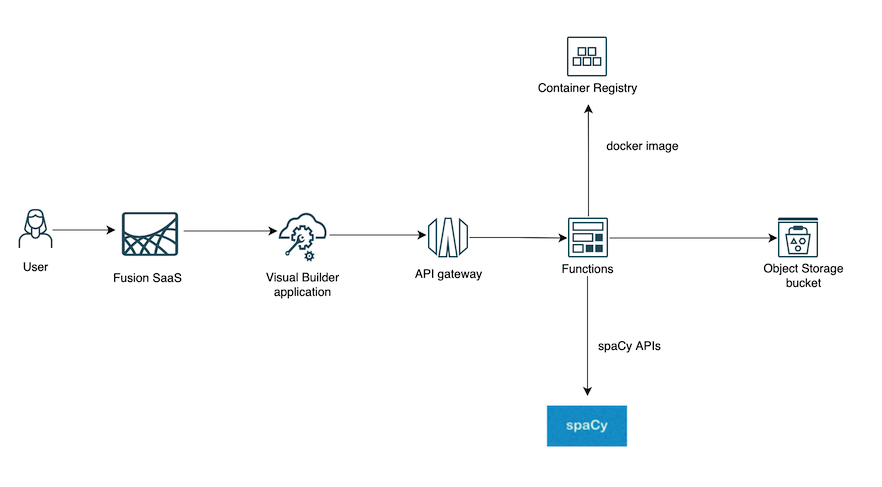
This reference architecture describes how you can extend Fusion SaaS with an NLP model using OCI Native services and Oracle Visual Builder.
Architecture Diagram
The following diagram illustrates the reference architecture.
Components
This architecture has the following components.
- Oracle Visual Builder, API Gateway, OCI Functions, and OCI Object Storage.
- spaCy is a popular open-source NLP library that provides a wide range of features for analyzing and processing text. Instead of spaCy, you can choose other NLP libraries or you can train your own models that suit your business use case.
What do these components do?
spaCy
spaCy comes with a set of pre-trained models that can be used to analyze text data.spaCy’s pre-trained models are designed to perform various tasks such as named entity recognition, part-of-speech tagging, and text classification. These models are trained on large datasets of text data, allowing them to identify patterns and relationships in the text more accurately than traditional rule-based approaches.
When you call the spaCy API called nlp on a text, spaCy first tokenizes the text to produce a Doc object. The Doc is then processed in several different steps of the processing pipeline. The pipeline used by the trained pipelines typically includes a tagger, a lemmatizer, a parser, and an entity recognizer. Each pipeline component returns the processed Doc, which is then passed on to the next component.
The following diagram illustrates a spaCy Processing Pipeline.

spaCy also has various matchers like PhraseMatcher, Matcher and DependencyMatcher using which you can match sequences of tokens, based on pattern rules or match subtrees within a dependency parse.
OCI Object Storage bucket
During a text analysis you will be looking for patterns, lemmas etc in the input text. If you want to use a file to store these patterns,base words etc you can use an Object Storage bucket to store that file.
OCI Function
It is used to,
- Pre-process text to remove HTML tags or any other unwanted information from the input.
- Get the pattern files from the Object Storage bucket.
- Pass the preprocessed text to the spaCy pipeline for NLP analysis. The spaCy pipeline returns the spaCy Doc object. This is then used for analysis. You can do several analysis using – Token Matcher, Phrase Matcher, Dependency matcher, NER, etc.
- Return the analysis results.
spaCy’s trained pipelines can be installed as Python packages.
To use spaCy in OCI Functions, create a Docker file and include the line below.
RUN python3 -m spacy download en_core_web_sm
This downloads the en_core_web_sm spaCy pre-trained model in the docker.
A sample of the Docker file is given below
FROM oraclelinux:7-slim

WORKDIR /function

RUN groupadd --gid 1000 fn && adduser --uid 1000 --gid fn fn

RUN yum -y install python3 oracle-release-el7 && \

rm -rf /var/cache/yum

ADD . /function/

RUN pip3 install --upgrade pip

RUN pip3 install --no-cache --no-cache-dir -r requirements.txt

RUN rm -fr /function/.pip_cache ~/.cache/pip requirements.txt func.yaml Dockerfile README.md

ENV PYTHONPATH=/python

RUN python3 -m spacy download en_core_web_sm

ENTRYPOINT ["/usr/local/bin/fdk", "/function/func.py", "handler"]
In func. yaml, point the OCI Function runtime to docker.
schema_version: 20180708
name: analyze-jd
version: 0.0.172
runtime: docker
build_image: fnproject/python:3.8-dev
run_image: fnproject/python:3.8
entrypoint: /python/bin/fdk /function/func.py handler
memory: 2048
The OCI Function code summary is below
import io
import logging
import pandas as pd
import numpy as np
import oci.object_storage
from fdk import response
import os
import spacy
from spacy.matcher import Matcher
from spacy.matcher import PhraseMatcher
import re
import json
……
# Get the Function Configuration variables
def get_env_var(var_name: str):

   value = os.getenv(var_name)
   if value is None:
      raise ValueError("ERROR: Missing configuration key {var_name}")
   return value

#Function Initialization
try:
   logging.getLogger().info("inside function initialization")

   signer = oci.auth.signers.get_resource_principals_signer()
   object_storage_client = oci.object_storage.ObjectStorageClient(config={}, signer=signer)

   env_vars = {
      "NAMESPACE_NAME": None,
      "JD_STORAGE_BUCKET": None,
   ......
   }

   for var in env_vars:
      env_vars[var] = get_env_var(var)

   NAMESPACE_NAME = env_vars["NAMESPACE_NAME"]
   INPUT_STORAGE_BUCKET = env_vars["JD_STORAGE_BUCKET"]
  ...
   #Load spacy model
   nlp = spacy.load("en_core_web_sm")

except Exception as e:
   logging.getLogger().error(e)
   raise
# Function Handler
def handler(ctx, data: io.BytesIO = None):
   # Get the payload
   payload_bytes = data.getvalue()
   if payload_bytes == b'':
      raise KeyError('No keys in payload')
   payload = payload_bytes.decode()
   # preprocess the payload by removing html tags
   .....

   # pass the preprocessed payload to spacy pipeline
   nlp_doc = nlp(preprocessed_payload)

# perform your analysis and get the results
   ........
   analysis_results = ......
   except Exception as handler_error:
   logging.getLogger().error(handler_error)
   return response.Response(
      ctx,
      status_code=500,
      response_data="Processing failed due to " + str(handler_error)
   )
   return response.Response(ctx, response_data=analysis_results)
API Gateway
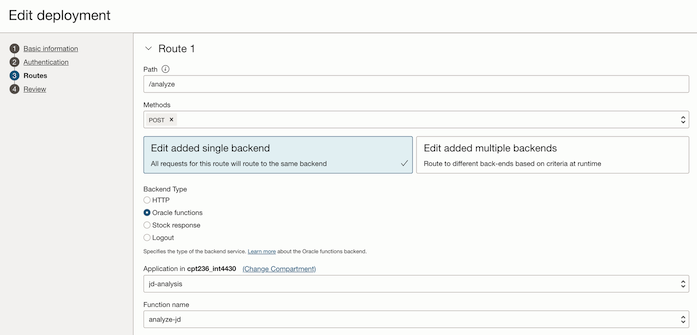
API Gateway exposes the OCI Function as a REST endpoint.
Oracle Visual Builder
Use Oracle Visual Builder(VB) to design your user interface. You can embed the Visual Builder application within a Fusion SaaS application page.
- Use the Visual Builder page designer to design your pages by adding components from the Components palette to the canvas. The page can contain text area to input your text for analysis or if the text is already present in Fusion SaaS, use appropriate REST APIs to obtain it.
- Create a VB Service Connection to connect to the REST endpoint exposed by the API Gateway and wire your VB Action Chain to it.
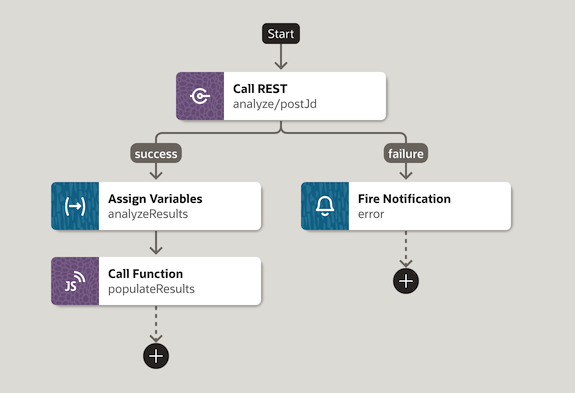
- Use Visual Builder components to appropriately display the results of the NLP analysis. You can do things like colour coding the specific portions of your input text to highlight the patterns detected, show a summary of the analysis, etc.
Conclusion
This blog showed a reference architecture for text analysis using spaCy and OCI native services. I hope you will be able to use the architecture described in this blog to incorporate NLP techniques into your business applications.