
It’s been almost five years since I first wrote about SD-WAN and the future importance of it. It is very interesting to see that more and more of our customers are asking about how we can integrate their OCI tenancy in an customer managed SD-WAN architecture. Indeed, this type of request is encountered more often nowadays.
The redundancy obtained by combining the SD-WAN with the existing FastConnect together with the newest security features we can add, truly makes a rock solid networking architecture. The things really changed a lot in the last five years and also the routing and security that we can configure in OCI changed a lot, from the enhanced DRG routing functions, to FNLB and from NFW to third party firewall appliances we can create very scalable and robust networks within OCI.
That is the scope of our new blog, to explain and deep dive into the engineering part of combining the FastConnect, SD-WAN and Traffic Inspection.
In order to have a better understanding on the next part of discussion, I really encourage the reading of From Palo Alto Active/Standby Cluster to Active/Active using the OCI FNLB since the networking architecture proposed will mainly use the routing and security configuration from that blog. For sure we will add the SD-WAN part.
That being said, let’s analyze and discuss based on the below networking architecture:

Let’s discuss about the SD-WAN integration in an existing networking topology without affecting what is already deployed. I preferred to use a separate VCN for the SD-WAN appliances since many times, the security posture is requiring that a different group or organization to manage the SD-WAN VCN and to be treated as a stand-alone resource. We will find some very intersting points here.
I was asked if the SD-WAN appliances can be deployed in an existing HUB or Shared or Security VCN and the answer is yes. The only thing you need to consider is related to the public subnets and Internet Gateway. If your security posture does permit the existence of public subnets and Internet Gateway in an existing HUB/Shared/Security VCN, then you can deploy the SD-WAN appliances directly in the existing VCN. If that is not permitted, then, the best solution is to have a separate VCN only for SD-WAN and all the networking artifacts needed for SD-WAN to run properly within OCI. This is our case and we will explain what needs to be created to integrate the SD-WAN in a current networking architecture.
With most of our SD-WAN vendors (Cisco, Palo Alto, Silver Peak and others) we are following the same kind of approach for integration. As we might notice in the SD-WAN VCN we have created two public subnets. The two public subnets will hold the VNICs used for specific purpose, we will detail the scope later. A very important part is related to the fact that SD-WAN appliances does not really need any HA mechanism, this simplifies the overall deployment but still having a redundant architecture (two SD-WAN appliances deployed having redundant IPSec tunnels with the DRG).
In a production network we will use two SD-WAN appliances like the ones depicted above, the appliances can be from your preferred vendor certified for OCI.
Let’s split our discussion at this point in two distinct parts:
- The connection to the SD-WAN network;
- The connection to the OCI DRG;
The connection to the SD-WAN network
Each and every SD-WAN appliances needs to have one VNIC in a public subnet dedicated for connections to the customer SD-WAN managed network. The connections will be initiated/received using the Internet Gateway. Over this network we will receive the SD-WAN network IP prefixes to be advertised to the DRG.
The connection to the OCI DRG
A new pair of VNICs will be configured in a different public subnet and will be used to create BGP over IPSec from SD-WAN appliances to the DRG. The Internet Gateway will be used to create the BGP over IPSec tunnels with the DRG. Do not worry, this traffic stays within the OCI internal network even if the Internet Gateway is used.
Two IPSec connections will be in place, each with associated public IP address for SD-WAN VM1 and SD-WAN VM2. From each connection we can configure one IPSec tunnel and using BGP we can have SD-WAN VM1 as primary and SD-WAN VM2 as a secondary path. Over this subnet we will obtain the routing information in a redundant manner from the DRG and we will advertise to the SD-WAN network. On another hand the routing information received from the SD-WAN network will be advertised to the DRG using the BGP over IPSec tunnels configured.
As a conclusion at this point, it is very important to have this construct since the two public subnets have different routing and security requirements.
Note that in our architecture we do not have any DRG attachment for the SD-WAN VCN. Since most of the management part for the SD-WAN appliances is done by using the IP addresses on the VNICs from SD-WAN subnet, that attachment is not really necessary. That can be configured if a specific request is raised.
The SD-WAN-RT DRG attachment route table for IPSec will have the same entries as the FC-RT DRG attachment route table for FastConnect, since all the traffic received over the IPSec tunnels needs to be inspected by the firewalls:
Now, we have a clear view of the networking configuration in the SD-WAN VCN.
We let the FastConnect at the end but the FastConnect will close our redundancy discussion. The FastConnect will be used as a backup for the entire SD-WAN construct and will backup the two IPSec tunnels that we are using over the SD-WAN. That being said, if the SD-WAN network will encounter any issues and none of the IPSec tunnels can be used, the FastConnect will be in place and ready to forward the customer traffic.
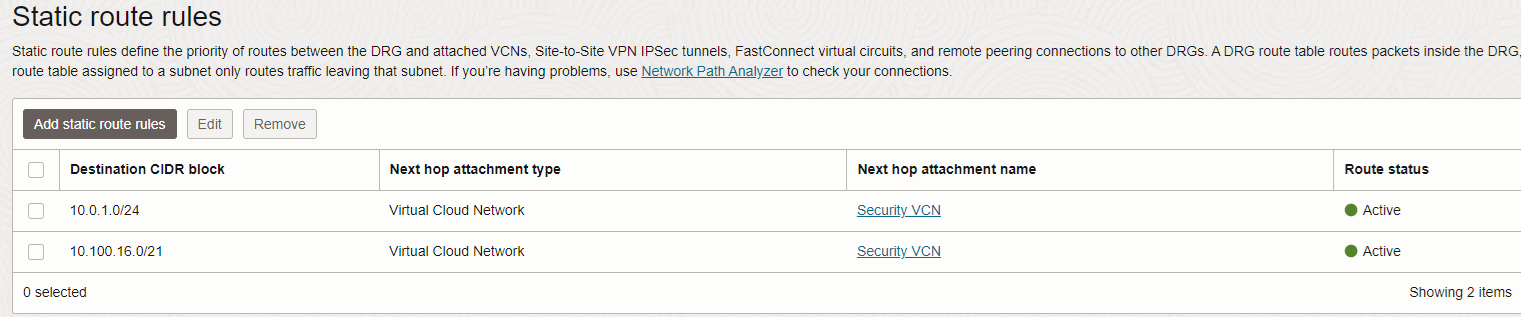
The expected route preference to accomplish the above scope in the FW-VCN-RT DRG Security VCN attachment is:

Please note that to make the FastConnect Virtual Circuit to be less preferred than the IPSec, we need to make sure that the BGP AS_PATH is longer on the FastConnect after OCI adds one private ASN to the routes received on the BGP over IPSec.
This concludes our discussion for SD-WAN OCI integration and configuration.