
Introduction
Recruitment team has to enter the job description details of the candidate before posting/linking the details in various channels/media/websites. This job description could be a long description and takes long time to enter manually.so we have automated the job description using AI service so that recruitment team can save time in defining the job definition of the candidate.
Overview of the Prototype
1.Prototype of a hypothetical HCM Recruiting use case.
2.This can be leveraged for other application pillars.
3.GPS Model trained with sample data provided by the data science team
4.Demo built as a PaaS extension of Fusion HCM Capability can be natively implemented into any SaaS application
Scope : Automation of HCM Job description using AI REST Service .
- VBS Page Developement Details.
- AI Service Integration with VBS Page.
- Integration of VBS Page in SaaS Application.
Components : SaaS application (Job Description) recruitment page , VBS Page , GP2 Model, AI REST Service, Integration of VBS Page with SaaS application .
Out of Scope(Blog) : Fine tuning GPT2 model (AI/ML Data extract and fine tuning).
Tuning and execution
- Fine-tuned GPT-2 model with sample data – 44h for 84K records on a P100 GPU (linear speed: 30 mins/1K records)
- 14GB out of 16GB GPU memory for tuning
- 3-4GB per model as REST service. 5 models could be run at once on a P100 16GB GPU
- REST performance on CPU is comparable, for single service. ONNX runtime can be used for potential improvements.
Challenges
- Context-driven text generation for better user experience and quality of prediction
- GPT2 can’t leverage context like state-of-the-art LLM
- Shift to more modern transformer models needed (e.g., GPT-J, OPT, Bloom)
Improving quality of test data
- Many HTML tags with specific formatting effect
- Many very similar phrases
- PII data like emails, names of Oracle employees
- Position specific URLs like youtube.com
Data preparation
- Removed HTML tags and replaced them with pragmatic approach
- Handling of many consecutive line breaks
- Removed/replaced special chars (non-Ascii, line breaks etc.)
- Reusable data preparation code on Orahub
More improvements
- Include text formatting.
- Handle rest of the data quality topics above.
Use case and architecture
Functional
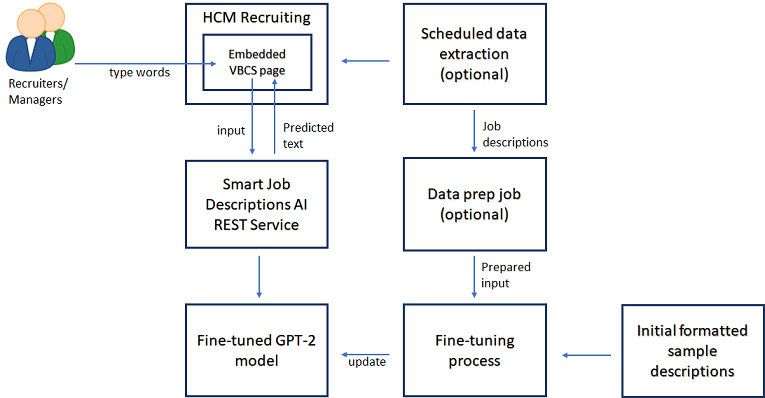
- Help managers rapidly write effective and compliant job descriptions.
- An improved type-ahead experience – predicts phrases and sentences.
- To keep job description focused for the position.
Technical
- Leverage existing AI assets
- Leverage OCI components
- Minimize fine-tuning resource needs
- Compare alternate models
- VBS User Interface
- Fusion SaaS integration
A.VBS Page Development Details
Design
Technical Architecture
STEPS TO DEVELOP PAGE (Please refer detailed screenshots)
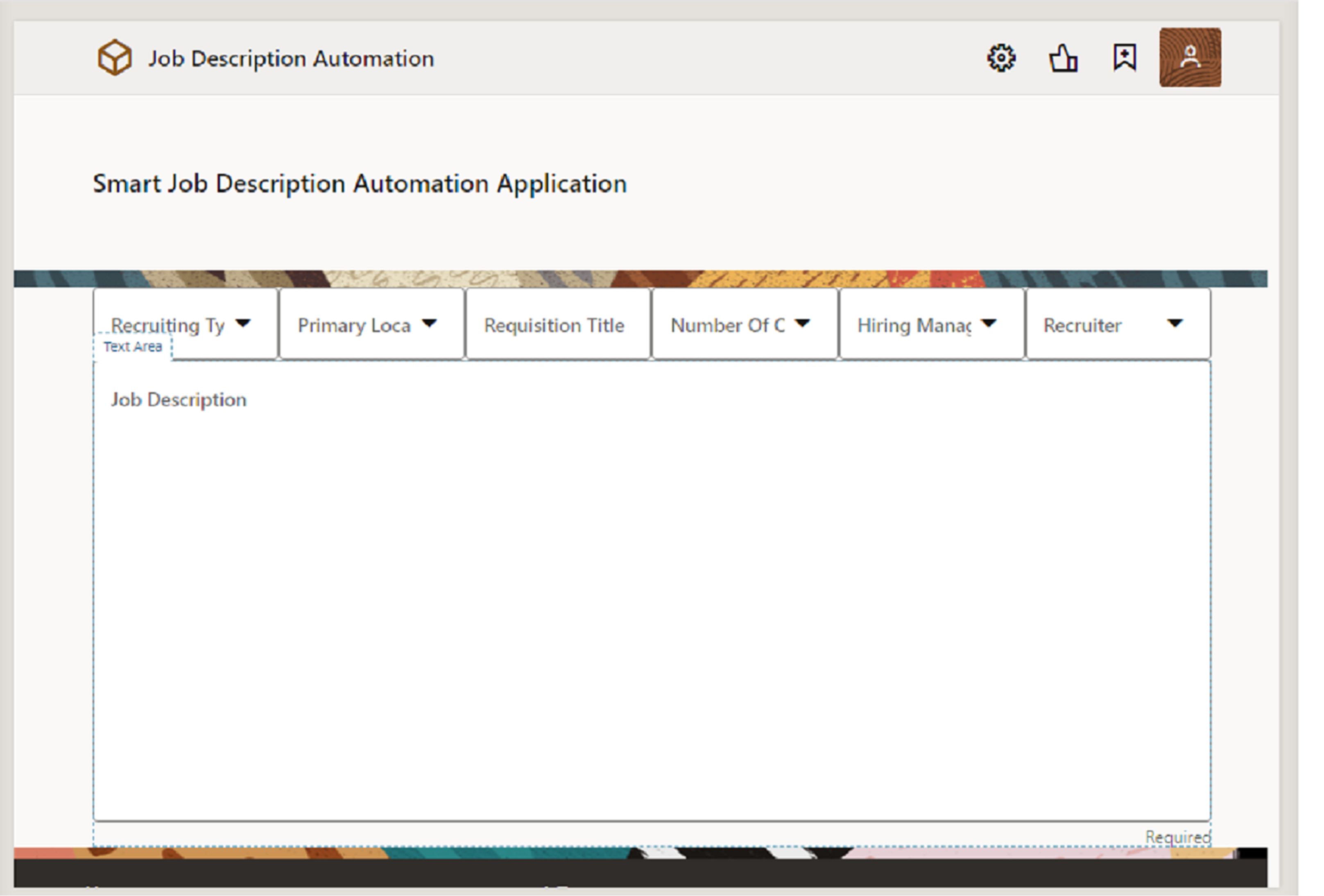
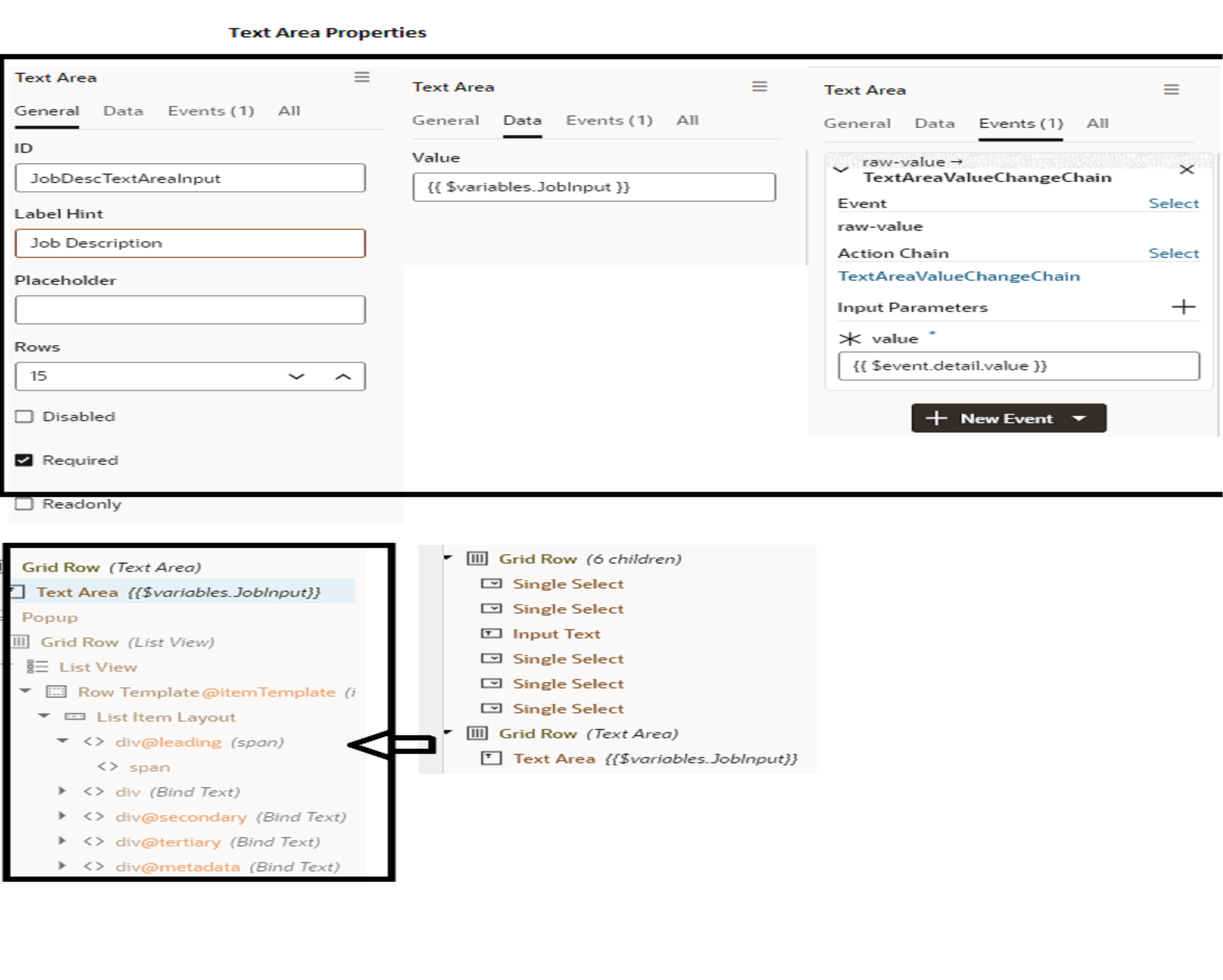
- Create grid row (6 fields as shown in the action chain mapping)
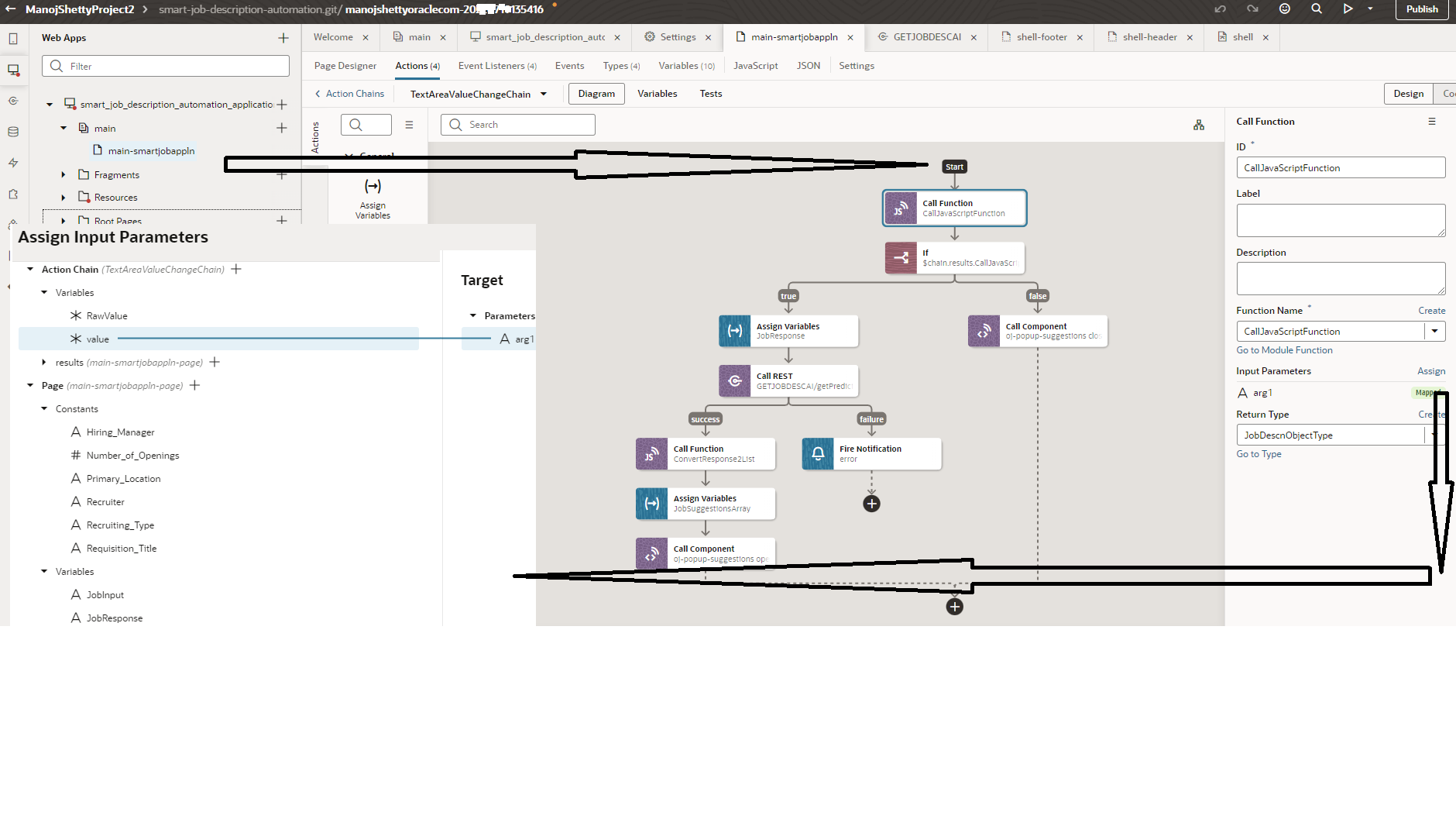
- Add text Area , action chain (TextAreaValueChangeChain) and mapping
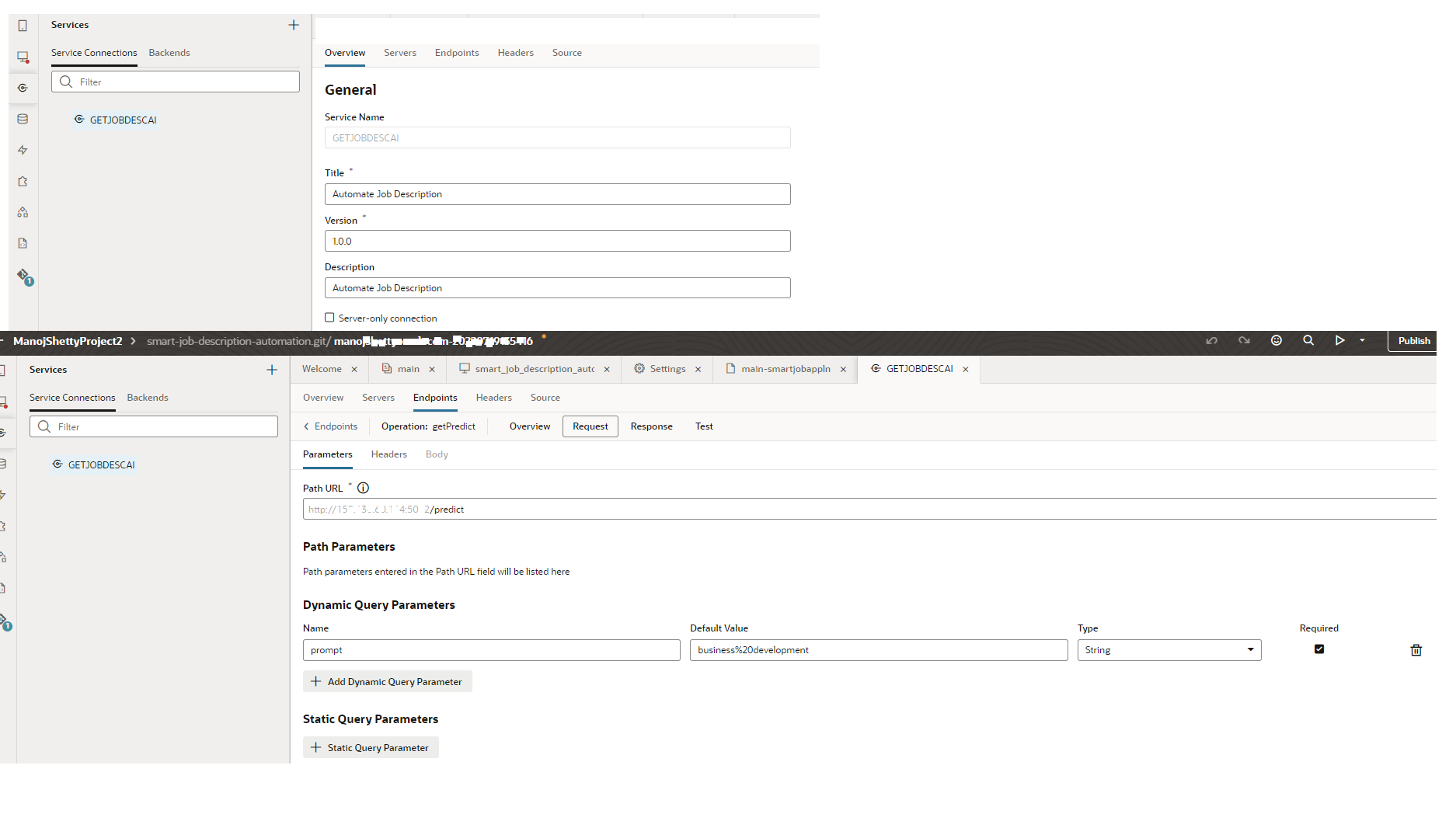
- Create service connection pointing to AI Service link (REST API) : GETJOBDESCAI
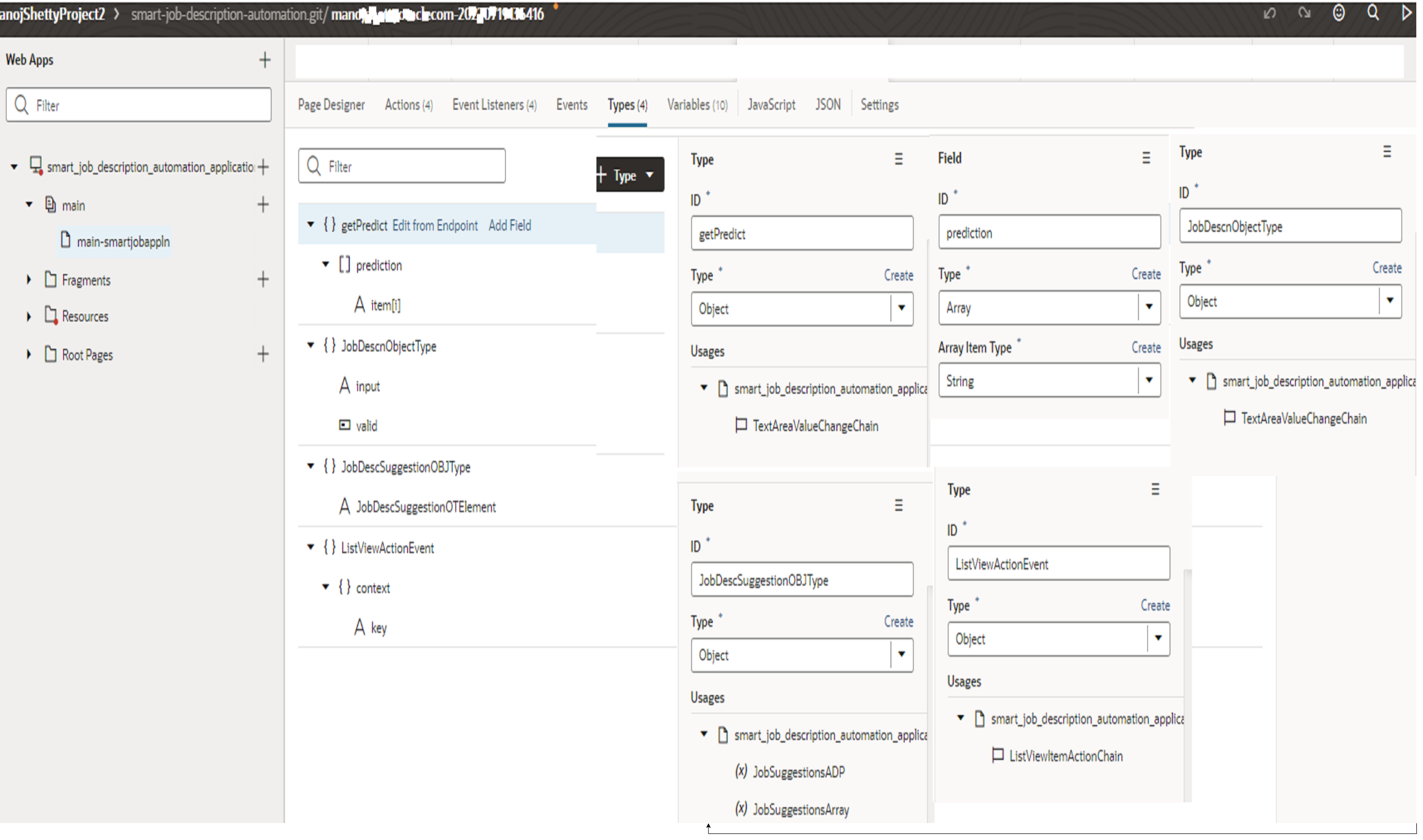
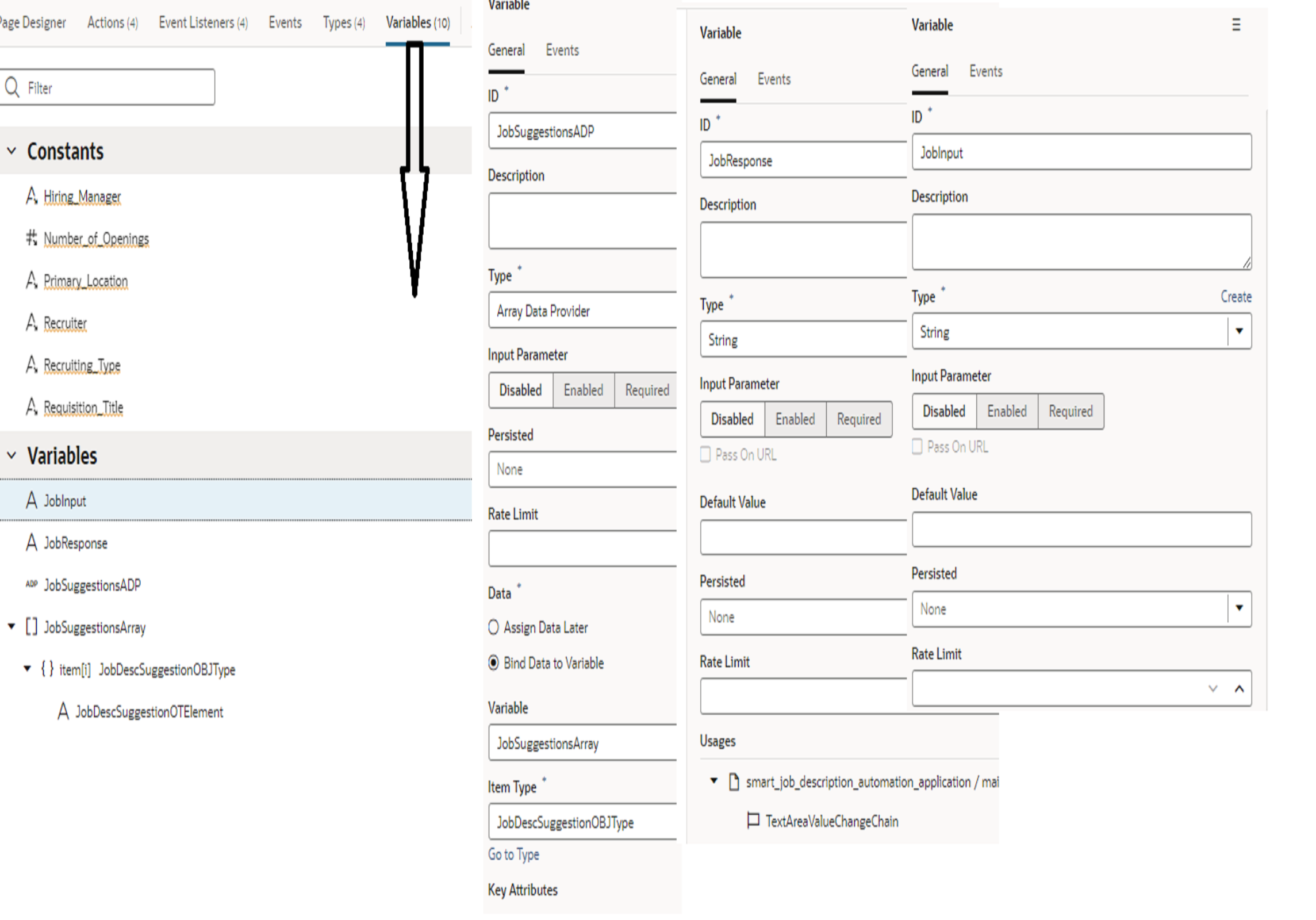
- Create variables and types
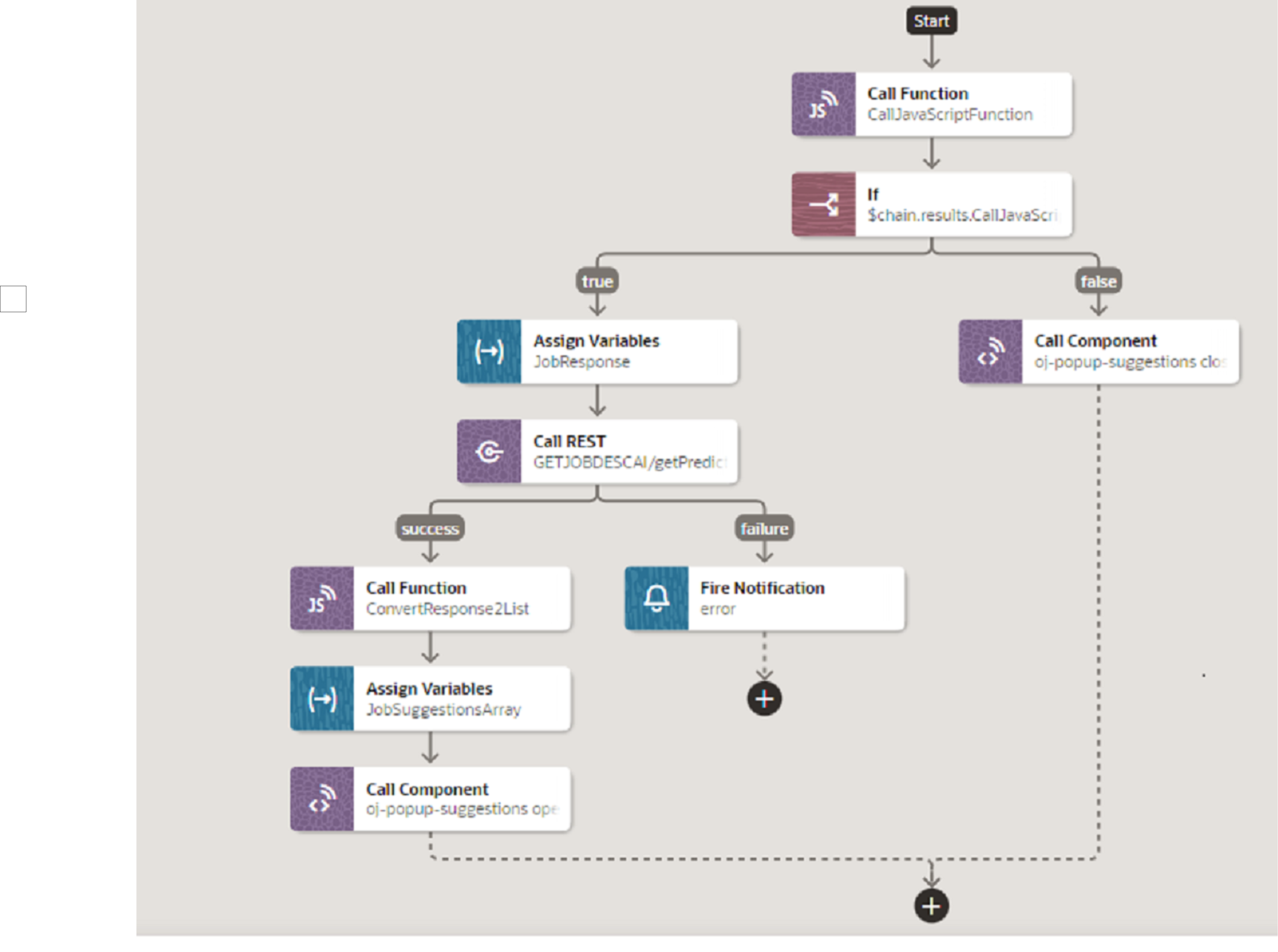
- Call java function to take the input job description and validate (more than 7 letters) then popup popup field: Ref CallJavaScriptFunction
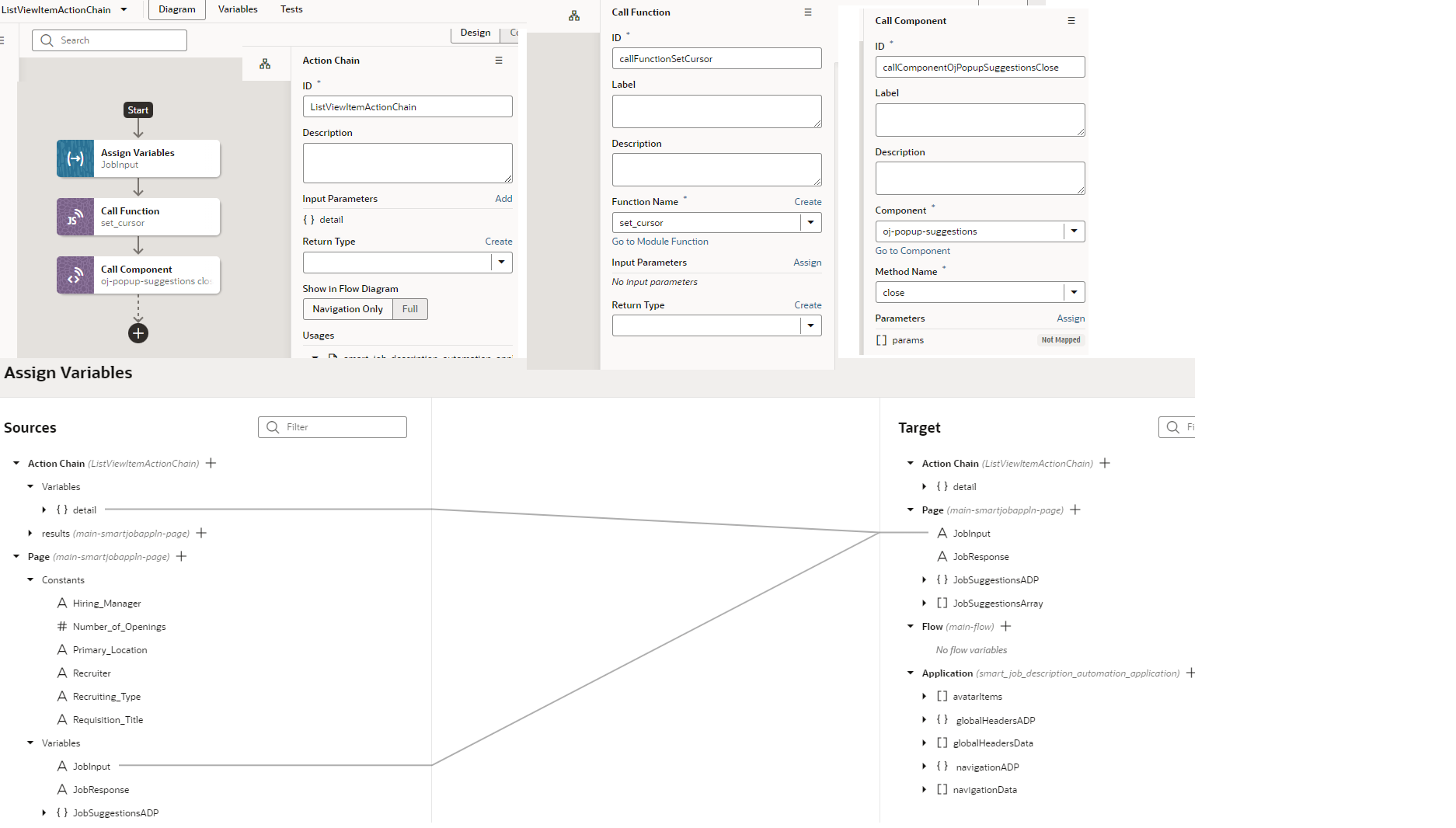
- Call AI Service REST API and pass the array of sugegsted values to popup field (This is implemented by seperate action chain ListViewItemActionChain).
- Select the suggested values and return the focus to the text area (call the function) : Ref set_focus
- Entering job description , calling AI Service and entering suggested values continues (User actions).
Notes: 1)Save,Edit and Delete option are not included in the prototype. This prototype shows how to call AI service within
VBS (Text Area) and integrate with Job description field in the recruitment page.
2) Role access and security has been setup in the VBS page.
Development components.
Text Area ActionChain
Action Chain Mapping
Types
Variables
TextArea and ListView
ListViewActionChain
B.AI Service Integration with VBS Page
C.Integration of VBS Page in SaaS Application
- UI implemented in VBS
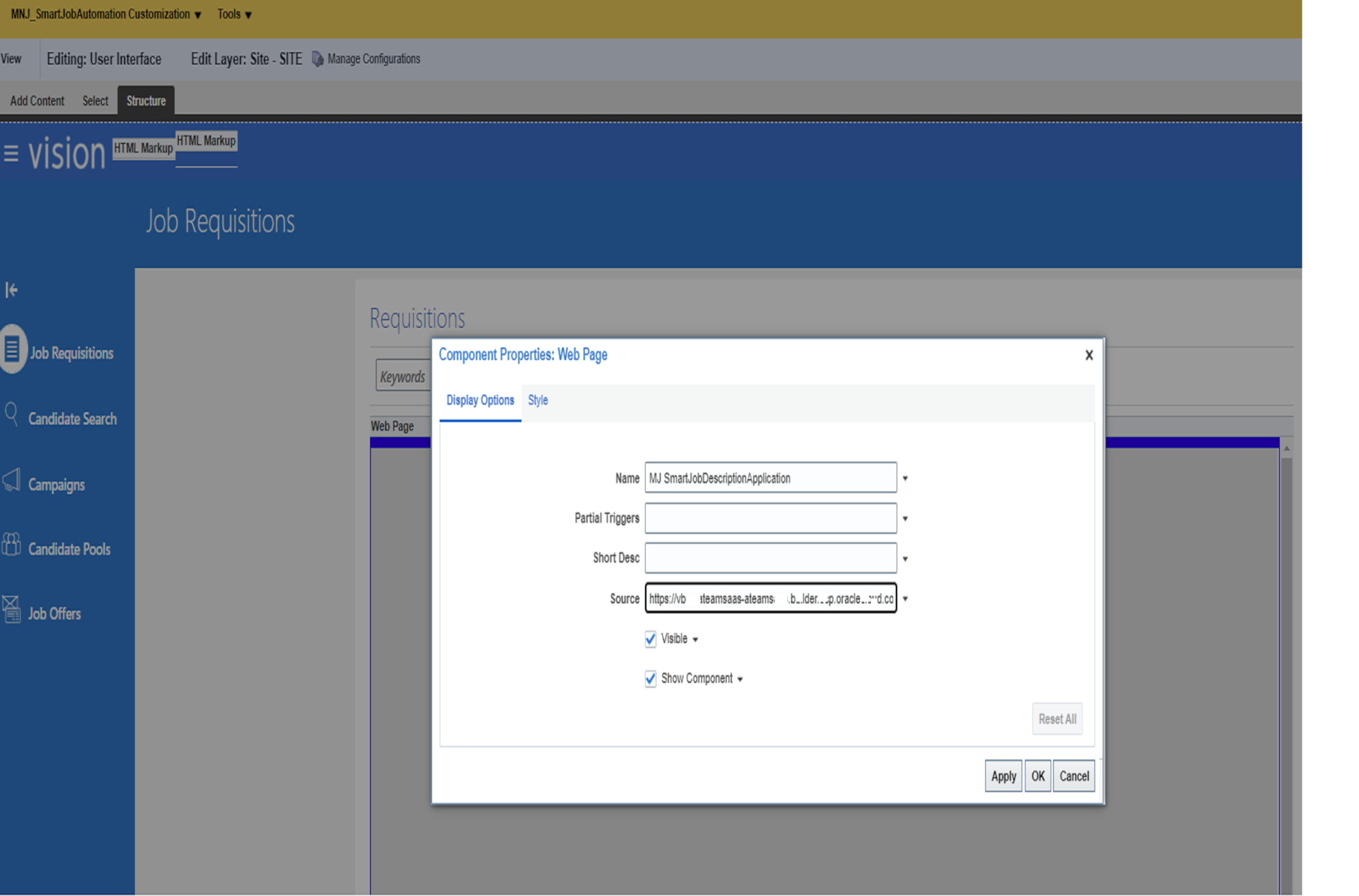
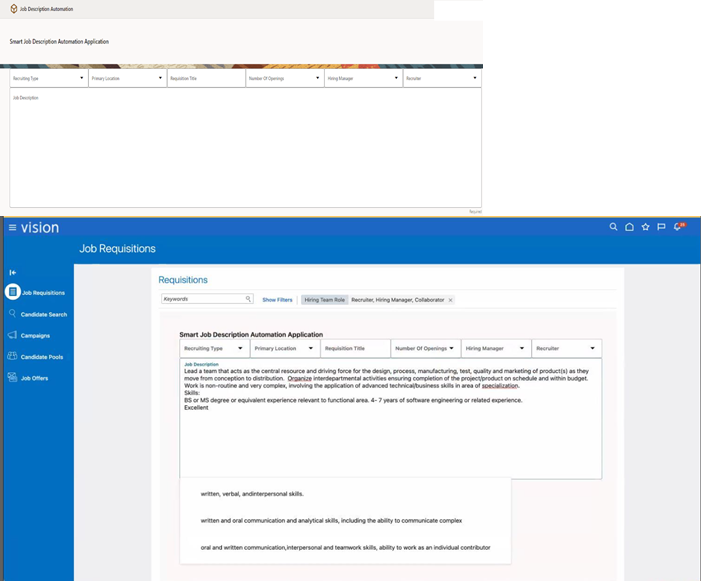
- Embedded in HCM Recruiting using page composer (Please refer screen shots below)
- Uses federation between HCM and VBS
- Rest integration with AI service
- Uses VB text area control with non-modal pop-up
Embed in HCM Recruiting using page composer
Create Sandbox=>Go to My client Groups and Hiring=> Page composer edit the job description field => Add the VBS Live link as shown in the screen shot.
Add Live link in the page composer edit page : https://vbcs-ateam…- ateamsaas.builder.ocp.oraclecloud.com/ic/builder/rt/Smart_Job_Description_Automation/live/webApps/smart_job_…………_application/
(Make sure that IDCS security user link , VBS page security and role addition (e,g : Recruitement Page access Role) setup has been completed)
Page Level Java Script.
define([], () => {
‘use strict’;
class PageModule {
/**
*
* @param {String} arg1
* @return {String}
*/
CallJavaScriptFunction(arg1) {
const MAX_PROMPT_WORDS = 7;
if ((arg1.length > 0) && (arg1.slice(-1) == ‘ ‘)) {
console.log(‘TRACE: TextArea value changed and last char is a space’);
var input = arg1.trim();
var words = input.split(” “);
var prompt = “”;
if (words.length <= MAX_PROMPT_WORDS)
prompt = input;
else {
var first_word = words.length-MAX_PROMPT_WORDS;
prompt = words[first_word];
for (var i = first_word+1, l = words.length; i<l; i++)
prompt += ‘ ‘ + words[i];
}
console.log(“TRACE: prompt used: ‘” + prompt + “‘”);
return { valid: true, input: prompt };
}
else
return { valid: false };
}
/**
*
* @param {String} arg1
* @return {String}
*/
set_cursor() {
console.log(‘TRACE: ListView item selected’);
var el = document.getElementById(‘JobDescTextAreaInput|input’);
el.setSelectionRange(el.value.length, el.value.length);
el.focus();
}
/**
*
* @param {String} arg1
* @return {String}
*/
ConvertResponse2List(response) {
console.log(“TRACE: Prediction Service returned'” + JSON.stringify(response) + “‘”);
var list = [];
for (var i = 0, l = response.length; i < l; ++i)
list.push( {“JobDescSuggestionOTElement”: response[i]} );
return list;
}
}
return PageModule;
});
JSON FILE (For Ref)
{
“title”: “”,
“description”: “”,
“variables”: {
“JobInput”: {
“type”: “string”
},
“JobResponse”: {
“type”: “string”
},
“JobSuggestionsADP”: {
“type”: “vb/ArrayDataProvider2”,
“defaultValue”: {
“data”: “{{ $variables.JobSuggestionsArray }}”,
“itemType”: “JobDescSuggestionOBJType”,
“keyAttributes”: “JobDescSuggestionOTElement”
}
},
“JobSuggestionsArray”: {
“type”: “JobDescSuggestionOBJType[]” }
},
“metadata”: {},
“types”: {
“@decorators.getPredict”: {
“endpoint”: “getPredict”,
“service”: “GETJOBDESCAI”,
“path”: “response”
},
“getPredict”: {
“prediction”: “string[]”
},
“JobDescnObjectType”: {
“input”: “string”,
“valid”: “boolean”
},
“JobDescSuggestionOBJType”: {
“JobDescSuggestionOTElement”: “string”
},
“ListViewActionEvent”: {
“context”: {
“key”: “string”
}
}
},
“eventListeners”: {
“listViewItemAction”: {
“chains”: [
{
“chainId”: “ListViewItemActionChain”,
“parameters”: {
“detail”: “{{$event.detail}}”
}
}
],
“@dt”: {
“showInDiagram”: “off”
}
},
“textAreaRawValue”: {
“chains”: [
{
“chainId”: “TextAreaValueChangeChain”,
“parameters”: {
“value”: “{{ $event.detail.value }}”
}
}
]
},
“toggleDrawer”: {
“chains”: [
{
“chainId”: “application:toggleDrawerHandler”
}
]
},
“jobDescTextAreaInputRawValue”: {
“chains”: [
{
“chainId”: “TextAreaValueChangeChain”,
“parameters”: {
“value”: “{{ $event.detail.value }}”
}
}
]
}
},
“imports”: {
“components”: {
“oj-button”: {
“path”: “ojs/ojbutton”
},
“oj-dialog”: {
“path”: “ojs/ojdialog”
},
“oj-input-text”: {
“path”: “ojs/ojinputtext”
},
“oj-list-item-layout”: {
“path”: “ojs/ojlistitemlayout”
},
“oj-list-view”: {
“path”: “ojs/ojlistview”
},
“oj-popup”: {
“path”: “ojs/ojpopup”
},
“oj-select-single”: {
“path”: “ojs/ojselectsingle”
},
“oj-text-area”: {
“path”: “ojs/ojinputtext”
}
}
},
“constants”: {
“Hiring_Manager”: {
“type”: “string”,
“defaultValue”: “Walter Johan Human Resource Manager”,
“description”: “Hiring_Manager”,
“input”: “fromCaller”
},
“Number_of_Openings”: {
“type”: “number”,
“defaultValue”: 50,
“description”: “Number_of_Openings”,
“input”: “fromCaller”
},
“Primary_Location”: {
“type”: “string”,
“defaultValue”: “Australia”,
“description”: “Primary_Location”,
“input”: “fromCaller”
},
“Recruiter”: {
“type”: “string”,
“defaultValue”: “MJ Recruiter Human Resource Asst”,
“description”: “Recruiter”,
“input”: “fromCaller”
},
“Recruiting_Type”: {
“type”: “string”,
“defaultValue”: “Hourly”,
“description”: “Recruiting_Type”,
“input”: “fromCaller”
},
“Requisition_Title”: {
“type”: “string”,
“description”: “Requisition_Title”,
“defaultValue”: “Tester”,
“input”: “fromCaller”
}
}
}
Possible improvements to prototype
- Use a rich text editor as base from Component exchange (e.g., CK editor)
- Integrate recruiting to create requisitions
- Insert smart variables such as email address, contact persons
Other possibilities
- Integrate AI service into Fusion directly
- ADF or APEX
A-team members invloved in this prototype: Mani Krishnan, Manoj Shetty , Max Froeschl,Emma Thomas and John Featherly.
***********Thank You**********