
In the following blog post, we will discuss IPv4 and IPv6 BYOIP processes. I need to tell you that during the time I received many questions regarding this process, what steps need to be done, what is the validation process, and how much time is needed for a specific IPv4 or IPv6 block to be announced to the Internet by the OCI and many other questions. In the following sections, you will find the answers to those questions together with some very useful information regarding the process.
Oracle Cloud Infrastructure allows you to Bring Your Own IP (BYOIP) address space to use with resources in Oracle Cloud Infrastructure, in addition to using Oracle owned public IPv4 and IPv6 addresses. BYOIP lets you manage your IPv4 CIDR blocks and IPv6 prefixes to align with your existing security, management, and deployment policies.
Oracle performs a validation process on imported IPv4 CIDR blocks or IPv6 prefixes, and after validation you are notified that they are available for advertisement. You can create one or many public IPv4 pools from this address space by specifying subranges from the BYOIP CIDR block and use IP pools to allocate specific resources. You can start or stop advertisement of the BYOIP when needed. IPv6 does not use IP pools, but you can similarly assign prefixes to VCNs and subnets.
The BYOIP process is listed in our public documentation under the BYOIP section.
Prerequisites
There are two cases when the BYOIP process will be honored by OCI:
a) You must have ownership of the public IPv4 CIDR block or IPv6 prefix you want to import into Oracle Cloud Infrastructure, and the ownership must be registered with a supported Regional Internet Registry (RIR). Oracle validates ownership of your addresses.
b) You are not the ownership of the public IPv4 CIDR block or IPv6 prefix you want to import into Oracle Cloud Infrastructure and you are using the public IP blocks delivered by an ISP, SP, or a third party. You can still use the public IP blocks on OCI if your ISP, SP, or third party entitles you with a document or Letter of Authorization to import the IP blocks on OCI and let OCI announce the IP blocks to the Internet with Oracle’s own BGP AS number.
Only the following registries are supported, and the addresses must have a specified type or status:
1. American Registry for Internet Numbers (ARIN) – “Direct Allocation” and “Direct Assignment” network types;
2. Réseaux IP Européens Network Coordination Centre (RIPE NCC) – “ALLOCATED PA,” “LEGACY,” “ASSIGNED PI,” and “ALLOCATED-BY-RIR” allocation statuses;
3. Asia-Pacific Network Information Centre (APNIC) – “ALLOCATED PORTABLE” and “ASSIGNED PORTABLE” allocation statuses;
Worth to say that the addresses in the IP address range must have a clean history. We might investigate the reputation of the IP address range and reserve the right to reject an IP address range that contains an IP address that is associated with malicious behavior.
Limits and Quotas
- The addresses can only be imported to a specific OCI Region;
- You can use BYOIP with an IPv4 CIDR block that is a minimum of /24 and a maximum of /8;
- An imported IPv6 prefix must be /48 or larger;
- You can bring up to 20 IPv4 CIDR blocks or IPv6 prefixes (or combination) to your Oracle Cloud Infrastructure account;
- You can’t bring the same address range to more than one compartment at a time;
- You can assign up to five total IPv6 prefixes per VCN and up to one per subnet. You may assign IPv6 addresses from one prefix to a VNIC;
IPv4 and IPv6 BYOP step-by-step Procedure
1. Select the right OCI Region and Compartment
2. Open the navigation menu and click Networking. Under IP Management, click BYOIP:
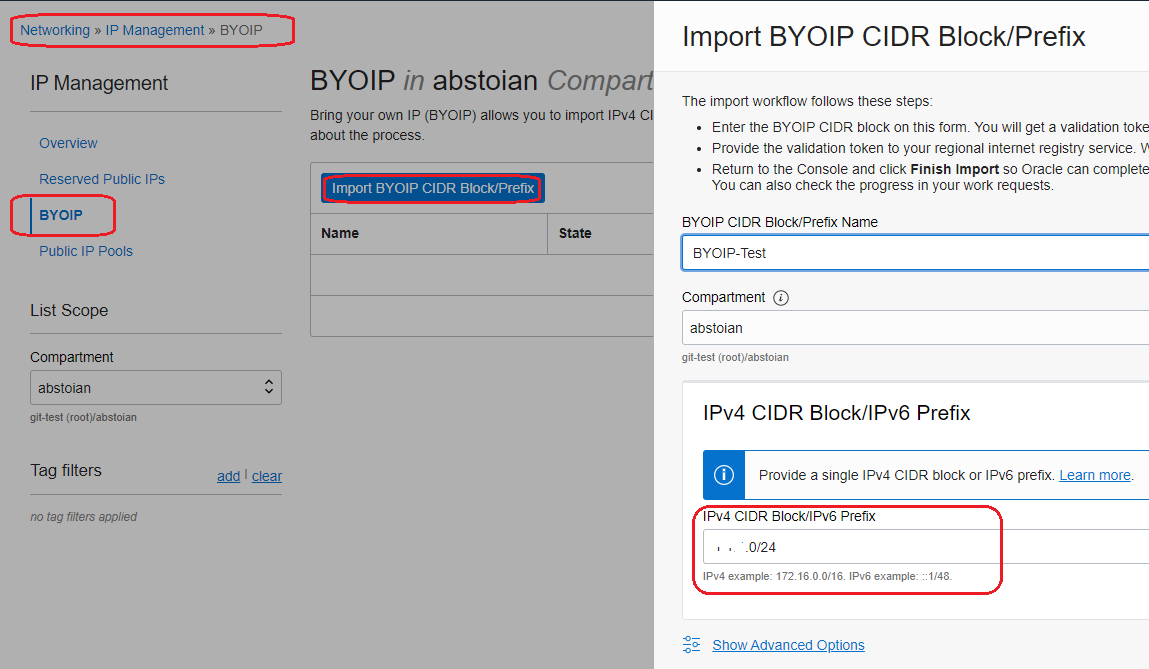
Once this step is finished, you will obtain the Validation Token:
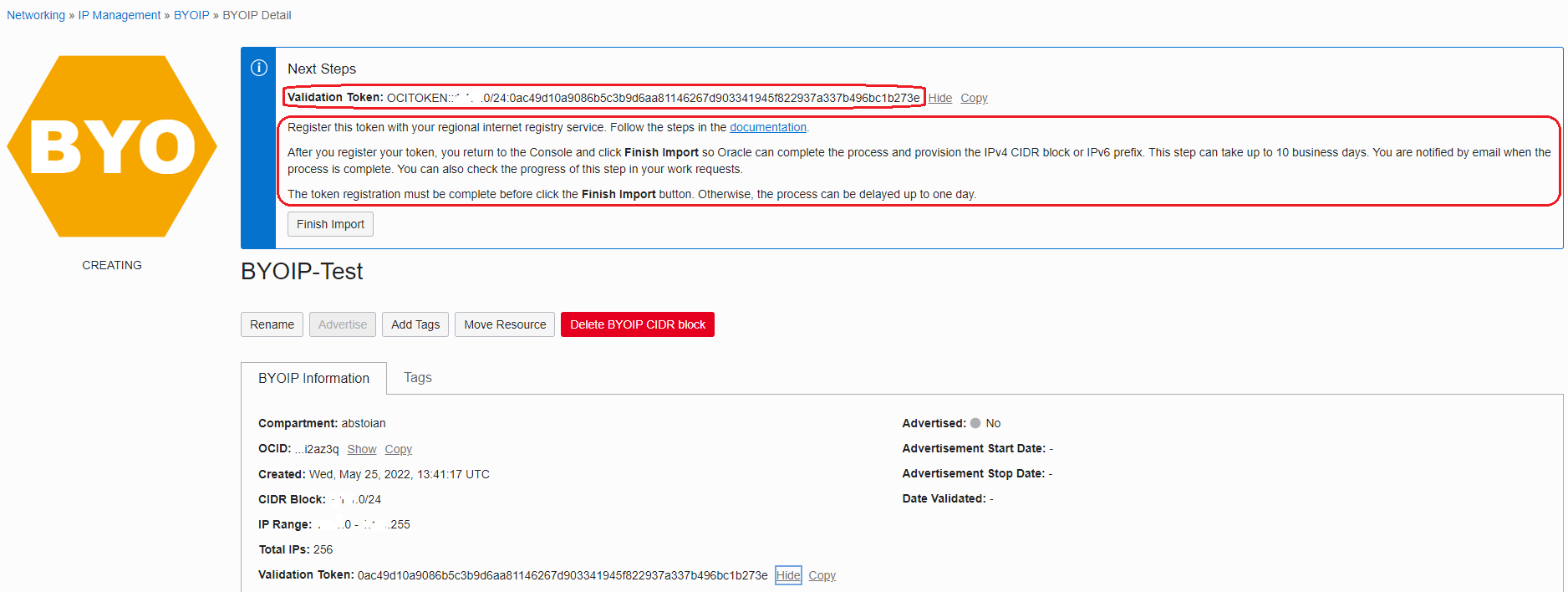
The IPv4 Validation Token has the following format:
OCITOKEN::<cidrBlock>:<validationToken>
The IPv6 Validation Token has the following format:
OCITOKEN::<ipv6Block>:<validationToken>
The OCI WebUI includes also the next-steps that needs to be followed.
3. Create a Route Origin Authorization (ROA) object that authorizes Oracle to advertise the BYOIP CIDR block
The Oracle BGP ASN is 31898 for the Commercial Cloud, US Government Cloud BGP AS is 6142 and the US Federal Cloud (Impact Level 5 authorization) BGP AS is 20054.
The instructions on how to create the ROA based on specific RIR are listed below:
ARIN – ROA Request
RIPE NCC – Managing ROAs
APNIC – Route/ROA management
Note that, without the ROA in place, Oracle will not be able to announce your public IPv4 or IPv6 blocks on the Internet.
4. Add the Validation Token to the RIR account information associated with your address range
The RIRs are using different methods, so, please find below the procedure for each of the RIRs:
ARIN: Add the Validation Token in the “Public Comments” section associated with your address range.
RIPE NCC: Add the Validation Token as a new “descr” field associated with your address range.
APNIC: Add the Validation Token to the “remarks” field for your address range by emailing it to helpdesk@apnic.net. The email must be sent from the APNIC authorized contact account for the IP address range.
After steps 3 and 4 are completed, wait for up to a day for both to complete.
5. From the OCI WebUI click Finish Import
Return on the OCI WebUI and click Finish Import, confirming that you would like to validate the BYOIP request. Allow up to 10 business days for Oracle to contact your RIR, validate the import, and provision the CIDR block. View the work requests to see the status.
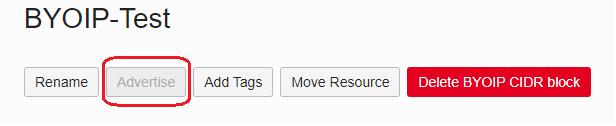
6. Use the Advertise button to advertise the public IPv4 and IPv6 blocks from OCI to the Internet
Once step 5 is successfully completed, the Advertise button becomes active. Now, you can advertise the public IP blocks from OCI to the Internet.
Important note: OCI by default is not advertising the public IP blocks to the Internet, you need to use the Advertise button for OCI to start the BGP advertisement.
At this point, any resource from your VCN using the IP addresses from the advertised public IP blocks will enabled for IP reachability using your public IPs.