
Overview
Generative AI can revolutionize manual business processes and automate them, saving valuable time and resources. One example is creating meeting minutes by automating transcription, summarization, and formatting. AI tools can transcribe discussions, extract key decisions, and highlight action items, ensuring accuracy and relieving the burden of manual work. AI can also organize extracted minutes into a structured format, and even integrate it with project management tools for seamless follow-up. By using generative AI, organizations can streamline documentation, enhance productivity, and reduce the manual effort involved capturing meeting outcomes, making it an invaluable asset for modern business operations.
In this blog, I will discuss using OCI gen AI services to generate meeting minutes.
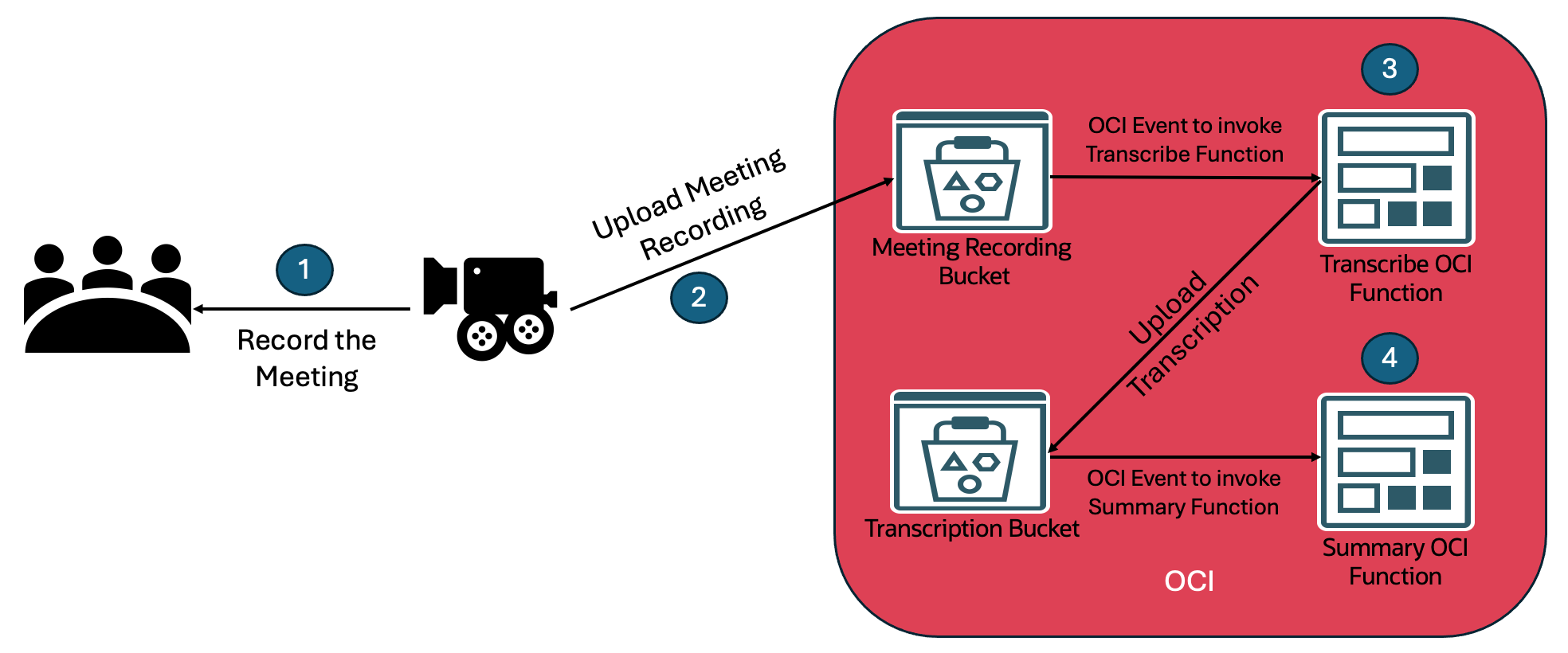
Meeting Minutes Generation Workflow
- Record the meeting. It could be a team meeting, daily stand-up, a customer meeting or any other meeting.
- Upload meeting recordings to the OCI object storage bucket. Uploading meeting recordings to OCI object storage can also be automated. However, that is outside of the scope of this blog.
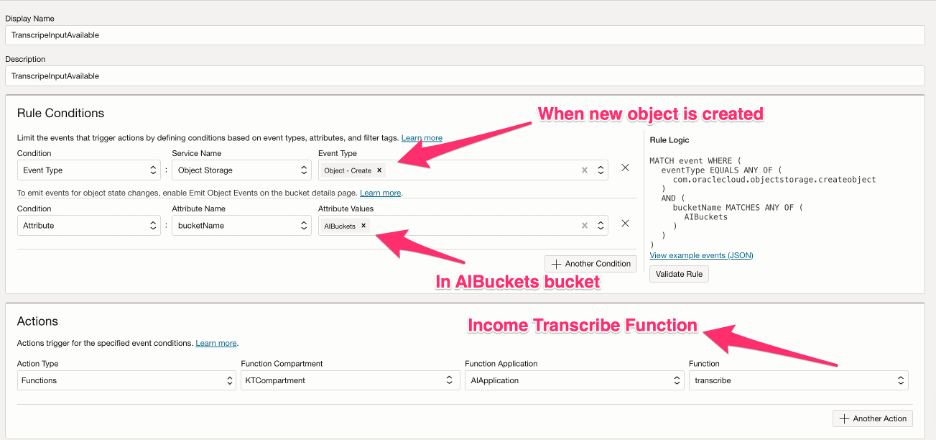
- You can invoke the transcribe function when an object is uploaded to the OCI bucket. The transcribe function uses the OCI speech to process and transcribe the meeting recording. OCI Speech is an AI service on OCI that transcribes speech to text and synthesizes speech from text. The speech service uploads the transcribed text in json format to the output location.
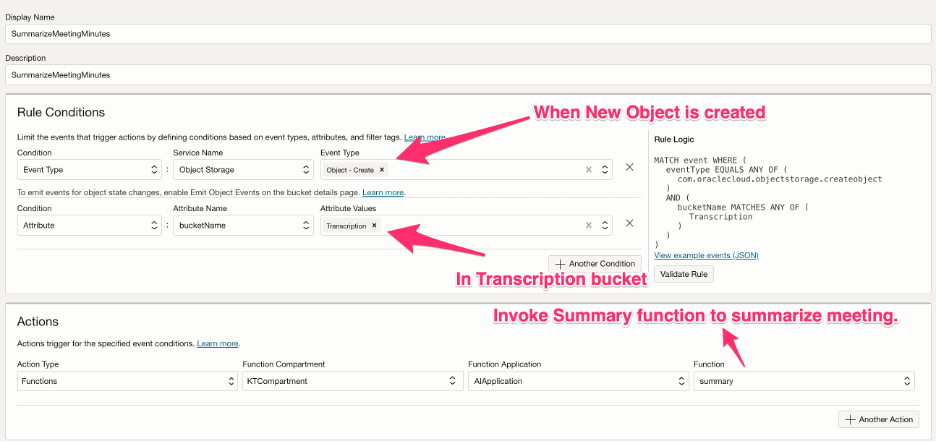
- You can invoke the summary function when an object is uploaded to the OCI transcription bucket. The summary function uses the Gen AI service on OCI to summarize the meeting transcription. The summary can be emailed or added to a confluence page via automation. That automation is out of the scope of this blog. You can follow this tutorial’s instructions to email the OCI function summary.
Pre-Requisites
- For the transcribe function to work, you need to assign the function permission to manage AI speech service and manage object storage.
- For the summary function to work, you need to assign the summary function permission to manage Gen AI service.
- For simplicity, I created the below dynamic group and assigned all the permissions to one dynamic group.
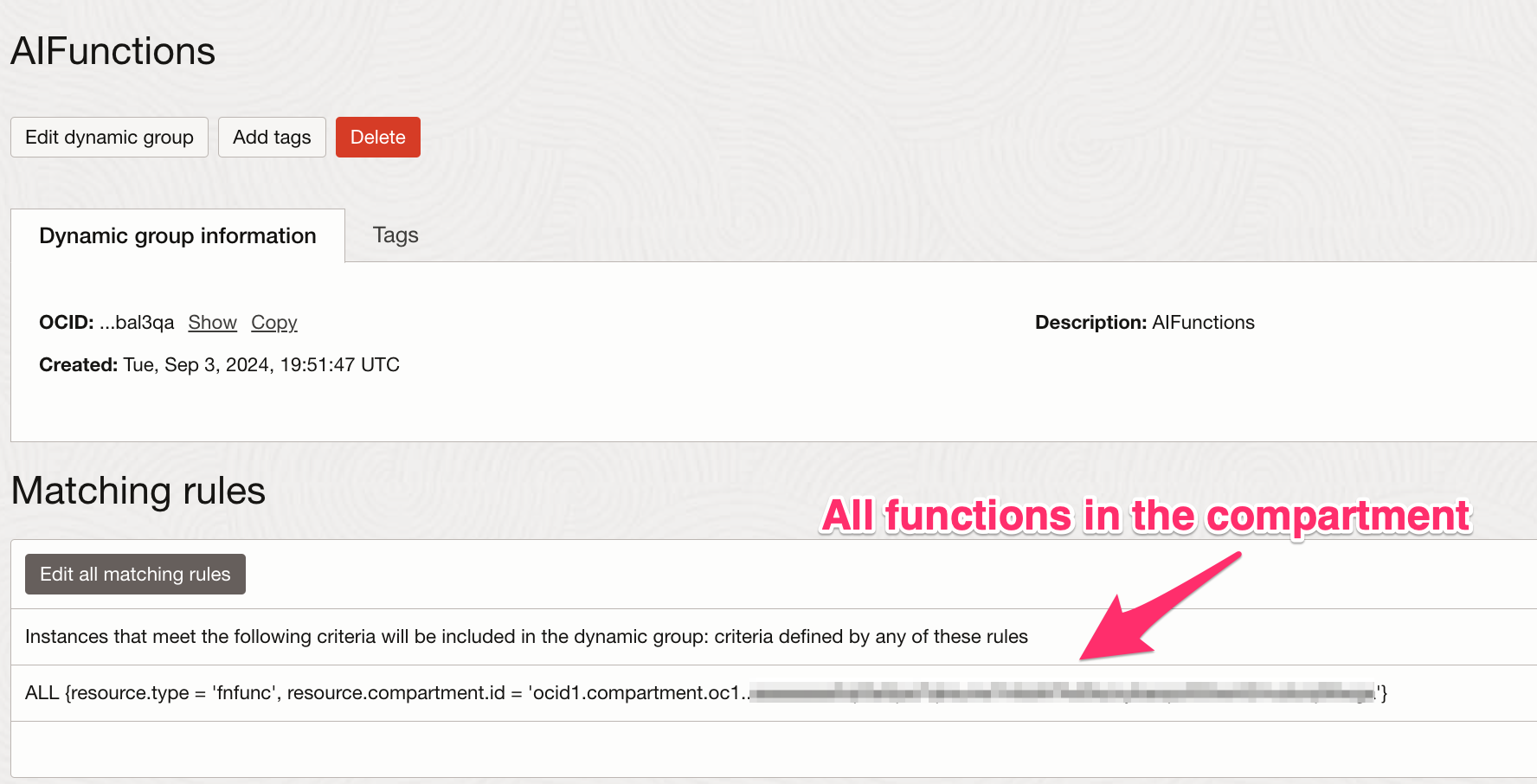
allow dynamic-group ‘Default’/’AIFunctions’ to manage object-family in compartment KTComnpartment
allow dynamic-group ‘Default’/’AIFunctions’ to manage ai-service-speech-family in compartment KTComnpartment
allow dynamic-group ‘Default’/’AIFunctions’ to manage generative-ai-family in compartment KTComnpartment
Transcribe Function
The transcribe function is invoked when the meeting recording is uploaded to the meeting recording bucket. The function reads meeting recording object information from the event data and transcribes the meeting recording. It is an offline process, and the function returns successfully once the transcription service accepts the request. The service creates a transcribed text file in the target bucket. The target bucket is read from the function configuration. However, if no value is configured, then the function will use the same bucket as the source bucket.
def handler(ctx, data: io.BytesIO = None):
    logging.getLogger().info("Inside Transcribe Function")
    try:
        raw_body = data.getvalue()
        logging.getLogger().info("Raw body: '%s'", raw_body)
        body = json.loads(raw_body)
        namespace = body["data"]["additionalDetails"]["namespace"]
        bucketName = body["data"]["additionalDetails"]["bucketName"]
        resourceName = body["data"]["resourceName"]
        compartmentId = body["data"]["compartmentId"]
        logging.getLogger().info("Namespace: '%s'", namespace)
        logging.getLogger().info("Bucket Name: '%s'", bucketName)
        logging.getLogger().info("Resource Name: '%s'", resourceName)
        logging.getLogger().info("Compartment Id: '%s'", compartmentId)
    except (Exception, ValueError) as ex:
        logging.getLogger().error('Error parsing json payload: ' + str(ex))
        return 'Error parsing Event json payload: ' + str(ex)

    try:
        cfg = ctx.Config()
        targetbucket = cfg["targetbucket"]
        #If the targetbucket is not configured then the source bucket will be used to upload transcription.
        #However, that will change the login to invoke summarization OCI function. You need to account for that change.
        if targetbucket == None:
            targetbucket = bucketName
    except Exception as ex:
        logging.getLogger().error('ERROR: Missing configuration keys', str(ex))
        targetbucket = bucketName

    try:
        signer = oci.auth.signers.get_resource_principals_signer()
        ai_speech_client = oci.ai_speech.AIServiceSpeechClient(config={}, signer=signer)

        create_transcription_job_response = ai_speech_client.create_transcription_job(
            create_transcription_job_details=oci.ai_speech.models.CreateTranscriptionJobDetails(
                compartment_id=compartmentId,
                input_location=oci.ai_speech.models.ObjectListInlineInputLocation(
                    location_type="OBJECT_LIST_INLINE_INPUT_LOCATION",
                    object_locations=[oci.ai_speech.models.ObjectLocation(
                        namespace_name=namespace,
                        bucket_name=bucketName,
                        object_names=[resourceName])]),
                output_location=oci.ai_speech.models.OutputLocation(
                    namespace_name=namespace,
                    bucket_name=targetbucket),
                additional_transcription_formats=["SRT"],
                normalization=oci.ai_speech.models.TranscriptionNormalization(
                    is_punctuation_enabled=False,
                    filters=[
                        oci.ai_speech.models.ProfanityTranscriptionFilter(
                            type="PROFANITY",
                            mode="MASK")])))
    except (Exception, ValueError) as ex:
        logging.getLogger().info('error parsing json payload: ' + str(ex))

    logging.getLogger().info("Transcribe Function Completed")
    return response.Response(
        ctx, response_data=json.dumps(
            {"message": "Transcription job completed successfully"}),
        headers={"Content-Type": "application/json"}
    )
Summary Function
The Email Summary function is invoked when an object is uploaded to the Transcription bucket. It needs two configuration parameters: the AI model and the AI endpoint. If those values are not configured, the function defaults to “cohere.command” AI model and Gen AI endpoint in the Chicago region.
def handler(ctx, data: io.BytesIO = None):
    logging.getLogger().info("Inside Summary Function")
    try:
        cfg = ctx.Config()
        aimodel = cfg["aimodel"]
        aiendpoint = cfg["aiendpoint"]
        if aimodel == None:
            aimodel = "cohere.command"
        if aiendpoint == None:
            aiendpoint = "https://inference.generativeai.us-chicago-1.oci.oraclecloud.com"
    except Exception as ex:
        logging.getLogger().error('ERROR: Missing configuration keys', str(ex))
        aimodel = "cohere.command"
        aiendpoint = "https://inference.generativeai.us-chicago-1.oci.oraclecloud.com"

    try:
        raw_body = data.getvalue()
        logging.getLogger().info("Raw body: '%s'", raw_body)
        body = json.loads(raw_body)
        namespace = body["data"]["additionalDetails"]["namespace"]
        bucketName = body["data"]["additionalDetails"]["bucketName"]
        resourceName = body["data"]["resourceName"]
        compartmentId = body["data"]["compartmentId"]
        logging.getLogger().info("Namespace: '%s'", namespace)
        logging.getLogger().info("Bucket Name: '%s'", bucketName)
        logging.getLogger().info("Resource Name: '%s'", resourceName)
        logging.getLogger().info("Compartment Id: '%s'", compartmentId)
    except (Exception, ValueError) as ex:
        logging.getLogger().error('Error parsing json payload: ' + str(ex))
        return 'Error parsing Event json payload: ' + str(ex)

    try:
        signer = oci.auth.signers.get_resource_principals_signer()
        object_storage_client = oci.object_storage.ObjectStorageClient(config={}, signer=signer)
        get_object_response = object_storage_client.get_object(
            namespace_name=namespace,
            bucket_name=bucketName,
            object_name=resourceName,
            opc_client_request_id="GetTranscribedObject")
        transcribedTest = get_object_response.data.text
        jsonText = json.loads(transcribedTest)
        transciptionArray = jsonText["transcriptions"]
        transcription = transciptionArray[0]["transcription"]

        generative_ai_inference_client = oci.generative_ai_inference.GenerativeAiInferenceClient(
            config={}, signer=signer, service_endpoint=aiendpoint)

        summarize_text_response = generative_ai_inference_client.summarize_text(
            summarize_text_details=oci.generative_ai_inference.models.SummarizeTextDetails(
                input=transcription,
                serving_mode=oci.generative_ai_inference.models.OnDemandServingMode(model_id=aimodel),
                compartment_id=compartmentId,
                is_echo=False,
                temperature=1,
                length="AUTO",
                format="AUTO",
                extractiveness="AUTO")).data
        logging.getLogger().info("Summarized Text: '%s'", summarize_text_response.summary)
        # Email the meeting minutes to team DL

    except (Exception, ValueError) as ex:
        logging.getLogger().info('Error Invoking Gen AI function: ' + str(ex))
        return 'Error Invoking Gen AI function: ' + str(ex)

    logging.getLogger().info("Summary Function Completed")
    return response.Response(
        ctx, response_data=json.dumps(
            {"message": "Summarization Job is completed successfully"}),
        headers={"Content-Type": "application/json"}
    )
OCI Events Configuration
You require two Event rules to trigger the transcribe and summary functions. The configuration of those two event rules is as follows.
Conclution
Generative AI is a powerful technology that can automate content creation across various tasks. From generating meeting minutes to creating personalized emails, drafting reports, or even generating creative content like blog posts, advertisements, and social media updates, the potential is vast. It can also be used for data analysis, generating insights, or visualizations based on large datasets. In customer service, AI-driven chatbots can handle inquiries, offer solutions, or escalate complex issues to human agents, enhancing efficiency across industries. The possibilities with generative AI are endless, and I encourage you to explore OCI’s Chatbot service to build more such use cases.