

Hi! Oracle Cloud VMware Solution (OCVS) is OCI’s solution to create and manage VMware enabled software-defined data centers (SDDCs). In this entry, we will talk about the ways you can connect to workloads deployed inside OCVS from your Datacenter or from OCI native workloads.
Oracle Cloud VMware Solution
The purpose of this blog is to discuss the OCVS interaction with OCI native networking and not be an OCVS deployment guide. Even so, there are some aspects about OCVS that we should discuss before diving into OCI networking.
Deploying OCVS will actually provision a number of Bare Metal servers, depending on the user preference. Regardless of the number, there are some important details to discuss, related to networking. The type of selected Bare Metal shape has an impact on the networking capabilities of the deployment. The highlights would be:
- All Bare Metal shapes come with 2 physical NICs;
- Some BM Shapes use both NICs so you get the aggregated throughput while other shapes use only one NIC at a time;
- Each physical NIC has a limit of virtualNICs which OCI can allocate to it. This is important because each VCN subnet and each VCN VLAN that we will use will need a vNIC on the physical NIC.
The documentation regarding physical NICs and supported vNICs for each Bare Metal can be found here.
The next thing we need to talk about is Virtual Cloud Network VLANs. Every OCI Virtual Cloud Network (VCN) works with VCN Subnets which are the network containers that hold resources, quite similarly to Datacenter subnets. However, in the cloud, the Subnets do not support Layer 2 Networking services (broadcast, multicast) as everything is unicast. Because VMware requires those Layer 2 services, we have a new construct called VCN VLAN which is very similar to a VCN Subnet with some exceptions:
- It is only available for the OCVS service;
- It does support all Layer 2 services;
- It supports only Network Security Groups while the VCN Subnet supports Security Lists too;
- It does not support IntraVCN routing.
Other than the exceptions, they will still work as a VCN Network service which means they can interact with the various Gateways of the VCN and use a VCN Route Table. Whenever you deploy the OCVS Service you are required to deploy it inside an OCI Virtual Cloud Network (VCN). The automation will either create new or use the following constructs:
- One VCN Subnet for managing the cluster nodes. This will translate to a single vNIC created for the Bare Metal host which is deployed in the subnet.
- Ten VCN VLANs used for VMware services/management. This will translate to 2 vNICs created for each VLAN, because OCI will allocate one VLAN vNIC to each of the two physical NICs.
In the end, after the initial deployment, each Bare Metal host will have 21 vNICs, one from the Subnet and 20 for the VLANs. A diagram would look like this:
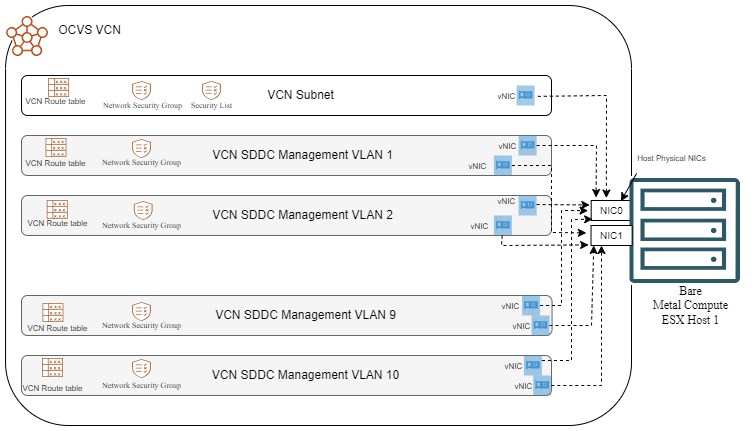
If you chose to deploy a cluster (3 hosts and above) then each host will get the 21 vNICs in the respective VCN Subnet/VLANs.
OCVS Customer Workloads
After the cluster is deployed, we need to talk about the actual workloads, the reason we use OCVS in the first place. The workloads can be deployed:
- As additional VCN VLANs;
- Inside OCVS, behind the NSX Layer;
- A combination of the two options above.
Choosing one over the other has pros and cons which we will explore in the following sections.
OCI Native VLAN Workloads
Using OCI Native VLANs for your workloads has one main advantage: simplicity. This method gives IPs to your VMs from the CIDR assigned to the VCN which, in turn, greatly simplifies OCI Networking configuration. When considering routing, the main advantage of having native VCN IPs is the ability to interact directly with all the gateways in OCI. This will make connectivity to your Datacenter, your other Native VCNs, Oracle Services, other regions and Internet seamless. Let’s take a look at a diagram:
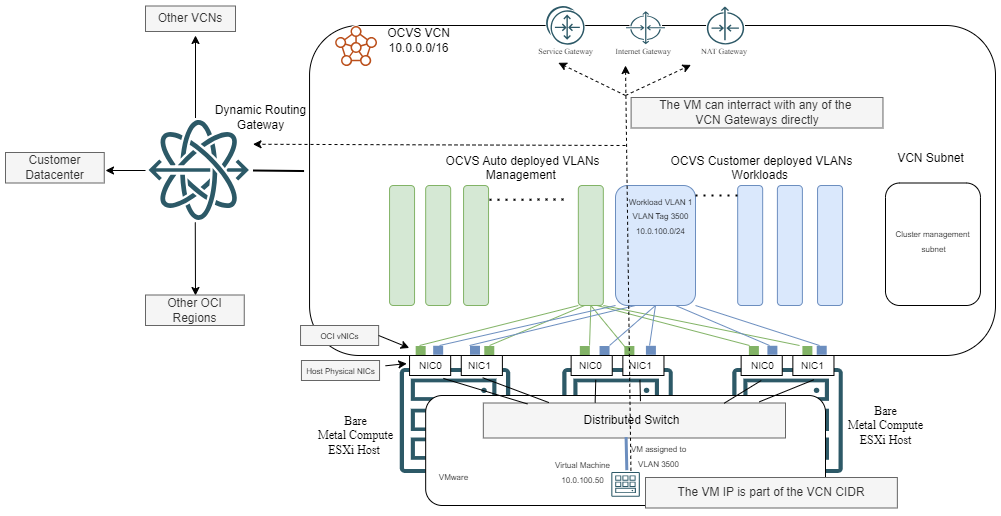
One important thing to note is scalability. In the section above we discussed that there are limits to how many VNICs a Bare Metal physical NIC can have which directly translates to how many VLANs you can actually use. While that limit has greatly increased for the newest shapes (up to 256 vNICs) it’s still a hard limit so use NSX based workloads if you need that level of microsegmentation.
NSX Segments
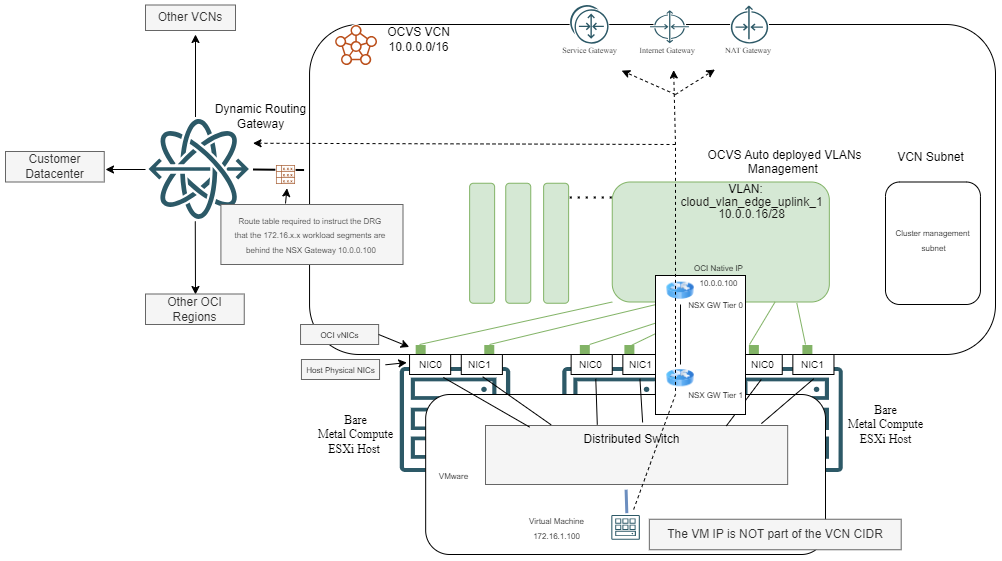
The other choice is to use your workloads as NSX Segments. This has some implications:
- You get access to a lot of advanced features provided by NSX.
- All of the traffic to the outside world will have to go through the NSX Gateways.
- Since the deployment is still inside an OCI VCN, OCI routing needs to be configured to send all traffic for your workloads to the NSX Tier 0 Gateway which gets an IP from the VCN CIDR space, in the “Uplink” VLAN.
A simple diagram would look like this:
Feature comparison
Now that we understand the two main modes for deploying VMware workloads, let’s take a look at a more detailed comparison between them.
| Feature | Oracle Native VLANs | VMware NSX Segments |
|---|---|---|
| Configuration |
Managed through OCI Console/API |
Managed through NSX Manager |
| Automation |
Integrated with Terraform, CLI, and SDK |
Requires NSX API and automation tools |
| VLAN Scalability |
Limited to 100 VLANs per VCN |
Virtually unlimited segments |
| Feature | Oracle Native VLANs | VMware NSX Segments |
|---|---|---|
| Traffic Isolation |
VLAN-based segmentation |
Logical segmentation using overlay networking |
| Firewall Rules |
OCI Security Lists and NSGs |
NSX Distributed Firewall (DFW) |
| Micro-Segmentation |
Not supported |
Fully supported |
| Zero Trust Networking |
Limited |
Fully integrated with NSX DFW |
| Feature | Oracle Native VLANs | VMware NSX Segments |
|---|---|---|
| Network Throughput |
High performance (up to 1.6 Tbps per VCN) |
Additional overhead due to encapsulation (Geneve) |
| East-West Traffic Optimization |
Requires manual routing configurations |
NSX Distributed Routing eliminates traffic hairpinning |
| Integration with OCI FastConnect |
Direct integration |
Requires NSX Edge for routing |
| Feature | Oracle Native VLANs | VMware NSX Segments |
|---|---|---|
| Connection to On-Premises |
Direct using FastConnect or VPN |
Requires NSX Edge for connectivity |
| Integration with OCI Services |
Seamless |
Additional configuration required |
| Cross-Region Networking |
VCN Peering supported |
Requires additional NSX configuration |
| Feature | Oracle Native VLANs | VMware NSX Segments |
|---|---|---|
| Default Routing |
Uses OCI Route Tables |
NSX-T Distributed Router (T1/T0) |
| Load Balancer |
OCI Load Balancer |
NSX Advanced Load Balancer (Avi Networks) |
| NAT Services |
OCI NAT Gateway |
NSX NAT functionality |
| Feature | Oracle Native VLANs | VMware NSX Segments |
|---|---|---|
| Logging and Monitoring |
OCI Logging and Monitoring |
NSX Intelligence, vRealize Network Insight |
| Compliance |
Aligned with OCI security standards |
Additional NSX policies required |
| Encryption |
IPSec VPN, TLS for application traffic |
NSX IPSec VPN, TLS support |
Use Oracle Native VLANs if:
- You prefer to manage networking through OCI’s native tools.
- Your workload does not require advanced micro-segmentation.
- You want simpler and direct integration with OCI services.
- Performance is a top priority, and you want to avoid overlay encapsulation overhead.
Use VMware NSX Segments if:
- You require micro-segmentation and software-defined security.
- You need east-west traffic optimization using NSX-T Distributed Routing.
- You want to leverage NSX Distributed Firewall for granular security controls.
- You plan to extend the network to multiple VMware environments across hybrid cloud.
Conclusion
Both Oracle Cloud native VLANs and VMware NSX segments offer powerful networking capabilities for Oracle Cloud VMware Solution. The decision ultimately depends on your security, performance, and management preferences. Oracle native VLANs provide seamless integration with OCI services and high-performance connectivity, while VMware NSX segments offer superior software-defined networking flexibility and security controls.
For enterprises with complex networking and security needs, VMware NSX is the better choice. However, for organizations looking for simplicity, OCI native VLANs are an excellent option. Understanding these differences will help you design an optimal network architecture for your Oracle Cloud VMware Solution deployment.