
Introduction
Extracting data from Fusion Applications is one of the most common use cases for Oracle Data Transforms customers.
However, there is currently no out of the box feature to automatically clean up the PVO files stored in Object Storage.
The goal of this blog is to share a configuration that uses variables and a database function to help automate the cleanup process.
Mandatory Configurations
The data flows must be named using the following format:
DF_<functional_area>_<pvo_name>
Example:
DF_arbiccextractam_transactionlineextractpvo
Setting up Variable and Workflow
Variable
Create a variable with Data Type: Long Text.
In the Query, enter the following SQL:
Select ‘<%=odiRef.getPrevStepLog(“STEP_NAME”)%>’ from dual
This expression uses the ODI APIs to retrieve the name of the previous step when used in workflows.
Note: Do not need to click on validate button since it fails but after works in the workflow.
Database Function
Create a function in your Autonomous Database with the following input parameters:
- v_previous_step – The name of the previous step, passed from the varible.
- p_credential_name – by default is using ODI which is created in the Data Flow.
- p_bucket_uri – The URI of the Object Storage Bucker.
- Format: https://<namespace>.objectstorage.<region>.oci.customer-oci.com/n/<namespace>/b/<bucket_name>/o
create or replace FUNCTION search_and_delete_files(
v_previous_step IN VARCHAR2,
p_credential_name IN VARCHAR2 DEFAULT ‘ODI’,
p_bucket_uri IN VARCHAR2
) RETURN NUMBER
IS
v_count NUMBER := 0;
v_index_table_name VARCHAR2(100);
v_sql VARCHAR2(4000);— Cursor to get files containing the search text
CURSOR c_files IS
SELECT distinct object_name
FROM TABLE(DBMS_CLOUD.LIST_OBJECTS(
credential_name => p_credential_name,
location_uri => p_bucket_uri
)) where object_name like ‘%’ || v_previous_step || ‘%’;BEGIN
FOR rec IN c_files
LOOP
— Delete each file found
BEGIN
DBMS_CLOUD.DELETE_OBJECT(
credential_name => p_credential_name,
object_uri => p_bucket_uri || ‘/’ || rec.object_name
);
v_count := v_count + 1;DBMS_OUTPUT.PUT_LINE(‘Deleted: ‘ || rec.object_name);
EXCEPTION
WHEN OTHERS THEN
DBMS_OUTPUT.PUT_LINE(‘Error deleting ‘ || rec.object_name || ‘: ‘ || SQLERRM);
END;
END LOOP;
RETURN v_count;EXCEPTION
WHEN OTHERS THEN
DBMS_OUTPUT.PUT_LINE(‘Function error: ‘ || SQLERRM);
RETURN -1;
END;
Workflow Setup
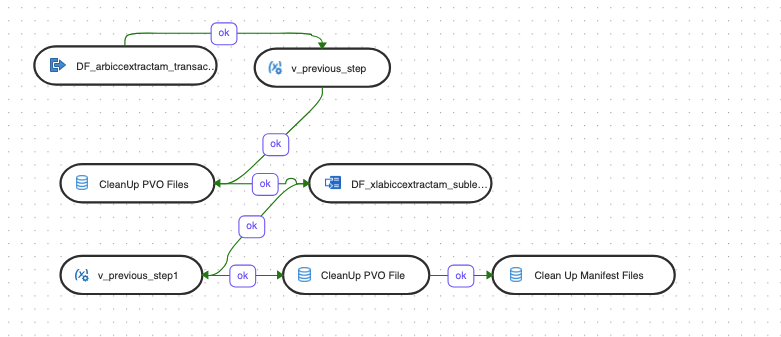
- Step 1: Add the Data Flow that performs the data extraction.
- Step 2: Add the variable step and set its Operation to Refresh Variable.
- Step 3: Add a SQL component that calls the database function using the output from the variable.
- The steps 4 to 6 are optional and you can add even more depending on number of Data Flows you want to execute.
- Step 7: Add a SQL component that calls the database function to delete the manifest files.
Conclusion
Automating PVO file cleanup in Object Storage with Oracle Data Transforms saves time and reduces manual effort. This solution, leveraging variables, database functions, and workflows Implement and customize it to optimize your operational processes.