
Simply locking the main entrance door of your home is not good enough for ensuring the overall security of your home. It’s just the beginning of a comprehensive home security strategy wherein you additionally lock down all possible entry points of your home to prevent an intruder. This is no different for your databases as well.
Database are often regarded as the “crown jewels” of an organization because they contain valuable and sensitive information that’s very critical to the functioning and success of your business. In the light of unending flow of cyber threats, you must ensure you have stronger security controls in place to protect your databases; failing to do so not only leads to a data breach but damages your organization’s reputation and also leads to losing your customer’s confidence.
Just as you lock down and monitor all entry points to your home, there are several security measures that you can take for your databases, such as enforcing strong authenticaton (MFA), encryption, masking, auditing and access controls, to provide a comprehensive defense against a wide range of threats.
This series of blog posts specifically focuses on what, why and how aspects of strong authentication (MFA) for Oracle Databases.
- Part 1: OCI IAM RADIUS Proxy – Enforce Strong Authentication (MFA) For Your Databases
- Part 2: How-To Configure MFA for Oracle Databases
- Part 3: MFA in Action for Oracle Databases
In this initial post (Part 1) of the blog series, we delve into the concepts of MFA, explore the architecture of MFA for Databases, examine the data flow and see a swift demonstration of MFA for Oracle Databases.
What is Multi-factor Authentication (MFA) and Why it’s important for your Databases ?
Multi-factor authentication (MFA) is a security measure that requires users to provide two or more forms of identification before gaining access to a system or application. This additional layer of security is important for databases, just as it is for other systems, due to several reasons:
Protection Against Stolen Credentials: If an attacker gains access to a user’s database credentials (username and password), they could potentially gain unauthorized access to the database. MFA adds an extra layer of security by requiring an additional factor, such as a one-time passcode (OTP) from a mobile app or via a SMS, which makes it significantly harder for attackers to exploit stolen credentials.
Weak or Compromised Passwords: Database users may reuse passwords or choose weak passwords that are easy to guess. MFA compensates for the limitations of passwords by requiring an additional form of identification that is harder to compromise.
Insider Threats: MFA also helps protect against insider threats, where employees or individuals with legitimate access misuse their privileges. Even if an insider’s credentials are used maliciously, the second factor of authentication acts as a deterrent and barrier to unauthorized actions.
Regulatory Compliance: Many industries and regions have certain regulatory requirements which recommend or require the use of MFA for protecting sensitive data. Implementing MFA for database access can help organizations meet these compliance standards (PII, PCI, GDPR, HIPAA,etc,.) by providing an extra layer of security.
Remote Access: With the rise of remote work and cloud-based databases, the traditional network perimeter has become more porous. MFA helps secure remote access to databases, reducing the risk of unauthorized access from outside the corporate network.
Increased Security Posture: Implementing MFA demonstrates a commitment to security and a proactive approach to safeguarding sensitive data. It adds an additional layer of defense, making it harder for attackers to breach the database.
We, at Oracle, take security very seriously and offer a wide range of security solutions to our customers and one such offerings is OCI Identity Domains (IAM) that allows you to configure and enable MFA for Oracle Databases using RADIUS Proxy that comes out-of-the-box with each Identity Domain.
A little intro to OCI Identity Domains…..
OCI Identity Domain is formerly known as Oracle Identity Cloud Service (IDCS). Each OCI Identity Domain represents a self-contained, cloud based and comprehensive identity and access management service that can be used to address a variety of IAM use cases for your orgainzation. For example, you can use an OCI IAM identity domain to manage access for your workforce across numerous cloud and on-premises applications and Oracle databases, enabling stronger authentication (MFA), easy management of entitlements, and seamless SSO for end users.
Note: Please note that Identity Domain type must be either “Oracle Apps Premium” or “Premium” in order to utilize the RADIUS proxy feature.
Architecture:
Let’s look at the architecture and components involved in configuring/enabling MFA for Oracle databases using OCI Identity Domain + RADIUS Proxy.
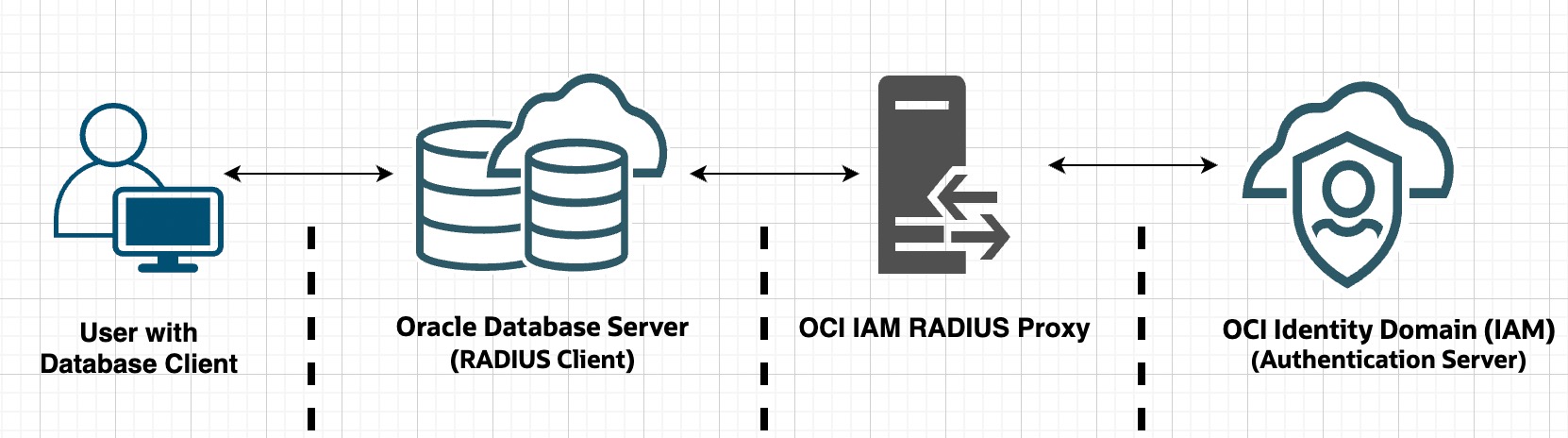
User: An individual (DB developer, DBA, etc) on a database client who tries to login to database server using his/her OCI Identity Domain credentials.
Oracle Database Server: Acts as a RADIUS client. Collects user credentials and delegates authentication to RADIUS Proxy based on the parameters defined in SQLNET.ora file. This file contains information about to how to reach to RADIUS proxy and whether to prompt the user for second factor authentication using challenge-response (asynchronous) authentication mode. See here for more details.
RADIUS Proxy: RADIUS proxy server sits between your Oracle Database server and OCI Identity Domain. It accepts user credentials from the database server, validates them against Identity Domain. As the name suggests, it operates on Remote Authentication Dial In User Service (RADIUS) a network protocol which was originally designed to authenticate remote users to a dial-in access server.
OCI Identity Domain: Plays the role of authentication server. It accepts user credentials from RADIUS Proxy and validates them. Once credentials are validated successfully, it can challenge the user for second factor authentication either by generating an OTP or generating a TOTP token on your Mobile app or triggering a push notification on user’s mobile device.
Data Flow:
Here is the visual representation of the data flow during a user’s attempt to log in to a database server in real-time.
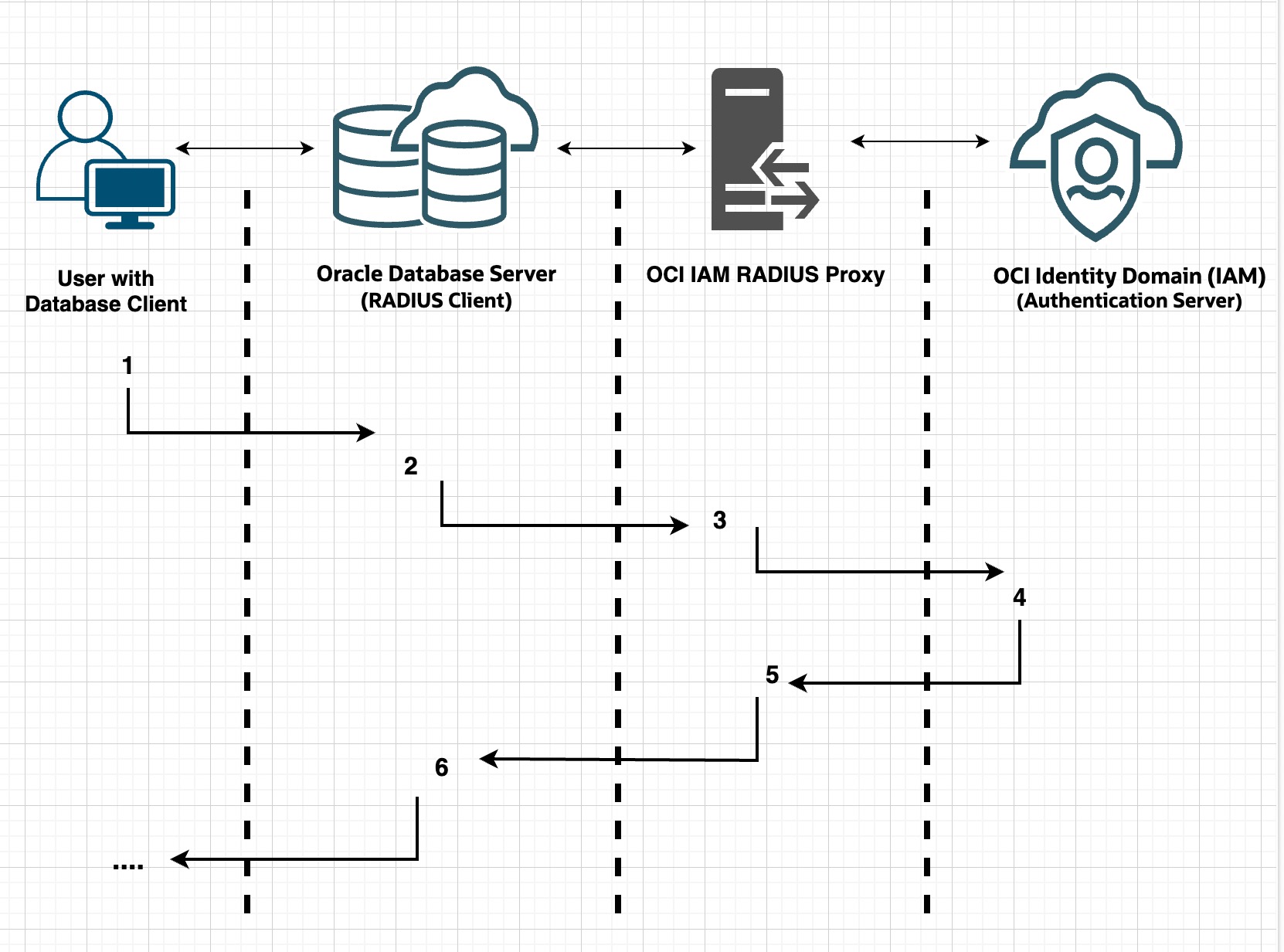
- A user with a database client (ex: SQL Plus) tries to connect to database by entering a database connect string (SID). The client system passes this data to the Oracle database server .
- The Oracle database server (acting as a RADIUS client), collects credentials from the user, passes them to the RADIUS server based on the parameters defined in SQLNET.ora file.
- The OCI IAM RADIUS proxy server in turn passes user credentials to OCI Identity Domain.
- OCI Identity Domain validates user credentials, optionally it can challenge the user for second factor authentication (MFA), sends either an Access Accept or an Access Reject message back to the RADIUS server
- The RADIUS proxy server passes this response to the Oracle database server/RADIUS client.
- The Oracle database server/RADIUS client passes the response back to the user. Based on the response, access is either granted or rejected for the user.
Quick Demo:
At very high level, let’s see how it works in action.
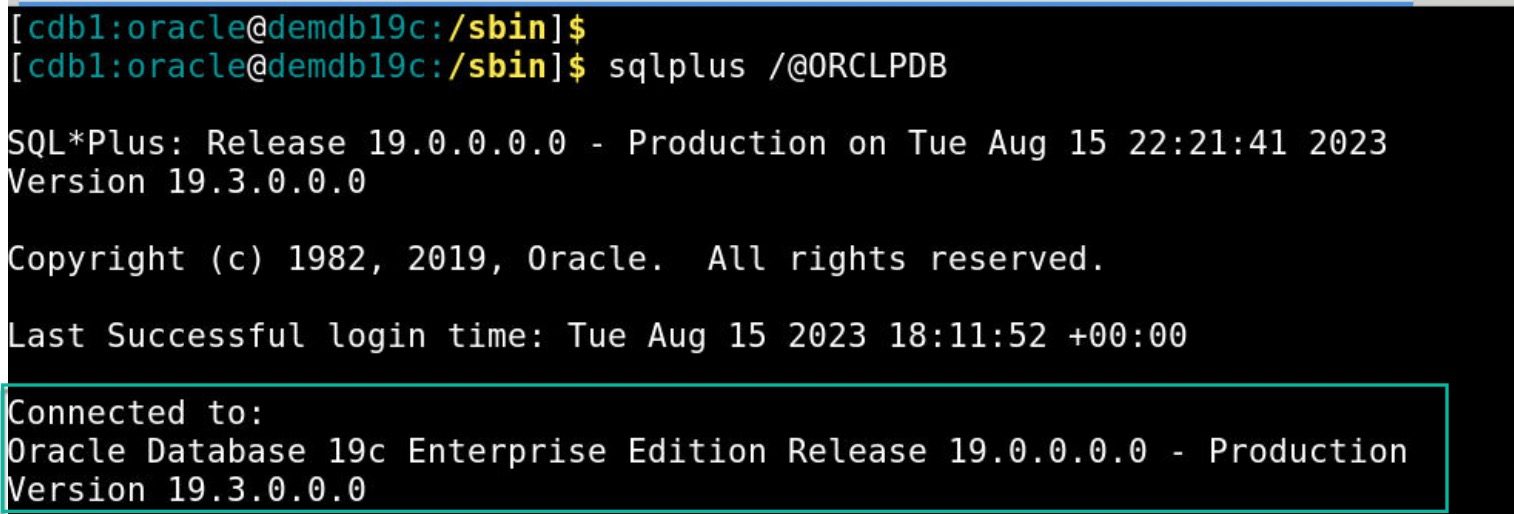
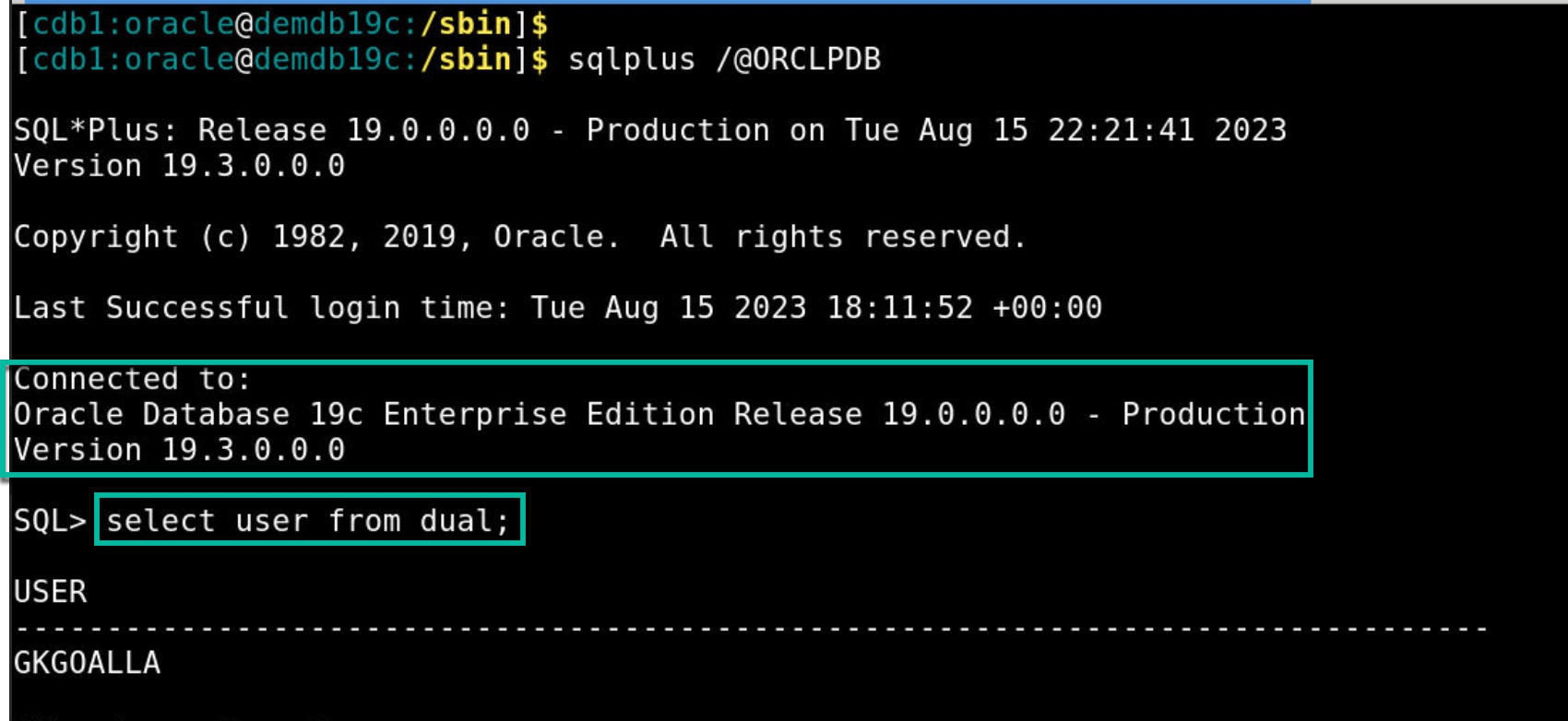
- User on a database client (SQLPlus command line utility) tries to connect to database using Database SID.
- User sees a pop-up window to enter credentials.
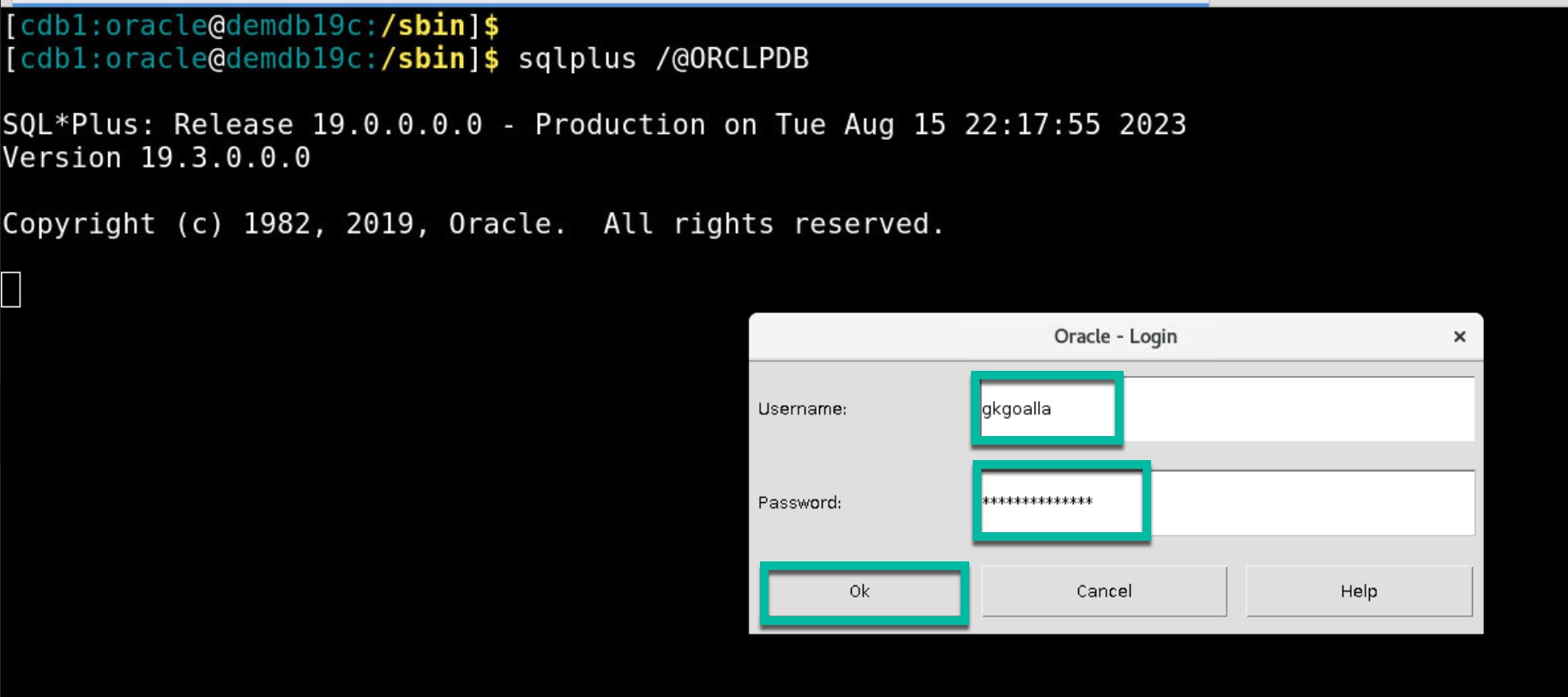
- User enters his/her OCI Identity Domain credentials.
- Upon successful authentication, user is challenged for second factor (ex: OTP) authentication and in this example user enters OTP on a separate pop-up window.
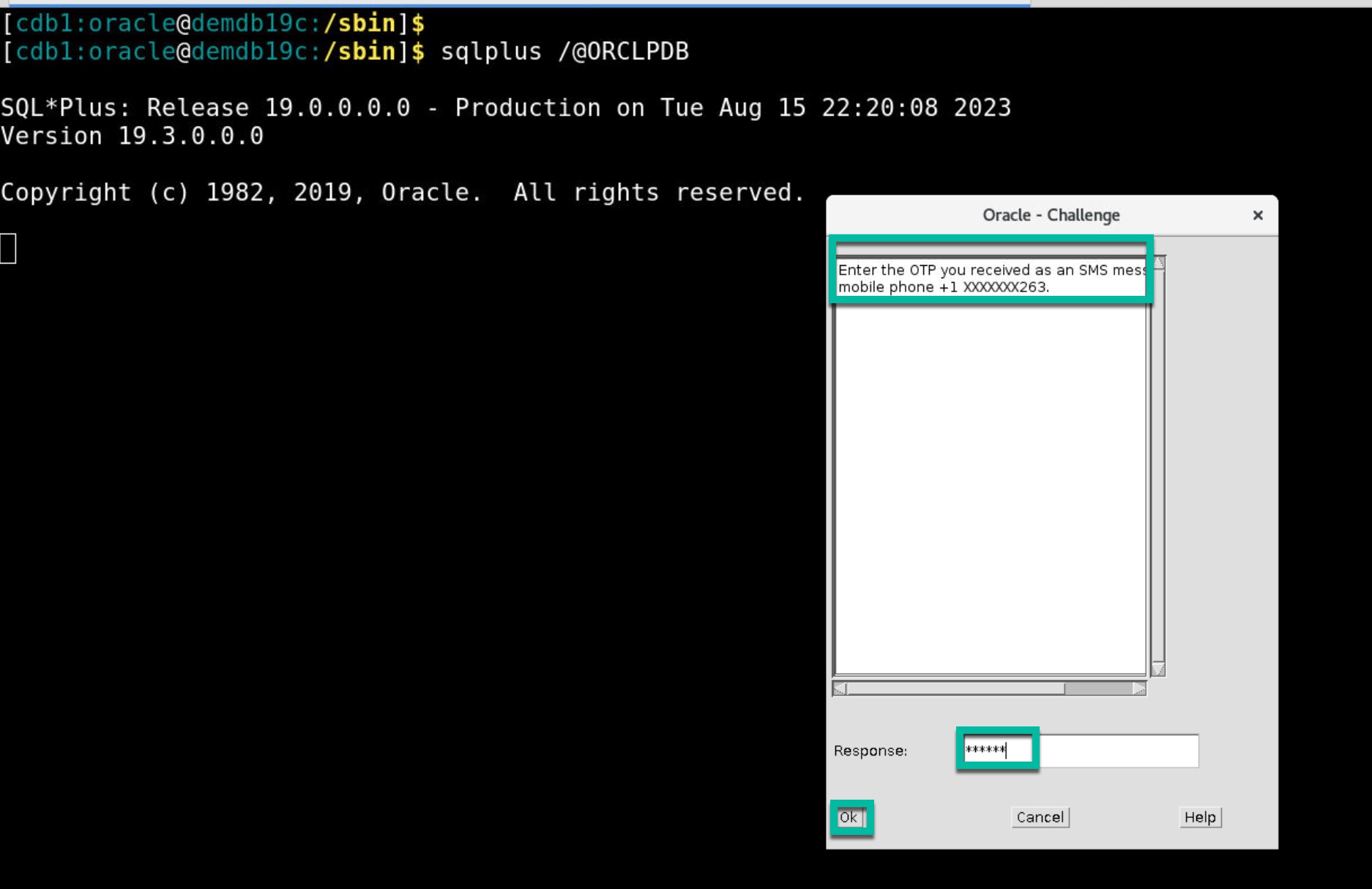
Note: Second factor can be either OTP delivered to your mobile or TOTP generated on your Mobile App or a Push notification on your Mobile App
- Once OTP is validated successfully, user successfully connects to the database.
Takeaway:
Incorporating multi-factor authentication for database access enhances the overall security posture of an organization by reducing the risk of unauthorized access and data breaches. It complements other security measures to provide a comprehensive defense against a wide range of threats for your database.
In this blog post, we explored what is strong authenticatoin (MFA), why it’s important for databases and Oracle’s approach to solve this use case. In the next blog post within this series, you will explore how-to configure MFA for your Oracle Databases.