
Reviewed and Updated: April ’25
An updated version of this topic, including recent features and AI enablement enhancements, is available here Oracle Fusion Cloud Implementation Architecture Deep Dive: Configuration and Extensibility.
Introduction
Oracle’s Fusion Cloud Applications is built on a single data model that connects end-to-end business processes across Human Capital Management (HCM), Enterprise Resource Planning (ERP), Customer Experience (CX) and Supply Chain Management (SCM) functionalities.
While Oracle is providing a common extension and configuration framework across all Fusion Clooud Applications, every pillar has also provided additional purpose-built tools and utilities that supports easier and faster deployment.
Objective for this blog, is to provide you with a high-level overview of implementation setup, configuration and migration considerations during your Fusion Cloud Applications implementation.
Customization and extensions that are available using Oracle Platform as a Service (PaaS) services are not covered in this article.
Configuration and Extension Tools
Oracle Fusion Cloud Applications supports all configurations and extensions to be performed at run time using browser-based configuration and administration tools. Users with the administrative privilege can access most of the runtime configurations. The recommended best practice is all configurations must be done in a TEST environment, and migrate the configurations to PRODUCTION environment.
Functional Setup Manager / Setup and Maintenance
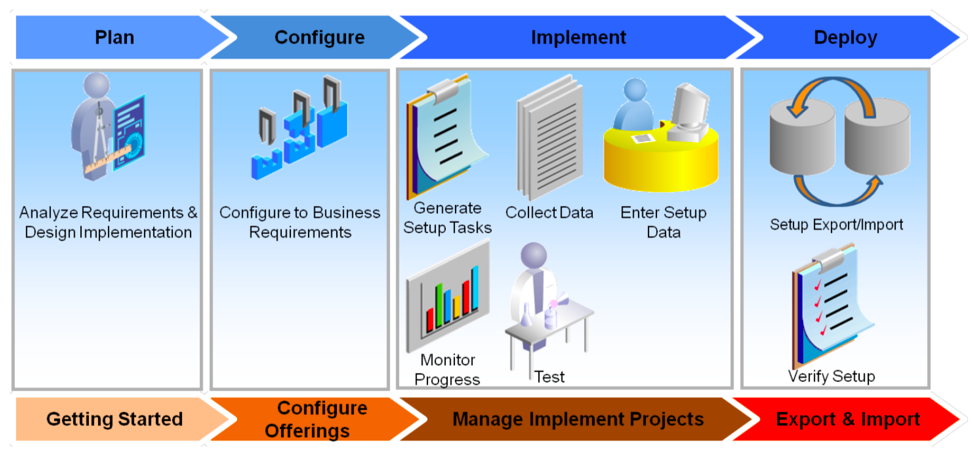
Functional Setup Manager (“FSM”) is the core component of Oracle Fusion Cloud Applications that allows developers/administrators to manage application offerings and design objects. It provides an efficient and consistent implementation process experience for all Fusion Clooud Applications across CX, ERP, HCM and SCM pillars.
With FSM, you can
- Understand implementation requirements and plan
- Configure applications to match your business needs
- Enter, export and import functional setup data and services between different instances
- Validate setup data by reviewing reports
- Reporting on setup data
Runtime Configurations and Extensions
Browser-based composers and tools are used to perform run-time configurations and extensions within Oracle Fusion Cloud Applications to modify user interface, navigation, security, reports & analytics, and help based on your business requirements.
The table below provides high level summary of all configuration and administration tools.
| Tool | Description | Sample Scenarios |
| Setup and Maintenance | Functional setup manager used to manage the implementation projects and tasks. | Manage Offerings, Enterprise Structures, Adding additional flex fields for key objects, pre-packaged lists/tasks for every module. |
| Page Composer | Browser based run-time page editor tool used to modify User Interface pages and components to suit your business needs. | Add/Hide fields, add validations, change default content, save queries. |
| Application Composer | Browser based design and run-time tool used to extend object model changes and user interface.
– Preferred tool for Sales, Service Cloud – Also used in ERP & SCM Cloud for selected modules & objects |
Add new fields to standard objects, create global functions, custom objects, relationships, security, workflows/approvals, email templates, etc. |
| Structure | Configure navigator and springboard preferences for home page. | Create groups and page entries;
Show or hide functional / feature components / objects in home page |
| Appearance | To change look and feel of the application pages. | Change logo, background image, color, Icons, home page display, etc. |
| User Interface Text | To change a specific term across all pages. | Change “Buyer” to “Customer” OR “Account” to “Companies”. |
| Application Help | Make comprehensive replacements of words or phrases that appear in messages, labels, and other areas of your user interface. | Change label “Accounts” to “Companies” in all screens. |
| Alerts Composer | Enables you to send informational notifications to HCM cloud users by email and work list. | Recruiting workflow notification |
| BI Composer | Used to create/modify reports, layouts, filters and subject areas. | Reports, Data exports for integrations |
| Personalization | End user tool to customize application look and feel without affecting other users. | Dashboards, application pages |
| Groovy Scripting | An interpreted objected oriented programming language for Java Virtual Machine (“JVM”). – Widely used and supported in Sales, Service Cloud – Very limited use in other modules |
Validation rules, triggers to objects/fields |
| Visual Builder Studio (VB Studio / VBS)** | Extend application page components for certain applications. Your test environment will be automatically populated with an instance of VB Studio. |
Display fields, add business logic, rearrange, hide fields, create your own application User Interface and deploy them along side within Fusion Cloud Applications instance. |
** Redwood applications provide a comprehensive set of features designed to meet a wide range of business requirements. But you can still make changes to your application to best fit your specific business needs. Express mode is the only mode supported by HCM, SCM, and Procurement.
Sandbox
Sandboxes are testing environments for developers/configurators/administrators and users can’t see. Sandbox configurations will be available to all users after publishing the configurations to mainline code. Sandbox allows developers/configurators/administrators to test application extensions in an isolated environment. Sandbox stores temporary copies of portions of metadata used to test the configurations before deploying them.
Applications metadata changes and data security changes are stored in a sandbox, and are validated before publishing the configurations to the mainline.
Configuration and Extension Tools mapping across Pillars
-
Configuration: These changes are made by administrators, and such changes affect many users. For example, you might hide some menu items in the Navigator, or create a new page for all users.
-
Application Extension: These changes are made by one or more application developers and administrators using Visual Builder Studio, and such changes affect all users. For example, you may want to add a new field to a table, or rearrange the fields in a form. There’s one application extension for each base application, which many people contribute to.
-
Personalization: These changes are made by individual users, and they affect only the users who made the changes. As an administrator, you can’t make personalizations for any specific user. Personalizations are also limited to certain types of changes, such as hiding infolets or resizing table columns.
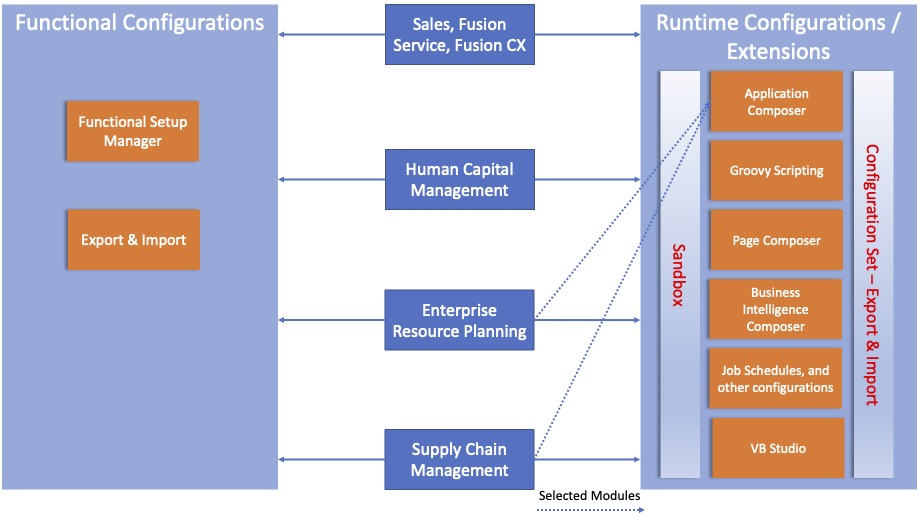
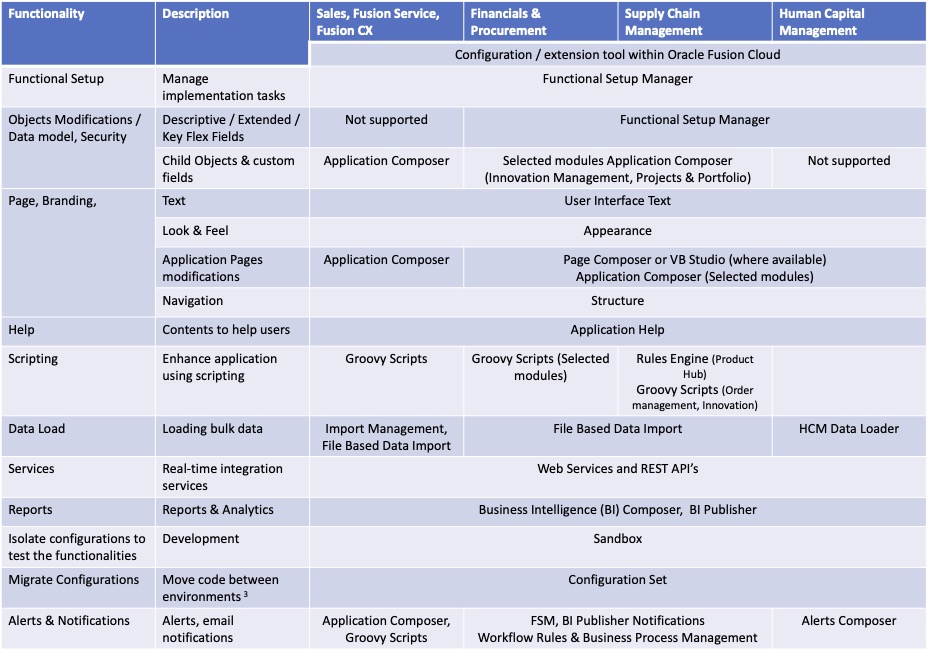
The diagram and table below provide you with a high-level mapping of tools across pillars as a guideline. It is recommended that you review the latest documentation and plan your implementation and configuration tools accordingly.
Note that Application Composer is widely used in Sales and Fusion Service Cloud, and for selected objects of ERP and SCM.
Migrating configurations/extensions
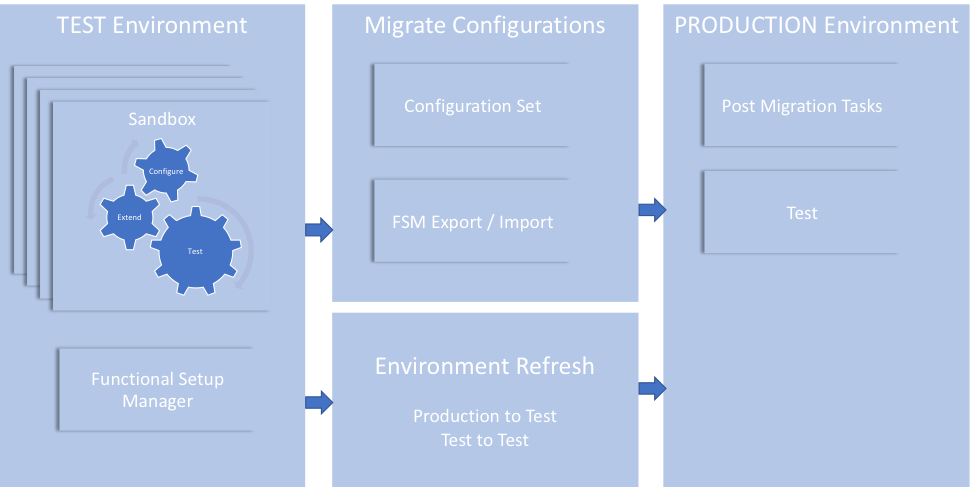
The configuration set contains configurations from all product families. Configuration set contains most of the application changes performed with Application Composer, Page Composer, Appearance, User Interface Text, Structure, Page Integration and application core setup data configured using FSM such as messages, look-ups, data security, flex fields, value sets, attachments, deep links, changes to Enterprise scheduler service (ESS) jobs, and others.
The diagram below shows a high-level view of migrating configurations and extensions between environments.
| Tool | Description | Sample Scenarios |
| Configuration Set Migration (“CSM”) |
Compressed file containing artifacts from modifying application. Used for migrating (Create, download & upload and import) configurations across all product families between environments with same patch level. CSM migration would only migrate customization. You can export and import configurations manually from the Oracle cloud Applications instance’s migration page, or configure CSM builds jobs and pipelines in VB Studio to automate the export & import process. |
Enterprise roles, new duty roles, and role hierarchy changes, which are made directly in Security Console aren’t migrated. |
| FSM Export & Import |
To move configurations and extensions to another environment, such as the production environment. |
Move functional setup data such as descriptive flex fields, value sets, lookups,etc. |
| Environment Refresh | Environment Refresh is a self-service feature that you can use to refresh data from a source environment to a target environment. |
From a production environment to a non-production environment (P2T). From a non-production environment to another non-production environment (T2T). |
Best Practices
Implementation Considerations
- Identify the business processes that shares information across applications and define the data flows and ownership.
- Tight co-ordination across implementation projects is the critical success factor.
- Consider configuration dependencies and plan the project tasks accordingly during the multi-pillar application deployment.
- Finalize the reports that requires cross pillar application information early in the project.
- Thoroughly test all the configurations before migrating between environments.
- Plan to resize your environments during your implementation.
- Avoid creating all the objects & attributes/fields from source as-is.
- Plan to perform data analysis as a separate task to analyze your legacy/source system data early to help you in identifying the data quality, and also the real extensions you would need to perform based on your existing data and business needs.
- Plan additional data testing cycles for data migration especially when you have many data sources and higher data volume.
- Do not miss out for planning upgrade/patch, environment refresh cycles in your project planning as needed.
Configuration/Extension Considerations
- Always perform configurations in TEST and migrate to PROD.
- Do not configure directly in PROD.
- Plan the post migration tasks required to be performed such as changes through Security Console, deletions/enabling/disabling certain profile options, etc.
- Avoid using Flex Fields extensions for Sales, Sercice Cloud, instead use Application Composer to extend.
- Before designing the configurations through Application Composer, make sure that the corresponding object is enabled
- Always work within a sandbox unless application notifies you to exit.
- Every developer should have their own sandbox.
- As a best practice, have one developer perform the sandbox configurations on the same object.
- Create an “Integration Sandbox” to maintain consolidated and approved configurations that will be published.
- Do not miss to delete all sandboxes before patch/upgrade, after every release/publish.
- Do not delete partial contents in a sandbox.
- Define and follow a naming convention for extension objects, attributes and other artifacts.
- Use Implementation Projects, tasks and assignments in FSM to define the structure of your implementation that will help you in monitoring the progress of your setup tasks.
- When you have large volume on setup data (> 50,000 records) for certain tasks (Example: Chart of Accounts), plan alternate option (File based export, BI Publisher) for migrating the data between environments.
- Limit the number of business users who manages functional setup data within FSM and define your governance process to avoid discrepancies and dependencies.
- If you have many DEVELOPMENT/TEST instances with large implementation team, and multiple test cycles requirements, you must define your implementation governance processes regarding the instances, configuration and migration/release management with your implementation team based on your priorities.
Migration Considerations
- Always perform all your configurations in TEST environment as Configuration Set migration does not merge the configurations. In other words, do not perform any configuration in PRODUCTION environment.
- After migrating the configurations to target environment, plan to delete the configuration deletions (if any) manually.
- Do not make any configurations during the configuration set export process.
- Plan the changes made using Security Console to be performed manually.
- Plan your required post migration tasks and include them in your project plan.
- All user personalization’s that are performed after a configuration set is applied are lost when you perform a restore action on that configuration set.
- Leverage FSM Export & Import to migrate core setup data between environments during the project. Note that the patch and version levels on both source and target environment could affect the export & import.
- Whenever you move your configurations to production, compare with the setup data in the current environment to identify setup data discrepancies. Note that high volume setup data comparison between environments is not recommended.
- Make sure the functional security associated with the roles exists in both source and target instance.
- If you make any configuration changes in PRODUCTION environment, define a process to perform the same changes in TEST environment as well, so that the changes will be carried over during next migration.
- Carefully design the lookup values as lookup values from source environment is added to the existing list in the target instance.
References
Note: Always refer to the latest documentation.
Configuring & Extending Applications
Extending Oracle Cloud Applications with Visual Builder Studio
Extending Redwood Applications for HCM and SCM Using Visual Builder Studio