
Welcome to the last part of this blog series where we will deploy a redundant VyOS router and connect our edge devices! To provide redundancy, we will deploy another router in a diverse location and use BGP as a failure detection mechanism. You should be familiar with the deployment process for connecting VyOS into OCI at this point, so this should be the easy part.
This is a blog series. If this is the first blog post you’re reading make sure to read the introduction of this blog and the VyOS/OCI deployment process before continuing through this post.
Considerations
The deployment of the second VyOS router will be a replica of the first except for a few small changes.
- A unique IPSec connection will be built in OCI and connected to VyOS.
- VyOS will be deployed in another Availability Domain. If you are in a single Availability Domain region, then deploy VyOS in a different FD than the first router.
Recommendations for connecting your remote edge (SDWAN appliance, Data Center or CSP) into VyOS
- An eBGP connection will simplify the routing configuration and will drop the requirement of a route reflector. I recommend having an ASN assigned specifically to the VyOS routers.
- Since IPSec is a point-to-point protocol, the tunnels will need to be statically configured for each remote edge connection. Jinja2 can help you templatize this configuration and iterate over this configuration many times. If you have a large amount of sites to connect, it will be worth your time to learn how to use this an create a scalable configuration.
- BGP peer groups can be used to simplify the BGP configuration and make it easier to make global BGP changes. Some BGP parameters are not available to configure in a peer group such at keepalive/hold timers and will need to be configured on a per-peer basis.
General Considerations
- This deployment focuses on an active/standby deployment for redundancy and failure tolerance. ECMP will have asymmetric routing and is not necessarily a recommended configuration for this deployment due to traffic going over both routers.
- There are not any advanced BGP configuration options in this deployment, but be aware of the BGP best path selection and how you want to manipulate traffic for your deployment for your failure scenarios.
Deployment Diagram
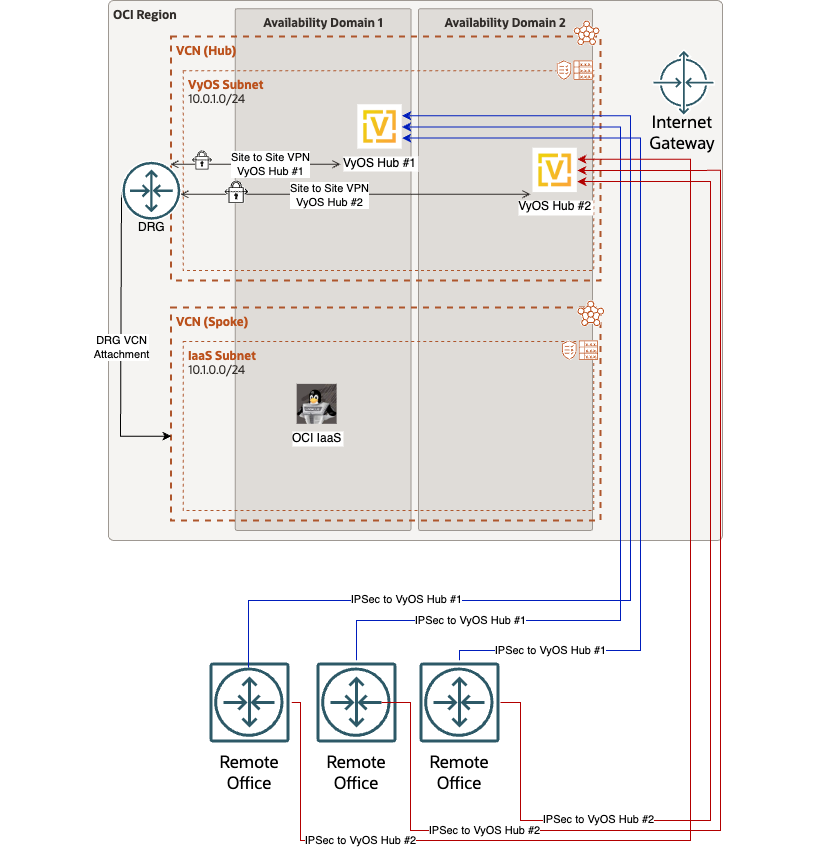
Notice that external connections coming into VyOS will come though the internet gateway, and VyOS connections to OCI will use the cloud native VPNaaS. Any VCN connected to this DRG will have the capability to route traffic to the remotely connected sites when this configuration is complete, and will also have redundancy in case of failure of one of the routers. The remote office routers represent what you want to connect into VyOS to have reachability to OCI.
Configuration
Here is the configuration I used on the HUB VyOS routers. I’m also using the same ESP and IKE group as I used to connect to OCI VPNaaS. If you want to use different ESP and IKE groups for connecting your edge, you will want to build them before starting this configuration.
This configuration example will build a VTI interface, an IPSec tunnel and a BGP peer for each remote router. This configuration will need to be set on both VyOS routers. I am showing one configuration for simplicity.
The VTI interface ID needs to be unique for each IPSec tunnel. Since I’m creating one tunnel on each VyOS router per remote edge, I can add some configuration logic and use the same VTI interface ID on each VyOS router, giving me the ability to reference the VTI interface as a site-id.
set interfaces vti vti4001 description HUB_1_Tunnel_2
set vpn ipsec site-to-site peer EDGE_PUB_IP authentication pre-shared-secret ‘SHAREDSECRET’
set vpn ipsec site-to-site peer EDGE_PUB_IP authentication remote-id ‘EDGE_PUB_IP’
set vpn ipsec site-to-site peer EDGE_PUB_IP connection-type ‘initiate’
set vpn ipsec site-to-site peer EDGE_PUB_IP ike-group ‘IKE_ORACLE’
set vpn ipsec site-to-site peer EDGE_PUB_IP ikev2-reauth ‘no’
set vpn ipsec site-to-site peer EDGE_PUB_IP local-address ‘ETH0_IP’
set vpn ipsec site-to-site peer EDGE_PUB_IP vti bind ‘vti4001’
set vpn ipsec site-to-site peer EDGE_PUB_IP vti esp-group ‘ESP_ORACLE’
set protocols bgp *VYOS_ASN* neighbor *EDGE_VTI_P2P_IP* remote-as ‘*EDGE_ASN*’
set protocols bgp *VYOS_ASN* neighbor *EDGE_VTI_P2P_IP* address-family ipv4-unicast soft-reconfiguration inbound
set protocols bgp *VYOS_ASN* neighbor *EDGE_VTI_P2P_IP* timers holdtime 15
set protocols bgp *VYOS_ASN* neighbor *EDGE_VTI_P2P_IP* timers keepalive 5
set protocols bgp *VYOS_ASN* neighbor *EDGE_VTI_P2P_IP* disable-connected-check
*Now it’s time to connect your edge routers into the connection you just made in VyOS!
Verification and Testing
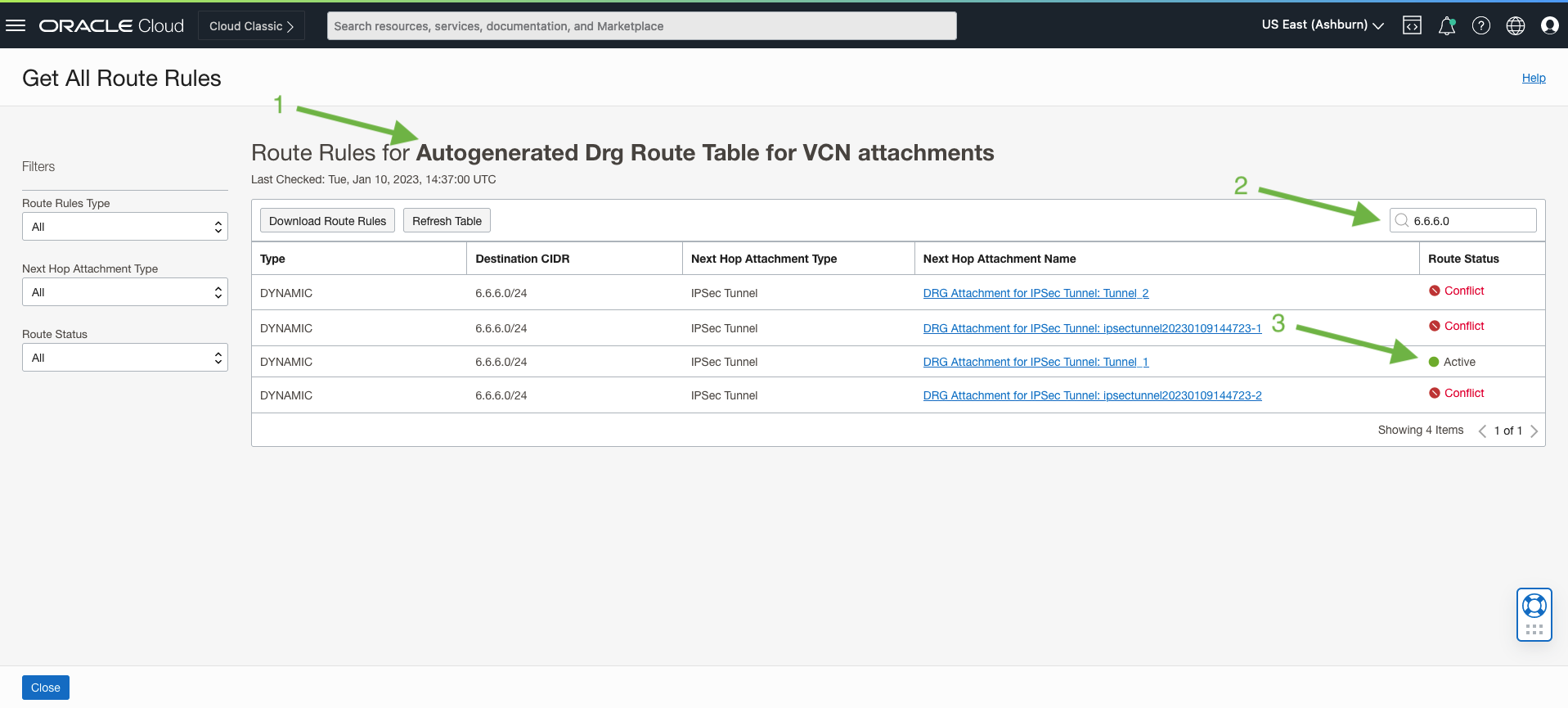
Once the IPSec tunnels are up and BGP is established between your remote office routers and VyOS, you should be able to see networks advertised from your remote edge locations. In this example, I have the 6.6.6.0/24 network that is being learned from the remote edge and routes are being populated in the DRG. Awesome! Everything connected to this DRG is capable of reaching this 6.6.6.0/24 network (assuming the subnet route table and firewall policies allow for it)
To perform this lookup, go to the DRG route table (the default is shown below) and search for the prefix you are interested in.
I was able to simulate a failure of a VyOS router where traffic was actively passing. When the router went into a failed state (hard shutdown within the OCI GUI), reconvergence happened ~20 seconds after the failure and then traffic began passing again.
I used a 200ms interval on my ping test to get sub-second connection loss information that you can see below.
[opc@super-oracle-instance ~]$ ping 6.6.6.6 -i .2
391 packets transmitted, 293 received, 25.0639% packet loss, time 79019ms
rtt min/avg/max/mdev = 22.162/24.468/25.848/0.452 ms
98 packets lost – 19.6 seconds to reconverge
703 packets transmitted, 613 received, 12.8023% packet loss, time 141487ms
rtt min/avg/max/mdev = 21.998/22.409/29.360/0.458 ms
90 packets lost – 18.0 seconds to reconverge
145 packets transmitted, 68 received, 53.1034% packet loss, time 29457ms
rtt min/avg/max/mdev = 22.194/23.216/28.997/1.231 ms
77 packets lost – 15.4 seconds reconvergence
Final Thoughts
The VyOS deployment is now complete and you have a working configuration to deploy VPN’s at scale. With this deployment, you will be able to connect 100’s to 1000’s of locations into OCI! I hope you enjoyed the series.