
Introduction
This is a blog series, which describes different patterns you can use for syncing data from source to target applications. This is the second part of the blog series.
First part of the blog series is, here.
In this part , I will describe a pattern that uses the OCI services – API Gateway, Functions, Vault, OCI Registry and Autonomous JSON DB(AJD).
Architecture
This architecture shows a source application sending data to a target application through a middle tier.
An API Gateway receives source application requests and routes the requests to a Function. API Gateway requests contain the JSON payload to be sent to target application. Function uses SODA API to insert the JSON request payload in AJD .
A second API Gateway receives requests to process the records in AJD. This API Gateway routes requests to a process Function. Function queries AJD for JSON contents which has status key as not_processed and posts those JSON data to the target application. If there is an error in the call to target application, the JSON payload in AJD is updated with status as failed. This API Gateway call can be invoked by a scheduled job or an on-demand call.
There is a third API Gateway that receives retry requests to re-process the failed records in AJD . This API Gateway routes requests to a retry Function. The retry Function, queries AJD for JSON contents which has status key as failed and tries to post JSON payload to target application. This API Gateway call can be invoked by a scheduled job or an on-demand call.
In most cases the target application API call will need a security token. In this pattern, I am passing the token in the authorization header of the POST call to API Gateway. Token needs to be securely stored for calling target application API later by Functions. OCI Vault is used to store tokens as secrets.
The following diagram illustrates this architecture.
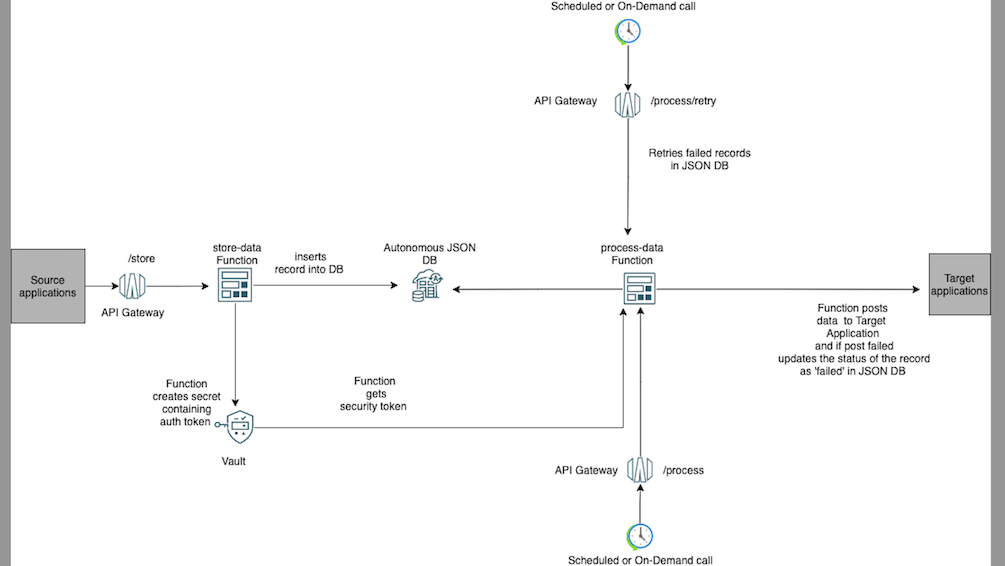
The architecture has the following components:
Autonomous JSON DB
Oracle Autonomous JSON Database (AJD) is a version of Oracle Autonomous Database exclusively for transactions and analytics on JSON data. Autonomous Database comes with several built-in features like Oracle Apex, Database Actions- View data using SQL, JSON, REST, DataModelers, Administration Tools etc.
AJD is priced at less than 25% of Oracle’s full-fledged Autonomous Database and offers the same autonomous operations and high availability.
AJD supports NoSQL-style document APIs (SODA and Oracle API for MongoDB). This sample uses SODA APIs.
SODA abstractions hide the complexities of SQL and client programming using
- Collection
- Document
Collection
A SODA collection is analogous to an Oracle Database table or view. A document collection contains documents. Collections are persisted in an Oracle Database schema .
In addition to its content, a document has other document components, including a unique identifier, called its key, a version, a media type (type of content), and the date and time that it was created and last modified.
Document
A SODA document is analogous to, a row of a database table or view.
SODA provides CRUD operations on documents. JSON documents can additionally be queried, using query-by-example (QBE) patterns, also known as filter specifications. A filter specification is itself a JSON object.
In this sample, a single collection is used, DataSyncCollection. This collection contains the json payload posted by the source application.
Functions
2 Functions are used in this pattern. They are python Functions and uses SODA for Python. Both Functions are exposed using API Gateway.
• store-data → It creates a collection called DataSyncCollection in AJD, if collection is not already existing and then populate the collection with the data posted by the source application. Each call to this Function adds a new record in the DataSyncCollection.
•process-data → This Function is used for processing JSON payload in DataSyncCollection as well as retrial of failed payloads in the DataSyncCollection .
When it is used for initial processing, it uses the SODA QBE filters and look for JSON documents which are not processed. When it is used for retrials , it uses SODA QBE filters and look for JSON documents which are of failed status.
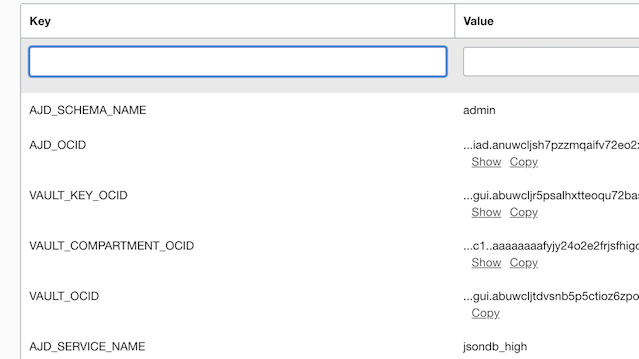
Application configuration used by the Functions is given below.
AJD_SERVICE_NAME is the database service name. AJD_SCHEMA_NAME is the database schema/user to connect to.
In addition to these, configuration contains OCIDs of various services.

API Gateway
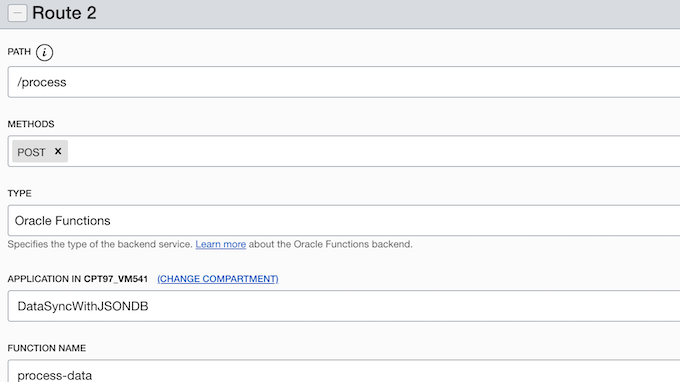
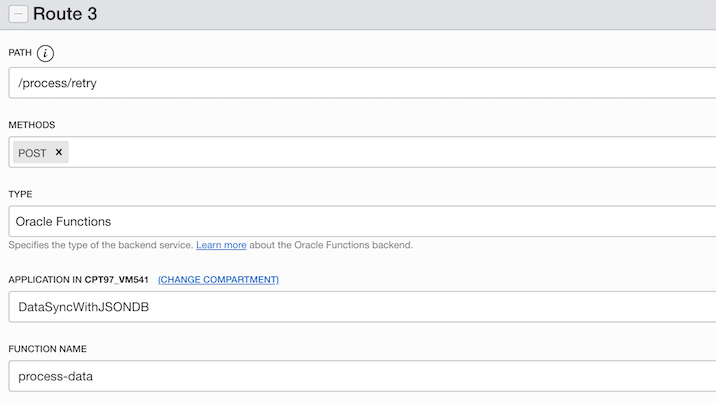
There is one API Gateway used, SyncDataGateway. There are 3 routes defined in API Gateway deployment. One is to map the Function store-data to the route /store, second is to map the process-data Function to the route /process and third is to map the process-data Function to the route /process/retry
Route with path /store

Route with path /process .
Route with path /process/retry
Vault
A Vault called, DataSyncVault is used to store the authorization header tokens sent by the Source Application as secrets. The database schema password to connect to AJD, also is added in the same Vault.
The secrets will use encryption keys in the Vault.

Process Flow
Step 1. Source application posts data to the API Gateway’s /store route. CURL command looks as given below.
curl --location --request POST 'https://pfk2ep3p.apigateway.us-ashburn-1.oci.customer-oci.com/jsondb/store'

--header 'Authorization: Bearer YWRtaW46V2VsY29tZTEyMzQq'

--header 'Content-Type: application/json'

--data-raw '{

"vaultSecretName": "s_123",

"targetRestApi":"https://gthsjj.com/fscmRestApi/resources/version/salesOrders",

"targetRestApiOperation": "POST",

"targetRestApiPayload": {

"SourceTransactionNumber": "R13_HdrEff_01",

"SourceTransactionSystem": "GPR",

"SourceTransactionId": "R13_HdrEff_01",

"BusinessUnitName": "Vision Operations",

"BuyingPartyName": "Computer Service and Rentals",

"TransactionType": "Standard Orders",

"RequestedShipDate": "2022-01-19T20:49:12+00:00",

"RequestedFulfillmentOrganizationName": "Vision Operations",

"PaymentTerms": "30 Net",

"TransactionalCurrencyName": "US Dollar",

"RequestingBusinessUnitName": "Vision Operations",

"FreezePriceFlag": false

},

"targetRestApiHeaders": {

"Content-Type": "application/json"

}

}'
The payload is self-contained i.e. it contains the target application API in targetRestApi node, target application’s REST API operation in targetRestApiOperation key and a target application’s REST API payload in targetRestApiPayload node. Headers for target REST API call should be sent in targetRestApiHeaders node.
In most cases the target application API will need a security token. Usually this token is passed in the authorization header of the POST call to API Gateway. This token needs to be securely stored for target application API processing later by process-data Function. For this purpose, the json payload contains a key called vaultSecretName which is an id that should be unique to messages that has the same auth token. The unique id will be used as a secret name in the Vault and the secret content will be the auth token passed in the authorization header. When the auth token in the authorization header changes, a new unique value should be passed in the vaultSecretName for those messages.
Step 2. store-data inserts the JSON payload into datasync_collection. It adds 2 new keys to JSON payload. One is called, status with value as not_processed. The second one is createdDate with value as current date& time. These keys will be used by process-data Function to filter and sort the records. It also reads the vaultSecretName and creates a secret in Vault with content as the authorization header token and secret name as the value of the key vaultSecretName.
Step 3. process-data Function which is exposed in API Gateway using the route with path /process, can be invoked sequentially to process the records. The CURL command for this API, will look like below.
curl --location --request POST 'https://pfk...us-ashburn-1.oci.customer-oci.com/jsondb/process'

--header 'Content-Type: application/json'

--data-raw '{

"no_of_records_to_process": 5

}'
The sequential invocation of the REST api should be automated. This Function reads through AJD and looks for JSON documents that are of status as not_processed, ordered by the createdDate. The number of records to process by a single call of the Function is defined in the no_of_records_to_process value in the payload.
It then calls the target application’s REST endpoint by reading the value of the key targetRESTApi and using the method in targetRestApiOperation from the collection document. If the call is successful, the JSON document in the collection is updated with status key value as success and the status_code as the REST response code of the target application API.
If the call is failed, the JSON document in the collection is updated with status key value as failed and the status_code as the REST response code of the target application API. Function also adds a failure_reason key with the reason for the target application call failure.
The response from the Function call will look like below. It gives the count of the total processed records, failed and successful records. It has a has_next key that indicates whether there are further records in the database, with status as not_processed. This helps in determining whether further call is required to the Function.
{"total_processed_records":1,"success_count":0,"failure_count":1,"has_next:"false"}
Step 4.
Lastly there is an option to retry the failed messages using an API Gateway API, that exposes the process-data Function, in the route /process/retry
The CURL command for this looks like below.
curl --location --request POST 'https://pfk...us-ashburn-1.oci.customer-oci.com/jsondb/process/retry'

--header 'Content-Type: application/json'

--data-raw '{

"no_of_records_to_process": 5,

"retry_codes": "504, 503",

"retry_limit": 3

}'
In the retry payload, specify the no_of_records_to_process, which tells the number of records to process by a single call of the Function. retry_codes is where you can specify the error response codes that should be retried as comma separted values. It also contains an option to set the number of times retry should happen using retry_limit.
This Function queries the database for JSON documents with status as failed and with status_code matching the retry_codes. If the processing of record has already been tried to a number equal to retry_limit, then those records are skkiped. This API call, sends a response as below
{"total_processed_records":1,"success_count":0,"failure_count":1,"skipped_count":0,"has_next:"false"}
In case of retry, the response informs, the number of JSON documents skipped from processing since retrial count has reached the limit for those documents. This is indicated by the value in skipped_count .
Enhancing the sample
Note that the sample given is only to demonstrate a pattern and mostly you will need to enhance it to fit them to your needs.
While enhancing the sample do consider the following.
- You can use Oracle Apex to build a custom adminstration tool to manage the data in AJD .
- You will need a process to delete the Vault secrets once they are no longer needed. One option is to write a Function, that can do the clean-up task periodically.
- retry and process API call payload, has a key no_of_records_to_process to set the no of JSON documents in the collection to be processed in a single call. Do change this to a smaller number, if processing of each document takes time and there is a possibility of Function to time out.
- retry and process call response has a has_next key which is either true or false. It indicates if there are further records available for processing. To process large number of messages together,invoke retry/process calls sequentially after checking if has_next key value of the previous call is true or false.
- The sample function handles PUT, POST and DELETE operations. To add or remove operations, change the process-data Function code.
- The source application is responsible for sending unique value in the vaultsecretname for API calls having same auth token.
- It is assumed that the authentication token to invoke the target application’s REST api is passed in the “Authorization” Header. There is a possibility that authorization token stored in Vault expires while retrying the message. This scenario is not considered in the sample. You can enhance the Function to get Refresh Tokens in case of token expiry.
- If the target application has the capability to publish it’s planned maintenance time, then you can use that information to mark the messages as failed without trying to call target application. You need to modify the store-data Function to check if the target application is down,and if its down, set the status key as failed with appropriate status_code.
- You will need to secure your API Gateway in a production application. This is not considered in the sample.
Reference Code
I am in the process of publishing the code for this pattern.The following code snippets are for your reference, until the code is published.
Use the same DockerFile for both Functions.
DockerFile
Make sure the dockerfile is created with the following instructions.
func.yaml uses this docker file as runtime explicitly.
The Database wallet is not part of the Docker image because it is not secure. Functions download the wallet while it is executed. The wallet is retrieved directly from Autonomous Database.
The docker file has instructions to
- Install an oracle instant client.
- Create a wallet directory.
- Create an environment variable, TNS_ADMIN to point to wallet directory.
Refer here for more details.
FROM oraclelinux:7-slim
WORKDIR /function
RUN groupadd --gid 1000 fn && adduser --uid 1000 --gid fn fn

ARG release=19
ARG update=14

RUN  yum-config-manager --disable ol7_developer_EPEL && \
     yum-config-manager --enable ol7_optional_latest && \
     yum-config-manager --enable ol7_oracle_instantclient && \
     yum -y install python3 oracle-release-el7 && \
     yum -y install oracle-instantclient${release}.${update}-basiclite && \
     rm -rf /var/cache/yum

RUN mkdir /tmp/dbwallet
RUN chown -R fn:fn /tmp/dbwallet
ENV TNS_ADMIN=/tmp/dbwallet

ADD . /function/
RUN pip3 install --upgrade pip
RUN pip3 install --no-cache --no-cache-dir -r requirements.txt
RUN rm -fr /function/.pip_cache ~/.cache/pip requirements.txt func.yaml Dockerfile README.md

ENV PYTHONPATH=/python
ENTRYPOINT ["/usr/local/bin/fdk", "/function/func.py", "handler"]
store-data
func.yaml
schema_version: 20180708
name: store-data
version: 0.0.67
runtime: docker
build_image: fnproject/python:3.8-dev
run_image: fnproject/python:3.8
entrypoint: /python/bin/fdk /function/func.py handler
memory: 2048
func.py
import base64
import datetime
import io
import json
import logging
import os
import random
import string
from zipfile import ZipFile

import cx_Oracle
import oci
from fdk import response


def get_dbwallet_from_autonomousdb():
   try:
      dbwalletzip_location = "/tmp/dbwallet.zip"

      ajd_client = oci.database.DatabaseClient(config={}, signer=signer)
      ajd_wallet_pwd = ''.join(random.choices(string.ascii_uppercase + string.digits, k=15))  # random string
      # the wallet password is for creation of the jks
      ajd_wallet_details = oci.database.models.GenerateAutonomousDatabaseWalletDetails(password=ajd_wallet_pwd)
      # Get the AJD wallet zip file
      obj = ajd_client.generate_autonomous_database_wallet(ajd_ocid, ajd_wallet_details)
      # write the DB wallet zip to dbwalletzip_location
      with open(dbwalletzip_location, 'w+b') as f:
         for chunk in obj.data.raw.stream(1024 * 1024, decode_content=False):
            f.write(chunk)
      # extract the zip to dbwallet_dir
      with ZipFile(dbwalletzip_location, 'r') as wallet_zip:
         wallet_zip.extractall(dbwallet_dir)
   except Exception as ex:
      logging.getLogger().error(ex)
      raise


# This method is to get the secret content stored in vault using the secret name
def get_secret_from_vault(vault_secret_name):
   try:
      # get the secret client
      client = oci.secrets.SecretsClient({}, signer=signer)

      # Read the secret content
      secret_content = client.get_secret_bundle_by_name(secret_name=vault_secret_name,
                                            vault_id=vault_ocid).data.secret_bundle_content.content
      decrypted_secret_content = base64.b64decode(secret_content).decode("utf-8")
      return decrypted_secret_content

   except Exception as ex:
      logging.getLogger().error(ex)
      raise


#
# Function Instantiation code
#
try:

   signer = oci.auth.signers.get_resource_principals_signer()
   if os.getenv("TNS_ADMIN") is not None:
      dbwallet_dir = os.getenv('TNS_ADMIN')
   else:
      raise ValueError("ERROR: TNS_ADMIN entry missing in Docker File")

   if os.getenv("VAULT_OCID") is not None:
      vault_ocid = os.getenv("VAULT_OCID")
   else:
      raise ValueError("ERROR: Missing configuration key VAULT_OCID")
   if os.getenv("VAULT_KEY_OCID") is not None:
      vault_key_ocid = os.getenv("VAULT_KEY_OCID")
   else:
      raise ValueError("ERROR: Missing configuration key VAULT_KEY_OCID")

   if os.getenv("VAULT_COMPARTMENT_OCID") is not None:
      vault_compartment_ocid = os.getenv("VAULT_COMPARTMENT_OCID")
   else:
      raise ValueError("ERROR: Missing configuration key VAULT_COMPARTMENT_OCID")

   if os.getenv("AJD_SCHEMA_NAME") is not None:
      dbuser = os.getenv("AJD_SCHEMA_NAME")
   else:
      raise ValueError("ERROR: Missing configuration key AJD_SCHEMA_NAME")

   if os.getenv("AJD_SERVICE_NAME") is not None:
      dbsvc = os.getenv("AJD_SERVICE_NAME")
   else:
      raise ValueError("ERROR: Missing configuration key AJD_SERVICE_NAME")
   if os.getenv("AJD_OCID") is not None:
      ajd_ocid = os.getenv("AJD_OCID")
   else:
      raise ValueError("ERROR: Missing configuration key AJD_OCID")

   get_dbwallet_from_autonomousdb()

   # Update SQLNET.ORA file present in the dbwallet_dir by replacing
   # the WALLET_LOCATION parameter to point to the path of dbwallet_dir
   with open(dbwallet_dir + '/sqlnet.ora') as orig_sqlnetora:
      new_text = orig_sqlnetora.read().replace('DIRECTORY=\"?/network/admin\"',
                                     'DIRECTORY=\"{}\"'.format(dbwallet_dir))
   with open(dbwallet_dir + '/sqlnet.ora', "w") as new_sqlnetora:
      new_sqlnetora.write(new_text)

   # Get database password from vault
   dbpwd = get_secret_from_vault('db_pwd')
   # create a DB pool

   dbpool = cx_Oracle.SessionPool(dbuser, dbpwd, dbsvc, min=1, max=1, encoding="UTF-8", nencoding="UTF-8")

except Exception as e:
   logging.getLogger().error(e)
   raise


#
# Function Handler
#
def handler(ctx, data: io.BytesIO = None):
   logging.getLogger().info("Inside handler method")
   try:
      payload_bytes = data.getvalue()
      if payload_bytes == b'':
         raise KeyError('No keys in payload')

      payload = json.loads(payload_bytes)
      # Update the payload with new key and values.
      payload["status"] = "not_processed"
      payload["createdDate"] = str(datetime.datetime.now().isoformat())
      # Read the authorization token from the request header
      auth_token = ctx.Headers().get("authorization")
      if "vaultSecretName" in payload:
         vault_secret_name = payload["vaultSecretName"]
      else:
         raise KeyError('Check if key vaultSecretName is set.')
      # Check if a secret with name as vault_secret_name already present in Vault.
      # If it is not present, create a new secret for storing authorization token.

      if not is_secret_in_vault(vault_secret_name):
         create_secret_in_vault(auth_token, vault_secret_name)
   except Exception as ex:
      logging.getLogger().error(ex)
      return response.Response(
         ctx,
         response_data="Processing failed due to " + str(ex),
         status_code=500
      )
   try:
      with dbpool.acquire() as dbconnection:
         dbconnection.autocommit = True

         soda = dbconnection.getSodaDatabase()
         # Open the Collection datasync_collection, if its already present in database
         # Else create a new collection
         collection = soda.openCollection("datasync_collection")
         if collection is None:
            collection = soda.createCollection("datasync_collection")
         # insert the payload to the collection
         collection.insertOne(payload)

   except Exception as ex1:
      logging.getLogger().error(ex1)
      return response.Response(
         ctx,
         response_data="Processing failed due to " + str(ex1),
         status_code=500
      )
   return response.Response(
      ctx,
      response_data="success"
   )


# Create a new secret in vault
def create_secret_in_vault(
      auth_token,
      vault_secret_name):
   logging.getLogger().info("Inside create_secret_in_vault method")
   try:
      vault_client = oci.vault.VaultsClient({}, signer=signer)

      secret_content_details = oci.vault.models.Base64SecretContentDetails(
         content_type=oci.vault.models.SecretContentDetails.CONTENT_TYPE_BASE64,
         name=vault_secret_name,
         stage="CURRENT",
         content=base64.b64encode(auth_token.encode('ascii')).decode("ascii"))
      secrets_details = oci.vault.models.CreateSecretDetails(compartment_id=vault_compartment_ocid,
                                                secret_content=secret_content_details,
                                                secret_name=vault_secret_name,
                                                vault_id=vault_ocid,
                                                key_id=vault_key_ocid)

      vault_client.create_secret(secrets_details)
   except Exception as ex:
      logging.getLogger().error("Failed to create the secret content due to exception. " + str(ex))
      raise


# Check if the secret is already present in vault
def is_secret_in_vault(vault_secret_name):
   logging.getLogger().info("Inside is_secret_in_vault method")
   try:
      vault_client = oci.vault.VaultsClient({}, signer=signer)

      list_secrets_response = vault_client.list_secrets(
         compartment_id=vault_compartment_ocid,
         name=vault_secret_name,
         vault_id=vault_ocid,
         lifecycle_state="ACTIVE")
      data = list_secrets_response.data

      if len(data) == 0:
         logging.getLogger().info("Secret not found in vault")
         return False
   except Exception as ex:
      logging.getLogger().error(
         "Failed to check if the secret is already present in Vault due to exception. " + str(ex))
      raise
   return True
process-data
func.yaml
schema_version: 20180708
name: process-data
version: 0.0.67
runtime: docker
build_image: fnproject/python:3.8-dev
run_image: fnproject/python:3.8
entrypoint: /python/bin/fdk /function/func.py handler
memory: 2048
func.py
import base64
import io
import json
import logging
import os
import random
import string
from urllib.parse import urlparse
from zipfile import ZipFile

import cx_Oracle
import oci
import requests
from fdk import response


def get_dbwallet_from_autonomousdb():
   try:
      dbwalletzip_location = "/tmp/dbwallet.zip"

      ajd_client = oci.database.DatabaseClient(config={}, signer=signer)
      ajd_wallet_pwd = ''.join(random.choices(string.ascii_uppercase + string.digits, k=15))  # random string
      # the wallet password is for creation of the jks
      ajd_wallet_details = oci.database.models.GenerateAutonomousDatabaseWalletDetails(password=ajd_wallet_pwd)
      # Get the AJD wallet zip file
      obj = ajd_client.generate_autonomous_database_wallet(ajd_ocid, ajd_wallet_details)
      # write the DB wallet zip to dbwalletzip_location
      with open(dbwalletzip_location, 'w+b') as f:
         for chunk in obj.data.raw.stream(1024 * 1024, decode_content=False):
            f.write(chunk)
      # extract the zip to dbwallet_dir
      with ZipFile(dbwalletzip_location, 'r') as wallet_zip:
         wallet_zip.extractall(dbwallet_dir)
   except Exception as ex:
      logging.getLogger().error(ex)
      raise


# This method is to get the secret content stored in vault using the secret name
def get_secret_from_vault(vault_secret_name):
   try:
      # get the secret client
      client = oci.secrets.SecretsClient({}, signer=signer)

      # Read the secret content
      secret_content = client.get_secret_bundle_by_name(secret_name=vault_secret_name,
                                            vault_id=vault_ocid).data.secret_bundle_content.content
      decrypted_secret_content = base64.b64decode(secret_content).decode("utf-8")
      return decrypted_secret_content

   except Exception as ex:
      logging.getLogger().error(ex)
      raise


#
# Function Instantiation code
#
try:

   signer = oci.auth.signers.get_resource_principals_signer()
   RETRY_PATH = "/jsondb/process/retry"
   if os.getenv("TNS_ADMIN") is not None:
      dbwallet_dir = os.getenv('TNS_ADMIN')
   else:
      raise ValueError("ERROR: TNS_ADMIN entry missing in Docker File")

   if os.getenv("VAULT_OCID") is not None:
      vault_ocid = os.getenv("VAULT_OCID")
   else:
      raise ValueError("ERROR: Missing configuration key VAULT_OCID")
   if os.getenv("VAULT_KEY_OCID") is not None:
      vault_key_ocid = os.getenv("VAULT_KEY_OCID")
   else:
      raise ValueError("ERROR: Missing configuration key VAULT_KEY_OCID")

   if os.getenv("VAULT_COMPARTMENT_OCID") is not None:
      vault_compartment_ocid = os.getenv("VAULT_COMPARTMENT_OCID")
   else:
      raise ValueError("ERROR: Missing configuration key VAULT_COMPARTMENT_OCID")

   if os.getenv("AJD_SCHEMA_NAME") is not None:
      dbuser = os.getenv("AJD_SCHEMA_NAME")
   else:
      raise ValueError("ERROR: Missing configuration key AJD_SCHEMA_NAME")

   if os.getenv("AJD_SERVICE_NAME") is not None:
      dbsvc = os.getenv("AJD_SERVICE_NAME")
   else:
      raise ValueError("ERROR: Missing configuration key AJD_SERVICE_NAME")
   if os.getenv("AJD_OCID") is not None:
      ajd_ocid = os.getenv("AJD_OCID")
   else:
      raise ValueError("ERROR: Missing configuration key AJD_OCID")

   get_dbwallet_from_autonomousdb()

   # Update SQLNET.ORA file present in the dbwallet_dir by replacing
   # the WALLET_LOCATION parameter to point to the path of dbwallet_dir
   with open(dbwallet_dir + '/sqlnet.ora') as orig_sqlnetora:
      new_text = orig_sqlnetora.read().replace('DIRECTORY=\"?/network/admin\"',
                                     'DIRECTORY=\"{}\"'.format(dbwallet_dir))
   with open(dbwallet_dir + '/sqlnet.ora', "w") as new_sqlnetora:
      new_sqlnetora.write(new_text)

   # Get database password from vault
   dbpwd = get_secret_from_vault('db_pwd')
   # create a DB pool

   dbpool = cx_Oracle.SessionPool(dbuser, dbpwd, dbsvc, min=1, max=1, encoding="UTF-8", nencoding="UTF-8")

except Exception as instantiation_error:
   logging.getLogger().error(instantiation_error)
   raise


#
# Function Handler
#
def handler(ctx, data: io.BytesIO = None):
   try:

      requesturl = ctx.RequestURL()
      parsed_url = urlparse(requesturl)
      # Get the path of the request URL to identify if the call is for retry
      path_param = parsed_url.path

      payload_bytes = data.getvalue()
      payload = json.loads(payload_bytes)

      if payload_bytes == b'':
         raise ValueError('No keys in payload')
      # Check if no_of_records_to_process is >0
      if "no_of_records_to_process" not in payload:
         raise ValueError('Check if no_of_records_to_process is set correctly in payload')
      no_of_records_to_process = int(payload["no_of_records_to_process"])
      if no_of_records_to_process <= 0:
         raise ValueError('no_of_records_to_process must be greater than 0')

      # If the Function call is for retry, get additional keys from payload
      if path_param == RETRY_PATH:
         if "retry_limit" in payload:
            retry_limit = int(payload["retry_limit"])
         else:
            raise ValueError('Check if retry_limit is set correctly in payload')

         if "retry_codes" in payload:
            retry_codes = payload["retry_codes"]
         else:
            raise ValueError('Check if retry_codes is set correctly in payload')
         response_data = prepare_and_process_data(path_param, no_of_records_to_process, retry_limit, retry_codes)
      else:
         response_data = prepare_and_process_data(path_param, no_of_records_to_process)

   except ValueError as valueError:

      return response.Response(
         ctx,
         response_data=str(valueError),
         status_code=500
      )
   except Exception as unexpected_error:
      logging.getLogger().error(unexpected_error)

      return response.Response(
         ctx,
         response_data="Failed in completing the request due to " + str(unexpected_error),
         status_code=500
      )
   # Return the result of processing
   return response.Response(
      ctx,
      response_data
   )


# This method is used to filter the records in JSON DB for processing , execute the target API and set the API
# response code in the payload
def prepare_and_process_data(path_param, no_of_records_to_process, retry_limit=0, retry_codes=0):
   with dbpool.acquire() as dbconnection:
      dbconnection.autocommit = True

      soda = dbconnection.getSodaDatabase()
      collection = soda.openCollection("datasync_collection")

      total_count = 0
      sucess_count = 0
      failed_count = 0
      skipped_count = 0
      qbe = construct_qbe(path_param, retry_codes)
      # Total number of records returned by filter
      num_docs = collection.find().filter(qbe).count()
      # Loop through the filtered records
      for doc in collection.find().filter(qbe).limit(no_of_records_to_process).getDocuments():
         try:
            content = doc.getContent()
            is_processed = True

            if path_param == RETRY_PATH:
               # Check how many times retrial has happened for the selected record
               if "retry_attempts" in content:
                  # If the retrial count of the record is less than specified limit, continue processing
                  if int(content["retry_attempts"]) < retry_limit:
                     content["retry_attempts"] = int(content["retry_attempts"]) + 1
                     execute_target_api(content)
                  else:
                     logging.getLogger().info('no of trials exceeded')
                     is_processed = False
                     # Count the no of records of skipped for processing  since record has reached the retry limit.
                     skipped_count = skipped_count + 1
               # set the key retry_attempts in JSON to 1, if this is first retry attempt
               else:
                  content["retry_attempts"] = 1
                  execute_target_api(content)
            else:
               execute_target_api(content)

            # Replace the content with new content which has status_code and status
            if is_processed:
               collection.find().key(doc.key).replaceOne(content)
               if content['status'] == "success":
                  sucess_count = sucess_count + 1
               elif content['status'] == "failed":
                  failed_count = failed_count + 1
            total_count = total_count + 1
         except Exception as unexpected_error:
            logging.getLogger().error(
               "Exception occured during the processing of " + str(doc.key) + "due to " + str(unexpected_error))

      # Check if there are more records to process
      if num_docs <= no_of_records_to_process:
         has_next = "false"
      else:
         has_next = "true"
      return '{"total_processed_records":' + str(total_count) + ',"success_count":' + str(
         sucess_count) + ',"failure_count":' + str(failed_count) + ',"skipped_count":' + str(
         skipped_count) + ',"has_next:"' + has_next + '"}'


def construct_qbe(path_param, retry_codes):
   # Check if it is a retry call
   if path_param == RETRY_PATH:
      # Filter the records with status as failed and with status_code matching the retry codes specified in payload
      qbe = {'$query': {'status': {'$eq': 'failed'}, 'status_code': {'$in': retry_codes.split(',')}},
            '$orderby': [
               {'path': 'createdDate', 'datatype': 'timestamp'}]}
   else:
      # Filter the records with status as not_processed
      qbe = {'$query': {'status': {'$eq': 'not_processed'}},
            '$orderby': [
               {'path': 'createdDate', 'datatype': 'timestamp'}]}
   return qbe


# This method is used to process the document in the collection
def execute_target_api(content):
   # extract the json payload key values
   try:
      vault_secret_name = content["vaultSecretName"]
      target_rest_api = content["targetRestApi"]
      target_rest_api_operation = content["targetRestApiOperation"]
      target_rest_api_payload = content["targetRestApiPayload"]

   except Exception as payload_error:
      logging.getLogger().error(payload_error)
      content['status'] = 'failed'
      content['status_code'] = 500
      content[
         'failure_reason'] = 'Check if the payload contains vaultSecretName,targetRestApi,targetRestApiOperation,' \
                        'targetRestApiPayload '
      return
   try:
      # Get the security token for API call rom vault
      auth_token = get_secret_from_vault(vault_secret_name)
      target_rest_api_headers = ({'Authorization': auth_token})
      if "targetRestApiHeaders" in content:
         # Merge the authorization header with any other headers already present
         target_rest_api_headers.update(content["targetRestApiHeaders"])

      if target_rest_api_operation == 'POST':

         api_call_response = requests.post(target_rest_api, data=json.dumps(target_rest_api_payload),
                                   headers=target_rest_api_headers)
      elif target_rest_api_operation == 'PUT':

         api_call_response = requests.put(target_rest_api, data=json.dumps(target_rest_api_payload),
                                  headers=target_rest_api_headers)
      elif target_rest_api_operation == 'DELETE':

         api_call_response = requests.delete(target_rest_api, data=json.dumps(target_rest_api_payload),
                                    headers=target_rest_api_headers)
      else:
         logging.getLogger().info("incorrect REST API method. Method should be either POST, PUT or DELETE")
         content['status'] = 'failed'
         content['status_code'] = 500
         content['failure_reason'] = "incorrect REST API method. Method should be either POST, PUT or DELETE"
         return

      if api_call_response.ok:
         content['status'] = 'success'
      else:

         content['status'] = 'failed'
         content['failure_reason'] = api_call_response.text

      content['status_code'] = api_call_response.status_code

   except Exception as api_call_error:
      logging.getLogger().error(api_call_error)
      content['status'] = 'failed'
      content['status_code'] = 500
      content['failure_reason'] = 'unexpected error. ' + str(api_call_error)
requirements.txt
oci
fdk
cx_oracle