
As explained in my previous blog, when a user is provisioned into Oracle Cloud Infrastructure (OCI), whether through manual or automated methods, the user account is configured to possess a full suite of capabilities as outlined below:
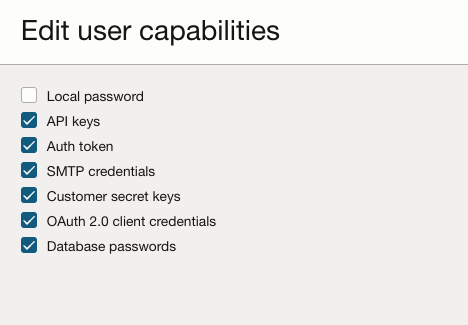
This ensures that users are equipped with the necessary access and tools from the onset, facilitating seamless integration and functionality within the OCI framework. Each of these credentials serves different purposes but are all crucial in maintaining the security and integrity of systems and data. They should be securely stored, regularly rotated, and accessed using the principle of least privilege to minimize risks of unauthorized access and data breaches.
Details about each credential are explained in the previous blog.
In this blog, we will address a use case where we have a number of users in the domain, and we need to:
- List the users with excessive user capabilities.
- Update the capabilities of these users.
Here is a sample Python script that lists the users who have all user capabilities enabled:
import oci
import json
from oci.identity import IdentityClient
from oci.exceptions import ServiceError
import logging
import requests
from oci.signer import Signer

config = oci.config.from_file("~/UserCapabilities/config")
auth = Signer(
tenancy=config['tenancy'],
user=config['user'],
fingerprint=config['fingerprint'],
private_key_file_location=config['key_file'],
pass_phrase=config['pass_phrase']
)
#domain_url = input("Please enter your the domain URL: ") #pass the domain url in the format: https://idcs-xxxxxxxxxxxx.identity.oraclecloud.com
domain_url='https://idcs-xxxxxxxxxxxx.identity.oraclecloud.com'
identity_domains_client = oci.identity_domains.IdentityDomainsClient(config,domain_url) # Pass the identity domain URL

users_list = [] # Initialize a list to hold user details

def list_users_in_domain():
try:list_users_response = identity_domains_client.list_users ()
while True:
users_list.extend(list_users_response.data.resources)
if list_users_response.has_next_page:
list_users_response = identity_domains_client.list_users(page=list_users_response.next_page)
else:
break
print(f"Found User(s) with all usercapabilities enabled ")
for user in users_list:
if user.urn_ietf_params_scim_schemas_oracle_idcs_extension_capabilities_user.can_use_api_keys== True & user.urn_ietf_params_scim_schemas_oracle_idcs_extension_capabilities_user.can_use_auth_tokens== True& user.urn_ietf_params_scim_schemas_oracle_idcs_extension_capabilities_user.can_use_customer_secret_keys== True & user.urn_ietf_params_scim_schemas_oracle_idcs_extension_capabilities_user.can_use_db_credentials== True & user.urn_ietf_params_scim_schemas_oracle_idcs_extension_capabilities_user.can_use_o_auth2_client_credentials== True & user.urn_ietf_params_scim_schemas_oracle_idcs_extension_capabilities_user.can_use_smtp_credentials== True:
print(f"{'User Name':<20} {user.user_name}")

except ServiceError as error:
print(f"Error getting users: {error}")
return [] # Return empty list on error

list_users_in_domain()
We can pass the domain URL as an input parameter or hardcode it directly into the script, as shown.
For authentication we will use the config file.This file contains the credentials needed to authenticate your script with OCI, which typically includes:
- User OCID: Unique identifier for the OCI user.
- Tenancy OCID: Unique identifier for the OCI tenancy.
- Fingerprint: Fingerprint of the public key uploaded to OCI.
- Private Key Path: Path to the private key file corresponding to the public key uploaded to OCI.
- Region: The OCI region where your resources are located.
Using a config file to manage credentials helps to keep sensitive information secure. Storing credentials in a centralized config file avoids hardcoding them into the script, which is a significant security risk.
The output of the script would be something similar to this:

Now we have a list of users with all usercapabilities enabled; lets say now we determine that in reality none of these users need those additional capabilities.
The next step is to remediate the user capabilities. Since my list of users is small, I will use an approach where the code prompts me to either edit or leave the user capabilities as is.
Here is a sample code for that:
import oci
import json
from oci.identity import IdentityClient
from oci.exceptions import ServiceError
import logging
import requests
from oci.signer import Signer

config = oci.config.from_file("~/UserCapabilities/config")
auth = Signer(
tenancy=config['tenancy'],
user=config['user'],
fingerprint=config['fingerprint'],
private_key_file_location=config['key_file'],
pass_phrase=config['pass_phrase']
)
#domain_url = input("Please enter your the domain URL: ") #pass the domain url in the format: https://idcs-xxxxxxxxxxxx.identity.oraclecloud.com
domain_url='https://idcs-xxxxxxxxxxxx.identity.oraclecloud.com'
identity_domains_client = oci.identity_domains.IdentityDomainsClient(config,domain_url) # Pass the identity domain URL

users_list = [] # Initialize a list to hold user details

valTrue = True # Provide this for the capabilites that the user can have
valFalse = False # Provide this for the capabilites we want to disable for the user
uc_body = {
#"canUseConsolePassword":valTrue, # this will false or true: if user is federated it will be valFalse if not it has to be ValTrue, tune it as needed
"canUseApiKeys":valTrue, #make it to true or false as per your requirement
"canUseAuthTokens":valTrue, #make it to true or false as per your requirement
"canUseSmtpCredentials":valFalse, #make it to true or false as per your requirement
"canUseCustomerSecretKeys":valFalse, #make it to true or false as per your requirement
"canUseOAuth2ClientCredentials":valFalse, #make it to true or false as per your requirement
"canUseDbCredentials":valFalse, #make it to true or false as per your requirement
"schemas":["urn:ietf:params:scim:schemas:oracle:idcs:UserCapabilitiesChanger"]
}

def list_users_in_domain():
try:

list_users_response = identity_domains_client.list_users ()
while True:
users_list.extend(list_users_response.data.resources)
if list_users_response.has_next_page:
list_users_response = identity_domains_client.list_users(page=list_users_response.next_page)
else:
break

for user in users_list:
if user.urn_ietf_params_scim_schemas_oracle_idcs_extension_capabilities_user.can_use_api_keys== True & user.urn_ietf_params_scim_schemas_oracle_idcs_extension_capabilities_user.can_use_auth_tokens== True& user.urn_ietf_params_scim_schemas_oracle_idcs_extension_capabilities_user.can_use_customer_secret_keys== True & user.urn_ietf_params_scim_schemas_oracle_idcs_extension_capabilities_user.can_use_db_credentials== True & user.urn_ietf_params_scim_schemas_oracle_idcs_extension_capabilities_user.can_use_o_auth2_client_credentials== True & user.urn_ietf_params_scim_schemas_oracle_idcs_extension_capabilities_user.can_use_smtp_credentials== True:
print(f" Found a User with all usercapabilities enabled " + user.name.formatted )
user_input = input("Do we want to modify the usercapabilities for " + user.name.formatted + " to proceed say? (yes/no): ")
user_input = user_input.strip().lower()
if user_input == "yes":
uc_url = domain_url + '/admin/v1/UserCapabilitiesChanger/' + user.id
uc_response = requests.put(uc_url, json=uc_body, auth=auth)
print(f'UserCapabilities have been modified for {user.name.formatted}')
elif user_input == "no":
print(f'UserCapabilities have not been modified for {user.name.formatted}')
else:
print("Invalid input. Please enter 'yes' or 'no'.")


except ServiceError as error:
print(f"Error getting users: {error}")
return [] # Return empty list on error

list_users_in_domain()
Note: It is advisable to first get the list of users and review their privileges. Once the privileges are reviewed, you can modify the above script to read the list of users and edit the user capabilities. The logic would be similar to what is mentioned here, but the approach would differ based on specific requirements.
You can either pass the domain URL as an input or hard code it as shown in the example. In this example, I am allowing users to have the capabilities of API Keys(“canUseApiKeys”:valTrue) and Auth Tokens while disabling the rest. Please adjust these user capabilities based on your specific needs. As before, we will use the config file for authentication.
Here is the sample code output:

In conclusion, we have successfully edited the capabilities of users with excessive permissions within an OCI IAM domain. This script serves as a starting point, and you will need to implement specific logic for checking excessive capabilities and updating user permissions based on your requirements.
This programmatic approach helps administrators review user capabilities and quickly update them as needed. Once we have cleaned up the existing user capabilities, we can utilize the function approach mentioned in the previous blog to effectively automate the process of updating user capabilities in OCI when they are provisioned.