
Intro
Bastions are a common way to securely access workloads in the Oracle Cloud environment. In this blog series we will look at deploying self service and cloud native Bastions and the best practices when deploying these services. In this particular blog, we will go over considerations of the architecture and the general deployment. In the subsequent posts, we will go through the usage of the “Self Service Bastion” and Oracle Cloud’s “Bastion as a Service”.
Here is the link to the other Blogs in this series.
Deploy and Connect To Self Service Bastions
Bastion as a Service Automation Deep Dive
Terminology
Bastion Host – The server that will be the intermediary (proxy) and forward traffic from your local operating system to the OCI endpoint. This proxy be either a Linux VM or OCI’s Bastion as a Service solution depending on if you choose Self Service Bastion or Bastion as as Service..
Bastion Target – The OCI Endpoint/Workload that needs to be Accessed.
Bastion Session – The connection from your local machine to the Bastion Host.
Architecture Diagram
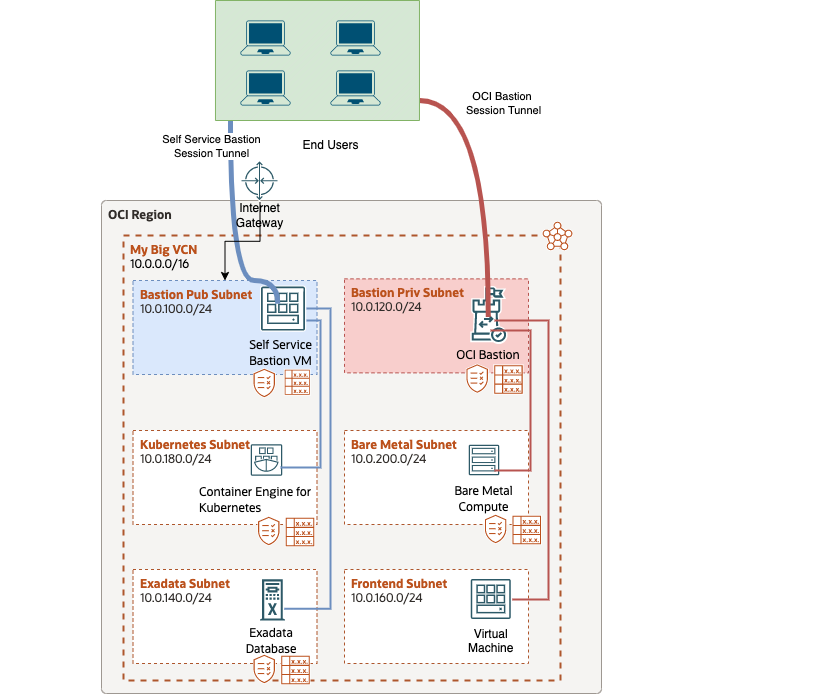
Here is the architecure that will be followed. For self service bastions (Blue) you will deploy an Oracle Linux 8 VM, a public subnet, and an internet gateway. For Basiton as a Service (Red) you will deploy your Bastion Host in a private subnet and make sure the proper security policy is in place. Regardless of the option you choose, your end users will be able to securely access resources within OCI.
Consider this:
- For manageability it is recommended to put your Bastion into a dedicated subnet.
- Bastion services can be deployed in a Hub-VCN to connect to many VCN’s. There are additional considerations with this deployment that are not covered in this blog post.
Security List and Network Security Group Firewall Considerations
Oracle Cloud has a built in vNIC firewall to police traffic between your resources. The vNIC firewall policies are managed by creating a Security Lists (Subnet Level) or Network Security Groups (Workload Level) policy. Since the vNIC firewall is stateful we only need to create rules where the traffic is initated instead of creating rules for each direction of traffic.
Below is an example of a secure firewall policy that will minimize the amount of access the bastion server has to services within OCI. As well as minimize the amount of internet traffic coming into the Bastion by limiting access to your Public IP Address. Two security lists are created, because the Bastion Host has different firewall requirments than the Bastion Targets.
Bastion Host Security List
Ingress Rules – PUBLIC_IPS/CIDR_RANGE, TCP/22
Egress Rules – VCN_CIDR/CIDR_RANGE, allowed ports.
Bastion Target Security List
Ingress Rules – Bastion Server IP or Subnet Range, allowing ports that the Bastion should have access to (443, 3389, etc)
Egress Rules – None
Once you’ve created both of these security lists within your VCN it is time to apply the Bastion Host Security List to the Bastion Subnet, and the Bastion Target Security List to the subnets that need to be accessed by the Bastion.
Consider This:
This security policy will fit most use cases but will need to be updated based on the requirements of your deployment. Here are some requirements that may change the policy.
1.) Some customers choose to only configure ingress rules on Security Lists and Network Security Groups and allow 0.0.0.0/0 for all protocols in the egress direction to simplify configuration.
2.) Network Security Groups need to be used instead of Security Lists such as when you are deploying a the CIS Landing Zone, there is a microsegmentation requirement for the workload, or subnet level network access is too permissive.
Comparing the Services
Self Service Bastion
Pros
- Use SSHuttle as a Pseudo VPN and eliminate 1:1 port forwarding.
- More flexibility (max session count, session time experation, etc)
Cons
- For connecting to production workloads, extra consideration needs to be made to make sure you are not inadvertently overexposing yourself to unwanted external traffic.
- If users can build their own bastions, there are additional security considerations and access concerns that need to be addressed for deploying compute instances.
Bastion as a Service
Pros
- Free service!
- Use OCI Native IAM policies for least permissive access. Users do not need access to deploy compute images in OCI to use this service.
- Access can be revoked at any time by removing the user from the IAM policy that allows creating Bastion Sessions.
- Centralized. Many users can use the same Bastion host to access services. Up to 20 users can be active on a Bastion at the same time.
Cons
- Limitations on session count and session timeout
Additional Bastion Considerations:
In general, both of these solutions provide quick, simple and secure connectivity to OCI. However, Bastions do not cover all connectivity requirements. I have written a blog series on deploying Remote Access VPN for more feature rich connectivity within OCI if your remote connectivity requirements do not fit within the use cases of a Bastion Host.
Outro
In this blog we covered some general configurations and a general architecuture to follow for deploying Bastion hosts. Make sure to follow Deploy and Connect To Self Service Bastions and Bastion as a Service Automation Deep Dive to learn how to use the services. I hope you enjoyed the blog!