
Introduction
When you attempt to log into the OCI Console and forget your password there is a mechanism to recover/reset your password. However, you may notice that there is no option to recover your username. Was this an oversight? This post will examine this question and go into details on how you can recover your username via the User Management APIs.
Details
Currently there is no interface today to trigger the username recovery flow. Unless of course you have built something custom like our custom login widget here. You can modify this code to add you own ‘Forgot Username’ link and screens.
I have rarely seen this as being an issue and I was asked about this recently (for the first time). I thought about why this has not come up more often. Thinking about this further, I realized that there two main reasons:
1) Customer is using a Identity provider(IdP) and/or
2) The email address is being used as the username.
Customer’s that use an external Identity Provider (IdP) like Entra ID or Okta, already have mechanisms/processes in place to handle recovery of usernames. Identity providers are the source of truth for identities and should have these systems in place.
Secondly, most customers are using email address or some form of their name as the username. It goes without saying that this is hard to forget; most users remember their email address etc.
The only scenario left is that the username is some unique string that the user or IdP system has given to the user. In this case, it is more likely that a user will forget their username, especially if they have not logged in after a long period of time. In order to obtain the username there must be some unique attribute(s) defined in the user’s profile that can link the user. Aa email address is a good attribute to start with.
The rest of the post will show a few methods an administrator can use to obtain user information based on an attribute like e-mail address to find a unique user.
Since this workflow cannot be initiated in the User Interface (UI) currently, the methods to access the usename are as follows:
OCI Console
Command Line Interface (CLI)
Identity DomaIn REST APIs
Software Development kit (SDK)
OCI Console
Obviously, you can access the OCI Console and search for a unique user attribute to find a user. I will not get into details here, however, you can start your search from the search bar at the top of the screen shown here:
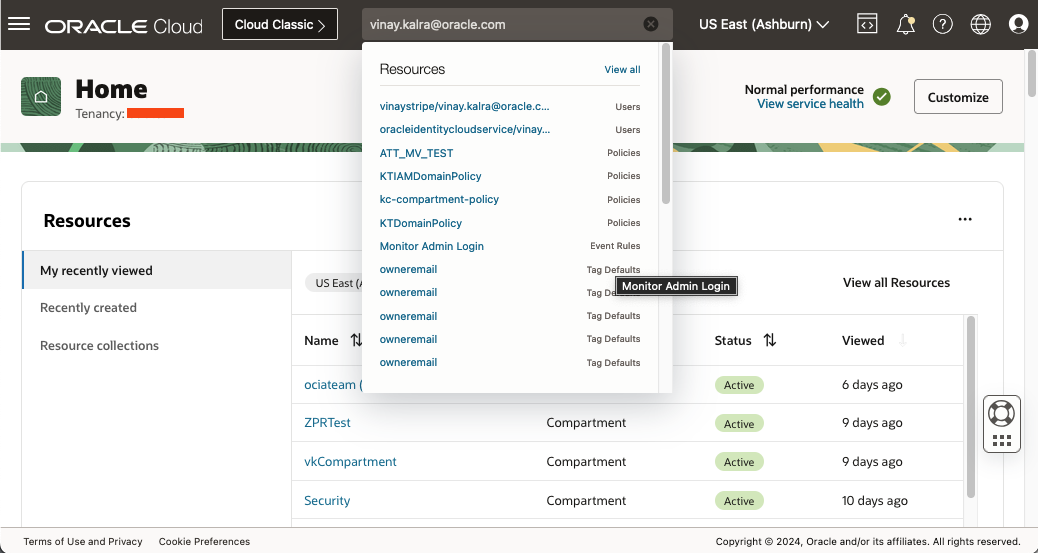
Notice when I type my email address in the search bar, I get a list of reources in the drop down. Two of these resources are User’s.
Command Line Interface (CLI)
I have provided some command line inputs that you could use to determine a username. There are two command line calls to access user data, the first call below does not apply to identity domains.
oci iam user list [OPTIONS]
Only users in ‘OracleIdentityCloudService’ are displayed here. No users from the domains including the ‘Default’ domain are listed. Do not use unless you are using a migrated identity domain/stripe. Newer tenancies will not have this domain. For this reason, I will not go into details on how to filter this request for a specific username.
In my previous post, I provide examples on how you can search for a username using the OCI CLI. Please read this post to understand the different methods to obtain user data and the difference between System for Cross Domain Identity Management (SCIM) and OCI user profile responses.
Identity Domain REST API
You can also use the REST APIs either directly using ‘curl’ or some custom code (HTTP request) or use Postman IDE to develop a set of REST calls to search for usernames. Recently, the OCI IAM REST APIs have been updated for Postman.
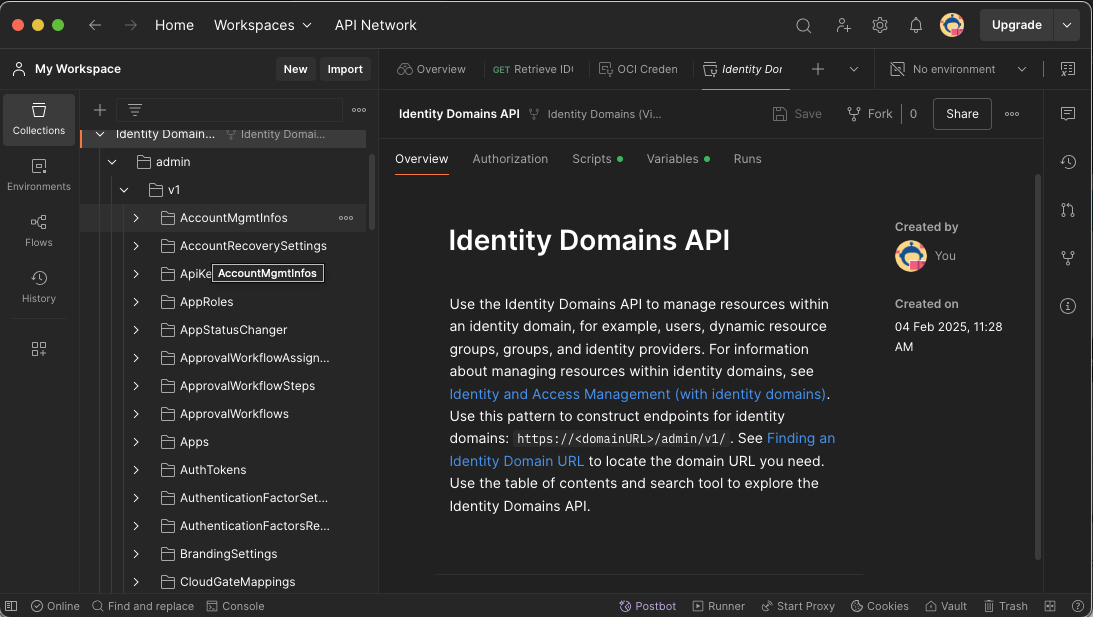
Comparing apples to apples, I will use the same API that was invoked above using the OCI CLI. The specific API can be found in the ‘Identity Domains API’ folder. Clicking on the link above will take you to the API for OCI IAM in Postman (you may need to login to your account), then select the folder. Scroll down until you see the ‘Identity Domains API’ folder and ‘Fork’ it. This will create a copy in your profile in Postman. During the ‘Fork’ you will have the option to also ‘Fork’ the environment associated with the API folder. If you do not do this then you will need to ‘Fork’ the ‘OCI Credentials’ seperately.
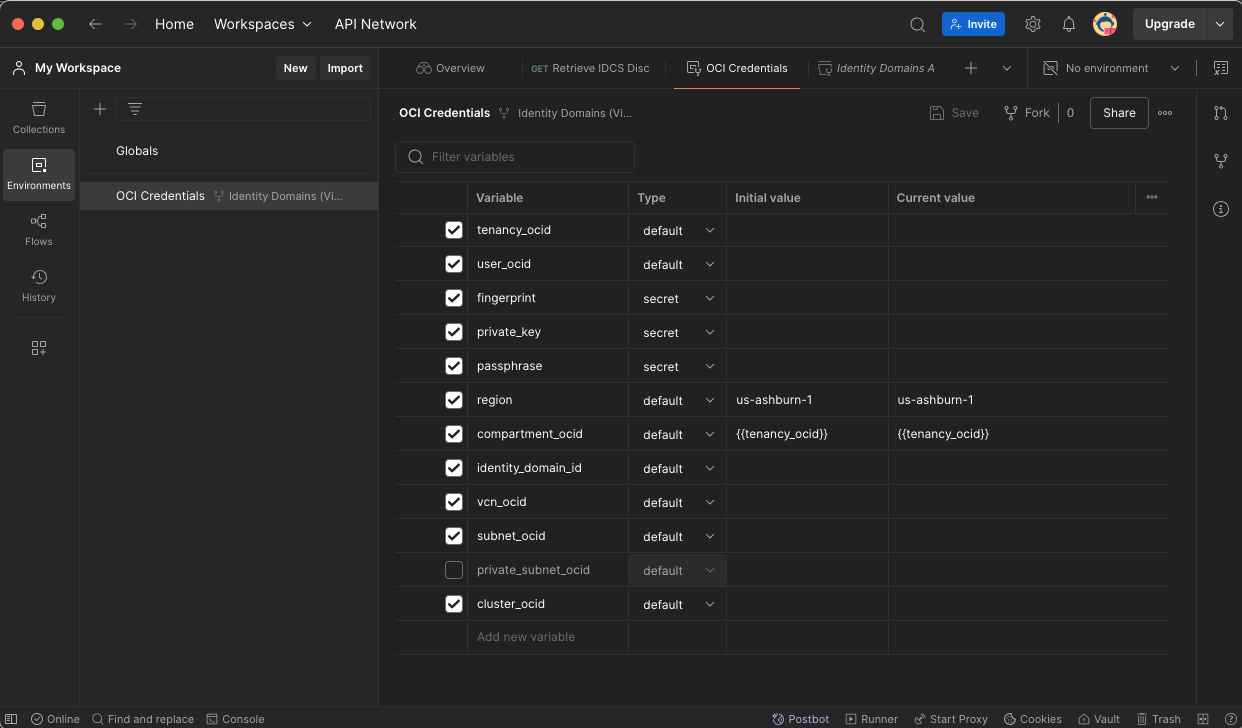
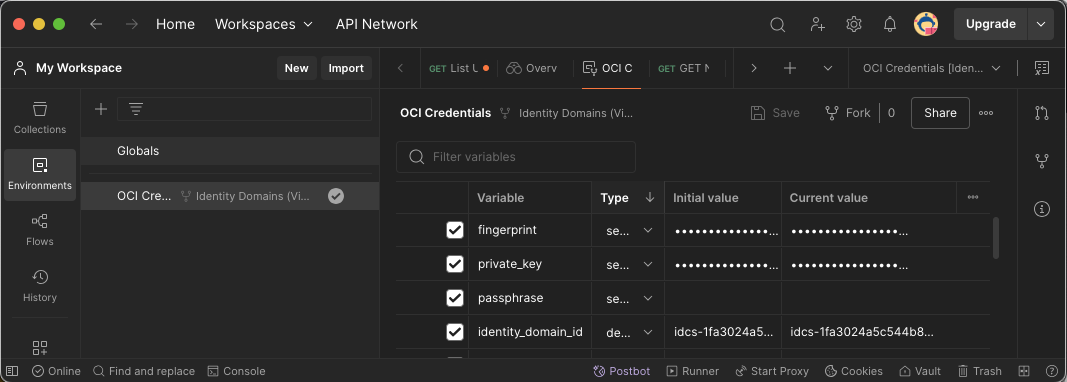
After the ‘Fork’ you will need to update the ‘identity_domain_id’ in ‘OCI Credentials’ with the endpoint URL for your identity domain.
Scrolling down you will see ‘List Users’ API call. The same API we used in the CL we will use here, List Users:
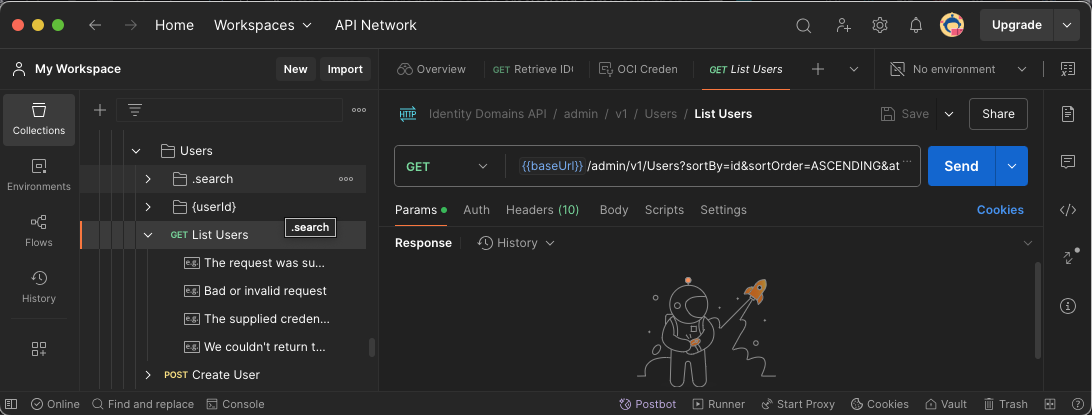
In our CLI example, we provided a filter and a query. If you remember the ‘–query’ flag is only supported out of the box for CLI using JMESPath, but for direct REST calls or the SDK. It is up to the developer to query the response.
In Postman you can set the “filter” in the ‘Query Params’ section:
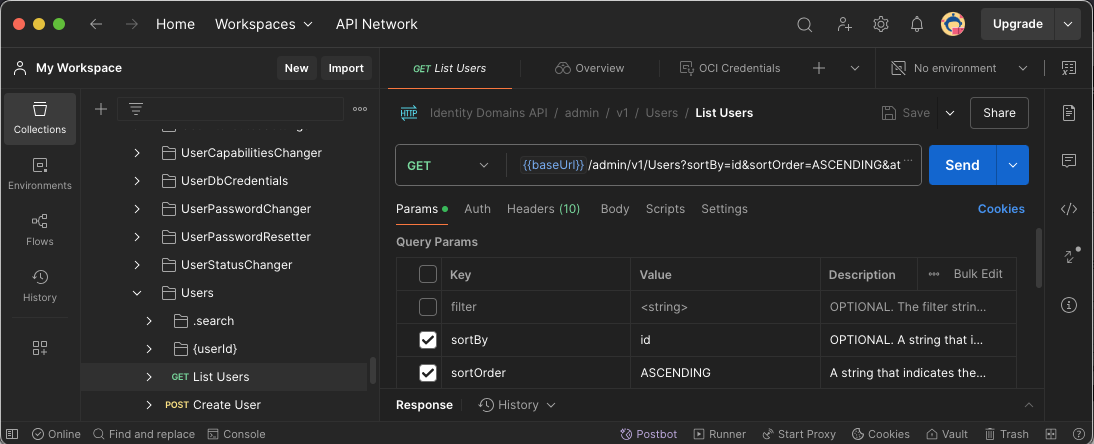
One difference from our CLI example, I provided the –endpoint parameter which is the Domain URL for your identity domain. In Postman, you will enter in the ‘identity_domain_id’ in OCI Credentials which is just the id part without the htttps://, as shown:
Also from my previos post the ‘filter’ flag follows the SCIM framework. The example filter I gave was the following:
‘username sw “Vinay”‘
In Postman you would enter the ‘filter’ as a query string as such:
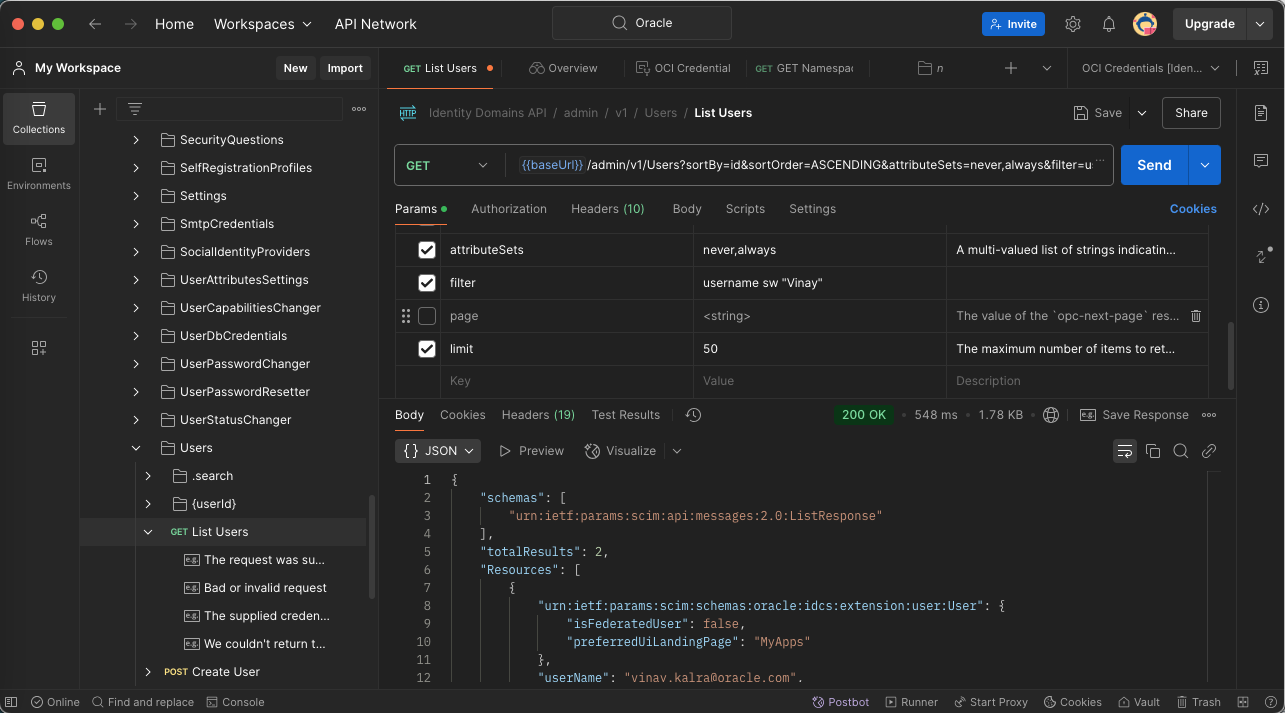
Hit ‘Send’ and you should get a response back with all usernames that start with (sw) Vinay.
Software Development kit (SDK)
OCI SDK supports multiple languages, check out this link here for more details. My language of choice is Python (API Reference). I have some sample code that invokes the ‘List User’ API..
If you read my earlier post, you’ll notice that within the CLI you can use the “filter” flag and/or the “query” flag. The SDK for Python only supports the ‘filter’ flag. This is because the ‘filter’ is done on the server. The CLI supports JMESpath which allows you to query the response data; the SDK does not. It is up to the developer to query the data once it is returned. You can use third party libraries like JMESpath for Python to query your responses as needed. Otherwise use the ‘filter’ flag to fine tune the response being returned; keeping in mind that if you do not use the filter parameter the entire data set will be returned.
Let’s start off with a simple program that lists users within your identity domain.
The main API calls are:
When you run the program you will notice that the output is a little different than when you ran the REST API call in Postman. The output is much larger than what I have pasted below, and you will also notice that there are a lot of attributes that have a value of null:
{
  "items_per_page": 50,
  "resources": [
    {
      "active": true,
      "addresses": null,
      "compartment_ocid": "ocid1.compartment.oc1..aaaaaaaawlycnxxmhf62itwpw7ztjfhsy2xg52gshhmz5un5k7qqz25fucya",
      "delete_in_progress": null,
      "description": null,
      "display_name": "Vinay Kalra",
      "domain_ocid": "ocid1.domain.oc1..******q",
      "emails": [
        {
          "pending_verification_data": null,
          "primary": false,
          "secondary": false,
          "type": "recovery",
          "value": "vinay.kalra@oracle.com",
          "verified": true
        },
You can also pass two additional attributes called ‘attributes’ and ‘attribtes_sets’. These parameters also play a role in what attributes are being sent in the response. You can read about these attributes in the API docs.
Now lets run the code again but this time uncomment the ‘skip_decentraliztation=True’ line:
Notice the output now? It is much more concise. All attributes that had a null value earlier should be removed from the output.
Summary
The ‘Forgot Username’ process flows are usually handled by the underlying Identity Provider (IdP) and the usernames are normally easy to remember, however, there are some edge cases where the username is not set as the email address and can be difficult to remember due to uniqueness. Finding the username based on an attribute is a relatively simple process. You can use the OCI Console as a manual process from an administrator or use the CLI, REST APIs or SDK for a automated process.
Thanks for reading!