
In order to deliver the best available performance, any cloud customer production network should be designed in such a way to accomplish four main points:
1. The shortest routing path from source to destination
2. Network scalability
3. Network redundancy
4. Network security
Sometimes (not so often) even if none of the above points are meet, that network starts to act as a production network. For sure it will work just fine for a period of time, however, at a certain moment, the customer starts to observe a series of difficulties in accommodating new services, in the maintenance process or the worst case scenario, the performance in very degraded.
Dealing with such a case is not simple, simply enough because that is a production network and it is changing all the game rules. You need to make the network to work as best as possible and you need to change the entire strategy on how to make it as good as possible. Dealing with networking optimization in a live production network is like a chess game, in order to win to need to do the correct moves.
The case I will present is based on a true customer story, going from the initial production network design to the optimized one. Let’s have a look and analyze the initial state of the network:
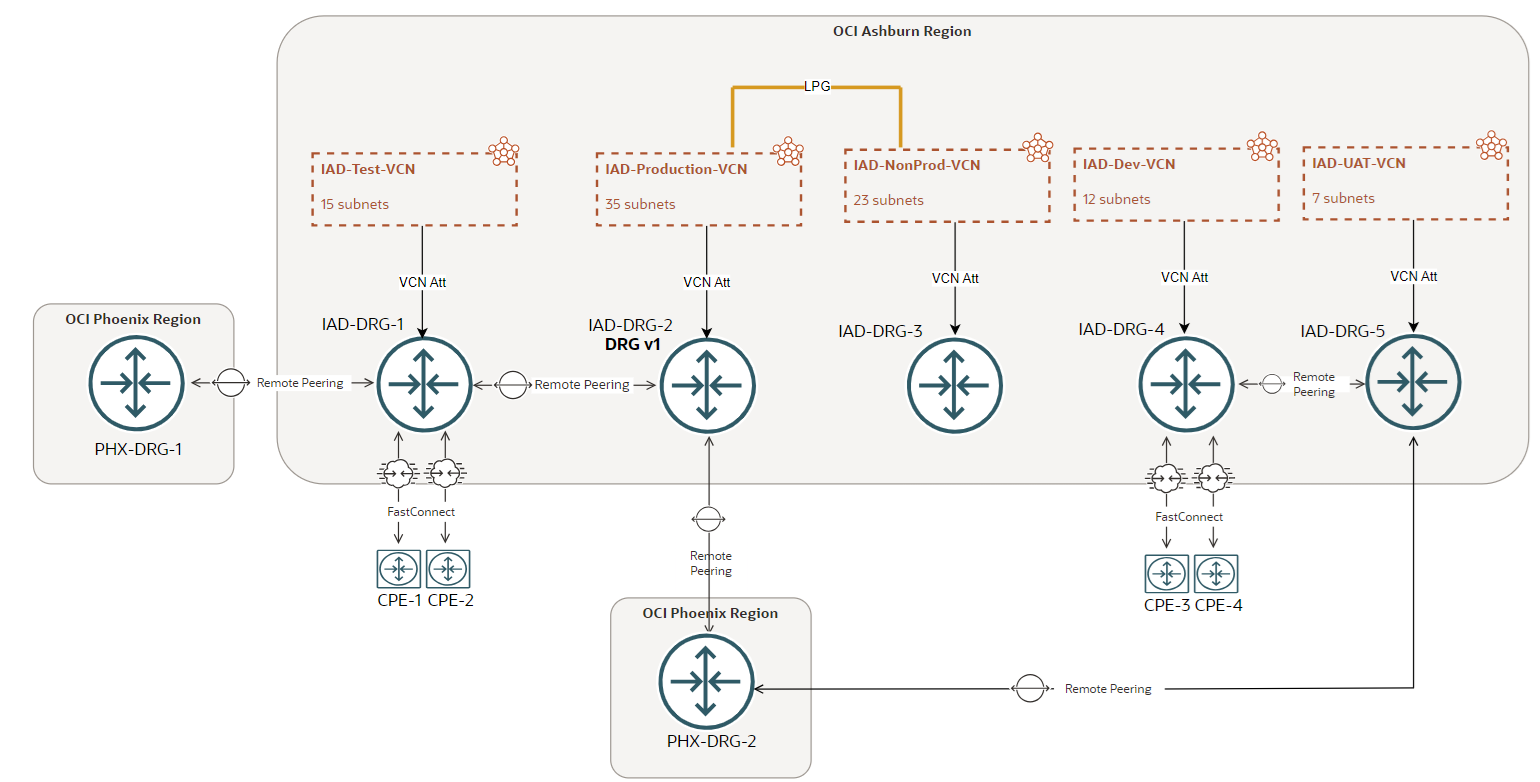
We have a lot of things to analyze above.
At the very first sight, we can observe (among other factors) that we are running in a structure with both, the legacy DRG (depicted as v1) and the rest being upgraded DRGs. For sure if we want to optimize the network we should have for at least the DRG or DRGs we want to keep (yes, sometimes, based on the requests it is necessary to have more than one DRG for very specific purposes) running as an upgraded DRG(s).
Part A: IAD-DRG-1, IAD-DRG-2, IAD-DRG-3
Three hours maintenance window required
A-1 (about one hour but it can finish earlier)
We will start the “optimize game” by upgrading the DRG depicted as v1. Upgrading the DRG is a simple process. We are recommending to perform the upgrade in one hour maintenance window because the traffic might be impacted during the upgrade process. In our scenario it’s imperative to perform the upgrade in a maintenance window since that DRG holds the connectivity for Production VCN.
After the DRG upgrade successfully completes and the connectivity is validated, we should decide which of the DRGs will remain and which we will remove (after we move all the connections to the new remaining one). When we reach this point, we must consider the importance of the DRG and the connections the DRG holds. Find the DRG that serves the production traffic and keep it, since this will not impact or will have a minimal impact on the production traffic during the transition to the optimized network. In our case that DRG is IAD-DRG-2 (the one that was previously upgraded). The DRG has a VCN attachment for the production network with 35 subnets within IAD-Production-VCN. Another important factor to consider is how IAD-Production-VCN is accessed from outside and is accessing outside resources. For on-premises network to access IAD-Production-VCN and vice-versa the FastConnect VCs on IAD-DRG-1 and RPC connection to IAD-DRG-2 are used. This is anything else but not optimal.
A-2 (about 15-20 minutes)
Now, let’s move the FastConnect VCs from IAD-DRG-1 to IAD-DRG-2. This action will require no more than 15-20 minutes from the three hours maintenance window we scheduled. After the two FastConnect VCs are moved (by editing each VC) from IAD-DRG-1 to IAD-DRG-2, just make sure the two VCs uses a brand new DRG VC attachment Route Table with new Import Route Distribution. Wait for both VCs to enter the Provisioned state and verify the UP state for each VC BGP session.
A-3 (about 15 minutes)
We can observe that IAD-NonProd-VCN is communicating with the IAD-Production-VCN via an LPG and it is attached to IAD-DRG-3 which essentially does not have any active connection. Let’s fix this by moving IAD-NonProd-VCN to the IAD-DRG-2. On IAD-DRG-2 we will create a specific DRG Route Distribution and Route Table for IAD-NonProd-VCN to control the route advertisement and to accomplish the required traffic segregation. The communication required by IAD-NonProd-VCN is bi-directional with IAD-Production-VCN and on-premises. We need to make sure in the Import Route Distribution for IAD-NonProd-VCN attachment we will import IAD-Production-VCN and on-premises via the FastConnect VCs. This point will take about 10 minutes to complete.
After A-3 is completed, we can restore the connectivity between: IAD-Production-VCN and IAD-NonProd-VCN by importing the VCNs in each associated DRG attachment (e.g in IAD-Production-VCN import IAD-NonProd-VCN and vice-versa). Each subnet from the two Prod and NonProd VCNs needs to have routes for the destination VCN with the IAD-DRG-2 as next-hop. In the FastConnect VCs DRG attachment Route Table import IAD-Production-VCN and IAD-NonProd-VCN, doing so, the connectivity from the two VCNs to on-premises and vice-versa will be restored.
A-4 (about 30 minutes)
IAD-DRG-1 has an RPC connection to OCI Phoenix region peering with PHX-DRG-1. Since we will move IAD-Test-VCN away from IAD-DRG-1 to IAD-DRG-2, first we need to create an RPC between IAD-DRG-2 and PHX-DRG-1. This connection will assure that IAD-Test-VCN will comply with the traffic definition in place before change. This RPC will need its own Import Route Distribution attached to new DRG attachment RPC Route Table since this connection will be used only by IAD-Test-VCN. In the DRG RPC attachment Route Table, we will include only IAD-Test-VCN (the same should be done on PHX-DRG-1 and include only the VCNs from OCI Phoenix region that needs connectivity to IAD-Test-VCN).
On the other hand, IAD-Test-VCN needs connectivity to IAD-Production-VCN and in order to accomplish this scope we need to import IAD-Test-VCN in the Import Route Distribution for IAD-Production-VCN and vice-versa.
Once the RPC is created and the peered status is green we can continue with the move of IAD-Test-VCN to IAD-DRG-2. This new DRG VCN attachment will use its own DRG VCN attachment Route Table and Import Route Distribution and will import: FC VCs, RPC to PHX-DRG-1 received routes and IAD-Production-VCN.
On the FastConnect VCs RT besides the already imported IAD-Production-VCN and IAD-NonProd-VCN we will import also IAD-Test-VCN. At each subnet level on IAD-Test-VCN we need to configure the IAD-DRG-2 as next-hop for intended destinations.
In order to finish the configuration change above we needed about two hours. The remaining hour from our maintenance window will be used for testing the traffic and make sure nothing was left behind.
The new networking diagram will look like this one:
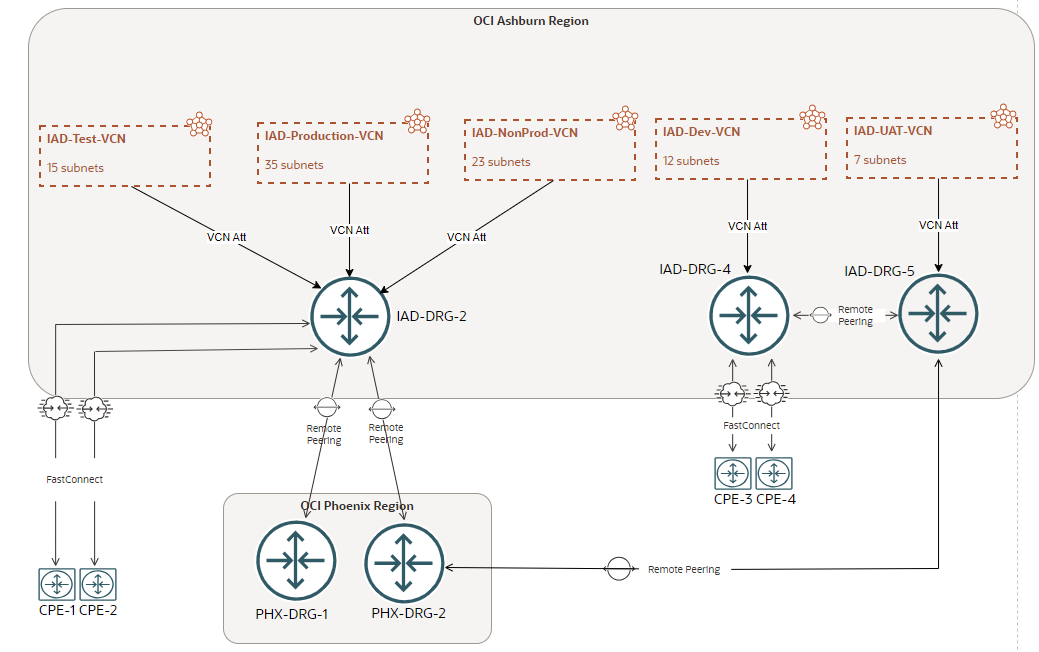
Part B: IAD-DRG-4 and IAD-DRG-5
Two hours maintenance window required
In this part we will deal with the move of IAD-Dev-VCN and IAD-UAT-VCN away from IAD-DRG-4 and IAD-DRG-5 respectively.
B-1 (20 minutes to complete)
In this section we will move IAD-Dev-VCN and IAD-UAT-VCN to IAD-DRG-2. Prior to move the VCNs, on IAD-DRG-2 we will create two DRG Route Tables each with its own Import Route Distribution. This is needed because we need to assure that IAD-Dev-VCN can talk only to IAD-UAT-VCN and vice-versa and both to on-premises via the two dedicated FastConnect VCs configured on IAD-DRG-4 (both FastConnect VCs will be moved to IAD-DRG-2 in the next part).
Proceed with the VCN move to IAD-DRG-2 and assign to each DRG VCN attachment the correct DRG Route Table created above. In the Import Route Distribution just add the desired VCN CIDR (e.g for IAD-Dev-VCN import IAD-UAT-VCN and vice-versa). At this point, we only need to configure the routes for each and every subnet on both VCNs to have the IAD-DRG-2 as next-hop. The connectivity is restored between the two VCNs.
B-2 (20 minutes to complete)
The next step is to move the FastConnect VCs from IAD-DRG-4 to IAD-DRG-2. The two VCs are serving only IAD-Dev-VCN and IAD-UAT-VCN. Before proceeding with the VCs move, we need to create on IAD-DRG-2 one separate DRG Route Table that will be associated with the two VCs. In the DRG Route Table associated with the VCs we will import IAD-Dev-VCN and IAD-UAT-VCN CIDRs.
B-3 (20 minutes to complete)
IAD-DRG-5 holds an RPC to OCI Phoenix region with PHX-DRG-2. This RPC is used only by IAD-UAT-VCN. The question is, should we create a new RPC from IAD-DRG-2 to PHX-DRG-2 only for IAD-UAT-VCN or we can use the existing RPC between IAD-DRG-2 and PHX-DRG-2? The design must comply with the following: a) IAD-Production-VCN must have connectivity only to the intended VCNs in PHX region and b) IAD-UAT-VCN must have connectivity only to the intended VCNs in PHX region, that being said, each VCN must have only specific routes to Phoenix secondary region, not all.
Based on the routing segregation request, we will use the existing RPC between IAD-DRG-2 and PHX-DRG-2 over which we are announcing any desired VCN CIDR with just one configuration change at the DRG IAD-Production-VCN and IAD-UAT-VCN Route Table attachments. Instead of dynamic importing the routes received over the RPC between IAD-DRG-2 and PHX-DRG-2, we will create static routes on each and every DRG VCN attachment (for IAD-Production-VCN and IAD-UAT-VCN) for the desired destinations in the remote region with the RPC as next-hop. The same configuration needs to be performed in the remote region as well.
After this point, the entire connectivity is restored and we will use the remaining hour for validating all the services can communicate.
The final optimized and optimal networking design is listed below:
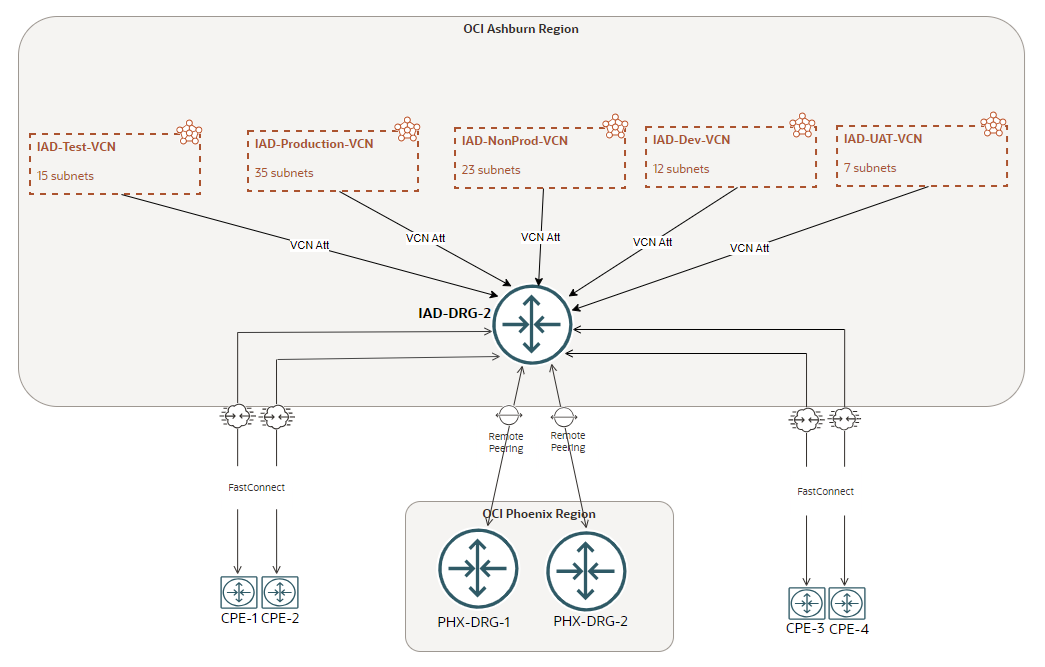
In order to reach the above routing and networking structure we needed 5 hours of maintenance window split in two working sessions. Just one DRG can handle up to 300 attachments, there is no need to use multiple DRGs for each VCN since the DRG is not acting just as a traditional router, it is an advanced and redundant routing engine that can handle and accommodate many complex networking scenarios. In order to avoid the situations when we need to optimize a production network, it is better to have some very good networking discussions and architecture design in the early stages of the project. Going with the best in class networking design from the very first go, will assure that all the time we can include the newest services with no changes or insignificant changes at the networking level.
Final note: There are some corner cases where multiple DRGs are required for very specific networking and security posture.