
Hi! A few years back I wrote a blog which talked about OCI private DNS, how it works and some common scenarios. Everything there is still true so take a look if you want to learn about the basics. However, I think a second blog for the same service, this time focused on best practices, is needed.
When designing your OCI architecture you need to think about many things, most of which are explained in this excellent best-practices series but I feel like private DNS needs a deep-dive because DNS changes have a big blast radius, you can bring the whole environment down just because of a bad setting somewhere so this needs to be well designed from the start. Let’s look at some of the most important decisions about OCI private DNS.
VCN naming or VCN DNS labels
Each OCI VCN has its own DNS domain in the form of {dns-label}.oraclevcn.com. After you create the VCN, each subnet inside that VCN will get its own private DNS zone in the form of {subnet-label}.{dns-label}.oraclevcn.com. Important things to consider:
– Both the vcn-label and the subnet-label are, by default, auto assigned by OCI from the first 15 characters of the name of that resource (VCN and subnet respectively), while removing the “-“ and “_” characters. You can override that by manually inputting the label, but most people will let the default behavior happen.
– The DNS labels (VCN and subnet) can only be decided at the resource creation time, and you cannot edit them later therefore you will need to delete and recreate the resource if you want to change them.
Considering the two points above, some bad decisions would be:
a) You use the same VCN name for multiple VCNs, in the same region or in different regions, and you do not modify the VCN DNS label.
b) You design your VCN naming convention with the first 15 characters the same and you do not modify the VCN DNS label.
Let’s look at what would happen if you did the above. Let’s imagine we decided to name our VCNs and subnets like this:
– VCN1 name vcn-oci-ashburn-ebs-prod and the subnet private-subnet. The resulting private DNS zone would be privatesubnet.vcnociashburneb.oraclevcn.com.
– VCN2 name vcn-oci-ashburn-ebs-nonprod and the subnet private-subnet. The resulting private DNS zone would again be privatesubnet.vcnociashburneb.oraclevcn.com.
Instances in those two VCNs will never be able to talk to each other using the DNS names assigned by OCI. The takeaway is you should mind the naming of your VCNs or provide distinct DNS labels when you create them.
OCI DNS resolver vs Your managed DNS servers
One major decision that impacts the DNS architecture is what DNS server should the environment use. You have two major options:
OCI DNS VCN Resolver
The default setting of any OCI VCN is to use the local DNS resolver. The functionality of this resolver is explained in the previous blog:
– Each VCN has its own DNS resolver which, by default, knows only about the private zones generated by OCI when you create subnets inside it.
– There are methods to let the resolver in “VCN A” know about the private zones in “VCN B”, explained in the previous blog.
– You can add your own private zone (ex: internal.example.com) but you have to manage it entirely meaning you have to create the records inside it.
– You can do conditional forwarding to let OCI talk to your DNS servers in your datacenter or other clouds and resolve your private DNS zones.
The key takeaway is that with the OCI DNS VCN Resolver you end up with X amount of DNS resolvers (where X = the number of VCNs), each Resolver only knowing about a part of the environment. That means we need to do some additional configuration, which will be detailed further down, so the whole environment can resolve all DNS zones. Mainly, these will be:
– Do a “hub-and-spoke” DNS architecture.
– Do conditional forwarding the right way.
Custom DNS servers
If your infrastructure is constructed around a 3rd party application, such as Microsoft Windows Active Directory (but not only), you may want to bring a set of those services into OCI. Customers tend to do that because the Virtual Machines will join the AD automatically when deployed and they will automatically get a DNS entry in a private zone that you choose, making it easy to onboard OCI into your larger infrastructure. If you bring your AD/DNS servers to OCI, some best practices should be followed:
– Put a pair in each OCI region where you have resources. In some cases (for example in DR regions), one local AD/DNS server should be fine if the region has connectivity back to a backup server.
– Do not use on-prem/remote AD/DNS Servers directly – if you configure only remote DNS servers you add a lot of latency to all your flows and, if the network path to them is disrupted, you run the risk of total DNS failure.
– Do a “hub-and-spoke” DNS architecture.
– Do conditional forwarding the right way.
– Do not disable OCI DNS even though you are not directly going to use it. As written above, if you deploy the VCNs without DNS you cannot enable it later. Some OCI services (Exadata Databases, Private Endpoints for PaaS) still require OCI DNS to be fully functional.
For more information on recommended architectures for Microsoft AD on OCI please go through this blog.
DNS “hub-and-spoke”
We saw above that a DNS hub and spoke topology is recommended. What does that mean, exactly? The configuration varies a little, depending on the type of DNS resolver that you use. Let’s see the two major options.
OCI DNS
If you use OCI DNS, each VCN will know about only the private zones of the subnets deployed inside it. Sure, you can add the private views of all other VCNs in the region, but that path does not fix resolution for your private domains outside of OCI and it becomes cumbersome as you add new VCNs to the environment. So, the alternative is this:
1) Choose a VCN from the region to act as the DNS HUB. Typically, it’s the network hub VCN, where you have a firewall, but there may be cases where you do not have one so it can be any VCN that has network connectivity to all other VCNs and to your remote DNS servers. To make it act as a DNS hub you need to:
– Attach all Private Views in the region so the resolver in that VCN can resolve any host from the region.
– Deploy Resolver Endpoints, both Forwarder and Listener, in any subnet of the VCN.
– Create conditional forwarding rules in the Resolver for any private zones outside of OCI, with target your remote DNS resolvers.
– Create conditional forwarding rules in the Resolver for any private zones in other OCI regions, with target the Listener endpoint of that region’s Hub.
2) Every other VCN in the region becomes a DNS Spoke. This means you need to:
– Deploy a Resolver endpoint type Forwarder.
– Create a single forward rule with all domains targeting the HUB Listener.
The spoke VCN Resolver will resolve internally any local zone and query the Hub for everything else, like other VCNs zones, zones outside of OCI or zones in a different OCI region.
Your AD/DNS servers
If you use your own DNS servers, you should put two of them in a VCN which will become the DNS Hub. Every VM in OCI will use the two servers as DNS Resolvers through the custom DHCP Options.
Here are some high-level steps:
– Deploy two Virtual Machines that have your application running (MS AD, Bind, Infoblox (link: https://docs.infoblox.com/space/vniosoci/35443534/About+Infoblox+vNIOS+for+Oracle+Cloud+Infrastructure) etc.). Make sure you have them in different ADs or FDs.
– Configure the DHCP Options of each VCN Subnet to target the IPs of your DNS servers.
– Make sure you have the routing and security configured to allow the flow from any VM in the region to your DNS servers, which will always be on UDP/53.
– Attach all OCI Private Views in the region to the VCN containing your DNS servers.
– In the same VCN, deploy an OCI DNS Listener endpoint.
– Create a conditional forward rule in your DNS servers to target the OCI Listener for OCI specific domains (oraclevcn.com, specific PaaS DNS names, etc).
Note: If you use Microsoft Active Directory, you may want to allow connectivity from the remote servers to the OCI DNS Listener, on UDP/53. In most cases, the conditional forwarding rule you create in OCI ADs will replicate to all of your remote servers so those servers should have a network path and appropriate security rules to reach the OCI DNS Listener.
DNS Conditional Forwarding
Regardless of which DNS servers you are using, you will probably need to do conditional forwarding between OCI and your DNS servers or vice-versa. When you do that, there are some best practices to follow.
OCI to your DNS servers
One of the common mistake people do when creating Conditional Forwarding is to set up rules like below:

Because the way the OCI DNS service works, the Resolver will always match the first line even if your Primary/First DNS resolver is not available. This means that even if the request to the DNS Resolver times out, OCI will not move to the second line to try the second DNS server.
To fix this and provide high availability, there are two options:
a) Target the Conditional Forward rule to a VIP in your datacenter.
b) Use an OCI Network Load Balancer as the target of the rule. The NLB will have the on-premise DNS servers as backends and has the ability to do DNS Health checks. The NLB functionality and configuration examples are explained in this great blog.
Your DNS Servers to OCI
When configuring Conditional Forwarding in your Datacenter or OCI deployed ADs towards the OCI DNS service, you need to deploy a Listener endpoint on one of the VCNs which will be the target of the forwarding rules. The important thing to discuss here is which DNS domains to forward. Let’s see the main use cases.
a) oraclevcn.com – this zone is an always-private zone used by OCI for any Virtual Machine deployed. Depending on your DNS setup in OCI you can target the whole domain to a single Listener (if you use Hub and Spoke) or you may need to create multiple rules, for each VCN zone ({vcn-dns-label}.oraclevcn.com) to go to a different Listener.
b) OCI Services – OCI Services such as Autonomous Databases, Oracle Analytics, Streaming, etc, support Private Endpoints. These services have automatic DNS records in the Oracle owned Public Zone oraclecloud.com. However, when you deploy the service with a Private Endpoint, that Endpoint gets a custom private zone inside the VCN with a single entry in the same public zone but this time used with a private scope.

The best practice here is to do Conditional Forwarding only for that specific Host (ex: fv7wtjhe.adb.eu-frankfurt-1.oraclecloud.com) because most entries in Oraclecloud.com are still Public and should target the OCI Public DNS servers, not the VCN private one. While forwarding the full zone will work as the OCI VCN Resolver will also resolve Public Records, you will add unnecessary latency and risk DNS failure if your link to OCI breaks.
Architecture diagrams
With everything above in mind, let’s see some diagrams.
A “best-practice” setup when using OCI DNS Resolvers would be:

A “best-practice” setup when using Custom Resolvers would be:
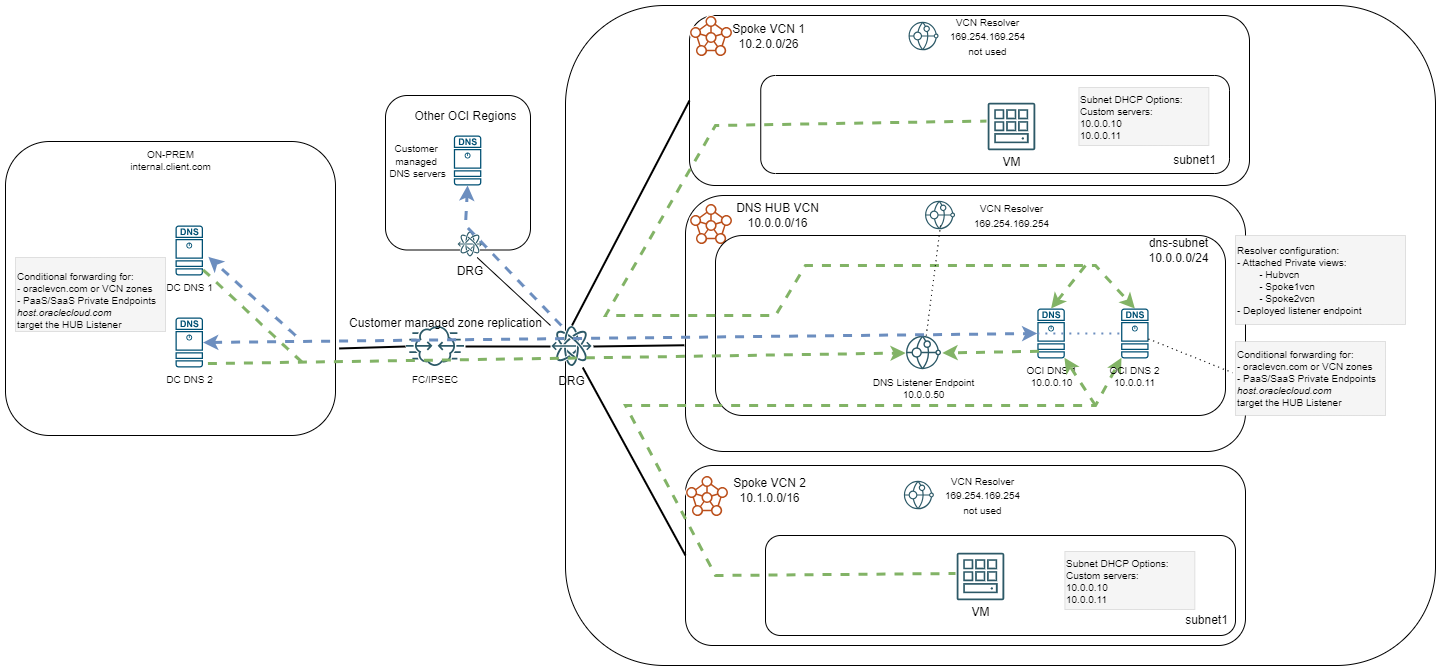
Other things to consider
DNS Traffic
All the DNS traffic moving around the environment will hit Security Lists or Network Security Groups firewall rules. The only traffic not affected by those is the traffic from OCI VMs to the local DNS resolver (169.254.169.254). Considering this, it is a best practice for large environments to create specific DNS firewall rules (UDP/53) that are STATELESS. Using stateful rules in either the SLs or NSGs may have impact on performance or even result in DNS resolution failures. Again, this is for large environments, thousands of VMs doing DNS queries.
Automation
When deploying Virtual Cloud Networks with automation (Terraform, OCI CLI, etc) the DNS service of the VCN is DISABLED by default and needs to be enabled by choosing a DNS Label. This is important to note because that is something which can only be enabled at the resource creation time.
Subnet DHCP Options
Each OCI Virtual Machine will get the DNS servers from the DHCP setting of the subnet it is deployed in. Some notes here would be:
– Do not change the DNS server entries directly on the Virtual Machine, they will be overwritten next time DHCP renews (default lease time for DHCP is 24h).
– When you change the DHCP settings for DNS, in OCI, you will need to force a DHCP renewal or a full network service restart for the changes to appear in the VM. Some ways of forcing DHCP renewal can be found in this blog.
Final Note
I tried to show a few private DNS best practices and highlight common mistakes observed in deployments. The architectures presented here are examples on how to create a robust DNS solution in OCI but are these are not the only possible solutions. Depending on the particularities of your setup, the final architecture can differ, and it does not mean it’s wrong as long as scalability and high availability concepts are followed.
And this is it! I hope it helps you!